RichardAtCT/claude-code-telegram
GitHub: RichardAtCT/claude-code-telegram
一个将 Claude Code 接入 Telegram 的机器人,支持自然语言远程编程、会话持久化和事件驱动自动化。
Stars: 2693 | Forks: 393
# Claude Code Telegram Bot
[](https://opensource.org/licenses/MIT)
[](https://www.python.org/downloads/)
一个让你远程访问 [Claude Code](https://claude.ai/code) 的 Telegram bot。随时随地通过自然聊天与 Claude 探讨你的项目 —— 无需终端命令。
## 这是什么?
这个 bot 将 Telegram 连接到 Claude Code,为你的代码库提供对话式 AI 接口:
- **自然聊天** —— 用通俗语言让 Claude 分析、编辑或解释你的代码
- **保持上下文** —— 基于每个项目自动持久化会话,对话不断档
- **移动编程** —— 任何装有 Telegram 的设备都能写代码
- **接收主动通知** —— 来自 webhook、定时任务和 CI/CD 事件
- **安全可靠** —— 内置身份验证、目录沙箱和审计日志
## 快速开始
### 演示
```
You: Can you help me add error handling to src/api.py?
Bot: I'll analyze src/api.py and add error handling...
[Claude reads your code, suggests improvements, and can apply changes directly]
You: Looks good. Now run the tests to make sure nothing broke.
Bot: Running pytest...
All 47 tests passed. The error handling changes are working correctly.
```
### 1. 前置条件
- **Python 3.11+** —— [在此下载](https://www.python.org/downloads/)
- **Claude Code CLI** —— [在此安装](https://claude.ai/code)
- **Telegram Bot Token** —— 从 [@BotFather](https://t.me/botfather) 获取
### 2. 安装
选择你喜欢的方式:
#### 选项 A:从发布标签安装(推荐)
```
# 使用 uv(推荐 — 安装在隔离环境中)
uv tool install git+https://github.com/RichardAtCT/claude-code-telegram@v1.3.0
# 或使用 pip
pip install git+https://github.com/RichardAtCT/claude-code-telegram@v1.3.0
# 追踪最新稳定版本
pip install git+https://github.com/RichardAtCT/claude-code-telegram@latest
```
#### 选项 B:从源码安装(用于开发)
```
git clone https://github.com/RichardAtCT/claude-code-telegram.git
cd claude-code-telegram
make dev # requires Poetry
```
### 3. 配置
```
cp .env.example .env
# 使用你的设置编辑 .env:
```
**最低要求:**
```
TELEGRAM_BOT_TOKEN=1234567890:ABC-DEF1234ghIkl-zyx57W2v1u123ew11
TELEGRAM_BOT_USERNAME=my_claude_bot
APPROVED_DIRECTORY=/Users/yourname/projects
ALLOWED_USERS=123456789 # Your Telegram user ID
```
### 4. 运行
```
make run # Production
make run-debug # With debug logging
```
在 Telegram 上给你的 bot 发消息即可开始使用。
## 模式
该 bot 支持两种交互模式:
### Agentic Mode(默认)
默认的对话模式。只需自然地与 Claude 交流 —— 无需特殊命令。
**命令:** `/start`、`/new`、`/status`、`/verbose`、`/repo`
若 `ENABLE_PROJECT_THREADS=true`:`/sync_threads`
```
You: What files are in this project?
Bot: Working... (3s)
📖 Read
📂 LS
💬 Let me describe the project structure
Bot: [Claude describes the project structure]
You: Add a retry decorator to the HTTP client
Bot: Working... (8s)
📖 Read: http_client.py
💬 I'll add a retry decorator with exponential backoff
✏️ Edit: http_client.py
💻 Bash: poetry run pytest tests/ -v
Bot: [Claude shows the changes and test results]
You: /verbose 0
Bot: Verbosity set to 0 (quiet)
```
使用 `/verbose 0|1|2` 控制显示多少后台活动:
| 级别 | 显示内容 |
|-------|-------|
| **0**(安静) | 仅显示最终响应(输入指示器保持激活) |
| **1**(普通,默认) | 实时显示工具名称 + 推理片段 |
| **2**(详细) | 工具名称及输入 + 更长的推理文本 |
#### GitHub Workflow
Claude Code 已经知道如何使用 `gh` CLI 和 `git`。在你的服务器上用 `gh auth login` 完成认证,然后就可以通过对话操作仓库:
```
You: List my repos related to monitoring
Bot: [Claude runs gh repo list, shows results]
You: Clone the uptime one
Bot: [Claude runs gh repo clone, clones into workspace]
You: /repo
Bot: 📦 uptime-monitor/ ◀
📁 other-project/
You: Show me the open issues
Bot: [Claude runs gh issue list]
You: Create a fix branch and push it
Bot: [Claude creates branch, commits, pushes]
```
使用 `/repo` 列出工作区中已克隆的仓库,或用 `/repo ` 切换目录(会话会自动恢复)。
### 经典模式
设置 `AGENTIC_MODE=false` 以启用完整的 13 命令类终端界面,支持目录导航、内联键盘、快捷操作、git 集成和会话导出。
**命令:** `/start`、`/help`、`/new`、`/continue`、`/end`、`/status`、`/cd`、`/ls`、`/pwd`、`/projects`、`/export`、`/actions`、`/git`
若 `ENABLE_PROJECT_THREADS=true`:`/sync_threads`
```
You: /cd my-web-app
Bot: Directory changed to my-web-app/
You: /ls
Bot: src/ tests/ package.json README.md
You: /actions
Bot: [Run Tests] [Install Deps] [Format Code] [Run Linter]
```
## 事件驱动自动化
除了直接聊天,bot 还能响应外部触发器:
- **Webhook** —— 接收 GitHub 事件(push、PR、issue)并通过 Claude 进行自动摘要或代码审查
- **Scheduler** —— 按 cron 时间表运行定期 Claude 任务(如每日代码健康检查)
- **Notification** —— 将 agent 响应推送到配置好的 Telegram 聊天
启用方式:`ENABLE_API_SERVER=true` 和 `ENABLE_SCHEDULER=true`。配置详见 [docs/setup.md](docs/setup.md)。
## 功能
### 已实现功能
- Agentic 对话模式(默认),支持自然语言交互
- Classic 类终端模式,包含 13 条命令和内联键盘
- 完整 Claude Code 集成(以 SDK 为主,CLI 为备选)
- 按用户/项目目录自动持久化会话
- 多层身份验证(白名单 + 可选 token)
- 基于令牌桶算法的限速
- 目录沙箱与路径遍历防护
- 文件上传处理,支持归档解压
- 图片/截图上传与分析
- 语音消息转录(Mistral Voxtral / OpenAI Whisper)
- Git 集成与安全仓库操作
- 快捷操作系统与上下文感知按钮
- 会话导出(Markdown、HTML、JSON)
- SQLite 持久化与迁移
- 用量与成本追踪
- 审计日志与安全事件追踪
- 事件总线实现解耦消息路由
- Webhook API 服务器(GitHub HMAC-SHA256、通用 Bearer token 认证)
- 任务调度器,支持 cron 表达式与持久存储
- 通知服务,支持按聊天限速
- 可调节详细输出,实时显示 Claude 的工具使用与推理
- 持久输入指示器,让用户始终知道 bot 正在工作
- 16 个可配置工具,支持 allowlist/disallowlist 控制(见 [docs/tools.md](docs/tools.md))
### 计划增强
- 面向第三方扩展的插件系统
## 配置
### 必需项
```
TELEGRAM_BOT_TOKEN=... # From @BotFather
TELEGRAM_BOT_USERNAME=... # Your bot's username
APPROVED_DIRECTORY=... # Base directory for project access
ALLOWED_USERS=123456789 # Comma-separated Telegram user IDs
```
### 常用选项
```
# Claude
ANTHROPIC_API_KEY=sk-ant-... # API key (optional if using CLI auth)
CLAUDE_MAX_COST_PER_USER=10.0 # Spending limit per user (USD)
CLAUDE_TIMEOUT_SECONDS=300 # Operation timeout
# 模式
AGENTIC_MODE=true # Agentic (default) or classic mode
VERBOSE_LEVEL=1 # 0=quiet, 1=normal (default), 2=detailed
# 速率限制
RATE_LIMIT_REQUESTS=10 # Requests per window
RATE_LIMIT_WINDOW=60 # Window in seconds
# 特性(经典模式)
ENABLE_GIT_INTEGRATION=true
ENABLE_FILE_UPLOADS=true
ENABLE_QUICK_ACTIONS=true
```
### Agentic Platform
```
# Webhook API Server
ENABLE_API_SERVER=false # Enable FastAPI webhook server
API_SERVER_PORT=8080 # Server port
# Webhook 认证
GITHUB_WEBHOOK_SECRET=... # GitHub HMAC-SHA256 secret
WEBHOOK_API_SECRET=... # Bearer token for generic providers
# Scheduler
ENABLE_SCHEDULER=false # Enable cron job scheduler
# 通知
NOTIFICATION_CHAT_IDS=123,456 # Default chat IDs for proactive notifications
```
### 项目线程模式
```
# 按项目启用严格主题路由
ENABLE_PROJECT_THREADS=true
# 模式:private(默认)或 group
PROJECT_THREADS_MODE=private
# YAML 注册表文件(参见 config/projects.example.yaml)
PROJECTS_CONFIG_PATH=config/projects.yaml
# 仅在 PROJECT_THREADS_MODE=group 时需要
PROJECT_THREADS_CHAT_ID=-1001234567890
# 主题同步期间 Telegram API 调用之间的最小延迟(秒)
# 设置为 0 以禁用速率控制
PROJECT_THREADS_SYNC_ACTION_INTERVAL_SECONDS=1.1
```
在 strict mode 下,只有 `/start` 和 `/sync_threads` 能在已映射项目主题之外使用。
在 private mode 下,`/start` 会为你的私聊自动同步项目主题。
要在你的 bot 中使用主题,请在 BotFather 中启用:
`Bot Settings -> Threaded mode`。
### 查找你的 Telegram User ID
在 Telegram 上给 [@userinfobot](https://t.me/userinfobot) 发消息 —— 它会回复你的 user ID 数字。
## 故障排查
**Bot 无响应:**
- 检查 `TELEGRAM_BOT_TOKEN` 是否正确
- 核对你的 user ID 是否在 `ALLOWED_USERS` 中
- 确认 Claude Code CLI 已安装且可用
- 用 `make run-debug` 查看 bot 日志
**Claude 集成不工作:**
- SDK 模式(默认):检查 `claude auth status` 或验证 `ANTHROPIC_API_KEY`
- CLI 模式:验证 `claude --version` 和 `claude auth status`
- 确认 `CLAUDE_ALLOWED_TOOLS` 包含所需工具(完整参考见 [docs/tools.md](docs/tools.md))
**用量成本过高:**
- 调整 `CLAUDE_MAX_COST_PER_USER` 设置消费上限
- 用 `/status` 监控用量
- 使用更短、更聚焦的请求
## 安全
本 bot 采用纵深防御安全策略:
- **访问控制** —— 基于白名单的用户认证
- **目录隔离** —— 将操作限制在批准的目录中
- **限速** —— 基于请求与成本的限额
- **输入校验** —— 注入与路径遍历防护
- **Webhook 认证** —— GitHub HMAC-SHA256 与 Bearer token 验证
- **审计日志** —— 完整追踪所有用户操作
详见 [SECURITY.md](SECURITY.md)。
## 开发
```
make dev # Install all dependencies
make test # Run tests with coverage
make lint # Black + isort + flake8 + mypy
make format # Auto-format code
make run-debug # Run with debug logging
```
### 版本管理
版本在 `pyproject.toml` 中定义一次,并在运行时通过 `importlib.metadata` 读取。发布流程:
```
make bump-patch # 1.2.0 -> 1.2.1 (bug fixes)
make bump-minor # 1.2.0 -> 1.3.0 (new features)
make bump-major # 1.2.0 -> 2.0.0 (breaking changes)
```
每条命令都会自动提交、打标签并推送,触发 CI 测试及带自动生成说明的 GitHub Release。
## 许可证
MIT License —— 见 [LICENSE](LICENSE)。
## Star History
[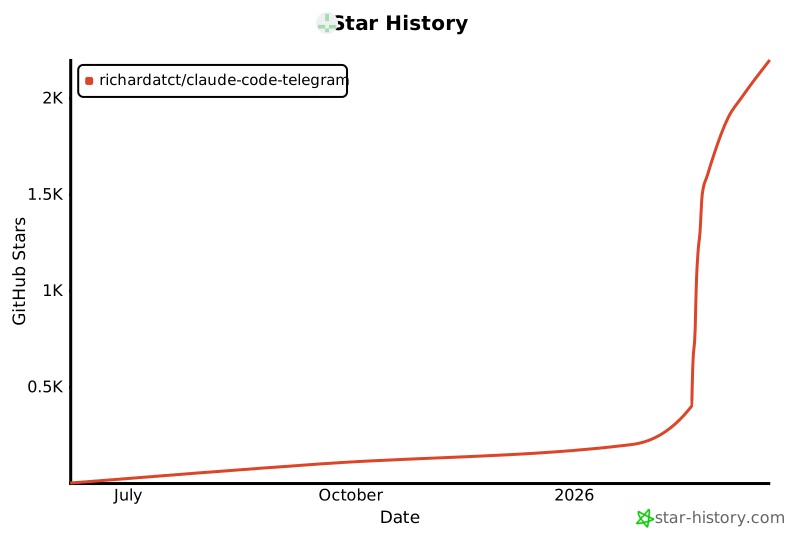](https://star-history.com/#RichardAtCT/claude-code-telegram&Date)
## 致谢
- [Claude](https://claude.ai) by Anthropic
- [python-telegram-bot](https://github.com/python-telegram-bot/python-telegram-bot)
标签:AI编程助手, Anthropic Claude, Claude Code, IP 地址批量处理, PE 加载器, Python, Telegram机器人, Webhook通知, 代码生成, 会话持久化, 即时通讯接口, 威胁情报, 开发者工具, 持续集成/CD, 无后门, 沙箱安全, 渗透测试工具, 移动开发, 编程工具, 自动化运维, 远程代码执行, 远程访问, 逆向工具