# 🚀 RAG-Anything: 全流程 RAG 框架

## 🎉 新闻
- [X] [2025.10]🎯📢 🚀 我们已发布 [RAG-Anything](http://arxiv.org/abs/2510.12323) 的技术报告。立即访问以探索我们的最新研究成果。
- [X] [2025.08]🎯📢 🔍 RAG-Anything 现已支持 **VLM 增强查询**模式!当文档包含图像时,系统可将图像无缝集成到 VLM 中进行高级多模态分析,结合视觉和文本上下文以获得更深入的洞察。
- [X] [2025.07]🎯📢 RAG-Anything 现已推出[上下文配置模块](docs/context_aware_processing.md),实现智能集成相关上下文信息以增强多模态内容处理。
- [X] [2025.07]🎯📢 🚀 RAG-Anything 现已支持多模态查询功能,能够无缝处理文本、图像、表格和公式,实现增强型 RAG。
- [X] [2025.07]🎯📢 🎉 RAG-Anything 在 GitHub 上已获得 1k🌟 星标!感谢您的鼎力支持和宝贵贡献。
## 🌟 系统概述
*下一代多模态智能系统*
现代文档越来越多地包含多样的多模态内容——文本、图像、表格、公式、图表和多媒体——而传统的纯文本 RAG 系统无法有效处理这些内容。**RAG-Anything** 作为全面的**多模态文档处理 RAG 系统**应运而生,基于 [LightRAG](https://github.com/HKUDS/LightRAG) 构建。
作为统一解决方案,RAG-Anything **无需使用多个专用工具**。它提供**在单一集成框架内跨所有内容模态的无缝处理和查询**。与传统的 RAG 方法不同,我们的全栈系统提供**全面的多模态检索能力**。
用户可以通过**统一的接口**查询包含**交错文本**、**视觉图表**、**结构化表格**和**数学公式**的文档。这种整合方法使 RAG-Anything 对于学术研究、技术文档、财务报告和企业知识管理特别有价值,因为这些领域丰富的混合内容文档需要**统一的处理框架**。
### 🎯 核心特性
- **🔄 端到端多模态管道** - 从文档摄入和解析到智能多模态问答的完整工作流程
- **📄 通用文档支持** - 无缝处理 PDF、Office 文档、图像和各种文件格式
- **🧠 专业内容分析** - 专用于图像、表格、数学公式和异构内容类型的处理器
- **🔗 多模态知识图谱** - 自动实体提取和跨模态关系发现,以增强理解能力
- **⚡ 自适应处理模式** - 灵活的基于 MinerU 的解析或直接多模态内容注入工作流程
- **📋 直接内容列表插入** - 绕过文档解析,直接插入来自外部源的预解析内容列表
- **🎯 混合智能检索** - 跨文本和多模态内容的高级搜索能力,支持上下文理解
## 🏗️ 算法与架构
### 核心算法
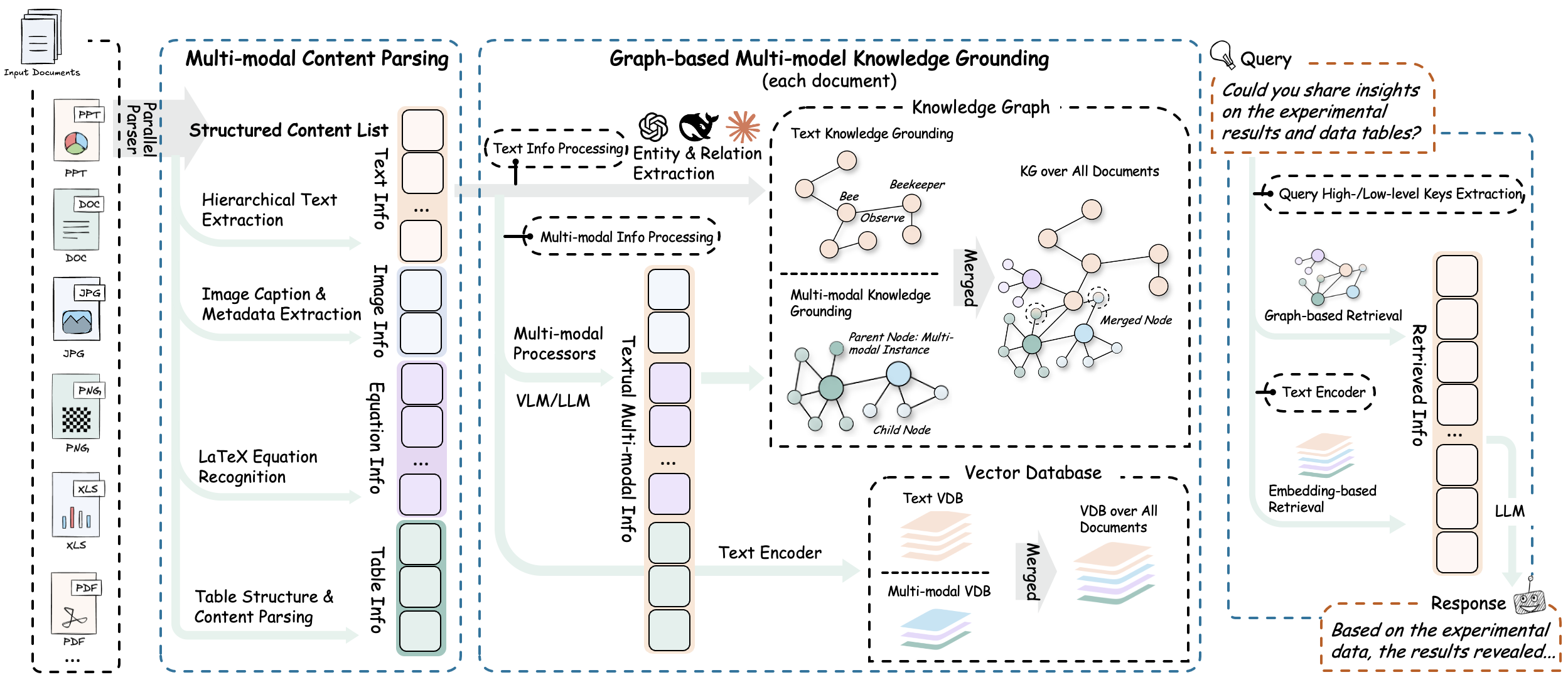
**RAG-Anything** 实现了有效的**多阶段多模态管道**,通过智能编排和跨模态理解从根本上扩展了传统 RAG 架构,以无缝处理多样的内容模态。
### 1. 文档解析阶段
系统通过自适应内容分解提供高保真文档提取。智能分割异构元素,同时保留上下文关系。通过专业优化的解析器实现通用格式兼容性。
**核心组件:**
- **⚙️ MinerU 集成**:利用 [MinerU](https://github.com/opendatalab/MinerU) 实现复杂布局的高保真文档结构提取和语义保留。
- **🧩 自适应内容分解**:自动将文档分割为连贯的文本块、视觉元素、结构化表格、数学公式和专用内容类型,同时保留上下文关系。
- **📁 通用格式支持**:通过具有格式特定优化的专用解析器,全面处理 PDF、Office 文档(DOC/DOCX/PPT/PPTX/XLS/XLSX)、图像和新兴格式。
### 2. 多模态内容理解与处理
系统自动对内容进行分类并通过优化通道进行路由。使用并发管道并行处理文本和多模态内容。在转换过程中保留文档层次结构和关系。
**核心组件:**
- **🎯 自主内容分类与路由**:自动识别、分类并通过优化执行通道路由不同内容类型。
- **⚡ 并发多管道架构**:通过专用处理管道实现文本和多模态内容的并发执行。这种方法在保持内容完整性的同时最大化吞吐量效率。
- **🏗️ 文档层次结构提取**:在内容转换过程中提取并保留原始文档层次结构和元素间关系。
### 3. 多模态分析引擎
系统部署了模态感知处理单元来处理异构数据模态:
**专业分析器:**
- **🔍 视觉内容分析器**:
- 集成视觉模型进行图像分析。
- 基于视觉语义生成上下文感知的描述性标题。
- 提取视觉元素之间的空间关系和层次结构。
- **📊 结构化数据解释器**:
- 对表格和结构化数据格式进行系统解释。
- 实现数据趋势分析的统计模式识别算法。
- 识别多个表格数据集之间的语义关系和依赖性。
- **📐 数学表达式解析器**:
- 高精度解析复杂的数学表达式和公式。
- 提供原生 LaTeX 格式支持,与学术工作流程无缝集成。
- 建立数学方程与领域特定知识库之间的概念映射。
- **🔧 可扩展模态处理器**:
- 为自定义和新兴内容类型提供可配置的处理框架。
- 通过插件架构支持新模态处理器的动态集成。
- 支持针对专用用例的运行时管道配置。
### 4. 多模态知识图谱索引
多模态知识图谱构建模块将文档内容转换为结构化语义表示。它提取多模态实体,建立跨模态关系,并保留层次组织。系统应用加权相关性评分以优化知识检索。
**核心功能:**
- **🔍 多模态实体提取**:将重要的多模态元素转换为结构化知识图谱实体。该过程包括语义注释和元数据保留。
- **🔗 跨模态关系映射**:建立文本实体与多模态组件之间的语义连接和依赖关系。这是通过自动关系推理算法实现的。
- **🏗️ 层次结构保留**:通过"属于"关系链维护原始文档组织。这些链保留逻辑内容层次结构和章节依赖性。
- **⚖️ 加权关系评分**:为关系类型分配定量相关性评分。评分基于文档结构内的语义接近度和上下文重要性。
### 5. 模态感知检索
混合检索系统结合向量相似度搜索和图遍历算法进行全面的内容检索。它实现模态感知排序机制,并保持检索元素之间的关系一致性,以确保上下文集成的信息传递。
**检索机制:**
- **🔀 向量-图融合**:将向量相似度搜索与图遍历算法相结合。这种方法利用语义嵌入和结构关系进行全面的内容检索。
- **📊 模态感知排序**:实现自适应评分机制,根据内容类型相关性对检索结果进行加权。系统根据查询特定的模态偏好调整排名。
- **🔗 关系一致性维护**:保持检索元素之间的语义和结构关系。这确保了连贯的信息传递和上下文完整性。
## 🚀 快速开始
*初始化您的 AI 之旅*

### 安装
#### 选项 1:从 PyPI 安装(推荐)
```
# 基础安装
pip install raganything
# 使用可选依赖以支持更多格式:
pip install 'raganything[all]' # All optional features
pip install 'raganything[image]' # Image format conversion (BMP, TIFF, GIF, WebP)
pip install 'raganything[text]' # Text file processing (TXT, MD)
pip install 'raganything[image,text]' # Multiple features
```
#### 选项 2:从源码安装
```
# 安装 uv(如果尚未安装)
curl -LsSf https://astral.sh/uv/install.sh | sh
# 使用 uv 克隆并设置项目
git clone https://github.com/HKUDS/RAG-Anything.git
cd RAG-Anything
# 在虚拟环境中安装包和依赖
uv sync
# 如果遇到网络超时(尤其是 opencv 包):
# UV_HTTP_TIMEOUT=120 uv sync
# 直接使用 uv 运行命令(推荐方式)
uv run python examples/raganything_example.py --help
# 安装可选依赖
uv sync --extra image --extra text # Specific extras
uv sync --all-extras # All optional features
```
#### 可选依赖项
- **`[image]`** - 启用 BMP、TIFF、GIF、WebP 图像格式的处理(需要 Pillow)
- **`[text]`** - 启用 TXT 和 MD 文件的处理(需要 ReportLab)
- **`[all]`** - 包含所有 Python 可选依赖项
**检查 MinerU 安装:**
```
# 验证安装
mineru --version
# 检查是否正确配置
python -c "from raganything import RAGAnything; rag = RAGAnything(); print('✅ MinerU installed properly' if rag.check_parser_installation() else '❌ MinerU installation issue')"
```
模型会在首次使用时自动下载。如需手动下载,请参考 [MinerU 模型源配置](https://github.com/opendatalab/MinerU/blob/master/README.md#22-model-source-configuration)。
### 使用示例
#### 1. 端到端文档处理
```
import asyncio
from raganything import RAGAnything, RAGAnythingConfig
from lightrag.llm.openai import openai_complete_if_cache, openai_embed
from lightrag.utils import EmbeddingFunc
async def main():
# Set up API configuration
api_key = "your-api-key"
base_url = "your-base-url" # Optional
# Create RAGAnything configuration
config = RAGAnythingConfig(
working_dir="./rag_storage",
parser="mineru", # Parser selection: mineru, docling, or paddleocr
parse_method="auto", # Parse method: auto, ocr, or txt
enable_image_processing=True,
enable_table_processing=True,
enable_equation_processing=True,
)
# Define LLM model function
def llm_model_func(prompt, system_prompt=None, history_messages=[], **kwargs):
return openai_complete_if_cache(
"gpt-4o-mini",
prompt,
system_prompt=system_prompt,
history_messages=history_messages,
api_key=api_key,
base_url=base_url,
**kwargs,
)
# Define vision model function for image processing
def vision_model_func(
prompt, system_prompt=None, history_messages=[], image_data=None, messages=None, **kwargs
):
# If messages format is provided (for multimodal VLM enhanced query), use it directly
if messages:
return openai_complete_if_cache(
"gpt-4o",
"",
system_prompt=None,
history_messages=[],
messages=messages,
api_key=api_key,
base_url=base_url,
**kwargs,
)
# Traditional single image format
elif image_data:
return openai_complete_if_cache(
"gpt-4o",
"",
system_prompt=None,
history_messages=[],
messages=[
{"role": "system", "content": system_prompt}
if system_prompt
else None,
{
"role": "user",
"content": [
{"type": "text", "text": prompt},
{
"type": "image_url",
"image_url": {
"url": f"data:image/jpeg;base64,{image_data}"
},
},
],
}
if image_data
else {"role": "user", "content": prompt},
],
api_key=api_key,
base_url=base_url,
**kwargs,
)
# Pure text format
else:
return llm_model_func(prompt, system_prompt, history_messages, **kwargs)
# Define embedding function
embedding_func = EmbeddingFunc(
embedding_dim=3072,
max_token_size=8192,
func=lambda texts: openai_embed.func(
texts,
model="text-embedding-3-large",
api_key=api_key,
base_url=base_url,
),
)
# Initialize RAGAnything
rag = RAGAnything(
config=config,
llm_model_func=llm_model_func,
vision_model_func=vision_model_func,
embedding_func=embedding_func,
)
# Process a document
await rag.process_document_complete(
file_path="path/to/your/document.pdf",
output_dir="./output",
parse_method="auto"
)
# Query the processed content
# Pure text query - for basic knowledge base search
text_result = await rag.aquery(
"What are the main findings shown in the figures and tables?",
mode="hybrid"
)
print("Text query result:", text_result)
# Multimodal query with specific multimodal content
multimodal_result = await rag.aquery_with_multimodal(
"Explain this formula and its relevance to the document content",
multimodal_content=[{
"type": "equation",
"latex": "P(d|q) = \\frac{P(q|d) \\cdot P(d)}{P(q)}",
"equation_caption": "Document relevance probability"
}],
mode="hybrid"
)
print("Multimodal query result:", multimodal_result)
if __name__ == "__main__":
asyncio.run(main())
```
#### 2. 直接多模态内容处理
```
import asyncio
from lightrag import LightRAG
from lightrag.llm.openai import openai_complete_if_cache, openai_embed
from lightrag.utils import EmbeddingFunc
from raganything.modalprocessors import ImageModalProcessor, TableModalProcessor
async def process_multimodal_content():
# Set up API configuration
api_key = "your-api-key"
base_url = "your-base-url" # Optional
# Initialize LightRAG
rag = LightRAG(
working_dir="./rag_storage",
llm_model_func=lambda prompt, system_prompt=None, history_messages=[], **kwargs: openai_complete_if_cache(
"gpt-4o-mini",
prompt,
system_prompt=system_prompt,
history_messages=history_messages,
api_key=api_key,
base_url=base_url,
**kwargs,
),
embedding_func=EmbeddingFunc(
embedding_dim=3072,
max_token_size=8192,
func=lambda texts: openai_embed.func(
texts,
model="text-embedding-3-large",
api_key=api_key,
base_url=base_url,
),
)
)
await rag.initialize_storages()
# Process an image
image_processor = ImageModalProcessor(
lightrag=rag,
modal_caption_func=lambda prompt, system_prompt=None, history_messages=[], image_data=None, **kwargs: openai_complete_if_cache(
"gpt-4o",
"",
system_prompt=None,
history_messages=[],
messages=[
{"role": "system", "content": system_prompt} if system_prompt else None,
{"role": "user", "content": [
{"type": "text", "text": prompt},
{"type": "image_url", "image_url": {"url": f"data:image/jpeg;base64,{image_data}"}}
]} if image_data else {"role": "user", "content": prompt}
],
api_key=api_key,
base_url=base_url,
**kwargs,
) if image_data else openai_complete_if_cache(
"gpt-4o-mini",
prompt,
system_prompt=system_prompt,
history_messages=history_messages,
api_key=api_key,
base_url=base_url,
**kwargs,
)
)
image_content = {
"img_path": "path/to/image.jpg",
"image_caption": ["Figure 1: Experimental results"],
"image_footnote": ["Data collected in 2024"]
}
description, entity_info = await image_processor.process_multimodal_content(
modal_content=image_content,
content_type="image",
file_path="research_paper.pdf",
entity_name="Experimental Results Figure"
)
# Process a table
table_processor = TableModalProcessor(
lightrag=rag,
modal_caption_func=lambda prompt, system_prompt=None, history_messages=[], **kwargs: openai_complete_if_cache(
"gpt-4o-mini",
prompt,
system_prompt=system_prompt,
history_messages=history_messages,
api_key=api_key,
base_url=base_url,
**kwargs,
)
)
table_content = {
"table_body": """
| Method | Accuracy | F1-Score |
|--------|----------|----------|
| RAGAnything | 95.2% | 0.94 |
| Baseline | 87.3% | 0.85 |
""",
"table_caption": ["Performance Comparison"],
"table_footnote": ["Results on test dataset"]
}
description, entity_info = await table_processor.process_multimodal_content(
modal_content=table_content,
content_type="table",
file_path="research_paper.pdf",
entity_name="Performance Results Table"
)
if __name__ == "__main__":
asyncio.run(process_multimodal_content())
```
#### 3. 批量处理
```
# 处理多个文档
await rag.process_folder_complete(
folder_path="./documents",
output_dir="./output",
file_extensions=[".pdf", ".docx", ".pptx"],
recursive=True,
max_workers=4
)
```
#### 4. 自定义模态处理器
```
from raganything.modalprocessors import GenericModalProcessor
class CustomModalProcessor(GenericModalProcessor):
async def process_multimodal_content(self, modal_content, content_type, file_path, entity_name):
# Your custom processing logic
enhanced_description = await self.analyze_custom_content(modal_content)
entity_info = self.create_custom_entity(enhanced_description, entity_name)
return await self._create_entity_and_chunk(enhanced_description, entity_info, file_path)
```
#### 5. 查询选项
RAG-Anything 提供三种类型的查询方法:
**纯文本查询** - 使用 LightRAG 直接搜索知识库:
```
# 文本查询的不同模式
text_result_hybrid = await rag.aquery("Your question", mode="hybrid")
text_result_local = await rag.aquery("Your question", mode="local")
text_result_global = await rag.aquery("Your question", mode="global")
text_result_naive = await rag.aquery("Your question", mode="naive")
# 同步版本
sync_text_result = rag.query("Your question", mode="hybrid")
```
**VLM 增强查询** - 使用 VLM 自动分析检索上下文中的图像:
```
# VLM 增强查询(提供 vision_model_func 时自动启用)
vlm_result = await rag.aquery(
"Analyze the charts and figures in the document",
mode="hybrid"
# vlm_enhanced=True is automatically set when vision_model_func is available
)
# 手动控制 VLM 增强
vlm_enabled = await rag.aquery(
"What do the images show in this document?",
mode="hybrid",
vlm_enhanced=True # Force enable VLM enhancement
)
vlm_disabled = await rag.aquery(
"What do the images show in this document?",
mode="hybrid",
vlm_enhanced=False # Force disable VLM enhancement
)
# 当文档包含图像时,VLM 可以直接查看和分析它们
# 系统将自动:
# 1. 检索包含图像路径的相关上下文
# 2. 加载图像并编码为 base64
# 3. 将文本上下文和图像发送给 VLM 进行全面分析
```
**多模态查询** - 通过特定多模态内容分析增强查询:
```
# 查询表格数据
table_result = await rag.aquery_with_multimodal(
"Compare these performance metrics with the document content",
multimodal_content=[{
"type": "table",
"table_data": """Method,Accuracy,Speed
RAGAnything,95.2%,120ms
Traditional,87.3%,180ms""",
"table_caption": "Performance comparison"
}],
mode="hybrid"
)
# 查询公式内容
equation_result = await rag.aquery_with_multimodal(
"Explain this formula and its relevance to the document content",
multimodal_content=[{
"type": "equation",
"latex": "P(d|q) = \\frac{P(q|d) \\cdot P(d)}{P(q)}",
"equation_caption": "Document relevance probability"
}],
mode="hybrid"
)
```
#### 6. 加载现有 LightRAG 实例
```
import asyncio
from raganything import RAGAnything, RAGAnythingConfig
from lightrag import LightRAG
from lightrag.llm.openai import openai_complete_if_cache, openai_embed
from lightrag.kg.shared_storage import initialize_pipeline_status
from lightrag.utils import EmbeddingFunc
import os
async def load_existing_lightrag():
# Set up API configuration
api_key = "your-api-key"
base_url = "your-base-url" # Optional
# First, create or load existing LightRAG instance
lightrag_working_dir = "./existing_lightrag_storage"
# Check if previous LightRAG instance exists
if os.path.exists(lightrag_working_dir) and os.listdir(lightrag_working_dir):
print("✅ Found existing LightRAG instance, loading...")
else:
print("❌ No existing LightRAG instance found, will create new one")
# Create/load LightRAG instance with your configuration
lightrag_instance = LightRAG(
working_dir=lightrag_working_dir,
llm_model_func=lambda prompt, system_prompt=None, history_messages=[], **kwargs: openai_complete_if_cache(
"gpt-4o-mini",
prompt,
system_prompt=system_prompt,
history_messages=history_messages,
api_key=api_key,
base_url=base_url,
**kwargs,
),
embedding_func=EmbeddingFunc(
embedding_dim=3072,
max_token_size=8192,
func=lambda texts: openai_embed.func(
texts,
model="text-embedding-3-large",
api_key=api_key,
base_url=base_url,
),
)
)
# Initialize storage (this will load existing data if available)
await lightrag_instance.initialize_storages()
await initialize_pipeline_status()
# Define vision model function for image processing
def vision_model_func(
prompt, system_prompt=None, history_messages=[], image_data=None, messages=None, **kwargs
):
# If messages format is provided (for multimodal VLM enhanced query), use it directly
if messages:
return openai_complete_if_cache(
"gpt-4o",
"",
system_prompt=None,
history_messages=[],
messages=messages,
api_key=api_key,
base_url=base_url,
**kwargs,
)
# Traditional single image format
elif image_data:
return openai_complete_if_cache(
"gpt-4o",
"",
system_prompt=None,
history_messages=[],
messages=[
{"role": "system", "content": system_prompt}
if system_prompt
else None,
{
"role": "user",
"content": [
{"type": "text", "text": prompt},
{
"type": "image_url",
"image_url": {
"url": f"data:image/jpeg;base64,{image_data}"
},
},
],
}
if image_data
else {"role": "user", "content": prompt},
],
api_key=api_key,
base_url=base_url,
**kwargs,
)
# Pure text format
else:
return lightrag_instance.llm_model_func(prompt, system_prompt, history_messages, **kwargs)
# Now use existing LightRAG instance to initialize RAGAnything
rag = RAGAnything(
lightrag=lightrag_instance, # Pass existing LightRAG instance
vision_model_func=vision_model_func,
# Note: working_dir, llm_model_func, embedding_func, etc. are inherited from lightrag_instance
)
# Query existing knowledge base
result = await rag.aquery(
"What data has been processed in this LightRAG instance?",
mode="hybrid"
)
print("Query result:", result)
# Add new multimodal document to existing LightRAG instance
await rag.process_document_complete(
file_path="path/to/new/multimodal_document.pdf",
output_dir="./output"
)
if __name__ == "__main__":
asyncio.run(load_existing_lightrag())
```
#### 7. 直接内容列表插入
对于已有预解析内容列表的场景(例如来自外部解析器或之前的处理),您可以直接将其插入到 RAGAnything 中,无需进行文档解析:
```
import asyncio
from raganything import RAGAnything, RAGAnythingConfig
from lightrag.llm.openai import openai_complete_if_cache, openai_embed
from lightrag.utils import EmbeddingFunc
async def insert_content_list_example():
# Set up API configuration
api_key = "your-api-key"
base_url = "your-base-url" # Optional
# Create RAGAnything configuration
config = RAGAnythingConfig(
working_dir="./rag_storage",
enable_image_processing=True,
enable_table_processing=True,
enable_equation_processing=True,
)
# Define model functions
def llm_model_func(prompt, system_prompt=None, history_messages=[], **kwargs):
return openai_complete_if_cache(
"gpt-4o-mini",
prompt,
system_prompt=system_prompt,
history_messages=history_messages,
api_key=api_key,
base_url=base_url,
**kwargs,
)
def vision_model_func(prompt, system_prompt=None, history_messages=[], image_data=None, messages=None, **kwargs):
# If messages format is provided (for multimodal VLM enhanced query), use it directly
if messages:
return openai_complete_if_cache(
"gpt-4o",
"",
system_prompt=None,
history_messages=[],
messages=messages,
api_key=api_key,
base_url=base_url,
**kwargs,
)
# Traditional single image format
elif image_data:
return openai_complete_if_cache(
"gpt-4o",
"",
system_prompt=None,
history_messages=[],
messages=[
{"role": "system", "content": system_prompt} if system_prompt else None,
{
"role": "user",
"content": [
{"type": "text", "text": prompt},
{"type": "image_url", "image_url": {"url": f"data:image/jpeg;base64,{image_data}"}}
],
} if image_data else {"role": "user", "content": prompt},
],
api_key=api_key,
base_url=base_url,
**kwargs,
)
# Pure text format
else:
return llm_model_func(prompt, system_prompt, history_messages, **kwargs)
embedding_func = EmbeddingFunc(
embedding_dim=3072,
max_token_size=8192,
func=lambda texts: openai_embed.func(
texts,
model="text-embedding-3-large",
api_key=api_key,
base_url=base_url,
),
)
# Initialize RAGAnything
rag = RAGAnything(
config=config,
llm_model_func=llm_model_func,
vision_model_func=vision_model_func,
embedding_func=embedding_func,
)
# Example: Pre-parsed content list from external source
content_list = [
{
"type": "text",
"text": "This is the introduction section of our research paper.",
"page_idx": 0 # Page number where this content appears
},
{
"type": "image",
"img_path": "/absolute/path/to/figure1.jpg", # IMPORTANT: Use absolute path
"image_caption": ["Figure 1: System Architecture"],
"image_footnote": ["Source: Authors' original design"],
"page_idx": 1 # Page number where this image appears
},
{
"type": "table",
"table_body": "| Method | Accuracy | F1-Score |\n|--------|----------|----------|\n| Ours | 95.2% | 0.94 |\n| Baseline | 87.3% | 0.85 |",
"table_caption": ["Table 1: Performance Comparison"],
"table_footnote": ["Results on test dataset"],
"page_idx": 2 # Page number where this table appears
},
{
"type": "equation",
"latex": "P(d|q) = \\frac{P(q|d) \\cdot P(d)}{P(q)}",
"text": "Document relevance probability formula",
"page_idx": 3 # Page number where this equation appears
},
{
"type": "text",
"text": "In conclusion, our method demonstrates superior performance across all metrics.",
"page_idx": 4 # Page number where this content appears
}
]
# Insert the content list directly
await rag.insert_content_list(
content_list=content_list,
file_path="research_paper.pdf", # Reference file name for citation
split_by_character=None, # Optional text splitting
split_by_character_only=False, # Optional text splitting mode
doc_id=None, # Optional custom document ID (will be auto-generated if not provided)
display_stats=True # Show content statistics
)
# Query the inserted content
result = await rag.aquery(
"What are the key findings and performance metrics mentioned in the research?",
mode="hybrid"
)
print("Query result:", result)
# You can also insert multiple content lists with different document IDs
another_content_list = [
{
"type": "text",
"text": "This is content from another document.",
"page_idx": 0 # Page number where this content appears
},
{
"type": "table",
"table_body": "| Feature | Value |\n|---------|-------|\n| Speed | Fast |\n| Accuracy | High |",
"table_caption": ["Feature Comparison"],
"page_idx": 1 # Page number where this table appears
}
]
await rag.insert_content_list(
content_list=another_content_list,
file_path="another_document.pdf",
doc_id="custom-doc-id-123" # Custom document ID
)
if __name__ == "__main__":
asyncio.run(insert_content_list_example())
```
**内容列表格式:**
`content_list` 应遵循标准格式,每个项目为包含以下内容的字典:
- **文本内容**:`{"type": "text", "text": "内容文本", "page_idx": 0}`
- **图像内容**:`{"type": "image", "img_path": "/absolute/path/to/image.jpg", "image_caption": ["caption"], "image_footnote": ["note"], "page_idx": 1}`
- **表格内容**:`{"type": "table", "table_body": "markdown table", "table_caption": ["caption"], "table_footnote": ["note"], "page_idx": 2}`
- **公式内容**:`{"type": "equation", "latex": "LaTeX formula", "text": "description", "page_idx": 3}`
- **通用内容**:`{"type": "custom_type", "content": "any content", "page_idx": 4}`
**重要说明:**
- **`img_path`**:必须是图像文件的绝对路径(例如 `/home/user/images/chart.jpg` 或 `C:\Users\user\images\chart.jpg`)
- **`page_idx`**:表示内容在原始文档中出现的页码(从 0 开始索引)
- **内容顺序**:项目按其在列表中出现的顺序处理
此方法在以下情况下特别有用:
- 您有来自外部解析器的内容(非 MinerU/Docling)
- 您想处理程序生成的内容
- 您需要将多个来源的内容插入到单个知识库中
- 您有缓存的解析结果想要重复使用
## 🛠️ 示例
*实际实现演示*

`examples/` 目录包含全面的使用示例:
- **`raganything_example.py`**:使用 MinerU 进行端到端文档处理
- **`modalprocessors_example.py`**:直接多模态内容处理
- **`office_document_test.py`**:使用 MinerU 进行 Office 文档解析测试(无需 API 密钥)
- **`image_format_test.py`**:使用 MinerU 进行图像格式解析测试(无需 API 密钥)
- **`text_format_test.py`**:使用 MinerU 进行文本格式解析测试(无需 API 密钥)
**运行示例:**
```
# 端到端处理(带解析器选择)
python examples/raganything_example.py path/to/document.pdf --api-key YOUR_API_KEY --parser mineru
# 直接模式处理
python examples/modalprocessors_example.py --api-key YOUR_API_KEY
# Office 文档解析测试(仅 MinerU)
python examples/office_document_test.py --file path/to/document.docx
# 图像格式解析测试(仅 MinerU)
python examples/image_format_test.py --file path/to/image.bmp
# 文本格式解析测试(仅 MinerU)
python examples/text_format_test.py --file path/to/document.md
# 检查 LibreOffice 安装
python examples/office_document_test.py --check-libreoffice --file dummy
# 检查 PIL/Pillow 安装
python examples/image_format_test.py --check-pillow --file dummy
# 检查 ReportLab 安装
python examples/text_format_test.py --check-reportlab --file dummy
```
## 🔧 配置
*系统优化参数*
### 环境变量
创建 `.env` 文件(参考 `.env.example`):
```
OPENAI_API_KEY=your_openai_api_key
OPENAI_BASE_URL=your_base_url # Optional
OUTPUT_DIR=./output # Default output directory for parsed documents
PARSER=mineru # Parser selection: mineru, docling, or paddleocr
PARSE_METHOD=auto # Parse method: auto, ocr, or txt
```
**注意:** 为保持向后兼容性,仍支持旧的环境变量名称:
- `MINERU_PARSE_METHOD` 已弃用,请使用 `PARSE_METHOD`
### 解析器配置
RAGAnything 现在支持多个解析器,每个解析器都有特定的优势:
#### MinerU 解析器
- 支持 PDF、图像、Office 文档等多种格式
- 强大的 OCR 和表格提取能力
- GPU加速支持
#### Docling 解析器
- 针对 Office 文档和 HTML 文件进行了优化
- 更好的文档结构保留
- 原生支持多种 Office 格式
#### PaddleOCR 解析器
- 面向 OCR 的图像和 PDF 解析器
- 生成与现有 `content_list` 处理兼容的文本块
- 支持通过先转换为 PDF 来解析 Office/TXT/MD
安装 PaddleOCR 解析器额外依赖:
```
pip install -e ".[paddleocr]"
# 或者
uv sync --extra paddleocr
```
### MinerU 配置
```
# MinerU 2.0 使用命令行参数而非配置文件
# 检查可用选项:
mineru --help
# 常用配置:
mineru -p input.pdf -o output_dir -m auto # Automatic parsing mode
mineru -p input.pdf -o output_dir -m ocr # OCR-focused parsing
mineru -p input.pdf -o output_dir -b pipeline --device cuda # GPU acceleration
```
您也可以通过 RAGAnything 参数配置解析:
```
# 带解析器选择的基础解析配置
await rag.process_document_complete(
file_path="document.pdf",
output_dir="./output/",
parse_method="auto", # or "ocr", "txt"
parser="mineru" # Optional: "mineru", "docling", or "paddleocr"
)
# 带特殊参数的高级解析配置
await rag.process_document_complete(
file_path="document.pdf",
output_dir="./output/",
parse_method="auto", # Parsing method: "auto", "ocr", "txt"
parser="mineru", # Parser selection: "mineru", "docling", or "paddleocr"
# MinerU special parameters - all supported kwargs:
lang="ch", # Document language for OCR optimization (e.g., "ch", "en", "ja")
device="cuda:0", # Inference device: "cpu", "cuda", "cuda:0", "npu", "mps"
start_page=0, # Starting page number (0-based, for PDF)
end_page=10, # Ending page number (0-based, for PDF)
formula=True, # Enable formula parsing
table=True, # Enable table parsing
backend="pipeline", # Parsing backend: pipeline|hybrid-auto-engine|hybrid-http-client|vlm-auto-engine|vlm-http-client.
source="huggingface", # Model source: "huggingface", "modelscope", "local"
# vlm_url="http://127.0.0.1:3000" # Service address when using backend=vlm-http-client
# Standard RAGAnything parameters
display_stats=True, # Display content statistics
split_by_character=None, # Optional character to split text by
doc_id=None # Optional document ID
)
```
### 处理要求
不同内容类型需要特定的可选依赖项:
- **Office 文档**(.doc, .docx, .ppt, .pptx, .xls, .xlsx):安装 [LibreOffice](https://www.libreoffice.org/download/download/)
- **扩展图像格式**(.bmp, .tiff, .gif, .webp):使用 `pip install raganything[image]` 安装
- **文本文件**(.txt, .md):使用 `pip install raganything[text]` 安装
- **PaddleOCR 解析器**(`parser="paddleocr"`):使用 `pip install raganything[paddleocr]` 安装,然后为您的平台安装 `paddlepaddle`
## 🧪 支持的内容类型
### 文档格式
- **PDF** - 论文、报告、演示文稿
- **Office 文档** - DOC、DOCX、PPT、PPTX、XLS、XLSX
- **图像** - JPG、PNG、BMP、TIFF、GIF、WebP
- **文本文件** - TXT、MD
### 多模态元素
- **图像** - 照片、图表、截图
- **表格** - 数据表、对比图、统计摘要
- **公式** - LaTeX 格式的数学公式
- **通用内容** - 通过可扩展处理器的自定义内容类型
*有关特定格式依赖项的安装,请参阅[配置](#-configuration)部分。*
## 📖 引用
*学术参考*
如果您在研究中发现 RAG-Anything 有用,请引用我们的论文:
```
@misc{guo2025raganythingallinoneragframework,
title={RAG-Anything: All-in-One RAG Framework},
author={Zirui Guo and Xubin Ren and Lingrui Xu and Jiahao Zhang and Chao Huang},
year={2025},
eprint={2510.12323},
archivePrefix={arXiv},
primaryClass={cs.AI},
url={https://arxiv.org/abs/2510.12323},
}
```
## 🔗 相关项目
*生态系统与扩展*
## ⭐ 星标历史
*社区增长轨迹*
## 🤝 贡献
*加入创新行列*
我们感谢所有贡献者的宝贵贡献。
⭐
感谢您访问 RAG-Anything!
⭐
构建多模态 AI 的未来