ccusage/ccusage

GitHub: ccusage/ccusage

一款跨多种 AI 编码助手的命令行使用量与成本报告工具,将本地 token 消耗数据汇总为多维度报表。

Stars: 17371 | Forks: 747

ccusage logo

ccusage

Socket Badge npm version NPM Downloads DeepWiki Mentioned in Awesome Claude Code 技術者倫理 遵守済み

ccusage%2Fccusage | Trendshift

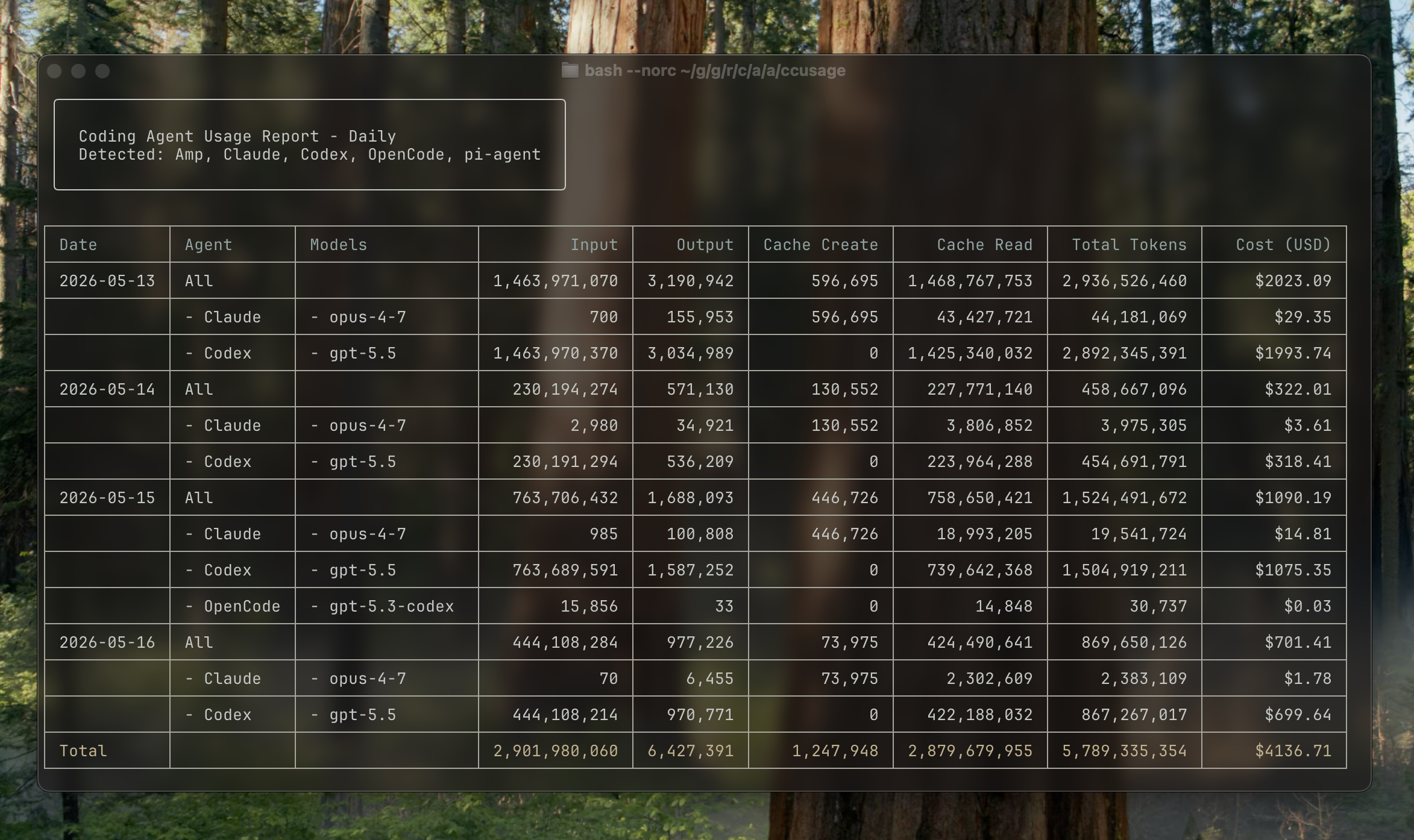
ccusage terminal report screenshot
## 快速开始 ``` npx ccusage@latest ``` ## 支持的来源 ccusage 读取来自编码 agent CLI 的本地使用数据,并将其转换为每日、每周、每月和会话报告。 | 来源 | 专属命令示例 | | ------------------ | ------------------------ | | Claude Code | `ccusage claude daily` | | Codex | `ccusage codex daily` | | OpenCode | `ccusage opencode daily` | | Amp | `ccusage amp daily` | | Droid | `ccusage droid daily` | | Codebuff | `ccusage codebuff daily` | | Hermes Agent | `ccusage hermes daily` | | pi-agent | `ccusage pi daily` | | Goose | `ccusage goose daily` | | OpenClaw | `ccusage openclaw daily` | | Kilo | `ccusage kilo daily` | | Kimi | `ccusage kimi daily` | | Qwen | `ccusage qwen daily` | | GitHub Copilot CLI | `ccusage copilot daily` | | Gemini CLI | `ccusage gemini daily` | 使用 `ccusage daily`、`ccusage weekly`、`ccusage monthly` 或 `ccusage session` 可将检测到的每个来源包含在单个报告中。 ## 安装说明 ### 包运行器 你可以直接运行 ccusage,而无需全局安装: ``` # npm npx ccusage@latest # Nix nix run github:ccusage/ccusage -- daily # 替代 package runners bunx ccusage pnpm dlx ccusage pnpx ccusage # PR preview builds bunx -p https://pkg.pr.new/ccusage/ccusage@ ccusage --offline ``` ## 使用方法 ``` # 基本用法 bunx ccusage # Show all detected sources by day (default) bunx ccusage daily # All detected sources by day bunx ccusage weekly # All detected sources by week bunx ccusage monthly # All detected sources by month bunx ccusage session # All detected sources by session bunx ccusage blocks # Claude Code 5-hour billing windows bunx ccusage statusline # Claude Code status line for hooks (Beta) # Source-focused reports 和选项 bunx ccusage claude daily --mode display bunx ccusage codex daily --speed fast bunx ccusage opencode weekly bunx ccusage amp session bunx ccusage droid daily bunx ccusage codebuff daily bunx ccusage hermes daily bunx ccusage goose daily bunx ccusage openclaw daily bunx ccusage kilo daily bunx ccusage kimi daily bunx ccusage qwen daily bunx ccusage copilot daily bunx ccusage gemini daily bunx ccusage pi daily --pi-path /path/to/sessions bunx ccusage pi daily --pi-path /path/to/sessions,/archive/pi/sessions # Explicit unified report bunx ccusage daily --all # Filters 和选项 bunx ccusage daily --since 2026-04-25 --until 2026-05-16 bunx ccusage daily --json # JSON output bunx ccusage daily --no-cost # Hide cost columns and JSON cost fields bunx ccusage daily --timezone UTC # Use UTC timezone # Project analysis bunx ccusage claude daily --instances # Group Claude Code by project/instance bunx ccusage claude daily --project myproject # Filter to specific Claude project bunx ccusage claude daily --instances --project myproject --json # Combined usage # 用于 screenshots/sharing 的 Compact mode bunx ccusage --compact # Force compact table mode bunx ccusage monthly --compact # Compact monthly report ``` ## 功能 - 📊 **每日报告**:查看按日期汇总的 token 使用量和费用 - 📅 **每月报告**:查看按月份汇总的 token 使用量和费用 - 💬 **会话报告**:查看按对话会话分组的使用情况 - 🤖 **统一 CLI 报告**:通过一个 CLI 查看 Claude Code、Codex、OpenCode、Amp、Droid、Codebuff、Hermes Agent、pi-agent、Goose、OpenClaw、Kilo、Kimi、Qwen、GitHub Copilot CLI 和 Gemini CLI 的使用情况 - ⏰ **5小时区块报告**:通过活动区块监控跟踪 Claude 计费窗口内的使用情况 - 🚀 **状态栏集成**:用于 Claude Code 状态栏钩子的简洁用量显示 (Beta) - 🤖 **模型追踪**:查看支持的来源中使用了哪些模型 - 📊 **模型明细**:使用 `--breakdown` 标志查看每个模型的费用明细 - 📅 **日期过滤**:使用 `--since` 和 `--until` 按日期范围过滤报告 - 📁 **自定义路径**:支持自定义本地数据目录位置 - 🎨 **美观输出**:带有自动响应式布局的彩色表格显示 - 📱 **智能表格**:针对窄终端(< 100 字符)的自动紧凑模式,仅显示关键列 - 📸 **紧凑模式**:使用 `--compact` 标志强制使用紧凑表格布局,非常适合截图和分享 - 📋 **增强的模型显示**:模型名称以项目符号列表形式显示,提高可读性 - 📄 **JSON 输出**:使用 `--json` 以结构化 JSON 格式导出数据 - 💰 **费用追踪**:显示每天/每月/每次会话的费用(以美元计) - 🔒 **隐藏费用**:使用 `--no-cost` 移除费用列和 JSON 费用字段 - 🔄 **Cache Token 支持**:分别跟踪并显示 cache 创建和 cache 读取 token - 🌐 **离线模式**:使用 `--offline` 在无网络连接的情况下使用预缓存的定价数据 - 🧩 **自定义定价覆盖**:无需重新构建,即可在 `ccusage.json` 中按原始模型名称覆盖 token 定价 - 🏗️ **Claude 实例支持**:使用 `--instances` 按项目对 Claude Code 用量进行分组,并按特定项目进行过滤 - 🌍 **时区支持**:使用 `--timezone` 选项配置日期分组的时区 - ⚙️ **配置文件**:使用 JSON 配置文件设置默认值,并提供 IDE 自动补全和验证功能 ## 文档 完整文档可在 **[ccusage.com](https://ccusage.com/)** 获取 ## 开发
贡献者设置 贡献者设置使用带有 [nix-direnv](https://github.com/nix-community/nix-direnv) 的 Nix flake 开发环境来锁定工具版本,并使用 `just` 执行日常开发任务。安装 [Nix](https://nixos.org/) 并启用 `nix-command` 和 `flakes` 实验性功能,然后让 nix-direnv 在你进入目录时自动加载开发 shell: ``` # Clone repository git clone https://github.com/ccusage/ccusage.git cd ccusage # 允许 direnv 加载 Nix dev shell direnv allow ``` 开发 shell 提供了来自 `flake.nix` 的锁定版 `pnpm`、Rust 工具链、GitHub CLI、git 钩子、生成的本地 agent 技能、打包工具和项目实用程序。仅当任务需要工作区的 `node_modules` 时,才运行 `pnpm install --frozen-lockfile`。 在 Nix 环境中使用 `just` 运行项目任务(`just --list` 会显示所有配方): ``` just fmt just test just check ``` ### Nix 包 该 flake 将 `ccusage` 作为默认包和应用公开: ``` nix run github:ccusage/ccusage nix run github:ccusage/ccusage -- codex daily --offline nix build github:ccusage/ccusage ``` Nix 构建会从锁定的 `litellm` flake 输入中嵌入 LiteLLM 定价文件,因此沙盒构建不会在构建时获取定价。要更新锁定的定价快照: 非 Nix 的 Cargo 构建会从 `flake.lock` 读取相同的锁定 LiteLLM 版本,并在构建时从该版本获取定价文件。 ``` just update-litellm-pricing ``` 计划的 `update pricing` 工作流会运行相同的更新和验证,然后在定价快照发生更改时提交 PR。
## Star 历史 Star History Chart ## 许可证 [MIT](LICENSE) © [@ryoppippi](https://github.com/ryoppippi)
标签:Claude Code, GNU通用公共许可证, MITM代理, Node.js, 使用量统计, 可视化界面, 开发辅助, 暗色界面, 通知系统