zhom/donutbrowser
GitHub: zhom/donutbrowser
Donut Browser 是一款功能强大的开源反指纹浏览器,支持多配置文件隔离、高级指纹伪装以及通过本地 API 与 AI 工作流集成。
Stars: 3401 | Forks: 359







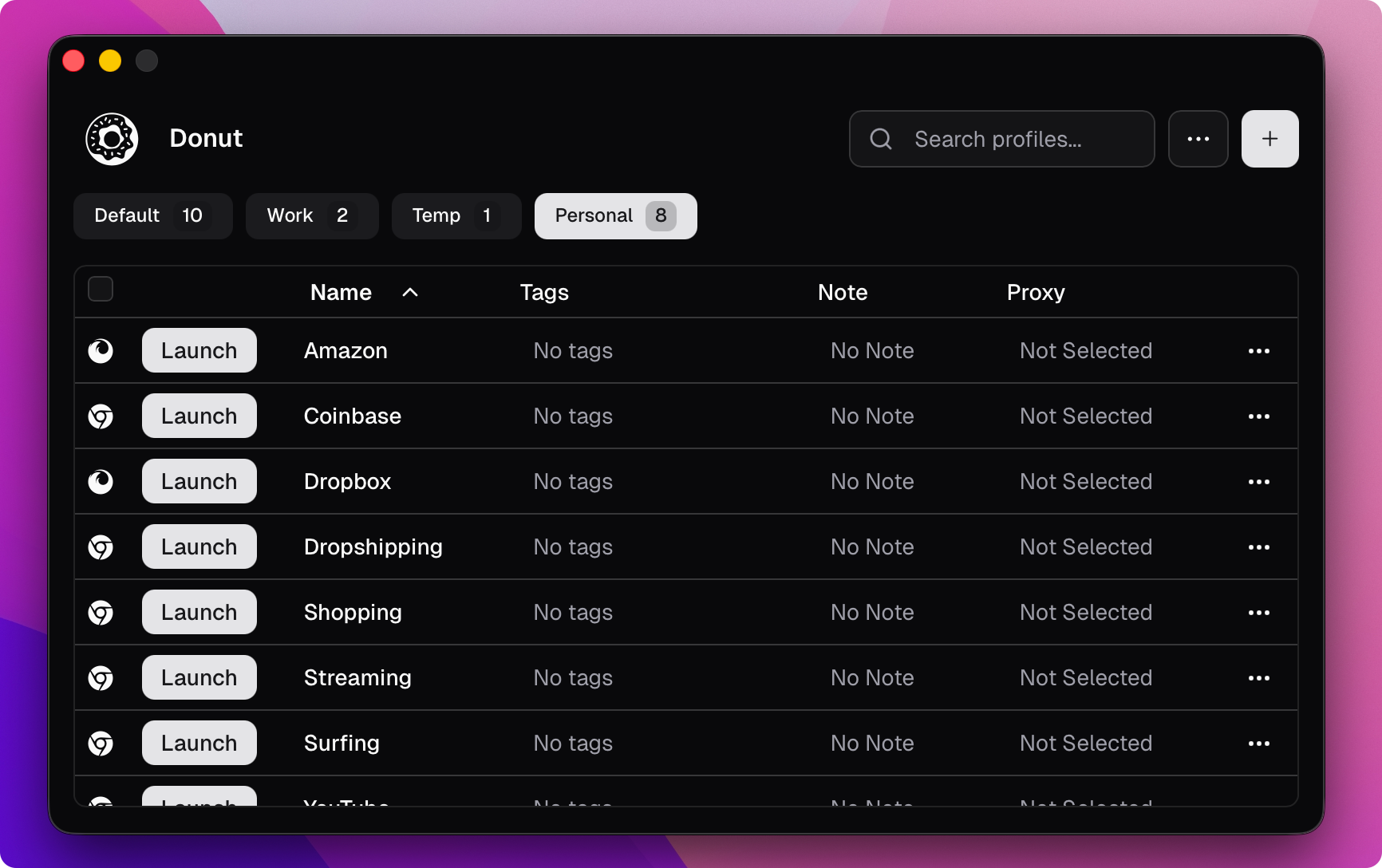 ## 功能
- **无限浏览器配置文件** — 每个配置文件完全隔离,拥有独立的指纹、Cookie、扩展和数据
- **Chromium & Firefox 引擎** — Chromium 由 [Wayfern](https://wayfern.com) 驱动,Firefox 由 [Camoufox](https://camoufox.com) 驱动,两者均具备高级指纹欺骗功能
- **代理支持** — 每个配置文件支持 HTTP、HTTPS、SOCKS4、SOCKS5,并支持动态代理 URL
- **VPN 支持** — 每个配置文件支持 WireGuard 和 OpenVPN 配置
- **Local API & MCP** — 提供 REST API 和 [Model Context Protocol](https://modelcontextprotocol.io) 服务器,用于与 Claude、自动化工具及自定义工作流集成
- **配置文件分组** — 组织配置文件并应用批量设置
- **导入配置文件** — 从 Chrome、Firefox、Edge、Brave 或其他 Chromium 浏览器迁移
- **Cookie 和扩展管理** — 导入/导出 Cookie,管理每个配置文件的扩展
- **默认浏览器** — 将 Donut 设置为默认浏览器,并选择由哪个配置文件打开每个链接
- **云同步** — 在设备间同步配置文件、代理和分组(可自托管)
- **E2E 加密** — 可选的端到端加密同步,密码仅由您知晓
- **零遥测** — 无跟踪或设备指纹收集
## 安装
### macOS
| | Apple Silicon | Intel |
|---|---|---|
| **DMG** | [下载](https://github.com/zhom/donutbrowser/releases/download/v0.20.3/Donut_0.20.3_aarch64.dmg) | [下载](https://github.com/zhom/donutbrowser/releases/download/v0.20.3/Donut_0.20.3_x64.dmg) |
或通过 Homebrew 安装:
```
brew install --cask donut
```
### Windows
[下载 Windows 安装程序 (x64)](https://github.com/zhom/donutbrowser/releases/download/v0.20.3/Donut_0.20.3_x64-setup.exe) · [便携版 (x64)](https://github.com/zhom/donutbrowser/releases/download/v0.20.3/Donut_0.20.3_x64-portable.zip)
### Linux
| 格式 | x86_64 | ARM64 |
|---|---|---|
| **deb** | [下载](https://github.com/zhom/donutbrowser/releases/download/v0.20.3/Donut_0.20.3_amd64.deb) | [下载](https://github.com/zhom/donutbrowser/releases/download/v0.20.3/Donut_0.20.3_arm64.deb) |
| **rpm** | [下载](https://github.com/zhom/donutbrowser/releases/download/v0.20.3/Donut-0.20.3-1.x86_64.rpm) | [下载](https://github.com/zhom/donutbrowser/releases/download/v0.20.3/Donut-0.20.3-1.aarch64.rpm) |
| **AppImage** | [下载](https://github.com/zhom/donutbrowser/releases/download/v0.20.3/Donut_0.20.3_amd64.AppImage) | [下载](https://github.com/zhom/donutbrowser/releases/download/v0.20.3/Donut_0.20.3_aarch64.AppImage) |
或通过包管理器安装:
```
curl -fsSL https://donutbrowser.com/install.sh | sh
```
## 功能
- **无限浏览器配置文件** — 每个配置文件完全隔离,拥有独立的指纹、Cookie、扩展和数据
- **Chromium & Firefox 引擎** — Chromium 由 [Wayfern](https://wayfern.com) 驱动,Firefox 由 [Camoufox](https://camoufox.com) 驱动,两者均具备高级指纹欺骗功能
- **代理支持** — 每个配置文件支持 HTTP、HTTPS、SOCKS4、SOCKS5,并支持动态代理 URL
- **VPN 支持** — 每个配置文件支持 WireGuard 和 OpenVPN 配置
- **Local API & MCP** — 提供 REST API 和 [Model Context Protocol](https://modelcontextprotocol.io) 服务器,用于与 Claude、自动化工具及自定义工作流集成
- **配置文件分组** — 组织配置文件并应用批量设置
- **导入配置文件** — 从 Chrome、Firefox、Edge、Brave 或其他 Chromium 浏览器迁移
- **Cookie 和扩展管理** — 导入/导出 Cookie,管理每个配置文件的扩展
- **默认浏览器** — 将 Donut 设置为默认浏览器,并选择由哪个配置文件打开每个链接
- **云同步** — 在设备间同步配置文件、代理和分组(可自托管)
- **E2E 加密** — 可选的端到端加密同步,密码仅由您知晓
- **零遥测** — 无跟踪或设备指纹收集
## 安装
### macOS
| | Apple Silicon | Intel |
|---|---|---|
| **DMG** | [下载](https://github.com/zhom/donutbrowser/releases/download/v0.20.3/Donut_0.20.3_aarch64.dmg) | [下载](https://github.com/zhom/donutbrowser/releases/download/v0.20.3/Donut_0.20.3_x64.dmg) |
或通过 Homebrew 安装:
```
brew install --cask donut
```
### Windows
[下载 Windows 安装程序 (x64)](https://github.com/zhom/donutbrowser/releases/download/v0.20.3/Donut_0.20.3_x64-setup.exe) · [便携版 (x64)](https://github.com/zhom/donutbrowser/releases/download/v0.20.3/Donut_0.20.3_x64-portable.zip)
### Linux
| 格式 | x86_64 | ARM64 |
|---|---|---|
| **deb** | [下载](https://github.com/zhom/donutbrowser/releases/download/v0.20.3/Donut_0.20.3_amd64.deb) | [下载](https://github.com/zhom/donutbrowser/releases/download/v0.20.3/Donut_0.20.3_arm64.deb) |
| **rpm** | [下载](https://github.com/zhom/donutbrowser/releases/download/v0.20.3/Donut-0.20.3-1.x86_64.rpm) | [下载](https://github.com/zhom/donutbrowser/releases/download/v0.20.3/Donut-0.20.3-1.aarch64.rpm) |
| **AppImage** | [下载](https://github.com/zhom/donutbrowser/releases/download/v0.20.3/Donut_0.20.3_amd64.AppImage) | [下载](https://github.com/zhom/donutbrowser/releases/download/v0.20.3/Donut_0.20.3_aarch64.AppImage) |
或通过包管理器安装:
```
curl -fsSL https://donutbrowser.com/install.sh | sh
```
AppImage 故障排除
如果 AppImage 在启动时发生段错误,请安装 **libfuse2**(`sudo apt install libfuse2` / `yay -S libfuse2` / `sudo dnf install fuse-libs`),或完全绕过 FUSE: ``` APPIMAGE_EXTRACT_AND_RUN=1 ./Donut.Browser_x.x.x_amd64.AppImage ``` 如果出现 EGL 显示错误,请尝试在上述命令中添加 `WEBKIT_DISABLE_DMABUF_RENDERER=1` 或 `GDK_BACKEND=x11`。如果问题仍然存在,**.deb** / **.rpm** 软件包是更可靠的替代方案。标签:Camoufox, Chromium, Cookie隔离, Donut Browser, Firefox, Wayfern, 匿名浏览, 反指纹浏览器, 反检测, 多账号管理, 开源浏览器, 扩展管理, 指纹伪装, 浏览器指纹, 浏览器自动化, 浏览器配置文件, 爬虫辅助, 网络安全, 网络营销, 请求拦截, 跨境电商工具, 通知系统, 防关联浏览器, 隐私保护