一款用 Go 编写的轻量级网络代理工具,能将 SOCKS5 代理转换为 HTTP 代理,并内置透明代理、流量嗅探、ARP/NDP/DNS 欺骗等多种网络中间人能力。
# GoHPTS - 使用 Go 编写的 HTTP(S) 和 TCP/UDP 透明代理到 SOCKS5 代理 (链)
[](https://www.gnu.org/licenses/gpl-3.0)
[](https://pkg.go.dev/github.com/shadowy-pycoder/go-http-proxy-to-socks)

[](https://goreportcard.com/report/github.com/shadowy-pycoder/go-http-proxy-to-socks)



 ## 目录
- [简介](#introduction)
- [功能特性](#features)
- [安装说明](#installation)
- [用法](#usage)
- [通过 CLI 标志配置](#configuration-via-cli-flags)
- [通过 YAML 文件配置](#configuration-via-yaml-file)
- [透明代理](#transparent-proxy)
- [redirect (通过 NAT 和 SO_ORIGINAL_DST)](#redirect-via-nat-and-so_original_dst)
- [tproxy (通过 MANGLE 和 IP_TRANSPARENT)](#tproxy-via-mangle-and-ip_transparent)
- [UDP 支持](#udp-support)
- [Android 支持](#android-support)
- [YAML 配置](#yaml-configuration)
- [流量嗅探](#traffic-sniffing)
- [JSON 格式](#json-format)
- [彩色格式](#colored-format)
- [IPv6 支持](#ipv6-support)
- [ARP 欺骗](#arp-spoofing)
- [NDP 欺骗](#ndp-spoofing)
- [DNS 欺骗](#dns-spoofing)
- [相关链接](#links)
- [贡献](#contributing)
- [许可证](#license)
## 简介
[[返回]](#目录)
`GoHPTS` CLI 工具是 HTTP 客户端与 SOCKS5 代理服务器或多个服务器(链)之间的桥梁。它作为 HTTP 代理在本地监听,接受标准的 HTTP
或 HTTPS(通过 CONNECT)请求,并通过 SOCKS5 代理转发连接。灵感来源于 [http-proxy-to-socks](https://github.com/oyyd/http-proxy-to-socks) 和 [Proxychains](https://github.com/rofl0r/proxychains-ng)
可能的应用场景:你需要通过 Postman 连接到外部 API,但该 API 只能从某台远程服务器访问。
以下命令将帮助你完成此任务:
通过 `ssh` 创建 SOCKS5 代理服务器:
```
ssh -D 1080 -Nf
```
使用 `gohpts` 创建 HTTP 到 SOCKS5 的连接
```
gohpts -s :1080 -l :8080
```
在 Postman 的代理配置中指定 http 服务器
## 功能特性
[[返回]](#目录)
- **代理链功能**\
支持 `strict`、`dynamic`、`random`、`round_robin` 链模式的 SOCKS5 代理
- **透明代理**\
支持 `redirect` (SO_ORIGINAL_DST) 和 `tproxy` (IP_TRANSPARENT) 模式
- **TCP 和 UDP 透明代理**\
`tproxy` (IP_TRANSPARENT) 处理 TCP 和 UDP 流量
- **流量嗅探**\
代理能够解析 HTTP 头部、TLS 握手、DNS 消息等
- **ARP 欺骗**\
通过 ARP 欺骗方法代理整个子网
- **NDP 欺骗**\
使用路由器/邻居通告和 RDNSS 注入代理 IPv6 连接。
- **DNS 欺骗**\
通过修改 DNS 记录将客户端重定向到任意域名
- **DNS 泄露保护**\
DNS 解析发生在 SOCKS5 服务器端。
- **CONNECT 方法支持**\
支持 HTTP CONNECT 隧道,从而支持 HTTPS 和其他基于 TCP 的协议。
- **Trailer Headers 支持**\
处理 HTTP 尾部标头
- **分块传输编码**\
处理分块和流式响应
- **SOCKS5 认证支持**\
支持 SOCKS5 代理的用户名/密码认证。
- **HTTP 认证支持**\
支持 HTTP 代理服务器的用户名/密码认证。
- **轻量且快速**\
以极低的开销和高效的请求处理为设计目标。
- **跨平台**\
兼容所有主流操作系统。
## 安装说明
[[返回]](#目录)
- Arch Linux/CachyOS/EndeavourOS
```
yay -S gohpts
```
- 从 [Releases](https://github.com/shadowy-pycoder/go-http-proxy-to-socks/releases) 页面下载适用于您平台的二进制文件。
```
GOHPTS_RELEASE=v1.13.3; wget -v https://github.com/shadowy-pycoder/go-http-proxy-to-socks/releases/download/$GOHPTS_RELEASE/gohpts-$GOHPTS_RELEASE-linux-amd64.tar.gz -O gohpts && tar xvzf gohpts && mv -f gohpts-$GOHPTS_RELEASE-linux-amd64 gohpts && ./gohpts -h
```
- 使用 `go install` 命令安装(需要 Go [1.26](https://go.dev/doc/install) 或更高版本):
```
CGO_ENABLED=0 go install -ldflags "-s -w" -trimpath github.com/shadowy-pycoder/go-http-proxy-to-socks/cmd/gohpts@latest
```
这会将 `gohpts` 二进制文件安装到您的 `$GOPATH/bin` 目录中。
- 从源码构建:
```
git clone https://github.com/shadowy-pycoder/go-http-proxy-to-socks.git
cd go-http-proxy-to-socks
make build
./bin/gohpts
```
## 用法
[[返回]](#目录)
```
gohpts -h
_____ _ _ _____ _______ _____
/ ____| | | | | __ \__ __/ ____|
| | __ ___ | |__| | |__) | | | | (___
| | |_ |/ _ \| __ | ___/ | | \___ \
| |__| | (_) | | | | | | | ____) |
\_____|\___/|_| |_|_| |_| |_____/
GoHPTS (HTTP(S) Proxy to SOCKS5 proxy) by shadowy-pycoder
GitHub: https://github.com/shadowy-pycoder/go-http-proxy-to-socks
Codeberg: https://codeberg.org/shadowy-pycoder/go-http-proxy-to-socks
Usage: gohpts [OPTIONS]
OPTIONS:
General:
-h Show this help message and exit
-v Show version and build information
-D Run as a daemon (provide -logfile to see logs)
-I Display list of network interfaces and exit
-f Path to proxy configuration file in YAML format
Proxy:
-l Address of HTTP proxy server (Default: "127.0.0.1:8080")
-s Address of SOCKS5 proxy server (Default: "127.0.0.1:1080")
-c Path to certificate PEM encoded file
-k Path to private key PEM encoded file
-U User for HTTP proxy (basic auth). This flag invokes prompt for password (not echoed to terminal)
-u User for SOCKS5 proxy authentication. This flag invokes prompt for password (not echoed to terminal)
-i Bind proxy to specific network interface (either by interface name or index)
-6 Enable IPv6 support for TCP and UDP
Logs:
-d Show logs in DEBUG mode
-j Show logs in JSON format
-logfile Log file path (Default: stdout)
-nocolor Disable colored output for logs (no effect if -j flag specified)
-pprof Address of pprof server with profiling data
Sniffing:
-sniff Enable traffic sniffing for HTTP and TLS
-snifflog Sniffed traffic log file path (Default: the same as -logfile)
-body Collect request and response body for HTTP traffic (credentials, tokens, etc)
TProxy:
-T Address of transparent proxy server
-Tu Address of transparent UDP proxy server
-M Transparent proxy mode: (redirect, tproxy)
-nohttp Disable HTTP server
-w Number of instances of transparent proxy server (Default: number of CPU cores)
-wu Number of instances of transparent UDP proxy server (Default: number of CPU cores)
-auto Automatically setup iptables and kernel parameters for transparent proxy (requires elevated privileges)
-mark Set mark for each packet sent through transparent proxy (Default: redirect 0, tproxy 100)
-P Comma separated list of ports to ignore when proxying traffic (Example: "22,80,443,9092")
-dump Dump iptables rules and other system settings generated by -auto flag
Spoofing:
-arpspoof Enable ARP spoof proxy for selected targets (Example: "targets 10.0.0.1,10.0.0.5-10,192.168.1.*,192.168.10.0/24;fullduplex false;debug true;interval 10s")
-ndpspoof Enable NDP spoof proxy for selected targets (Example: "ra true;na true;targets fe80::3a1c:7bff:fe22:91a4;fullduplex false;debug true;interval 10s")
```
### 通过 CLI 标志配置
[[返回]](#目录)
```
gohpts -s 1080 -l 8080 -d -j
```
输出:
```
{"level":"info","time":"2025-05-28T06:15:18+00:00","message":"SOCKS5 Proxy: :1080"}
{"level":"info","time":"2025-05-28T06:15:18+00:00","message":"HTTP Proxy: :8080"}
{"level":"debug","time":"2025-05-28T06:15:22+00:00","message":"HTTP/1.1 - CONNECT - www.google.com:443"}
```
指定 SOCKS5 代理服务器的用户名和密码:
```
gohpts -s 1080 -l 8080 -d -j -u user
SOCKS5 Password: #you will be prompted for password input here
```
指定 HTTP 代理服务器的用户名和密码:
```
gohpts -s 1080 -l 8080 -d -j -U user
HTTP Password: #you will be prompted for password input here
```
当 `-u` 和 `-U` 同时存在时,您将被提示输入两次
通过 TLS 连接运行 http 代理
```
gohpts -s 1080 -l 8080 -c "path/to/certificate" -k "path/to/private/key"
```
将代理作为守护进程运行(需要指定日志文件来记录输出,否则您将看不到任何内容)
```
gohpts -D -logfile /tmp/gohpts.log
```
```
# 输出
gohpts pid:
```
```
# 终止进程
kill
#or
kill $(pidof gohpts)
```
`-u` 和 `-U` 标志在守护进程模式下不起作用(因此认证也不可用),但您可以提供一个配置文件(见下文)
### 通过 YAML 文件配置
[[返回]](#目录)
当您希望预先配置代理而不想过多处理 CLI,或者只是想为不同需求配置多个配置文件时,配置文件非常有用。
在 SOCKS5 代理链模式下运行 HTTP 代理(通过 YAML 配置文件指定服务器设置)
```
gohpts -f "~/gohtps.yaml" -d -j
```
配置示例:
```
# 将代理绑定到特定的网络接口(通过接口名称或索引)
interface: "eth0" # if specified, overrides http server IP address
ipv6_enabled: false # this must be enabled for ndpspoof
http_server:
enabled: true
address: 127.0.0.1:8080
# socks5 代理列表
# 如果 proxy_chain 被禁用,则使用列表中的第一个服务器作为 upstream
proxy_list:
- address: 127.0.0.1:1080
- address: 127.0.0.1:1081
- address: :1082 # empty host means localhost
proxy_chain:
enabled: false
# Explanations for chains taken from /etc/proxychains4.conf
# strict - Each connection will be done via chained proxies
# all proxies chained in the order as they appear in the list
# all proxies must be online to play in chain
# dynamic - Each connection will be done via chained proxies
# all proxies chained in the order as they appear in the list
# at least one proxy must be online to play in chain
# (dead proxies are skipped)
# random - Each connection will be done via random proxy
# (or proxy chain, see chain_len) from the list.
# this option is good to test your IDS :)
# round_robin - Each connection will be done via chained proxies
# of chain_len length
# all proxies chained in the order as they appear in the list
# at least one proxy must be online to play in chain
# (dead proxies are skipped).
# the start of the current proxy chain is the proxy after the last
# proxy in the previously invoked proxy chain.
# if the end of the proxy chain is reached while looking for proxies
# start at the beginning again.
# These semantics are not guaranteed in a multithreaded environment.
type: strict # dynamic, strict, random, round_robin
length: 2 # maximum number of proxy in a chain (works only for random chain and round_robin chain)
logging:
debug: true
json: false
# defaults to standard output
#logfile: /tmp/gohpts.log
# use colored output in logs (no effect if json enabled)
nocolor: false
# profiling data
pprof: 127.0.0.1:8081
```
您可以通过提供相应的 CLI 标志来覆盖配置文件中指定的几乎所有设置:
```
gohpts -l :6969 -f "~/gohtps.yaml" -nocolor
```
代理会读取 `~/gohpts.yaml` 中指定的所有设置,但会在 `127.0.0.1:6969` 而不是 `127.0.0.1:8080` 上启动 HTTP 服务器,并且还会禁用日志中的彩色输出。
某些设置(例如 proxy_chain 和 dns 过滤器)只能通过文件进行配置。
完整的配置版本可以在这里找到:[example_gohpts.yaml](./resources/example_gohpts.yaml)
要了解更多关于代理链的信息,请访问 [Proxychains Github](https://github.com/rofl0r/proxychains-ng)
## 透明代理
[[返回]](#目录)
此功能仅在 Linux 系统和 Android (arm64) 上可用,并需要额外的设置(`iptables`、ip route 等)
`-T address` 标志指定透明代理服务器的地址
有两种模式 `redirect` 和 `tproxy`,可以使用 `-M` 标志指定
## `redirect` (通过 _NAT_ 和 _SO_ORIGINAL_DST_)
[[返回]](#目录)
在这种模式下,代理是通过 `iptables` 的 `nat` 表和 `REDIRECT` 目标进行的。传入数据包的主机地址会被更改为运行 `redirect` 透明代理的地址,但它也包含可以通过 `getsockopt(SO_ORIGINAL_DST)` 获取的原始目的地。
要在这种模式下运行 `GoHPTS`,请结合 `-M redirect` 使用 `-T` 标志
### 示例
```
# 运行代理
gohpts -s 1080 -T 1090 -M redirect -d
```
```
# 在 127.0.0.1:1080 上运行 socks5 服务器
ssh remote -D 1080 -Nf
```
设置您的操作系统:
```
# 以下命令需要提升的权限(你可以使用 `sudo -i` 来运行它)
#enable ip forwarding
sysctl -w net.ipv4.ip_forward=1
# 创建 `GOHPTS` nat 链
iptables -t nat -N GOHPTS
# 为本地、http 代理、ssh 和重定向代理本身设置不重定向规则
iptables -t nat -A GOHPTS -d 127.0.0.0/8 -j RETURN
iptables -t nat -A GOHPTS -p tcp --dport 8080 -j RETURN
iptables -t nat -A GOHPTS -p tcp --dport 1090 -j RETURN
iptables -t nat -A GOHPTS -p tcp --dport 22 -j RETURN
# 将流量重定向到透明代理
iptables -t nat -A GOHPTS -p tcp -j REDIRECT --to-ports 1090
# 通过添加我们的代理来设置 prerouting
iptables -t nat -A PREROUTING -p tcp -j GOHPTS
# 拦截本地流量以进行测试
iptables -t nat -A OUTPUT -p tcp -j GOHPTS
```
测试连接:
```
#traffic should be redirected via 127.0.0.1:1090
curl http://example.com
```
```
#traffic should be redirected via 127.0.0.1:8080
curl --proxy http://127.0.0.1:8080 http://example.com
```
撤销所有操作:
```
sysctl -w net.ipv4.ip_forward=0
iptables -t nat -D PREROUTING -p tcp -j GOHPTS
iptables -t nat -D OUTPUT -p tcp -j GOHPTS
iptables -t nat -F GOHPTS
iptables -t nat -X GOHPTS
```
### `redirect` 模式的自动配置
[[返回]](#目录)
要自动配置您的系统,请运行以下命令:
```
sudo env PATH=$PATH gohpts -d -T 8888 -M redirect -auto
```
请注意,自动配置需要 `sudo` 权限,并且是非常通用的,可能不适合您的需求。
您可以选择指定 `-mark ` 来防止可能的代理循环
```
sudo env PATH=$PATH gohpts -d -T 8888 -M redirect -auto -mark 100
```
## `tproxy` (通过 _MANGLE_ 和 _IP_TRANSPARENT_)
[[返回]](#目录)
在这种模式下,代理是通过 `iptables` 的 `mangle` 表和 `TPROXY` 目标进行的。透明代理看到的目的地址保持不变,不会被内核重写。为了实现这一点,代理使用 `IP_TRANSPARENT` 套接字选项进行绑定,`iptables` 使用 TPROXY 目标拦截流量,路由规则指示标记的数据包发送到本地代理,而不更改其原始目的地。
此模式需要提升的权限才能运行 `GoHPTS`。您可以通过运行以下命令来实现:
```
sudo setcap 'cap_net_admin+ep' ~/go/bin/gohpts
```
要在这种模式下运行 `GoHPTS`,请结合 `-M tproxy` 使用 `-T` 标志
### 示例
```
# 运行代理
gohpts -s 1080 -T 0.0.0.0:1090 -M tproxy -d
```
```
# 在 127.0.0.1:1080 上运行 socks5 服务器
ssh remote -D 1080 -Nf
```
设置您的操作系统:
```
ip netns exec ns-client ip route add default via 10.0.0.1
sysctl -w net.ipv4.ip_forward=1
iptables -t mangle -A PREROUTING -i veth1 -p tcp -j TPROXY --on-port 1090 --tproxy-mark 0x1/0x1
ip rule add fwmark 1 lookup 100
ip route add local 0.0.0.0/0 dev lo table 100
```
测试连接:
```
ip netns exec ns-client curl http://1.1.1.1
```
撤销所有操作:
```
sysctl -w net.ipv4.ip_forward=0
iptables -t mangle -F
ip rule del fwmark 1 lookup 100
ip route flush table 100
ip netns del ns-client
ip link del veth1
```
### `tproxy` 模式的自动配置
[[返回]](#目录)
要自动配置您的系统,请运行以下命令(例如,在单独的虚拟机上):
```
ssh remote -D 1080 -Nf
sudo env PATH=$PATH gohpts -d -T 8888 -M tproxy -auto -mark 100
```
在您的主机上运行以下命令:
```
ip route show default > /tmp/default-route.txt
ip route add 0.0.0.0/1 via 192.168.0.1 # change with ip of your VM
ip route add 128.0.0.0/1 via 192.168.0.1
```
测试连接:
```
curl http://example.com #check logs on your VM
```
撤销所有操作:
```
ip route del 0.0.0.0/1 via 192.168.0.1 2>/dev/null || true
ip route del 128.0.0.0/1 via 192.168.0.1 2>/dev/null || true
if [[ -f /tmp/default-route.txt ]]; then
eval $(awk '{print "ip route add "$0}' /tmp/default-route.txt)
rm -f /tmp/default-route.txt
else
echo "Something went wrong"
fi
```
### UDP 支持
[[返回]](#目录)
`GoHPTS` 支持在 `tproxy` 模式下启用 UDP。要使此设置生效,您需要连接到能够处理 UDP 连接(`UDP ASSOCIATE`)的 socks5 服务器。例如,您可以使用 [https://github.com/wzshiming/socks5](https://github.com/wzshiming/socks5) 在某台远程或本地机器上部署支持 UDP 的 socks5 服务器。一旦您有了要连接的服务器,请运行以下命令:
```
sudo env PATH=$PATH gohpts -s remote -Tu :8989 -M tproxy -auto -mark 100 -d
```
此命令将配置您的操作系统并在 `0.0.0.0:8989` 地址上启动服务器。
要在本地测试,您可以将 UDP 透明代理与 `-arpspoof` 标志结合使用。例如:
1. 在您的系统上设置一个虚拟机,安装任何支持 `tproxy` 的 Linux 发行版(例如 Kali Linux)。
2. 启用 `bridged` 网络连接,以便虚拟机能够访问您的主机。
3. 将 `gohpts` 二进制文件移动到虚拟机(例如通过 `ssh`),或者在操作系统/架构不同时直接在虚拟机上构建它。
4. 在您的虚拟机上运行以下命令:
```
# 请勿忘记将 和 替换为实际地址
sudo ./gohpts -s -T 8888 -Tu :8989 -M tproxy -sniff -body -auto -mark 100 -d -arpspoof "targets ;fullduplex true;debug false"
```
5. 在您的主机上检查连接,流量应该通过 Kali 机器。
### Android 支持
[[返回]](#目录)
在具有 root 权限的 Android 设备 (arm64) 上可以启用透明代理。您可以安装 [Termux](https://github.com/termux/termux-app) 并在那里将 `GoHPTS` 作为 CLI 工具运行:
```
# 你需要先 root 你的设备
pkg install tsu iproute2
# Android 支持已在 v1.10.2 中添加
GOHPTS_RELEASE=v1.10.2; wget -v https://github.com/shadowy-pycoder/go-http-proxy-to-socks/releases/download/$GOHPTS_RELEASE/gohpts-$GOHPTS_RELEASE-android-arm64.tar.gz -O gohpts && tar xvzf gohpts && mv -f gohpts-$GOHPTS_RELEASE-android-arm64 gohpts && ./gohpts -h
# 将你的手机用作 LAN 设备的路由器,将其流量重定向到远程 socks5 服务器
sudo ./gohpts -s remote -T 8888 -Tu :8989 -M tproxy -sniff -body -auto -mark 100 -d -arpspoof "fullduplex true;debug false"
```
### YAML 配置
[[返回]](#目录)
```
transparent_proxy:
tcp:
enabled: true
address: 0.0.0.0:8888
# number of instances of transparent proxy server (Default: number of CPU cores)
workers: 1
udp:
enabled: true
address: 0.0.0.0:8889
# number of instances of transparent UDP proxy server (Default: number of CPU cores)
workers: 1
mode: "tproxy" # available modes are "redirect", "tproxy" (udp requires tproxy mode)
disable_http: false
# automatically setup iptables and kernel parameters for transparent proxy (requires elevated privileges)
auto: true
# dump iptables rules and other system settings generated by auto setting
dump_rules: false
# list of ports to ignore when proxying traffic (Example: [22,80,443,9092])
ignored_ports: []
# set mark for each packet sent through transparent proxy (Default: redirect 0, tproxy 100)
mark: 100
```
## 流量嗅探
[[返回]](#目录)
`GoHPTS` 代理允许捕获和监控通过该服务的流量。此过程被称为 `traffic sniffing`、`packet sniffing` 或简称为 `sniffing`。具体来说,代理会尝试识别流量是明文 (HTTP) 还是 TLS,识别完成后,它会解析请求/响应的元数据并将其写入文件或控制台。在 `GoHTPS` 代理中,解析出的元数据如下所示(TLS 握手):
### JSON 格式
[[返回]](#目录)
```
[
{
"connection": {
"tproxy_mode": "redirect",
"src_local": "127.0.0.1:8888",
"src_remote": "192.168.0.107:51142",
"dst_local": "127.0.0.1:56256",
"dst_remote": "127.0.0.1:1080",
"original_dst": "216.58.209.206:443"
}
},
{
"tls_request": {
"sni": "www.youtube.com",
"type": "Client hello (1)",
"version": "TLS 1.2 (0x0303)",
"session_id": "2670a6779b4346e5e84d46890ad2aaf7a53b08adcfe0c9f6868c2d9882242e39",
"cipher_suites": [
"TLS_AES_128_GCM_SHA256 (0x1301)",
"TLS_CHACHA20_POLY1305_SHA256 (0x1303)",
"TLS_AES_256_GCM_SHA384 (0x1302)",
"TLS_ECDHE_ECDSA_WITH_AES_128_GCM_SHA256 (0xc02b)",
"TLS_ECDHE_RSA_WITH_AES_128_GCM_SHA256 (0xc02f)",
"TLS_ECDHE_ECDSA_WITH_CHACHA20_POLY1305_SHA256 (0xcca9)",
"TLS_ECDHE_RSA_WITH_CHACHA20_POLY1305_SHA256 (0xcca8)",
"TLS_ECDHE_ECDSA_WITH_AES_256_GCM_SHA384 (0xc02c)",
"TLS_ECDHE_RSA_WITH_AES_256_GCM_SHA384 (0xc030)",
"TLS_ECDHE_ECDSA_WITH_AES_256_CBC_SHA (0xc00a)",
"TLS_ECDHE_ECDSA_WITH_AES_128_CBC_SHA (0xc009)",
"TLS_ECDHE_RSA_WITH_AES_128_CBC_SHA (0xc013)",
"TLS_ECDHE_RSA_WITH_AES_256_CBC_SHA (0xc014)",
"TLS_RSA_WITH_AES_128_GCM_SHA256 (0x9c)",
"TLS_RSA_WITH_AES_256_GCM_SHA384 (0x9d)",
"TLS_RSA_WITH_AES_128_CBC_SHA (0x2f)",
"TLS_RSA_WITH_AES_256_CBC_SHA (0x35)"
],
"extensions": [
"server_name (0)",
"extended_master_secret (23)",
"renegotiation_info (65281)",
"supported_groups (10)",
"ec_point_formats (11)",
"session_ticket (35)",
"application_layer_protocol_negotiation (16)",
"status_request (5)",
"delegated_credential (34)",
"signed_certificate_timestamp (18)",
"key_share (51)",
"supported_versions (43)",
"signature_algorithms (13)",
"psk_key_exchange_modes (45)",
"record_size_limit (28)",
"compress_certificate (27)",
"encrypted_client_hello (65037)"
],
"alpn": ["h2", "http/1.1"]
}
},
{
"tls_response": {
"type": "Server hello (2)",
"version": "TLS 1.2 (0x0303)",
"session_id": "2670a6779b4346e5e84d46890ad2aaf7a53b08adcfe0c9f6868c2d9882242e39",
"cipher_suite": "TLS_AES_128_GCM_SHA256 (0x1301)",
"extensions": ["key_share (51)", "supported_versions (43)"],
"supported_version": "TLS 1.3 (0x0304)"
}
}
]
```
以及使用 curl 的 HTTP 请求:
```
[
{
"connection": {
"tproxy_mode": "redirect",
"src_local": "127.0.0.1:8888",
"src_remote": "192.168.0.107:45736",
"dst_local": "127.0.0.1:37640",
"dst_remote": "127.0.0.1:1080",
"original_dst": "96.7.128.198:80"
}
},
{
"http_request": {
"host": "example.com",
"uri": "/",
"method": "GET",
"proto": "HTTP/1.1",
"header": {
"Accept": ["*/*"],
"My": ["Header"],
"User-Agent": ["curl/7.81.0"]
}
}
},
{
"http_response": {
"proto": "HTTP/1.1",
"status": "200 OK",
"content-length": 1256,
"header": {
"Cache-Control": ["max-age=2880"],
"Connection": ["keep-alive"],
"Content-Length": ["1256"],
"Content-Type": ["text/html"],
"Date": ["Tue, 17 Jun 2025 14:43:24 GMT"],
"Etag": ["\"84238dfc8092e5d9c0dac8ef93371a07:1736799080.121134\""],
"Last-Modified": ["Mon, 13 Jan 2025 20:11:20 GMT"]
}
}
}
]
```
使用方法很简单,只需在常规标志旁边指定 `-sniff` 标志
```
gohpts -d -T 8888 -M redirect -sniff -j
```
您还可以指定一个文件来写入嗅探到的流量:
```
gohpts -sniff -snifflog ~/sniff.log -j
```
### 彩色格式
[[返回]](#目录)
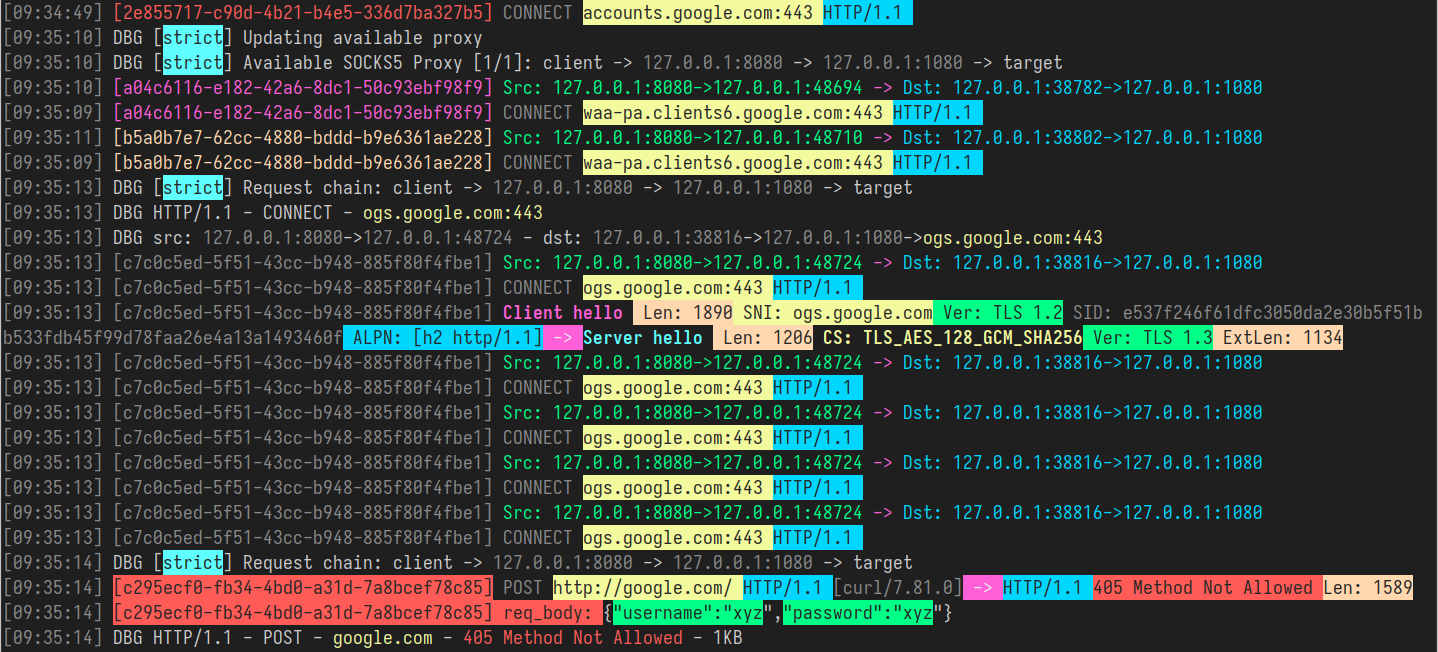
您可以在上图中看到彩色输出的示例。在这种模式下,`GoHPTS` 会尝试高亮显示重要信息,例如 TLS 握手、HTTP 元数据,以及类似于登录/密码的内容或不同类型的身份验证和秘密 token。与 JSON 相比,输出内容有限,但人类阅读起来要容易得多。
要在这种模式下运行 `GoHPTS`,请使用以下标志:
```
gohpts -sniff -body
```
您可以将嗅探与透明模式结合使用:
```
./gohpts -T 8888 -M redirect -sniff -body
```
要禁用颜色,请添加 `-nocolor`:
```
gohpts -sniff -body -nocolor
```
## IPv6 支持
[[返回]](#目录)
只需添加 `-6` 标志即可 IPv6 处理,例如在与透明代理一起使用时:
```
sudo ./gohpts -T 8888 -M redirect -sniff -body -auto -mark 100 -d -6
```
要使其正常工作,您的 ISP 和远程 socks5 代理必须启用了 IPv6 支持,您可以访问 [https://test-ipv6.com/](https://test-ipv6.com/) 以确认您是否能访问 IPv6 地址。
要测试 IPv6 模式下的代理,您可以使用任何 Linux 虚拟机:
1. 在您的虚拟机上:
```
# 将你的主机添加为 VM 的网关
export GATEWAY=""
ip route add 0.0.0.0/1 via "$GATEWAY"
ip route add 128.0.0.0/1 via "$GATEWAY"
# 将你的主机添加为 VM 的 IPv6 网关
export GATEWAY6=""
ip -6 route add ::/1 via "$GATEWAY6" dev eth0
ip -6 route add 8000::/1 via "$GATEWAY6" dev eth0
```
2. 在您的主机上:
```
# 在你的主机上运行代理
sudo ./gohpts -T 8888 -Tu 8889 -M tproxy -sniff -body -auto -d -6
```
3. 在您的虚拟机上访问任何网站并在代理日志中查看流量
## ARP 欺骗
[[返回]](#目录)
`GoHPTS` 内置了 ARP 欺骗器,可用于使您局域网中所有进行 TCP 通信的设备通过代理服务器连接到 Internet。
这可以通过添加带有几个用分号分隔的参数的 `-arpspoof` 标志来实现。
示例:
```
ssh remote -D 1080 -Nf
sudo env PATH=$PATH gohpts -d -T 8888 -M tproxy -sniff -body -auto -mark 100 -arpspoof "targets 192.168.10.0/24;fullduplex true;debug true"
```
代理将扫描子网 `192.168.10.0/24` 中的设备,并向它们发送 ARP 数据包以伪装成网关,如果 `fullduplex` 为 true,
代理也会向网关发送 ARP 数据包,使其相信我们的代理拥有子网上的每个 IP。
通过 `Ctrl+C` 停止代理后,它将自动取消对所有目标的欺骗。
`GoHPTS` 还可以与 [Bettercap](https://github.com/bettercap/bettercap) 等工具配合使用,以代理被 ARP 欺骗的流量。
运行代理:
```
ssh remote -D 1080 -Nf
sudo env PATH=$PATH gohpts -d -T 8888 -M tproxy -sniff -body -auto -mark 100
```
使用此命令运行 `bettercap`(参见 [文档](https://www.bettercap.org/)):
```
sudo bettercap -eval "net.probe on;net.recon on;set arp.spoof.fullduplex true;arp.spoof on"
```
在代理日志中检查来自局域网中其他设备的流量
有关 arpspoof 选项的更多信息,请参见 `gohpts -h` 和 [https://github.com/shadowy-pycoder/arpspoof](https://github.com/shadowy-pycoder/arpspoof)
### NDP 欺骗
[[返回]](#目录)
`GoHPTS` 内置了在 IPv6 网络中通过路由器通告 和邻居通告 数据包执行 NDP 欺骗的功能。它还在 RA 数据包中包含 RDNSS 选项,将自身设置受影响客户端的 IPv6 名称服务器。当与透明代理模式 (TCP/UDP) 结合使用时,NDP 欺骗允许 `gohpts` 代理本地网络中客户端的流量。与 [ARP 欺骗](#arp-spoofing) 的情况一样,您可以使用单个 `-ndpspoof` 标志设置 ndp 欺骗选项:
示例:
```
sudo env PATH=$PATH gohpts -d -T 8888 -M tproxy -sniff -body -auto -mark 100 -ndpspoof "ra true;na true;targets fe80::3a1c:7bff:fe22:91a4;fullduplex false;debug true"
```
有关 ndpspoof 选项的更多信息,请参见 `gohpts -h` 和 [https://github.com/shadowy-pycoder/ndpspoof](https://github.com/shadowy-pycoder/ndpspoof)
请注意,某些选项如 `rdnss`、`gateway`、`interface` 会由 `gohpts` 自动设置,以便其作为代理正常运作。
由于 `gohpts` 通过上游 SOCKS5 服务器代理所有连接,因此您需要拥有一个支持 IPv4/IPv6 和 TCP/UDP 的正常运行的服务器。显然,远程机器(例如 VPS)也应该具备正常工作的 IPv6 连接。毫无疑问,运行 `gohpts` 的机器必须处于支持 IPv6 的网络中。
使 NDP 欺骗正常工作的示例设置:
1. 连接到 VPS
```
ssh remote@203.0.113.10
```
2. 安装依赖项
```
GO_VERSION=$(curl 'https://go.dev/VERSION?m=text' | head -n1)
cd ~/Downloads/ && wget https://go.dev/dl/$GO_VERSION.linux-amd64.tar.gz
sudo rm -rf /usr/local/go && sudo tar -C /usr/local -xzf $GO_VERSION.linux-amd64.tar.gz
```
3. 设置 SOCKS5 服务器(确保防火墙规则没有阻止使用的端口)
```
git clone https://github.com/wzshiming/socks5.git && cd socks5
go build -o ./bin/socks5_server ./cmd/socks5/*.go
./bin/socks5_server -a :3000
```
4. 返回到您的主机并安装 `gohpts`(参见 [安装说明](#installation))
5. 运行 `gohtps`:
```
gohpts -s 203.0.113.10:3000 -T 8888 -Tu 8889 -M tproxy -sniff -body -auto -mark 100 -arpspoof "fullduplex true;debug true" -ndpspoof "ra true;debug true
" -6 -d
```
6. 拿另一台设备(手机、平板电脑等)并将其连接到同一网络。尝试访问 Internet 并检查您的主机上是否出现一些流量。使用一些在线工具检查公共 IP 地址(它应该与本例中的 VPS 地址 `203.0.113.10` 或全局 IPv6 地址相匹配)
7. 按 Ctrl+C 停止代理
8. 盈利!
### DNS 欺骗
[[返回]](#目录)
要强制执行 DNS 过滤器并通过更改 DNS 记录来欺骗目标,运行 `GoHPTS` 的主机应成为局域网设备的默认网关。为此,只需在启用 UDP 的情况下运行透明代理,并同时运行 ARP/NDP 欺骗,以使目标使用您的 DNS 服务器。
`GoHPTS` 创建的 DNS 回复看起来就像是来自路由器或受信任的 DNS 服务器(Google、Cloudflare)的普通数据包,这会导致客户端使用您告知它们的内容更新其缓存。但是请记住,这只适用于“标准”的未加密 DNS 流量(`DOT`/`DOH` 不会被过滤或欺骗)。
DNS 过滤器和用于欺骗的域可以在 yaml 文件配置的 `dns_filter` 部分进行配置。所有列表均接受 URL、文件路径以及通常类似于 hosts 文件中的条目,参见 [https://en.wikipedia.org/wiki/Hosts\_(file)]().
示例:
```
# dns 过滤器需要 udp 透明代理和 arpspoof/ndpspoof
# 过滤器接受类似 hosts 条目的内容(使用链接、文件路径或仅使用以逗号分隔的纯文本列表
dns_filter:
enabled: true
whitelist: ["/tmp/whitelisted_domains.txt", "example.com", "*.google.com"] # ip is optional, domains can start with *. to match all subdomains
blacklist:
["https://raw.githubusercontent.com/StevenBlack/hosts/master/hosts"]
blacklist_all: false # block all non whitelisted domains
spooflist: ["127.0.0.1 example.com"] # ip address is required here
```
用例:
- 面向所有局域网设备的广告和跟踪器拦截器
- 通过屏蔽特定类别的网站进行家长控制
- 阻止已知的钓鱼和恶意软件域名
- 用于分析的流量重定向
- 通过重定向进行凭据收集
- 流量劫持和篡改(注入广告、脚本、跟踪)
- 监控和画像
此设置的最低配置:
```
# gohpts_dns_spoof.yaml
proxy_list:
- address: 127.0.0.1:1080 # point to socks5 server supporting TCP/UDP
sniffing:
enabled: true
body: true
transparent_proxy:
tcp:
enabled: true
address: 0.0.0.0:8888
udp:
enabled: true
address: 0.0.0.0:8889
mode: "tproxy"
disable_http: true
auto: true
arpspoof:
enabled: true
settings: "fullduplex 1;debug 1;interval 1s"
dns_filter:
enabled: true
whitelist: []
blacklist: [
"https://raw.githubusercontent.com/StevenBlack/hosts/master/hosts",
] # list of domains to filter
blacklist_all: true
# all requests for example.com will be redirected to 0.0.0.0 address
spooflist: ["0.0.0.0 example.com"]
```
运行:
```
sudo ./gohpts -f ./gohpts_dns_spoof.yaml
```
更多信息可以在找到:[https://en.wikipedia.org/wiki/DNS_spoofing](https://en.wikipedia.org/wiki/DNS_spoofing)
## 相关链接
[[返回]](#目录)
通过访问以下链接了解更多关于透明代理的信息:
- [Linux 内核中的透明代理支持](https://docs.kernel.org/networking/tproxy.html)
- [Gost 的透明代理教程](https://latest.gost.run/en/tutorials/redirect/)
- [简单的 tproxy 示例](https://github.com/FarFetchd/simple_tproxy_example)
- [Golang TProxy](https://github.com/KatelynHaworth/go-tproxy)
- [使用 eBPF 和 Go 的透明代理实现](https://medium.com/all-things-ebpf/building-a-transparent-proxy-with-ebpf-50a012237e76)
- [https://github.com/heiher/hev-socks5-tproxy](https://github.com/heiher/hev-socks5-tproxy)
支持 `UDP ASSOCIATE` 的 `socks5` 代理:
- [https://github.com/wzshiming/socks5](https://github.com/wzshiming/socks5)
- [https://github.com/things-go/go-socks5](https://github.com/things-go/go-socks5)
- [https://github.com/0990/socks5](https://github.com/0990/socks5)
- [https://github.com/dizda/fast-socks5](https://github.com/dizda/fast-socks5)
- [https://github.com/semigodking/redsocks](https://github.com/semigodking/redsocks)
- [https://github.com/ginuerzh/gost](https://github.com/ginuerzh/gost)
IPv4/IPv6 网络安全:
- [https://caster0x00.com/legless/](https://caster0x00.com/legless/)
- [https://caster0x00.com/intercept/](https://caster0x00.com/intercept/)
- [https://www.prosec-networks.com/en/blog/ipv6-mitm/](https://www.prosec-networks.com/en/blog/ipv6-mitm/)
## 贡献
[[返回]](#目录)
您是开发者吗?
- Fork 本仓库
- 创建您的功能分支:`git switch -c my-new-feature`
- 提交您的更改:`git commit -am 'Add some feature'`
- 推送到分支:`git push origin my-new-feature`
- 提交 Pull Request
## 许可证
[[返回]](#目录)
GPLv3
## 目录
- [简介](#introduction)
- [功能特性](#features)
- [安装说明](#installation)
- [用法](#usage)
- [通过 CLI 标志配置](#configuration-via-cli-flags)
- [通过 YAML 文件配置](#configuration-via-yaml-file)
- [透明代理](#transparent-proxy)
- [redirect (通过 NAT 和 SO_ORIGINAL_DST)](#redirect-via-nat-and-so_original_dst)
- [tproxy (通过 MANGLE 和 IP_TRANSPARENT)](#tproxy-via-mangle-and-ip_transparent)
- [UDP 支持](#udp-support)
- [Android 支持](#android-support)
- [YAML 配置](#yaml-configuration)
- [流量嗅探](#traffic-sniffing)
- [JSON 格式](#json-format)
- [彩色格式](#colored-format)
- [IPv6 支持](#ipv6-support)
- [ARP 欺骗](#arp-spoofing)
- [NDP 欺骗](#ndp-spoofing)
- [DNS 欺骗](#dns-spoofing)
- [相关链接](#links)
- [贡献](#contributing)
- [许可证](#license)
## 简介
[[返回]](#目录)
`GoHPTS` CLI 工具是 HTTP 客户端与 SOCKS5 代理服务器或多个服务器(链)之间的桥梁。它作为 HTTP 代理在本地监听,接受标准的 HTTP
或 HTTPS(通过 CONNECT)请求,并通过 SOCKS5 代理转发连接。灵感来源于 [http-proxy-to-socks](https://github.com/oyyd/http-proxy-to-socks) 和 [Proxychains](https://github.com/rofl0r/proxychains-ng)
可能的应用场景:你需要通过 Postman 连接到外部 API,但该 API 只能从某台远程服务器访问。
以下命令将帮助你完成此任务:
通过 `ssh` 创建 SOCKS5 代理服务器:
```
ssh -D 1080 -Nf
```
使用 `gohpts` 创建 HTTP 到 SOCKS5 的连接
```
gohpts -s :1080 -l :8080
```
在 Postman 的代理配置中指定 http 服务器
## 功能特性
[[返回]](#目录)
- **代理链功能**\
支持 `strict`、`dynamic`、`random`、`round_robin` 链模式的 SOCKS5 代理
- **透明代理**\
支持 `redirect` (SO_ORIGINAL_DST) 和 `tproxy` (IP_TRANSPARENT) 模式
- **TCP 和 UDP 透明代理**\
`tproxy` (IP_TRANSPARENT) 处理 TCP 和 UDP 流量
- **流量嗅探**\
代理能够解析 HTTP 头部、TLS 握手、DNS 消息等
- **ARP 欺骗**\
通过 ARP 欺骗方法代理整个子网
- **NDP 欺骗**\
使用路由器/邻居通告和 RDNSS 注入代理 IPv6 连接。
- **DNS 欺骗**\
通过修改 DNS 记录将客户端重定向到任意域名
- **DNS 泄露保护**\
DNS 解析发生在 SOCKS5 服务器端。
- **CONNECT 方法支持**\
支持 HTTP CONNECT 隧道,从而支持 HTTPS 和其他基于 TCP 的协议。
- **Trailer Headers 支持**\
处理 HTTP 尾部标头
- **分块传输编码**\
处理分块和流式响应
- **SOCKS5 认证支持**\
支持 SOCKS5 代理的用户名/密码认证。
- **HTTP 认证支持**\
支持 HTTP 代理服务器的用户名/密码认证。
- **轻量且快速**\
以极低的开销和高效的请求处理为设计目标。
- **跨平台**\
兼容所有主流操作系统。
## 安装说明
[[返回]](#目录)
- Arch Linux/CachyOS/EndeavourOS
```
yay -S gohpts
```
- 从 [Releases](https://github.com/shadowy-pycoder/go-http-proxy-to-socks/releases) 页面下载适用于您平台的二进制文件。
```
GOHPTS_RELEASE=v1.13.3; wget -v https://github.com/shadowy-pycoder/go-http-proxy-to-socks/releases/download/$GOHPTS_RELEASE/gohpts-$GOHPTS_RELEASE-linux-amd64.tar.gz -O gohpts && tar xvzf gohpts && mv -f gohpts-$GOHPTS_RELEASE-linux-amd64 gohpts && ./gohpts -h
```
- 使用 `go install` 命令安装(需要 Go [1.26](https://go.dev/doc/install) 或更高版本):
```
CGO_ENABLED=0 go install -ldflags "-s -w" -trimpath github.com/shadowy-pycoder/go-http-proxy-to-socks/cmd/gohpts@latest
```
这会将 `gohpts` 二进制文件安装到您的 `$GOPATH/bin` 目录中。
- 从源码构建:
```
git clone https://github.com/shadowy-pycoder/go-http-proxy-to-socks.git
cd go-http-proxy-to-socks
make build
./bin/gohpts
```
## 用法
[[返回]](#目录)
```
gohpts -h
_____ _ _ _____ _______ _____
/ ____| | | | | __ \__ __/ ____|
| | __ ___ | |__| | |__) | | | | (___
| | |_ |/ _ \| __ | ___/ | | \___ \
| |__| | (_) | | | | | | | ____) |
\_____|\___/|_| |_|_| |_| |_____/
GoHPTS (HTTP(S) Proxy to SOCKS5 proxy) by shadowy-pycoder
GitHub: https://github.com/shadowy-pycoder/go-http-proxy-to-socks
Codeberg: https://codeberg.org/shadowy-pycoder/go-http-proxy-to-socks
Usage: gohpts [OPTIONS]
OPTIONS:
General:
-h Show this help message and exit
-v Show version and build information
-D Run as a daemon (provide -logfile to see logs)
-I Display list of network interfaces and exit
-f Path to proxy configuration file in YAML format
Proxy:
-l Address of HTTP proxy server (Default: "127.0.0.1:8080")
-s Address of SOCKS5 proxy server (Default: "127.0.0.1:1080")
-c Path to certificate PEM encoded file
-k Path to private key PEM encoded file
-U User for HTTP proxy (basic auth). This flag invokes prompt for password (not echoed to terminal)
-u User for SOCKS5 proxy authentication. This flag invokes prompt for password (not echoed to terminal)
-i Bind proxy to specific network interface (either by interface name or index)
-6 Enable IPv6 support for TCP and UDP
Logs:
-d Show logs in DEBUG mode
-j Show logs in JSON format
-logfile Log file path (Default: stdout)
-nocolor Disable colored output for logs (no effect if -j flag specified)
-pprof Address of pprof server with profiling data
Sniffing:
-sniff Enable traffic sniffing for HTTP and TLS
-snifflog Sniffed traffic log file path (Default: the same as -logfile)
-body Collect request and response body for HTTP traffic (credentials, tokens, etc)
TProxy:
-T Address of transparent proxy server
-Tu Address of transparent UDP proxy server
-M Transparent proxy mode: (redirect, tproxy)
-nohttp Disable HTTP server
-w Number of instances of transparent proxy server (Default: number of CPU cores)
-wu Number of instances of transparent UDP proxy server (Default: number of CPU cores)
-auto Automatically setup iptables and kernel parameters for transparent proxy (requires elevated privileges)
-mark Set mark for each packet sent through transparent proxy (Default: redirect 0, tproxy 100)
-P Comma separated list of ports to ignore when proxying traffic (Example: "22,80,443,9092")
-dump Dump iptables rules and other system settings generated by -auto flag
Spoofing:
-arpspoof Enable ARP spoof proxy for selected targets (Example: "targets 10.0.0.1,10.0.0.5-10,192.168.1.*,192.168.10.0/24;fullduplex false;debug true;interval 10s")
-ndpspoof Enable NDP spoof proxy for selected targets (Example: "ra true;na true;targets fe80::3a1c:7bff:fe22:91a4;fullduplex false;debug true;interval 10s")
```
### 通过 CLI 标志配置
[[返回]](#目录)
```
gohpts -s 1080 -l 8080 -d -j
```
输出:
```
{"level":"info","time":"2025-05-28T06:15:18+00:00","message":"SOCKS5 Proxy: :1080"}
{"level":"info","time":"2025-05-28T06:15:18+00:00","message":"HTTP Proxy: :8080"}
{"level":"debug","time":"2025-05-28T06:15:22+00:00","message":"HTTP/1.1 - CONNECT - www.google.com:443"}
```
指定 SOCKS5 代理服务器的用户名和密码:
```
gohpts -s 1080 -l 8080 -d -j -u user
SOCKS5 Password: #you will be prompted for password input here
```
指定 HTTP 代理服务器的用户名和密码:
```
gohpts -s 1080 -l 8080 -d -j -U user
HTTP Password: #you will be prompted for password input here
```
当 `-u` 和 `-U` 同时存在时,您将被提示输入两次
通过 TLS 连接运行 http 代理
```
gohpts -s 1080 -l 8080 -c "path/to/certificate" -k "path/to/private/key"
```
将代理作为守护进程运行(需要指定日志文件来记录输出,否则您将看不到任何内容)
```
gohpts -D -logfile /tmp/gohpts.log
```
```
# 输出
gohpts pid:
```
```
# 终止进程
kill
#or
kill $(pidof gohpts)
```
`-u` 和 `-U` 标志在守护进程模式下不起作用(因此认证也不可用),但您可以提供一个配置文件(见下文)
### 通过 YAML 文件配置
[[返回]](#目录)
当您希望预先配置代理而不想过多处理 CLI,或者只是想为不同需求配置多个配置文件时,配置文件非常有用。
在 SOCKS5 代理链模式下运行 HTTP 代理(通过 YAML 配置文件指定服务器设置)
```
gohpts -f "~/gohtps.yaml" -d -j
```
配置示例:
```
# 将代理绑定到特定的网络接口(通过接口名称或索引)
interface: "eth0" # if specified, overrides http server IP address
ipv6_enabled: false # this must be enabled for ndpspoof
http_server:
enabled: true
address: 127.0.0.1:8080
# socks5 代理列表
# 如果 proxy_chain 被禁用,则使用列表中的第一个服务器作为 upstream
proxy_list:
- address: 127.0.0.1:1080
- address: 127.0.0.1:1081
- address: :1082 # empty host means localhost
proxy_chain:
enabled: false
# Explanations for chains taken from /etc/proxychains4.conf
# strict - Each connection will be done via chained proxies
# all proxies chained in the order as they appear in the list
# all proxies must be online to play in chain
# dynamic - Each connection will be done via chained proxies
# all proxies chained in the order as they appear in the list
# at least one proxy must be online to play in chain
# (dead proxies are skipped)
# random - Each connection will be done via random proxy
# (or proxy chain, see chain_len) from the list.
# this option is good to test your IDS :)
# round_robin - Each connection will be done via chained proxies
# of chain_len length
# all proxies chained in the order as they appear in the list
# at least one proxy must be online to play in chain
# (dead proxies are skipped).
# the start of the current proxy chain is the proxy after the last
# proxy in the previously invoked proxy chain.
# if the end of the proxy chain is reached while looking for proxies
# start at the beginning again.
# These semantics are not guaranteed in a multithreaded environment.
type: strict # dynamic, strict, random, round_robin
length: 2 # maximum number of proxy in a chain (works only for random chain and round_robin chain)
logging:
debug: true
json: false
# defaults to standard output
#logfile: /tmp/gohpts.log
# use colored output in logs (no effect if json enabled)
nocolor: false
# profiling data
pprof: 127.0.0.1:8081
```
您可以通过提供相应的 CLI 标志来覆盖配置文件中指定的几乎所有设置:
```
gohpts -l :6969 -f "~/gohtps.yaml" -nocolor
```
代理会读取 `~/gohpts.yaml` 中指定的所有设置,但会在 `127.0.0.1:6969` 而不是 `127.0.0.1:8080` 上启动 HTTP 服务器,并且还会禁用日志中的彩色输出。
某些设置(例如 proxy_chain 和 dns 过滤器)只能通过文件进行配置。
完整的配置版本可以在这里找到:[example_gohpts.yaml](./resources/example_gohpts.yaml)
要了解更多关于代理链的信息,请访问 [Proxychains Github](https://github.com/rofl0r/proxychains-ng)
## 透明代理
[[返回]](#目录)
此功能仅在 Linux 系统和 Android (arm64) 上可用,并需要额外的设置(`iptables`、ip route 等)
`-T address` 标志指定透明代理服务器的地址
有两种模式 `redirect` 和 `tproxy`,可以使用 `-M` 标志指定
## `redirect` (通过 _NAT_ 和 _SO_ORIGINAL_DST_)
[[返回]](#目录)
在这种模式下,代理是通过 `iptables` 的 `nat` 表和 `REDIRECT` 目标进行的。传入数据包的主机地址会被更改为运行 `redirect` 透明代理的地址,但它也包含可以通过 `getsockopt(SO_ORIGINAL_DST)` 获取的原始目的地。
要在这种模式下运行 `GoHPTS`,请结合 `-M redirect` 使用 `-T` 标志
### 示例
```
# 运行代理
gohpts -s 1080 -T 1090 -M redirect -d
```
```
# 在 127.0.0.1:1080 上运行 socks5 服务器
ssh remote -D 1080 -Nf
```
设置您的操作系统:
```
# 以下命令需要提升的权限(你可以使用 `sudo -i` 来运行它)
#enable ip forwarding
sysctl -w net.ipv4.ip_forward=1
# 创建 `GOHPTS` nat 链
iptables -t nat -N GOHPTS
# 为本地、http 代理、ssh 和重定向代理本身设置不重定向规则
iptables -t nat -A GOHPTS -d 127.0.0.0/8 -j RETURN
iptables -t nat -A GOHPTS -p tcp --dport 8080 -j RETURN
iptables -t nat -A GOHPTS -p tcp --dport 1090 -j RETURN
iptables -t nat -A GOHPTS -p tcp --dport 22 -j RETURN
# 将流量重定向到透明代理
iptables -t nat -A GOHPTS -p tcp -j REDIRECT --to-ports 1090
# 通过添加我们的代理来设置 prerouting
iptables -t nat -A PREROUTING -p tcp -j GOHPTS
# 拦截本地流量以进行测试
iptables -t nat -A OUTPUT -p tcp -j GOHPTS
```
测试连接:
```
#traffic should be redirected via 127.0.0.1:1090
curl http://example.com
```
```
#traffic should be redirected via 127.0.0.1:8080
curl --proxy http://127.0.0.1:8080 http://example.com
```
撤销所有操作:
```
sysctl -w net.ipv4.ip_forward=0
iptables -t nat -D PREROUTING -p tcp -j GOHPTS
iptables -t nat -D OUTPUT -p tcp -j GOHPTS
iptables -t nat -F GOHPTS
iptables -t nat -X GOHPTS
```
### `redirect` 模式的自动配置
[[返回]](#目录)
要自动配置您的系统,请运行以下命令:
```
sudo env PATH=$PATH gohpts -d -T 8888 -M redirect -auto
```
请注意,自动配置需要 `sudo` 权限,并且是非常通用的,可能不适合您的需求。
您可以选择指定 `-mark ` 来防止可能的代理循环
```
sudo env PATH=$PATH gohpts -d -T 8888 -M redirect -auto -mark 100
```
## `tproxy` (通过 _MANGLE_ 和 _IP_TRANSPARENT_)
[[返回]](#目录)
在这种模式下,代理是通过 `iptables` 的 `mangle` 表和 `TPROXY` 目标进行的。透明代理看到的目的地址保持不变,不会被内核重写。为了实现这一点,代理使用 `IP_TRANSPARENT` 套接字选项进行绑定,`iptables` 使用 TPROXY 目标拦截流量,路由规则指示标记的数据包发送到本地代理,而不更改其原始目的地。
此模式需要提升的权限才能运行 `GoHPTS`。您可以通过运行以下命令来实现:
```
sudo setcap 'cap_net_admin+ep' ~/go/bin/gohpts
```
要在这种模式下运行 `GoHPTS`,请结合 `-M tproxy` 使用 `-T` 标志
### 示例
```
# 运行代理
gohpts -s 1080 -T 0.0.0.0:1090 -M tproxy -d
```
```
# 在 127.0.0.1:1080 上运行 socks5 服务器
ssh remote -D 1080 -Nf
```
设置您的操作系统:
```
ip netns exec ns-client ip route add default via 10.0.0.1
sysctl -w net.ipv4.ip_forward=1
iptables -t mangle -A PREROUTING -i veth1 -p tcp -j TPROXY --on-port 1090 --tproxy-mark 0x1/0x1
ip rule add fwmark 1 lookup 100
ip route add local 0.0.0.0/0 dev lo table 100
```
测试连接:
```
ip netns exec ns-client curl http://1.1.1.1
```
撤销所有操作:
```
sysctl -w net.ipv4.ip_forward=0
iptables -t mangle -F
ip rule del fwmark 1 lookup 100
ip route flush table 100
ip netns del ns-client
ip link del veth1
```
### `tproxy` 模式的自动配置
[[返回]](#目录)
要自动配置您的系统,请运行以下命令(例如,在单独的虚拟机上):
```
ssh remote -D 1080 -Nf
sudo env PATH=$PATH gohpts -d -T 8888 -M tproxy -auto -mark 100
```
在您的主机上运行以下命令:
```
ip route show default > /tmp/default-route.txt
ip route add 0.0.0.0/1 via 192.168.0.1 # change with ip of your VM
ip route add 128.0.0.0/1 via 192.168.0.1
```
测试连接:
```
curl http://example.com #check logs on your VM
```
撤销所有操作:
```
ip route del 0.0.0.0/1 via 192.168.0.1 2>/dev/null || true
ip route del 128.0.0.0/1 via 192.168.0.1 2>/dev/null || true
if [[ -f /tmp/default-route.txt ]]; then
eval $(awk '{print "ip route add "$0}' /tmp/default-route.txt)
rm -f /tmp/default-route.txt
else
echo "Something went wrong"
fi
```
### UDP 支持
[[返回]](#目录)
`GoHPTS` 支持在 `tproxy` 模式下启用 UDP。要使此设置生效,您需要连接到能够处理 UDP 连接(`UDP ASSOCIATE`)的 socks5 服务器。例如,您可以使用 [https://github.com/wzshiming/socks5](https://github.com/wzshiming/socks5) 在某台远程或本地机器上部署支持 UDP 的 socks5 服务器。一旦您有了要连接的服务器,请运行以下命令:
```
sudo env PATH=$PATH gohpts -s remote -Tu :8989 -M tproxy -auto -mark 100 -d
```
此命令将配置您的操作系统并在 `0.0.0.0:8989` 地址上启动服务器。
要在本地测试,您可以将 UDP 透明代理与 `-arpspoof` 标志结合使用。例如:
1. 在您的系统上设置一个虚拟机,安装任何支持 `tproxy` 的 Linux 发行版(例如 Kali Linux)。
2. 启用 `bridged` 网络连接,以便虚拟机能够访问您的主机。
3. 将 `gohpts` 二进制文件移动到虚拟机(例如通过 `ssh`),或者在操作系统/架构不同时直接在虚拟机上构建它。
4. 在您的虚拟机上运行以下命令:
```
# 请勿忘记将 和 替换为实际地址
sudo ./gohpts -s -T 8888 -Tu :8989 -M tproxy -sniff -body -auto -mark 100 -d -arpspoof "targets ;fullduplex true;debug false"
```
5. 在您的主机上检查连接,流量应该通过 Kali 机器。
### Android 支持
[[返回]](#目录)
在具有 root 权限的 Android 设备 (arm64) 上可以启用透明代理。您可以安装 [Termux](https://github.com/termux/termux-app) 并在那里将 `GoHPTS` 作为 CLI 工具运行:
```
# 你需要先 root 你的设备
pkg install tsu iproute2
# Android 支持已在 v1.10.2 中添加
GOHPTS_RELEASE=v1.10.2; wget -v https://github.com/shadowy-pycoder/go-http-proxy-to-socks/releases/download/$GOHPTS_RELEASE/gohpts-$GOHPTS_RELEASE-android-arm64.tar.gz -O gohpts && tar xvzf gohpts && mv -f gohpts-$GOHPTS_RELEASE-android-arm64 gohpts && ./gohpts -h
# 将你的手机用作 LAN 设备的路由器,将其流量重定向到远程 socks5 服务器
sudo ./gohpts -s remote -T 8888 -Tu :8989 -M tproxy -sniff -body -auto -mark 100 -d -arpspoof "fullduplex true;debug false"
```
### YAML 配置
[[返回]](#目录)
```
transparent_proxy:
tcp:
enabled: true
address: 0.0.0.0:8888
# number of instances of transparent proxy server (Default: number of CPU cores)
workers: 1
udp:
enabled: true
address: 0.0.0.0:8889
# number of instances of transparent UDP proxy server (Default: number of CPU cores)
workers: 1
mode: "tproxy" # available modes are "redirect", "tproxy" (udp requires tproxy mode)
disable_http: false
# automatically setup iptables and kernel parameters for transparent proxy (requires elevated privileges)
auto: true
# dump iptables rules and other system settings generated by auto setting
dump_rules: false
# list of ports to ignore when proxying traffic (Example: [22,80,443,9092])
ignored_ports: []
# set mark for each packet sent through transparent proxy (Default: redirect 0, tproxy 100)
mark: 100
```
## 流量嗅探
[[返回]](#目录)
`GoHPTS` 代理允许捕获和监控通过该服务的流量。此过程被称为 `traffic sniffing`、`packet sniffing` 或简称为 `sniffing`。具体来说,代理会尝试识别流量是明文 (HTTP) 还是 TLS,识别完成后,它会解析请求/响应的元数据并将其写入文件或控制台。在 `GoHTPS` 代理中,解析出的元数据如下所示(TLS 握手):
### JSON 格式
[[返回]](#目录)
```
[
{
"connection": {
"tproxy_mode": "redirect",
"src_local": "127.0.0.1:8888",
"src_remote": "192.168.0.107:51142",
"dst_local": "127.0.0.1:56256",
"dst_remote": "127.0.0.1:1080",
"original_dst": "216.58.209.206:443"
}
},
{
"tls_request": {
"sni": "www.youtube.com",
"type": "Client hello (1)",
"version": "TLS 1.2 (0x0303)",
"session_id": "2670a6779b4346e5e84d46890ad2aaf7a53b08adcfe0c9f6868c2d9882242e39",
"cipher_suites": [
"TLS_AES_128_GCM_SHA256 (0x1301)",
"TLS_CHACHA20_POLY1305_SHA256 (0x1303)",
"TLS_AES_256_GCM_SHA384 (0x1302)",
"TLS_ECDHE_ECDSA_WITH_AES_128_GCM_SHA256 (0xc02b)",
"TLS_ECDHE_RSA_WITH_AES_128_GCM_SHA256 (0xc02f)",
"TLS_ECDHE_ECDSA_WITH_CHACHA20_POLY1305_SHA256 (0xcca9)",
"TLS_ECDHE_RSA_WITH_CHACHA20_POLY1305_SHA256 (0xcca8)",
"TLS_ECDHE_ECDSA_WITH_AES_256_GCM_SHA384 (0xc02c)",
"TLS_ECDHE_RSA_WITH_AES_256_GCM_SHA384 (0xc030)",
"TLS_ECDHE_ECDSA_WITH_AES_256_CBC_SHA (0xc00a)",
"TLS_ECDHE_ECDSA_WITH_AES_128_CBC_SHA (0xc009)",
"TLS_ECDHE_RSA_WITH_AES_128_CBC_SHA (0xc013)",
"TLS_ECDHE_RSA_WITH_AES_256_CBC_SHA (0xc014)",
"TLS_RSA_WITH_AES_128_GCM_SHA256 (0x9c)",
"TLS_RSA_WITH_AES_256_GCM_SHA384 (0x9d)",
"TLS_RSA_WITH_AES_128_CBC_SHA (0x2f)",
"TLS_RSA_WITH_AES_256_CBC_SHA (0x35)"
],
"extensions": [
"server_name (0)",
"extended_master_secret (23)",
"renegotiation_info (65281)",
"supported_groups (10)",
"ec_point_formats (11)",
"session_ticket (35)",
"application_layer_protocol_negotiation (16)",
"status_request (5)",
"delegated_credential (34)",
"signed_certificate_timestamp (18)",
"key_share (51)",
"supported_versions (43)",
"signature_algorithms (13)",
"psk_key_exchange_modes (45)",
"record_size_limit (28)",
"compress_certificate (27)",
"encrypted_client_hello (65037)"
],
"alpn": ["h2", "http/1.1"]
}
},
{
"tls_response": {
"type": "Server hello (2)",
"version": "TLS 1.2 (0x0303)",
"session_id": "2670a6779b4346e5e84d46890ad2aaf7a53b08adcfe0c9f6868c2d9882242e39",
"cipher_suite": "TLS_AES_128_GCM_SHA256 (0x1301)",
"extensions": ["key_share (51)", "supported_versions (43)"],
"supported_version": "TLS 1.3 (0x0304)"
}
}
]
```
以及使用 curl 的 HTTP 请求:
```
[
{
"connection": {
"tproxy_mode": "redirect",
"src_local": "127.0.0.1:8888",
"src_remote": "192.168.0.107:45736",
"dst_local": "127.0.0.1:37640",
"dst_remote": "127.0.0.1:1080",
"original_dst": "96.7.128.198:80"
}
},
{
"http_request": {
"host": "example.com",
"uri": "/",
"method": "GET",
"proto": "HTTP/1.1",
"header": {
"Accept": ["*/*"],
"My": ["Header"],
"User-Agent": ["curl/7.81.0"]
}
}
},
{
"http_response": {
"proto": "HTTP/1.1",
"status": "200 OK",
"content-length": 1256,
"header": {
"Cache-Control": ["max-age=2880"],
"Connection": ["keep-alive"],
"Content-Length": ["1256"],
"Content-Type": ["text/html"],
"Date": ["Tue, 17 Jun 2025 14:43:24 GMT"],
"Etag": ["\"84238dfc8092e5d9c0dac8ef93371a07:1736799080.121134\""],
"Last-Modified": ["Mon, 13 Jan 2025 20:11:20 GMT"]
}
}
}
]
```
使用方法很简单,只需在常规标志旁边指定 `-sniff` 标志
```
gohpts -d -T 8888 -M redirect -sniff -j
```
您还可以指定一个文件来写入嗅探到的流量:
```
gohpts -sniff -snifflog ~/sniff.log -j
```
### 彩色格式
[[返回]](#目录)

您可以在上图中看到彩色输出的示例。在这种模式下,`GoHPTS` 会尝试高亮显示重要信息,例如 TLS 握手、HTTP 元数据,以及类似于登录/密码的内容或不同类型的身份验证和秘密 token。与 JSON 相比,输出内容有限,但人类阅读起来要容易得多。
要在这种模式下运行 `GoHPTS`,请使用以下标志:
```
gohpts -sniff -body
```
您可以将嗅探与透明模式结合使用:
```
./gohpts -T 8888 -M redirect -sniff -body
```
要禁用颜色,请添加 `-nocolor`:
```
gohpts -sniff -body -nocolor
```
## IPv6 支持
[[返回]](#目录)
只需添加 `-6` 标志即可 IPv6 处理,例如在与透明代理一起使用时:
```
sudo ./gohpts -T 8888 -M redirect -sniff -body -auto -mark 100 -d -6
```
要使其正常工作,您的 ISP 和远程 socks5 代理必须启用了 IPv6 支持,您可以访问 [https://test-ipv6.com/](https://test-ipv6.com/) 以确认您是否能访问 IPv6 地址。
要测试 IPv6 模式下的代理,您可以使用任何 Linux 虚拟机:
1. 在您的虚拟机上:
```
# 将你的主机添加为 VM 的网关
export GATEWAY=""
ip route add 0.0.0.0/1 via "$GATEWAY"
ip route add 128.0.0.0/1 via "$GATEWAY"
# 将你的主机添加为 VM 的 IPv6 网关
export GATEWAY6=""
ip -6 route add ::/1 via "$GATEWAY6" dev eth0
ip -6 route add 8000::/1 via "$GATEWAY6" dev eth0
```
2. 在您的主机上:
```
# 在你的主机上运行代理
sudo ./gohpts -T 8888 -Tu 8889 -M tproxy -sniff -body -auto -d -6
```
3. 在您的虚拟机上访问任何网站并在代理日志中查看流量
## ARP 欺骗
[[返回]](#目录)
`GoHPTS` 内置了 ARP 欺骗器,可用于使您局域网中所有进行 TCP 通信的设备通过代理服务器连接到 Internet。
这可以通过添加带有几个用分号分隔的参数的 `-arpspoof` 标志来实现。
示例:
```
ssh remote -D 1080 -Nf
sudo env PATH=$PATH gohpts -d -T 8888 -M tproxy -sniff -body -auto -mark 100 -arpspoof "targets 192.168.10.0/24;fullduplex true;debug true"
```
代理将扫描子网 `192.168.10.0/24` 中的设备,并向它们发送 ARP 数据包以伪装成网关,如果 `fullduplex` 为 true,
代理也会向网关发送 ARP 数据包,使其相信我们的代理拥有子网上的每个 IP。
通过 `Ctrl+C` 停止代理后,它将自动取消对所有目标的欺骗。
`GoHPTS` 还可以与 [Bettercap](https://github.com/bettercap/bettercap) 等工具配合使用,以代理被 ARP 欺骗的流量。
运行代理:
```
ssh remote -D 1080 -Nf
sudo env PATH=$PATH gohpts -d -T 8888 -M tproxy -sniff -body -auto -mark 100
```
使用此命令运行 `bettercap`(参见 [文档](https://www.bettercap.org/)):
```
sudo bettercap -eval "net.probe on;net.recon on;set arp.spoof.fullduplex true;arp.spoof on"
```
在代理日志中检查来自局域网中其他设备的流量
有关 arpspoof 选项的更多信息,请参见 `gohpts -h` 和 [https://github.com/shadowy-pycoder/arpspoof](https://github.com/shadowy-pycoder/arpspoof)
### NDP 欺骗
[[返回]](#目录)
`GoHPTS` 内置了在 IPv6 网络中通过路由器通告 和邻居通告 数据包执行 NDP 欺骗的功能。它还在 RA 数据包中包含 RDNSS 选项,将自身设置受影响客户端的 IPv6 名称服务器。当与透明代理模式 (TCP/UDP) 结合使用时,NDP 欺骗允许 `gohpts` 代理本地网络中客户端的流量。与 [ARP 欺骗](#arp-spoofing) 的情况一样,您可以使用单个 `-ndpspoof` 标志设置 ndp 欺骗选项:
示例:
```
sudo env PATH=$PATH gohpts -d -T 8888 -M tproxy -sniff -body -auto -mark 100 -ndpspoof "ra true;na true;targets fe80::3a1c:7bff:fe22:91a4;fullduplex false;debug true"
```
有关 ndpspoof 选项的更多信息,请参见 `gohpts -h` 和 [https://github.com/shadowy-pycoder/ndpspoof](https://github.com/shadowy-pycoder/ndpspoof)
请注意,某些选项如 `rdnss`、`gateway`、`interface` 会由 `gohpts` 自动设置,以便其作为代理正常运作。
由于 `gohpts` 通过上游 SOCKS5 服务器代理所有连接,因此您需要拥有一个支持 IPv4/IPv6 和 TCP/UDP 的正常运行的服务器。显然,远程机器(例如 VPS)也应该具备正常工作的 IPv6 连接。毫无疑问,运行 `gohpts` 的机器必须处于支持 IPv6 的网络中。
使 NDP 欺骗正常工作的示例设置:
1. 连接到 VPS
```
ssh remote@203.0.113.10
```
2. 安装依赖项
```
GO_VERSION=$(curl 'https://go.dev/VERSION?m=text' | head -n1)
cd ~/Downloads/ && wget https://go.dev/dl/$GO_VERSION.linux-amd64.tar.gz
sudo rm -rf /usr/local/go && sudo tar -C /usr/local -xzf $GO_VERSION.linux-amd64.tar.gz
```
3. 设置 SOCKS5 服务器(确保防火墙规则没有阻止使用的端口)
```
git clone https://github.com/wzshiming/socks5.git && cd socks5
go build -o ./bin/socks5_server ./cmd/socks5/*.go
./bin/socks5_server -a :3000
```
4. 返回到您的主机并安装 `gohpts`(参见 [安装说明](#installation))
5. 运行 `gohtps`:
```
gohpts -s 203.0.113.10:3000 -T 8888 -Tu 8889 -M tproxy -sniff -body -auto -mark 100 -arpspoof "fullduplex true;debug true" -ndpspoof "ra true;debug true
" -6 -d
```
6. 拿另一台设备(手机、平板电脑等)并将其连接到同一网络。尝试访问 Internet 并检查您的主机上是否出现一些流量。使用一些在线工具检查公共 IP 地址(它应该与本例中的 VPS 地址 `203.0.113.10` 或全局 IPv6 地址相匹配)
7. 按 Ctrl+C 停止代理
8. 盈利!
### DNS 欺骗
[[返回]](#目录)
要强制执行 DNS 过滤器并通过更改 DNS 记录来欺骗目标,运行 `GoHPTS` 的主机应成为局域网设备的默认网关。为此,只需在启用 UDP 的情况下运行透明代理,并同时运行 ARP/NDP 欺骗,以使目标使用您的 DNS 服务器。
`GoHPTS` 创建的 DNS 回复看起来就像是来自路由器或受信任的 DNS 服务器(Google、Cloudflare)的普通数据包,这会导致客户端使用您告知它们的内容更新其缓存。但是请记住,这只适用于“标准”的未加密 DNS 流量(`DOT`/`DOH` 不会被过滤或欺骗)。
DNS 过滤器和用于欺骗的域可以在 yaml 文件配置的 `dns_filter` 部分进行配置。所有列表均接受 URL、文件路径以及通常类似于 hosts 文件中的条目,参见 [https://en.wikipedia.org/wiki/Hosts\_(file)]().
示例:
```
# dns 过滤器需要 udp 透明代理和 arpspoof/ndpspoof
# 过滤器接受类似 hosts 条目的内容(使用链接、文件路径或仅使用以逗号分隔的纯文本列表
dns_filter:
enabled: true
whitelist: ["/tmp/whitelisted_domains.txt", "example.com", "*.google.com"] # ip is optional, domains can start with *. to match all subdomains
blacklist:
["https://raw.githubusercontent.com/StevenBlack/hosts/master/hosts"]
blacklist_all: false # block all non whitelisted domains
spooflist: ["127.0.0.1 example.com"] # ip address is required here
```
用例:
- 面向所有局域网设备的广告和跟踪器拦截器
- 通过屏蔽特定类别的网站进行家长控制
- 阻止已知的钓鱼和恶意软件域名
- 用于分析的流量重定向
- 通过重定向进行凭据收集
- 流量劫持和篡改(注入广告、脚本、跟踪)
- 监控和画像
此设置的最低配置:
```
# gohpts_dns_spoof.yaml
proxy_list:
- address: 127.0.0.1:1080 # point to socks5 server supporting TCP/UDP
sniffing:
enabled: true
body: true
transparent_proxy:
tcp:
enabled: true
address: 0.0.0.0:8888
udp:
enabled: true
address: 0.0.0.0:8889
mode: "tproxy"
disable_http: true
auto: true
arpspoof:
enabled: true
settings: "fullduplex 1;debug 1;interval 1s"
dns_filter:
enabled: true
whitelist: []
blacklist: [
"https://raw.githubusercontent.com/StevenBlack/hosts/master/hosts",
] # list of domains to filter
blacklist_all: true
# all requests for example.com will be redirected to 0.0.0.0 address
spooflist: ["0.0.0.0 example.com"]
```
运行:
```
sudo ./gohpts -f ./gohpts_dns_spoof.yaml
```
更多信息可以在找到:[https://en.wikipedia.org/wiki/DNS_spoofing](https://en.wikipedia.org/wiki/DNS_spoofing)
## 相关链接
[[返回]](#目录)
通过访问以下链接了解更多关于透明代理的信息:
- [Linux 内核中的透明代理支持](https://docs.kernel.org/networking/tproxy.html)
- [Gost 的透明代理教程](https://latest.gost.run/en/tutorials/redirect/)
- [简单的 tproxy 示例](https://github.com/FarFetchd/simple_tproxy_example)
- [Golang TProxy](https://github.com/KatelynHaworth/go-tproxy)
- [使用 eBPF 和 Go 的透明代理实现](https://medium.com/all-things-ebpf/building-a-transparent-proxy-with-ebpf-50a012237e76)
- [https://github.com/heiher/hev-socks5-tproxy](https://github.com/heiher/hev-socks5-tproxy)
支持 `UDP ASSOCIATE` 的 `socks5` 代理:
- [https://github.com/wzshiming/socks5](https://github.com/wzshiming/socks5)
- [https://github.com/things-go/go-socks5](https://github.com/things-go/go-socks5)
- [https://github.com/0990/socks5](https://github.com/0990/socks5)
- [https://github.com/dizda/fast-socks5](https://github.com/dizda/fast-socks5)
- [https://github.com/semigodking/redsocks](https://github.com/semigodking/redsocks)
- [https://github.com/ginuerzh/gost](https://github.com/ginuerzh/gost)
IPv4/IPv6 网络安全:
- [https://caster0x00.com/legless/](https://caster0x00.com/legless/)
- [https://caster0x00.com/intercept/](https://caster0x00.com/intercept/)
- [https://www.prosec-networks.com/en/blog/ipv6-mitm/](https://www.prosec-networks.com/en/blog/ipv6-mitm/)
## 贡献
[[返回]](#目录)
您是开发者吗?
- Fork 本仓库
- 创建您的功能分支:`git switch -c my-new-feature`
- 提交您的更改:`git commit -am 'Add some feature'`
- 推送到分支:`git push origin my-new-feature`
- 提交 Pull Request
## 许可证
[[返回]](#目录)
GPLv3