drpetersonfernandes/BatchConvertToCHD
GitHub: drpetersonfernandes/BatchConvertToCHD
一个Windows平台的CHDMAN图形化前端工具,用于将各类游戏磁盘镜像批量转换为CHD压缩格式并验证文件完整性。
Stars: 25 | Forks: 0
# 批量转换为 CHD
[](https://www.microsoft.com/windows)
[](https://dotnet.microsoft.com/download/dotnet/10.0)
[](LICENSE.txt)
[](https://github.com/drpetersonfernandes/BatchConvertToCHD/releases)
**Batch Convert to CHD** 是一款高性能的 Windows 桌面实用工具,旨在简化将各种磁盘镜像格式转换为 **Compressed Hunks of Data (CHD)** 格式的过程。
## 🚀 核心功能
### 💻 现代化并排仪表盘
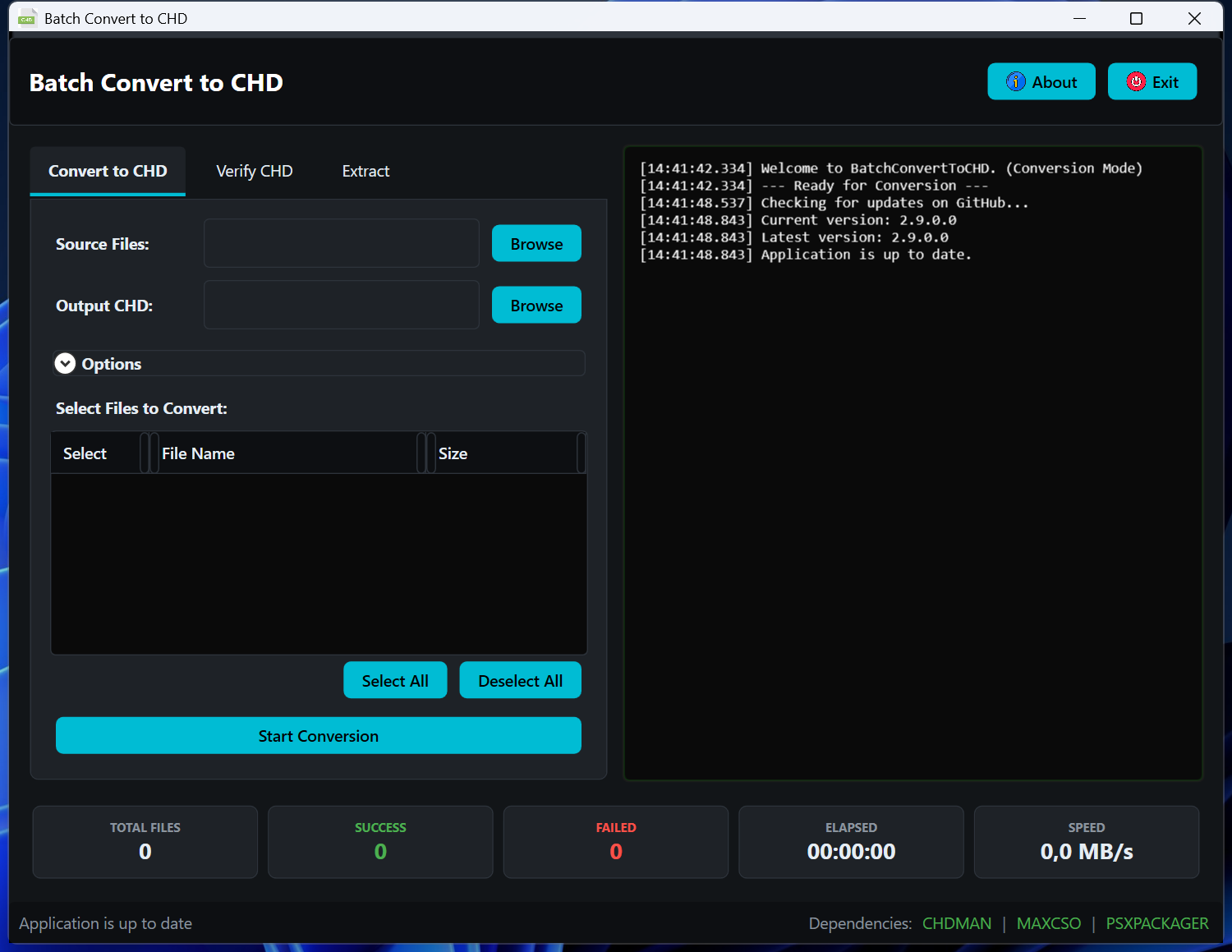
* **双窗格界面**:在左侧查看您的设置和文件列表,同时在右侧监控实时处理日志。
* **交互式文件选择**:自动扫描文件夹,允许您通过详细的文件列表手动精确挑选要处理的文件。
* **优化的文件加载器**:采用分块加载策略,即使在扫描包含数千个文件的目录时也能保持 UI 响应速度。
* **可调整大小的布局**:包含内置的网格分割器,可调整文件资源管理器和终端视图之间的比例。
### 💻 多架构支持
* **原生 ARM64 与 x64**:自动检测您的系统架构,并使用相应的 `chdman` 二进制文件以实现最高效率。
* **优化的性能**:在 ARM64 硬件上利用原生指令,减少繁重压缩任务期间的开销。
### 🛠️ 智能转换与提取
* **自动化批处理**:转换整个磁盘镜像目录,支持实时进度监控和即时取消响应。
* **递归结构保留**:处理子文件夹时,在输出文件夹中保持原始的目录层级结构。
* **CloneCD 支持**:智能检测属于 CloneCD 套件(通过 `.ccd` 文件)的 `.img` 文件,自动确保使用正确的 `createcd` 命令。
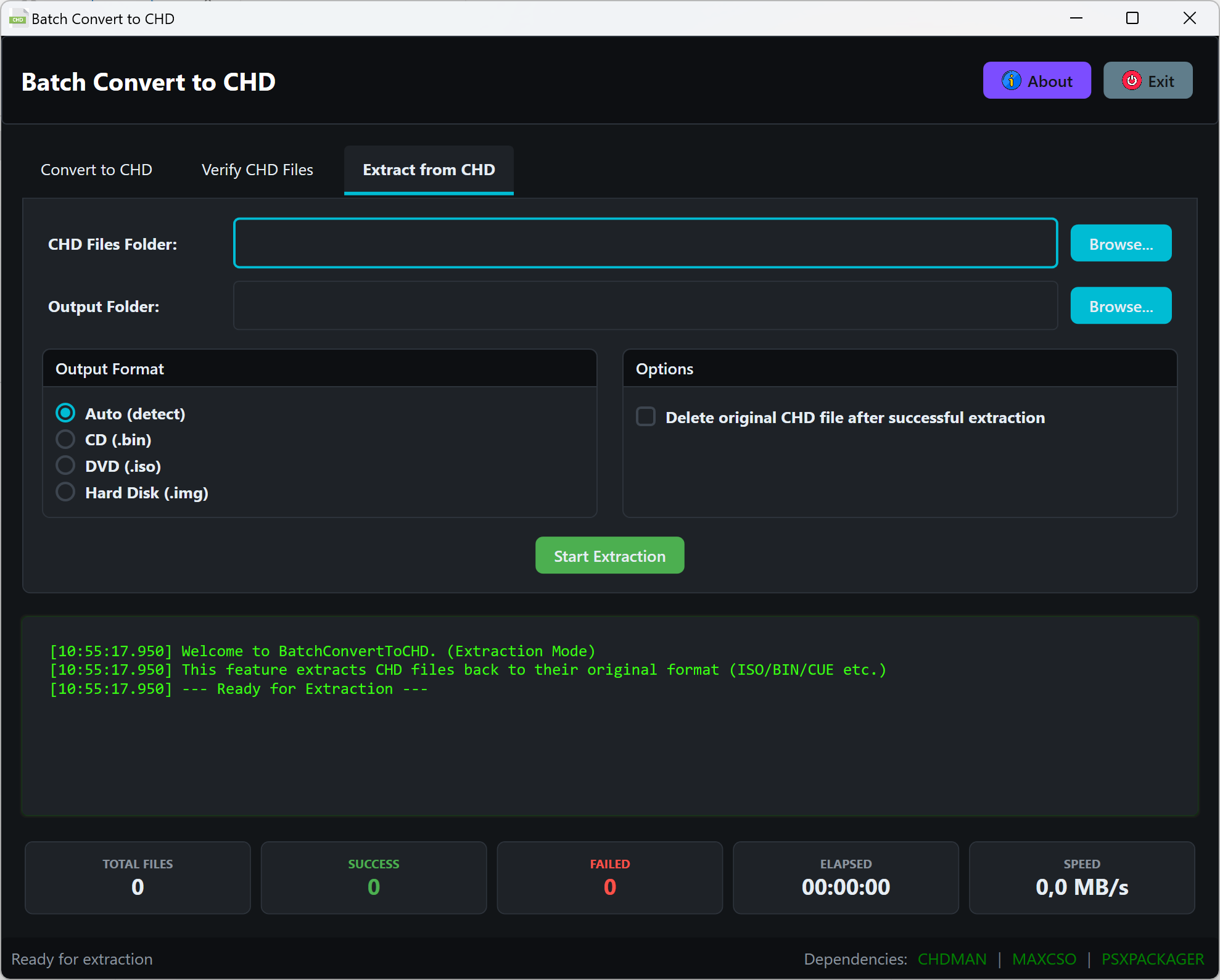
* **稳健的提取功能**:支持将 CHD 文件提取回 **.cue (CD)**、**.iso (DVD)**、**.gdi (Dreamcast/Naomi)** 和 **.img (HDD)**,并具备智能元数据自动检测功能。
* **压缩包集成**:透明地处理 `.zip`、`.7z` 和 `.rar` 压缩包,自动提取并处理内容,同时响应取消令牌。包含一个 7za.exe 作为后备,用于处理 SharpCompress 无法提取的 `.7z` 文件。
* **CSO 解压**:通过集成 `maxcso` 内置了对 `.cso` (Compressed ISO) 文件的支持。
* **PBP 提取**:通过集成 `psxpackager` 将 PlayStation Portable 的 `.pbp` 文件转换为 CHD 格式。
### ✅ 完整性、安全性与验证
* **安全删除**:只有在确认转换/提取成功的情况下,才会删除源文件(及其依赖项如 `.bin`、`.sub` 等)。
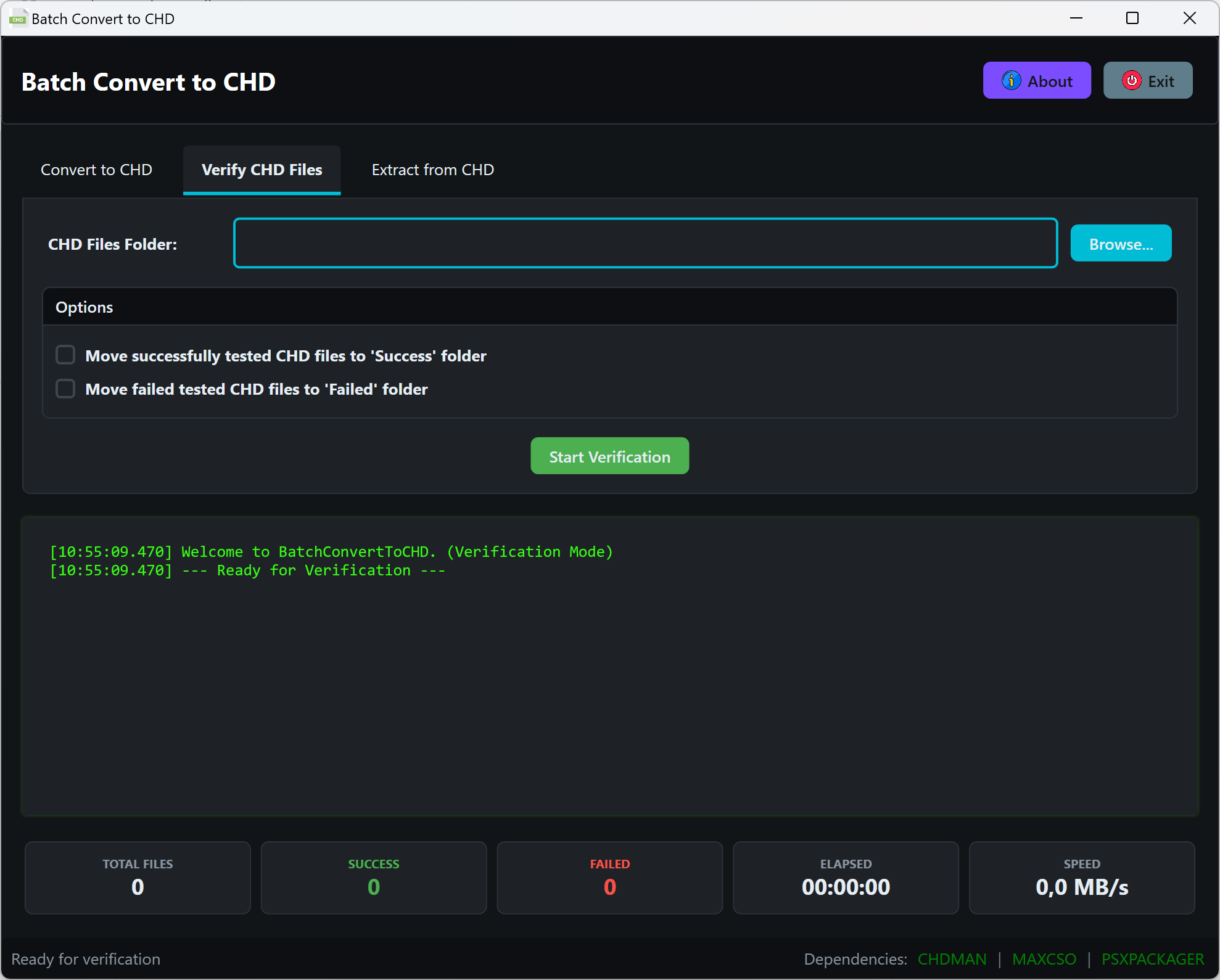
* **批量验证**:验证现有 CHD 文件的校验和与结构完整性。
* **自动化整理**:可选择将已验证成功或失败的文件移动到指定的子文件夹(`Success`/`Failed`)中,同时在后续扫描时忽略这些特殊文件夹。
* **清理功能**:自动清理在文件被移动或删除后遗留的空子目录。
* **依赖项保护**:在启动时执行关键的依赖项检查,如果缺少必需的组件(如 `chdman.exe`),系统会发出通知。
### 📊 性能与 UI
* **实时遥测**:在操作过程中监控磁盘写入/读取速度和已用时间。
* **优化的日志记录**:高性能日志系统支持自动截断,以保持应用程序在长时间运行的任务期间保持响应。
* **集中式样式**:现代深色主题 UI,具备一致且易于访问的设计元素。
### 🔄 更新与稳定性
* **自动检查更新**:在启动时如果 GitHub 上有可用的新版本,会立即通知您。
* **自动错误报告**:内置错误报告系统通过自动发送崩溃报告来帮助改进应用程序(不收集任何个人数据)。
## 📂 支持的格式
| 分类 | 格式 |
|:---------------------|:-----------------------------------------------------------------------------|
| **标准镜像** | `.iso`, `.cue` (+`.bin`), `.img`, `.ccd` (+`.sub`), `.raw`, `.toc` |
| **特定主机** | `.gdi` (Dreamcast), `.pbp` (PlayStation) |
| **压缩文件** | `.cso` (Compressed ISO) |
| **压缩包** | `.zip`, `.7z`, `.rar` |
| **输出** | `.chd` (Compressed Hunks of Data) |
## 🛠️ 技术逻辑
应用程序采用基于优先级的逻辑以确保兼容性:
1. **DVD 镜像 (`.iso`)**:默认使用 `createdvd`。
2. **CloneCD / 多轨道镜像 (`.ccd`, `.cue`, `.gdi`, `.toc`)**:默认使用 `createcd`。
3. **硬盘镜像 (`.img`)**:除非检测到随附的 `.ccd` 文件,否则默认使用 `createhd`。
4. **原始数据 (`.raw`)**:默认使用 `createraw`。
5. **PlayStation PBP (`.pbp`)**:使用 `psxpackager` 解压为 CUE/BIN,然后使用 `createcd` 转换为 CHD。
*注意:用户可以通过 UI 手动覆盖这些设置,以强制指定特定模式(但 PBP 除外,因为它始终优先进行解压)。*
## 💻 系统要求
* **操作系统**:Windows 10 / 11 (x64 或 ARM64)
* **运行环境**:[.NET 10.0 Desktop Runtime](https://dotnet.microsoft.com/download/dotnet/10.0)
* **内置依赖项**:
* `chdman.exe` / `chdman_arm64.exe` (MAME Project)
* `maxcso.exe` (CSO 解压 - 仅限 x64)
* `psxpackager.exe` (PBP 提取)
* `7za.exe` / `7za_arm64.exe` (7-Zip 后备提取)
* **NuGet 依赖项**:
* [SharpCompress](https://github.com/adamhathcock/sharpcompress) (v0.49.1) - 压缩包提取支持
## 📥 安装说明
1. 从 [Releases](https://github.com/drpetersonfernandes/BatchConvertToCHD/releases) 页面下载最新的二进制文件。
2. 将内容解压到一个永久文件夹。
3. **重要提示**:确保所有 `.exe` 文件(包括 ARM64 变体)与 `BatchConvertToCHD.exe` 保留在同一目录中。
4. 启动应用程序。
## 📖 使用说明
该应用程序还接受文件夹路径作为命令行参数,以便快速填充源目录:
```
BatchConvertToCHD.exe "C:\ROMs\MyGames"
```
### 转换工作流
1. 导航到 **Convert to CHD** 选项卡。
2. 选择您的**源文件夹**(包含镜像或压缩包)。
3. 选择您的**输出文件夹**。
4. *(可选)* 勾选“Process smaller files first”以按文件大小排序。
5. *(可选)* 勾选“Force CD”或“Force DVD”以覆盖自动命令检测。
6. *(可选)* 设置每个文件的时间限制,以中止超过指定时长的转换。
7. *(可选)* 启用“Delete original files”以便在成功转换后清理源数据。
8. 点击 **Start Conversion**。
### 提取工作流
1. 导航到 **Extract CHD Files** 选项卡。
2. 选择您的**源文件夹**(包含 `.chd` 文件)。
3. 选择您的**输出文件夹**。
4. 选择所需的输出格式(自动检测、CD `.cue`、DVD `.iso`、Dreamcast `.gdi`、HDD `.img`)。
5. *(可选)* 启用“Include subfolders”以处理嵌套目录。
6. *(可选)* 启用“Delete original CHD files”以便在成功提取后进行清理。
7. 点击 **Start Extraction**。
### 验证工作流
1. 导航到 **Verify CHD Files** 选项卡。
2. 选择包含 `.chd` 文件的文件夹。
3. 配置文件夹整理选项(Success/Failed 文件夹)。
4. 点击 **Start Verification**。
## 📜 许可证
该项目基于 **GNU General Public License v3.0** 授权。有关详细信息,请参阅 [LICENSE.txt](LICENSE.txt) 文件。
**致谢:**
* [MAME Team](https://www.mamedev.org/) 提供的 `chdman`。
* [unknownbrackets](https://github.com/unknownbrackets/maxcso) 提供的 `maxcso`。
* [PSXPackager](https://github.com/rupert-avery/psxpackager) 提供的 PlayStation PBP 提取支持。
* [SharpCompress](https://github.com/adamhathcock/sharpcompress) 提供的压缩包处理支持。
* [Igor Pavlov](https://www.7-zip.org/) 提供的 `7za.exe` (7-Zip 命令行工具)。
由 [Pure Logic Code](https://www.purelogiccode.com) 开发
标签:CHD格式, 批量处理, 文件转换, 桌面工具, 磁盘镜像