
Automatic Cyber Threat Intelligence Knowledge Graph Construction Using Large Language Models




## 新闻与更新
📢 [2026/02] CTINexus 在 PRISM Workshop(与 NDSS 联合举办)上作为[教程](https://ctinexus.github.io/prism-workshop)进行了展示。
📦 [2025/10] CTINexus Python 包正式发布!可通过 `pip install ctinexus` 安装并无缝集成到您的 Python 项目中。
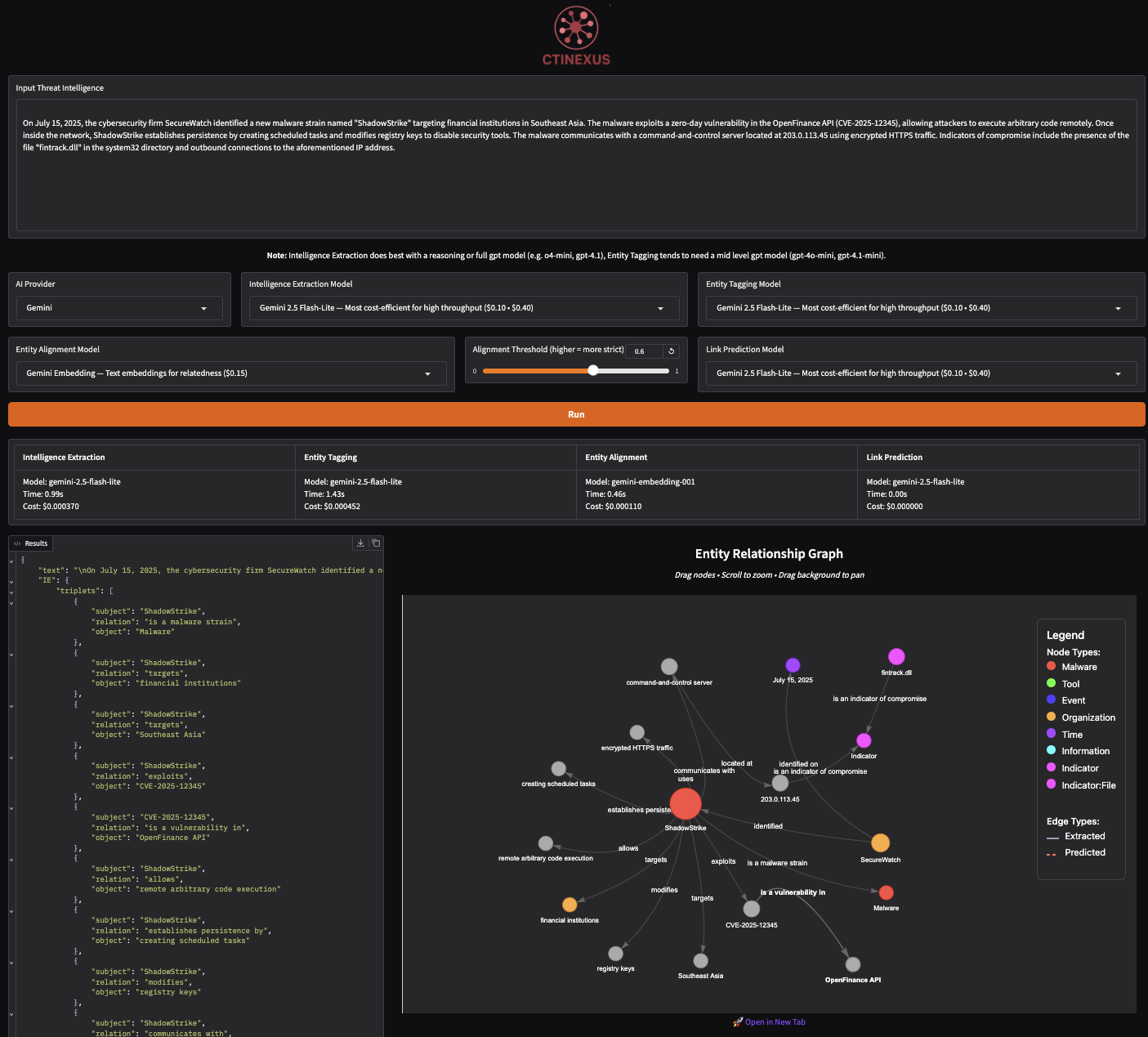
🌟 [2025/07] CTINexus 现已支持直观的 Gradio 界面!只需提交威胁情报文本,即可即时可视化提取出的交互式图谱。
🔥 [2025/04] 我们在 [arxiv](https://arxiv.org/pdf/2410.21060) 上发布了定稿论文。
🔥 [2025/02] CTINexus 被 2025 IEEE 欧洲安全与隐私研讨会 ([Euro S&P](https://eurosp2025.ieee-security.org/index.html)) 录用。
## 📖 目录
- [概述](#overview)
- [功能特性](#features)
- [支持的 AI 提供商](#supported-ai-providers)
- [入门指南](#getting-started)
- [选项 1:Python 包](#python-package)
- [选项 2:Web 界面 (本地)](#web-interface)
- [选项 3:Docker](#docker-setup)
- [命令行界面](#command-line)
- [贡献](#contributing)
- [引用](#citation)
- [许可证](#license)
## 概述
**CTINexus** 是一个利用大语言模型 (LLM) 优化的上下文学习 (ICL),从非结构化文本中自动提取网络威胁情报 (CTI) 并构建网络安全知识图谱 (CSKG) 的框架。
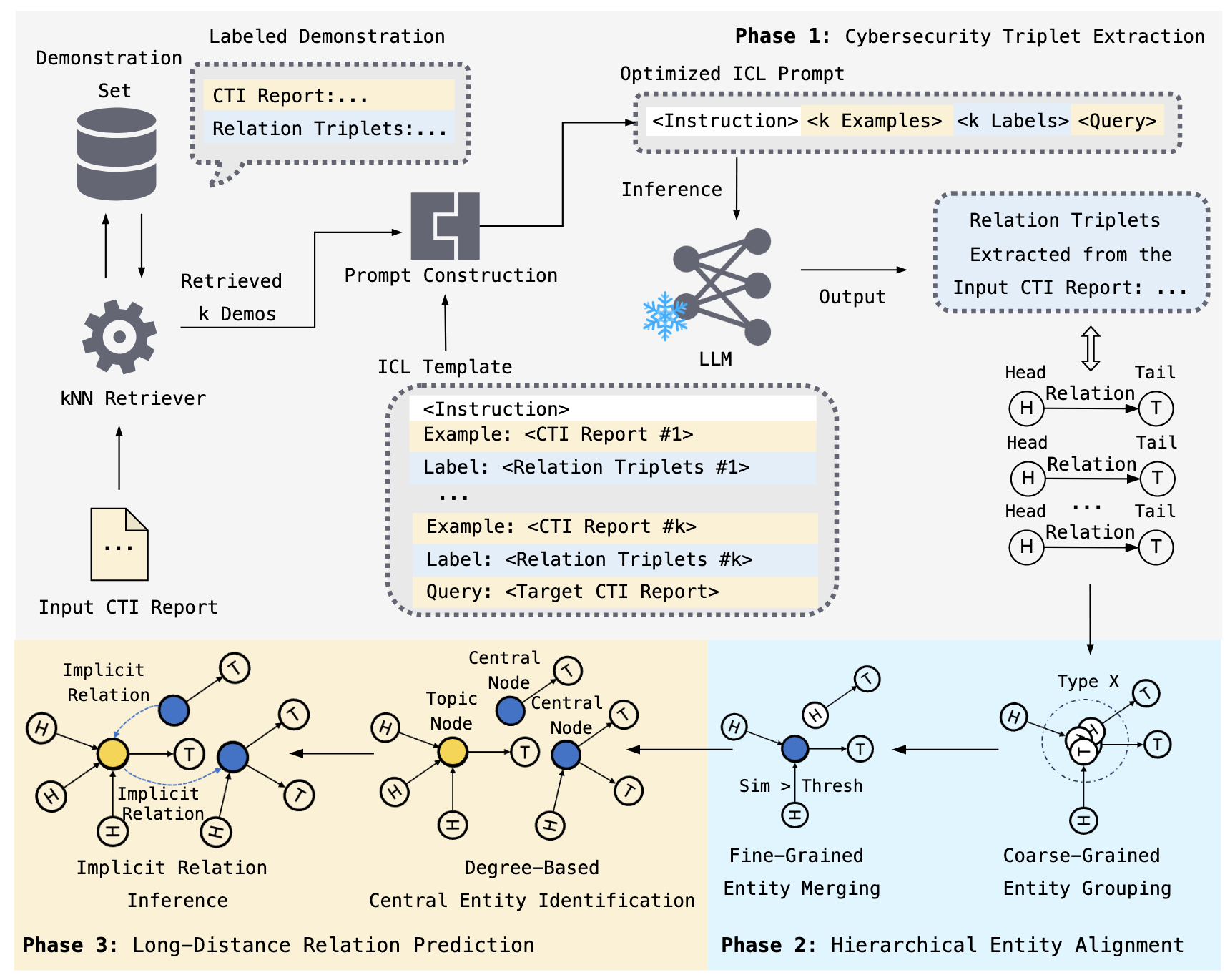
该框架通过处理威胁情报报告来:
- 🔍 **提取网络安全实体**(恶意软件、漏洞、攻击战术、IOCs)
- 🔗 **识别关系** 安全概念之间的关联
- 📊 **构建知识图谱** 提供交互式可视化
- ⚡ **仅需最少配置** - 无需大量训练数据或参数调整
## 功能特性
### 核心流水线组件
1. **情报提取 (IE)**
- 自动从非结构化文本中提取网络安全实体和关系
- 使用优化的 Prompt 构造和示例检索
2. **层级实体对齐**
- **实体类型划分 (ET)**:按语义类型对实体进行分类
- **实体合并 (EM)**:规范化实体并在保护 IOC 的前提下去除冗余
3. **关系预测 (LP)**
- 预测并添加缺失的关系以完善知识图谱
4. **交互式可视化**
- 对构建的网络安全知识图谱进行网络图可视化
## 支持的 AI 提供商
CTINexus 支持多种 AI 提供商,以确保灵活性:
| 提供商 | 模型 | 所需配置 |
|----------|--------|----------------|
| **OpenAI** | GPT-4, GPT-4o, o1, o3 等 | API Key |
| **Google Gemini** | Gemini 2.0, 2.5 Flash 等 | API Key |
| **AWS Bedrock** | Claude, Nova, Llama, DeepSeek 等 | AWS Credentials |
| **Ollama** | Llama, Mistral, Qwen, Gemma 等 | 本地安装(免费) |
## 入门指南
### 📦 选项 1:Python 包
#### 安装
```
pip install ctinexus
```
#### 配置
在项目目录中创建一个 `.env` 文件,并填入至少一个提供商的凭据。请参考 [.env.example](.env.example) 获取示例。
要通过自定义的 OpenAI 兼容网关路由请求,请设置:
- `CUSTOM_BASE_URL`(例如,`https://gateway.example.com/v1`)
- `CUSTOM_API_KEY`(如需要)
#### 使用方法
```
from ctinexus import process_cti_report
from dotenv import load_dotenv
# 加载 API 凭据
load_dotenv()
# 处理威胁情报文本
text = """
APT29 used PowerShell to download additional malware from command-and-control
server at 192.168.1.100. The attack exploited CVE-2023-1234 in Microsoft Exchange.
"""
result = process_cti_report(
text=text,
provider="openai", # optional: auto-detected if not specified
model="gpt-4", # optional: uses default if not specified
similarity_threshold=0.6,
output="results.json" # optional: save results to file
)
# 访问结果
print(f"Graph saved to: {result['entity_relation_graph']}")
# 在浏览器中打开 HTML 文件以查看交互式图表
# 或者从 CTI 报告/博客 URL 处理
result = process_cti_report(
source_url="https://example.com/threat-report",
provider="openai",
model="gpt-4",
)
```
**API 参数:**
| 参数 | 类型 | 默认值 | 描述 |
|-----------|------|---------|-------------|
| `text` | str | None | 要处理的威胁情报文本(如果未提供 `source_url` 则为必填) |
| `source_url` | str | None | 用于摄取和处理的 CTI 报告/博客 URL(如果未提供 `text` 则为必填) |
| `provider` | str | 自动检测 | `"openai"`、`"gemini"`、`"aws"` 或 `"ollama"` |
| `model` | str | 提供商默认值 | 模型名称(例如,`"gpt-4o"`、`"gemini-2.0-flash"`) |
| `embedding_model` | str | 提供商默认值 | 用于实体对齐的 Embedding 模型 |
| `similarity_threshold` | float | 0.6 | 实体相似度阈值(0.0-1.0) |
| `output` | str | None | 保存 JSON 结果的路径 |
**注意**:`text` 和 `source_url` 互斥。请仅提供一种输入源。
**返回值:**
该函数返回一个包含完整分析结果的字典:
```
{
"text": "Original input text",
"IE": {"triplets": [...]}, # Extracted entities and relationships
"ET": {"typed_triplets": [...]}, # Entities with type classifications
"EA": {"aligned_triplets": [...]}, # Canonicalized entities
"LP": {"predicted_links": [...]}, # Predicted relationships
"entity_relation_graph": "path/to/graph.html" # Interactive visualization
}
```
### 🖥️ 选项 2:Web 界面(本地设置)
#### 安装
```
git clone https://github.com/peng-gao-lab/CTINexus.git
cd CTINexus
# 创建并激活虚拟环境
python -m venv .venv
# 激活 (macOS/Linux)
source .venv/bin/activate
# 激活 (Windows)
# .venv\Scripts\activate
# 安装包
pip install -e .
```
#### 配置
```
# 复制示例环境文件
cp .env.example .env
# 使用你的凭据编辑 .env
```
#### 使用方法
**1. 启动应用程序:**
```
ctinexus
```
**2. 访问 Web 界面:**
在浏览器中打开:**http://127.0.0.1:7860**
**3. 处理威胁情报:**
1. **粘贴** 威胁情报文本到输入区域
2. **选择** 您的 AI 提供商和模型(从下拉菜单中)
3. **点击** “Run” 进行分析
4. **查看** 提取的实体、关系和交互式图谱
5. **导出** JSON 格式的结果或保存图谱图片
### 🐳 选项 3:Docker(容器化设置)
**前置条件:**
- 安装 [Docker Desktop](https://docs.docker.com/get-docker/)
**设置:**
```
# 克隆仓库
git clone https://github.com/peng-gao-lab/CTINexus.git
cd CTINexus
# 复制环境模板
cp .env.example .env
# 使用你的凭据编辑 .env
```
#### 使用方法
**1. 构建并启动:**
```
# 前台运行
docker compose up --build
# 或者后台运行(detached mode)
docker compose up -d --build
# 查看日志(如果在后台运行)
docker compose logs -f
```
**2. 访问应用程序:**
在浏览器中打开:**http://localhost:8000**
**3. 处理威胁情报:**
1. **粘贴** 威胁情报文本到输入区域
2. **选择** 您的 AI 提供商和模型(从下拉菜单中)
3. **点击** “Run” 进行分析
4. **查看** 提取的实体、关系和交互式图谱
5. **导出** JSON 格式的结果或保存图谱图片
## ⚡ 命令行界面
CLI 适用于**任何安装方法**,非常适合自动化和批处理任务。
### 基本用法
```
# 处理文件
ctinexus --input-file report.txt
# 直接处理文本
ctinexus --text "APT29 exploited CVE-2023-1234 using PowerShell..."
# 指定 provider 和 model
ctinexus -i report.txt --provider openai --model gpt-4o
# 保存到自定义位置
ctinexus -i report.txt --output results/analysis.json
```
**📖 [完整的 CLI 文档](docs/cli-guide.md)** - 包含详细的示例和所有可用选项。
## 引用
如果您在研究中使用了 CTINexus,请引用我们的论文:
```
@inproceedings{cheng2025ctinexusautomaticcyberthreat,
title={CTINexus: Automatic Cyber Threat Intelligence Knowledge Graph Construction Using Large Language Models},
author={Yutong Cheng and Osama Bajaber and Saimon Amanuel Tsegai and Dawn Song and Peng Gao},
booktitle={2025 IEEE European Symposium on Security and Privacy (EuroS\&P)},
year={2025},
organization={IEEE}
}
```
## 许可证
源代码基于 [MIT](LICENSE.txt) 许可证授权。
我们热忱欢迎业界合作。如果您有兴趣基于 CTINexus 进行开发或探索合作计划,请发送电子邮件至 yutongcheng@vt.edu 或 saimon.tsegai@vt.edu,我们很乐意安排一次简短的电话会议来交流想法。