maurosoria/dirsearch
GitHub: maurosoria/dirsearch
dirsearch 是一款基于 Python 的 Web 路径暴力扫描工具,用于快速发现隐藏目录、文件和备份路径。
Stars: 14395 | Forks: 2444

 # dirsearch - Web 路径发现



[](https://github.com/maurosoria/dirsearch/releases)
[](https://github.com/sponsors/maurosoria)
[](https://discord.gg/2N22ZdAJRj)
[](https://twitter.com/_dirsearch)
**dirsearch** 正在由 [@maurosoria](https://twitter.com/_maurosoria) 和 [@shelld3v](https://twitter.com/shells3c_) 积极开发
*访问我们的 [Discord server](https://discord.gg/2N22ZdAJRj) 与团队沟通*
## 目录
- [Supported Platforms](#supported-platforms)
- [Installation & Usage](#installation--usage)
- [Standalone Binaries](#standalone-binaries)
- [Wordlists](#wordlists-important)
- [Options](#options)
- [Configuration](#configuration)
- [How to use](#how-to-use)
- [Session Management](#session-management)
- [Support Docker](#support-docker)
- [Building from Source](#building-from-source)
- [CI/CD & GitHub Workflows](#cicd--github-workflows)
- [References](#references)
- [Tips](#tips)
- [Contribution](#contribution)
- [License](#license)
## 支持平台
dirsearch 可在多个平台上运行,可通过 Python 或独立二进制文件使用:
| 平台 | Python | 独立二进制文件 |
|----------|--------|-------------------|
| **Linux** (x86_64) | Python 3.9+ | `dirsearch-linux-amd64` |
| **Windows** (x64) | Python 3.9+ | `dirsearch-windows-x64.exe` |
| **macOS** (Intel) | Python 3.9+ | `dirsearch-macos-intel` |
| **macOS** (Apple Silicon) | Python 3.9+ | `dirsearch-macos-silicon` |
独立二进制文件是自包含的可执行文件,不需要 Python 环境。
## 安装与使用
**要求:Python 3.9 或更高**
选择以下一种安装方式:
- 使用 **git** 安装:`git clone https://github.com/maurosoria/dirsearch.git --depth 1`(**推荐**)
- 使用 ZIP 文件安装:[Download here](https://github.com/maurosoria/dirsearch/archive/master.zip)
- 使用 Docker 安装:`docker build -t "dirsearch:v0.4.3" .`(更多信息请参见 [here](https://github.com/maurosoria/dirsearch#support-docker))
- 使用 PyPi 安装:`pip3 install dirsearch` 或 `pip install dirsearch`
- 使用 Kali Linux 安装:`sudo apt-get install dirsearch`(已弃用)
## 独立二进制文件
预构建的独立二进制文件已为所有主流平台提供。这些文件不需要安装 Python。
**从 [Releases](https://github.com/maurosoria/dirsearch/releases) 下载**
| 平台 | 二进制文件名 | 架构 |
|----------|-------------|--------------|
| Linux | `dirsearch-linux-amd64` | x86_64 |
| Windows | `dirsearch-windows-x64.exe` | x64 |
| macOS Intel | `dirsearch-macos-intel` | x86_64 |
| macOS Apple Silicon | `dirsearch-macos-silicon` | ARM64 |
**使用方法:**
```
# Linux/macOS - 首先使其可执行
chmod +x dirsearch-linux-amd64
./dirsearch-linux-amd64 -u https://target
# Windows
dirsearch-windows-x64.exe -u https://target
```
**注意:** 独立二进制文件包含打包的 `db/` 词表和 `config.ini`。使用打包构建时,会话文件会存储在 `$HOME/.dirsearch/sessions/` 中。
## 词表(重要)
**概述:**
- 词表是文本文件,每行代表一个路径。
- 关于扩展名,不同于其他工具,dirsearch 只会用 **-e** 标志提供的扩展名替换 `%EXT%` 关键字。
- 对于没有 `%EXT%` 的词表(如 [SecLists](https://github.com/danielmiessler/SecLists)),需要使用 **-f | --force-extensions** 开关来为词表中的每个词追加扩展名以及 `/`。
- 若要对已有扩展名的词表条目应用你的扩展名,使用 **-O** | **--overwrite-extensions**(注意:某些扩展名如 *.log*, *.json*, *.xml* 等以及媒体扩展名如 *.jpg*, *.png* 被排除在覆盖之外)。
- 若要使用多个词表,可用逗号分隔。例如:`wordlist1.txt,wordlist2.txt`。
- 打包的词表分类位于 `db/categories/`,可使用 **--wordlist-categories** 进行选择。可用:`extensions`、`conf`、`vcs`、`backups`、`db`、`logs`、`keys`、`web`、`common`(使用 `all` 包含全部)。
# dirsearch - Web 路径发现



[](https://github.com/maurosoria/dirsearch/releases)
[](https://github.com/sponsors/maurosoria)
[](https://discord.gg/2N22ZdAJRj)
[](https://twitter.com/_dirsearch)
**dirsearch** 正在由 [@maurosoria](https://twitter.com/_maurosoria) 和 [@shelld3v](https://twitter.com/shells3c_) 积极开发
*访问我们的 [Discord server](https://discord.gg/2N22ZdAJRj) 与团队沟通*
## 目录
- [Supported Platforms](#supported-platforms)
- [Installation & Usage](#installation--usage)
- [Standalone Binaries](#standalone-binaries)
- [Wordlists](#wordlists-important)
- [Options](#options)
- [Configuration](#configuration)
- [How to use](#how-to-use)
- [Session Management](#session-management)
- [Support Docker](#support-docker)
- [Building from Source](#building-from-source)
- [CI/CD & GitHub Workflows](#cicd--github-workflows)
- [References](#references)
- [Tips](#tips)
- [Contribution](#contribution)
- [License](#license)
## 支持平台
dirsearch 可在多个平台上运行,可通过 Python 或独立二进制文件使用:
| 平台 | Python | 独立二进制文件 |
|----------|--------|-------------------|
| **Linux** (x86_64) | Python 3.9+ | `dirsearch-linux-amd64` |
| **Windows** (x64) | Python 3.9+ | `dirsearch-windows-x64.exe` |
| **macOS** (Intel) | Python 3.9+ | `dirsearch-macos-intel` |
| **macOS** (Apple Silicon) | Python 3.9+ | `dirsearch-macos-silicon` |
独立二进制文件是自包含的可执行文件,不需要 Python 环境。
## 安装与使用
**要求:Python 3.9 或更高**
选择以下一种安装方式:
- 使用 **git** 安装:`git clone https://github.com/maurosoria/dirsearch.git --depth 1`(**推荐**)
- 使用 ZIP 文件安装:[Download here](https://github.com/maurosoria/dirsearch/archive/master.zip)
- 使用 Docker 安装:`docker build -t "dirsearch:v0.4.3" .`(更多信息请参见 [here](https://github.com/maurosoria/dirsearch#support-docker))
- 使用 PyPi 安装:`pip3 install dirsearch` 或 `pip install dirsearch`
- 使用 Kali Linux 安装:`sudo apt-get install dirsearch`(已弃用)
## 独立二进制文件
预构建的独立二进制文件已为所有主流平台提供。这些文件不需要安装 Python。
**从 [Releases](https://github.com/maurosoria/dirsearch/releases) 下载**
| 平台 | 二进制文件名 | 架构 |
|----------|-------------|--------------|
| Linux | `dirsearch-linux-amd64` | x86_64 |
| Windows | `dirsearch-windows-x64.exe` | x64 |
| macOS Intel | `dirsearch-macos-intel` | x86_64 |
| macOS Apple Silicon | `dirsearch-macos-silicon` | ARM64 |
**使用方法:**
```
# Linux/macOS - 首先使其可执行
chmod +x dirsearch-linux-amd64
./dirsearch-linux-amd64 -u https://target
# Windows
dirsearch-windows-x64.exe -u https://target
```
**注意:** 独立二进制文件包含打包的 `db/` 词表和 `config.ini`。使用打包构建时,会话文件会存储在 `$HOME/.dirsearch/sessions/` 中。
## 词表(重要)
**概述:**
- 词表是文本文件,每行代表一个路径。
- 关于扩展名,不同于其他工具,dirsearch 只会用 **-e** 标志提供的扩展名替换 `%EXT%` 关键字。
- 对于没有 `%EXT%` 的词表(如 [SecLists](https://github.com/danielmiessler/SecLists)),需要使用 **-f | --force-extensions** 开关来为词表中的每个词追加扩展名以及 `/`。
- 若要对已有扩展名的词表条目应用你的扩展名,使用 **-O** | **--overwrite-extensions**(注意:某些扩展名如 *.log*, *.json*, *.xml* 等以及媒体扩展名如 *.jpg*, *.png* 被排除在覆盖之外)。
- 若要使用多个词表,可用逗号分隔。例如:`wordlist1.txt,wordlist2.txt`。
- 打包的词表分类位于 `db/categories/`,可使用 **--wordlist-categories** 进行选择。可用:`extensions`、`conf`、`vcs`、`backups`、`db`、`logs`、`keys`、`web`、`common`(使用 `all` 包含全部)。
词表示例(点击展开)
**示例:** - *普通扩展名*: ``` index.%EXT% ``` 将 **asp** 和 **aspx** 作为扩展名会生成如下字典: ``` index index.asp index.aspx ``` - *强制扩展名*: ``` admin ``` 将 **php** 和 **html** 作为扩展名并使用 **-f**/**--force-extensions** 标志会生成如下字典: ``` admin admin.php admin.html admin/ ``` - *覆盖扩展名*: ``` login.html ``` 将 **jsp** 和 **jspa** 作为扩展名并使用 **-O**/**--overwrite-extensions** 标志会生成如下字典: ``` login.html login.jsp login.jspa ```完整参数列表(点击展开)
``` Usage: dirsearch.py [-u|--url] target [-e|--extensions] extensions [options] Options: --version show program's version number and exit -h, --help show this help message and exit Mandatory: -u URL, --url=URL Target URL(s), can use multiple flags -l PATH, --urls-file=PATH URL list file --stdin Read URL(s) from STDIN --cidr=CIDR Target CIDR --raw=PATH Load raw HTTP request from file (use '--scheme' flag to set the scheme) --nmap-report=PATH Load targets from nmap report (Ensure the inclusion of the -sV flag during nmap scan for comprehensive results) -s SESSION_FILE, --session=SESSION_FILE Session file Note: legacy .pickle/.pkl sessions are no longer supported. --config=PATH Path to configuration file (Default: 'DIRSEARCH_CONFIG' environment variable, otherwise 'config.ini') Dictionary Settings: -w WORDLISTS, --wordlists=WORDLISTS Wordlist files or directories contain wordlists (separated by commas) --wordlist-categories=CATEGORIES Comma-separated wordlist category names (e.g. common,conf,web). Use 'all' to include all bundled categories -e EXTENSIONS, --extensions=EXTENSIONS Extension list separated by commas (e.g. php,asp) -f, --force-extensions Add extensions to the end of every wordlist entry. By default dirsearch only replaces the %EXT% keyword with extensions -O, --overwrite-extensions Overwrite other extensions in the wordlist with your extensions (selected via `-e`) --exclude-extensions=EXTENSIONS Exclude extension list separated by commas (e.g. asp,jsp) --remove-extensions Remove extensions in all paths (e.g. admin.php -> admin) --prefixes=PREFIXES Add custom prefixes to all wordlist entries (separated by commas) --suffixes=SUFFIXES Add custom suffixes to all wordlist entries, ignore directories (separated by commas) -U, --uppercase Uppercase wordlist -L, --lowercase Lowercase wordlist -C, --capital Capital wordlist General Settings: -t THREADS, --threads=THREADS Number of threads --list-sessions List resumable sessions and exit --sessions-dir=PATH Directory to search for resumable sessions (default: dirsearch path /sessions, or $HOME/.dirsearch/sessions when bundled) --async Enable asynchronous mode -r, --recursive Brute-force recursively --deep-recursive Perform recursive scan on every directory depth (e.g. api/users -> api/) --force-recursive Do recursive brute-force for every found path, not only directories -R DEPTH, --max-recursion-depth=DEPTH Maximum recursion depth --recursion-status=CODES Valid status codes to perform recursive scan, support ranges (separated by commas) --subdirs=SUBDIRS Scan sub-directories of the given URL[s] (separated by commas) --exclude-subdirs=SUBDIRS Exclude the following subdirectories during recursive scan (separated by commas) -i CODES, --include-status=CODES Include status codes, separated by commas, support ranges (e.g. 200,300-399) -x CODES, --exclude-status=CODES Exclude status codes, separated by commas, support ranges (e.g. 301,500-599) --exclude-sizes=SIZES Exclude responses by sizes, separated by commas (e.g. 0B,4KB) --exclude-text=TEXTS Exclude responses by text, can use multiple flags --exclude-regex=REGEX Exclude responses by regular expression --exclude-redirect=STRING Exclude responses if this regex (or text) matches redirect URL (e.g. '/index.html') --exclude-response=PATH Exclude responses similar to response of this page, path as input (e.g. 404.html) --skip-on-status=CODES Skip target whenever hit one of these status codes, separated by commas, support ranges --min-response-size=LENGTH Minimum response length --max-response-size=LENGTH Maximum response length --max-time=SECONDS Maximum runtime for the scan --exit-on-error Exit whenever an error occurs Request Settings: -m METHOD, --http-method=METHOD HTTP method (default: GET) -d DATA, --data=DATA HTTP request data --data-file=PATH File contains HTTP request data -H HEADERS, --header=HEADERS HTTP request header, can use multiple flags --headers-file=PATH File contains HTTP request headers -F, --follow-redirects Follow HTTP redirects --random-agent Choose a random User-Agent for each request --auth=CREDENTIAL Authentication credential (e.g. user:password or bearer token) --auth-type=TYPE Authentication type (basic, digest, bearer, ntlm, jwt) --cert-file=PATH File contains client-side certificate --key-file=PATH File contains client-side certificate private key (unencrypted) --user-agent=USER_AGENT --cookie=COOKIE Connection Settings: --timeout=TIMEOUT Connection timeout --delay=DELAY Delay between requests -p PROXY, --proxy=PROXY Proxy URL (HTTP/SOCKS), can use multiple flags --proxies-file=PATH File contains proxy servers --proxy-auth=CREDENTIAL Proxy authentication credential --replay-proxy=PROXY Proxy to replay with found paths --tor Use Tor network as proxy --scheme=SCHEME Scheme for raw request or if there is no scheme in the URL (Default: auto-detect) --max-rate=RATE Max requests per second --retries=RETRIES Number of retries for failed requests --ip=IP Server IP address --interface=NETWORK_INTERFACE Network interface to use Advanced Settings: --crawl Crawl for new paths in responses View Settings: --full-url Full URLs in the output (enabled automatically in quiet mode) --redirects-history Show redirects history --no-color No colored output -q, --quiet-mode Quiet mode Output Settings: -o PATH/URL, --output=PATH/URL Output file or MySQL/PostgreSQL URL (Format: scheme://[username:password@]host[:port]/database- name) --format=FORMAT Report format (Available: simple, plain, json, xml, md, csv, html, sqlite, mysql, postgresql) --log=PATH Log file ```配置文件参考(点击展开)
默认使用 `config.ini`(位于 dirsearch 目录)作为配置文件,也可以通过 `--config` 标志或 `DIRSEARCH_CONFIG` 环境变量指定其他文件。 ``` # 如果您想编辑 dirsearch 的默认配置,可以 # 编辑此文件中的值。`#` 之后的内容是注释 # 不会被应用 [general] threads = 25 async = False recursive = False deep-recursive = False force-recursive = False recursion-status = 200-399,401,403 max-recursion-depth = 0 exclude-subdirs = %%ff/,.;/,..;/,;/,./,../,%%2e/,%%2e%%2e/ random-user-agents = False max-time = 0 exit-on-error = False # subdirs = /,api/ # include-status = 200-299,401 # exclude-status = 400,500-999 # exclude-sizes = 0b,123gb # exclude-text = "Not found" # exclude-regex = "^403$" # exclude-redirect = "*/error.html" # exclude-response = 404.html # skip-on-status = 429,999 [dictionary] default-extensions = php,aspx,jsp,html,js force-extensions = False overwrite-extensions = False lowercase = False uppercase = False capitalization = False # exclude-extensions = old,log # prefixes = .,admin # suffixes = ~,.bak # wordlists = /path/to/wordlist1.txt,/path/to/wordlist2.txt [request] http-method = get follow-redirects = False # headers-file = /path/to/headers.txt # user-agent = MyUserAgent # cookie = SESSIONID=123 [connection] timeout = 7.5 delay = 0 max-rate = 0 max-retries = 1 ## 通过禁用 `scheme` 变量,dirsearch 将自动识别 URI 方案 # scheme = http # proxy = localhost:8080 # proxy-file = /path/to/proxies.txt # replay-proxy = localhost:8000 [advanced] crawl = False [view] full-url = False quiet-mode = False color = True show-redirects-history = False [output] ## 支持: plain, simple, json, xml, md, csv, html, sqlite report-format = plain autosave-report = True autosave-report-folder = reports/ # log-file = /path/to/dirsearch.log # log-file-size = 50000000 ```更多使用示例(点击展开)
### 暂停进度 dirsearch 支持使用 CTRL+C 暂停扫描进度,随后可以保存进度(稍后继续),跳过当前目标或跳过当前子目录。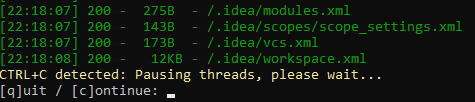 ### 递归
- 递归暴力破解会持续对已发现的目录进行暴力破解。例如,dirsearch 发现 `admin/` 后会暴力破解 `admin/*`(`*` 表示暴力破解的对象)。要启用此功能,请使用 **-r**(或 **--recursive**)标志
```
python3 dirsearch.py -e php,html,js -u https://target -r
```
- 可使用 **--max-recursion-depth** 设置最大递归深度,使用 **--recursion-status** 设置递归的状态码
```
python3 dirsearch.py -e php,html,js -u https://target -r --max-recursion-depth 3 --recursion-status 200-399
```
- 还有两个选项:**--force-recursive** 和 **--deep-recursive**
- **强制递归**:对所有发现的路径进行递归暴力破解,而不仅仅是以 `/` 结尾的路径
- **深度递归**:对路径的所有层级进行递归暴力破解(`a/b/c` => 添加 `a/`、`a/b/`)
- 若有不希望递归暴力破解的子目录,请使用 `--exclude-subdirs`
```
python3 dirsearch.py -e php,html,js -u https://target -r --exclude-subdirs image/,media/,css/
```
### 线程
线程数(**-t | --threads**)决定了独立的暴力破解进程数量。线程数越大,dirsearch 运行越快。默认线程数为 25,若想加速可自行调高。
即便如此,速度仍然受服务器响应时间影响较大。提醒:请勿将线程数设置得过大,以免导致 DoS(拒服务)。
```
python3 dirsearch.py -e php,htm,js,bak,zip,tgz,txt -u https://target -t 20
```
### 异步
使用 `--async` 可切换到异步模式,让 dirsearch 使用协程而非线程来处理并发请求。
理论上,异步模式性能更好、CPU 占用更低,因为不需要在不同线程上下文之间切换。此外,按下 CTRL+C 会立即暂停进度,无需等待线程挂起。
### 前缀 / 后缀
- **--prefixes**:为所有条目添加自定义前缀
```
python3 dirsearch.py -e php -u https://target --prefixes .,admin,_
```
词表:
```
tools
```
生成带前缀的词表:
```
tools
.tools
admintools
_tools
```
- **--suffixes**:为所有条目添加自定义后缀
```
python3 dirsearch.py -e php -u https://target --suffixes ~
```
词表:
```
index.php
internal
```
生成带后缀的词表:
```
index.php
internal
index.php~
internal~
```
### 黑名单
在 `db/` 文件夹中有多个“黑名单文件”。这些文件中的路径会在扫描结果中被过滤,前提是它们的状态码与文件名中指定的相同。
示例:如果在 `db/403_blacklist.txt` 中添加 `admin.php`,当扫描到 `admin.php` 返回 403 时,它将从结果中被过滤。
### 过滤器
使用 **-i | --include-status** 与 **-x | --exclude-status** 来选择允许或不允许的响应状态码。
更高级的过滤器:**--exclude-sizes**、**--exclude-texts**、**--exclude-regexps**、**--exclude-redirects** 和 **--exclude-response**
```
python3 dirsearch.py -e php,html,js -u https://target --exclude-sizes 1B,243KB
```
```
python3 dirsearch.py -e php,html,js -u https://target --exclude-texts "403 Forbidden"
```
```
python3 dirsearch.py -e php,html,js -u https://target --exclude-regexps "^Error$"
```
```
python3 dirsearch.py -e php,html,js -u https://target --exclude-redirects "https://(.*).okta.com/*"
```
```
python3 dirsearch.py -e php,html,js -u https://target --exclude-response /error.html
```
### 原始请求
dirsearch 支持从文件导入原始请求。内容示例如下:
```
GET /admin HTTP/1.1
Host: admin.example.com
Cache-Control: max-age=0
Accept: */*
```
由于 dirsearch 无法自动识别 URI 方案,需要使用 `--scheme` 标志手动指定。默认情况下,dirsearch 会自动检测方案。
### 词表格式
支持的词表格式:大写、全小写、首字母大写
#### 小写:
```
admin
index.html
```
#### 大写:
```
ADMIN
INDEX.HTML
```
#### 首字母大写:
```
Admin
Index.html
```
### 排除扩展名
使用 **-X | --exclude-extensions** 并提供扩展名列表,可删除词表中包含这些扩展名的所有路径
`python3 dirsearch.py -u https://target -X jsp`
词表:
```
admin.php
test.jsp
```
结果:
```
admin.php
```
### 扫描子目录
- 使用 **--subdirs** 可从 URL 扫描子目录列表。
```
python3 dirsearch.py -e php,html,js -u https://target --subdirs /,admin/,folder/
```
### 代理
dirsearch 支持 SOCKS 和 HTTP 代理,有两种选项:单个代理服务器或代理服务器列表。
```
python3 dirsearch.py -e php,html,js -u https://target --proxy 127.0.0.1:8080
```
```
python3 dirsearch.py -e php,html,js -u https://target --proxy socks5://10.10.0.1:8080
```
```
python3 dirsearch.py -e php,html,js -u https://target --proxylist proxyservers.txt
```
### 报告
支持的报告格式:**simple**、**plain**、**json**、**xml**、**md**、**csv**、**html**、**sqlite**、**mysql**、**postgresql**
```
python3 dirsearch.py -e php -l URLs.txt --format plain -o report.txt
```
```
python3 dirsearch.py -e php -u https://target --format html -o target.json
```
### 更多示例命令
```
cat urls.txt | python3 dirsearch.py --stdin
```
```
python3 dirsearch.py -u https://target --max-time 360
```
```
python3 dirsearch.py -u https://target --auth admin:pass --auth-type basic
```
```
python3 dirsearch.py -u https://target --header-list rate-limit-bypasses.txt
```
**还有更多功能待你发掘,快来尝试吧!**
### 递归
- 递归暴力破解会持续对已发现的目录进行暴力破解。例如,dirsearch 发现 `admin/` 后会暴力破解 `admin/*`(`*` 表示暴力破解的对象)。要启用此功能,请使用 **-r**(或 **--recursive**)标志
```
python3 dirsearch.py -e php,html,js -u https://target -r
```
- 可使用 **--max-recursion-depth** 设置最大递归深度,使用 **--recursion-status** 设置递归的状态码
```
python3 dirsearch.py -e php,html,js -u https://target -r --max-recursion-depth 3 --recursion-status 200-399
```
- 还有两个选项:**--force-recursive** 和 **--deep-recursive**
- **强制递归**:对所有发现的路径进行递归暴力破解,而不仅仅是以 `/` 结尾的路径
- **深度递归**:对路径的所有层级进行递归暴力破解(`a/b/c` => 添加 `a/`、`a/b/`)
- 若有不希望递归暴力破解的子目录,请使用 `--exclude-subdirs`
```
python3 dirsearch.py -e php,html,js -u https://target -r --exclude-subdirs image/,media/,css/
```
### 线程
线程数(**-t | --threads**)决定了独立的暴力破解进程数量。线程数越大,dirsearch 运行越快。默认线程数为 25,若想加速可自行调高。
即便如此,速度仍然受服务器响应时间影响较大。提醒:请勿将线程数设置得过大,以免导致 DoS(拒服务)。
```
python3 dirsearch.py -e php,htm,js,bak,zip,tgz,txt -u https://target -t 20
```
### 异步
使用 `--async` 可切换到异步模式,让 dirsearch 使用协程而非线程来处理并发请求。
理论上,异步模式性能更好、CPU 占用更低,因为不需要在不同线程上下文之间切换。此外,按下 CTRL+C 会立即暂停进度,无需等待线程挂起。
### 前缀 / 后缀
- **--prefixes**:为所有条目添加自定义前缀
```
python3 dirsearch.py -e php -u https://target --prefixes .,admin,_
```
词表:
```
tools
```
生成带前缀的词表:
```
tools
.tools
admintools
_tools
```
- **--suffixes**:为所有条目添加自定义后缀
```
python3 dirsearch.py -e php -u https://target --suffixes ~
```
词表:
```
index.php
internal
```
生成带后缀的词表:
```
index.php
internal
index.php~
internal~
```
### 黑名单
在 `db/` 文件夹中有多个“黑名单文件”。这些文件中的路径会在扫描结果中被过滤,前提是它们的状态码与文件名中指定的相同。
示例:如果在 `db/403_blacklist.txt` 中添加 `admin.php`,当扫描到 `admin.php` 返回 403 时,它将从结果中被过滤。
### 过滤器
使用 **-i | --include-status** 与 **-x | --exclude-status** 来选择允许或不允许的响应状态码。
更高级的过滤器:**--exclude-sizes**、**--exclude-texts**、**--exclude-regexps**、**--exclude-redirects** 和 **--exclude-response**
```
python3 dirsearch.py -e php,html,js -u https://target --exclude-sizes 1B,243KB
```
```
python3 dirsearch.py -e php,html,js -u https://target --exclude-texts "403 Forbidden"
```
```
python3 dirsearch.py -e php,html,js -u https://target --exclude-regexps "^Error$"
```
```
python3 dirsearch.py -e php,html,js -u https://target --exclude-redirects "https://(.*).okta.com/*"
```
```
python3 dirsearch.py -e php,html,js -u https://target --exclude-response /error.html
```
### 原始请求
dirsearch 支持从文件导入原始请求。内容示例如下:
```
GET /admin HTTP/1.1
Host: admin.example.com
Cache-Control: max-age=0
Accept: */*
```
由于 dirsearch 无法自动识别 URI 方案,需要使用 `--scheme` 标志手动指定。默认情况下,dirsearch 会自动检测方案。
### 词表格式
支持的词表格式:大写、全小写、首字母大写
#### 小写:
```
admin
index.html
```
#### 大写:
```
ADMIN
INDEX.HTML
```
#### 首字母大写:
```
Admin
Index.html
```
### 排除扩展名
使用 **-X | --exclude-extensions** 并提供扩展名列表,可删除词表中包含这些扩展名的所有路径
`python3 dirsearch.py -u https://target -X jsp`
词表:
```
admin.php
test.jsp
```
结果:
```
admin.php
```
### 扫描子目录
- 使用 **--subdirs** 可从 URL 扫描子目录列表。
```
python3 dirsearch.py -e php,html,js -u https://target --subdirs /,admin/,folder/
```
### 代理
dirsearch 支持 SOCKS 和 HTTP 代理,有两种选项:单个代理服务器或代理服务器列表。
```
python3 dirsearch.py -e php,html,js -u https://target --proxy 127.0.0.1:8080
```
```
python3 dirsearch.py -e php,html,js -u https://target --proxy socks5://10.10.0.1:8080
```
```
python3 dirsearch.py -e php,html,js -u https://target --proxylist proxyservers.txt
```
### 报告
支持的报告格式:**simple**、**plain**、**json**、**xml**、**md**、**csv**、**html**、**sqlite**、**mysql**、**postgresql**
```
python3 dirsearch.py -e php -l URLs.txt --format plain -o report.txt
```
```
python3 dirsearch.py -e php -u https://target --format html -o target.json
```
### 更多示例命令
```
cat urls.txt | python3 dirsearch.py --stdin
```
```
python3 dirsearch.py -u https://target --max-time 360
```
```
python3 dirsearch.py -u https://target --auth admin:pass --auth-type basic
```
```
python3 dirsearch.py -u https://target --header-list rate-limit-bypasses.txt
```
**还有更多功能待你发掘,快来尝试吧!**
Docker 安装与使用(点击展开)
### 安装 Docker(Linux) 安装 Docker ``` curl -fsSL https://get.docker.com | bash ``` ### 构建 dirsearch 镜像 创建镜像 ``` docker build -t "dirsearch:v0.4.3" . ``` ### 使用 dirsearch 使用方法 ``` docker run -it --rm "dirsearch:v0.4.3" -u target -e php,html,js,zip ```文章与教程(点击展开)
- [Comprehensive Guide on Dirsearch](https://www.hackingarticles.in/comprehensive-guide-on-dirsearch/) by Shubham Sharma - [Comprehensive Guide on Dirsearch Part 2](https://www.hackingarticles.in/comprehensive-guide-on-dirsearch-part-2/) by Shubham Sharma - [How to Find Hidden Web Directories with Dirsearch](https://www.geeksforgeeks.org/how-to-find-hidden-web-directories-with-dirsearch/) by GeeksforGeeks - [GUÍA COMPLETA SOBRE EL USO DE DIRSEARCH](https://esgeeks.com/guia-completa-uso-dirsearch/?feed_id=5703&_unique_id=6076249cc271f) by ESGEEKS - [How to use Dirsearch to detect web directories](https://www.ehacking.net/2020/01/how-to-find-hidden-web-directories-using-dirsearch.html) by EHacking - [dirsearch how to](https://vk9-sec.com/dirsearch-how-to/) by VK9 Security - [Find Hidden Web Directories with Dirsearch](https://null-byte.wonderhowto.com/how-to/find-hidden-web-directories-with-dirsearch-0201615/) by Wonder How To - [Brute force directories and files in webservers using dirsearch](https://upadhyayraj.medium.com/brute-force-directories-and-files-in-webservers-using-dirsearch-613e4a7fa8d5) by Raj Upadhyay - [Live Bug Bounty Recon Session on Yahoo (Amass, crts.sh, dirsearch) w/ @TheDawgyg](https://www.youtube.com/watch?v=u4dUnJ1U0T4) by Nahamsec - [Dirsearch to find Hidden Web Directories](https://medium.com/@irfaanshakeel/dirsearch-to-find-hidden-web-directories-d0357fbe47b0) by Irfan Shakeel - [Getting access to 25000 employees details](https://medium.com/@ehsahil/getting-access-to-25k-employees-details-c085d18b73f0) by Sahil Ahamad - [Best Tools For Directory Bruteforcing](https://secnhack.in/multiple-ways-to-find-hidden-directory-on-web-server/) by Shubham Goyal - [Discover hidden files & directories on a webserver - dirsearch full tutorial](https://www.youtube.com/watch?v=jVxs5at0gxg) by CYBER BYTES标签:DNS解析, Docker支持, Frida, GNU通用公共许可证, Node.js, Python脚本, VEH, Web路径扫描, 代码生成, 字典攻击, 开源项目, 渗透测试工具, 漏洞挖掘, 目录枚举, 移动安全, 请求拦截, 运行时操纵, 进程调试, 逆向工具