astral-sh/ty
GitHub: astral-sh/ty
由 Astral 开发的极速 Python 类型检查器和语言服务器,使用 Rust 编写,比 mypy 和 Pyright 快 10-100 倍。
Stars: 18980 | Forks: 303
# ty
[](https://github.com/astral-sh/ty)
[](https://pypi.python.org/pypi/ty)
[](https://discord.com/invite/astral-sh)
一款极速的 Python 类型检查器和语言服务器,使用 Rust 编写。
ty 由 [Astral](https://astral.sh) 提供支持,该公司也是 [uv](https://github.com/astral-sh/uv) 和 [Ruff](https://github.com/astral-sh/ruff) 的创造者。 ty 目前处于 [Beta](#version-policy) 阶段。 ## 亮点 - 比 mypy 和 Pyright 快 10 倍到 100 倍 - 具有丰富上下文信息的全面 [诊断信息](https://docs.astral.sh/ty/features/diagnostics/) - 可配置的 [规则等级](https://docs.astral.sh/ty/rules/)、[单文件覆盖](https://docs.astral.sh/ty/reference/configuration/#overrides)、[抑制注释](https://docs.astral.sh/ty/suppression/) 以及一流的项目支持 - 专为采用而设计,支持 [重声明](https://docs.astral.sh/ty/features/type-system/#redeclarations) 和 [部分类型代码](https://docs.astral.sh/ty/features/type-system/#gradual-guarantee) - [语言服务器](https://docs.astral.sh/ty/features/language-server/) 提供代码导航、补全、代码操作、自动导入、inlay hints、悬停帮助等功能 - 细粒度的 [增量分析](https://docs.astral.sh/ty/features/language-server/#fine-grained-incrementality),专为在 IDE 中编辑文件时实现快速更新而设计 - 适用于 [VS Code](https://docs.astral.sh/ty/editors/#vs-code)、[PyCharm](https://docs.astral.sh/ty/editors/#pycharm)、[Neovim](https://docs.astral.sh/ty/editors/#neovim) 等的编辑器集成 - 高级类型特性,如一流的 [交叉类型](https://docs.astral.sh/ty/features/type-system/#intersection-types)、高级 [类型缩窄](https://docs.astral.sh/ty/features/type-system/#top-and-bottom-materializations) 以及 [复杂的可达性分析](https://docs.astral.sh/ty/features/type-system/#reachability-based-on-types) ## 快速开始 使用 [uvx](https://docs.astral.sh/uv/guides/tools/#running-tools) 运行 ty 以快速上手: ``` uvx ty check ``` 或者,查看 [ty playground](https://play.ty.dev) 在浏览器中试用。 欲了解更多关于使用 ty 的信息,请参阅 [文档](https://docs.astral.sh/ty/)。 ## 安装 要安装 ty,请参阅 [安装](https://docs.astral.sh/ty/installation/) 文档。 要将 ty 语言服务器添加到您的编辑器,请参阅 [编辑器集成](https://docs.astral.sh/ty/editors/) 指南。 ## 获取帮助 如果您有问题或想报告错误,请在此仓库中 [提交 issue](https://github.com/astral-sh/ty/issues)。 您也可以加入我们的 [Discord 服务器](https://discord.com/invite/astral-sh)。 ## 贡献 目前,本项目的开发工作在 [Ruff](https://github.com/astral-sh/ruff) 仓库中 进行。请在那里 [提交 pull request](https://github.com/astral-sh/ruff/pulls) 以更改 `ruff` 子模块中的任何内容(其中包括所有 Rust 源代码)。 有关更多详细信息,请参阅 [贡献指南](./CONTRIBUTING.md)。 ## 版本策略 ty 使用 `0.0.x` 版本号。ty 尚未拥有稳定的 API;任何两个版本之间都可能发生中断性变更,包括 对诊断信息的更改。请参阅 [类型系统支持](https://github.com/astral-sh/ty/issues/1889) 跟踪 issue 以获取当前支持功能的详细概览。 ## 常见问题 #### 为什么 ty 会执行 \_\_\_\_\_? 请参阅我们的 [类型常见问题](https://docs.astral.sh/ty/reference/typing-faq)。 #### ty 怎么发音? 发音为 "tee - why" ([`/tiː waɪ/`](https://en.wikipedia.org/wiki/Help:IPA/English#Key)) #### ty 的样式应该怎么写? 请直接使用 "ty"。 ## 许可证 ty 根据 MIT 许可证授权([LICENSE](LICENSE) 或)。
除非您明确声明,否则您有意提交以包含在 ty 中的任何贡献,
根据 MIT 许可证的定义,均应按上述方式许可,不附加任何额外条款或
条件。

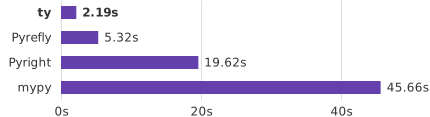
在无缓存情况下对 home-assistant 项目进行类型检查。
ty 由 [Astral](https://astral.sh) 提供支持,该公司也是 [uv](https://github.com/astral-sh/uv) 和 [Ruff](https://github.com/astral-sh/ruff) 的创造者。 ty 目前处于 [Beta](#version-policy) 阶段。 ## 亮点 - 比 mypy 和 Pyright 快 10 倍到 100 倍 - 具有丰富上下文信息的全面 [诊断信息](https://docs.astral.sh/ty/features/diagnostics/) - 可配置的 [规则等级](https://docs.astral.sh/ty/rules/)、[单文件覆盖](https://docs.astral.sh/ty/reference/configuration/#overrides)、[抑制注释](https://docs.astral.sh/ty/suppression/) 以及一流的项目支持 - 专为采用而设计,支持 [重声明](https://docs.astral.sh/ty/features/type-system/#redeclarations) 和 [部分类型代码](https://docs.astral.sh/ty/features/type-system/#gradual-guarantee) - [语言服务器](https://docs.astral.sh/ty/features/language-server/) 提供代码导航、补全、代码操作、自动导入、inlay hints、悬停帮助等功能 - 细粒度的 [增量分析](https://docs.astral.sh/ty/features/language-server/#fine-grained-incrementality),专为在 IDE 中编辑文件时实现快速更新而设计 - 适用于 [VS Code](https://docs.astral.sh/ty/editors/#vs-code)、[PyCharm](https://docs.astral.sh/ty/editors/#pycharm)、[Neovim](https://docs.astral.sh/ty/editors/#neovim) 等的编辑器集成 - 高级类型特性,如一流的 [交叉类型](https://docs.astral.sh/ty/features/type-system/#intersection-types)、高级 [类型缩窄](https://docs.astral.sh/ty/features/type-system/#top-and-bottom-materializations) 以及 [复杂的可达性分析](https://docs.astral.sh/ty/features/type-system/#reachability-based-on-types) ## 快速开始 使用 [uvx](https://docs.astral.sh/uv/guides/tools/#running-tools) 运行 ty 以快速上手: ``` uvx ty check ``` 或者,查看 [ty playground](https://play.ty.dev) 在浏览器中试用。 欲了解更多关于使用 ty 的信息,请参阅 [文档](https://docs.astral.sh/ty/)。 ## 安装 要安装 ty,请参阅 [安装](https://docs.astral.sh/ty/installation/) 文档。 要将 ty 语言服务器添加到您的编辑器,请参阅 [编辑器集成](https://docs.astral.sh/ty/editors/) 指南。 ## 获取帮助 如果您有问题或想报告错误,请在此仓库中 [提交 issue](https://github.com/astral-sh/ty/issues)。 您也可以加入我们的 [Discord 服务器](https://discord.com/invite/astral-sh)。 ## 贡献 目前,本项目的开发工作在 [Ruff](https://github.com/astral-sh/ruff) 仓库中 进行。请在那里 [提交 pull request](https://github.com/astral-sh/ruff/pulls) 以更改 `ruff` 子模块中的任何内容(其中包括所有 Rust 源代码)。 有关更多详细信息,请参阅 [贡献指南](./CONTRIBUTING.md)。 ## 版本策略 ty 使用 `0.0.x` 版本号。ty 尚未拥有稳定的 API;任何两个版本之间都可能发生中断性变更,包括 对诊断信息的更改。请参阅 [类型系统支持](https://github.com/astral-sh/ty/issues/1889) 跟踪 issue 以获取当前支持功能的详细概览。 ## 常见问题 #### 为什么 ty 会执行 \_\_\_\_\_? 请参阅我们的 [类型常见问题](https://docs.astral.sh/ty/reference/typing-faq)。 #### ty 怎么发音? 发音为 "tee - why" ([`/tiː waɪ/`](https://en.wikipedia.org/wiki/Help:IPA/English#Key)) #### ty 的样式应该怎么写? 请直接使用 "ty"。 ## 许可证 ty 根据 MIT 许可证授权([LICENSE](LICENSE) 或
标签:Astral, LSP, myPy替代, Python, Rust, SOC Prime, VS Code, 云安全监控, 代码补全, 代码诊断, 可视化界面, 增量分析, 开发工具, 性能优化, 无后门, 检测绕过, 类型检查, 编程语言工具, 网络流量审计, 自动导入, 语言服务器, 逆向工具, 静态分析, 静态类型