






**Gito** 是一款开源的 **AI 代码审查工具**,可与任何语言模型提供商配合使用。
它能即时、可靠且不受供应商限制地,检测 GitHub pull request 或本地代码库变更中的问题。
在几秒钟内获得一致且彻底的代码审查——无需等待人工介入。
## 📋 目录
- [为什么选择 Gito?](#-why-gito)
- [适用场景](#-perfect-for)
- [支持的平台与集成](#-supported-platforms--integrations)
- [安全与隐私](#-security--privacy)
- [快速开始](#-quickstart)
- [1. 通过 GitHub Actions 审查 Pull Request](#1-review-pull-requests-via-github-actions)
- [2. 在本地运行代码分析](#2-running-code-analysis-locally)
- [配置说明](#-configuration)
- [指南与参考](#-guides--reference)
- [命令行参考](https://github.com/Nayjest/Gito/blob/main/documentation/command_line_reference.md) ↗
- [配置手册](https://github.com/Nayjest/Gito/blob/main/documentation/config_cookbook.md) ↗
- [GitHub 设置指南](https://github.com/Nayjest/Gito/blob/main/documentation/github_setup.md) ↗
- 集成
- [Linear 集成](https://github.com/Nayjest/Gito/blob/main/documentation/linear_integration.md) ↗
- [Atlassian Jira 集成](https://github.com/Nayjest/Gito/blob/main/documentation/jira_integration.md) ↗
- [故障排除](https://github.com/Nayjest/Gito/blob/main/documentation/troubleshooting.md) ↗
- [使用 Gito 生成文档](https://github.com/Nayjest/Gito/blob/main/documentation/documentation_generation.md) ↗
- [已知限制](#-known-limitations)
- [开发环境配置](#-development-setup)
- [贡献指南](#-contributing)
- [许可证](#-license)
## ✨ 为什么选择 Gito?
- [⚡] **闪电般快速:** 几秒钟内获得详细的代码审查,而非几天——由并行化的 LLM 处理提供支持
- [🔧] **供应商无关:** 支持任何语言模型提供商(OpenAI、Anthropic、Google、本地模型等)
- [🔒] **私密且安全:** 你的代码直接发送到你选择的 LLM 推理提供商或本地模型——不经过任何中间服务器
- [🌐] **通用性:** 支持所有主流编程语言和框架
- [🔍] **全面分析:** 检测安全性、性能、可维护性、最佳实践等多方面的问题
- [📈] **一致的质量:** 永不疲倦,绝无偏见——每次审查的质量始终如一
- [🚀] **易于集成:** 通过 CI/CD 工作流(GitHub Actions 等)自动审查 pull request,将结果作为 PR 评论发布,并对维护者的评论做出响应
- [🎛️] **无限灵活:** 适应任何项目的标准——配置审查规则、严重级别和重点领域,构建自定义工作流
## 🎯 适用场景
- 希望无需等待即可获得专家级代码审查的独立开发者
- 希望在人工审查之前发现问题的团队
- 致力于大规模保持高代码质量的开源项目
- 需要自动化质量门禁的 CI/CD 流水线
✨ 查看[代码审查实战演示](https://github.com/Nayjest/Gito/pull/99) ✨
## 🌐 支持的平台与集成
### 🧩 Git 平台
| 平台 | 状态 |
|-------------|----------------------|
| GitHub | ✅ 已支持 |
| GitLab | 🧪 已支持 (Beta) |
| Bitbucket | 🛠️ 计划中 |
| Local / CLI | ✅ 已支持 |
### 🤖 LLM 提供商 / 运行时
| 提供商 / 运行时 | 状态 |
|-------------------------------------------------------------------------------------------------|---------------|
| OpenAI 兼容 API
`Mistral, xAI, Azure, Amazon Bedrock, OpenRouter, Fireworks 等等` | ✅ 已支持 |
| Anthropic API | ✅ 已支持 |
| Google API | ✅ 已支持 |
| 本地 LLM 服务
`Ollama, vLLM, llama.cpp, SGLang, LM Studio 等等` | ✅ 已支持 |
| 嵌入式推理
使用 `PyTorch / Transformers` 或自定义 Python 推理函数 | ✅ 已支持 |
| 基于基于 CLI 的 LLM 工具 / 编码 Agent CLI 运行
`Claude Code, Gemini CLI 等等` | ✅ 已支持 |
### 🗂️ 问题跟踪器
| 工具 | 状态 | 文档 |
|--------|---------------|---------------|
| Jira | ✅ 已支持 | [Atlassian Jira 集成](https://github.com/Nayjest/Gito/blob/main/documentation/jira_integration.md) ↗ |
| Linear | ✅ 已支持 | [Linear 集成](https://github.com/Nayjest/Gito/blob/main/documentation/linear_integration.md) ↗ |
## 🔒 安全与隐私
Gito 在设计上保证了源代码的私密性:
它被设计为一款**无状态的客户端工具**,并实行严格的零保留策略。
- **无中间人:** 源代码直接从你的环境(CI/CD runner 或本地机器)传输到你明确配置的 LLM 提供商。
如果你使用的是本地模型,你的代码永远不会离开你的网络。
我们永远看不到你的代码。
- **不收集数据:** 你的代码不会被 Gito 存储、记录或保留。
- **完全可审计:** 100% 开源。你可以亲自验证每一行代码。
## 🚀 快速开始
### 1. 通过 GitHub Actions 审查 Pull Request
创建一个 `.github/workflows/gito-code-review.yml` 文件,内容如下:
```
name: "Gito: AI Code Review"
on:
pull_request:
types: [opened, synchronize, reopened]
workflow_dispatch:
inputs:
pr_number:
description: "Pull Request number"
required: true
jobs:
review:
runs-on: ubuntu-latest
permissions: { contents: read, pull-requests: write } # 'write' for leaving the summary comment
steps:
- uses: actions/checkout@v6
with: { fetch-depth: 0 }
- name: Set up Python
uses: actions/setup-python@v6
with: { python-version: "3.13" }
- name: Install AI Code Review tool
run: pip install gito.bot~=4.1
- name: Run AI code analysis
env:
LLM_API_KEY: ${{ secrets.LLM_API_KEY }}
LLM_API_TYPE: openai
MODEL: "gpt-5.5"
GITHUB_TOKEN: ${{ secrets.GITHUB_TOKEN }}
PR_NUMBER_FROM_WORKFLOW_DISPATCH: ${{ github.event.inputs.pr_number }}
run: |
gito --verbose review
gito github-comment --token ${{ secrets.GITHUB_TOKEN }}
- uses: actions/upload-artifact@v6
with:
name: ai-code-review-results
path: |
code-review-report.md
code-review-report.json
```
💪 完成!
对你仓库发起的 PR 现在将自动获得 AI 代码审查。 ✨
有关更多详细信息,请参阅 [GitHub 设置指南](https://github.com/Nayjest/Gito/blob/main/documentation/github_setup.md)。
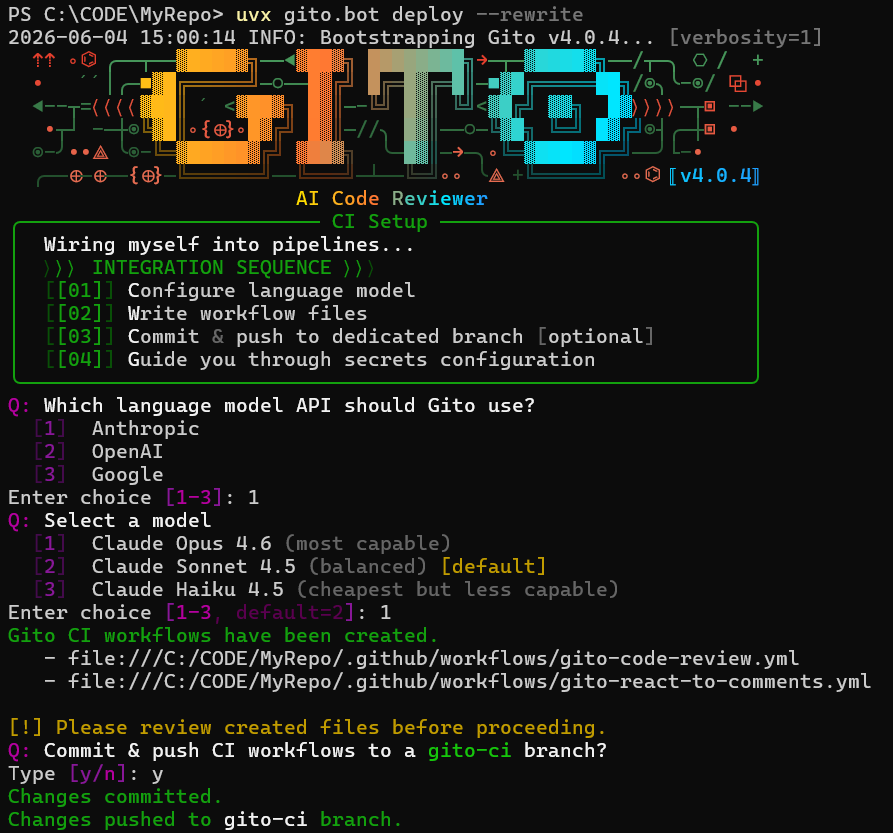
或者,在本地安装 Gito 并在你的仓库根目录下运行 `gito deploy`。
部署向导将引导你完成 AI 驱动的代码审查设置,并自动生成或更新所需的工作流文件。支持 GitHub Actions 和 GitLab CI。
如需手动配置 GitLab,请参阅 [GitLab 工作流模板](https://github.com/Nayjest/Gito/tree/main/gito/tpl/workflows/gitlab)。
### 2. 在本地运行代码分析
#### 2.1 在本地安装 Gito
**选项 1:** 使用 [pip](https://en.wikipedia.org/wiki/Pip_(package_manager) 安装 [gito.bot](https://github.com/Nayjest/Gito))。
**前置条件:**
- [Python](https://www.python.org/downloads/) 3.11 / 3.12 / 3.13
- [Git](https://git-scm.com)
运行以下命令从 PyPI 安装最新的稳定版本:
```
pip install gito.bot
```
若要从仓库源码 / 特定分支安装:
```
pip install git+https://github.com/Nayjest/Gito.git@
```
**选项 2:** Windows 独立安装程序
从 [Releases](https://github.com/Nayjest/Gito/releases) 下载最新的 Windows 安装程序。
该安装程序包含:
- 独立的可执行文件(无需 Python)
- 自动配置 PATH
- 开始菜单快捷方式
- 易于卸载
#### 2.2 配置 LLM 连接
以下命令将使用交互式向导进行一次性设置。
系统会提示你输入 LLM 配置详细信息(API 类型、API key 等)。
配置将保存到 `~/.gito/.env`。
```
gito setup
```
或者,如果你安装了 `uvx`,你可以通过 `uvx` 运行设置命令:
```
uvx gito.bot setup
```
#### 2.3 在本地执行你的首次 AI 代码审查
**步骤 1:** 导航到你的仓库根目录。
**步骤 2:** 切换到你要审查的分支。
**步骤 3:** 运行以下命令:
```
gito review
```
**审查远程仓库**
```
gito remote git@github.com:owner/repo.git ..
```
使用交互式帮助获取详细信息:
```
gito remote --help
```
## 🔧 配置说明
Gito 采用双层配置模型:
| 范围 | 位置 | 用途 |
|-------|----------|---------|
| **环境** | `~/.gito/.env` 或操作系统环境变量 | LLM 提供商、模型、API key、并发数 |
| **项目** | `/.gito/config.toml` | 审查行为、提示词、模板、集成 |
### 环境配置
环境设置用于控制 LLM 推理、API Key,并在系统范围内生效。
Gito 使用 [ai-microcore](https://github.com/Nayjest/ai-microcore) 来实现供应商无关的 LLM 访问。所有设置均通过操作系统环境变量或 `.env` 文件进行配置。
**默认位置:** `~/.gito/.env`
*(通过 `gito setup` 自动创建)*
#### 示例
```
# ~/.gito/.env
LLM_API_TYPE=openai
LLM_API_KEY=sk-...
LLM_API_BASE=https://api.openai.com/v1/
MODEL=gpt-5.5
MAX_CONCURRENT_TASKS=20
```
如需了解所有受支持的选项,请参阅 [ai-microcore 配置指南](https://github.com/Nayjest/ai-microcore?tab=readme-ov-file#%EF%B8%8F-configuring)。
#### CI/CD 环境
在 CI 工作流中,通过工作流环境变量配置 LLM 设置。使用平台的密钥管理服务(如 GitHub Secrets、GitLab CI Variables)来存储 API key。
### 项目配置
Gito 支持通过放置在项目根目录下的 `.gito/config.toml` 文件进行逐仓库自定义。这使你可以根据特定的代码库、编码标准和工作流需求来定制代码审查行为。
#### 配置继承模型
项目设置遵循分层覆盖模型:
**内置默认值** ([config.toml](https://github.com/Nayjest/Gito/blob/main/gito/config.toml)) → **项目配置** (`/.gito/config.toml`)
你项目的 `.gito/config.toml` 中定义的任何值都会与内置默认值合并。你只需指定想要更改的设置——其余内容将回退到合理的默认值。
#### 常见自定义项
- **审查提示词** — 调整 AI 指令、审查标准和质量阈值
- **输出模板** — 自定义用于 GitHub 评论和 CLI 的报告格式
- **后处理** — 用于过滤或转换检测到的问题的 Python 代码片段
- **Bot 行为** — 提及触发器、重试、评论处理
- **流水线集成** — Jira、Linear 等
浏览内置的 [config.toml](https://github.com/Nayjest/Gito/blob/main/gito/config.toml) 以获取可用选项的完整列表。
#### 示例
```
# .gito/config.toml
mention_triggers = ["gito", "/check"]
collapse_previous_code_review_comments = true
# 作为 context 提供的文件
aux_files = [
'documentation/command_line_reference.md'
]
exclude_files = [
'poetry.lock',
]
[prompt_vars]
# 注入到 system prompts 中的自定义指令
awards = "" # Disable awards
requirements = """
- All public functions must have docstrings.
"""
```
如需详细指南,请参阅 [📖 配置手册](https://github.com/Nayjest/Gito/blob/main/documentation/config_cookbook.md)。
## 📚 指南与参考
欲获取更多详细信息,请查看以下文章:
- [命令行参考](https://github.com/Nayjest/Gito/blob/main/documentation/command_line_reference.md)
- [配置手册](https://github.com/Nayjest/Gito/blob/main/documentation/config_cookbook.md)
- [GitHub 设置指南](https://github.com/Nayjest/Gito/blob/main/documentation/github_setup.md)
- 集成
- [Linear 集成](https://github.com/Nayjest/Gito/blob/main/documentation/linear_integration.md)
- [Atlassian Jira 集成](https://github.com/Nayjest/Gito/blob/main/documentation/jira_integration.md)
- [使用 Gito 生成文档](https://github.com/Nayjest/Gito/blob/main/documentation/documentation_generation.md)
- [故障排除](https://github.com/Nayjest/Gito/blob/main/documentation/troubleshooting.md)
或在 [`/documentation`](https://github.com/Nayjest/Gito/tree/main/documentation) 目录中浏览所有文档。
## 🚧 已知限制
在响应 GitHub PR 评论(例如,“Gito fix issue 2”)时,Gito 无法修改 `.github/workflows` 中的文件。
这是 GitHub 的一项安全限制,旨在防止工作流使用默认的 `GITHUB_TOKEN` 修改其他工作流文件。
虽然使用具有 `workflow` scope 的 Personal Access Token (PAT) 可以绕过此限制,但作为解决方案,并不推荐这种做法。
PAT 拥有更广泛的权限、更长的生命周期,并且与个人用户账户绑定,这使得它们在 CI/CD 流水线中不如默认的 `GITHUB_TOKEN` 安全。
## 💻 开发环境配置
克隆仓库并导航到该目录:
```
git clone https://github.com/Nayjest/Gito.git
cd Gito
```

安装依赖:
```
make install
```
格式化代码并检查样式:
```
make black
make cs
```
运行测试:
```
pytest
```