drpetersonfernandes/BatchConvertIsoToXiso
GitHub: drpetersonfernandes/BatchConvertIsoToXiso
一款高性能 Windows WPF 应用,用于批量将 Xbox 和 Xbox 360 的 ISO 镜像转换为精简的 XISO 格式,并提供完整性测试与文件浏览功能。
Stars: 15 | Forks: 0
# 批量 ISO 到 XISO 转换器
[](https://www.microsoft.com/windows)
[](https://dotnet.microsoft.com/download/dotnet/10.0)
[](https://github.com/drpetersonfernandes/BatchConvertIsoToXiso/releases)
[](LICENSE.txt)
[](https://github.com/drpetersonfernandes/BatchConvertIsoToXiso/releases)
一款专为 Xbox 游戏保存和模拟器社区打造的高性能 Windows WPF 工具。支持双引擎转换、验证和浏览 Xbox 与 Xbox 360 ISO 文件:内置原生 C# XDVDFS 引擎以及外部工具集成。
## 📋 目录
- [概述](#overview)
- [主要功能](#key-features)
- [安装说明](#installation)
- [用法](#usage)
- [支持的格式](#supported-formats)
- [架构](#architecture)
- [系统要求](#system-requirements)
- [安全性与可靠性](#safety--reliability)
- [截图](#screenshots)
- [致谢](#acknowledgements)
- [许可证](#license)
## 概述
**批量 ISO 到 XISO 转换器** 简化了将标准 Xbox 和 Xbox 360 ISO 转换为优化且精简的 **XISO** 格式的过程。该工具基于灵活的多引擎架构构建,结合了 **原生 C# XDVDFS 引擎**与强大的**外部工具集成**(extract-xiso 和 xdvdfs),提供卓越的性能和实时磁盘写入监控等现代功能。
无论您是正在管理大量的 Xbox 游戏备份,还是要验证转储文件的完整性,这款应用程序都能提供友好的用户界面以及强大的批处理功能。
## 主要功能
### 🔄 批量转换
- **多引擎支持**:提供三种转换方法供选择:
- **extract-xiso**(外部):通过重新打包实现最大压缩率
- **xdvdfs**(外部):采用现代 Rust 实现的最大压缩率
- **Modified Deterous Logic**(内置):快速精简,同时保留原始结构
- **智能处理**:移除视频分区和填充数据,将 Redump ISO 转换为可玩的 XISO 格式
- **压缩包支持**:通过 SharpCompress 高性能解压,直接处理 `.zip`、`.7z` 和 `.rar` 文件,对于复杂的 `.7z` 压缩包会自动回退使用 7-Zip CLI
- **加密压缩包检测**:自动检测受密码保护的压缩包,并提供清晰的手动解压指导,防止出现难以理解的解压失败错误
- **CUE/BIN 支持**:集成 `bchunk` 支持,可将经典光盘镜像转换为 ISO 格式
- **系统更新移除**:可选择跳过 `$SystemUpdate` 文件夹以额外节省空间(原生引擎和 extract-xiso 均支持此功能)
### ✅ 完整性测试
- **结构验证**:深度遍历 XDVDFS 文件树,确保文件系统有效
- **深度表面扫描**:可选的顺序扇区读取,用于检测物理数据损坏或坏道
- **批量整理**:自动将通过或未通过测试的镜像文件整理到指定的子文件夹中
### 🔍 XISO 浏览器
- **原生浏览**:无需解压即可打开任何 Xbox ISO 来浏览文件和目录
- **元数据视图**:直接在界面中查看文件大小、属性和目录结构
- **双击打开**:使用默认关联的应用程序直接从 ISO 中打开文件
- **拖放提取**:将文件从浏览器中拖出,即可将其提取到任何文件夹(如 Windows 资源管理器、桌面等)
### 📊 高级监控
- **实时统计**:跟踪成功/失败计数、已用时间和已处理文件
- **磁盘监控**:实时监控写入速度和驱动器活动,以识别硬件瓶颈
- **云感知**:自动检测和处理云端存储的文件(如 OneDrive)
## 安装说明
### 前置条件
- **操作系统**:Windows 10(版本 1809)或更高版本 / Windows 11
- **运行环境**:[.NET 10.0 Desktop Runtime](https://dotnet.microsoft.com/download/dotnet/10.0)
- **架构支持**:
- **x64(64 位)**:支持全部三种精简逻辑。
- **ARM64**:支持内置的“Modified Deterous Logic”;另外两种逻辑可能也可运行。
### 步骤
1. 从 [Releases](https://github.com/drpetersonfernandes/BatchConvertIsoToXiso/releases) 页面下载最新版本
2. 将 ZIP 文件解压到您想要的位置
3. 运行 `BatchConvertIsoToXiso.exe`
无需安装 —— 该应用程序是完全便携的。
## 用法
### 转换 ISO
1. 启动应用程序
2. 点击 **“Select Input Folder”** 并选择包含 ISO 文件的目录
3. 点击 **“Select Output Folder”** 指定转换后文件的保存位置
4. 配置选项:
- **Remove System Update**:跳过 `$SystemUpdate` 文件夹以节省空间
- **Replace Originals**:用转换后的版本替换输入文件
- **Test After Conversion**:自动验证转换后的 ISO
- **Conversion Method**:在以下选项中选择:
- **extract-xiso**:输出文件最小,外部工具
- **xdvdfs**:输出文件最小,外部工具
- **Modified Deterous Logic**:内置(基于 Deterous/XboxKit 增强),保留原始布局
> 💡 有关详细比较,请参阅[转换方法详解](#conversion-methods-explained)
5. 点击 **“Convert”** 开始批处理过程
### 测试 ISO 完整性
1. 切换到 **“Test ISO”** 选项卡
2. 选择包含 ISO 文件的输入文件夹
3. 启用 **“Move Passed Files”** 和/或 **“Move Failed Files”** 来整理结果
4. 点击 **“Test ISOs”** 开始验证
### 浏览 XISO 内容
1. 切换到 **“XISO Explorer”** 选项卡
2. 点击 **“Open ISO”** 并选择一个 Xbox ISO 文件
3. 浏览文件树以查看内容,无需解压
4. **打开文件**:双击任何文件以使用其默认应用程序打开
5. **提取文件**:将文件从浏览器中拖放到 Windows 资源管理器、桌面或任何文件夹中即可提取
## 转换方法详解
该应用程序提供**三种转换方法**,每种方法都采用不同的方式将 Redump ISO 转换为 XISO 格式:
### 方法比较
| 功能 | extract-xiso | xdvdfs | Modified Deterous Logic (内置) |
|:--------|:-------------|:-------|:----------------------------------|
| **方式** | 重新打包 | 重新打包 | 精简 |
| **输出大小** | 最小 | 最小 | 略大 |
| **安全性** | 高 | 高 | **最高** |
| **保留布局** | 否 | 否 | **是** |
| **外部工具** | 需要 | 需要 | **内置** |
### 移除内容
这三种方法都会从 Redump ISO 中移除以下部分:
- ✅ **视频分区**(DVD 电影/演示) - **移除约 7-387 MB**
- ✅ **末尾填充**(最后一个文件之后的空扇区) - **可变**
- ✅ **系统更新**(可选) - **移除约 100-300 MB**
### 主要区别
#### extract-xiso(外部工具)
- **开发者**:XboxDev 团队
- **方式**:读取整个 ISO,通过将文件紧密打包在一起来创建新的优化 XISO
- **优点**:输出大小最小,经过充分测试
- **缺点**:需要外部可执行文件
- **最适合**:最大化节省存储空间
#### xdvdfs(外部工具)
- **开发者**:antangelo
- **方式**:采用现代 Rust 实现从头重建 XISO
- **优点**:输出大小最小
- **缺点**:需要外部可执行文件
- **最适合**:最大兼容性和存储空间节省
#### Modified Deterous Logic(内置)
- **原始来源**:基于 Deterous 的 [XboxKit](https://github.com/Deterous/XboxKit) `XDVDFS.cs` 实现,用于遍历 XDVDFS 文件系统
- **方式**:通过识别并仅复制有效扇区(标头、目录树、文件数据)来**精简** ISO,同时保留原始文件布局及文件之间的间隙
- **主要修改与增强**(与原版相比):
- 将递归目录遍历转换为**基于堆栈的迭代**方法,以避免在处理深层/复杂目录时发生堆栈溢出
- 使用 `HashSet` 添加了**循环检测**,防止死循环
- **增强的签名检测**:支持多种已知的 XGD1/XGD2/XGD3 分区偏移量 + 健壮的验证 + 针对非标准/Redump 变体的回退扇区扫描
- **可选的 $SystemUpdate 跳过**:可排除系统更新文件以额外节省空间
- 改进了目录项解析、名称读取、属性处理以及全面的错误处理/验证
- 现代 C# 实现,具备更好的性能并能完美集成到应用程序中
- **优点**:
- **最快** - 无需重新打包,仅进行选择性扇区复制
- **最安全** - 完全保留原始 XDVDFS 结构和布局
- **无外部依赖** - 纯 C# 实现
- **缺点**:输出文件较大(保留了原始 ISO 中文件之间的间隙)
- **最适合**:保留原始结构、调试以及实现最大的安全性/兼容性
### 可视化对比
```
Redump ISO (Original):
[Video Partition][XDVDFS: Header][Dir][File A][gap][File B][gap][File C][Padding]
extract-xiso / xdvdfs Output:
[XDVDFS: Header][Dir][File A][File B][File C] (gaps removed, tightly packed)
↑ ↑ ↑
Files repositioned for maximum compression
Modified Deterous Logic Output:
[XDVDFS: Header][Dir][File A][gap][File B][gap][File C]
↑ ↑
Original layout preserved, only video/padding removed
```
### 该如何选择?
| 使用场景 | 推荐方法 |
|:---------|:-------------------|
| **最大化节省存储空间** | xdvdfs 或 extract-xiso |
| **保留确切的游戏结构** | Modified Deterous Logic |
| **调试 / 开发** | Modified Deterous Logic |
| **通过 FTP 传输到 Xbox** | xdvdfs 或 extract-xiso |
### 建议
**对于大多数用户**:如果存储空间至关重要,请使用 **xdvdfs** 或 **extract-xiso** 以获得最大压缩率。当您希望保留源 ISO 中的原始文件布局和结构时,请使用 **Modified Deterous Logic**。
## 支持的格式
| 操作 | 支持的格式 |
|:---------------|:-----------------------------------------------|
| **转换** | `.iso`, `.zip`, `.7z`, `.rar`, `.cue` / `.bin` |
| **测试** | `.iso` (直接文件) |
| **浏览器** | `.iso` (Xbox/Xbox 360 XDVDFS) |
## 架构
该应用程序遵循现代软件工程原则,具有基于**依赖注入**和**面向服务设计**的清晰、可维护的架构。
### 依赖注入
利用 `Microsoft.Extensions.DependencyInjection` 进行全面的服务管理。所有核心逻辑均与 UI 解耦,从而实现更轻松的测试和模块化更新。
### 测试
全面的 [xUnit](https://xunit.net/) 测试套件(`BatchConvertIsoToXiso.Tests`)涵盖了模型、服务和 XISO 服务,包含超过 25 个测试文件,并使用 [Moq](https://github.com/devlooped/moq) 进行模拟。
### 技术文档
有关 XDVDFS 格式、二进制文件结构和内部转换算法的深入了解,请参阅 [XDVDFS 技术文档](wiki.md)。
## 系统要求
| 组件 | 最低要求 |
|:-------------|:------------------------------------|
| 操作系统 | Windows 10 (1809) 或 Windows 11 |
| .NET 运行环境 | .NET 10.0 Desktop Runtime |
| 处理器 | x64 或 arm64 架构 |
| 内存 | 建议 4 GB |
| 存储空间 | 取决于 ISO 集合的大小 |
## 安全性与可靠性
- **原子操作**:在删除原始文件之前,会先验证已转换的文件
- **自动清理**:[`TempFolderCleanupHelper`](BatchConvertIsoToXiso/Services/TempFolderCleanupHelper.cs) 会在启动时或崩溃后移除孤立的临时文件
- **备用临时驱动器**:当系统临时驱动器空间不足以进行压缩包解压时,会自动搜索备用的本地驱动器
- **健壮的错误处理**:全面的异常处理,并带有自动错误报告
- **网络弹性**:完全支持 UNC 路径和映射的网络驱动器,并针对临时网络故障提供自动重试逻辑
- **云感知重试**:针对云同步文件(OneDrive 等)提供带指数退避自动重试
- **加密压缩包处理**:能够优雅地检测受密码保护和加密的压缩包,提供清晰的用户指导,而不是报出令人费解的错误
- **进程隔离**:外部工具在隔离的进程中运行,并支持取消操作
## 截图
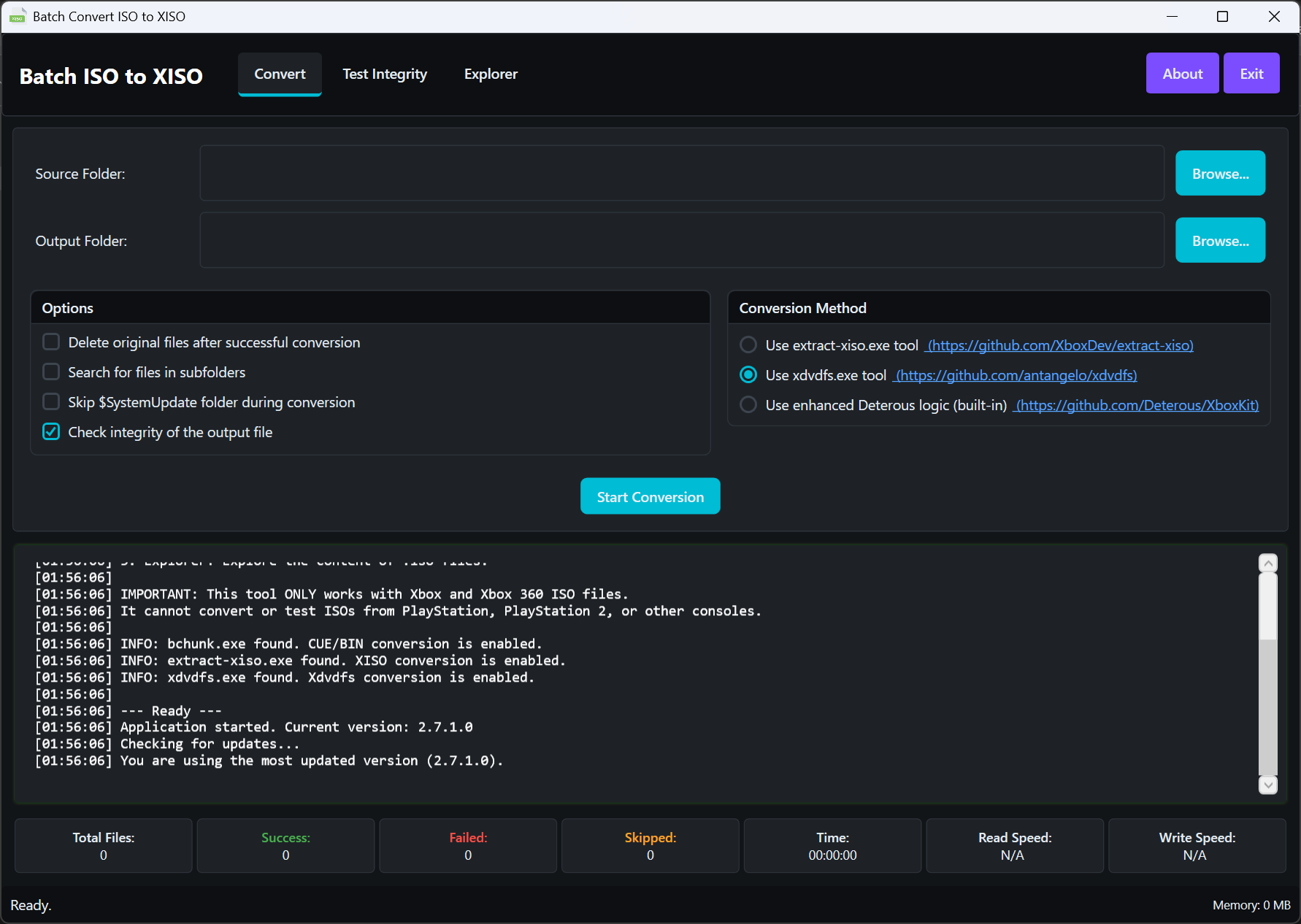
*带有实时进度监控的批量转换界面*
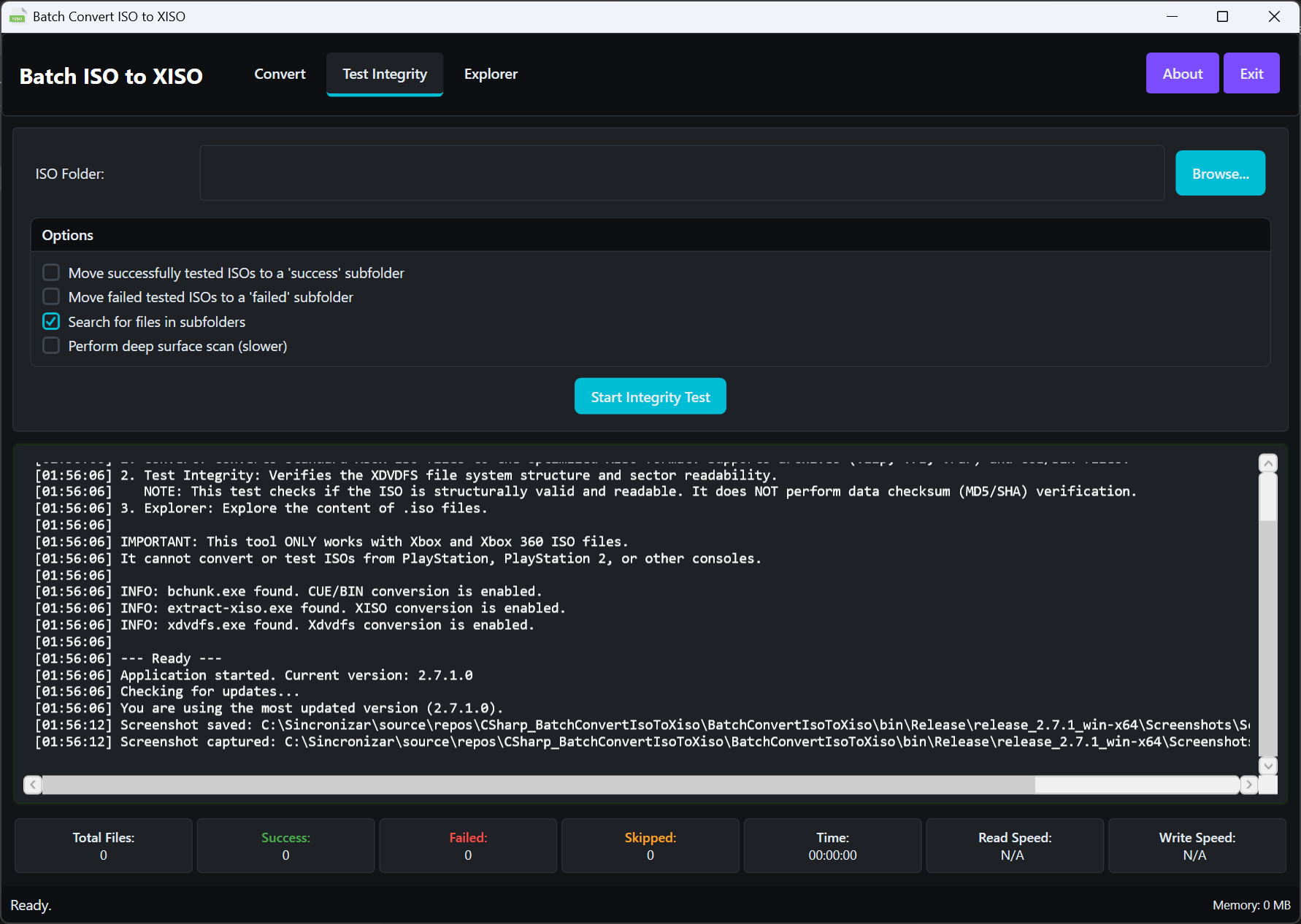
*带有批量整理功能的 ISO 完整性测试*
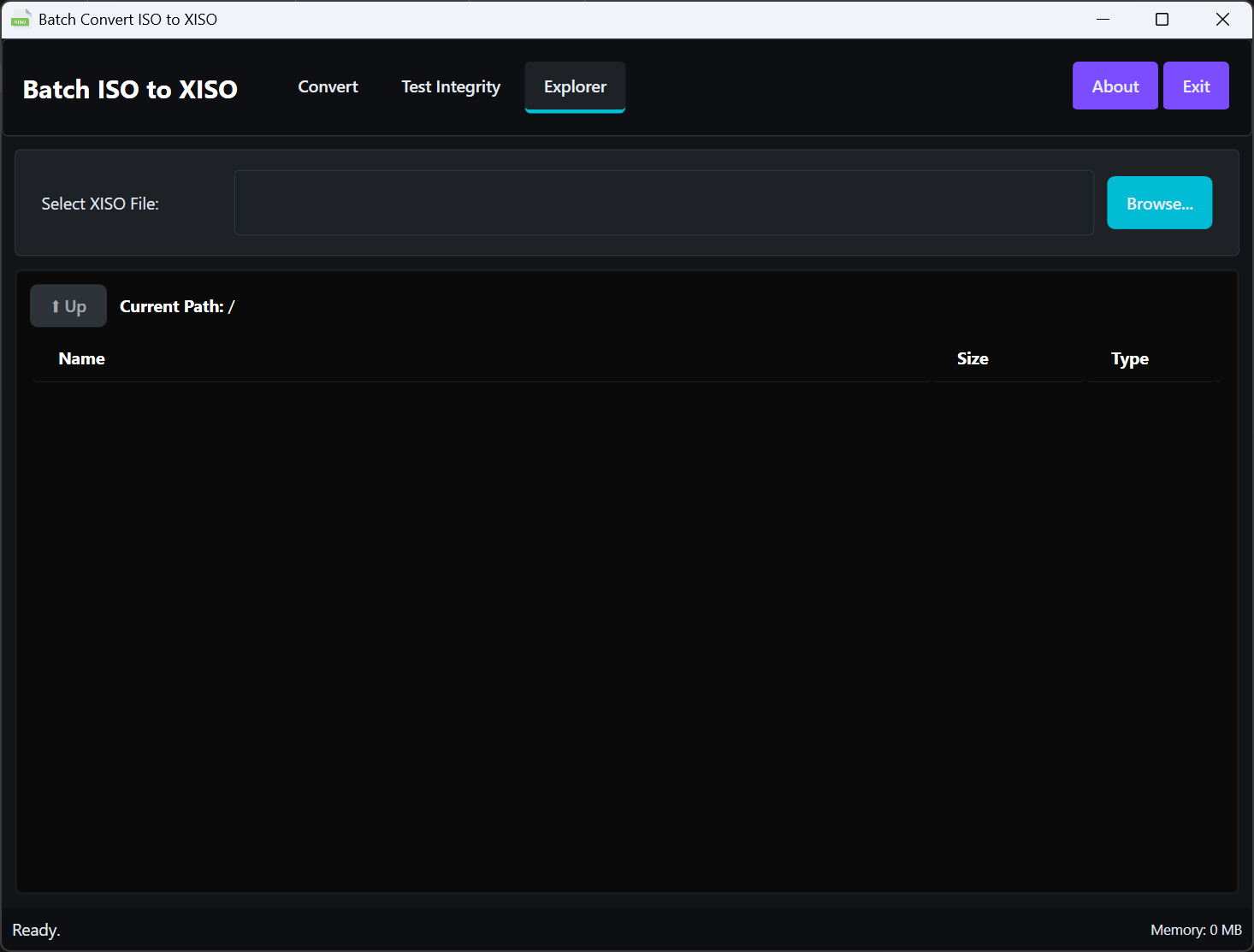
*XISO 文件浏览器*
## 许可证
该项目基于 GNU General Public License v3.0 授权 —— 有关详细信息,请参阅 [LICENSE.txt](LICENSE.txt) 文件。
⭐ 如果您觉得这个工具很有用,请在 GitHub 上给我们点个 Star! ⭐
标签:ISO转换, WPF, Xbox, 文件完整性校验