Aureliustics/CodeHS-Plus
GitHub: Aureliustics/CodeHS-Plus
CodeHS Plus 是一款 Tampermonkey 用户脚本,为 CodeHS 平台学生提供作业答案解密、沙盒链接管理和反作弊规避功能。
Stars: 6 | Forks: 1
CodeHS Plus
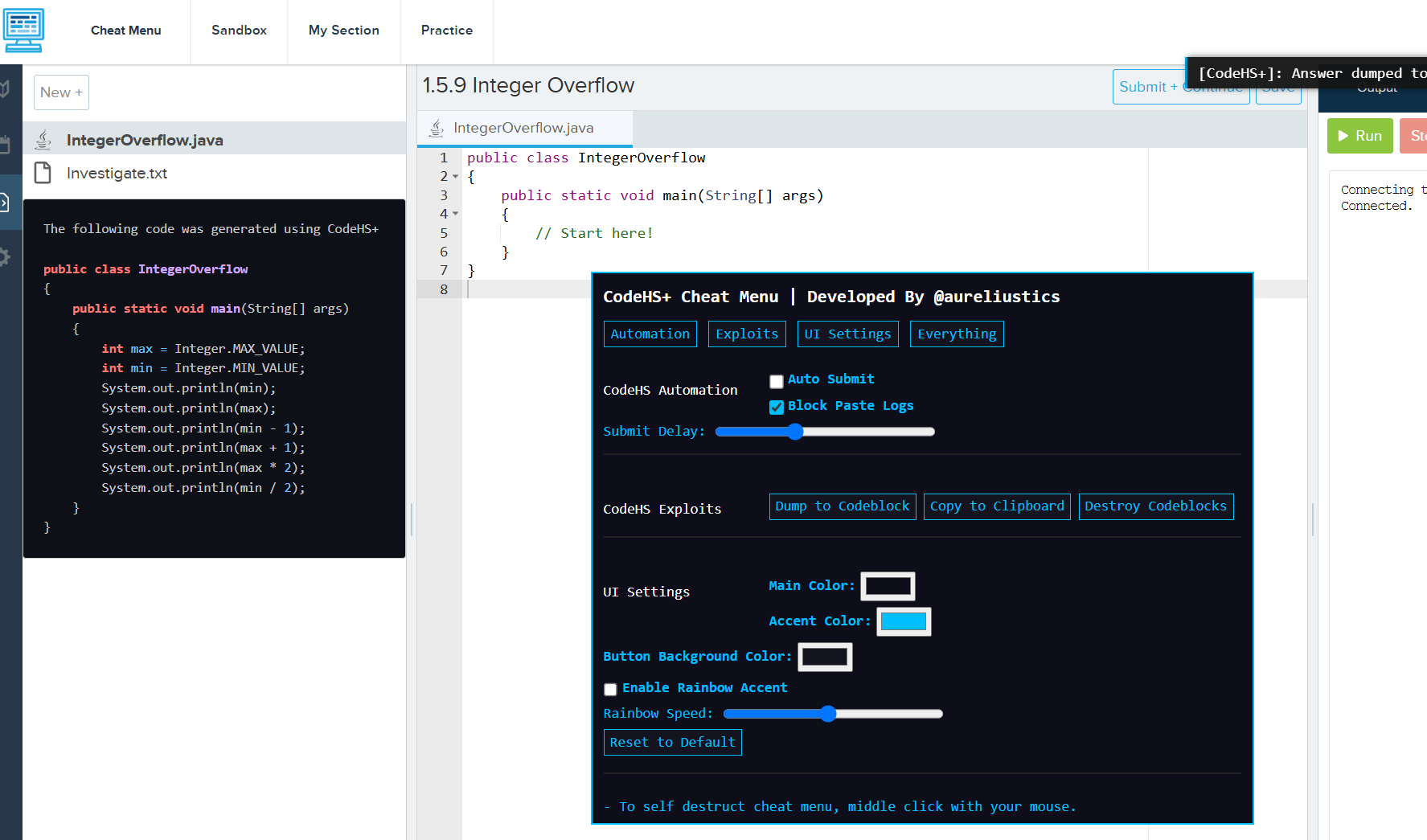

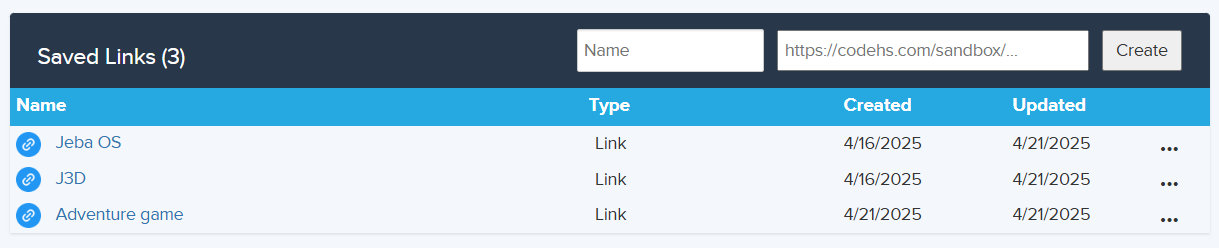
Adds general utility and quality of life to CodeHS. Currently the only features are saving sandbox links to collaborate on CodeHS easier, showing assignment answers in a codeblock or copying to clipboard, some color customization to the cheat menu, displaying the amount of time you spent in a sandbox. The cheat menu is built with stealth in mind. There is a self destruct button (middle click to activate) to destroy cheat menu and codeblock. This makes it harder to get caught by teachers. If you like this repository, a star would be greatly appreciated, thank you.
Installation
- If you just want to cheat on your assignments without installing anything:
- Copy the cheat menu script here, control + A then control + C on your keyboard
- Go to your CodeHS assignment and right click, click inspect then navigate to the "Console" at the top of inspect element
- Type "allow pasting" into the console then press enter
- Control + V to paste the cheat menu script then enter and you should have the cheat
- The only caveat with this installion method is you have to keep pasting the script into the console for every assignment or refresh, so its better to do method 2.
Method 1: Lazy
- You need the Tampermonkey extension for the cheat menu and misc CodeHS+ features to load automatically.
- Install Tampermonkey here
- Make sure you enabled developer mode in chrome extensions, and gave UserScript access to Tampermonkey (right click icon -> "Manage extension")
- Click on the Tampermonkey extensions icon once installed and press "Dashboard"
- Click the + icon to the left of "Installed Userscripts"
- If you want to have updates to come with your install (recommended), replace the initial code with the following: ``` // ==UserScript== // @name CodeHS+ // @namespace http://tampermonkey.net/ // @version 2.5 // @description Adds general utility and quality of life to CodeHS. // @author Aureliustics // @icon https://www.google.com/s2/favicons?sz=64&domain=codehs.com // @match https://codehs.com/sandbox* // @match https://codehs.com/student/*/section/*/assignment/* // @grant GM_setValue // @grant GM_getValue // @grant GM_xmlhttpRequest // @require https://raw.githubusercontent.com/Aureliustics/CodeHS-Plus/refs/heads/main/main.js // @resource CheatMenu data:application/json,{"stealth":false} // ==/UserScript== ```
- 如果你 不 希望在安装时附带更新,只需将此 脚本 粘贴到 tampermonkey 中即可。
- 前往 CodeHS 并确认脚本正在运行。你应该能在 Tampermonkey 图标上看到一个红色的 (1) 标志。
Method 2: Proper
使用说明
- 导航至 https://codehs.com/sandbox
- 创建、重命名、删除或复制你保存的沙盒的链接。
- 在做作业时,你应该能在左上角 CodeHS logo 旁边看到一个新按钮。
- 它被称为“作弊菜单”。点击它即可切换该菜单
- 当你在沙盒中时,它会实时显示你在其中花费的时间。此数据会自动保存并跨标签页同步。
已知 Bug
- 似乎代码块没有被创建。可能是因为 CodeHS 更改了他们的 UI(?),因为复制到剪贴板功能仍然正常。我会尽快修复,但现在实在太忙了。
- 如果作弊菜单或保存的链接 UI 没有显示,请刷新页面。这通常是因为 Tampermonkey 在子域名更改时不会重新注入。
- 你可能会注意到某些按钮和文本受到作弊菜单中 CSS 的影响,即它们会显示相同的颜色。这是一个很容易修复的问题,但并不严重,所以目前我可能会先搁置它。
免责声明
如果你因使用作弊功能被抓或在使用过程中发生任何损害,我概不负责。CodeHS 已经部署了反作弊措施,我无法保证该作弊工具完全不被检测到。标签:作弊工具, 教育辅助, 数字取证, 数据可视化, 浏览器扩展, 策略控制器, 自动化脚本, 自定义脚本