mandiant/flare-vm
GitHub: mandiant/flare-vm
一套基于 PowerShell、Chocolatey 和 Boxstarter 的 Windows 逆向工程环境一键部署方案,自动安装并配置大量行业主流的分析与调试工具。
Stars: 8760 | Forks: 1089
# FLARE-VM
欢迎使用 FLARE-VM —— 这是一个用于 Windows 系统的软件安装脚本集合,让您可以轻松地在虚拟机 (VM) 上设置和维护逆向工程环境。FLARE-VM 旨在解决逆向工程工具的筛选问题,并依赖于两项主要技术:[Chocolatey](https://chocolatey.org) 和 [Boxstarter](https://boxstarter.org)。Chocolatey 是一个基于 Windows 的 Nuget 包管理系统,其中“包”本质上是一个 ZIP 文件,包含用于下载和配置特定工具的 PowerShell 安装脚本。Boxstarter 利用 Chocolatey 包来自动化软件安装,并创建可重复、脚本化的 Windows 环境。
`
* 使用具有最小用户交互的纯 CLI 模式:`.\install.ps1 -password -noWait -noGui`
* 使用具有最小用户交互和自定义配置文件的纯 CLI 模式:`.\install.ps1 -customConfig -password -noWait -noGui`
* 安装完成后,建议切换到 `host-only` 网络模式并创建 VM 快照
#### 安装程序参数
以下是 CLI 参数说明。
```
PARAMETERS
-password
Current user password to allow reboot resiliency via Boxstarter. The script prompts for the password if not provided.
-noPassword []
Switch parameter indicating a password is not needed for reboots.
-customConfig
Path to a configuration XML file. May be a file path or URL.
-customLayout
Path to a taskbar layout XML file. May be a file path or URL.
-noWait []
Switch parameter to skip installation message before installation begins.
-noGui []
Switch parameter to skip customization GUI.
-noReboots []
Switch parameter to prevent reboots (not recommended).
-noChecks []
Switch parameter to skip validation checks (not recommended).
```
通过运行 `Get-Help .\install.ps1 -Detailed` 获取完整的用法信息。
#### 安装程序 GUI
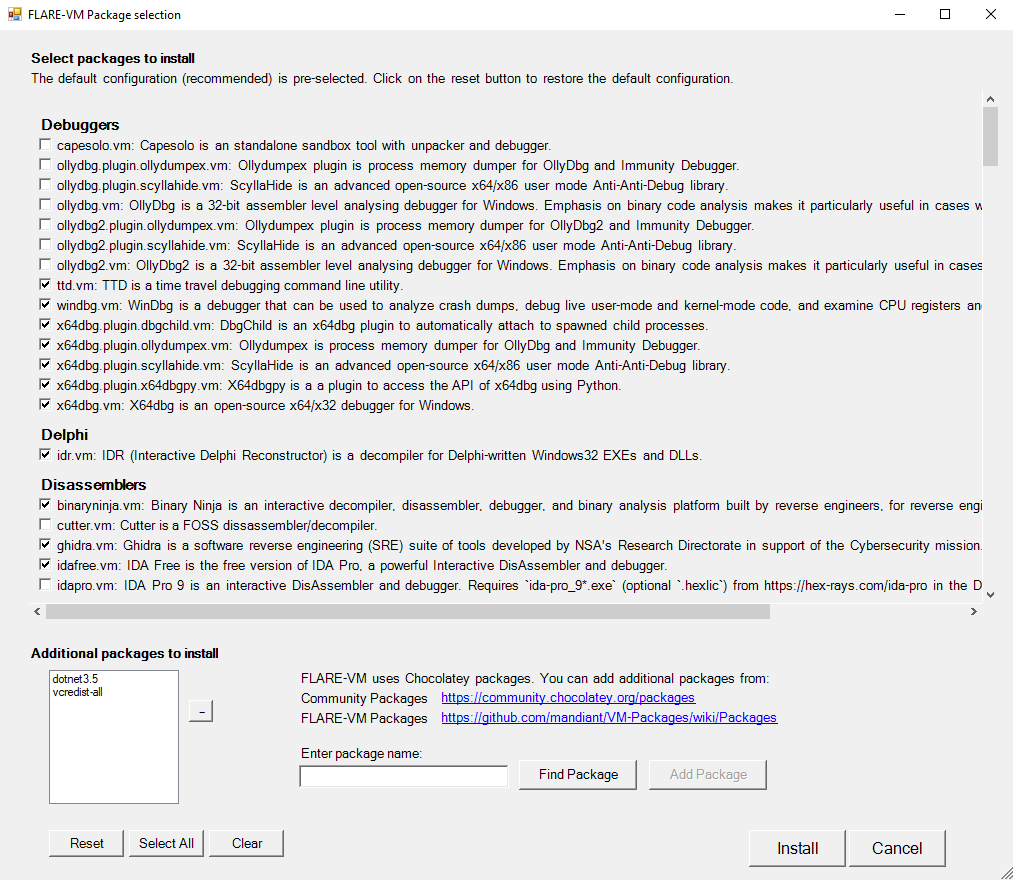
安装程序 GUI 在执行验证检查并安装 Boxstarter 和 Chocolatey(如果尚未安装)之后显示。
使用安装程序 GUI 您可以自定义:
* 从 FLARE-VM 和 Chocolatey 社区选择包
* 环境变量路径
#### 配置
安装程序将从 FLARE-VM 仓库下载 [`config.xml`](https://raw.githubusercontent.com/mandiant/flare-vm/main/config.xml)。此文件包含默认配置,包括要安装的包列表和环境变量路径。您可以通过指定 CLI 参数 `-customConfig` 并提供 `config.xml` 文件的本地路径或 URL 来使用您自己的配置。例如:
```
.\install.ps1 -customConfig "https://raw.githubusercontent.com/mandiant/flare-vm/main/config.xml"
```
#### 任务栏布局
安装程序将使用 FLARE-VM 仓库中的 [`CustomStartLayout.xml`](https://raw.githubusercontent.com/mandiant/flare-vm/main/CustomStartLayout.xml)。此文件包含默认的任务栏布局。您可以通过指定 CLI 参数 `-customLayout` 并提供 `CustomStartLayout.xml` 文件的本地路径或 URL 来使用您自己的配置。例如:
```
.\install.ps1 -customLayout "https://raw.githubusercontent.com/mandiant/flare-vm/main/CustomStartLayout.xml"
```
##### 注意事项:
- .xml 中未安装的项目不会显示在任务栏中(不会固定损坏的链接)
- 只有应用程序(`.exe` 文件)或应用程序的快捷方式才能被固定。
- 如果您想固定非应用程序的内容,请考虑创建一个指向 `cmd.exe` 或 `powershell` 的快捷方式,并提供执行所需操作的参数。
- 如果您想让某程序以管理员权限运行,请考虑使用 `VM-Install-Shortcut` 和 `-runAsAdmin` 标志创建快捷方式,并固定该快捷方式。
#### 安装后步骤
您可以在配置的 `apps`、`services`、`path-items`、`registry-items` 和 `custom-items` 标签内包含任何您喜欢的安装后步骤。
例如:
- 显示已知文件扩展名:
```
```
更多示例,请查看默认配置文件:[`config.xml`](https://raw.githubusercontent.com/mandiant/flare-vm/main/config.xml)。
## 贡献
- 查看我们的[贡献指南](/CONTRIBUTING.md)以了解如何为项目做出贡献。
## 故障排除
如果您的安装失败,请尝试通过阅读系统上列出的日志文件来确定安装错误的原因:
* `%VM_COMMON_DIR%\log.txt`
* `%PROGRAMDATA%\chocolatey\logs\chocolatey.log`
* `%LOCALAPPDATA%\Boxstarter\boxstarter.log`
确保您运行的是最新版本的 FLARE-VM 安装程序,并且您的 VM 满足[要求](#requirements)。
### 安装程序错误
如果安装由于安装脚本(例如 `install.ps1`)中的问题而失败,请[在 FLARE-VM 中报告错误](https://github.com/mandiant/flare-vm/issues/new?labels=%3Abug%3A+bug&template=bug.yml)。
提供所有请求的信息以确保我们能够帮助您。
### 包错误
包安装偶尔会失败 —— 这是正常的。最常见的原因如下:
1. Chocolatey 或 MyGet 下载 `.nupkg` 文件失败或超时
2. 从远程主机下载工具时失败或超时
3. 入侵检测系统 (IDS) 或杀毒软件(例如 Windows Defender)阻止工具下载或从系统中移除工具
4. 主机特定问题,例如使用未测试的版本
5. 由于依赖关系,工具构建失败
6. 工具 URL 过旧(例如 `HTTP STATUS 404`)
7. 工具的 SHA256 哈希值已更改为与包安装脚本中硬编码的值不同
原因 **1-4** 我们很难修复,因为我们无法控制它们。如果提交与原因 **1-4** 相关的问题,我们不太可能提供帮助。
我们可以帮助解决原因 **5-7**,也欢迎社区贡献修复方案!
请[在 VM-Packages 中报告错误](https://github.com/mandiant/VM-Packages/issues/new?labels=%3Abug%3A+bug&template=bug.yml),并提供所有请求的信息。
### 更新
请注意,包更新是尽力而为的,并且不对其进行测试。
如果您遇到错误,请执行全新的 FLARE-VM 安装。
### 邮件列表
订阅 FLARE 邮件列表以获取社区公告!发送包含 "subscribe" 的电子邮件至 [flare-external@google.com](mailto:flare-external@google.com?subject=subscribe)。
## 法律声明
标签:AD攻击面, AI合规, Boxstarter, Chocolatey, DAST, FireEye, FLARE-VM, IPv6, Libemu, Libemu, Libemu, OpenCanary, PowerShell, RFI远程文件包含, Windows 安全, 二进制分析, 云安全监控, 云安全运维, 云资产清单, 安全实验室, 安全工具集, 恶意软件分析, 漏洞分析, 特权提升, 环境配置, 自动化部署, 虚拟机环境, 路径探测, 逆向工程, 静态分析