dernasherbrezon/r2cloud
GitHub: dernasherbrezon/r2cloud
在树莓派等设备上自动跟踪并解码气象卫星、立方星等多种卫星无线电信号的开源地面站平台。
Stars: 305 | Forks: 31
## 关于 [](https://github.com/dernasherbrezon/r2cloud/actions/workflows/build.yml) [](https://sonarcloud.io/dashboard?id=ru.r2cloud%3Ar2cloud) [](https://github.com/dernasherbrezon/r2cloud/discussions)
r2cloud 可以跟踪并解码来自卫星的各种无线电信号,例如:
- APT (气象卫星)
- LRPT (气象卫星)
- Cubesats (FSK, BPSK, QPSK, AFSK, AX.25, AX100 等)
- LoRa
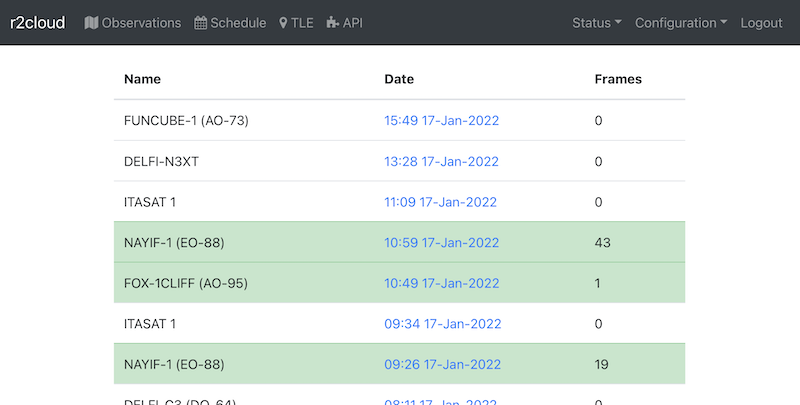
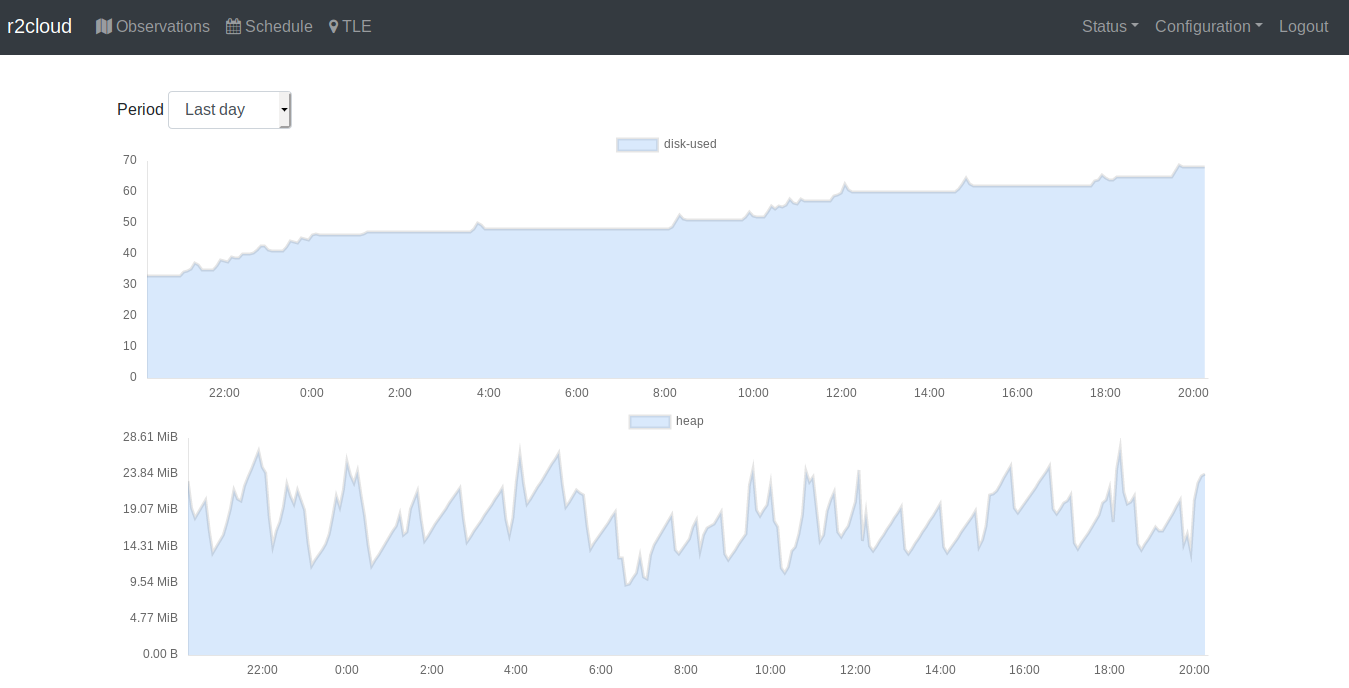
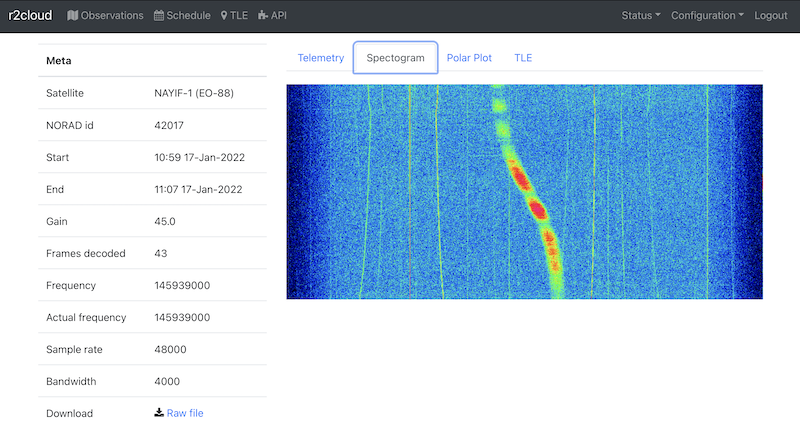
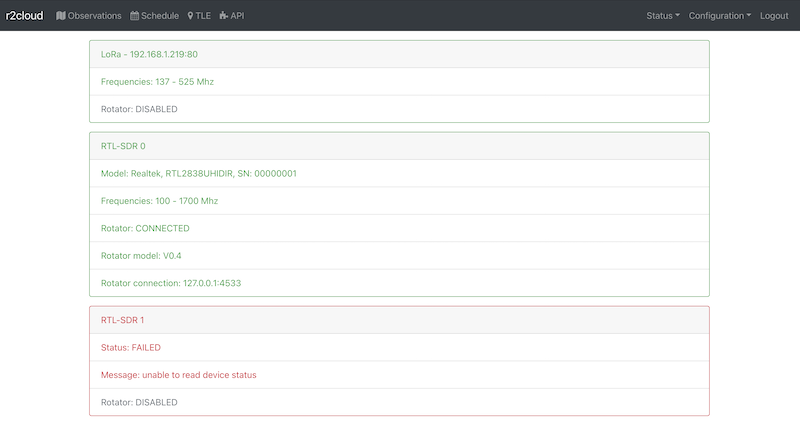
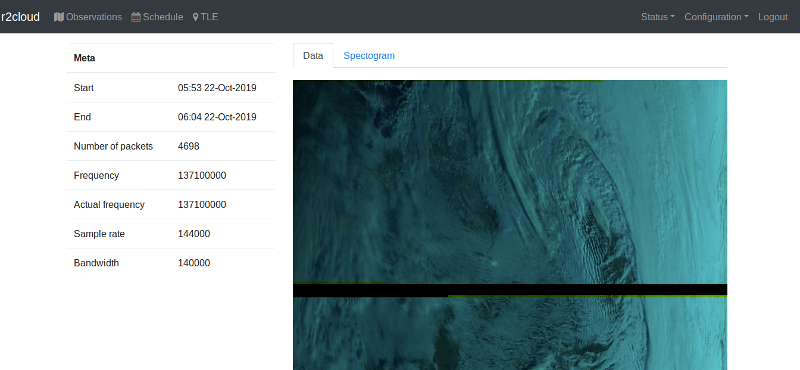
## 截图 ([r2cloud-ui](https://github.com/dernasherbrezon/r2cloud-ui))
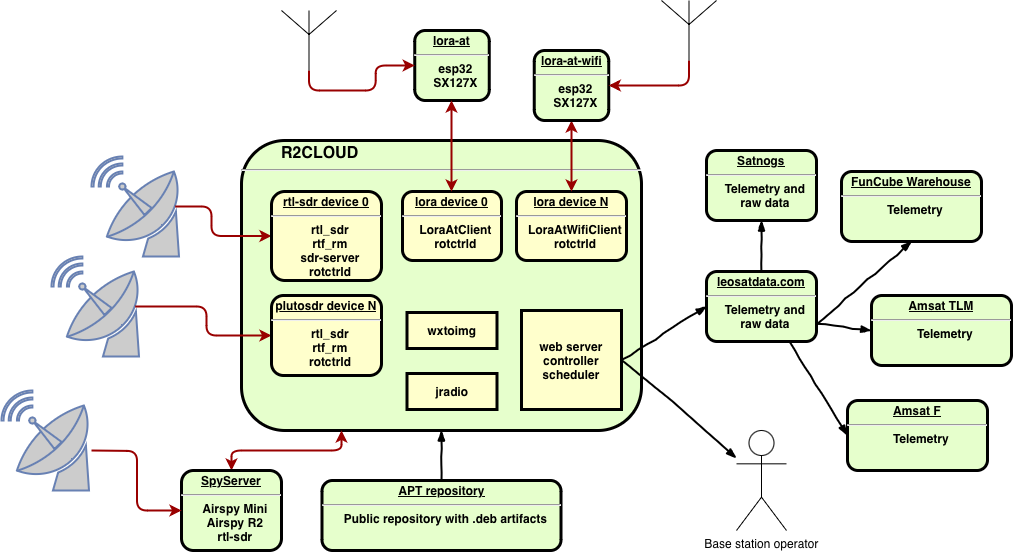
 ## 架构图
## 主要功能
- r2cloud 了解数百颗卫星、它们的轨道、无线电信道和通信协议
- 它可以自动为选定的卫星安排观测
- 一旦卫星进入天线范围,r2cloud 将接收信号,保存并解码
- 解码后的数据将显示在 UI 上,或转发到中央数据仓库进行分析
详细功能可在 [文档](https://github.com/dernasherbrezon/r2cloud/wiki/Features) 中找到。
## 硬件
需要以下硬件:
- 天线
- SDR 接收机
- 基于 *nix 的计算机
请查看推荐的 [物料清单](https://github.com/dernasherbrezon/r2cloud/wiki/Bill-of-materials)。这是一个非常基础的设置,但保证可以正常工作。
## 软件
1. 安装 r2cloud
- 从镜像安装。这是在 Raspberry PI 上安装 r2cloud 最简单的方法。它需要一张全新的 SD 卡:
- 下载 [最新](http://apt.leosatdata.com/dist/image_2025-10-31-r2cloud-lite.zip) 的官方镜像
- 将 SD 卡插入读卡器并刷入镜像。您可以使用 [Raspberry PI Imager](https://www.raspberrypi.com/software/) 或 [Etcher](https://etcher.io) 来完成此操作
- 将 SD 卡插入读卡器,并在根目录下创建 ```r2cloud.txt``` 文件。此文件应包含任意随机字符串。此字符串是登录令牌。此令牌将在初始设置期间使用。
- 或者从 [仓库二进制文件](https://leosatdata.com/apt.html) 安装。适用于 Ubuntu 或 Debian:
- 通过 SSH 登录并在 /boot 目录下创建 ```r2cloud.txt``` 文件。此文件应包含任意随机文本。此文本是登录令牌。此令牌随后将在初始设置期间使用。
- 执行以下命令:
```
sudo apt-get install curl lsb-release
curl -fsSL https://leosatdata.com/r2cloud.gpg.key | sudo gpg --dearmor -o /usr/share/keyrings/r2cloud.gpg
sudo bash -c "echo 'deb [signed-by=/usr/share/keyrings/r2cloud.gpg] http://apt.leosatdata.com $(lsb_release --codename --short) main' > /etc/apt/sources.list.d/r2cloud.list"
sudo apt-get update
sudo apt-get install r2cloud
```
2. 打开 [https://raspberrypi.local](https://raspberrypi.local) 地址。
3. 接受自签名证书。这是安装期间生成的唯一证书。
## 接下来做什么?
1. 配置站点
2. 根据频率/个人偏好选择要观测的卫星
3. 等待进行数次观测
4. 使用“频谱图”功能和帧数分析结果。帧数越多越好!
5. 调整软件配置和硬件设置以获得更好的性能
6. 安装旋转器以最大化信号强度
7. 设置额外的 LNA 或带通滤波器
8. 帮助追踪 [刚发射的卫星](https://github.com/dernasherbrezon/r2cloud/wiki/Tracking-newly-launched-satellites)
9. 使用 [leosatdata.com](https://leosatdata.com) 集成与社区 [共享数据](https://github.com/dernasherbrezon/r2cloud/wiki/LEOSatData)
## 贡献
请阅读我们的 [指南](https://github.com/dernasherbrezon/r2cloud/wiki/Contribution)。
## 联系方式
请在 Twitter 上关注 [@r2cloud1](https://twitter.com/r2cloud1) 以获取最新更新,或在 [github discussions](https://github.com/dernasherbrezon/r2cloud/discussions) 中加入讨论。
## 故障排除指南
常见错误已汇总在 [故障排除指南](https://github.com/dernasherbrezon/r2cloud/wiki/Troubleshooting-guide) 中。
## 架构图

## 主要功能
- r2cloud 了解数百颗卫星、它们的轨道、无线电信道和通信协议
- 它可以自动为选定的卫星安排观测
- 一旦卫星进入天线范围,r2cloud 将接收信号,保存并解码
- 解码后的数据将显示在 UI 上,或转发到中央数据仓库进行分析
详细功能可在 [文档](https://github.com/dernasherbrezon/r2cloud/wiki/Features) 中找到。
## 硬件
需要以下硬件:
- 天线
- SDR 接收机
- 基于 *nix 的计算机
请查看推荐的 [物料清单](https://github.com/dernasherbrezon/r2cloud/wiki/Bill-of-materials)。这是一个非常基础的设置,但保证可以正常工作。
## 软件
1. 安装 r2cloud
- 从镜像安装。这是在 Raspberry PI 上安装 r2cloud 最简单的方法。它需要一张全新的 SD 卡:
- 下载 [最新](http://apt.leosatdata.com/dist/image_2025-10-31-r2cloud-lite.zip) 的官方镜像
- 将 SD 卡插入读卡器并刷入镜像。您可以使用 [Raspberry PI Imager](https://www.raspberrypi.com/software/) 或 [Etcher](https://etcher.io) 来完成此操作
- 将 SD 卡插入读卡器,并在根目录下创建 ```r2cloud.txt``` 文件。此文件应包含任意随机字符串。此字符串是登录令牌。此令牌将在初始设置期间使用。
- 或者从 [仓库二进制文件](https://leosatdata.com/apt.html) 安装。适用于 Ubuntu 或 Debian:
- 通过 SSH 登录并在 /boot 目录下创建 ```r2cloud.txt``` 文件。此文件应包含任意随机文本。此文本是登录令牌。此令牌随后将在初始设置期间使用。
- 执行以下命令:
```
sudo apt-get install curl lsb-release
curl -fsSL https://leosatdata.com/r2cloud.gpg.key | sudo gpg --dearmor -o /usr/share/keyrings/r2cloud.gpg
sudo bash -c "echo 'deb [signed-by=/usr/share/keyrings/r2cloud.gpg] http://apt.leosatdata.com $(lsb_release --codename --short) main' > /etc/apt/sources.list.d/r2cloud.list"
sudo apt-get update
sudo apt-get install r2cloud
```
2. 打开 [https://raspberrypi.local](https://raspberrypi.local) 地址。
3. 接受自签名证书。这是安装期间生成的唯一证书。
## 接下来做什么?
1. 配置站点
2. 根据频率/个人偏好选择要观测的卫星
3. 等待进行数次观测
4. 使用“频谱图”功能和帧数分析结果。帧数越多越好!
5. 调整软件配置和硬件设置以获得更好的性能
6. 安装旋转器以最大化信号强度
7. 设置额外的 LNA 或带通滤波器
8. 帮助追踪 [刚发射的卫星](https://github.com/dernasherbrezon/r2cloud/wiki/Tracking-newly-launched-satellites)
9. 使用 [leosatdata.com](https://leosatdata.com) 集成与社区 [共享数据](https://github.com/dernasherbrezon/r2cloud/wiki/LEOSatData)
## 贡献
请阅读我们的 [指南](https://github.com/dernasherbrezon/r2cloud/wiki/Contribution)。
## 联系方式
请在 Twitter 上关注 [@r2cloud1](https://twitter.com/r2cloud1) 以获取最新更新,或在 [github discussions](https://github.com/dernasherbrezon/r2cloud/discussions) 中加入讨论。
## 故障排除指南
常见错误已汇总在 [故障排除指南](https://github.com/dernasherbrezon/r2cloud/wiki/Troubleshooting-guide) 中。
## 架构图

## 主要功能
- r2cloud 了解数百颗卫星、它们的轨道、无线电信道和通信协议
- 它可以自动为选定的卫星安排观测
- 一旦卫星进入天线范围,r2cloud 将接收信号,保存并解码
- 解码后的数据将显示在 UI 上,或转发到中央数据仓库进行分析
详细功能可在 [文档](https://github.com/dernasherbrezon/r2cloud/wiki/Features) 中找到。
## 硬件
需要以下硬件:
- 天线
- SDR 接收机
- 基于 *nix 的计算机
请查看推荐的 [物料清单](https://github.com/dernasherbrezon/r2cloud/wiki/Bill-of-materials)。这是一个非常基础的设置,但保证可以正常工作。
## 软件
1. 安装 r2cloud
- 从镜像安装。这是在 Raspberry PI 上安装 r2cloud 最简单的方法。它需要一张全新的 SD 卡:
- 下载 [最新](http://apt.leosatdata.com/dist/image_2025-10-31-r2cloud-lite.zip) 的官方镜像
- 将 SD 卡插入读卡器并刷入镜像。您可以使用 [Raspberry PI Imager](https://www.raspberrypi.com/software/) 或 [Etcher](https://etcher.io) 来完成此操作
- 将 SD 卡插入读卡器,并在根目录下创建 ```r2cloud.txt``` 文件。此文件应包含任意随机字符串。此字符串是登录令牌。此令牌将在初始设置期间使用。
- 或者从 [仓库二进制文件](https://leosatdata.com/apt.html) 安装。适用于 Ubuntu 或 Debian:
- 通过 SSH 登录并在 /boot 目录下创建 ```r2cloud.txt``` 文件。此文件应包含任意随机文本。此文本是登录令牌。此令牌随后将在初始设置期间使用。
- 执行以下命令:
```
sudo apt-get install curl lsb-release
curl -fsSL https://leosatdata.com/r2cloud.gpg.key | sudo gpg --dearmor -o /usr/share/keyrings/r2cloud.gpg
sudo bash -c "echo 'deb [signed-by=/usr/share/keyrings/r2cloud.gpg] http://apt.leosatdata.com $(lsb_release --codename --short) main' > /etc/apt/sources.list.d/r2cloud.list"
sudo apt-get update
sudo apt-get install r2cloud
```
2. 打开 [https://raspberrypi.local](https://raspberrypi.local) 地址。
3. 接受自签名证书。这是安装期间生成的唯一证书。
## 接下来做什么?
1. 配置站点
2. 根据频率/个人偏好选择要观测的卫星
3. 等待进行数次观测
4. 使用“频谱图”功能和帧数分析结果。帧数越多越好!
5. 调整软件配置和硬件设置以获得更好的性能
6. 安装旋转器以最大化信号强度
7. 设置额外的 LNA 或带通滤波器
8. 帮助追踪 [刚发射的卫星](https://github.com/dernasherbrezon/r2cloud/wiki/Tracking-newly-launched-satellites)
9. 使用 [leosatdata.com](https://leosatdata.com) 集成与社区 [共享数据](https://github.com/dernasherbrezon/r2cloud/wiki/LEOSatData)
## 贡献
请阅读我们的 [指南](https://github.com/dernasherbrezon/r2cloud/wiki/Contribution)。
## 联系方式
请在 Twitter 上关注 [@r2cloud1](https://twitter.com/r2cloud1) 以获取最新更新,或在 [github discussions](https://github.com/dernasherbrezon/r2cloud/discussions) 中加入讨论。
## 故障排除指南
常见错误已汇总在 [故障排除指南](https://github.com/dernasherbrezon/r2cloud/wiki/Troubleshooting-guide) 中。标签:AFSK, APT, AX.25, BPSK, FSK, JS文件枚举, LoRa, LRPT, QPSK, SDR, 业余无线电, 信号处理, 信号解码, 卫星通信, 域名枚举, 域名枚举, 域名枚举, 天基通信, 嵌入式系统, 开源硬件, 数据接收, 无线电追踪, 气象卫星, 立方星, 自动化观测, 软件定义无线电