samanhappy/mcphub
GitHub: samanhappy/mcphub
一个集中管理和灵活路由多个 MCP 服务器的统一平台,通过 HTTP/SSE 端点为 AI 客户端提供统一接入。
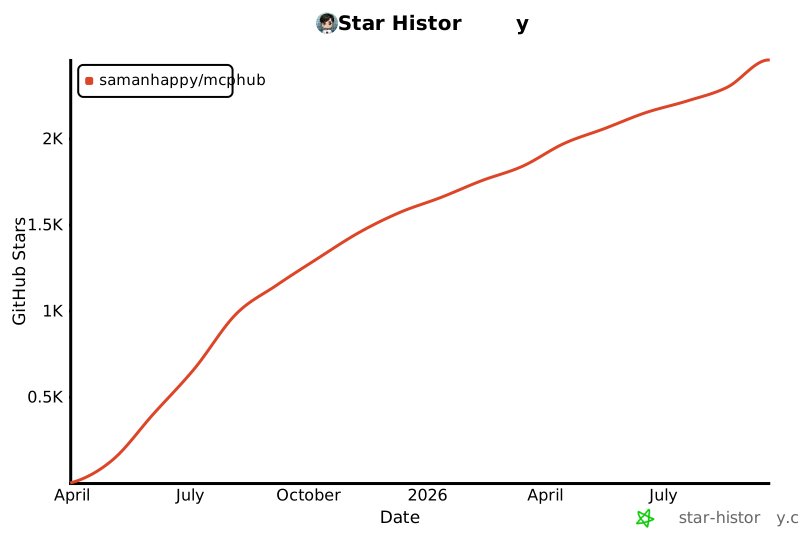
Stars: 2234 | Forks: 271
# MCPHub: Model Context Protocol (MCP) 服务器的统一中心
English | [Français](README.fr.md) | [中文版](README.zh.md)
MCPHub 通过将多个 MCP (Model Context Protocol) 服务器组织为灵活的 Streamable HTTP (SSE) 端点,使得管理和扩展它们变得轻而易举——支持访问所有服务器、单个服务器或逻辑服务器组。
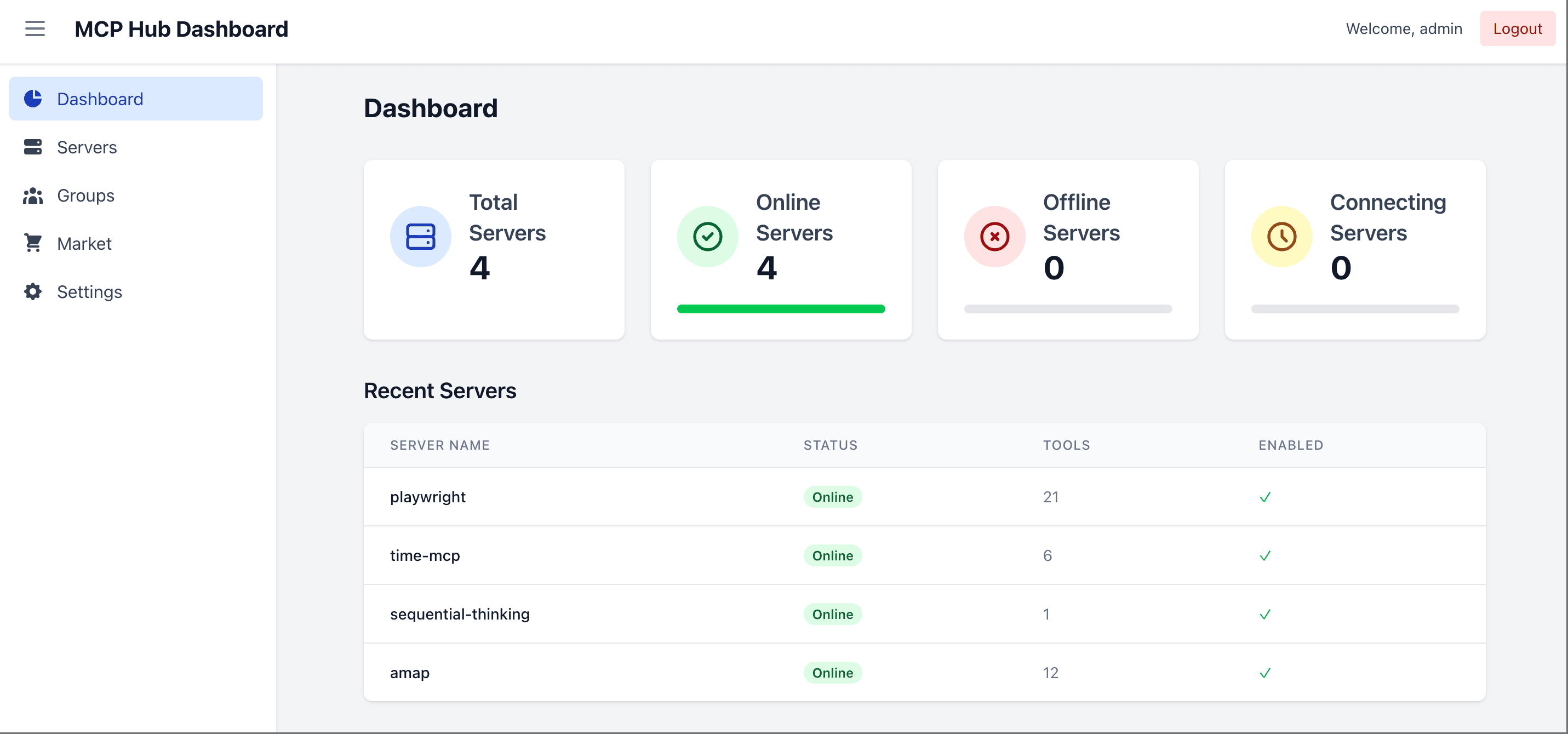
## 🌐 在线演示与文档
- **文档**: [docs.mcphub.app](https://docs.mcphub.app/)
- **演示环境**: [demo.mcphub.app](https://demo.mcphub.app/)
## 🚀 功能特性
- **集中管理** - 从统一的仪表盘监控和控制所有 MCP 服务器
- **灵活路由** - 通过 HTTP/SSE 访问所有服务器、特定分组或单个服务器
- **精细的分组可见性** - 为组内的每个服务器独立控制 Tool、Prompt 和 Resource 的可见性
- **智能路由** - 使用向量语义搜索进行 AI 驱动的工具发现 ([了解更多](https://docs.mcphub.app/features/smart-routing))
- **热更新配置** - 无需停机即可添加、移除或更新服务器
- **OAuth 2.0 支持** - 提供客户端和服务器双模式以进行安全身份验证 ([了解更多](https://docs.mcphub.app/features/oauth))
- **社交登录** - 通过 Better Auth 集成无缝支持 GitHub 和 Google 登录(需要 Database Mode)
- **Database Mode** - 在 PostgreSQL 中存储配置以用于生产环境 ([了解更多](https://docs.mcphub.app/configuration/database-configuration))
- **Docker 就绪** - 使用容器化配置即时部署
## 🔧 快速入门
### 配置
创建一个 `mcp_settings.json` 文件:
```
{
"mcpServers": {
"time": {
"command": "npx",
"args": ["-y", "time-mcp"]
},
"fetch": {
"command": "uvx",
"args": ["mcp-server-fetch"]
}
}
}
```
📖 请参阅 [配置指南](https://docs.mcphub.app/configuration/mcp-settings) 获取包括 OAuth、环境变量等在内的完整选项。
### Docker 部署
```
# 使用自定义配置运行(推荐)
docker run -p 3000:3000 -v ./mcp_settings.json:/app/mcp_settings.json -v ./data:/app/data samanhappy/mcphub
# 或使用默认设置运行
docker run -p 3000:3000 samanhappy/mcphub
```
### 访问仪表盘
打开 `http://localhost:3000` 并使用用户名 `admin` 登录。首次启动时,如果未设置 `ADMIN_PASSWORD` 环境变量,系统将生成随机密码并打印在服务器日志中。您也可以预先设置密码:
```
# Docker: 通过环境变量设置管理员密码
docker run -p 3000:3000 -e ADMIN_PASSWORD=your-secure-password samanhappy/mcphub
```
### 连接 AI 客户端
通过以下方式连接 AI 客户端 (Claude Desktop、Cursor 等):
```
http://localhost:3000/mcp # All servers
http://localhost:3000/mcp/{group} # Specific group
http://localhost:3000/mcp/{server} # Specific server
http://localhost:3000/mcp/$smart # Smart routing
http://localhost:3000/mcp/$smart/{group} # Smart routing within group
```
📖 有关详细的端点文档,请参阅 [API 参考](https://docs.mcphub.app/api-reference)。
## 📚 文档
| 主题 | 描述 |
| ------------------------------------------------------------------------------ | --------------------------------- |
| [快速入门](https://docs.mcphub.app/quickstart) | 5 分钟内开始使用 |
| [配置说明](https://docs.mcphub.app/configuration/mcp-settings) | MCP 服务器配置选项 |
| [Database Mode](https://docs.mcphub.app/configuration/database-configuration) | 面向生产环境的 PostgreSQL 设置 |
| [OAuth](https://docs.mcphub.app/features/oauth) | OAuth 2.0 客户端和服务器设置 |
| [智能路由](https://docs.mcphub.app/features/smart-routing) | AI 驱动的工具发现 |
| [Docker 设置](https://docs.mcphub.app/configuration/docker-setup) | Docker 部署指南 |
## 🧑💻 本地开发
```
git clone https://github.com/samanhappy/mcphub.git
cd mcphub
pnpm install
pnpm dev
```
📖 请参阅 [开发指南](https://docs.mcphub.app/development) 了解详细的设置说明。
## 🔍 技术栈
- **后端**: Node.js, Express, TypeScript
- **前端**: React, Vite, Tailwind CSS
- **身份验证**: JWT & bcrypt
- **协议**: Model Context Protocol SDK
## 🌟 Star 历史
[](https://www.star-history.com/#samanhappy/mcphub&Date)
## 📄 许可证
根据 [Apache 2.0 许可证](LICENSE) 授权。
标签:AI Agent基础设施, AI中间件, API编排, API网关, CISA项目, DNS解析, Docker, LLM工具管理, MCP服务器管理, MCP网关, MITM代理, Model Context Protocol, OAuth 2.0, PostgreSQL, SSE, Streamable HTTP, 动态路由, 向量搜索, 大模型工具调用, 安全防御评估, 工具聚合, 开源项目, 微服务网关, 智能路由, 服务器集群, 测试用例, 热重载配置, 网关管理面板, 自动化攻击, 语义路由, 请求拦截, 负载均衡