humanlayer/12-factor-agents
GitHub: humanlayer/12-factor-agents
这是一套构建可靠 LLM 应用的十二要素方法论,借鉴12-Factor Apps思想,指导开发者以软件工程最佳实践打造生产级 AI Agent。
Stars: 24485 | Forks: 1861
# 12-Factor Agents - 构建可靠 LLM 应用的原则



-white)
 *灵感来源于 [12 Factor Apps](https://12factor.net/)*。*本项目的源代码公开在 https://github.com/humanlayer/12-factor-agents,欢迎您的反馈和贡献。让我们一起探索!*
 大家好,我是 Dex。我在 [AI agents](https://theouterloop.substack.com) 领域已经 [折腾](https://youtu.be/8bIHcttkOTE) 了 [一段时间](https://humanlayer.dev)。
**我尝试了市面上所有的 agent 框架**,从即插即用的 crew/langchains,到"极简主义"的 smolagents,再到号称"生产级"的 langraph、griptape 等。
**我与很多非常优秀的创始人交流过**,包括 YC 内外的,他们都在用 AI 构建令人印象深刻的产品。他们中的大多数人都在自己搭建技术栈。我在生产环境的客户-facing agent 中并没有看到太多框架的身影。
**令我惊讶的是**,市面上大多数标榜为"AI Agents"的产品其实并没有那么 agentic。它们大多只是确定性代码,在恰到好处的节点撒上 LLM 步骤,让体验变得真正神奇。
Agents,至少优秀的那些,并不遵循["这是你的 prompt,这是一袋工具,循环直到达成目标"](https://www.anthropic.com/engineering/building-effective-agents#agents) 的模式。相反,它们主要由普通软件构成。
所以,我开始着手回答:
欢迎来到 12-factor agents。正如戴利之后每一位芝加哥市长都会在城市主要机场铺天盖地展示的那样,我们很高兴您来到这里。
## 精简版:12 个要素
即使 LLM [继续呈指数级变得更强大](https://github.com/humanlayer/12-factor-agents/blob/main/content/factor-10-small-focused-agents.md#what-if-llms-get-smarter),仍然会有一些核心技术让 LLM 驱动的软件更可靠、更可扩展、更易维护。
- [我们如何走到这里:软件简史](https://github.com/humanlayer/12-factor-agents/blob/main/content/brief-history-of-software.md)
- [要素 1:自然语言转换为工具调用](https://github.com/humanlayer/12-factor-agents/blob/main/content/factor-01-natural-language-to-tool-calls.md)
- [要素 2:掌控你的 prompt](https://github.com/humanlayer/12-factor-agents/blob/main/content/factor-02-own-your-prompts.md)
- [要素 3:掌控你的上下文窗口](https://github.com/humanlayer/12-factor-agents/blob/main/content/factor-03-own-your-context-window.md)
- [要素 4:工具就是结构化输出](https://github.com/humanlayer/12-factor-agents/blob/main/content/factor-04-tools-are-structured-outputs.md)
- [要素 5:统一执行状态与业务状态](https://github.com/humanlayer/12-factor-agents/blob/main/content/factor-05-unify-execution-state.md)
- [要素 6:通过简单的 API 启动/暂停/恢复](https://github.com/humanlayer/12-factor-agents/blob/main/content/factor-06-launch-pause-resume.md)
- [要素 7:通过工具调用联系人类](https://github.com/humanlayer/12-factor-agents/blob/main/content/factor-07-contact-humans-with-tools.md)
- [要素 8:掌控你的控制流](https://github.com/humanlayer/12-factor-agents/blob/main/content/factor-08-own-your-control-flow.md)
- [要素 9:将错误压缩到上下文窗口中](https://github.com/humanlayer/12-factor-agents/blob/main/content/factor-09-compact-errors.md)
- [要素 10:小型、专注的 Agent](https://github.com/humanlayer/12-factor-agents/blob/main/content/factor-10-small-focused-agents.md)
- [要素 11:从任何地方触发,在用户所在之处触达他们](https://github.com/humanlayer/12-factor-agents/blob/main/content/factor-11-trigger-from-anywhere.md)
- [要素 12:让你的 agent 成为无状态 reducer](https://github.com/humanlayer/12-factor-agents/blob/main/content/factor-12-stateless-reducer.md)
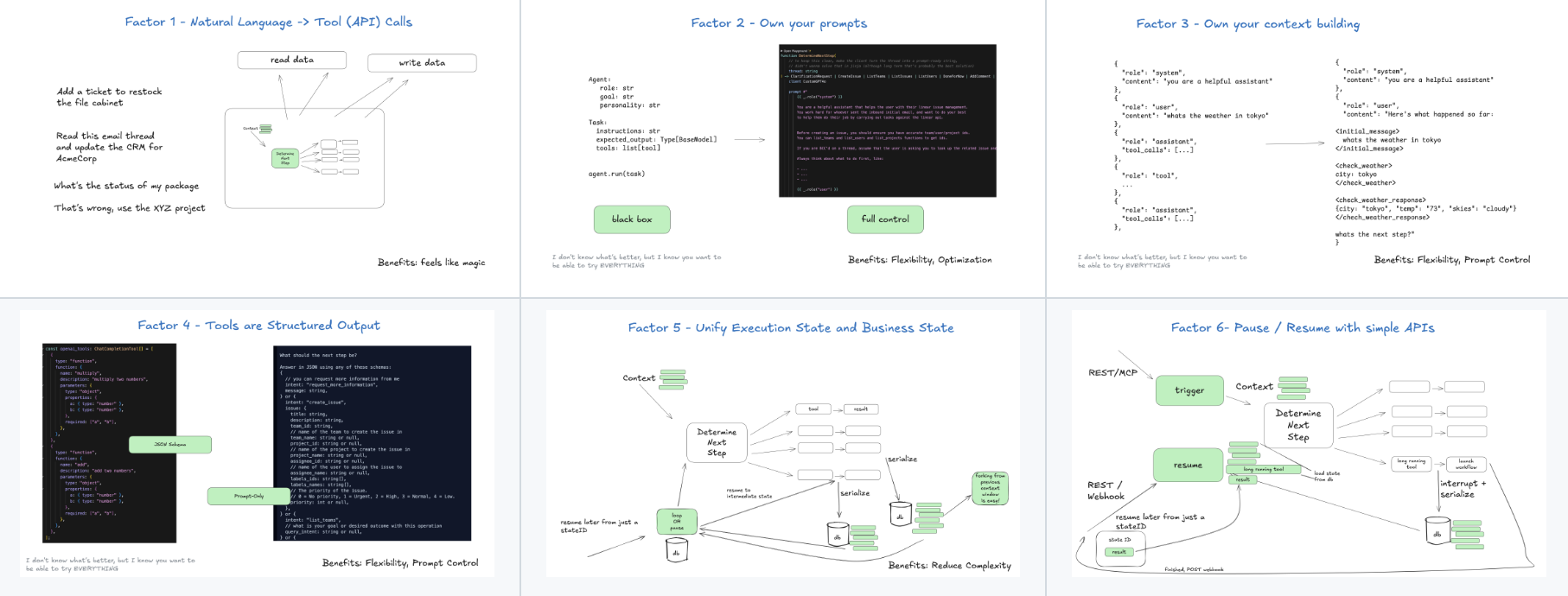
### 可视化导航
| | | |
|----|----|-----|
|[](https://github.com/humanlayer/12-factor-agents/blob/main/content/factor-01-natural-language-to-tool-calls.md) | [](https://github.com/humanlayer/12-factor-agents/blob/main/content/factor-02-own-your-prompts.md) | [](https://github.com/humanlayer/12-factor-agents/blob/main/content/factor-03-own-your-context-window.md) |
|[](https://github.com/humanlayer/12-factor-agents/blob/main/content/factor-04-tools-are-structured-outputs.md) | [](https://github.com/humanlayer/12-factor-agents/blob/main/content/factor-05-unify-execution-state.md) | [](https://github.com/humanlayer/12-factor-agents/blob/main/content/factor-06-launch-pause-resume.md) |
| [](https://github.com/humanlayer/12-factor-agents/blob/main/content/factor-07-contact-humans-with-tools.md) | [](https://github.com/humanlayer/12-factor-agents/blob/main/content/factor-08-own-your-control-flow.md) | [](https://github.com/humanlayer/12-factor-agents/blob/main/content/factor-09-compact-errors.md) |
| [](https://github.com/humanlayer/12-factor-agents/blob/main/content/factor-10-small-focused-agents.md) | [](https://github.com/humanlayer/12-factor-agents/blob/main/content/factor-11-trigger-from-anywhere.md) | [](https://github.com/humanlayer/12-factor-agents/blob/main/content/factor-12-stateless-reducer.md) |
## 我们如何走到这里
关于我的 agent 历程以及是什么引导我们走到这里的更深入探讨,请查看 [软件简史](https://github.com/humanlayer/12-factor-agents/blob/main/content/brief-history-of-software.md) - 以下是简要总结:
### Agent 的承诺
我们会大量讨论有向图(DGs)及其无环版本 DAGs。我想首先指出……嗯……软件就是有向图。我们曾经用流程图来表示程序是有原因的。

### 从代码到 DAG
大约 20 年前,DAG 编排器开始流行起来。我们说的是经典如 [Airflow](https://airflow.apache.org/)、[Prefect](https://www.prefect.io/),一些先驱,以及一些较新的如 ([dagster](https://dagster.io/)、[inggest](https://www.inngest.com/)、[windmill](https://www.windmill.dev/)。它们都遵循相同的图模式,并增加了可观测性、模块化、重试、管理等优势。

### Agent 的承诺
我不是 [第一个这么说的人](https://youtu.be/Dc99-zTMyMg?si=bcT0hIwWij2mR-40&t=73),但我开始学习 agent 时最大的收获是:你可以把 DAG 扔掉了。软件工程师不再需要编码每个步骤和边缘情况,你可以给 agent 一个目标和一组转换:

让 LLM 实时做出决策来找出路径

这里的承诺是你写更少的软件,只需给 LLM 提供图的"边",让它自己找出"节点"。你可以从错误中恢复,可以写更少的代码,而且你可能会发现 LLM 能找到问题的新颖解决方案。
### Agent 即循环
正如我们稍后会看到的,这并不太奏效。
让我们深入一步——使用 agent,你有一个由 3 步组成的循环:
1. LLM 确定工作流中的下一步,输出结构化 json("工具调用")
2. 确定性代码执行工具调用
3. 结果被追加到上下文窗口
4. 重复直到下一步被确定为"完成"
```
initial_event = {"message": "..."}
context = [initial_event]
while True:
next_step = await llm.determine_next_step(context)
context.append(next_step)
if (next_step.intent === "done"):
return next_step.final_answer
result = await execute_step(next_step)
context.append(result)
```
我们的初始上下文只是起始事件(可能是用户消息,可能是 cron 触发,可能是 webhook 等),我们要求 llm 选择下一步(工具)或确定我们已完成。
这是一个多步骤示例:
[](https://github.com/user-attachments/assets/3beb0966-fdb1-4c12-a47f-ed4e8240f8fd)
## 为什么是 12-factor agents?
归根结底,这种方法并不像我们希望的那样有效。
在构建 HumanLayer 的过程中,我与至少 100 位 SaaS 构建者(主要是技术创始人)交流过,他们都在寻求让自己的现有产品更加 agentic。旅程通常是这样的:
1. 决定要构建一个 agent
2. 产品设计,UX 映射,确定要解决什么问题
3. 想要快速行动,所以拿来 $FRAMEWORK 然后*开始构建*
4. 达到 70-80% 的质量标准
5. 意识到 80% 对大多数客户-facing 功能来说不够好
6. 意识到要突破 80% 需要逆向工程框架、prompt、流程等
7. 从头开始
## 优秀 LLM 应用的设计模式
在深入研究了数百个 AI 库并与数十位创始人合作后,我的直觉是:
1. 有一些核心要素让 agent 变得优秀
2. 全力投入一个框架并构建本质上是全新重写的东西可能适得其反
3. 有一些核心原则让 agent 变得优秀,如果你引入一个框架,你就能获得大部分/全部这些原则
4. 但是,我所看到的让构建者将高质量 AI 软件交到客户手中的最快方法,是从 agent 构建中提取小型、模块化的概念,并将它们融入现有产品中
5. 这些来自 agent 的模块化概念可以由大多数有经验的软件工程师来定义和应用,即使他们没有 AI 背景
## 12 个要素(再次列出)
- [我们如何走到这里:软件简史](https://github.com/humanlayer/12-factor-agents/blob/main/content/brief-history-of-software.md)
- [要素 1:自然语言转换为工具调用](https://github.com/humanlayer/12-factor-agents/blob/main/content/factor-01-natural-language-to-tool-calls.md)
- [要素 2:掌控你的 prompt](https://github.com/humanlayer/12-factor-agents/blob/main/content/factor-02-own-your-prompts.md)
- [要素 3:掌控你的上下文窗口](https://github.com/humanlayer/12-factor-agents/blob/main/content/factor-03-own-your-context-window.md)
- [要素 4:工具就是结构化输出](https://github.com/humanlayer/12-factor-agents/blob/main/content/factor-04-tools-are-structured-outputs.md)
- [要素 5:统一执行状态与业务状态](https://github.com/humanlayer/12-factor-agents/blob/main/content/factor-05-unify-execution-state.md)
- [要素 6:通过简单的 API 启动/暂停/恢复](https://github.com/humanlayer/12-factor-agents/blob/main/content/factor-06-launch-pause-resume.md)
- [要素 7:通过工具调用联系人类](https://github.com/humanlayer/12-factor-agents/blob/main/content/factor-07-contact-humans-with-tools.md)
- [要素 8:掌控你的控制流](https://github.com/humanlayer/12-factor-agents/blob/main/content/factor-08-own-your-control-flow.md)
- [要素 9:将错误压缩到上下文窗口中](https://github.com/humanlayer/12-factor-agents/blob/main/content/factor-09-compact-errors.md)
- [要素 10:小型、专注的 Agent](https://github.com/humanlayer/12-factor-agents/blob/main/content/factor-10-small-focused-agents.md)
- [要素 11:从任何地方触发,在用户所在之处触达他们](https://github.com/humanlayer/12-factor-agents/blob/main/content/factor-11-trigger-from-anywhere.md)
- [要素 12:让你的 agent 成为无状态 reducer](https://github.com/humanlayer/12-factor-agents/blob/main/content/factor-12-stateless-reducer.md)
## 荣誉提名 / 其他建议
- [要素 13:预取你可能需要的所有上下文](https://github.com/humanlayer/12-factor-agents/blob/main/content/appendix-13-pre-fetch.md)
## 相关资源
- 在 [此处](https://github.com/humanlayer/12-factor-agents) 为本指南贡献内容
- 我在 2025 年 3 月的 Tool Use 播客 [一集中讨论了很多这些内容](https://youtu.be/8bIHcttkOTE)
- 我在 [The Outer Loop](https://theouterloop.substack.com) 撰写一些相关内容
- 我与 [@hellovai](https://github.com/hellovai) 一起做了关于 [最大化 LLM 性能](https://github.com/hellovai/ai-that-works/tree/main) 的 webinar
- 我们用这个方法论在 [got-agents/agents](https://github.com/got-agents/agents) 下构建 OSS agent
- 我们无视了自己的建议,构建了一个 [在 kubernetes 中运行分布式 agent 的框架](https://github.com/humanlayer/kubechain)
- 本指南中的其他链接:
- [12 Factor Apps](https://12factor.net)
- [Building Effective Agents (Anthropic)](https://www.anthropic.com/engineering/building-effective-agents#agents)
- [Prompts are Functions](https://thedataexchange.media/baml-revolution-in-ai-engineering/ )
- [Library patterns: Why frameworks are evil](https://tomasp.net/blog/2015/library-frameworks/)
- [The Wrong Abstraction](https://sandimetz.com/blog/2016/1/20/the-wrong-abstraction)
- [Mailcrew Agent](https://github.com/dexhorthy/mailcrew)
- [Mailcrew Demo Video](https://www.youtube.com/watch?v=f_cKnoPC_Oo)
- [Chainlit Demo](https://x.com/chainlit_io/status/1858613325921480922)
- [TypeScript for LLMs](https://www.linkedin.com/posts/dexterihorthy_llms-typescript-aiagents-activity-7290858296679313408-Lh9e)
- [Schema Aligned Parsing](https://www.boundaryml.com/blog/schema-aligned-parsing)
- [Function Calling vs Structured Outputs vs JSON Mode](https://www.vellum.ai/blog/when-should-i-use-function-calling-structured-outputs-or-json-mode)
- [BAML on GitHub](https://github.com/boundaryml/baml)
- [OpenAI JSON vs Function Calling](https://docs.llamaindex.ai/en/stable/examples/llm/openai_json_vs_function_calling/)
- [Outer Loop Agents](https://theouterloop.substack.com/p/openais-realtime-api-is-a-step-towards)
- [Airflow](https://airflow.apache.org/)
- [Prefect](https://www.prefect.io/)
- [Dagster](https://dagster.io/)
- [Inngest](https://www.inngest.com/)
- [Windmill](https://www.windmill.dev/)
- [The AI Agent Index (MIT)](https://aiagentindex.mit.edu/)
- [NotebookLM on Finding Model Capability Boundaries](https://open.substack.com/pub/swyx/p/notebooklm?selection=08e1187c-cfee-4c63-93c9-71216640a5f8)
## 许可证
所有内容和图片均采用 CC BY-SA 4.0 许可证
代码采用 Apache 2.0 许可证
大家好,我是 Dex。我在 [AI agents](https://theouterloop.substack.com) 领域已经 [折腾](https://youtu.be/8bIHcttkOTE) 了 [一段时间](https://humanlayer.dev)。
**我尝试了市面上所有的 agent 框架**,从即插即用的 crew/langchains,到"极简主义"的 smolagents,再到号称"生产级"的 langraph、griptape 等。
**我与很多非常优秀的创始人交流过**,包括 YC 内外的,他们都在用 AI 构建令人印象深刻的产品。他们中的大多数人都在自己搭建技术栈。我在生产环境的客户-facing agent 中并没有看到太多框架的身影。
**令我惊讶的是**,市面上大多数标榜为"AI Agents"的产品其实并没有那么 agentic。它们大多只是确定性代码,在恰到好处的节点撒上 LLM 步骤,让体验变得真正神奇。
Agents,至少优秀的那些,并不遵循["这是你的 prompt,这是一袋工具,循环直到达成目标"](https://www.anthropic.com/engineering/building-effective-agents#agents) 的模式。相反,它们主要由普通软件构成。
所以,我开始着手回答:
欢迎来到 12-factor agents。正如戴利之后每一位芝加哥市长都会在城市主要机场铺天盖地展示的那样,我们很高兴您来到这里。
## 精简版:12 个要素
即使 LLM [继续呈指数级变得更强大](https://github.com/humanlayer/12-factor-agents/blob/main/content/factor-10-small-focused-agents.md#what-if-llms-get-smarter),仍然会有一些核心技术让 LLM 驱动的软件更可靠、更可扩展、更易维护。
- [我们如何走到这里:软件简史](https://github.com/humanlayer/12-factor-agents/blob/main/content/brief-history-of-software.md)
- [要素 1:自然语言转换为工具调用](https://github.com/humanlayer/12-factor-agents/blob/main/content/factor-01-natural-language-to-tool-calls.md)
- [要素 2:掌控你的 prompt](https://github.com/humanlayer/12-factor-agents/blob/main/content/factor-02-own-your-prompts.md)
- [要素 3:掌控你的上下文窗口](https://github.com/humanlayer/12-factor-agents/blob/main/content/factor-03-own-your-context-window.md)
- [要素 4:工具就是结构化输出](https://github.com/humanlayer/12-factor-agents/blob/main/content/factor-04-tools-are-structured-outputs.md)
- [要素 5:统一执行状态与业务状态](https://github.com/humanlayer/12-factor-agents/blob/main/content/factor-05-unify-execution-state.md)
- [要素 6:通过简单的 API 启动/暂停/恢复](https://github.com/humanlayer/12-factor-agents/blob/main/content/factor-06-launch-pause-resume.md)
- [要素 7:通过工具调用联系人类](https://github.com/humanlayer/12-factor-agents/blob/main/content/factor-07-contact-humans-with-tools.md)
- [要素 8:掌控你的控制流](https://github.com/humanlayer/12-factor-agents/blob/main/content/factor-08-own-your-control-flow.md)
- [要素 9:将错误压缩到上下文窗口中](https://github.com/humanlayer/12-factor-agents/blob/main/content/factor-09-compact-errors.md)
- [要素 10:小型、专注的 Agent](https://github.com/humanlayer/12-factor-agents/blob/main/content/factor-10-small-focused-agents.md)
- [要素 11:从任何地方触发,在用户所在之处触达他们](https://github.com/humanlayer/12-factor-agents/blob/main/content/factor-11-trigger-from-anywhere.md)
- [要素 12:让你的 agent 成为无状态 reducer](https://github.com/humanlayer/12-factor-agents/blob/main/content/factor-12-stateless-reducer.md)
### 可视化导航
| | | |
|----|----|-----|
|[](https://github.com/humanlayer/12-factor-agents/blob/main/content/factor-01-natural-language-to-tool-calls.md) | [](https://github.com/humanlayer/12-factor-agents/blob/main/content/factor-02-own-your-prompts.md) | [](https://github.com/humanlayer/12-factor-agents/blob/main/content/factor-03-own-your-context-window.md) |
|[](https://github.com/humanlayer/12-factor-agents/blob/main/content/factor-04-tools-are-structured-outputs.md) | [](https://github.com/humanlayer/12-factor-agents/blob/main/content/factor-05-unify-execution-state.md) | [](https://github.com/humanlayer/12-factor-agents/blob/main/content/factor-06-launch-pause-resume.md) |
| [](https://github.com/humanlayer/12-factor-agents/blob/main/content/factor-07-contact-humans-with-tools.md) | [](https://github.com/humanlayer/12-factor-agents/blob/main/content/factor-08-own-your-control-flow.md) | [](https://github.com/humanlayer/12-factor-agents/blob/main/content/factor-09-compact-errors.md) |
| [](https://github.com/humanlayer/12-factor-agents/blob/main/content/factor-10-small-focused-agents.md) | [](https://github.com/humanlayer/12-factor-agents/blob/main/content/factor-11-trigger-from-anywhere.md) | [](https://github.com/humanlayer/12-factor-agents/blob/main/content/factor-12-stateless-reducer.md) |
## 我们如何走到这里
关于我的 agent 历程以及是什么引导我们走到这里的更深入探讨,请查看 [软件简史](https://github.com/humanlayer/12-factor-agents/blob/main/content/brief-history-of-software.md) - 以下是简要总结:
### Agent 的承诺
我们会大量讨论有向图(DGs)及其无环版本 DAGs。我想首先指出……嗯……软件就是有向图。我们曾经用流程图来表示程序是有原因的。

### 从代码到 DAG
大约 20 年前,DAG 编排器开始流行起来。我们说的是经典如 [Airflow](https://airflow.apache.org/)、[Prefect](https://www.prefect.io/),一些先驱,以及一些较新的如 ([dagster](https://dagster.io/)、[inggest](https://www.inngest.com/)、[windmill](https://www.windmill.dev/)。它们都遵循相同的图模式,并增加了可观测性、模块化、重试、管理等优势。

### Agent 的承诺
我不是 [第一个这么说的人](https://youtu.be/Dc99-zTMyMg?si=bcT0hIwWij2mR-40&t=73),但我开始学习 agent 时最大的收获是:你可以把 DAG 扔掉了。软件工程师不再需要编码每个步骤和边缘情况,你可以给 agent 一个目标和一组转换:

让 LLM 实时做出决策来找出路径

这里的承诺是你写更少的软件,只需给 LLM 提供图的"边",让它自己找出"节点"。你可以从错误中恢复,可以写更少的代码,而且你可能会发现 LLM 能找到问题的新颖解决方案。
### Agent 即循环
正如我们稍后会看到的,这并不太奏效。
让我们深入一步——使用 agent,你有一个由 3 步组成的循环:
1. LLM 确定工作流中的下一步,输出结构化 json("工具调用")
2. 确定性代码执行工具调用
3. 结果被追加到上下文窗口
4. 重复直到下一步被确定为"完成"
```
initial_event = {"message": "..."}
context = [initial_event]
while True:
next_step = await llm.determine_next_step(context)
context.append(next_step)
if (next_step.intent === "done"):
return next_step.final_answer
result = await execute_step(next_step)
context.append(result)
```
我们的初始上下文只是起始事件(可能是用户消息,可能是 cron 触发,可能是 webhook 等),我们要求 llm 选择下一步(工具)或确定我们已完成。
这是一个多步骤示例:
[](https://github.com/user-attachments/assets/3beb0966-fdb1-4c12-a47f-ed4e8240f8fd)
## 为什么是 12-factor agents?
归根结底,这种方法并不像我们希望的那样有效。
在构建 HumanLayer 的过程中,我与至少 100 位 SaaS 构建者(主要是技术创始人)交流过,他们都在寻求让自己的现有产品更加 agentic。旅程通常是这样的:
1. 决定要构建一个 agent
2. 产品设计,UX 映射,确定要解决什么问题
3. 想要快速行动,所以拿来 $FRAMEWORK 然后*开始构建*
4. 达到 70-80% 的质量标准
5. 意识到 80% 对大多数客户-facing 功能来说不够好
6. 意识到要突破 80% 需要逆向工程框架、prompt、流程等
7. 从头开始
## 优秀 LLM 应用的设计模式
在深入研究了数百个 AI 库并与数十位创始人合作后,我的直觉是:
1. 有一些核心要素让 agent 变得优秀
2. 全力投入一个框架并构建本质上是全新重写的东西可能适得其反
3. 有一些核心原则让 agent 变得优秀,如果你引入一个框架,你就能获得大部分/全部这些原则
4. 但是,我所看到的让构建者将高质量 AI 软件交到客户手中的最快方法,是从 agent 构建中提取小型、模块化的概念,并将它们融入现有产品中
5. 这些来自 agent 的模块化概念可以由大多数有经验的软件工程师来定义和应用,即使他们没有 AI 背景
## 12 个要素(再次列出)
- [我们如何走到这里:软件简史](https://github.com/humanlayer/12-factor-agents/blob/main/content/brief-history-of-software.md)
- [要素 1:自然语言转换为工具调用](https://github.com/humanlayer/12-factor-agents/blob/main/content/factor-01-natural-language-to-tool-calls.md)
- [要素 2:掌控你的 prompt](https://github.com/humanlayer/12-factor-agents/blob/main/content/factor-02-own-your-prompts.md)
- [要素 3:掌控你的上下文窗口](https://github.com/humanlayer/12-factor-agents/blob/main/content/factor-03-own-your-context-window.md)
- [要素 4:工具就是结构化输出](https://github.com/humanlayer/12-factor-agents/blob/main/content/factor-04-tools-are-structured-outputs.md)
- [要素 5:统一执行状态与业务状态](https://github.com/humanlayer/12-factor-agents/blob/main/content/factor-05-unify-execution-state.md)
- [要素 6:通过简单的 API 启动/暂停/恢复](https://github.com/humanlayer/12-factor-agents/blob/main/content/factor-06-launch-pause-resume.md)
- [要素 7:通过工具调用联系人类](https://github.com/humanlayer/12-factor-agents/blob/main/content/factor-07-contact-humans-with-tools.md)
- [要素 8:掌控你的控制流](https://github.com/humanlayer/12-factor-agents/blob/main/content/factor-08-own-your-control-flow.md)
- [要素 9:将错误压缩到上下文窗口中](https://github.com/humanlayer/12-factor-agents/blob/main/content/factor-09-compact-errors.md)
- [要素 10:小型、专注的 Agent](https://github.com/humanlayer/12-factor-agents/blob/main/content/factor-10-small-focused-agents.md)
- [要素 11:从任何地方触发,在用户所在之处触达他们](https://github.com/humanlayer/12-factor-agents/blob/main/content/factor-11-trigger-from-anywhere.md)
- [要素 12:让你的 agent 成为无状态 reducer](https://github.com/humanlayer/12-factor-agents/blob/main/content/factor-12-stateless-reducer.md)
## 荣誉提名 / 其他建议
- [要素 13:预取你可能需要的所有上下文](https://github.com/humanlayer/12-factor-agents/blob/main/content/appendix-13-pre-fetch.md)
## 相关资源
- 在 [此处](https://github.com/humanlayer/12-factor-agents) 为本指南贡献内容
- 我在 2025 年 3 月的 Tool Use 播客 [一集中讨论了很多这些内容](https://youtu.be/8bIHcttkOTE)
- 我在 [The Outer Loop](https://theouterloop.substack.com) 撰写一些相关内容
- 我与 [@hellovai](https://github.com/hellovai) 一起做了关于 [最大化 LLM 性能](https://github.com/hellovai/ai-that-works/tree/main) 的 webinar
- 我们用这个方法论在 [got-agents/agents](https://github.com/got-agents/agents) 下构建 OSS agent
- 我们无视了自己的建议,构建了一个 [在 kubernetes 中运行分布式 agent 的框架](https://github.com/humanlayer/kubechain)
- 本指南中的其他链接:
- [12 Factor Apps](https://12factor.net)
- [Building Effective Agents (Anthropic)](https://www.anthropic.com/engineering/building-effective-agents#agents)
- [Prompts are Functions](https://thedataexchange.media/baml-revolution-in-ai-engineering/ )
- [Library patterns: Why frameworks are evil](https://tomasp.net/blog/2015/library-frameworks/)
- [The Wrong Abstraction](https://sandimetz.com/blog/2016/1/20/the-wrong-abstraction)
- [Mailcrew Agent](https://github.com/dexhorthy/mailcrew)
- [Mailcrew Demo Video](https://www.youtube.com/watch?v=f_cKnoPC_Oo)
- [Chainlit Demo](https://x.com/chainlit_io/status/1858613325921480922)
- [TypeScript for LLMs](https://www.linkedin.com/posts/dexterihorthy_llms-typescript-aiagents-activity-7290858296679313408-Lh9e)
- [Schema Aligned Parsing](https://www.boundaryml.com/blog/schema-aligned-parsing)
- [Function Calling vs Structured Outputs vs JSON Mode](https://www.vellum.ai/blog/when-should-i-use-function-calling-structured-outputs-or-json-mode)
- [BAML on GitHub](https://github.com/boundaryml/baml)
- [OpenAI JSON vs Function Calling](https://docs.llamaindex.ai/en/stable/examples/llm/openai_json_vs_function_calling/)
- [Outer Loop Agents](https://theouterloop.substack.com/p/openais-realtime-api-is-a-step-towards)
- [Airflow](https://airflow.apache.org/)
- [Prefect](https://www.prefect.io/)
- [Dagster](https://dagster.io/)
- [Inngest](https://www.inngest.com/)
- [Windmill](https://www.windmill.dev/)
- [The AI Agent Index (MIT)](https://aiagentindex.mit.edu/)
- [NotebookLM on Finding Model Capability Boundaries](https://open.substack.com/pub/swyx/p/notebooklm?selection=08e1187c-cfee-4c63-93c9-71216640a5f8)
## 许可证
所有内容和图片均采用 CC BY-SA 4.0 许可证
代码采用 Apache 2.0 许可证
大家好,我是 Dex。我在 [AI agents](https://theouterloop.substack.com) 领域已经 [折腾](https://youtu.be/8bIHcttkOTE) 了 [一段时间](https://humanlayer.dev)。
**我尝试了市面上所有的 agent 框架**,从即插即用的 crew/langchains,到"极简主义"的 smolagents,再到号称"生产级"的 langraph、griptape 等。
**我与很多非常优秀的创始人交流过**,包括 YC 内外的,他们都在用 AI 构建令人印象深刻的产品。他们中的大多数人都在自己搭建技术栈。我在生产环境的客户-facing agent 中并没有看到太多框架的身影。
**令我惊讶的是**,市面上大多数标榜为"AI Agents"的产品其实并没有那么 agentic。它们大多只是确定性代码,在恰到好处的节点撒上 LLM 步骤,让体验变得真正神奇。
Agents,至少优秀的那些,并不遵循["这是你的 prompt,这是一袋工具,循环直到达成目标"](https://www.anthropic.com/engineering/building-effective-agents#agents) 的模式。相反,它们主要由普通软件构成。
所以,我开始着手回答:
欢迎来到 12-factor agents。正如戴利之后每一位芝加哥市长都会在城市主要机场铺天盖地展示的那样,我们很高兴您来到这里。
## 精简版:12 个要素
即使 LLM [继续呈指数级变得更强大](https://github.com/humanlayer/12-factor-agents/blob/main/content/factor-10-small-focused-agents.md#what-if-llms-get-smarter),仍然会有一些核心技术让 LLM 驱动的软件更可靠、更可扩展、更易维护。
- [我们如何走到这里:软件简史](https://github.com/humanlayer/12-factor-agents/blob/main/content/brief-history-of-software.md)
- [要素 1:自然语言转换为工具调用](https://github.com/humanlayer/12-factor-agents/blob/main/content/factor-01-natural-language-to-tool-calls.md)
- [要素 2:掌控你的 prompt](https://github.com/humanlayer/12-factor-agents/blob/main/content/factor-02-own-your-prompts.md)
- [要素 3:掌控你的上下文窗口](https://github.com/humanlayer/12-factor-agents/blob/main/content/factor-03-own-your-context-window.md)
- [要素 4:工具就是结构化输出](https://github.com/humanlayer/12-factor-agents/blob/main/content/factor-04-tools-are-structured-outputs.md)
- [要素 5:统一执行状态与业务状态](https://github.com/humanlayer/12-factor-agents/blob/main/content/factor-05-unify-execution-state.md)
- [要素 6:通过简单的 API 启动/暂停/恢复](https://github.com/humanlayer/12-factor-agents/blob/main/content/factor-06-launch-pause-resume.md)
- [要素 7:通过工具调用联系人类](https://github.com/humanlayer/12-factor-agents/blob/main/content/factor-07-contact-humans-with-tools.md)
- [要素 8:掌控你的控制流](https://github.com/humanlayer/12-factor-agents/blob/main/content/factor-08-own-your-control-flow.md)
- [要素 9:将错误压缩到上下文窗口中](https://github.com/humanlayer/12-factor-agents/blob/main/content/factor-09-compact-errors.md)
- [要素 10:小型、专注的 Agent](https://github.com/humanlayer/12-factor-agents/blob/main/content/factor-10-small-focused-agents.md)
- [要素 11:从任何地方触发,在用户所在之处触达他们](https://github.com/humanlayer/12-factor-agents/blob/main/content/factor-11-trigger-from-anywhere.md)
- [要素 12:让你的 agent 成为无状态 reducer](https://github.com/humanlayer/12-factor-agents/blob/main/content/factor-12-stateless-reducer.md)
### 可视化导航
| | | |
|----|----|-----|
|[](https://github.com/humanlayer/12-factor-agents/blob/main/content/factor-01-natural-language-to-tool-calls.md) | [](https://github.com/humanlayer/12-factor-agents/blob/main/content/factor-02-own-your-prompts.md) | [](https://github.com/humanlayer/12-factor-agents/blob/main/content/factor-03-own-your-context-window.md) |
|[](https://github.com/humanlayer/12-factor-agents/blob/main/content/factor-04-tools-are-structured-outputs.md) | [](https://github.com/humanlayer/12-factor-agents/blob/main/content/factor-05-unify-execution-state.md) | [](https://github.com/humanlayer/12-factor-agents/blob/main/content/factor-06-launch-pause-resume.md) |
| [](https://github.com/humanlayer/12-factor-agents/blob/main/content/factor-07-contact-humans-with-tools.md) | [](https://github.com/humanlayer/12-factor-agents/blob/main/content/factor-08-own-your-control-flow.md) | [](https://github.com/humanlayer/12-factor-agents/blob/main/content/factor-09-compact-errors.md) |
| [](https://github.com/humanlayer/12-factor-agents/blob/main/content/factor-10-small-focused-agents.md) | [](https://github.com/humanlayer/12-factor-agents/blob/main/content/factor-11-trigger-from-anywhere.md) | [](https://github.com/humanlayer/12-factor-agents/blob/main/content/factor-12-stateless-reducer.md) |
## 我们如何走到这里
关于我的 agent 历程以及是什么引导我们走到这里的更深入探讨,请查看 [软件简史](https://github.com/humanlayer/12-factor-agents/blob/main/content/brief-history-of-software.md) - 以下是简要总结:
### Agent 的承诺
我们会大量讨论有向图(DGs)及其无环版本 DAGs。我想首先指出……嗯……软件就是有向图。我们曾经用流程图来表示程序是有原因的。

### 从代码到 DAG
大约 20 年前,DAG 编排器开始流行起来。我们说的是经典如 [Airflow](https://airflow.apache.org/)、[Prefect](https://www.prefect.io/),一些先驱,以及一些较新的如 ([dagster](https://dagster.io/)、[inggest](https://www.inngest.com/)、[windmill](https://www.windmill.dev/)。它们都遵循相同的图模式,并增加了可观测性、模块化、重试、管理等优势。

### Agent 的承诺
我不是 [第一个这么说的人](https://youtu.be/Dc99-zTMyMg?si=bcT0hIwWij2mR-40&t=73),但我开始学习 agent 时最大的收获是:你可以把 DAG 扔掉了。软件工程师不再需要编码每个步骤和边缘情况,你可以给 agent 一个目标和一组转换:

让 LLM 实时做出决策来找出路径

这里的承诺是你写更少的软件,只需给 LLM 提供图的"边",让它自己找出"节点"。你可以从错误中恢复,可以写更少的代码,而且你可能会发现 LLM 能找到问题的新颖解决方案。
### Agent 即循环
正如我们稍后会看到的,这并不太奏效。
让我们深入一步——使用 agent,你有一个由 3 步组成的循环:
1. LLM 确定工作流中的下一步,输出结构化 json("工具调用")
2. 确定性代码执行工具调用
3. 结果被追加到上下文窗口
4. 重复直到下一步被确定为"完成"
```
initial_event = {"message": "..."}
context = [initial_event]
while True:
next_step = await llm.determine_next_step(context)
context.append(next_step)
if (next_step.intent === "done"):
return next_step.final_answer
result = await execute_step(next_step)
context.append(result)
```
我们的初始上下文只是起始事件(可能是用户消息,可能是 cron 触发,可能是 webhook 等),我们要求 llm 选择下一步(工具)或确定我们已完成。
这是一个多步骤示例:
[](https://github.com/user-attachments/assets/3beb0966-fdb1-4c12-a47f-ed4e8240f8fd)
GIF 版本

随机免责声明
**免责声明**: 我不确定说这句话的确切位置,但这里似乎和其他地方一样合适:**这绝不是在贬低众多框架或开发它们的相当聪明的人**。它们实现了令人难以置信的事情,加速了 AI 生态系统的发展。 我希望这篇文章的一个结果是,agent 框架构建者可以从我和其他人的历程中学习,让框架变得更好。 特别是对于那些想要快速行动但需要深度控制的构建者。 **免责声明 2**: 我不会谈论 MCP。我相信你能看到它在哪里适用。 **免责声明 3**: 我主要使用 typescript,[原因在此](https://www.linkedin.com/posts/dexterihorthy_llms-typescript-aiagents-activity-7290858296679313408-Lh9e?utm_source=share&utm_medium=member_desktop&rcm=ACoAAA4oHTkByAiD-wZjnGsMBUL_JT6nyyhOh30),但所有这些内容在 python 或你偏好的任何其他语言中都有效。 总之回到正题……标签:12因子应用, AI, AI产品, AI代理, AI工具链, AI工程, Apex, DLL 劫持, LLM应用开发, MLOps, 人工智能代理, 可靠性工程, 后端开发, 大语言模型, 工程原理, 应用开发, 技术实践, 技术框架, 技术领导, 数据管道, 智能体开发, 最佳实践, 机器学习, 生产就绪, 生产系统, 生成式AI, 系统工程, 系统设计, 索引, 自动化代码审查, 软件工程, 软件开发, 软件开发原则, 软件开发方法论, 软件架构, 逆向工具, 防御加固