hahwul/urx

GitHub: hahwul/urx

从OSINT归档中高效提取历史URL的安全侦察工具,支持多源并行采集、智能过滤和缓存增量扫描。

Stars: 176 | Forks: 17

Urx Logo

Extracts URLs from OSINT Archives for Security Insights.

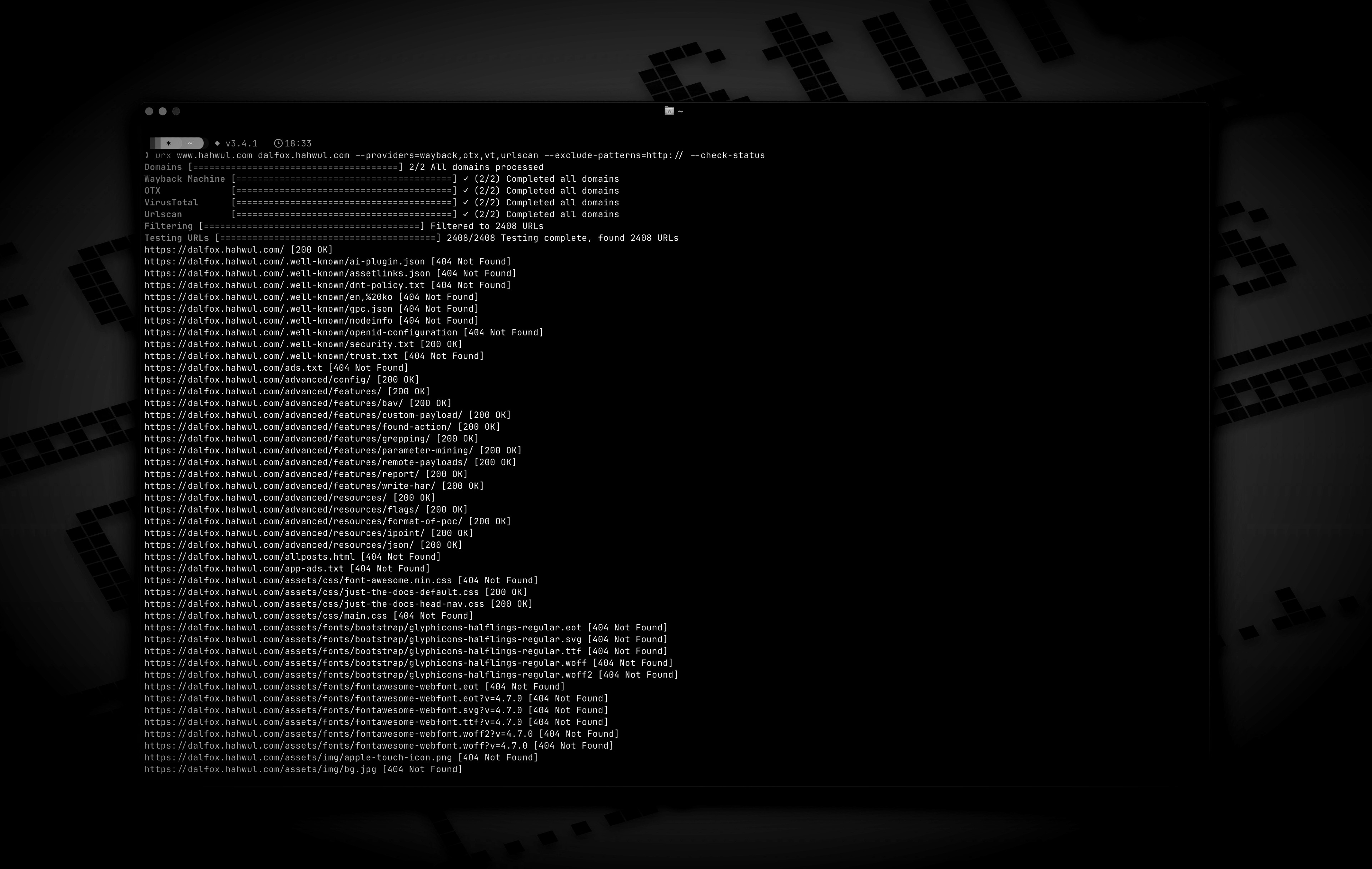
Urx 是一款命令行工具,旨在从 OSINT 归档(如 Wayback Machine 和 Common Crawl)中收集 URL。该工具使用 Rust 构建以确保效率,并利用异步处理快速查询多个数据源。Urx 简化了为指定域收集 URL 信息的过程,提供了一个可用于多种用途(包括安全测试和分析)的综合数据集。 ## 功能特性 * 并行从多个来源(Wayback Machine, Common Crawl, OTX)获取 URL * 支持 VirusTotal 和 URLScan 提供商的 API 密钥轮换,以缓解速率限制 * 根据文件扩展名、模式或预定义预设过滤结果(例如,“no-image” 排除图片) * URL 规范化和去重:对查询参数进行排序,移除尾部斜杠,并合并语义相同的 URL * 支持多种输出格式:纯文本、JSON、CSV * 直接文件输入支持:直接从 WARC 文件、URLTeam 压缩文件和文本文件中读取 URL * 将结果输出到控制台或文件,或通过 stdin 流式传输以便集成到管道中 * URL 测试: * 根据 HTTP 状态码和模式过滤及验证 URL。 * 从收集到的 URL 中提取额外的链接 * 缓存和增量扫描: * 本地 SQLite 或远程 Redis 缓存,避免重复扫描域 * 增量模式,仅发现上次扫描以来的新 URL * 可配置的缓存 TTL 和过期条目的自动清理 ![Preview](https://static.pigsec.cn/wp-content/uploads/repos/2026/03/13b22cda12154653.jpg) ## 安装说明 ### 通过 Cargo ``` # https://crates.io/crates/urx cargo install urx ``` ### 通过 Homebrew ``` # https://formulae.brew.sh/formula/urx brew install urx ``` ### 通过源码 ``` git clone https://github.com/hahwul/urx.git cd urx cargo build --release ``` 编译后的二进制文件将位于 `target/release/urx`。 ### 通过 Docker [ghcr.io/hahwul/urx](https://github.com/hahwul/urx/pkgs/container/urx) ## 用法 ### 基本用法 ``` # 扫描单个域名 urx example.com # 扫描多个域名 urx example.com example.org # 从文件扫描域名 cat domains.txt | urx ``` ### 选项 ``` Usage: urx [OPTIONS] [DOMAINS]... Arguments: [DOMAINS]... Domains to fetch URLs for Options: -c, --config Config file to load -h, --help Print help -V, --version Print version Input Options: --files ... Read URLs directly from files (supports WARC, URLTeam compressed, and text files). Use multiple --files flags or space-separate multiple files Output Options: -o, --output Output file to write results -f, --format Output format (e.g., "plain", "json", "csv") [default: plain] --merge-endpoint Merge endpoints with the same path and merge URL parameters --normalize-url Normalize URLs for better deduplication (sorts query parameters, removes trailing slashes) Provider Options: --providers Providers to use (comma-separated, e.g., "wayback,cc,otx,vt,urlscan") [default: wayback,cc,otx] --subs Include subdomains when searching --cc-index Common Crawl index to use (e.g., CC-MAIN-2025-13) [default: CC-MAIN-2025-13] --vt-api-key API key for VirusTotal (can be used multiple times for rotation, can also use URX_VT_API_KEY environment variable with comma-separated keys) --urlscan-api-key API key for Urlscan (can be used multiple times for rotation, can also use URX_URLSCAN_API_KEY environment variable with comma-separated keys) Discovery Options: --exclude-robots Exclude robots.txt discovery --exclude-sitemap Exclude sitemap.xml discovery Display Options: -v, --verbose Show verbose output --silent Silent mode (no output) --no-progress No progress bar Filter Options: -p, --preset Filter Presets (e.g., "no-resources,no-images,only-js,only-style") -e, --extensions Filter URLs to only include those with specific extensions (comma-separated, e.g., "js,php,aspx") --exclude-extensions Filter URLs to exclude those with specific extensions (comma-separated, e.g., "html,txt") --patterns Filter URLs to only include those containing specific patterns (comma-separated) --exclude-patterns Filter URLs to exclude those containing specific patterns (comma-separated) --show-only-host Only show the host part of the URLs --show-only-path Only show the path part of the URLs --show-only-param Only show the parameters part of the URLs --min-length Minimum URL length to include --max-length Maximum URL length to include --strict Enforce exact host validation (default) Network Options: --network-scope Control which components network settings apply to (all, providers, testers, or providers,testers) [default: all] --proxy Use proxy for HTTP requests (format: ) --proxy-auth Proxy authentication credentials (format: username:password) --insecure Skip SSL certificate verification (accept self-signed certs) --random-agent Use a random User-Agent for HTTP requests --timeout Request timeout in seconds [default: 120] --retries Number of retries for failed requests [default: 2] --parallel Maximum number of parallel requests per provider and maximum concurrent domain processing [default: 5] --rate-limit Rate limit (requests per second) Testing Options: --check-status Check HTTP status code of collected URLs [aliases: ----cs] --include-status Include URLs with specific HTTP status codes or patterns (e.g., --is=200,30x) [aliases: ----is] --exclude-status Exclude URLs with specific HTTP status codes or patterns (e.g., --es=404,50x,5xx) [aliases: ----es] --extract-links Extract additional links from collected URLs (requires HTTP requests) ``` ### 示例 ``` # 保存结果到文件 urx example.com -o results.txt # 输出为 JSON 格式 urx example.com -f json -o results.json # 仅筛选 JavaScript 文件 urx example.com -e js # 排除 HTML 和文本文件 urx example.com --exclude-extensions html,txt # 筛选 API endpoints urx example.com --patterns api,v1,graphql # 排除特定 patterns urx example.com --exclude-patterns static,images # 使用 Filter Preset (类似于 --exclude-extensions=png,jpg,.....) urx example.com -p no-images # 使用特定 providers urx example.com --providers wayback,otx # 使用 VirusTotal 和 URLScan providers # 1. 显式添加到 providers (通过命令行提供 API keys) urx example.com --providers=vt,urlscan --vt-api-key=*** --urlscan-api-key=*** # 2. 使用环境变量设置 API keys URX_VT_API_KEY=*** URX_URLSCAN_API_KEY=*** urx example.com --providers=vt,urlscan # 3. 自动启用:当提供 API keys 时自动添加 providers urx example.com --vt-api-key=*** --urlscan-api-key=*** # No need to specify in --providers # 4. 多 API key 轮换 (以缓解 rate limits) # 使用重复 flags 设置多个 keys urx example.com --vt-api-key=key1 --vt-api-key=key2 --vt-api-key=key3 # 使用包含逗号分隔 keys 的环境变量 URX_VT_API_KEY=key1,key2,key3 URX_URLSCAN_API_KEY=ukey1,ukey2 urx example.com # 结合 CLI flags 和环境变量 (优先使用 CLI keys) URX_VT_API_KEY=env_key1,env_key2 urx example.com --vt-api-key=cli_key1 --vt-api-key=cli_key2 # 默认包含来自 robots.txt 和 sitemap.xml 的 URLs # 排除来自 robots.txt 文件的 URLs urx example.com --exclude-robots # 排除来自 sitemap 的 URLs urx example.com --exclude-sitemap # 包含 subdomains urx example.com --subs # 检查已收集 URLs 的状态 urx example.com --check-status # 直接从文本文件读取 URLs urx --files urls.txt # 结合文件输入与过滤 urx --files urls.txt --patterns api,admin -f json # 从已收集的 URLs 中提取额外链接 urx example.com --extract-links # 网络配置 urx example.com --proxy http://localhost:8080 --timeout 60 --parallel 10 --insecure # 高级过滤 urx example.com -e js,php --patterns admin,login --exclude-patterns logout,static --min-length 20 # 基于 HTTP Status code 的过滤 urx example.com --include-status 200,30x,405 --exclude-status 20x # 禁用 host 验证 urx example.com --strict false # URL 规范化与去重 # 通过排序 query parameters 和移除尾部斜杠来规范化 URLs urx example.com --normalize-url # 结合规范化与 endpoint 合并以进行彻底去重 urx example.com --normalize-url --merge-endpoint # 带文件输入的 URL 规范化 urx --files urls.txt --normalize-url ``` ### 缓存和增量扫描 Urx 支持缓存以提高重复扫描的性能,并支持增量扫描以仅发现新的 URL。 ``` # 启用 SQLite 缓存 (默认) urx example.com --cache-type sqlite --cache-path ~/.urx/cache.db # 使用 Redis 进行分布式缓存 urx example.com --cache-type redis --redis-url redis://localhost:6379 # 增量扫描 - 仅显示上次扫描以来的新 URLs urx example.com --incremental # 将 cache TTL (time-to-live) 设置为 12 小时 urx example.com --cache-ttl 43200 # 完全禁用缓存 urx example.com --no-cache # 结合增量扫描与 filters urx example.com --incremental -e js,php --patterns api # 带有缓存设置的配置文件 urx -c example/config.toml example.com ``` #### 缓存使用场景 ``` # 每日监控 - 仅对新 URLs 发出警报 urx target.com --incremental --silent | notify-tool # 高效域名列表处理 cat domains.txt | urx --incremental --cache-ttl 3600 > new_urls.txt # 使用 Redis 进行分布式团队扫描 urx example.com --cache-type redis --redis-url redis://shared-cache:6379 # 开发过程中的快速重新扫描 urx test-domain.com --cache-ttl 300 # 5-minute cache for rapid iterations ``` ## 与其他工具集成 Urx 可以很好地与其他安全和侦察工具在管道中协作: ``` # 查找域名,然后发现 URLs echo "example.com" | urx | grep "login" > potential_targets.txt # 与其他工具结合使用 cat domains.txt | urx --patterns api | other-tool ``` ## 灵感来源 Urx 的灵感来源于 [gau (GetAllUrls)](https://github.com/lc/gau),这是一款从 AlienVault's Open Threat Exchange、Wayback Machine 和 Common Crawl 获取已知 URL 的工具。虽然核心功能相似,但 Urx 是用 Rust 从零开始构建的,专注于性能、并发和扩展的过滤能力。 ## 贡献 Urx 是一个开源项目,用 ❤️ 制作。 如果您想为该项目做出贡献,请参阅 [CONTRIBUTING.md](./CONTRIBUTING.md) 并提交包含精彩内容的 Pull-Request。 [![](https://static.pigsec.cn/wp-content/uploads/repos/2026/03/aa6a55c534154713.svg)](https://github.com/hahwul/urx/graphs/contributors)
标签:API密钥轮换, Ask搜索, ESC4, OSINT, OTX, Rust, URL提取, VirusTotal, Wayback Machine, 反汇编, 反编译, 可视化界面, 安全测试, 密码管理, 异步处理, 搜索引擎查询, 攻击性安全, 攻击面枚举, 敏感文件泄露, 数据展示, 数据清洗, 白帽, 红队, 网络安全, 网络流量审计, 资产收集, 路径发现, 通知系统, 隐私保护