nsec/ctf-script
GitHub: nsec/ctf-script
一款以代码化管理 CTF 挑战的 CLI 工具,自动化构建与部署比赛环境。
Stars: 6 | Forks: 4
# CTF 脚本
一个主观意见驱动的命令行界面(CLI)工具,用于管理夺旗(CTF)挑战。
它使用:
- YAML 文件来描述挑战和论坛帖子
- OpenTofu(Terraform 分支)来描述基础设施
- Incus(LXD 分支)在容器中运行挑战
- Ansible Playbook 来配置挑战
自 2025 年起,这个工具被 NorthSec CTF 团队用于管理他们的挑战。
[NorthSec](https://nsec.io/) 是世界上规模最大的线下网络安全 CTF 之一,每年于加拿大蒙特利尔举行,
届时 700+ 名参赛者将在长达 48 小时的比赛环境中竞技。
## 功能与用法
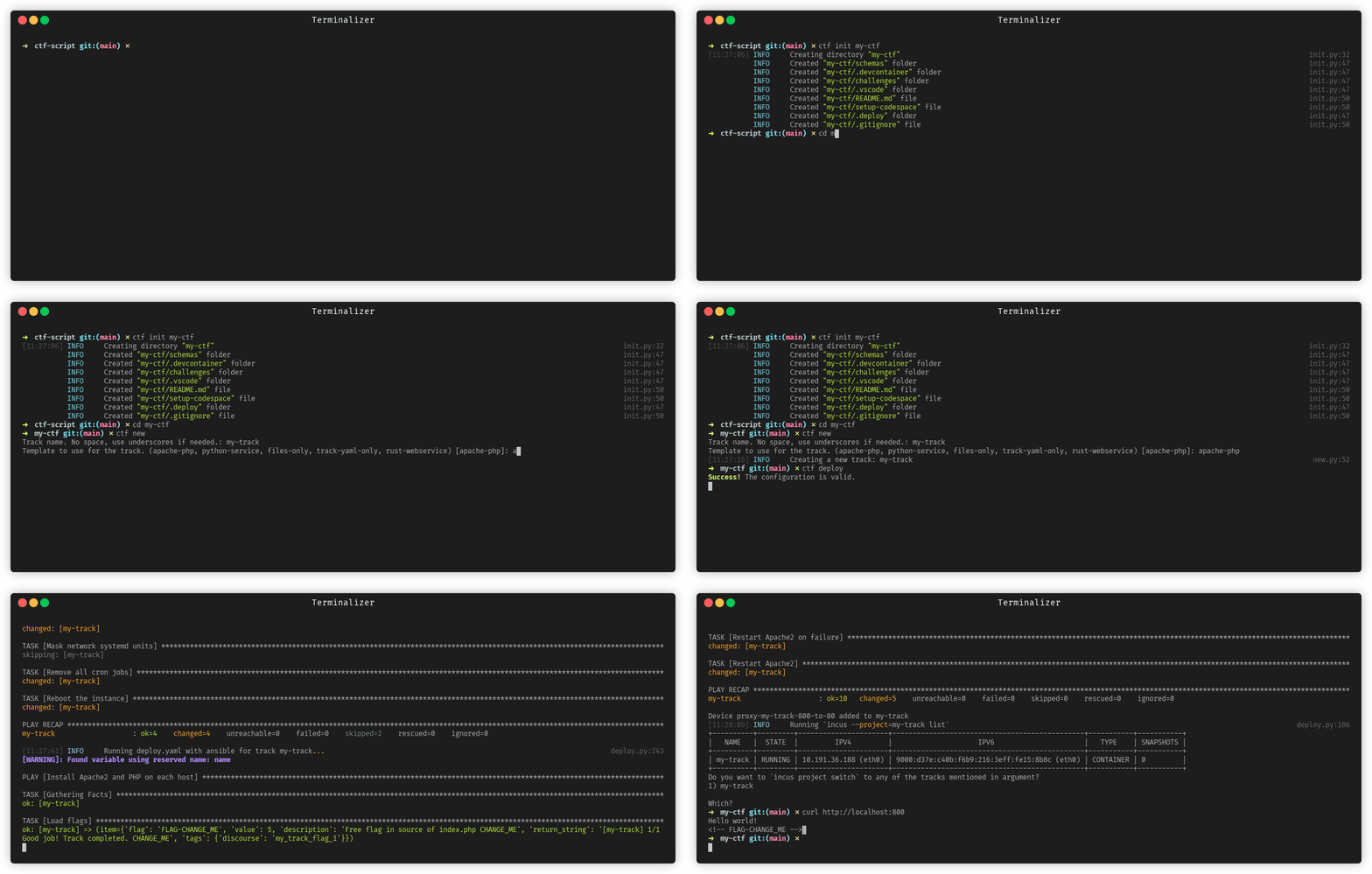
- `ctf init` 初始化一个新的 CTF 仓库
- `ctf new` 创建一个新挑战。支持常见挑战类型的模板
- `ctf deploy` 将挑战部署到本地(或远程)Incus 服务器
- `ctf validate` 对挑战执行大量静态检查(包括 JSON Schema),以确保质量
- `ctf stats` 提供有关 CTF 的大量有用统计信息
- 更多信息请查看 `ctf --help` 命令
要在任意目录下运行 `ctf`,请设置 `CTF_ROOT_DIR` 环境变量,使脚本
在正确的目录下执行;或者直接在该目录下执行脚本。如果未设置,`ctf` 将逐级向上遍历目录树,直到找到 `challenges/` 和 `.deploy` 目录,这即为 CTF 仓库的根目录。
## CTF 仓库结构
```
my-ctf/
├── challenges/ # Directory containing all the tracks
│ ├── track1/ # Directory for a specific track that contains N flags.
│ │ ├── track.yaml # Main file that describes the track
│ │ ├── files/ # Directory that contains all the files available for download in the track
│ │ │ ├── somefile.zip
│ │ │ ├── askgod/
│ │ │ │ ├── gifs/ # GIF directory for askgod fireworks.
│ │ │ │ │ └── my-gif.gif
│ │ │ │ ├── sounds/ # Sound directory for askgod fireworks.
│ │ │ │ │ └── my-sound.mp3
│ │ ├── ansible/ # Directory containing Ansible playbooks to configure the track
│ │ │ ├── build.yaml # Optional: Playbook when a build container is needed
│ │ │ ├── deploy.yaml # Main playbook to deploy the track
│ │ │ └── inventory # Inventory file for Ansible
│ │ ├── terraform/ # Directory containing OpenTofu (terraform fork) files to describe the infrastructure
│ │ │ └── main.tf # Main OpenTofu file to deploy the track
│ │ ├── posts/ # Directory containing forum posts related to the track
│ │ │ ├── track1.yaml # Initial post for the track
│ │ │ └── track1_flag1.yaml # Inventory file for Ansible
```
## 安装
使用 [uv](https://docs.astral.sh/uv/guides/tools/) 安装(若需安装 `uv`,[请点击此链接](https://docs.astral.sh/uv/getting-started/installation/#installation-methods):):
```
uv tool install git+https://github.com/nsec/ctf-script.git
```
使用 pipx 安装:
```
pipx install git+https://github.com/nsec/ctf-script.git
```
使用 pip 安装:
```
pip install git+https://github.com/nsec/ctf-script.git
```
### 为 Bash/Zsh 添加自动补全到 .bashrc
```
echo 'eval "$(register-python-argcomplete ctf)"' >> ~/.bashrc && source ~/.bashrc # If using bash
echo 'eval "$(register-python-argcomplete ctf)"' >> ~/.zshrc && source ~/.zshrc # If using zsh
```
## 在 Incus 中创建 Windows 镜像
要创建 Windows 镜像,可以使用 [incus-windows](https://github.com/antifob/incus-windows),它将构建一个已安装 Incus 代理服务(agent)的 Windows 镜像。然后,在你的赛道中使用导入的镜像,填写到 `main.tf` 中的 OpenTOFU/Terraform 相应字段即可。只需将镜像名称(别名)或镜像指纹填入 `main.tf` 的对应位置。
## 开发
使用 [uv](https://docs.astral.sh/uv/guides/tools/) 虚拟环境安装:
```
git clone https://github.com/nsec/ctf-script.git
cd ctf-script
uv venv venv
source venv/bin/activate
uv pip install -e .
```
使用虚拟环境和 pip 安装:
```
git clone https://github.com/nsec/ctf-script.git
cd ctf-script
python3 -m venv venv
source venv/bin/activate
pip install -e .
```
标签:Ansible, CTF框架, DevOps安全, EC2, ECS, flag管理, IaC, Incus, LXC, NIDS, OpenTofu, Playbook, Schema验证, Terraform, Web截图, YAML, 代码化挑战, 多轨道管理, 夺旗赛, 安全库, 容器化, 容器安全, 开源框架, 持续集成, 挑战管理, 本地部署, 模板引擎, 特权提升, 环境变量, 竞赛安全, 系统提示词, 统计分析, 网络安全, 脚本工具, 自动化部署, 远程部署, 逆向工具, 隐私保护, 静态检查