Wian47/CLI-NetworkScanner
GitHub: Wian47/CLI-NetworkScanner
一款用 Python 编写的多功能命令行网络诊断工具,整合了端口扫描、连通性检测、DNS 查询、设备发现、带宽监控和漏洞扫描等网络管理与安全审计能力。
Stars: 1 | Forks: 0
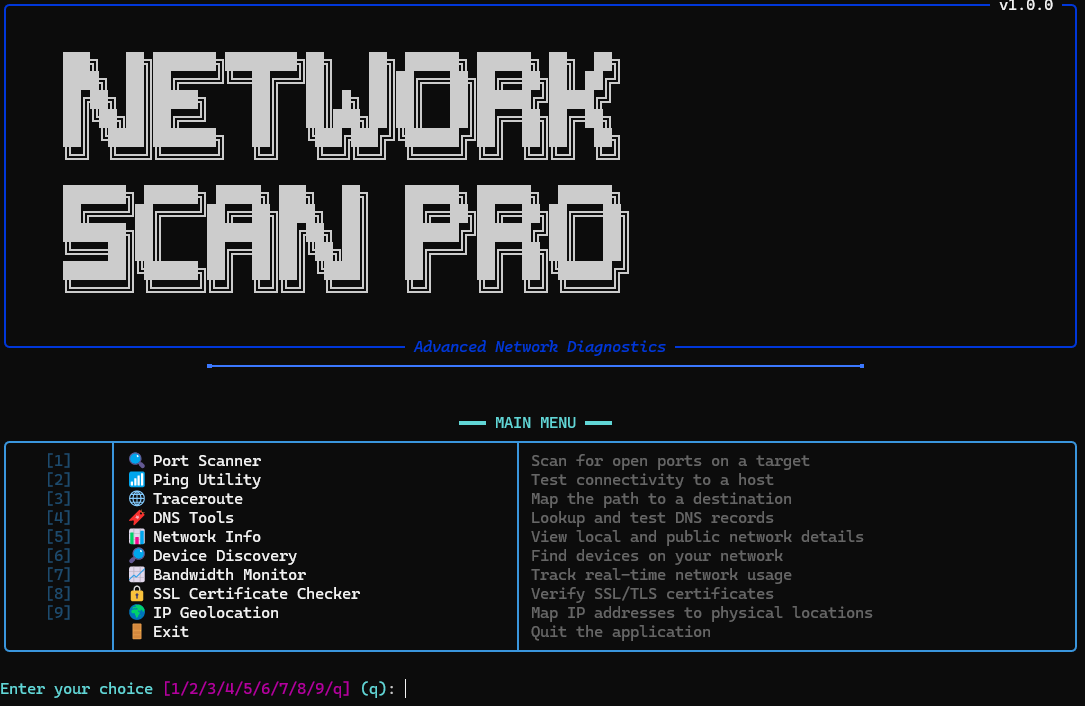
🌐 NetworkScan Pro
强大的命令行网络诊断工具包
功能 •
安装 •
使用方法 •
贡献




## ✨ 功能
| 功能 | 描述 |
|---------|-------------|
| 🔍 **端口扫描器** | TCP 连接、SYN 隐蔽以及高级扫描模式 |
| 📶 **Ping 工具** | 通过详细的统计数据测试连通性 |
| 🌐 **Traceroute** | 映射到任何目标的网络路径 |
| 🔖 **DNS 工具** | 查询 A、MX、TXT、NS 记录等 |
| 📊 **网络信息** | 查看本地接口和公网 IP 详情 |
| 🔎 **设备发现** | 查找本地网络上的所有设备 |
| 📈 **带宽监控** | 实时上传/下载跟踪 |
| 🔒 **SSL 检查器** | 验证证书、过期日期和证书链 |
| 🌍 **IP 地理位置** | 通过交互式地图将 IP 映射到物理位置 |
| 🛡️ **漏洞扫描器** | 检测已知的服务漏洞 |
| 📱 **MAC 修改器** | 更改网络接口的 MAC 地址 |
## 🚀 安装
### 快速安装(推荐)
```
git clone https://github.com/Wian47/CLI-NetworkScanner.git
cd CLI-NetworkScanner
pip install -e .
```
现在可以在任何地方使用 `netscan`:
```
netscan --version
netscan check # Verify system dependencies
netscan --help # See all commands
```
### 手动运行
```
git clone https://github.com/Wian47/CLI-NetworkScanner.git
cd CLI-NetworkScanner
pip install -r requirements.txt
python networkscanner.py
```
## 📖 使用方法
### 端口扫描
```
# 扫描特定端口
netscan scan google.com --ports 80,443,8080
# 扫描常见端口
netscan scan 192.168.1.1 --common
# 扫描范围
netscan scan target.com --ports 20-100
```
### 网络诊断
```
# 使用自定义次数进行 Ping
netscan ping google.com --count 10
# 跟踪到目标的路由
netscan trace cloudflare.com --max-hops 20
# DNS 查询
netscan dns example.com --type mx
netscan dns example.com --type txt
```
### 网络发现
```
# 查找网络上的设备
netscan discover
# 获取本地网络信息
netscan netinfo --type local
# 获取公网 IP 信息
netscan netinfo --type public
```
### 安全工具
```
# 检查 SSL 证书
netscan ssl github.com
# IP 地理定位
netscan geoip 8.8.8.8
# 带有交互式地图的地理定位
netscan geoip 1.1.1.1 --output map.html --open
```
### 输出选项
```
# 用于脚本编写的 JSON 输出
netscan --json check
netscan --json ping google.com --count 2
# 静默模式(无 banner)
netscan --quiet ping google.com
```
## 🛠️ 开发者信息
仓库管理工具
```
# 交互式 dashboard
python scripts/repo_dashboard.py
# 健康检查
python scripts/repo_health_check.py
# Version 管理
python scripts/version_manager.py
```
自动化 CI/CD
- **GitHub Actions** - 多平台测试(Windows、macOS、Linux)
- **Dependabot** - 自动化依赖更新
- **安全扫描** - Bandit 和安全审计
- **代码质量** - 自动化代码检查和格式化
## 📋 环境要求
- **Python** 3.8 或更高版本
- **平台**:Windows、macOS 或 Linux
- **可选**:用于高级扫描功能的管理员/root 权限
## 📄 许可证
本项目基于 MIT 许可证授权 - 详情请参阅 [LICENSE](LICENSE) 文件。
用 ❤️ 为网络管理员和安全爱好者打造
标签:Python, 动态分析, 实时处理, 情报分析, 插件系统, 数据泄露防护, 数据统计, 无后门, 端口扫描, 网络探测, 网络诊断, 逆向工具