alienx5499/SortVision
GitHub: alienx5499/SortVision
一个交互式排序算法可视化工具,帮助用户通过动画学习和比较各种排序算法。
Stars: 237 | Forks: 73
# 🌟 **SortVision** 🌟
### _交互式排序算法可视化工具_
[](https://github.com/alienx5499/sortvisioN/actions)
[](https://nodejs.org/)
[](https://github.com/alienx5499/sortvisioN/blob/main/CONTRIBUTING.md)
[](https://github.com/alienx5499/sortvisioN/blob/main/LICENSE)
[](https://sortvision.vercel.app/)
[](https://visitor-badge.laobi.icu/badge?page_id=alienx5499.sortvision)
[](https://github.com/alienx5499/sortvisioN/stargazers)
[](https://github.com/alienx5499/sortvisioN/network)
[](https://github.com/alienx5499/sortvisioN/commits/main)
[](https://github.com/alienx5499/sortvisioN/issues)
[](https://github.com/alienx5499/sortvisioN/pulls)
[](https://github.com/alienx5499/sortvisioN)
## 🎯 **SortVision 是什么?**
SortVision 是一个交互式 Web 应用程序,它通过实时可视化让排序算法栩栩如生。它基于现代 Web 技术构建,为学习和理解各种排序算法提供了一个引人入胜的平台。
### 🌟 **主要特点**
- **交互式可视化**:通过实时动画观察排序算法的实际运行
- **多种算法**:探索 8 种不同的排序算法
- **可定制参数**:调整速度、数组大小等
- **性能指标**:跟踪比较次数、交换操作和时间复杂度
- **教育性见解**:了解算法行为和效率
- **响应式设计**:在桌面和移动设备上无缝运行
### 🚀 **与我们一起构建精彩项目!**
**这些算法对您有启发吗?您正是我们为之构建的目标用户!** ✨
_帮助其他开发者发现您刚刚体验到的内容_ 💝




## 📚 **目录**
1. [✨ 功能特点](#-features)
2. [🦾 技术栈](#-tech-stack)
3. [📂 项目结构](#-project-structure)
4. [📸 截图](#-screenshots)
5. [🚀 快速开始](#-quick-start)
6. [👨🔧 详细设置](#-detailed-setup)
7. [🛠️ 开发者工具](#️-developer-tools)
8. [🎯 目标受众](#-target-audience)
9. [🤝 贡献指南](#-contributing)
10. [⭐ 星标历史](#-star-history)
11. [🌟 优秀贡献者](#-awesome-contributors)
12. [📜 许可证](#-license)
13. [📬 反馈与建议](#-feedback--suggestions)
## ✨ **功能特点**
### 🎮 **交互式可视化**
- 排序步骤的实时视觉呈现
- 可调节的动画速度
- 暂停和恢复功能
- 数组大小自定义
- 随机数组生成
### 📊 **支持的算法**
- **冒泡排序**:基于简单比较的算法
- **选择排序**:原地比较排序
- **插入排序**:自适应排序算法
- **归并排序**:分治算法
- **快速排序**:高效的原地排序
- **堆排序**:使用二叉堆数据结构的比较排序
- **基数排序**:非比较整数排序
- **桶排序**:将元素分组到桶中的分布式排序
### 📈 **性能跟踪**
- 实时比较计数
- 交换操作跟踪
- 时间复杂度可视化
- 算法效率指标
### 🎨 **用户界面**
- 现代、响应式设计
- 支持深色模式
- 移动设备友好界面
- 直观的控件
## 🦾 **技术栈**
### 🌐 **前端技术**
- **框架**:React.js 配合 Next.js
- **样式**:Tailwind CSS v4,自定义动画
- **图标**:Lucide React
- **音频**:Web Audio API
- **分析**:Vercel Analytics & Speed Insights
- **路由**:React Router DOM(客户端)配合 Next.js App Router
- **构建工具**:Next.js
### 🛠️ **开发工具**
- **构建工具**:Vite
- **包管理器**:npm/pnpm
- **代码质量**:ESLint
- **版本控制**:Git
- **部署**:Vercel
### 🔧 **未来增强功能**
- 使用 Node.js 的后端集成
- 用户偏好设置存储
- 算法性能历史记录
- 自定义算法支持
## 📂 **项目结构**
```
SortVision/
├─ .github/ # GitHub specific configurations
│ ├─ ISSUE_TEMPLATE/ # Templates for GitHub issues
│ │ ├─ bug_report.md # Bug report template
│ │ ├─ config.yml # Issue template configuration
│ │ ├─ documentation.md # Documentation request template
│ │ ├─ feature_request.md # Feature request template
│ │ └─ performance.md # Performance issue template
│ ├─ dependabot.yml # Dependabot configuration
│ └─ pull_request_template.md # PR template
├─ .gitignore # Git ignore configuration
├─ CODE_OF_CONDUCT.md # Community code of conduct
├─ CONTRIBUTING.md # Contribution guidelines
├─ LICENSE # MIT license file
├─ README.md # Project documentation (this file)
├─ SECURITY.md # Security policy and reporting
└─ SortVision/ # Main application directory
├─ .env.example # Environment variables template
├─ Dockerfile # Docker containerization config
├─ api/ # API endpoints
│ └─ gemini.js # Gemini AI API integration
├─ components.json # Component configuration
├─ docker-compose.yml # Docker Compose configuration
├─ eslint.config.js # ESLint configuration
├─ jsconfig.json # JavaScript configuration
├─ next.config.mjs # Next.js configuration
├─ nginx.conf # Nginx configuration
├─ package-lock.json # NPM package lock
├─ package.json # NPM package definition
├─ pnpm-lock.yaml # PNPM package lock
├─ postcss.config.mjs # PostCSS configuration
├─ public/ # Public static assets
│ ├─ code/ # Algorithm implementations in multiple languages
│ │ ├─ bubble/ # Bubble Sort implementations
│ │ │ ├─ c/ # C implementation
│ │ │ │ └─ bubbleSort.c
│ │ │ ├─ cpp/ # C++ implementation
│ │ │ │ └─ bubbleSort.cpp
│ │ │ ├─ csharp/ # C# implementation
│ │ │ │ └─ bubbleSort.cs
│ │ │ ├─ dart/ # Dart implementation
│ │ │ │ └─ bubbleSort.dart
│ │ │ ├─ golang/ # Go implementation
│ │ │ │ └─ bubbleSort.go
│ │ │ ├─ haskell/ # Haskell implementation
│ │ │ │ └─ bubbleSort.hs
│ │ │ ├─ java/ # Java implementation
│ │ │ │ └─ bubbleSort.java
│ │ │ ├─ javascript/ # JavaScript implementation
│ │ │ │ └─ bubbleSort.js
│ │ │ ├─ julia/ # Julia implementation
│ │ │ │ └─ bubbleSort.jl
│ │ │ ├─ kotlin/ # Kotlin implementation
│ │ │ │ └─ bubbleSort.kt
│ │ │ ├─ lua/ # Lua implementation
│ │ │ │ └─ bubbleSort.lua
│ │ │ ├─ php/ # PHP implementation
│ │ │ │ └─ bubbleSort.php
│ │ │ ├─ pseudocode/ # Pseudocode representation
│ │ │ │ └─ bubbleSort.txt
│ │ │ ├─ python/ # Python implementation
│ │ │ │ └─ bubbleSort.py
│ │ │ ├─ r/ # R implementation
│ │ │ │ └─ bubbleSort.r
│ │ │ ├─ ruby/ # Ruby implementation
│ │ │ │ └─ bubbleSort.rb
│ │ │ ├─ rust/ # Rust implementation
│ │ │ │ └─ bubbleSort.rs
│ │ │ ├─ scala/ # Scala implementation
│ │ │ │ └─ bubbleSort.scala
│ │ │ ├─ swift/ # Swift implementation
│ │ │ │ └─ bubbleSort.swift
│ │ │ └─ typescript/ # TypeScript implementation
│ │ │ └─ bubbleSort.ts
│ │ ├─ bucket/ # Bucket Sort implementations (same structure)
│ │ ├─ heap/ # Heap Sort implementations (same structure)
│ │ ├─ insertion/ # Insertion Sort implementations (same structure)
│ │ ├─ merge/ # Merge Sort implementations (same structure)
│ │ ├─ quick/ # Quick Sort implementations (same structure)
│ │ ├─ radix/ # Radix Sort implementations (same structure)
│ │ └─ selection/ # Selection Sort implementations (same structure)
│ ├─ devTools/ # Developer tools directory
│ │ ├─ core.js # Core utilities and initialization
│ │ ├─ device-info.js # Device detection and information
│ │ ├─ index.js # Main entry point for debug tools
│ │ ├─ monitoring.js # Performance monitoring utilities
│ │ ├─ performance.js # Performance metrics tracking
│ │ └─ ui.js # Debug UI components and panel
│ ├─ favicon.svg # Site favicon
│ ├─ google12e2679e2ea95334.html # Google site verification
│ ├─ manifest.json # PWA manifest
│ ├─ mobile.css # Mobile-specific styles
│ ├─ og-image.png # Open Graph image for sharing
│ ├─ robots.txt # Search engine crawling instructions
│ ├─ sitemap.xml # Site map for search engines
│ ├─ splash.svg # App splash screen
│ ├─ sw.js # Service worker for offline support
│ └─ twitter-image.png # Twitter card image
├─ scripts/ # Build and utility scripts
│ └─ generate-sitemap.js # Sitemap generator
├─ server/ # Backend server directory
│ └─ index.js # Express server for API proxy
├─ src/ # Source code directory
│ ├─ App.css # App-level styles
│ ├─ App.jsx # Main App component
│ ├─ algorithms/ # Sorting algorithm implementations
│ │ ├─ bubbleSort.jsx # Bubble sort implementation
│ │ ├─ bucketSort.jsx # Bucket sort implementation
│ │ ├─ heapSort.jsx # Heap sort implementation
│ │ ├─ index.js # Algorithm exports
│ │ ├─ insertionSort.jsx # Insertion sort implementation
│ │ ├─ mergeSort.jsx # Merge sort implementation
│ │ ├─ quickSort.jsx # Quick sort implementation
│ │ ├─ radixSort.jsx # Radix sort implementation
│ │ └─ selectionSort.jsx # Selection sort implementation
│ ├─ app/ # Next.js App Router directory
│ │ ├─ [[...slug]]/ # Dynamic catch-all route
│ │ │ ├─ client.jsx # Client-side component
│ │ │ └─ page.jsx # Page component
│ │ ├─ favicon.svg # App favicon
│ │ ├─ globals.css # Global CSS styles
│ │ └─ layout.jsx # Root layout component
│ ├─ components/ # UI components
│ │ ├─ MobileOverlay.jsx # Mobile device support
│ │ ├─ SEOContent.jsx # SEO content component
│ │ ├─ SortingVisualizer.jsx # Main visualization component
│ │ ├─ chatbot/ # AI Chatbot components
│ │ │ ├─ ChatAssistant.jsx # Main chatbot component
│ │ │ ├─ ChatButton.jsx # Chat button trigger
│ │ │ ├─ ChatModal.jsx # Chat modal dialog
│ │ │ ├─ assistantEngine.js # AI engine logic
│ │ │ └─ index.js # Chatbot exports
│ │ ├─ feedback/ # User feedback system
│ │ │ ├─ FeedbackButton.jsx # Feedback button
│ │ │ ├─ FeedbackForm.jsx # Feedback form
│ │ │ ├─ FeedbackModal.jsx # Feedback modal
│ │ │ ├─ githubService.js # GitHub integration
│ │ │ ├─ index.js # Feedback exports
│ │ │ └─ locationService.js # Location detection
│ │ ├─ panels/ # UI panels directory
│ │ │ ├─ ConfigPanel.jsx # Configuration panel
│ │ │ ├─ ContributionPanel.jsx # Contribution information panel
│ │ │ ├─ DetailsPanel.jsx # Algorithm details panel
│ │ │ ├─ MetricsPanel.jsx # Performance metrics panel
│ │ │ ├─ config/ # Configuration components
│ │ │ │ ├─ AlgorithmSelector.jsx # Algorithm selection
│ │ │ │ ├─ ArraySizeControl.jsx # Array size controls
│ │ │ │ ├─ ComplexityInfo.jsx # Complexity information
│ │ │ │ ├─ ControlButtons.jsx # Control buttons
│ │ │ │ ├─ SpeedControl.jsx # Animation speed control
│ │ │ │ └─ index.js # Config component exports
│ │ │ ├─ contributions/ # Contribution-related components
│ │ │ │ ├─ guide/ # Contribution guides
│ │ │ │ │ ├─ BestPractices.jsx # Best practices guide
│ │ │ │ │ ├─ ContributeGuide.jsx # How to contribute guide
│ │ │ │ │ ├─ QuickReferences.jsx # Quick reference guide
│ │ │ │ │ └─ index.js # Guide component exports
│ │ │ │ ├─ index.js # Contribution component exports
│ │ │ │ ├─ overview/ # Contribution overview
│ │ │ │ │ ├─ ContributorList.jsx # List of contributors
│ │ │ │ │ ├─ ContributorStats.jsx # Contributor statistics
│ │ │ │ │ ├─ RepositoryHealth.jsx # Repository health metrics
│ │ │ │ │ └─ index.js # Overview component exports
│ │ │ │ └─ ssoc/ # SSOC leaderboard system
│ │ │ │ ├─ ExportButton.jsx # Data export functionality
│ │ │ │ ├─ LeaderboardList.jsx # Leaderboard display
│ │ │ │ ├─ LeaderboardRow.jsx # Individual row component
│ │ │ │ ├─ config.js # Configuration settings
│ │ │ │ ├─ exportService.js # Export service logic
│ │ │ │ ├─ githubService.js # GitHub API integration
│ │ │ │ └─ index.js # SSOC exports
│ │ │ ├─ details/ # Detail components
│ │ │ │ ├─ AlgorithmDetails.jsx # Algorithm detail display
│ │ │ │ ├─ AlgorithmInfo.jsx # Algorithm information
│ │ │ │ ├─ AlgorithmSelector.jsx # Algorithm selection
│ │ │ │ ├─ DataPanel.jsx # Data display panel
│ │ │ │ ├─ FunFact.jsx # Fun facts about algorithms
│ │ │ │ ├─ InteractiveTip.jsx # Interactive tips
│ │ │ │ ├─ LanguageSelector.jsx # Programming language selector
│ │ │ │ └─ index.js # Detail component exports
│ │ │ ├─ index.js # Panel component exports
│ │ │ └─ metrics/ # Metric components
│ │ │ ├─ AlgorithmComparison.jsx # Algorithm comparisons
│ │ │ ├─ CurrentRunMetrics.jsx # Current run metrics
│ │ │ ├─ RankingCard.jsx # Algorithm ranking display
│ │ │ ├─ TestControls.jsx # Testing controls
│ │ │ ├─ WinnerSummary.jsx # Algorithm comparison results
│ │ │ └─ index.js # Metric component exports
│ │ ├─ settings/ # Application settings
│ │ │ ├─ SettingsButton.jsx # Settings button
│ │ │ ├─ SettingsForm.jsx # Settings form
│ │ │ ├─ SettingsModal.jsx # Settings modal
│ │ │ └─ index.js # Settings exports
│ │ ├─ sortingVisualizer/ # Visualization components
│ │ │ ├─ AudioControls.jsx # Audio control components
│ │ │ ├─ PerformanceMetrics.jsx # Performance display
│ │ │ ├─ SortingControls.jsx # Sorting control buttons
│ │ │ ├─ SortingHeader.jsx # Visualization header
│ │ │ ├─ SortingVisualizer.jsx # Main visualizer
│ │ │ └─ index.js # Visualizer component exports
│ │ ├─ ui/ # UI component library
│ │ │ ├─ VolumeControl.jsx # Volume control component
│ │ │ ├─ badge.jsx # Badge component
│ │ │ ├─ button.jsx # Button component
│ │ │ ├─ card.jsx # Card component
│ │ │ ├─ input.jsx # Input component
│ │ │ ├─ select.jsx # Select dropdown component
│ │ │ ├─ slider.jsx # Slider component
│ │ │ └─ tabs.jsx # Tabs component
│ │ └─ visualizations/ # Visualization components
│ │ ├─ ArrayVisualization.jsx # Array visual representation
│ │ └─ index.js # Visualization component exports
│ ├─ context/ # React Context providers
│ │ └─ AlgorithmState.jsx # Algorithm state management
│ ├─ hooks/ # Custom React hooks
│ │ └─ useAudio.js # Audio management hook
│ ├─ index.css # Global styles
│ ├─ lib/ # Library utilities
│ │ └─ utils.js # Shared utility functions
│ └─ utils/ # Utility modules
│ ├─ audioEngine.js # Audio engine for sound effects
│ ├─ seo.js # SEO optimization utilities
│ ├─ soundEffects.js # Sound effect definitions
│ └─ themeUtils.js # Theme management utilities
└─ vercel.json # Vercel deployment configuration
```
### 📁 **关键目录和文件**:
- **`public/code/`**:用于教育参考的、涵盖 20 多种编程语言的完整算法实现
- **`src/app/`**:带有动态路由和 SEO 优化元数据的 Next.js App Router
- **`src/components/chatbot/`**:具备高级算法知识的 AI 驱动聊天机器人系统
- **`src/components/feedback/`**:集成了 GitHub 的全面用户反馈系统
- **`src/components/panels/contributions/ssoc/`**:SSOC(Social Summer of Code)排行榜和贡献跟踪
- **`src/utils/audioEngine.js`**:用于沉浸式排序可视化体验的高级音频引擎
- **`server/`**:用于 API 代理和外部服务集成的 Express.js 后端服务器
- **`api/`**:API 端点,包括用于聊天机器人的 Gemini AI 集成
- **`scripts/`**:构建自动化和 SEO 优化脚本
- **`.github/`**:全面的 GitHub 工作流、问题模板和社区指南
## 📸 **截图**
### **可视化器 & 指标选择界面**
## 🚀 **快速开始**
1. **访问网站**
[](https://sortvision.vercel.app/)
2. **选择一个算法**
- 从可用的排序算法中选择
- 调整可视化参数
3. **开始可视化**
- 点击 "Start" 开始可视化
- 使用控件调整速度、暂停/恢复
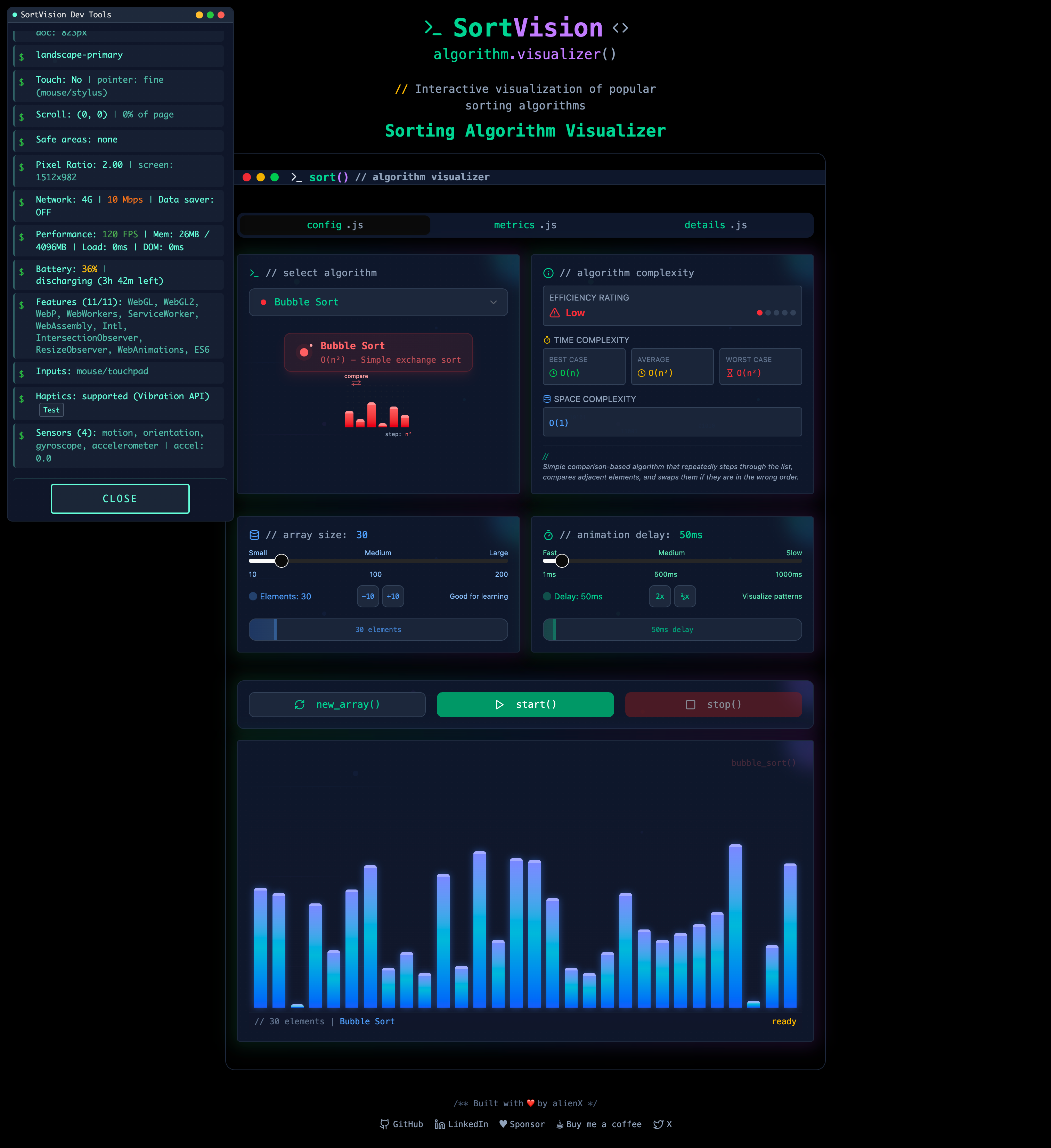
## 🛠️ **开发者工具**
SortVision 包含一套全面的开发者工具,旨在增强开发体验、调试性能问题并实时监控应用程序行为。这些工具智能地限制在仅限开发环境使用,并在生产部署中自动屏蔽,以优化安全性和性能。
### **🔐 安全与访问控制**
DevTools 实现了复杂的访问控制系统:
- **仅限开发环境访问**:工具在生产环境中完全无法访问
- **基于 URL 的身份验证**:需要特定查询参数才能激活
- **域名限制**:自动检测并阻止在生产域名上的访问
- **性能保护**:防止在实时环境中性能下降
### **⚡ 访问 DevTools**
#### **前提条件**
- Node.js 开发环境
- 本地开发服务器正在运行
- 已启用 JavaScript 的现代浏览器
#### **访问方法**
1. **标准开发访问**:
npm run dev
# 或者
pnpm dev
2. **DevTools 激活**:
http://localhost:3000/?cr7=goat
3. **其他本地 URL**:
http://127.0.0.1:3000/?cr7=goat
http://localhost:3000/?cr7=goat # Next.js 默认端口
### **🧰 DevTools 功能套件**
#### **📊 性能监控**
**带有详细指标的实时性能跟踪:**
- **帧率分析**
- 带有历史数据的实时 FPS 计数器
- 帧时间分布图
- 性能瓶颈检测
- 流畅/卡顿动画识别
- **内存使用跟踪**
- 堆内存消耗监控
- 内存泄漏检测
- 垃圾回收影响分析
- 内存使用趋势和模式
- **渲染性能**
- 组件渲染时间跟踪
- 重新渲染频率分析
- DOM 操作性能
- CSS 动画性能指标
- **算法执行指标**
- 排序算法性能比较
- 分步执行计时
- 排序期间的内存分配
- 优化机会识别
#### **📱 设备信息面板**
**全面的设备和浏览器分析:**
- **硬件规格**
- CPU 核心数和架构
- 可用内存和使用情况
- GPU 信息和能力
- 屏幕分辨率和像素密度
- **浏览器环境**
- 用户代理字符串分析
- 支持的 Web API
- JavaScript 引擎详细信息
- CSS 功能支持矩阵
- **网络信息**
- 连接类型和速度
- 带宽估计
- 延迟测量
- 网络质量评估
- **视口和显示**
- 屏幕尺寸和方向
- 色深和 HDR 支持
- 触摸能力检测
- 设备像素比
#### **💻 控制台集成**
**增强的调试能力:**
- **格式化日志**
- 彩色日志级别
- 结构化数据可视化
- 错误堆栈跟踪增强
- 性能计时日志
- **交互式调试**
- 变量检查工具
- 断点管理
- 调用栈可视化
- 内存快照分析
#### **📈 高级监控功能**
- **算法可视化指标**
- 动画帧一致性
- 排序步骤准确性验证
- 视觉元素定位跟踪
- 用户交互响应时间
- **资源加载分析**
- 资产加载性能
- 包大小影响评估
- 延迟加载有效性
- 关键资源识别
- **错误跟踪与报告**
- 运行时错误捕获
- Promise 拒绝处理
- 组件错误边界
- 性能回归检测
### **🔍 使用 DevTools 进行开发**
#### **基本用法**
1. **面板管理**
// 切换 DevTools 面板
// 点击浮动小部件中的 "TOGGLE PANEL" 按钮
// 完全关闭 DevTools
// 点击 "CLOSE" 按钮隐藏所有工具
2. **性能监控**
// 监控特定算法性能
// 选择算法并观察实时指标
// 比较不同数组大小下的性能
// 在排序期间识别性能瓶颈
#### **高级开发工作流**
1. **性能优化**
- 使用 FPS 监控识别动画问题
- 分析长时间排序操作期间的内存使用情况
- 在不同数组大小下监控渲染性能
- 实时比较算法效率
2. **跨设备测试**
- 在不同屏幕尺寸下验证响应式设计
- 在移动设备上测试触摸交互
- 分析低端设备上的性能
- 确保跨浏览器引擎的兼容性
3. **算法开发**
- 调试新的排序算法实现
- 验证排序步骤的正确性
- 优化动画性能
- 测试边界情况和错误处理
#### **性能优化提示**
- **内存管理**
// 在数组操作期间监控内存
// 识别算法实现中的内存泄漏
// 优化垃圾回收模式
- **渲染优化**
// 跟踪组件重新渲染
// 识别不必要的 DOM 更新
// 为 60fps 优化 CSS 动画
### **⚙️ 技术实现**
#### **架构概述**
- **模块化设计**:每个工具都作为独立模块实现
- **事件驱动**:使用观察者模式进行实时更新
- **非侵入式**:对应用程序性能影响最小
- **条件加载**:仅在明确请求时加载
#### **文件结构**
```
public/devTools/
├── index.js # Main entry point and tool orchestration
├── core.js # Core utilities and initialization logic
├── performance.js # Performance monitoring implementation
├── device-info.js # Device detection and analysis
├── monitoring.js # Real-time monitoring utilities
└── ui.js # User interface components and styling
```
#### **API 集成**
```
// Example DevTools API usage
window.devTools = {
performance: {
startMonitoring(),
getMetrics(),
createReport()
},
device: {
getInfo(),
runDiagnostics(),
exportData()
}
};
```
### **🚨 故障排除**
#### **常见问题**
1. **DevTools 未加载**
# 验证开发服务器正在运行
npm run dev
# 检查 URL 参数
http://localhost:3000/?cr7=goat
# 清除浏览器缓存
Ctrl+Shift+R (Windows/Linux)
Cmd+Shift+R (Mac)
2. **性能问题**
// 如果 DevTools 影响性能:
// 1. 关闭不必要的监控面板
// 2. 降低监控频率
// 3. 禁用重量级指标收集
3. **浏览器兼容性**
// 支持的浏览器:
// Chrome 80+, Firefox 75+, Safari 13+, Edge 80+
// 一些功能在旧版浏览器中可能受限
#### **性能考虑**
- **开发影响**:DevTools 会增加约 2-5% 的性能开销
- **内存使用**:活动时额外占用 10-20MB 内存
- **网络**:网络影响极小(仅限本地工具)
- **电池**:可能增加移动设备的电池消耗
### **🎪 高级功能**
#### **自定义指标**
```
// Add custom performance markers
performance.mark("algorithm-start");
// ... sorting algorithm execution
performance.mark("algorithm-end");
performance.measure("algorithm-duration", "algorithm-start", "algorithm-end");
```
#### **导出功能**
- JSON 格式的性能报告
- 可下载的设备信息数据
- 内存使用图表和图形
- 算法性能比较
#### **与流行工具的集成**
- **React DevTools**:增强的组件检查
- **Chrome DevTools**:扩展的性能分析
- **Lighthouse**:性能审计集成
- **WebPageTest**:网络性能分析
### **🎯 最佳实践**
1. **开发工作流**
- 在开发期间始终启用 DevTools 进行测试
- 使用性能指标指导优化决策
- 在算法开发期间监控内存使用
- 定期检查设备兼容性
2. **性能测试**
- 在各种设备规格上进行测试
- 监控不同数组大小下的性能
- 验证 60fps 下的流畅动画
- 检查内存使用模式
3. **调试策略**
- 使用控制台集成进行系统化调试
- 利用性能指标识别瓶颈
- 监控设备信息以解决兼容性问题
- 跟踪用户交互模式
## 👨🔧 **详细设置**
### **前提条件**
- **Node.js** (v16.10.0 或更高版本)
- **npm** 或 **pnpm** 包管理器
- **Git** 用于版本控制
### **安装步骤**
1. **克隆仓库**
git clone https://github.com/alienx5499/SortVision.git
2. **导航到项目目录**
cd SortVision
3. **安装依赖项**
npm install
# 或者
pnpm install
4. **启动开发服务器**
npm run dev
# 或者
pnpm dev
5. **在浏览器中打开**
- 访问 `http://localhost:3000`
- 开始探索排序算法!
### 🐳 **Docker 设置**
可以使用 Docker 运行 SortVision,这确保了跨所有平台的开发和部署环境一致。
#### **前提条件**
- 机器上已安装 Docker
- Docker Compose(通常随 Docker Desktop 一起提供)
#### **使用 Docker 运行**
1. **开发模式**
# 构建并启动开发服务器
docker compose up dev
# 在以下地址访问应用程序:
http://localhost:7777
开发模式特点:
- 启用热重载
- 源代码已挂载以实现实时更新
- 开发工具可用
- 实时编译
2. **生产模式**
# 构建并启动生产服务器
docker compose up prod
# 在以下地址访问应用程序:
http://localhost:80
生产模式特点:
- 优化构建
- Nginx 服务器
- 适当的缓存
- 启用压缩
- 生产就绪配置
#### **Docker 命令参考**
```
# 构建镜像
docker compose build
# 停止容器
docker compose down
# 查看日志
docker compose logs
# 重建并重启容器
docker compose up --build
# 移除所有容器和卷
docker compose down -v
```
#### **使用不同的包管理器**
Docker 设置支持多个包管理器。要在它们之间切换:
1. **对于 pnpm (默认)**:
# 已在 Dockerfile 中配置
RUN npm install -g pnpm
COPY package.json ./
RUN pnpm install
2. **对于 yarn**:
# 修改 Dockerfile 以使用 yarn
RUN npm install -g yarn
COPY package.json ./
RUN yarn install
3. **对于 npm**:
# 修改 Dockerfile 以使用 npm
COPY package.json ./
RUN npm install
#### **环境变量**
Docker 设置遵循以下环境变量:
- `NODE_ENV`:开发/生产模式
- `PORT`:应用程序端口(默认:开发环境 7777,生产环境 80)
- `HOST`:主机绑定(默认:0.0.0.0)
## 🎯 **目标受众**
### 👨🎓 **学生**
- 排序算法的直观学习
- 理解时间复杂度
- 算法比较与分析
### 👨🏫 **教育工作者**
- 交互式教学工具
- 算法演示
- 性能可视化
### 👨💻 **开发者**
- 算法实现参考
- 性能优化见解
- 代码结构示例
### 📊 **数据爱好者**
- 算法行为分析
- 性能比较
- 数据结构可视化
### **贡献指南**
## 📜 **许可证**
本项目根据 MIT 许可证获得许可 - 有关详细信息,请参阅 [LICENSE](LICENSE) 文件。
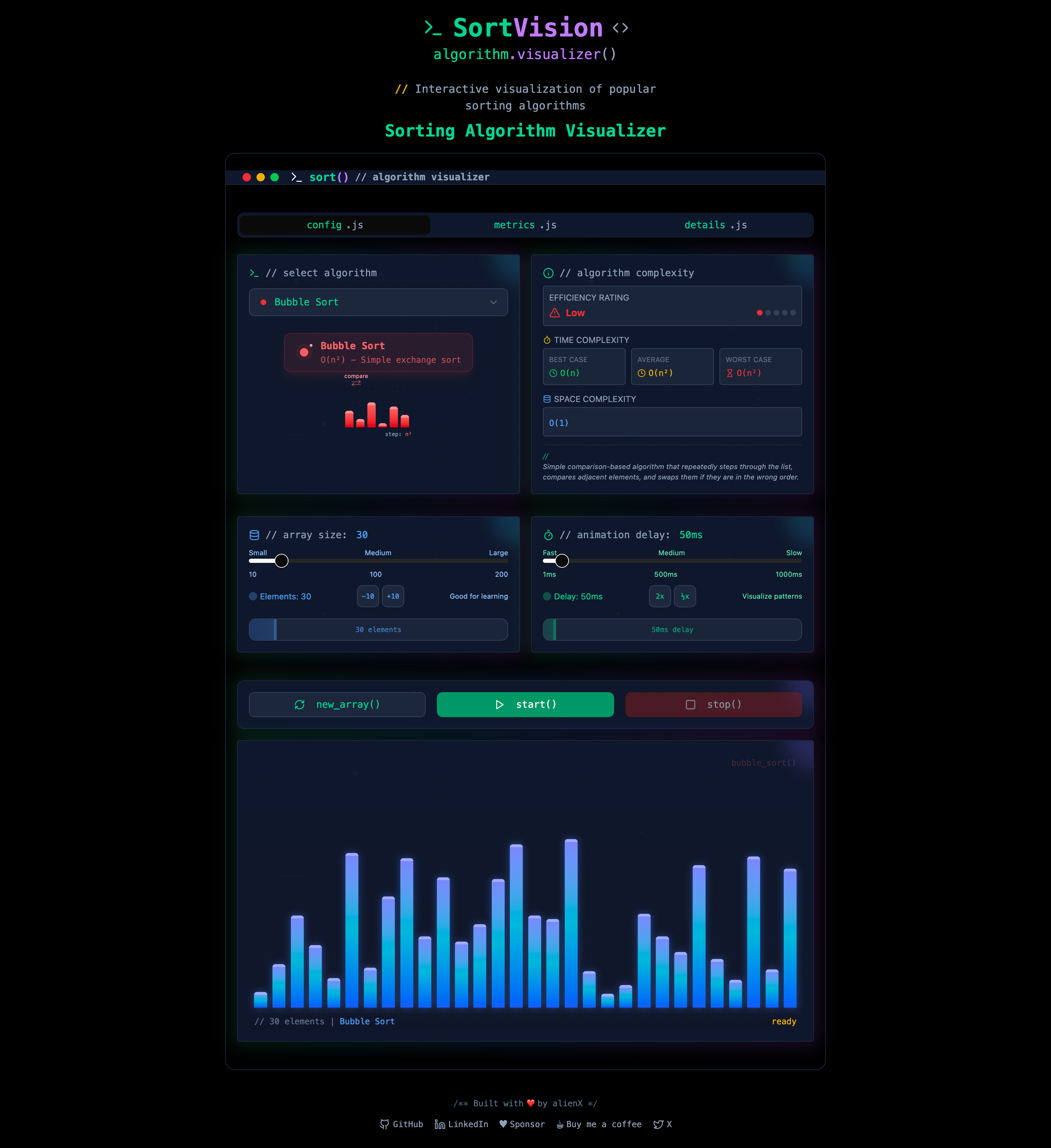 |
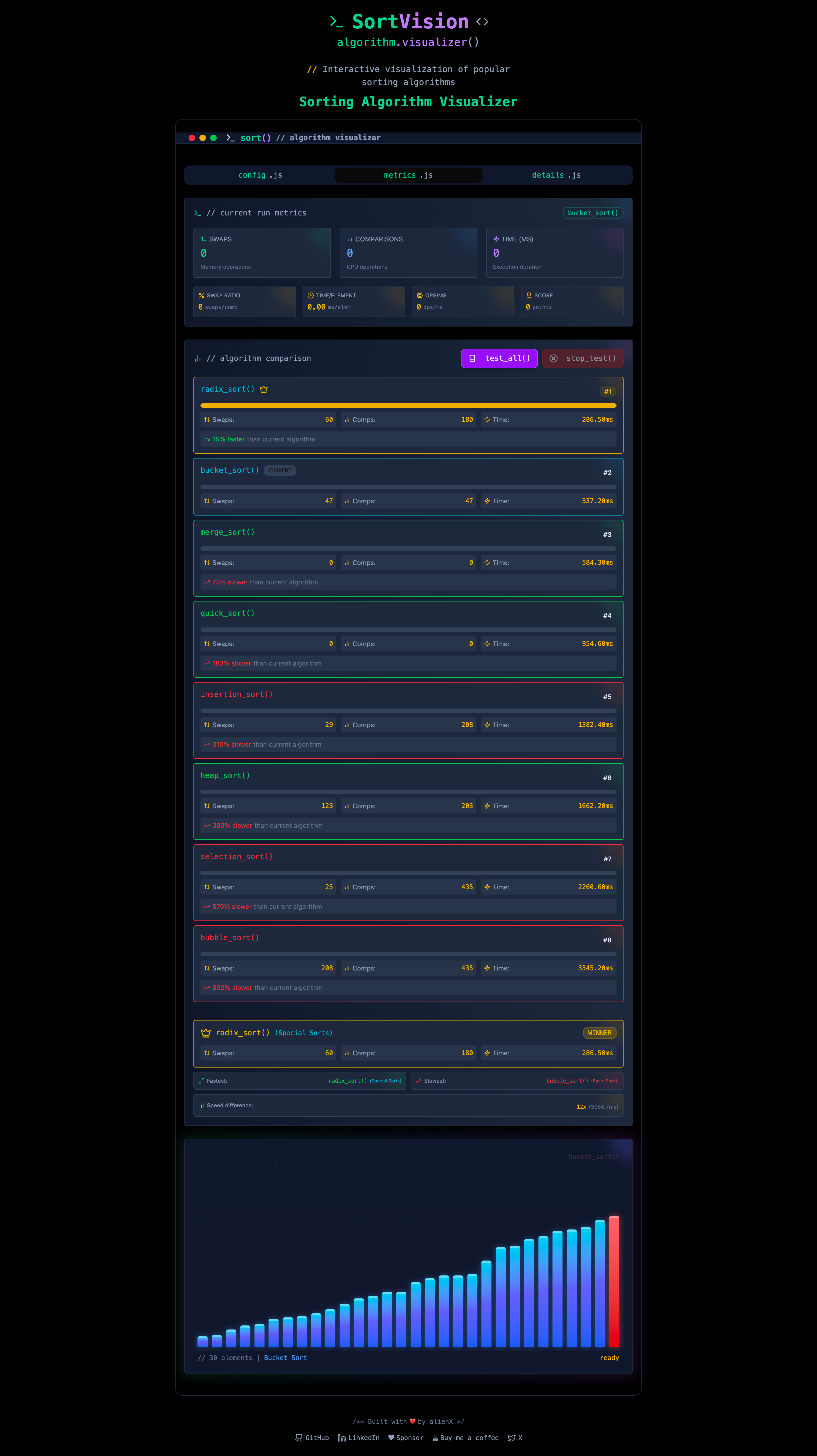 |
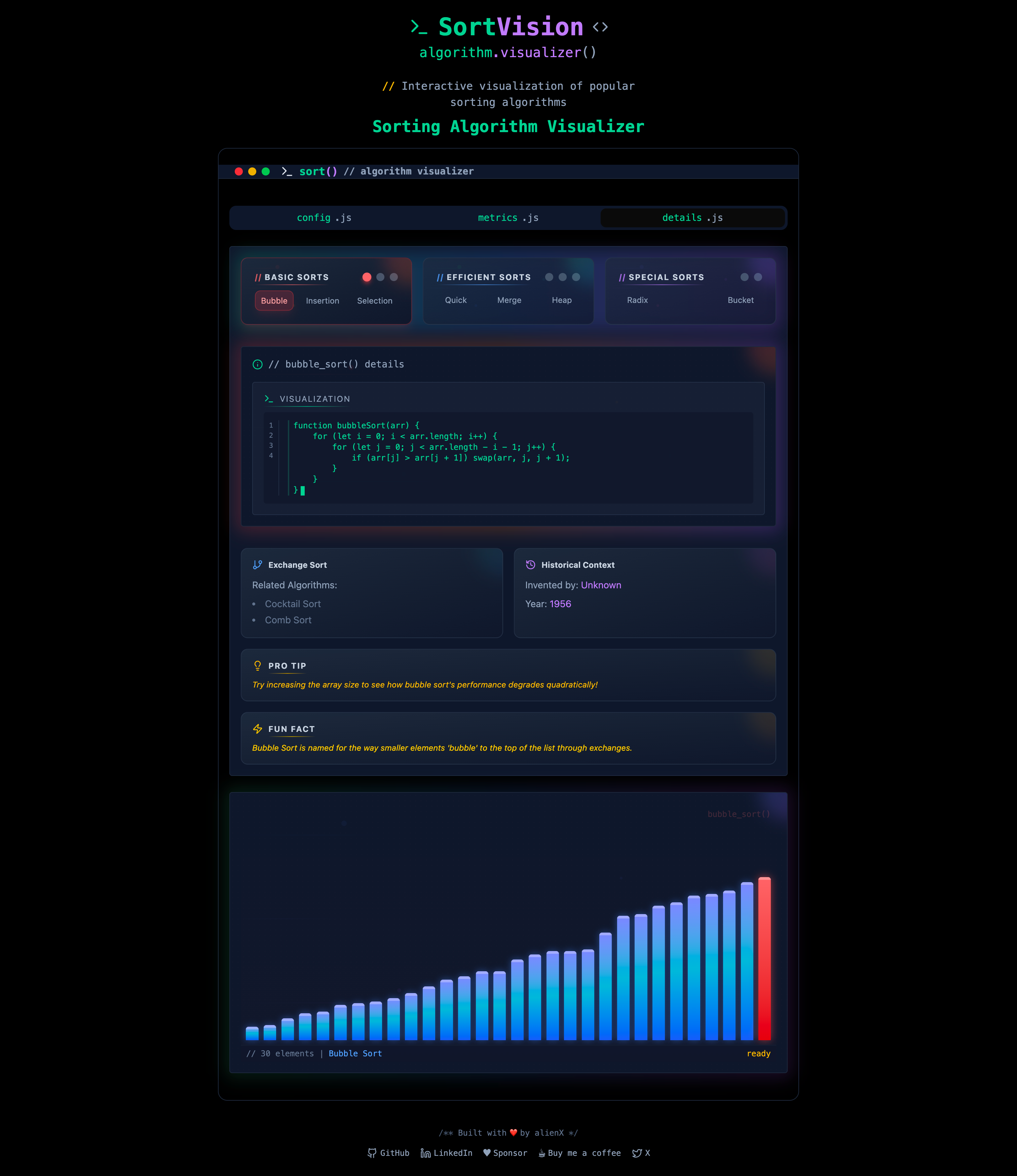 |
| Visualizer Screen | Metric Screen | Details Screen |
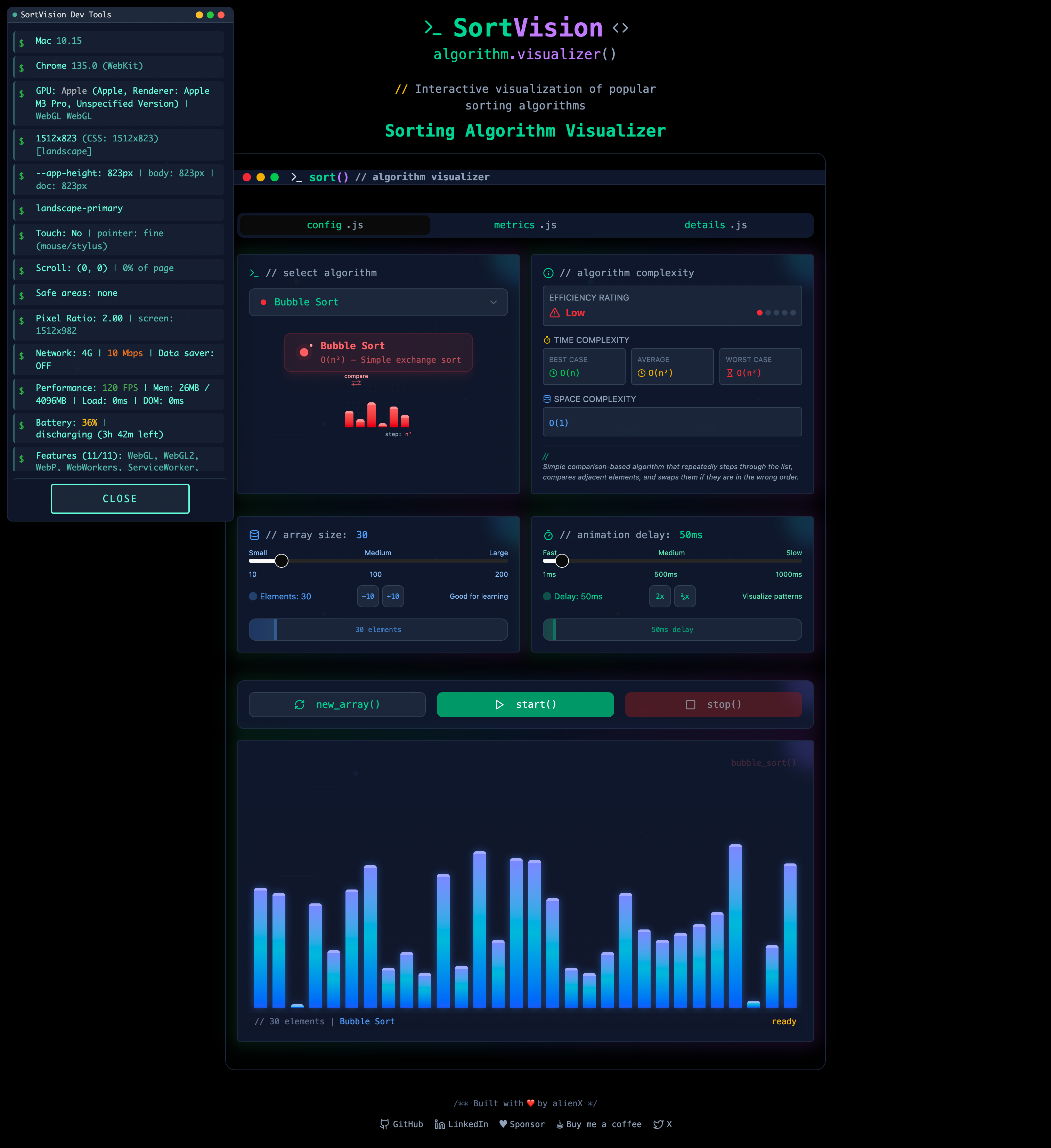 |
 |
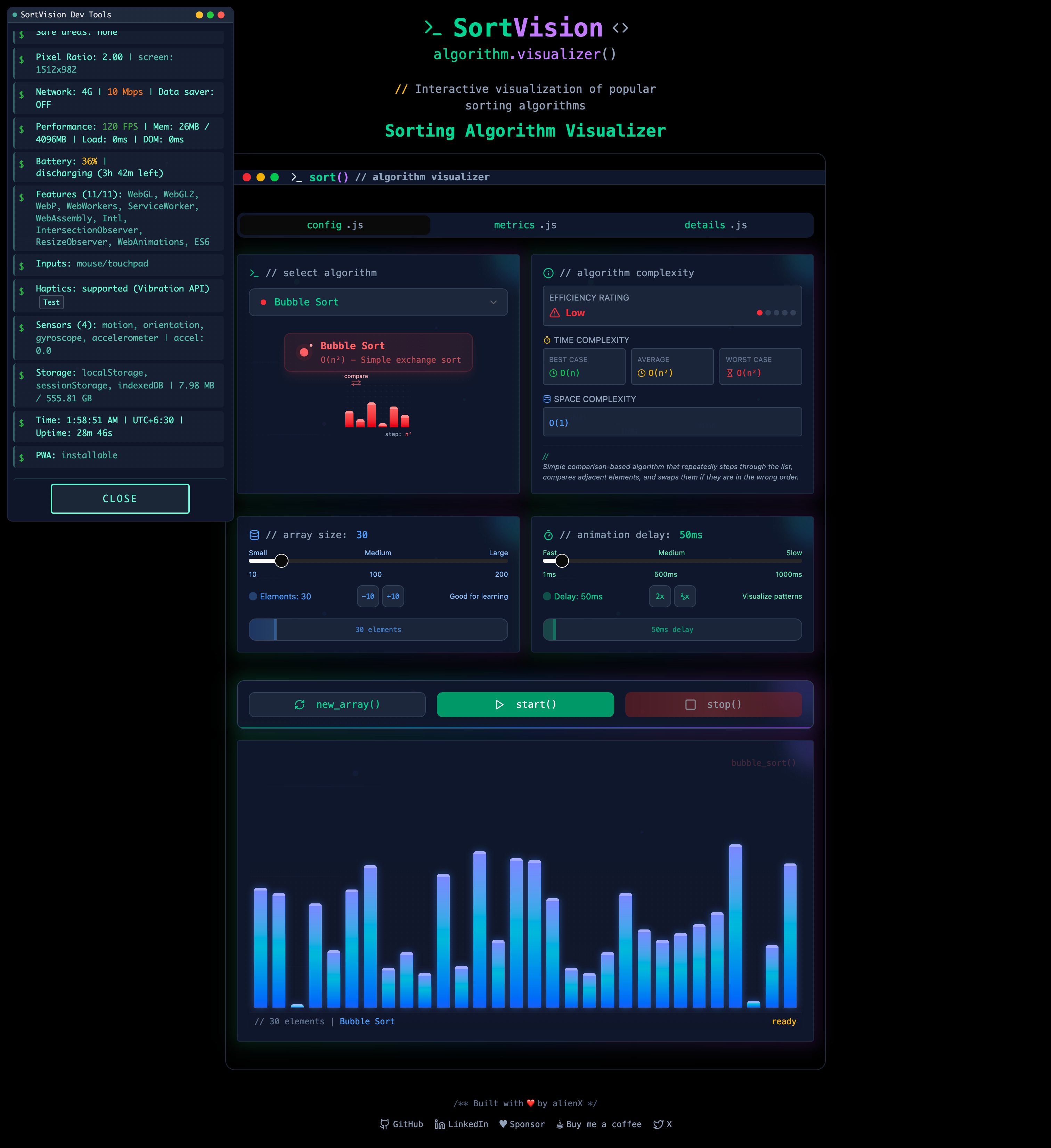 |
| DevTools Panel | Performance Monitoring | Device Information |
### 📬 **反馈与建议**
_我们重视您的意见!通过 [GitHub Issues](https://github.com/alienx5499/sortvisioN/issues) 分享您的想法。_
💡 _让我们共同努力,加深对排序算法的理解!_
标签:CMS安全, GNU通用公共许可证, JavaScript, Node.js, Vercel部署, 交互式可视化, 学习资源, 实时动画, 实时渲染, 排序算法, 教育工具, 数据可视化, 数据结构, 浏览器工具, 用户交互, 算法可视化, 算法学习, 算法比较, 自动化攻击, 计算机科学教育