openai/openai-agents-python
GitHub: openai/openai-agents-python
OpenAI 官方的轻量级 Python 框架,用于构建支持多 Agent 协作、安全护栏和人工介入的 LLM 工作流应用。
Stars: 27170 | Forks: 4191
# OpenAI Agents SDK [](https://pypi.org/project/openai-agents/)
OpenAI Agents SDK 是一个轻量级但功能强大的框架,用于构建多 Agent 工作流。它与提供商无关,支持 OpenAI Responses 和 Chat Completions API,以及 100 多个其他 LLM。
 ### 核心概念:
1. [**Agents**](https://openai.github.io/openai-agents-python/agents):配置了指令、工具、护栏和移交功能的 LLM
2. **[Agents as tools](https://openai.github.io/openai-agents-python/tools/#agents-as-tools) / [Handoffs](https://openai.github.io/openai-agents-python/handoffs/)**:将特定任务委托给其他 Agent
3. [**Tools**](https://openai.github.io/openai-agents-python/tools/):各种工具允许 Agent 执行操作(函数、MCP、托管工具)
4. [**Guardrails**](https://openai.github.io/openai-agents-python/guardrails/):用于输入和输出验证的可配置安全检查
5. [**Human in the loop**](https://openai.github.io/openai-agents-python/human_in_the_loop/):用于在 Agent 运行过程中引入人工参与的内置机制
6. [**Sessions**](https://openai.github.io/openai-agents-python/sessions/):跨 Agent 运行的自动对话历史管理
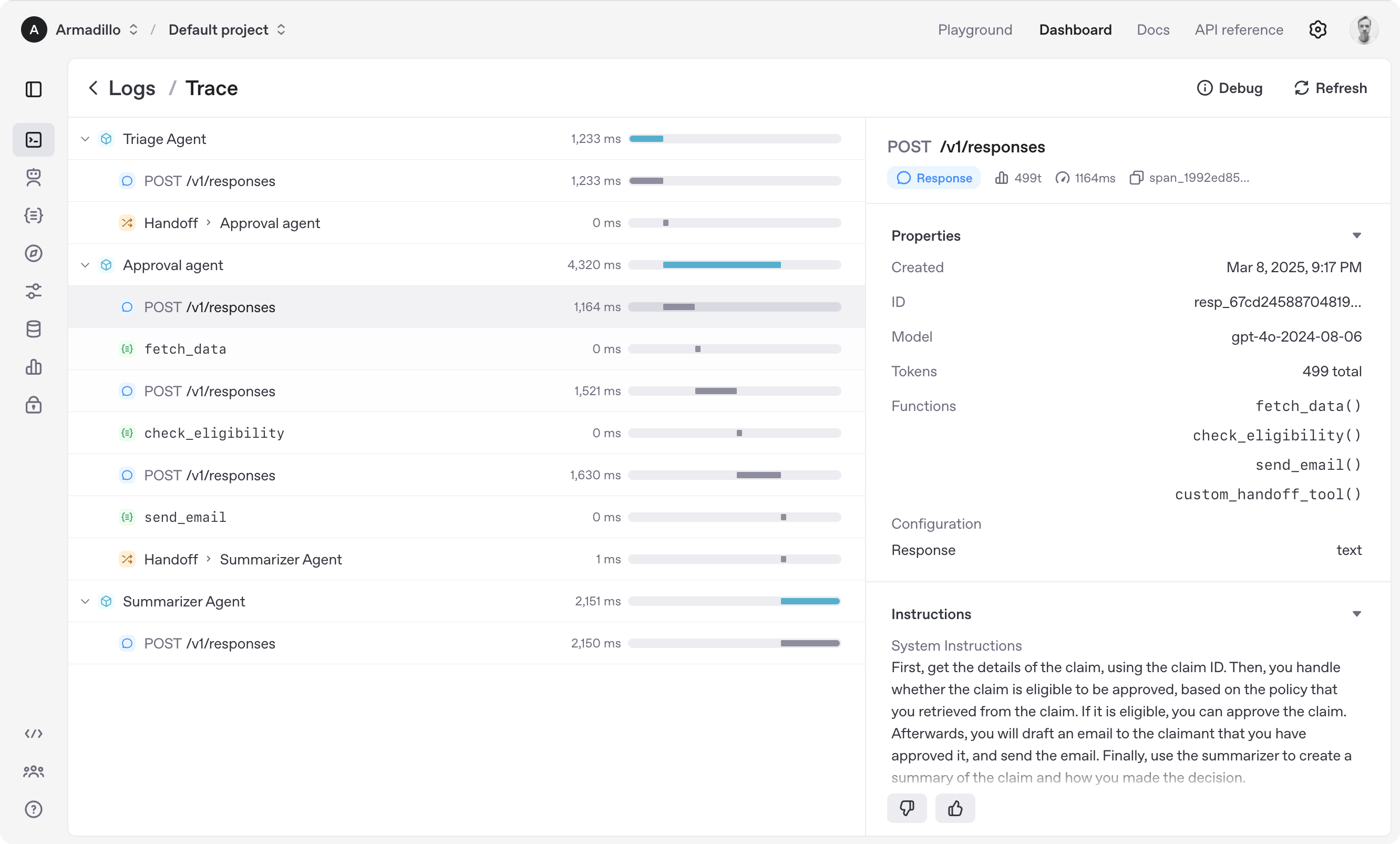
7. [**Tracing**](https://openai.github.io/openai-agents-python/tracing/):内置的 Agent 运行追踪,允许您查看、调试和优化工作流
8. [**Realtime Agents**](https://openai.github.io/openai-agents-python/realtime/quickstart/):构建功能强大的语音 Agent
浏览 [示例](https://github.com/openai/openai-agents-python/tree/main/examples) 目录以查看 SDK 的实际应用,并阅读我们的 [文档](https://openai.github.io/openai-agents-python/) 了解更多详情。
## 开始使用
首先,设置您的 Python 环境(需要 Python 3.10 或更高版本),然后安装 OpenAI Agents SDK 包。
### venv
```
python -m venv .venv
source .venv/bin/activate # On Windows: .venv\Scripts\activate
pip install openai-agents
```
如需语音支持,请安装可选的 `voice` 组:`pip install 'openai-agents[voice]'`。如需 Redis 会话支持,请安装可选的 `redis` 组:`pip install 'openai-agents[redis]'`。
### uv
如果您熟悉 [uv](https://docs.astral.sh/uv/),安装包会更加简单:
```
uv init
uv add openai-agents
```
如需语音支持,请安装可选的 `voice` 组:`uv add 'openai-agents[voice]'`。如需 Redis 会话支持,请安装可选的 `redis` 组:`uv add 'openai-agents[redis]'`。
## 运行您的第一个 Agent
```
from agents import Agent, Runner
agent = Agent(name="Assistant", instructions="You are a helpful assistant")
result = Runner.run_sync(agent, "Write a haiku about recursion in programming.")
print(result.final_output)
# 代码中的代码,
# 函数自我调用,
# 无限循环之舞。
```
(如果运行此代码,请确保设置了 `OPENAI_API_KEY` 环境变量)
(针对 Jupyter notebook 用户,请参阅 [hello_world_jupyter.ipynb](https://github.com/openai/openai-agents-python/blob/main/examples/basic/hello_world_jupyter.ipynb))
浏览 [示例](https://github.com/openai/openai-agents-python/tree/main/examples) 目录以查看 SDK 的实际应用,并阅读我们的 [文档](https://openai.github.io/openai-agents-python/) 了解更多详情。
## 致谢
我们要感谢开源社区的出色工作,特别是:
- [Pydantic](https://docs.pydantic.dev/latest/)(数据验证)和 [PydanticAI](https://ai.pydantic.dev/)(高级 Agent 框架)
- [LiteLLM](https://github.com/BerriAI/litellm)(100 多个 LLM 的统一接口)
- [MkDocs](https://github.com/squidfunk/mkdocs-material)
- [Griffe](https://github.com/mkdocstrings/griffe)
- [uv](https://github.com/astral-sh/uv) 和 [ruff](https://github.com/astral-sh/ruff)
我们致力于继续将 Agents SDK 构建为一个开源框架,以便社区中的其他人可以在我们的方法基础上进行扩展。
### 核心概念:
1. [**Agents**](https://openai.github.io/openai-agents-python/agents):配置了指令、工具、护栏和移交功能的 LLM
2. **[Agents as tools](https://openai.github.io/openai-agents-python/tools/#agents-as-tools) / [Handoffs](https://openai.github.io/openai-agents-python/handoffs/)**:将特定任务委托给其他 Agent
3. [**Tools**](https://openai.github.io/openai-agents-python/tools/):各种工具允许 Agent 执行操作(函数、MCP、托管工具)
4. [**Guardrails**](https://openai.github.io/openai-agents-python/guardrails/):用于输入和输出验证的可配置安全检查
5. [**Human in the loop**](https://openai.github.io/openai-agents-python/human_in_the_loop/):用于在 Agent 运行过程中引入人工参与的内置机制
6. [**Sessions**](https://openai.github.io/openai-agents-python/sessions/):跨 Agent 运行的自动对话历史管理
7. [**Tracing**](https://openai.github.io/openai-agents-python/tracing/):内置的 Agent 运行追踪,允许您查看、调试和优化工作流
8. [**Realtime Agents**](https://openai.github.io/openai-agents-python/realtime/quickstart/):构建功能强大的语音 Agent
浏览 [示例](https://github.com/openai/openai-agents-python/tree/main/examples) 目录以查看 SDK 的实际应用,并阅读我们的 [文档](https://openai.github.io/openai-agents-python/) 了解更多详情。
## 开始使用
首先,设置您的 Python 环境(需要 Python 3.10 或更高版本),然后安装 OpenAI Agents SDK 包。
### venv
```
python -m venv .venv
source .venv/bin/activate # On Windows: .venv\Scripts\activate
pip install openai-agents
```
如需语音支持,请安装可选的 `voice` 组:`pip install 'openai-agents[voice]'`。如需 Redis 会话支持,请安装可选的 `redis` 组:`pip install 'openai-agents[redis]'`。
### uv
如果您熟悉 [uv](https://docs.astral.sh/uv/),安装包会更加简单:
```
uv init
uv add openai-agents
```
如需语音支持,请安装可选的 `voice` 组:`uv add 'openai-agents[voice]'`。如需 Redis 会话支持,请安装可选的 `redis` 组:`uv add 'openai-agents[redis]'`。
## 运行您的第一个 Agent
```
from agents import Agent, Runner
agent = Agent(name="Assistant", instructions="You are a helpful assistant")
result = Runner.run_sync(agent, "Write a haiku about recursion in programming.")
print(result.final_output)
# 代码中的代码,
# 函数自我调用,
# 无限循环之舞。
```
(如果运行此代码,请确保设置了 `OPENAI_API_KEY` 环境变量)
(针对 Jupyter notebook 用户,请参阅 [hello_world_jupyter.ipynb](https://github.com/openai/openai-agents-python/blob/main/examples/basic/hello_world_jupyter.ipynb))
浏览 [示例](https://github.com/openai/openai-agents-python/tree/main/examples) 目录以查看 SDK 的实际应用,并阅读我们的 [文档](https://openai.github.io/openai-agents-python/) 了解更多详情。
## 致谢
我们要感谢开源社区的出色工作,特别是:
- [Pydantic](https://docs.pydantic.dev/latest/)(数据验证)和 [PydanticAI](https://ai.pydantic.dev/)(高级 Agent 框架)
- [LiteLLM](https://github.com/BerriAI/litellm)(100 多个 LLM 的统一接口)
- [MkDocs](https://github.com/squidfunk/mkdocs-material)
- [Griffe](https://github.com/mkdocstrings/griffe)
- [uv](https://github.com/astral-sh/uv) 和 [ruff](https://github.com/astral-sh/ruff)
我们致力于继续将 Agents SDK 构建为一个开源框架,以便社区中的其他人可以在我们的方法基础上进行扩展。
### 核心概念:
1. [**Agents**](https://openai.github.io/openai-agents-python/agents):配置了指令、工具、护栏和移交功能的 LLM
2. **[Agents as tools](https://openai.github.io/openai-agents-python/tools/#agents-as-tools) / [Handoffs](https://openai.github.io/openai-agents-python/handoffs/)**:将特定任务委托给其他 Agent
3. [**Tools**](https://openai.github.io/openai-agents-python/tools/):各种工具允许 Agent 执行操作(函数、MCP、托管工具)
4. [**Guardrails**](https://openai.github.io/openai-agents-python/guardrails/):用于输入和输出验证的可配置安全检查
5. [**Human in the loop**](https://openai.github.io/openai-agents-python/human_in_the_loop/):用于在 Agent 运行过程中引入人工参与的内置机制
6. [**Sessions**](https://openai.github.io/openai-agents-python/sessions/):跨 Agent 运行的自动对话历史管理
7. [**Tracing**](https://openai.github.io/openai-agents-python/tracing/):内置的 Agent 运行追踪,允许您查看、调试和优化工作流
8. [**Realtime Agents**](https://openai.github.io/openai-agents-python/realtime/quickstart/):构建功能强大的语音 Agent
浏览 [示例](https://github.com/openai/openai-agents-python/tree/main/examples) 目录以查看 SDK 的实际应用,并阅读我们的 [文档](https://openai.github.io/openai-agents-python/) 了解更多详情。
## 开始使用
首先,设置您的 Python 环境(需要 Python 3.10 或更高版本),然后安装 OpenAI Agents SDK 包。
### venv
```
python -m venv .venv
source .venv/bin/activate # On Windows: .venv\Scripts\activate
pip install openai-agents
```
如需语音支持,请安装可选的 `voice` 组:`pip install 'openai-agents[voice]'`。如需 Redis 会话支持,请安装可选的 `redis` 组:`pip install 'openai-agents[redis]'`。
### uv
如果您熟悉 [uv](https://docs.astral.sh/uv/),安装包会更加简单:
```
uv init
uv add openai-agents
```
如需语音支持,请安装可选的 `voice` 组:`uv add 'openai-agents[voice]'`。如需 Redis 会话支持,请安装可选的 `redis` 组:`uv add 'openai-agents[redis]'`。
## 运行您的第一个 Agent
```
from agents import Agent, Runner
agent = Agent(name="Assistant", instructions="You are a helpful assistant")
result = Runner.run_sync(agent, "Write a haiku about recursion in programming.")
print(result.final_output)
# 代码中的代码,
# 函数自我调用,
# 无限循环之舞。
```
(如果运行此代码,请确保设置了 `OPENAI_API_KEY` 环境变量)
(针对 Jupyter notebook 用户,请参阅 [hello_world_jupyter.ipynb](https://github.com/openai/openai-agents-python/blob/main/examples/basic/hello_world_jupyter.ipynb))
浏览 [示例](https://github.com/openai/openai-agents-python/tree/main/examples) 目录以查看 SDK 的实际应用,并阅读我们的 [文档](https://openai.github.io/openai-agents-python/) 了解更多详情。
## 致谢
我们要感谢开源社区的出色工作,特别是:
- [Pydantic](https://docs.pydantic.dev/latest/)(数据验证)和 [PydanticAI](https://ai.pydantic.dev/)(高级 Agent 框架)
- [LiteLLM](https://github.com/BerriAI/litellm)(100 多个 LLM 的统一接口)
- [MkDocs](https://github.com/squidfunk/mkdocs-material)
- [Griffe](https://github.com/mkdocstrings/griffe)
- [uv](https://github.com/astral-sh/uv) 和 [ruff](https://github.com/astral-sh/ruff)
我们致力于继续将 Agents SDK 构建为一个开源框架,以便社区中的其他人可以在我们的方法基础上进行扩展。标签:Agent, DLL 劫持, Function Calling, Guardrails, Handoffs, LLM, MCP, OpenAI, Petitpotam, Provider-Agnostic, Python SDK, tracing, Unmanaged PE, 人工智能, 人机协同, 内存规避, 多智能体, 多模型支持, 大语言模型, 实时通信, 对话历史管理, 工作流自动化, 工具调用, 搜索引擎查询, 用户模式Hook绕过, 编排框架, 语音助手, 轻量级框架, 逆向工具