zerothreatai/docs
GitHub: zerothreatai/docs
ZeroThreat AI 是一个云端 Web 应用与 API 安全扫描平台的官方文档仓库,帮助用户快速检测漏洞并生成可操作的修复报告。
Stars: 4 | Forks: 3

# ✨ ZeroThreat AI
在网络安全威胁日益演变的今天,**ZeroThreat** 作为您坚定的守护者,为 Web 应用程序和 API 提供最先进的安全解决方案。尽早检测漏洞,快速进行修复,自信地保护您的数字资产。
ZeroThreat 是一个专为简洁与强大而设计的基于云端的安全平台。凭借**点击即用的便捷性**、**零配置**以及**快速扫描**(0.5–2 小时),它能够识别 OWASP Top 10 漏洞和敏感数据泄露等关键问题,让团队能够毫不费力地保护其应用程序的安全。

## 🚀 为什么选择 ZeroThreat?
- **极其易用**:几分钟内即可开始扫描,无需复杂设置。
- **闪电般的扫描速度**:仅需 0.5–2 小时即可获得全面结果。
- **广泛的覆盖范围**:从 OWASP Top 10 到敏感数据泄露,我们为您提供全方位保障。
- **团队友好**:内置基于角色的访问权限和协作工具。
- **顶尖支持**:随时随地获取详细的文档和快速响应的协助。
## 🛡️ 核心功能
### 全面的安全扫描
精准发现漏洞:
- Web 应用程序漏洞检测
- API 安全评估
- SSL/TLS 证书分析
- 服务器端口扫描
- 邮件服务器配置检查
- 合规性验证
我们尖端的引擎确保每次评估都全面、可靠。
### 高级身份验证支持
像真实用户一样进行测试:
- 经过身份验证的扫描功能
- 登录序列记录
- 多因素认证 (MFA) 支持
- 自定义 Header 管理
在不牺牲可用性的前提下模拟真实的场景。
### 组织管理
简化团队工作:
- 多组织支持
- 基于角色的访问控制
- 团队协作功能
- 用户管理
为您的团队提供对关键数据安全、有序的访问权限。
### 扫描管理
掌控您的安全流程:
- 定时扫描
- 详细的扫描报告
- 漏洞优先级排序
- 自定义扫描配置
根据您的需求定制扫描,时刻领先于威胁。
### 目标管理
高效管理资产:
- **目标验证**:通过 DNS TXT 或 HTML 文件上传确保域名所有权的安全。
- **目标配置**:自定义 Header、身份验证、范围和规则。
保持您的扫描专注且安全。
### 扫描结果与报告
将洞察转化为行动:
- **综合报告**:详细的漏洞分析、风险等级和修复步骤。
- **结果共享**:支持导出 PDF、团队协作和历史追踪。
利用清晰、可操作的数据做出明智的决策。
## 🎯 ZeroThreat 入门指南
准备好保护您的应用程序了吗?以下是开始步骤:
1. **创建账户**
- 前往 [zerothreat.ai](https://zerothreat.ai)
- 注册并选择适合您需求的套餐
2. **添加您的第一个目标**
- 进入“目标 (Targets)”部分
- 输入您的 Web 应用或 API URL
- 为安全起见验证所有权
3. **运行您的第一次扫描**
- 选择您的目标和扫描类型
- 设置您的参数
- 启动扫描,然后您就可以休息了
4. **查看结果**
- 探索详细报告
- 确定修复优先级
- 跟踪您的进度
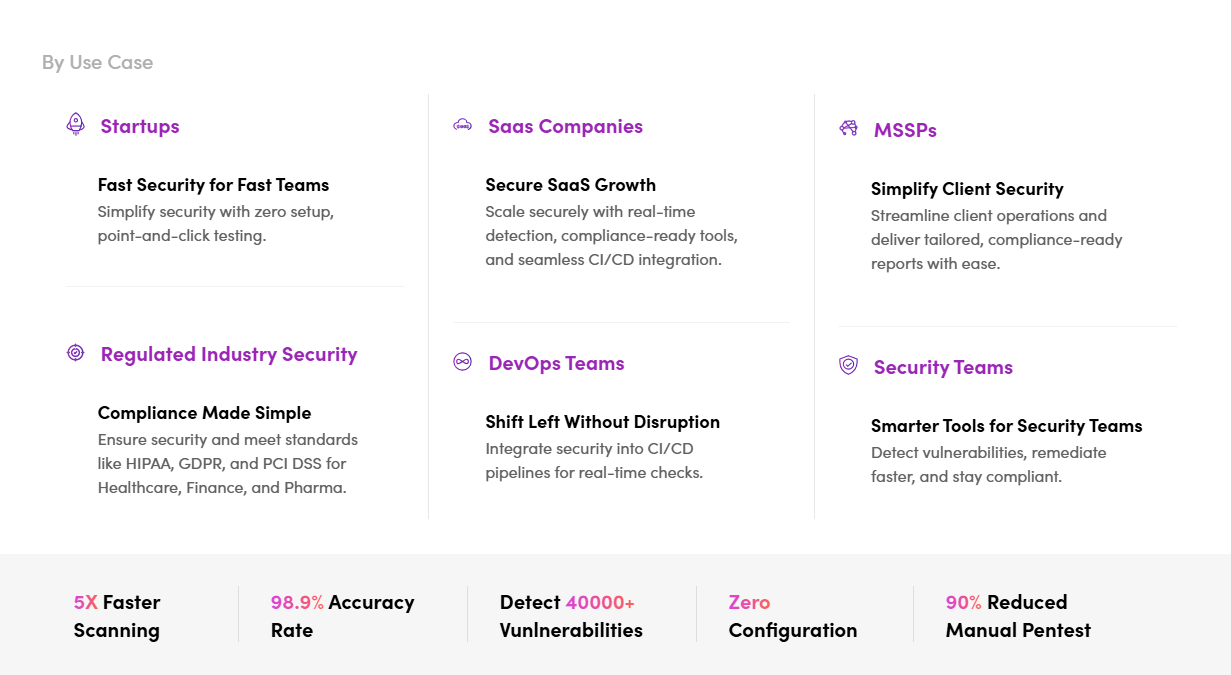
## 💡 谁能从 ZeroThreat 中受益?
## 
## 📚 文档与资源
通过我们的全面资源深入了解:
- **快速入门指南**
- **功能文档**
- **最佳实践**
- **故障排除提示**
- **常见问题**
## 🤝 支持与联系
我们随时为您服务:
- **技术支持**:通过我们的门户网站联系我们
- **邮箱**:[hello@zerothreat.ai](mailto:hello@zerothreat.ai)
- **网站**:[zerothreat.ai](https://zerothreat.ai)
## **准备好掌控您的安全了吗?**
在 [zerothreat.ai](https://zerothreat.ai) 开始您的免费试用,体验 ZeroThreat 如何变革漏洞评估。
标签:API安全, CISA项目, DInvoke, JSON输出, SaaS, Web安全, 安全测试, 攻击性安全, 蓝队分析