smtg-ai/claude-squad
GitHub: smtg-ai/claude-squad
一款终端多AI代理管理工具,支持在独立git工作空间中并行运行Claude Code、Codex、Gemini、Aider等多个AI编程助手。
Stars: 7950 | Forks: 570
# Claude Squad [](https://github.com/smtg-ai/claude-squad/actions/workflows/build.yml) [](https://github.com/smtg-ai/claude-squad/releases/latest)
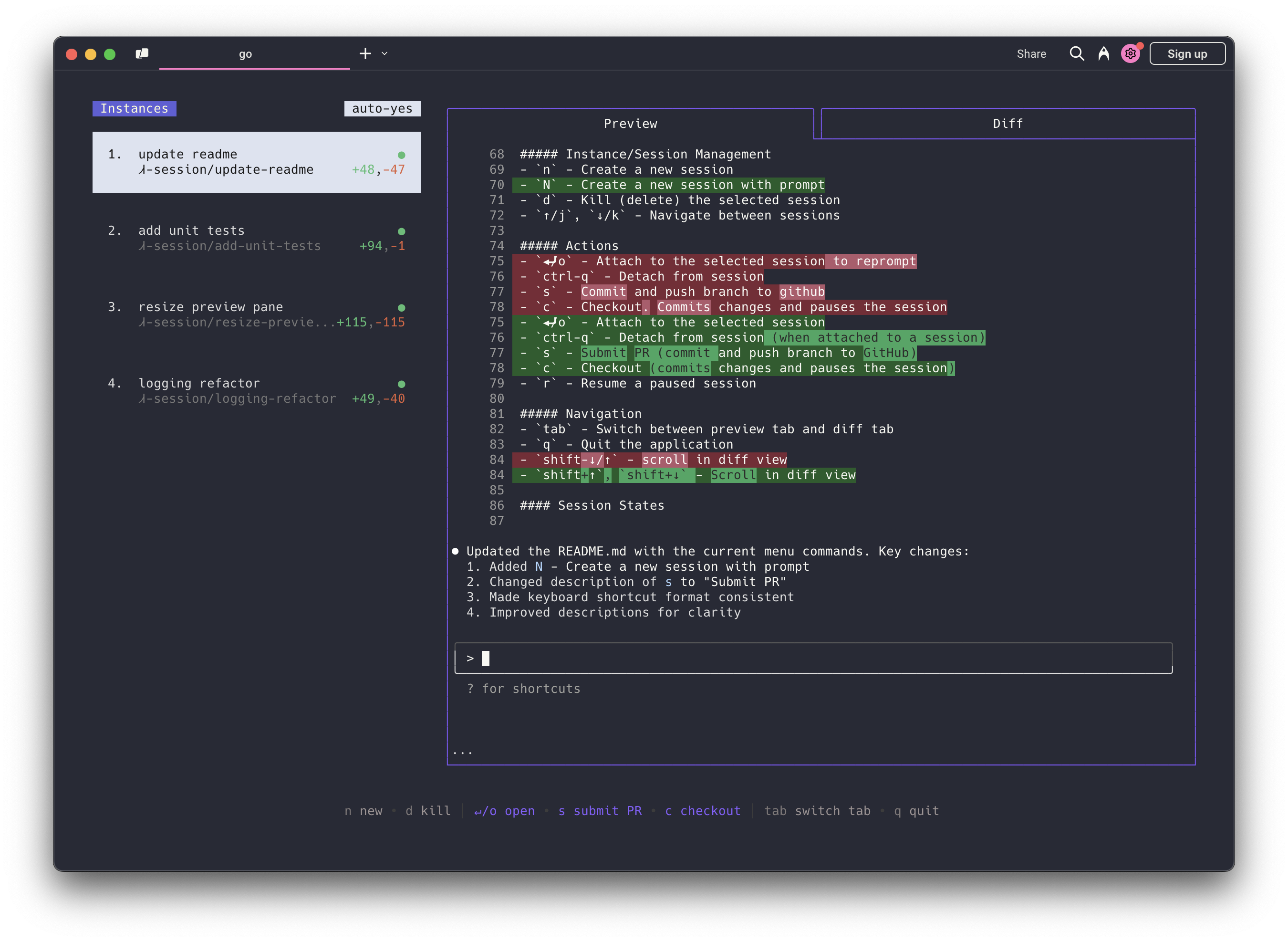
[Claude Squad](https://smtg-ai.github.io/claude-squad/) 是一款终端应用程序,用于在独立的工作空间中管理多个 [Claude Code](https://github.com/anthropics/claude-code)、[Codex](https://github.com/openai/codex)、[Gemini](https://github.com/google-gemini/gemini-cli)(以及其他本地代理,包括 [Aider](https://github.com/Aider-AI/aider)),允许您同时处理多个任务。
### 亮点
- 在后台完成任务(包括 yolo / 自动接受模式!)
- 在一个终端窗口中管理实例和任务
- 在应用更改前审查它们,在推送前检出更改
- 每个任务都有自己独立的 git 工作空间,因此不会发生冲突
https://github.com/user-attachments/assets/aef18253-e58f-4525-9032-f5a3d66c975a
### 安装 Homebrew 和手动安装都会将 Claude Squad 以 `cs` 的名称安装到您的系统中。 #### Homebrew ``` brew install claude-squad ln -s "$(brew --prefix)/bin/claude-squad" "$(brew --prefix)/bin/cs" ``` #### 手动安装 也可以通过运行以下命令来安装 Claude Squad: ``` curl -fsSL https://raw.githubusercontent.com/smtg-ai/claude-squad/main/install.sh | bash ``` 这会将 `cs` 二进制文件放入 `~/.local/bin`。 要为二进制文件使用自定义名称: ``` curl -fsSL https://raw.githubusercontent.com/smtg-ai/claude-squad/main/install.sh | bash -s -- --name
```
### 前置条件
- [tmux](https://github.com/tmux/tmux/wiki/Installing)
- [gh](https://cli.github.com/)
### 使用方法
```
Usage:
cs [flags]
cs [command]
Available Commands:
completion Generate the autocompletion script for the specified shell
debug Print debug information like config paths
help Help about any command
reset Reset all stored instances
version Print the version number of claude-squad
Flags:
-y, --autoyes [experimental] If enabled, all instances will automatically accept prompts for claude code & aider
-h, --help help for claude-squad
-p, --program string Program to run in new instances (e.g. 'aider --model ollama_chat/gemma3:1b')
```
使用以下命令运行应用程序:
```
cs
```
注意:默认程序是 `claude`,我们建议使用最新版本。
将 Claude Squad 与其他 AI 助手配合使用: - 对于 [Codex](https://github.com/openai/codex):使用 `export OPENAI_API_KEY=` 设置您的 API key
- 使用特定助手启动:
- Codex: `cs -p "codex"`
- Aider: `cs -p "aider ..."`
- Gemini: `cs -p "gemini"`
- 通过修改配置文件(使用 `cs debug` 定位)将其设为默认
#### 菜单 屏幕底部的菜单显示了可用的命令: ##### 实例/会话管理 - `n` - 创建新会话 - `N` - 创建带有提示词的新会话 - `D` - 终止(删除)选中的会话 - `↑/j`, `↓/k` - 在会话之间导航 ##### 操作 - `↵/o` - 附加到选中的会话以重新提示 - `ctrl-q` - 从会话分离 - `s` - 提交并将分支推送到 github - `c` - Checkout。提交更改并暂停会话 - `r` - 恢复已暂停的会话 - `?` - 显示帮助菜单 ##### 导航 - `tab` - 在预览标签页和 diff 标签页之间切换 - `q` - 退出应用程序 - `shift-↓/↑` - 在 diff 视图中滚动 ### 配置 Claude Squad 将其配置存储在 `~/.claude-squad/config.json` 中。您可以通过运行 `cs debug` 找到确切的路径。 #### 配置文件 (Profiles) Profiles 允许您定义多个命名的程序配置,并在创建新会话时在它们之间切换。当定义了多个 profile 时,会话创建叠加层会显示一个 profile 选择器,您可以使用 `←`/`→` 进行导航。 要配置 profiles,请在您的配置文件中添加一个 `profiles` 数组,并将 `default_program` 设置为默认选择的 profile 名称: ``` { "default_program": "claude", "profiles": [ { "name": "claude", "program": "claude" }, { "name": "codex", "program": "codex" }, { "name": "aider", "program": "aider --model ollama_chat/gemma3:1b" } ] } ``` 每个 profile 有两个字段: | 字段 | 描述 | |-----------|----------------------------------------------| | `name` | 在 profile 选择器中显示的名称 | | `program` | 用于为该 profile 启动 agent 的 shell 命令 | 如果未定义 profiles,Claude Squad 会直接使用 `default_program` 作为启动命令(默认值为 `claude`)。 ### 常见问题 #### 无法启动新会话 如果您遇到类似 `failed to start new session: timed out waiting for tmux session` 的错误,请将底层程序(例如 `claude`)更新到最新版本。 ### 工作原理 1. 使用 **tmux** 为每个 agent 创建独立的终端会话 2. 使用 **git worktrees** 隔离代码库,以便每个会话在自己的分支上工作 3. 提供简单的 TUI 界面以便于导航和管理 ### 许可证 [AGPL-3.0](LICENSE.md) ### Star 历史 [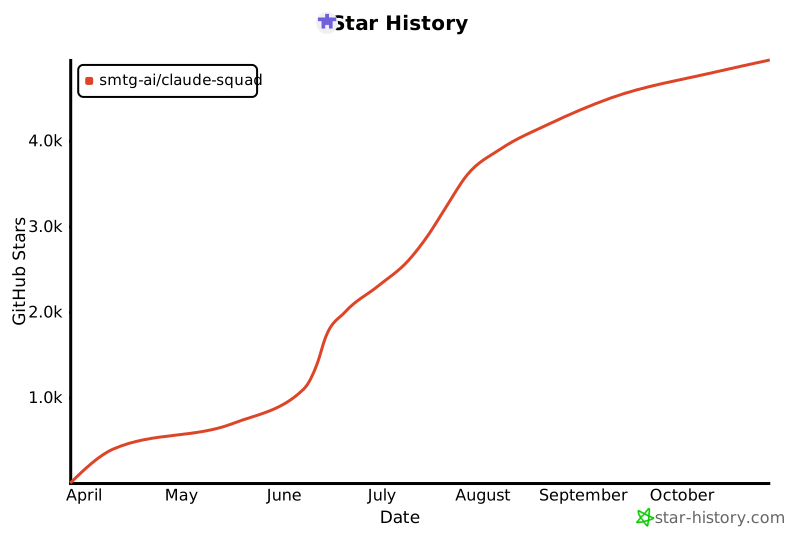](https://www.star-history.com/#smtg-ai/claude-squad&Date)
https://github.com/user-attachments/assets/aef18253-e58f-4525-9032-f5a3d66c975a
### 安装 Homebrew 和手动安装都会将 Claude Squad 以 `cs` 的名称安装到您的系统中。 #### Homebrew ``` brew install claude-squad ln -s "$(brew --prefix)/bin/claude-squad" "$(brew --prefix)/bin/cs" ``` #### 手动安装 也可以通过运行以下命令来安装 Claude Squad: ``` curl -fsSL https://raw.githubusercontent.com/smtg-ai/claude-squad/main/install.sh | bash ``` 这会将 `cs` 二进制文件放入 `~/.local/bin`。 要为二进制文件使用自定义名称: ``` curl -fsSL https://raw.githubusercontent.com/smtg-ai/claude-squad/main/install.sh | bash -s -- --name
将 Claude Squad 与其他 AI 助手配合使用: - 对于 [Codex](https://github.com/openai/codex):使用 `export OPENAI_API_KEY=
#### 菜单 屏幕底部的菜单显示了可用的命令: ##### 实例/会话管理 - `n` - 创建新会话 - `N` - 创建带有提示词的新会话 - `D` - 终止(删除)选中的会话 - `↑/j`, `↓/k` - 在会话之间导航 ##### 操作 - `↵/o` - 附加到选中的会话以重新提示 - `ctrl-q` - 从会话分离 - `s` - 提交并将分支推送到 github - `c` - Checkout。提交更改并暂停会话 - `r` - 恢复已暂停的会话 - `?` - 显示帮助菜单 ##### 导航 - `tab` - 在预览标签页和 diff 标签页之间切换 - `q` - 退出应用程序 - `shift-↓/↑` - 在 diff 视图中滚动 ### 配置 Claude Squad 将其配置存储在 `~/.claude-squad/config.json` 中。您可以通过运行 `cs debug` 找到确切的路径。 #### 配置文件 (Profiles) Profiles 允许您定义多个命名的程序配置,并在创建新会话时在它们之间切换。当定义了多个 profile 时,会话创建叠加层会显示一个 profile 选择器,您可以使用 `←`/`→` 进行导航。 要配置 profiles,请在您的配置文件中添加一个 `profiles` 数组,并将 `default_program` 设置为默认选择的 profile 名称: ``` { "default_program": "claude", "profiles": [ { "name": "claude", "program": "claude" }, { "name": "codex", "program": "codex" }, { "name": "aider", "program": "aider --model ollama_chat/gemma3:1b" } ] } ``` 每个 profile 有两个字段: | 字段 | 描述 | |-----------|----------------------------------------------| | `name` | 在 profile 选择器中显示的名称 | | `program` | 用于为该 profile 启动 agent 的 shell 命令 | 如果未定义 profiles,Claude Squad 会直接使用 `default_program` 作为启动命令(默认值为 `claude`)。 ### 常见问题 #### 无法启动新会话 如果您遇到类似 `failed to start new session: timed out waiting for tmux session` 的错误,请将底层程序(例如 `claude`)更新到最新版本。 ### 工作原理 1. 使用 **tmux** 为每个 agent 创建独立的终端会话 2. 使用 **git worktrees** 隔离代码库,以便每个会话在自己的分支上工作 3. 提供简单的 TUI 界面以便于导航和管理 ### 许可证 [AGPL-3.0](LICENSE.md) ### Star 历史 [](https://www.star-history.com/#smtg-ai/claude-squad&Date)
标签:Aider, AI代理管理, Claude Code, EVTX分析, Git工作空间, Go语言, OpenAI Codex, SOC Prime, Tmux, 代码审查, 代码自动化, 任务编排, 后台任务, 命令行界面, 多任务处理, 安全可观测性, 开发工具, 效率工具, 日志审计, 版本控制, 程序破解, 终端工具