laluka/skillarch
GitHub: laluka/skillarch
面向安全专业人员的一站式 Arch Linux 环境配置工具,预装攻防工具链并支持高度自定义和云端部署。
Stars: 60 | Forks: 35
# SkillArch - [](https://github.com/laluka/skillarch/actions/workflows/cicd.yml)


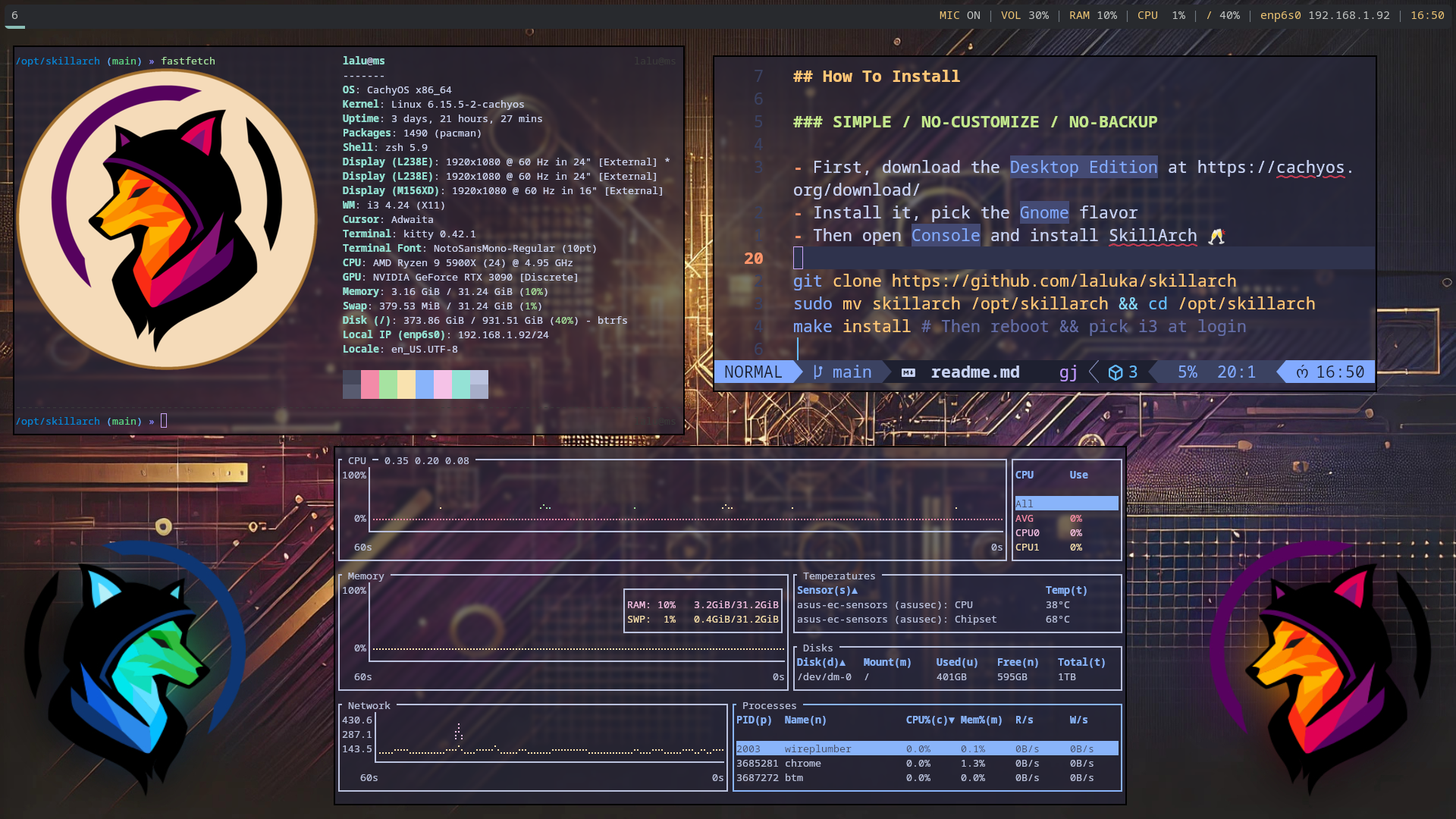 ## 如何安装
### 简单 / 不自定义 / 不备份
[](https://youtu.be/HB1hxJgGoDo)
- 首先,在 https://cachyos.org/download/ 下载 `Desktop Edition`
- 安装它,选择 `Plasma` 版本
- 然后打开 `Console` 并安装 SkillArch 🥂
```
git clone https://github.com/laluka/skillarch
sudo mv skillarch /opt/skillarch && cd /opt/skillarch
make install # Then reboot && pick i3 at login
# 运行此命令进行更新(将拉取更改并应用):
ska-update-simple
```
### 高级 / 完全自定义 / 完全备份
[](https://youtu.be/Wq6CmJJnTJk)
1. [Fork 本仓库](https://github.com/laluka/skillarch/fork)
2. 使用[常规安装流程](#simple--no-customize--no-backup)安装 `你的` SkillArch
3. 添加上游源:`git remote add upstream https://github.com/laluka/skillarch.git`
4. 当你想 `添加微调` 或 `更新你的配置` 时 🫶
```
# 运行此命令进行更新(只需按照流程操作):
ska-update-advanced
# “该流程”大致如下所示:
# 保存您在 repo 上的更改
git add foo ; git commit -m i-added-foo ; git push
# 然后,从 CLEAN git 状态
ska && git status
# PULL & CHECKOUT upstream 更改
git fetch upstream && git checkout main
# MERGE upstream 更改
git merge upstream/main
# 保存您的新当前状态
git push origin main
# 检查并比较您当前与 upstream 的差异
git diff upstream/main
# 根据最新更改重新应用
ska-update-simple
```
## 文档
[](https://youtu.be/pUm7KEgM2g8)
### 获取帮助
```
make help
# 欢迎来到 SkillArch!🌹
# 用法:make [target]
# Targets:
# help 显示此帮助信息
# install 安装 SkillArch
# install-base 安装基础 packages
# install-cli-tools 安装系统 packages
# install-shell 安装 shell packages
# install-docker 安装 docker
# install-gui 安装 i3, polybar, kitty, rofi, picom, KDE Plasma
# install-gui-tools 安装 GUI 应用(Chrome, VSCode, Ghidra 等)
# install-offensive 安装 offensive 工具
# install-wordlists 安装 wordlists
# install-hardening 安装 hardening 工具
# update 更新 SkillArch
# cloud (独立)为 cloud/remote desktop 安装 KasmVNC
# docker-build 在本地构建 lite docker image
# docker-build-full 在本地构建 full docker image
# docker-run 在本地运行 lite docker image
# docker-run-full 在本地运行 full docker image
# clean 清理系统并移除不必要的文件
```
### Ska 助手,i3 绑定,别名,工具
| 别名 | 描述 |
|-------|-------------|
| `ska-help-aliases` | 模糊查找别名 |
| `ska-help-bindings` | 模糊查找 i3 绑定 |
| `ska-help-packages` | 模糊查找已安装的软件包 |
| `ska-sudo-unlock` | 在 3 次 sudo 失败后解锁当前用户 |
| `ska-update-simple` | 更新 SkillArch 仓库并开始安装 |
| `ska-update-advanced` | 辅助拉取上游并合并 |
| `ska-vnc` | 通过 KasmVNC 启动 KDE Plasma 桌面(浏览器访问 https://127.0.0.1:8443) |
### 杂项注意事项
- 如果 `make install` 或 `ska-update-simple` 在 y/n 问题上循环,请先修复你的 pacman 配置!😉
- 主配置为 azerty(嘘,我知道),这里有一个参考资料可以将[你的配置改回 qwerty](https://github.com/CachyOS/cachyos-i3wm-settings/blob/develop/etc/skel/.config/i3/config)
- Kitty 的可视化/矩形选择是通过 `ctrl+alt+点击/拖动` 完成的,不客气!
- Docker 的 `latest` 实际上是包含所有 CLI 相关内容的 `lite` 镜像
- Docker 的 `full` 镜像包含 GUI 内容和字典
- 为什么 `Makefile` 里有 `sleep`?构建太快会触发 github 的限速
- 没有 [CachyOs on ARM](https://discuss.cachyos.org/t/arm-future-for-cachyos/727),因此 SkillArch 也不支持 ARM。
- Chrome 扩展默认不安装。请查看 [/config/chrome-extensions.lst](/config/chrome-extensions.lst)
### VM 与 VirtualBox 相关
- `ska-vbox-install-guestutils` 别名将自动安装 `virtualbox-guest-utils`
- 在 `VirtualBox` 中,当 i3 启动时,它会运行 `VBoxClient-all` 以提供剪贴板和其他好用的功能
- 透明度 `可以` 与 `picom` 一起工作,但是:
- 它需要启用 `enable hardware virtualization`(硬件虚拟化)
- 即使有好的 GPU,它基本上也 `非常慢`
- 我建议 `不要` 使用它,但你可以按你的想法做,PR 是开放的!
- 目前它只在未运行于虚拟机监控程序中的 i3 下启动
- 在 `~/config/i3/config` 中 : `killall -q picom ; grep -qF hypervisor /proc/cpuinfo || picom`
### 多显示器
1. 打开 arandr 并设置你的屏幕布局:拖拽
2. 设置你的主屏幕:右键点击 > 勾选 `Primary`
3. 保存你的布局:Layout > Save As > `arandr-main-layout.sh`
4. 在登录时自动应用布局:
```
echo "$HOME/.screenlayout/arandr-main-layout.sh &" > ~/.xprofile
chmod +x ~/.xprofile
# 注销、登录,应该首次尝试即可成功!
```
- 如果出于某些原因出现了多个 polybar,那是因为没有分配主显示器
- 检查它是否确实如此:`polybar --list-monitors` # 应该有一个 primary 标签
- 通过打开 `arandr` + 右键点击在你的主屏幕上设置 `primary` 来修复它。
- 使用 `mod+Shift+r` 重新加载 i3,然后使其永久生效,即参考文档 `Multiple Monitor`
### Docker 使用
https://hub.docker.com/r/thelaluka/skillarch
```
# lite image:仅 CLI
make docker-run
# full image:挂载 X11 socket 的 GUI 内容!
make docker-run-full
```
### 主要 i3 绑定与别名
- 关于别名请查看 [config/aliases](/config/aliases)
```
# 帮助
bindsym $mod+h exec kitty --title "Help: SkillArch Bindings" zsh -ic "ska-help-bindings"
bindsym $mod+Shift+h exec kitty --title "Help: SkillArch Aliases" zsh -ic "ska-help-aliases"
bindsym $mod+Control+h exec kitty --title "Help: SkillArch packages" zsh -ic "ska-help-packages"
# 声音与灯光
bindsym XF86AudioRaiseVolume exec --no-startup-id pactl set-sink-volume @DEFAULT_SINK@ +10% && $refresh_i3status
bindsym XF86AudioLowerVolume exec --no-startup-id pactl set-sink-volume @DEFAULT_SINK@ -10% && $refresh_i3status
bindsym XF86AudioMute exec --no-startup-id pactl set-sink-mute @DEFAULT_SINK@ toggle && $refresh_i3status
bindsym XF86AudioMicMute exec --no-startup-id pactl set-source-mute @DEFAULT_SOURCE@ toggle && $refresh_i3status
bindsym XF86MonBrightnessUp exec --no-startup-id brightnessctl set +20% # && notify-send --icon=/dev/null --expire-time=500 "Brightness +20%"
bindsym XF86MonBrightnessDown exec --no-startup-id brightnessctl set 20%- # && notify-send --icon=/dev/null --expire-time=500 "Brightness -20%"
bindsym $mod+Shift+l exec --no-startup-id brightnessctl set 1%
bindsym $mod+m exec pactl set-source-mute @DEFAULT_SOURCE@ toggle
# 终端与应用
bindsym $mod+Return exec /usr/bin/kitty
bindsym $mod+Shift+Return exec /usr/bin/google-chrome-stable
bindsym $mod+Shift+Q kill
bindsym $mod+space exec --no-startup-id rofi -show drun
bindsym $mod+Shift+space exec --no-startup-id rofi -show run
bindsym $mod+Control+space exec --no-startup-id rofi -show window
# 电源与锁屏
bindsym $mod+Escape exec rofi -show power-menu -modi power-menu:rofi-power-menu
bindsym $mod+l exec i3lock-fancy -f Bitstream-Vera-Serif -t 'Welcome back to SkillArch'
# 窗口与工作区
bindsym $mod+Left focus left
bindsym $mod+Down focus down
bindsym $mod+Up focus up
bindsym $mod+Right focus right
bindsym $mod+Shift+Left move left
bindsym $mod+Shift+Down move down
bindsym $mod+Shift+Up move up
bindsym $mod+Shift+Right move right
bindsym $mod+h split h
bindsym $mod+v split v
bindsym $mod+f fullscreen toggle
bindsym $mod+BackSpace split toggle
bindsym $mod+s layout stacking
bindsym $mod+z layout tabbed
bindsym $mod+BackSpace layout toggle split
bindsym $mod+Shift+f floating toggle
bindsym $mod+Shift+BackSpace focus mode_toggle
bindsym $mod+q focus parent
bindsym $mod+ampersand workspace number $ws1
bindsym $mod+eacute workspace number $ws2
bindsym $mod+quotedbl workspace number $ws3
bindsym $mod+apostrophe workspace number $ws4
bindsym $mod+parenleft workspace number $ws5
bindsym $mod+minus workspace number $ws6
bindsym $mod+egrave workspace number $ws7
bindsym $mod+underscore workspace number $ws8
bindsym $mod+ccedilla workspace number $ws9
bindsym $mod+agrave workspace number $ws10
bindsym $mod+Shift+1 move container to workspace number $ws1
bindsym $mod+Shift+eacute move container to workspace number $ws2
bindsym $mod+Shift+3 move container to workspace number $ws3
bindsym $mod+Shift+4 move container to workspace number $ws4
bindsym $mod+Shift+5 move container to workspace number $ws5
bindsym $mod+Shift+6 move container to workspace number $ws6
bindsym $mod+Shift+egrave move container to workspace number $ws7
bindsym $mod+Shift+8 move container to workspace number $ws8
bindsym $mod+Shift+ccedilla move container to workspace number $ws9
bindsym $mod+Shift+agrave move container to workspace number $ws10
bindsym $mod+Shift+c reload
bindsym $mod+Shift+r restart
# 调整大小与 Scratchpad
bindsym $mod+Shift+e exec "i3-nagbar -t warning -m 'You pressed the exit shortcut. Do you really want to exit i3? This will end your X session.' -B 'Yes, exit i3' 'i3-msg exit'"
bindsym Left resize shrink width 10 px or 10 ppt
bindsym Down resize grow height 10 px or 10 ppt
bindsym Up resize shrink height 10 px or 10 ppt
bindsym Right resize grow width 10 px or 10 ppt
bindsym Return mode "default"
bindsym Escape mode "default"
bindsym $mod+r mode "default"
bindsym $mod+r mode "resize"
bindsym $mod+shift+a move to scratchpad
bindsym $mod+a scratchpad show
# 自定义应用与设置
bindsym $mod+p exec flameshot gui
bindsym $mod+Shift+p exec flameshot full -p ~/Pictures/
bindsym $mod+s exec systemsettings kcm_pulseaudio
bindsym $mod+shift+s exec pavucontrol
bindsym $mod+e exec emote
bindsym $mod+b exec blueman-manager
bindsym $mod+w exec systemsettings kcm_networkmanagement
bindsym $mod+n exec dolphin
bindsym $mod+v exec vlc
bindsym $mod+c exec code
```
### 已安装的软件包、插件、工具
- 查看详尽列表请检查 [/Makefile](/Makefile)
```
# Pacman Packages
arandr asciinema base-devel bat bettercap bison blueman bottom brightnessctl bzip2 ca-certificates cloc cmake visual-studio-code-bin curl discord dmenu docker docker-compose dos2unix dragon-drop-git dunst emote eza expect fastfetch feh ffmpeg filezilla flameshot foremost fq fx gdb ghex ghidra git git-delta gitleaks glow gnupg google-chrome gparted gron guvcview hashcat htmlq htop hwinfo xorg-server i3-gaps i3blocks i3lock i3lock-fancy-git i3status icu inotify-tools iproute2 jless jq kdenlive kitty kompare lazygit libedit libffi libjpeg-turbo libpcap libpng libreoffice-fresh libxml2 libzip llvm lsof ltrace make meld metasploit mise mlocate mplayer ncurses neovim net-tools ngrep nm-connection-editor nmap okular opensnitch openssh openssl parallel perl-image-exiftool php-gd picom pkgconf polybar postgresql-libs python-virtualenv qbittorrent re2c readline ripgrep rlwrap rofi signal-desktop socat sqlite sshpass superfile sysstat tmate tmux tor torbrowser-launcher traceroute trash-cli tree unzip vbindiff veracrypt vim viu vlc vlc-plugin-ffmpeg flatpak websocat wget wireshark-qt xclip qsv xz yay zip zsh zsh-autosuggestions zsh-completions zsh-history-substring-search zsh-syntax-highlighting zsh-theme-powerlevel10k cronie tree-sitter audacity xorg-xhost archlinux-keyring jdk21-openjdk polkit-kde-agent dolphin kamoso plasma-desktop plasma-x11-session kwin-x11 konsole alacritty
# Yay packages
ffuf gau pdtm-bin waybackurls fswebcam caido-desktop caido-cli i3-battery-popup-git rofi-power-menu fabric-ai-bin
# Yay packages(仅限 cloud 目标 —— 不属于 make install)
openssl-1.1 kasmvncserver-bin
# Flatpak packages
com.obsproject.Studio
# Mise tools
uv usage pdm rust terraform golang python nodejs opencode
# Mise golang tools
sw33tLie/sns glitchedgitz/cook x90skysn3k/brutespray sensepost/gowitness
# GitHub binary releases
slicingmelon/gobypass403 Chocapikk/wpprobe
# Pdtm tools
aix alterx asnmap cdncheck chaos-client cloudlist cvemap dnsx httpx interactsh-client interactsh-server katana mapcidr naabu notify nuclei proxify shuffledns simplehttpserver subfinder tldfinder tlsx tunnelx uncover urlfinder
# Python uv tools
argcomplete bypass-url-parser exegol pre-commit sqlmap wafw00f yt-dlp semgrep defaultcreds-cheat-sheet
# OMZ plugins
colored-man-pages docker extract fzf mise npm terraform tmux zsh-autosuggestions zsh-completions zsh-syntax-highlighting ssh-agent z
# VsCode Extensions
bibhasdn.unique-lines
eriklynd.json-tools
mechatroner.rainbow-csv
mitchdenny.ecdc
ms-azuretools.vscode-docker
ms-python.debugpy
ms-python.python
ms-python.vscode-pylance
ms-vscode-remote.remote-containers
ms-vscode-remote.remote-ssh
ms-vscode-remote.remote-ssh-edit
ms-vscode.remote-explorer
ms-vsliveshare.vsliveshare
pomdtr.excalidraw-editor
trailofbits.weaudit
yzane.markdown-pdf
zobo.php-intellisense
# Cloned Tools
https://github.com/LazyVim/starter
https://github.com/jpillora/chisel
https://github.com/ambionics/phpggc
https://github.com/CBHue/PyFuscation
https://github.com/christophetd/CloudFlair
https://github.com/minos-org/minos-static
https://github.com/offensive-security/exploit-database
https://gitlab.com/exploit-database/exploitdb
https://github.com/laluka/pty4all
https://github.com/laluka/pypotomux
https://github.com/hugsy/gef
# Clones Wordlists
https://github.com/brannondorsey/naive-hashcat/releases/download/data/rockyou.txt
https://github.com/swisskyrepo/PayloadsAllTheThings
https://github.com/1N3/BruteX
https://github.com/1N3/IntruderPayloads
https://github.com/berzerk0/Probable-Wordlists
https://github.com/cujanovic/Open-Redirect-Payloads
https://github.com/danielmiessler/SecLists
https://github.com/ignis-sec/Pwdb-Public
https://github.com/Karanxa/Bug-Bounty-Wordlists
https://github.com/tarraschk/richelieu
https://github.com/p0dalirius/webapp-wordlists
```
### 服务
以下 systemd 服务已安装,但**默认已禁用并停止**。请仅启用你需要的服务:
| 服务 | 软件包 | 启动 | 开机自启 | 用途 |
|---------|---------|-------|---------------|---------|
| `docker` | `docker` | 安装时自动启动 (裸金属) | 是 (裸金属) | Container runtime |
| `opensnitchd` | `opensnitch` | `sudo systemctl start opensnitchd` | `sudo systemctl enable opensnitchd` | 出站防火墙 (opt-in) |
### 云目标 (独立 -- `make cloud`)
安装 KasmVNC + cloud-init + SSH。KDE Plasma 通过 `make install-gui` 安装。在执行 `make cloud` 后,`ska-vnc` 别名将启动一个可通过浏览器访问的完整 KDE Plasma 桌面。
| 服务 | 软件包 | 启动 | 用途 |
|---------|---------|-------|---------|
| *(用户级)* | `kasmvncserver-bin` | `ska-vnc` | 通过浏览器访问 KDE Plasma 桌面 (VNC over websocket) |
| `sshd` | `openssh` | 自动启用 | SSH 访问 |
| `cloud-init` | `cloud-init` | 自动启用 | VM 自动配置 (网络, SSH keys, 主机名) |
**快速开始:**
```
ska-vnc
# KasmVNC 运行于 https://127.0.0.1:8443(无 auth)
# 从您的本地机器,进行 SSH port-forward 然后在浏览器中打开:
ssh -L 8443:localhost:8443 user@host
# 访问:https://localhost:8443
# 停止:
vncserver -kill :1
```
**工作原理:** KasmVNC 的 Xvnc 没有 GLX 扩展,所以 KDE Plasma 6 无法使用 OpenGL。`vnc-xstartup` 脚本设置 `QT_QUICK_BACKEND=software` 以强制使用 Qt 的软件光栅化器。kwin 在没有合成的情况下运行,但仍然管理窗口和装饰。有关完整的变通细节,请参阅 `kasm-pls.md`。
### 安全
- `opensnitch` 可以帮助你阻止出站数据包和连接 (opt-in,需手动启动)
- `ufw` 可以帮助你阻止入站数据包和请求
- 但要小心,[docker iptables 的捣乱会绕过 ufw 规则](https://richincapie.medium.com/docker-ufw-and-iptables-a-security-flaw-you-need-to-solve-now-40c85587b563)
## 自 [Lalubuntu](https://github.com/laluka/lalubuntu) 以来的主要变化
| 内容 | Lalubuntu | SkillArch |
|------|-----------|-----------|
| 操作系统 | Ubuntu | Arch |
| 安装时间 | 60mn | 20mn |
| 终端 | Gnome Terminal | Kitty |
| i3 配置 | regolith | homemade |
| 安装工具 | ansible | Makefile |
| 镜像构建 | packer | docker |
| 镜像 | base,offensive,gui | lite,full |
| 生活质量 | decent | wow! |
## 致谢
- https://github.com/bernsteining/beep-beep
- https://github.com/CachyOS/cachyos-desktop
- https://github.com/davatorium/rofi
- https://github.com/Hyde-project/hyde
- https://github.com/jluttine/rofi-power-menu
- https://github.com/newmanls/rofi-themes-collection
- https://github.com/orhun/config
- https://github.com/regolith-linux/regolith-desktop
## 如何安装
### 简单 / 不自定义 / 不备份
[](https://youtu.be/HB1hxJgGoDo)
- 首先,在 https://cachyos.org/download/ 下载 `Desktop Edition`
- 安装它,选择 `Plasma` 版本
- 然后打开 `Console` 并安装 SkillArch 🥂
```
git clone https://github.com/laluka/skillarch
sudo mv skillarch /opt/skillarch && cd /opt/skillarch
make install # Then reboot && pick i3 at login
# 运行此命令进行更新(将拉取更改并应用):
ska-update-simple
```
### 高级 / 完全自定义 / 完全备份
[](https://youtu.be/Wq6CmJJnTJk)
1. [Fork 本仓库](https://github.com/laluka/skillarch/fork)
2. 使用[常规安装流程](#simple--no-customize--no-backup)安装 `你的` SkillArch
3. 添加上游源:`git remote add upstream https://github.com/laluka/skillarch.git`
4. 当你想 `添加微调` 或 `更新你的配置` 时 🫶
```
# 运行此命令进行更新(只需按照流程操作):
ska-update-advanced
# “该流程”大致如下所示:
# 保存您在 repo 上的更改
git add foo ; git commit -m i-added-foo ; git push
# 然后,从 CLEAN git 状态
ska && git status
# PULL & CHECKOUT upstream 更改
git fetch upstream && git checkout main
# MERGE upstream 更改
git merge upstream/main
# 保存您的新当前状态
git push origin main
# 检查并比较您当前与 upstream 的差异
git diff upstream/main
# 根据最新更改重新应用
ska-update-simple
```
## 文档
[](https://youtu.be/pUm7KEgM2g8)
### 获取帮助
```
make help
# 欢迎来到 SkillArch!🌹
# 用法:make [target]
# Targets:
# help 显示此帮助信息
# install 安装 SkillArch
# install-base 安装基础 packages
# install-cli-tools 安装系统 packages
# install-shell 安装 shell packages
# install-docker 安装 docker
# install-gui 安装 i3, polybar, kitty, rofi, picom, KDE Plasma
# install-gui-tools 安装 GUI 应用(Chrome, VSCode, Ghidra 等)
# install-offensive 安装 offensive 工具
# install-wordlists 安装 wordlists
# install-hardening 安装 hardening 工具
# update 更新 SkillArch
# cloud (独立)为 cloud/remote desktop 安装 KasmVNC
# docker-build 在本地构建 lite docker image
# docker-build-full 在本地构建 full docker image
# docker-run 在本地运行 lite docker image
# docker-run-full 在本地运行 full docker image
# clean 清理系统并移除不必要的文件
```
### Ska 助手,i3 绑定,别名,工具
| 别名 | 描述 |
|-------|-------------|
| `ska-help-aliases` | 模糊查找别名 |
| `ska-help-bindings` | 模糊查找 i3 绑定 |
| `ska-help-packages` | 模糊查找已安装的软件包 |
| `ska-sudo-unlock` | 在 3 次 sudo 失败后解锁当前用户 |
| `ska-update-simple` | 更新 SkillArch 仓库并开始安装 |
| `ska-update-advanced` | 辅助拉取上游并合并 |
| `ska-vnc` | 通过 KasmVNC 启动 KDE Plasma 桌面(浏览器访问 https://127.0.0.1:8443) |
### 杂项注意事项
- 如果 `make install` 或 `ska-update-simple` 在 y/n 问题上循环,请先修复你的 pacman 配置!😉
- 主配置为 azerty(嘘,我知道),这里有一个参考资料可以将[你的配置改回 qwerty](https://github.com/CachyOS/cachyos-i3wm-settings/blob/develop/etc/skel/.config/i3/config)
- Kitty 的可视化/矩形选择是通过 `ctrl+alt+点击/拖动` 完成的,不客气!
- Docker 的 `latest` 实际上是包含所有 CLI 相关内容的 `lite` 镜像
- Docker 的 `full` 镜像包含 GUI 内容和字典
- 为什么 `Makefile` 里有 `sleep`?构建太快会触发 github 的限速
- 没有 [CachyOs on ARM](https://discuss.cachyos.org/t/arm-future-for-cachyos/727),因此 SkillArch 也不支持 ARM。
- Chrome 扩展默认不安装。请查看 [/config/chrome-extensions.lst](/config/chrome-extensions.lst)
### VM 与 VirtualBox 相关
- `ska-vbox-install-guestutils` 别名将自动安装 `virtualbox-guest-utils`
- 在 `VirtualBox` 中,当 i3 启动时,它会运行 `VBoxClient-all` 以提供剪贴板和其他好用的功能
- 透明度 `可以` 与 `picom` 一起工作,但是:
- 它需要启用 `enable hardware virtualization`(硬件虚拟化)
- 即使有好的 GPU,它基本上也 `非常慢`
- 我建议 `不要` 使用它,但你可以按你的想法做,PR 是开放的!
- 目前它只在未运行于虚拟机监控程序中的 i3 下启动
- 在 `~/config/i3/config` 中 : `killall -q picom ; grep -qF hypervisor /proc/cpuinfo || picom`
### 多显示器
1. 打开 arandr 并设置你的屏幕布局:拖拽
2. 设置你的主屏幕:右键点击 > 勾选 `Primary`
3. 保存你的布局:Layout > Save As > `arandr-main-layout.sh`
4. 在登录时自动应用布局:
```
echo "$HOME/.screenlayout/arandr-main-layout.sh &" > ~/.xprofile
chmod +x ~/.xprofile
# 注销、登录,应该首次尝试即可成功!
```
- 如果出于某些原因出现了多个 polybar,那是因为没有分配主显示器
- 检查它是否确实如此:`polybar --list-monitors` # 应该有一个 primary 标签
- 通过打开 `arandr` + 右键点击在你的主屏幕上设置 `primary` 来修复它。
- 使用 `mod+Shift+r` 重新加载 i3,然后使其永久生效,即参考文档 `Multiple Monitor`
### Docker 使用
https://hub.docker.com/r/thelaluka/skillarch
```
# lite image:仅 CLI
make docker-run
# full image:挂载 X11 socket 的 GUI 内容!
make docker-run-full
```
### 主要 i3 绑定与别名
- 关于别名请查看 [config/aliases](/config/aliases)
```
# 帮助
bindsym $mod+h exec kitty --title "Help: SkillArch Bindings" zsh -ic "ska-help-bindings"
bindsym $mod+Shift+h exec kitty --title "Help: SkillArch Aliases" zsh -ic "ska-help-aliases"
bindsym $mod+Control+h exec kitty --title "Help: SkillArch packages" zsh -ic "ska-help-packages"
# 声音与灯光
bindsym XF86AudioRaiseVolume exec --no-startup-id pactl set-sink-volume @DEFAULT_SINK@ +10% && $refresh_i3status
bindsym XF86AudioLowerVolume exec --no-startup-id pactl set-sink-volume @DEFAULT_SINK@ -10% && $refresh_i3status
bindsym XF86AudioMute exec --no-startup-id pactl set-sink-mute @DEFAULT_SINK@ toggle && $refresh_i3status
bindsym XF86AudioMicMute exec --no-startup-id pactl set-source-mute @DEFAULT_SOURCE@ toggle && $refresh_i3status
bindsym XF86MonBrightnessUp exec --no-startup-id brightnessctl set +20% # && notify-send --icon=/dev/null --expire-time=500 "Brightness +20%"
bindsym XF86MonBrightnessDown exec --no-startup-id brightnessctl set 20%- # && notify-send --icon=/dev/null --expire-time=500 "Brightness -20%"
bindsym $mod+Shift+l exec --no-startup-id brightnessctl set 1%
bindsym $mod+m exec pactl set-source-mute @DEFAULT_SOURCE@ toggle
# 终端与应用
bindsym $mod+Return exec /usr/bin/kitty
bindsym $mod+Shift+Return exec /usr/bin/google-chrome-stable
bindsym $mod+Shift+Q kill
bindsym $mod+space exec --no-startup-id rofi -show drun
bindsym $mod+Shift+space exec --no-startup-id rofi -show run
bindsym $mod+Control+space exec --no-startup-id rofi -show window
# 电源与锁屏
bindsym $mod+Escape exec rofi -show power-menu -modi power-menu:rofi-power-menu
bindsym $mod+l exec i3lock-fancy -f Bitstream-Vera-Serif -t 'Welcome back to SkillArch'
# 窗口与工作区
bindsym $mod+Left focus left
bindsym $mod+Down focus down
bindsym $mod+Up focus up
bindsym $mod+Right focus right
bindsym $mod+Shift+Left move left
bindsym $mod+Shift+Down move down
bindsym $mod+Shift+Up move up
bindsym $mod+Shift+Right move right
bindsym $mod+h split h
bindsym $mod+v split v
bindsym $mod+f fullscreen toggle
bindsym $mod+BackSpace split toggle
bindsym $mod+s layout stacking
bindsym $mod+z layout tabbed
bindsym $mod+BackSpace layout toggle split
bindsym $mod+Shift+f floating toggle
bindsym $mod+Shift+BackSpace focus mode_toggle
bindsym $mod+q focus parent
bindsym $mod+ampersand workspace number $ws1
bindsym $mod+eacute workspace number $ws2
bindsym $mod+quotedbl workspace number $ws3
bindsym $mod+apostrophe workspace number $ws4
bindsym $mod+parenleft workspace number $ws5
bindsym $mod+minus workspace number $ws6
bindsym $mod+egrave workspace number $ws7
bindsym $mod+underscore workspace number $ws8
bindsym $mod+ccedilla workspace number $ws9
bindsym $mod+agrave workspace number $ws10
bindsym $mod+Shift+1 move container to workspace number $ws1
bindsym $mod+Shift+eacute move container to workspace number $ws2
bindsym $mod+Shift+3 move container to workspace number $ws3
bindsym $mod+Shift+4 move container to workspace number $ws4
bindsym $mod+Shift+5 move container to workspace number $ws5
bindsym $mod+Shift+6 move container to workspace number $ws6
bindsym $mod+Shift+egrave move container to workspace number $ws7
bindsym $mod+Shift+8 move container to workspace number $ws8
bindsym $mod+Shift+ccedilla move container to workspace number $ws9
bindsym $mod+Shift+agrave move container to workspace number $ws10
bindsym $mod+Shift+c reload
bindsym $mod+Shift+r restart
# 调整大小与 Scratchpad
bindsym $mod+Shift+e exec "i3-nagbar -t warning -m 'You pressed the exit shortcut. Do you really want to exit i3? This will end your X session.' -B 'Yes, exit i3' 'i3-msg exit'"
bindsym Left resize shrink width 10 px or 10 ppt
bindsym Down resize grow height 10 px or 10 ppt
bindsym Up resize shrink height 10 px or 10 ppt
bindsym Right resize grow width 10 px or 10 ppt
bindsym Return mode "default"
bindsym Escape mode "default"
bindsym $mod+r mode "default"
bindsym $mod+r mode "resize"
bindsym $mod+shift+a move to scratchpad
bindsym $mod+a scratchpad show
# 自定义应用与设置
bindsym $mod+p exec flameshot gui
bindsym $mod+Shift+p exec flameshot full -p ~/Pictures/
bindsym $mod+s exec systemsettings kcm_pulseaudio
bindsym $mod+shift+s exec pavucontrol
bindsym $mod+e exec emote
bindsym $mod+b exec blueman-manager
bindsym $mod+w exec systemsettings kcm_networkmanagement
bindsym $mod+n exec dolphin
bindsym $mod+v exec vlc
bindsym $mod+c exec code
```
### 已安装的软件包、插件、工具
- 查看详尽列表请检查 [/Makefile](/Makefile)
```
# Pacman Packages
arandr asciinema base-devel bat bettercap bison blueman bottom brightnessctl bzip2 ca-certificates cloc cmake visual-studio-code-bin curl discord dmenu docker docker-compose dos2unix dragon-drop-git dunst emote eza expect fastfetch feh ffmpeg filezilla flameshot foremost fq fx gdb ghex ghidra git git-delta gitleaks glow gnupg google-chrome gparted gron guvcview hashcat htmlq htop hwinfo xorg-server i3-gaps i3blocks i3lock i3lock-fancy-git i3status icu inotify-tools iproute2 jless jq kdenlive kitty kompare lazygit libedit libffi libjpeg-turbo libpcap libpng libreoffice-fresh libxml2 libzip llvm lsof ltrace make meld metasploit mise mlocate mplayer ncurses neovim net-tools ngrep nm-connection-editor nmap okular opensnitch openssh openssl parallel perl-image-exiftool php-gd picom pkgconf polybar postgresql-libs python-virtualenv qbittorrent re2c readline ripgrep rlwrap rofi signal-desktop socat sqlite sshpass superfile sysstat tmate tmux tor torbrowser-launcher traceroute trash-cli tree unzip vbindiff veracrypt vim viu vlc vlc-plugin-ffmpeg flatpak websocat wget wireshark-qt xclip qsv xz yay zip zsh zsh-autosuggestions zsh-completions zsh-history-substring-search zsh-syntax-highlighting zsh-theme-powerlevel10k cronie tree-sitter audacity xorg-xhost archlinux-keyring jdk21-openjdk polkit-kde-agent dolphin kamoso plasma-desktop plasma-x11-session kwin-x11 konsole alacritty
# Yay packages
ffuf gau pdtm-bin waybackurls fswebcam caido-desktop caido-cli i3-battery-popup-git rofi-power-menu fabric-ai-bin
# Yay packages(仅限 cloud 目标 —— 不属于 make install)
openssl-1.1 kasmvncserver-bin
# Flatpak packages
com.obsproject.Studio
# Mise tools
uv usage pdm rust terraform golang python nodejs opencode
# Mise golang tools
sw33tLie/sns glitchedgitz/cook x90skysn3k/brutespray sensepost/gowitness
# GitHub binary releases
slicingmelon/gobypass403 Chocapikk/wpprobe
# Pdtm tools
aix alterx asnmap cdncheck chaos-client cloudlist cvemap dnsx httpx interactsh-client interactsh-server katana mapcidr naabu notify nuclei proxify shuffledns simplehttpserver subfinder tldfinder tlsx tunnelx uncover urlfinder
# Python uv tools
argcomplete bypass-url-parser exegol pre-commit sqlmap wafw00f yt-dlp semgrep defaultcreds-cheat-sheet
# OMZ plugins
colored-man-pages docker extract fzf mise npm terraform tmux zsh-autosuggestions zsh-completions zsh-syntax-highlighting ssh-agent z
# VsCode Extensions
bibhasdn.unique-lines
eriklynd.json-tools
mechatroner.rainbow-csv
mitchdenny.ecdc
ms-azuretools.vscode-docker
ms-python.debugpy
ms-python.python
ms-python.vscode-pylance
ms-vscode-remote.remote-containers
ms-vscode-remote.remote-ssh
ms-vscode-remote.remote-ssh-edit
ms-vscode.remote-explorer
ms-vsliveshare.vsliveshare
pomdtr.excalidraw-editor
trailofbits.weaudit
yzane.markdown-pdf
zobo.php-intellisense
# Cloned Tools
https://github.com/LazyVim/starter
https://github.com/jpillora/chisel
https://github.com/ambionics/phpggc
https://github.com/CBHue/PyFuscation
https://github.com/christophetd/CloudFlair
https://github.com/minos-org/minos-static
https://github.com/offensive-security/exploit-database
https://gitlab.com/exploit-database/exploitdb
https://github.com/laluka/pty4all
https://github.com/laluka/pypotomux
https://github.com/hugsy/gef
# Clones Wordlists
https://github.com/brannondorsey/naive-hashcat/releases/download/data/rockyou.txt
https://github.com/swisskyrepo/PayloadsAllTheThings
https://github.com/1N3/BruteX
https://github.com/1N3/IntruderPayloads
https://github.com/berzerk0/Probable-Wordlists
https://github.com/cujanovic/Open-Redirect-Payloads
https://github.com/danielmiessler/SecLists
https://github.com/ignis-sec/Pwdb-Public
https://github.com/Karanxa/Bug-Bounty-Wordlists
https://github.com/tarraschk/richelieu
https://github.com/p0dalirius/webapp-wordlists
```
### 服务
以下 systemd 服务已安装,但**默认已禁用并停止**。请仅启用你需要的服务:
| 服务 | 软件包 | 启动 | 开机自启 | 用途 |
|---------|---------|-------|---------------|---------|
| `docker` | `docker` | 安装时自动启动 (裸金属) | 是 (裸金属) | Container runtime |
| `opensnitchd` | `opensnitch` | `sudo systemctl start opensnitchd` | `sudo systemctl enable opensnitchd` | 出站防火墙 (opt-in) |
### 云目标 (独立 -- `make cloud`)
安装 KasmVNC + cloud-init + SSH。KDE Plasma 通过 `make install-gui` 安装。在执行 `make cloud` 后,`ska-vnc` 别名将启动一个可通过浏览器访问的完整 KDE Plasma 桌面。
| 服务 | 软件包 | 启动 | 用途 |
|---------|---------|-------|---------|
| *(用户级)* | `kasmvncserver-bin` | `ska-vnc` | 通过浏览器访问 KDE Plasma 桌面 (VNC over websocket) |
| `sshd` | `openssh` | 自动启用 | SSH 访问 |
| `cloud-init` | `cloud-init` | 自动启用 | VM 自动配置 (网络, SSH keys, 主机名) |
**快速开始:**
```
ska-vnc
# KasmVNC 运行于 https://127.0.0.1:8443(无 auth)
# 从您的本地机器,进行 SSH port-forward 然后在浏览器中打开:
ssh -L 8443:localhost:8443 user@host
# 访问:https://localhost:8443
# 停止:
vncserver -kill :1
```
**工作原理:** KasmVNC 的 Xvnc 没有 GLX 扩展,所以 KDE Plasma 6 无法使用 OpenGL。`vnc-xstartup` 脚本设置 `QT_QUICK_BACKEND=software` 以强制使用 Qt 的软件光栅化器。kwin 在没有合成的情况下运行,但仍然管理窗口和装饰。有关完整的变通细节,请参阅 `kasm-pls.md`。
### 安全
- `opensnitch` 可以帮助你阻止出站数据包和连接 (opt-in,需手动启动)
- `ufw` 可以帮助你阻止入站数据包和请求
- 但要小心,[docker iptables 的捣乱会绕过 ufw 规则](https://richincapie.medium.com/docker-ufw-and-iptables-a-security-flaw-you-need-to-solve-now-40c85587b563)
## 自 [Lalubuntu](https://github.com/laluka/lalubuntu) 以来的主要变化
| 内容 | Lalubuntu | SkillArch |
|------|-----------|-----------|
| 操作系统 | Ubuntu | Arch |
| 安装时间 | 60mn | 20mn |
| 终端 | Gnome Terminal | Kitty |
| i3 配置 | regolith | homemade |
| 安装工具 | ansible | Makefile |
| 镜像构建 | packer | docker |
| 镜像 | base,offensive,gui | lite,full |
| 生活质量 | decent | wow! |
## 致谢
- https://github.com/bernsteining/beep-beep
- https://github.com/CachyOS/cachyos-desktop
- https://github.com/davatorium/rofi
- https://github.com/Hyde-project/hyde
- https://github.com/jluttine/rofi-power-menu
- https://github.com/newmanls/rofi-themes-collection
- https://github.com/orhun/config
- https://github.com/regolith-linux/regolith-desktop
## 如何安装
### 简单 / 不自定义 / 不备份
[](https://youtu.be/HB1hxJgGoDo)
- 首先,在 https://cachyos.org/download/ 下载 `Desktop Edition`
- 安装它,选择 `Plasma` 版本
- 然后打开 `Console` 并安装 SkillArch 🥂
```
git clone https://github.com/laluka/skillarch
sudo mv skillarch /opt/skillarch && cd /opt/skillarch
make install # Then reboot && pick i3 at login
# 运行此命令进行更新(将拉取更改并应用):
ska-update-simple
```
### 高级 / 完全自定义 / 完全备份
[](https://youtu.be/Wq6CmJJnTJk)
1. [Fork 本仓库](https://github.com/laluka/skillarch/fork)
2. 使用[常规安装流程](#simple--no-customize--no-backup)安装 `你的` SkillArch
3. 添加上游源:`git remote add upstream https://github.com/laluka/skillarch.git`
4. 当你想 `添加微调` 或 `更新你的配置` 时 🫶
```
# 运行此命令进行更新(只需按照流程操作):
ska-update-advanced
# “该流程”大致如下所示:
# 保存您在 repo 上的更改
git add foo ; git commit -m i-added-foo ; git push
# 然后,从 CLEAN git 状态
ska && git status
# PULL & CHECKOUT upstream 更改
git fetch upstream && git checkout main
# MERGE upstream 更改
git merge upstream/main
# 保存您的新当前状态
git push origin main
# 检查并比较您当前与 upstream 的差异
git diff upstream/main
# 根据最新更改重新应用
ska-update-simple
```
## 文档
[](https://youtu.be/pUm7KEgM2g8)
### 获取帮助
```
make help
# 欢迎来到 SkillArch!🌹
# 用法:make [target]
# Targets:
# help 显示此帮助信息
# install 安装 SkillArch
# install-base 安装基础 packages
# install-cli-tools 安装系统 packages
# install-shell 安装 shell packages
# install-docker 安装 docker
# install-gui 安装 i3, polybar, kitty, rofi, picom, KDE Plasma
# install-gui-tools 安装 GUI 应用(Chrome, VSCode, Ghidra 等)
# install-offensive 安装 offensive 工具
# install-wordlists 安装 wordlists
# install-hardening 安装 hardening 工具
# update 更新 SkillArch
# cloud (独立)为 cloud/remote desktop 安装 KasmVNC
# docker-build 在本地构建 lite docker image
# docker-build-full 在本地构建 full docker image
# docker-run 在本地运行 lite docker image
# docker-run-full 在本地运行 full docker image
# clean 清理系统并移除不必要的文件
```
### Ska 助手,i3 绑定,别名,工具
| 别名 | 描述 |
|-------|-------------|
| `ska-help-aliases` | 模糊查找别名 |
| `ska-help-bindings` | 模糊查找 i3 绑定 |
| `ska-help-packages` | 模糊查找已安装的软件包 |
| `ska-sudo-unlock` | 在 3 次 sudo 失败后解锁当前用户 |
| `ska-update-simple` | 更新 SkillArch 仓库并开始安装 |
| `ska-update-advanced` | 辅助拉取上游并合并 |
| `ska-vnc` | 通过 KasmVNC 启动 KDE Plasma 桌面(浏览器访问 https://127.0.0.1:8443) |
### 杂项注意事项
- 如果 `make install` 或 `ska-update-simple` 在 y/n 问题上循环,请先修复你的 pacman 配置!😉
- 主配置为 azerty(嘘,我知道),这里有一个参考资料可以将[你的配置改回 qwerty](https://github.com/CachyOS/cachyos-i3wm-settings/blob/develop/etc/skel/.config/i3/config)
- Kitty 的可视化/矩形选择是通过 `ctrl+alt+点击/拖动` 完成的,不客气!
- Docker 的 `latest` 实际上是包含所有 CLI 相关内容的 `lite` 镜像
- Docker 的 `full` 镜像包含 GUI 内容和字典
- 为什么 `Makefile` 里有 `sleep`?构建太快会触发 github 的限速
- 没有 [CachyOs on ARM](https://discuss.cachyos.org/t/arm-future-for-cachyos/727),因此 SkillArch 也不支持 ARM。
- Chrome 扩展默认不安装。请查看 [/config/chrome-extensions.lst](/config/chrome-extensions.lst)
### VM 与 VirtualBox 相关
- `ska-vbox-install-guestutils` 别名将自动安装 `virtualbox-guest-utils`
- 在 `VirtualBox` 中,当 i3 启动时,它会运行 `VBoxClient-all` 以提供剪贴板和其他好用的功能
- 透明度 `可以` 与 `picom` 一起工作,但是:
- 它需要启用 `enable hardware virtualization`(硬件虚拟化)
- 即使有好的 GPU,它基本上也 `非常慢`
- 我建议 `不要` 使用它,但你可以按你的想法做,PR 是开放的!
- 目前它只在未运行于虚拟机监控程序中的 i3 下启动
- 在 `~/config/i3/config` 中 : `killall -q picom ; grep -qF hypervisor /proc/cpuinfo || picom`
### 多显示器
1. 打开 arandr 并设置你的屏幕布局:拖拽
2. 设置你的主屏幕:右键点击 > 勾选 `Primary`
3. 保存你的布局:Layout > Save As > `arandr-main-layout.sh`
4. 在登录时自动应用布局:
```
echo "$HOME/.screenlayout/arandr-main-layout.sh &" > ~/.xprofile
chmod +x ~/.xprofile
# 注销、登录,应该首次尝试即可成功!
```
- 如果出于某些原因出现了多个 polybar,那是因为没有分配主显示器
- 检查它是否确实如此:`polybar --list-monitors` # 应该有一个 primary 标签
- 通过打开 `arandr` + 右键点击在你的主屏幕上设置 `primary` 来修复它。
- 使用 `mod+Shift+r` 重新加载 i3,然后使其永久生效,即参考文档 `Multiple Monitor`
### Docker 使用
https://hub.docker.com/r/thelaluka/skillarch
```
# lite image:仅 CLI
make docker-run
# full image:挂载 X11 socket 的 GUI 内容!
make docker-run-full
```
### 主要 i3 绑定与别名
- 关于别名请查看 [config/aliases](/config/aliases)
```
# 帮助
bindsym $mod+h exec kitty --title "Help: SkillArch Bindings" zsh -ic "ska-help-bindings"
bindsym $mod+Shift+h exec kitty --title "Help: SkillArch Aliases" zsh -ic "ska-help-aliases"
bindsym $mod+Control+h exec kitty --title "Help: SkillArch packages" zsh -ic "ska-help-packages"
# 声音与灯光
bindsym XF86AudioRaiseVolume exec --no-startup-id pactl set-sink-volume @DEFAULT_SINK@ +10% && $refresh_i3status
bindsym XF86AudioLowerVolume exec --no-startup-id pactl set-sink-volume @DEFAULT_SINK@ -10% && $refresh_i3status
bindsym XF86AudioMute exec --no-startup-id pactl set-sink-mute @DEFAULT_SINK@ toggle && $refresh_i3status
bindsym XF86AudioMicMute exec --no-startup-id pactl set-source-mute @DEFAULT_SOURCE@ toggle && $refresh_i3status
bindsym XF86MonBrightnessUp exec --no-startup-id brightnessctl set +20% # && notify-send --icon=/dev/null --expire-time=500 "Brightness +20%"
bindsym XF86MonBrightnessDown exec --no-startup-id brightnessctl set 20%- # && notify-send --icon=/dev/null --expire-time=500 "Brightness -20%"
bindsym $mod+Shift+l exec --no-startup-id brightnessctl set 1%
bindsym $mod+m exec pactl set-source-mute @DEFAULT_SOURCE@ toggle
# 终端与应用
bindsym $mod+Return exec /usr/bin/kitty
bindsym $mod+Shift+Return exec /usr/bin/google-chrome-stable
bindsym $mod+Shift+Q kill
bindsym $mod+space exec --no-startup-id rofi -show drun
bindsym $mod+Shift+space exec --no-startup-id rofi -show run
bindsym $mod+Control+space exec --no-startup-id rofi -show window
# 电源与锁屏
bindsym $mod+Escape exec rofi -show power-menu -modi power-menu:rofi-power-menu
bindsym $mod+l exec i3lock-fancy -f Bitstream-Vera-Serif -t 'Welcome back to SkillArch'
# 窗口与工作区
bindsym $mod+Left focus left
bindsym $mod+Down focus down
bindsym $mod+Up focus up
bindsym $mod+Right focus right
bindsym $mod+Shift+Left move left
bindsym $mod+Shift+Down move down
bindsym $mod+Shift+Up move up
bindsym $mod+Shift+Right move right
bindsym $mod+h split h
bindsym $mod+v split v
bindsym $mod+f fullscreen toggle
bindsym $mod+BackSpace split toggle
bindsym $mod+s layout stacking
bindsym $mod+z layout tabbed
bindsym $mod+BackSpace layout toggle split
bindsym $mod+Shift+f floating toggle
bindsym $mod+Shift+BackSpace focus mode_toggle
bindsym $mod+q focus parent
bindsym $mod+ampersand workspace number $ws1
bindsym $mod+eacute workspace number $ws2
bindsym $mod+quotedbl workspace number $ws3
bindsym $mod+apostrophe workspace number $ws4
bindsym $mod+parenleft workspace number $ws5
bindsym $mod+minus workspace number $ws6
bindsym $mod+egrave workspace number $ws7
bindsym $mod+underscore workspace number $ws8
bindsym $mod+ccedilla workspace number $ws9
bindsym $mod+agrave workspace number $ws10
bindsym $mod+Shift+1 move container to workspace number $ws1
bindsym $mod+Shift+eacute move container to workspace number $ws2
bindsym $mod+Shift+3 move container to workspace number $ws3
bindsym $mod+Shift+4 move container to workspace number $ws4
bindsym $mod+Shift+5 move container to workspace number $ws5
bindsym $mod+Shift+6 move container to workspace number $ws6
bindsym $mod+Shift+egrave move container to workspace number $ws7
bindsym $mod+Shift+8 move container to workspace number $ws8
bindsym $mod+Shift+ccedilla move container to workspace number $ws9
bindsym $mod+Shift+agrave move container to workspace number $ws10
bindsym $mod+Shift+c reload
bindsym $mod+Shift+r restart
# 调整大小与 Scratchpad
bindsym $mod+Shift+e exec "i3-nagbar -t warning -m 'You pressed the exit shortcut. Do you really want to exit i3? This will end your X session.' -B 'Yes, exit i3' 'i3-msg exit'"
bindsym Left resize shrink width 10 px or 10 ppt
bindsym Down resize grow height 10 px or 10 ppt
bindsym Up resize shrink height 10 px or 10 ppt
bindsym Right resize grow width 10 px or 10 ppt
bindsym Return mode "default"
bindsym Escape mode "default"
bindsym $mod+r mode "default"
bindsym $mod+r mode "resize"
bindsym $mod+shift+a move to scratchpad
bindsym $mod+a scratchpad show
# 自定义应用与设置
bindsym $mod+p exec flameshot gui
bindsym $mod+Shift+p exec flameshot full -p ~/Pictures/
bindsym $mod+s exec systemsettings kcm_pulseaudio
bindsym $mod+shift+s exec pavucontrol
bindsym $mod+e exec emote
bindsym $mod+b exec blueman-manager
bindsym $mod+w exec systemsettings kcm_networkmanagement
bindsym $mod+n exec dolphin
bindsym $mod+v exec vlc
bindsym $mod+c exec code
```
### 已安装的软件包、插件、工具
- 查看详尽列表请检查 [/Makefile](/Makefile)
```
# Pacman Packages
arandr asciinema base-devel bat bettercap bison blueman bottom brightnessctl bzip2 ca-certificates cloc cmake visual-studio-code-bin curl discord dmenu docker docker-compose dos2unix dragon-drop-git dunst emote eza expect fastfetch feh ffmpeg filezilla flameshot foremost fq fx gdb ghex ghidra git git-delta gitleaks glow gnupg google-chrome gparted gron guvcview hashcat htmlq htop hwinfo xorg-server i3-gaps i3blocks i3lock i3lock-fancy-git i3status icu inotify-tools iproute2 jless jq kdenlive kitty kompare lazygit libedit libffi libjpeg-turbo libpcap libpng libreoffice-fresh libxml2 libzip llvm lsof ltrace make meld metasploit mise mlocate mplayer ncurses neovim net-tools ngrep nm-connection-editor nmap okular opensnitch openssh openssl parallel perl-image-exiftool php-gd picom pkgconf polybar postgresql-libs python-virtualenv qbittorrent re2c readline ripgrep rlwrap rofi signal-desktop socat sqlite sshpass superfile sysstat tmate tmux tor torbrowser-launcher traceroute trash-cli tree unzip vbindiff veracrypt vim viu vlc vlc-plugin-ffmpeg flatpak websocat wget wireshark-qt xclip qsv xz yay zip zsh zsh-autosuggestions zsh-completions zsh-history-substring-search zsh-syntax-highlighting zsh-theme-powerlevel10k cronie tree-sitter audacity xorg-xhost archlinux-keyring jdk21-openjdk polkit-kde-agent dolphin kamoso plasma-desktop plasma-x11-session kwin-x11 konsole alacritty
# Yay packages
ffuf gau pdtm-bin waybackurls fswebcam caido-desktop caido-cli i3-battery-popup-git rofi-power-menu fabric-ai-bin
# Yay packages(仅限 cloud 目标 —— 不属于 make install)
openssl-1.1 kasmvncserver-bin
# Flatpak packages
com.obsproject.Studio
# Mise tools
uv usage pdm rust terraform golang python nodejs opencode
# Mise golang tools
sw33tLie/sns glitchedgitz/cook x90skysn3k/brutespray sensepost/gowitness
# GitHub binary releases
slicingmelon/gobypass403 Chocapikk/wpprobe
# Pdtm tools
aix alterx asnmap cdncheck chaos-client cloudlist cvemap dnsx httpx interactsh-client interactsh-server katana mapcidr naabu notify nuclei proxify shuffledns simplehttpserver subfinder tldfinder tlsx tunnelx uncover urlfinder
# Python uv tools
argcomplete bypass-url-parser exegol pre-commit sqlmap wafw00f yt-dlp semgrep defaultcreds-cheat-sheet
# OMZ plugins
colored-man-pages docker extract fzf mise npm terraform tmux zsh-autosuggestions zsh-completions zsh-syntax-highlighting ssh-agent z
# VsCode Extensions
bibhasdn.unique-lines
eriklynd.json-tools
mechatroner.rainbow-csv
mitchdenny.ecdc
ms-azuretools.vscode-docker
ms-python.debugpy
ms-python.python
ms-python.vscode-pylance
ms-vscode-remote.remote-containers
ms-vscode-remote.remote-ssh
ms-vscode-remote.remote-ssh-edit
ms-vscode.remote-explorer
ms-vsliveshare.vsliveshare
pomdtr.excalidraw-editor
trailofbits.weaudit
yzane.markdown-pdf
zobo.php-intellisense
# Cloned Tools
https://github.com/LazyVim/starter
https://github.com/jpillora/chisel
https://github.com/ambionics/phpggc
https://github.com/CBHue/PyFuscation
https://github.com/christophetd/CloudFlair
https://github.com/minos-org/minos-static
https://github.com/offensive-security/exploit-database
https://gitlab.com/exploit-database/exploitdb
https://github.com/laluka/pty4all
https://github.com/laluka/pypotomux
https://github.com/hugsy/gef
# Clones Wordlists
https://github.com/brannondorsey/naive-hashcat/releases/download/data/rockyou.txt
https://github.com/swisskyrepo/PayloadsAllTheThings
https://github.com/1N3/BruteX
https://github.com/1N3/IntruderPayloads
https://github.com/berzerk0/Probable-Wordlists
https://github.com/cujanovic/Open-Redirect-Payloads
https://github.com/danielmiessler/SecLists
https://github.com/ignis-sec/Pwdb-Public
https://github.com/Karanxa/Bug-Bounty-Wordlists
https://github.com/tarraschk/richelieu
https://github.com/p0dalirius/webapp-wordlists
```
### 服务
以下 systemd 服务已安装,但**默认已禁用并停止**。请仅启用你需要的服务:
| 服务 | 软件包 | 启动 | 开机自启 | 用途 |
|---------|---------|-------|---------------|---------|
| `docker` | `docker` | 安装时自动启动 (裸金属) | 是 (裸金属) | Container runtime |
| `opensnitchd` | `opensnitch` | `sudo systemctl start opensnitchd` | `sudo systemctl enable opensnitchd` | 出站防火墙 (opt-in) |
### 云目标 (独立 -- `make cloud`)
安装 KasmVNC + cloud-init + SSH。KDE Plasma 通过 `make install-gui` 安装。在执行 `make cloud` 后,`ska-vnc` 别名将启动一个可通过浏览器访问的完整 KDE Plasma 桌面。
| 服务 | 软件包 | 启动 | 用途 |
|---------|---------|-------|---------|
| *(用户级)* | `kasmvncserver-bin` | `ska-vnc` | 通过浏览器访问 KDE Plasma 桌面 (VNC over websocket) |
| `sshd` | `openssh` | 自动启用 | SSH 访问 |
| `cloud-init` | `cloud-init` | 自动启用 | VM 自动配置 (网络, SSH keys, 主机名) |
**快速开始:**
```
ska-vnc
# KasmVNC 运行于 https://127.0.0.1:8443(无 auth)
# 从您的本地机器,进行 SSH port-forward 然后在浏览器中打开:
ssh -L 8443:localhost:8443 user@host
# 访问:https://localhost:8443
# 停止:
vncserver -kill :1
```
**工作原理:** KasmVNC 的 Xvnc 没有 GLX 扩展,所以 KDE Plasma 6 无法使用 OpenGL。`vnc-xstartup` 脚本设置 `QT_QUICK_BACKEND=software` 以强制使用 Qt 的软件光栅化器。kwin 在没有合成的情况下运行,但仍然管理窗口和装饰。有关完整的变通细节,请参阅 `kasm-pls.md`。
### 安全
- `opensnitch` 可以帮助你阻止出站数据包和连接 (opt-in,需手动启动)
- `ufw` 可以帮助你阻止入站数据包和请求
- 但要小心,[docker iptables 的捣乱会绕过 ufw 规则](https://richincapie.medium.com/docker-ufw-and-iptables-a-security-flaw-you-need-to-solve-now-40c85587b563)
## 自 [Lalubuntu](https://github.com/laluka/lalubuntu) 以来的主要变化
| 内容 | Lalubuntu | SkillArch |
|------|-----------|-----------|
| 操作系统 | Ubuntu | Arch |
| 安装时间 | 60mn | 20mn |
| 终端 | Gnome Terminal | Kitty |
| i3 配置 | regolith | homemade |
| 安装工具 | ansible | Makefile |
| 镜像构建 | packer | docker |
| 镜像 | base,offensive,gui | lite,full |
| 生活质量 | decent | wow! |
## 致谢
- https://github.com/bernsteining/beep-beep
- https://github.com/CachyOS/cachyos-desktop
- https://github.com/davatorium/rofi
- https://github.com/Hyde-project/hyde
- https://github.com/jluttine/rofi-power-menu
- https://github.com/newmanls/rofi-themes-collection
- https://github.com/orhun/config
- https://github.com/regolith-linux/regolith-desktop标签:Arch Linux, CachyOS, Dotfiles, i3wm, Linux发行版定制, MITM代理, Plasma, 事件响应, 二进制发布, 可视化界面, 安全研究员, 开发环境, 开源工具, 日志审计, 桌面环境配置, 渗透测试环境, 生产力工具, 窗口管理器, 系统优化, 系统自动化部署, 终端美化, 请求拦截, 逆向工具