Wan-Video/Wan2.1
GitHub: Wan-Video/Wan2.1
Wan2.1 是一套全面开源的大规模视频生成基础模型,支持文本生视频、图像生视频、视频编辑等多种视频生成与编辑任务。
Stars: 16454 | Forks: 2939

💜 Wan | 🖥️ GitHub | 🤗 Hugging Face | 🤖 ModelScope | 📑 技术报告 | 📑 博客 | 💬 微信群 | 📖 Discord
[**Wan:开放且先进的大规模视频生成模型**](https://arxiv.org/abs/2503.20314)
##### (1) 不使用 Prompt 扩展
为了方便实现,我们将从跳过 [Prompt 扩展](#2-using-prompt-extention) 步骤的基础版推理流程开始。
- 单 GPU 推理
```
python generate.py --task t2v-14B --size 1280*720 --ckpt_dir ./Wan2.1-T2V-14B --prompt "Two anthropomorphic cats in comfy boxing gear and bright gloves fight intensely on a spotlighted stage."
```
如果遇到 OOM(显存不足)问题,可以使用 `--offload_model True` 和 `--t5_cpu` 选项来减少 GPU 显存使用。例如,在 RTX 4090 GPU 上:
```
python generate.py --task t2v-1.3B --size 832*480 --ckpt_dir ./Wan2.1-T2V-1.3B --offload_model True --t5_cpu --sample_shift 8 --sample_guide_scale 6 --prompt "Two anthropomorphic cats in comfy boxing gear and bright gloves fight intensely on a spotlighted stage."
```
- 使用 FSDP + xDiT USP 的多 GPU 推理
我们使用 FSDP 和 [xDiT](https://github.com/xdit-project/xDiT) USP 来加速推理。
* Ulysess 策略
如果你想使用 [`Ulysses`](https://arxiv.org/abs/2309.14509) 策略,你应该设置 `--ulysses_size $GPU_NUMS`。请注意,如果你想使用 `Ulysess` 策略,`num_heads` 必须能被 `ulysses_size` 整除。对于 1.3B 模型,其 `num_heads` 为 `12`,无法被 8 整除(因为大多数多 GPU 机器有 8 个 GPU)。因此,建议改用 `Ring 策略`。
* Ring 策略
如果你想使用 [`Ring`](https://arxiv.org/pdf/2310.01889) 策略,你应该设置 `--ring_size $GPU_NUMS`。请注意,使用 `Ring` 策略时,`序列长度`(sequence length)必须能被 `ring_size` 整除。
当然,你也可以结合使用 `Ulysses` 和 `Ring` 策略。
```
pip install "xfuser>=0.4.1"
torchrun --nproc_per_node=8 generate.py --task t2v-14B --size 1280*720 --ckpt_dir ./Wan2.1-T2V-14B --dit_fsdp --t5_fsdp --ulysses_size 8 --prompt "Two anthropomorphic cats in comfy boxing gear and bright gloves fight intensely on a spotlighted stage."
```
##### (2) 使用 Prompt 扩展
扩展 Prompt 可以有效丰富生成视频中的细节,进一步提升视频质量。因此,我们建议启用 Prompt 扩展。我们提供以下两种 Prompt 扩展方法:
- 使用 Dashscope API 进行扩展。
- 提前申请 `dashscope.api_key`([英文](https://www.alibabacloud.com/help/en/model-studio/getting-started/first-api-call-to-qwen) | [中文](https://help.aliyun.com/zh/model-studio/getting-started/first-api-call-to-qwen))。
- 配置环境变量 `DASH_API_KEY` 以指定 Dashscope API key。对于阿里云国际站用户,还需将环境变量 `DASH_API_URL` 设置为 'https://dashscope-intl.aliyuncs.com/api/v1'。更详细的说明请参阅 [Dashscope 文档](https://www.alibabacloud.com/help/en/model-studio/developer-reference/use-qwen-by-calling-api?spm=a2c63.p38356.0.i1)。
- 文本生成视频任务使用 `qwen-plus` 模型,图像生成视频任务使用 `qwen-vl-max`。
- 你可以使用 `--prompt_extend_model` 参数修改用于扩展的模型。例如:
```
DASH_API_KEY=your_key python generate.py --task t2v-14B --size 1280*720 --ckpt_dir ./Wan2.1-T2V-14B --prompt "Two anthropomorphic cats in comfy boxing gear and bright gloves fight intensely on a spotlighted stage" --use_prompt_extend --prompt_extend_method 'dashscope' --prompt_extend_target_lang 'zh'
```
- 使用本地模型进行扩展。
- 默认情况下,此扩展使用 HuggingFace 上的 Qwen 模型。用户可根据可用的 GPU 显存大小选择 Qwen 模型或其他模型。
- 对于文本生成视频任务,你可以使用 `Qwen/Qwen2.5-14B-Instruct`、`Qwen/Qwen2.5-7B-Instruct` 和 `Qwen/Qwen2.5-3B-Instruct` 等模型。
- 对于图像生成视频或首尾帧生成视频任务,你可以使用 `Qwen/Qwen2.5-VL-7B-Instruct` 和 `Qwen/Qwen2.5-VL-3B-Instruct` 等模型。
- 更大的模型通常能提供更好的扩展效果,但需要更多的 GPU 显存。
- 你可以使用 `--prompt_extend_model` 参数修改用于扩展的模型,允许指定本地模型路径或 Hugging Face 模型。例如:
```
python generate.py --task t2v-14B --size 1280*720 --ckpt_dir ./Wan2.1-T2V-14B --prompt "Two anthropomorphic cats in comfy boxing gear and bright gloves fight intensely on a spotlighted stage" --use_prompt_extend --prompt_extend_method 'local_qwen' --prompt_extend_target_lang 'zh'
```
##### (3) 使用 Diffusers 运行
你可以使用 Diffusers 通过以下命令轻松推理 **Wan2.1**-T2V:
```
import torch
from diffusers.utils import export_to_video
from diffusers import AutoencoderKLWan, WanPipeline
from diffusers.schedulers.scheduling_unipc_multistep import UniPCMultistepScheduler
# 可用模型:Wan-AI/Wan2.1-T2V-14B-Diffusers, Wan-AI/Wan2.1-T2V-1.3B-Diffusers
model_id = "Wan-AI/Wan2.1-T2V-14B-Diffusers"
vae = AutoencoderKLWan.from_pretrained(model_id, subfolder="vae", torch_dtype=torch.float32)
flow_shift = 5.0 # 5.0 for 720P, 3.0 for 480P
scheduler = UniPCMultistepScheduler(prediction_type='flow_prediction', use_flow_sigmas=True, num_train_timesteps=1000, flow_shift=flow_shift)
pipe = WanPipeline.from_pretrained(model_id, vae=vae, torch_dtype=torch.bfloat16)
pipe.scheduler = scheduler
pipe.to("cuda")
prompt = "A cat and a dog baking a cake together in a kitchen. The cat is carefully measuring flour, while the dog is stirring the batter with a wooden spoon. The kitchen is cozy, with sunlight streaming through the window."
negative_prompt = "Bright tones, overexposed, static, blurred details, subtitles, style, works, paintings, images, static, overall gray, worst quality, low quality, JPEG compression residue, ugly, incomplete, extra fingers, poorly drawn hands, poorly drawn faces, deformed, disfigured, misshapen limbs, fused fingers, still picture, messy background, three legs, many people in the background, walking backwards"
output = pipe(
prompt=prompt,
negative_prompt=negative_prompt,
height=720,
width=1280,
num_frames=81,
guidance_scale=5.0,
).frames[0]
export_to_video(output, "output.mp4", fps=16)
```
##### (4) 运行本地 Gradio
```
cd gradio
# 如果使用 dashscope 的 API 进行 prompt 扩展
DASH_API_KEY=your_key python t2v_14B_singleGPU.py --prompt_extend_method 'dashscope' --ckpt_dir ./Wan2.1-T2V-14B
# 如果使用本地模型进行 prompt 扩展
python t2v_14B_singleGPU.py --prompt_extend_method 'local_qwen' --ckpt_dir ./Wan2.1-T2V-14B
```
#### 运行图像生成视频(Image-to-Video)
与文本生成视频类似,图像生成视频也分为包含和不包含 Prompt 扩展步骤的过程。具体参数及其相应设置如下:
任务
分辨率
模型
480P
720P
t2v-14B
✔️
✔️
Wan2.1-T2V-14B
t2v-1.3B
✔️
❌
Wan2.1-T2V-1.3B
##### (1) 不使用 Prompt 扩展
- 单 GPU 推理
```
python generate.py --task i2v-14B --size 1280*720 --ckpt_dir ./Wan2.1-I2V-14B-720P --image examples/i2v_input.JPG --prompt "Summer beach vacation style, a white cat wearing sunglasses sits on a surfboard. The fluffy-furred feline gazes directly at the camera with a relaxed expression. Blurred beach scenery forms the background featuring crystal-clear waters, distant green hills, and a blue sky dotted with white clouds. The cat assumes a naturally relaxed posture, as if savoring the sea breeze and warm sunlight. A close-up shot highlights the feline's intricate details and the refreshing atmosphere of the seaside."
```
- 使用 FSDP + xDiT USP 的多 GPU 推理
```
pip install "xfuser>=0.4.1"
torchrun --nproc_per_node=8 generate.py --task i2v-14B --size 1280*720 --ckpt_dir ./Wan2.1-I2V-14B-720P --image examples/i2v_input.JPG --dit_fsdp --t5_fsdp --ulysses_size 8 --prompt "Summer beach vacation style, a white cat wearing sunglasses sits on a surfboard. The fluffy-furred feline gazes directly at the camera with a relaxed expression. Blurred beach scenery forms the background featuring crystal-clear waters, distant green hills, and a blue sky dotted with white clouds. The cat assumes a naturally relaxed posture, as if savoring the sea breeze and warm sunlight. A close-up shot highlights the feline's intricate details and the refreshing atmosphere of the seaside."
```
##### (2) 使用 Prompt 扩展
Prompt 扩展的流程可以参考[这里](#2-using-prompt-extention)。
使用 `Qwen/Qwen2.5-VL-7B-Instruct` 运行本地 Prompt 扩展:
```
python generate.py --task i2v-14B --size 1280*720 --ckpt_dir ./Wan2.1-I2V-14B-720P --image examples/i2v_input.JPG --use_prompt_extend --prompt_extend_model Qwen/Qwen2.5-VL-7B-Instruct --prompt "Summer beach vacation style, a white cat wearing sunglasses sits on a surfboard. The fluffy-furred feline gazes directly at the camera with a relaxed expression. Blurred beach scenery forms the background featuring crystal-clear waters, distant green hills, and a blue sky dotted with white clouds. The cat assumes a naturally relaxed posture, as if savoring the sea breeze and warm sunlight. A close-up shot highlights the feline's intricate details and the refreshing atmosphere of the seaside."
```
使用 `dashscope` 运行远程 Prompt 扩展:
```
DASH_API_KEY=your_key python generate.py --task i2v-14B --size 1280*720 --ckpt_dir ./Wan2.1-I2V-14B-720P --image examples/i2v_input.JPG --use_prompt_extend --prompt_extend_method 'dashscope' --prompt "Summer beach vacation style, a white cat wearing sunglasses sits on a surfboard. The fluffy-furred feline gazes directly at the camera with a relaxed expression. Blurred beach scenery forms the background featuring crystal-clear waters, distant green hills, and a blue sky dotted with white clouds. The cat assumes a naturally relaxed posture, as if savoring the sea breeze and warm sunlight. A close-up shot highlights the feline's intricate details and the refreshing atmosphere of the seaside."
```
##### (3) 使用 Diffusers 运行
你可以使用 Diffusers 通过以下命令轻松推理 **Wan2.1**-I2V:
```
import torch
import numpy as np
from diffusers import AutoencoderKLWan, WanImageToVideoPipeline
from diffusers.utils import export_to_video, load_image
from transformers import CLIPVisionModel
# 可用模型:Wan-AI/Wan2.1-I2V-14B-480P-Diffusers, Wan-AI/Wan2.1-I2V-14B-720P-Diffusers
model_id = "Wan-AI/Wan2.1-I2V-14B-720P-Diffusers"
image_encoder = CLIPVisionModel.from_pretrained(model_id, subfolder="image_encoder", torch_dtype=torch.float32)
vae = AutoencoderKLWan.from_pretrained(model_id, subfolder="vae", torch_dtype=torch.float32)
pipe = WanImageToVideoPipeline.from_pretrained(model_id, vae=vae, image_encoder=image_encoder, torch_dtype=torch.bfloat16)
pipe.to("cuda")
image = load_image(
"https://huggingface.co/datasets/huggingface/documentation-images/resolve/main/diffusers/astronaut.jpg"
)
max_area = 720 * 1280
aspect_ratio = image.height / image.width
mod_value = pipe.vae_scale_factor_spatial * pipe.transformer.config.patch_size[1]
height = round(np.sqrt(max_area * aspect_ratio)) // mod_value * mod_value
width = round(np.sqrt(max_area / aspect_ratio)) // mod_value * mod_value
image = image.resize((width, height))
prompt = (
"An astronaut hatching from an egg, on the surface of the moon, the darkness and depth of space realised in "
"the background. High quality, ultrarealistic detail and breath-taking movie-like camera shot."
)
negative_prompt = "Bright tones, overexposed, static, blurred details, subtitles, style, works, paintings, images, static, overall gray, worst quality, low quality, JPEG compression residue, ugly, incomplete, extra fingers, poorly drawn hands, poorly drawn faces, deformed, disfigured, misshapen limbs, fused fingers, still picture, messy background, three legs, many people in the background, walking backwards"
output = pipe(
image=image,
prompt=prompt,
negative_prompt=negative_prompt,
height=height, width=width,
num_frames=81,
guidance_scale=5.0
).frames[0]
export_to_video(output, "output.mp4", fps=16)
```
##### (4) 运行本地 Gradio
```
cd gradio
# 如果在 gradio 中仅使用 480P 模型
DASH_API_KEY=your_key python i2v_14B_singleGPU.py --prompt_extend_method 'dashscope' --ckpt_dir_480p ./Wan2.1-I2V-14B-480P
# 如果在 gradio 中仅使用 720P 模型
DASH_API_KEY=your_key python i2v_14B_singleGPU.py --prompt_extend_method 'dashscope' --ckpt_dir_720p ./Wan2.1-I2V-14B-720P
# 如果在 gradio 中同时使用 480P 和 720P 模型
DASH_API_KEY=your_key python i2v_14B_singleGPU.py --prompt_extend_method 'dashscope' --ckpt_dir_480p ./Wan2.1-I2V-14B-480P --ckpt_dir_720p ./Wan2.1-I2V-14B-720P
```
#### 运行首尾帧生成视频(First-Last-Frame-to-Video)
首尾帧生成视频也分为包含和不包含 Prompt 扩展步骤的过程。目前仅支持 720P。具体参数和相应设置如下:
任务
分辨率
模型
480P
720P
i2v-14B
❌
✔️
Wan2.1-I2V-14B-720P
i2v-14B
✔️
❌
Wan2.1-T2V-14B-480P
##### (1) 不使用 Prompt 扩展
- 单 GPU 推理
```
python generate.py --task flf2v-14B --size 1280*720 --ckpt_dir ./Wan2.1-FLF2V-14B-720P --first_frame examples/flf2v_input_first_frame.png --last_frame examples/flf2v_input_last_frame.png --prompt "CG animation style, a small blue bird takes off from the ground, flapping its wings. The bird’s feathers are delicate, with a unique pattern on its chest. The background shows a blue sky with white clouds under bright sunshine. The camera follows the bird upward, capturing its flight and the vastness of the sky from a close-up, low-angle perspective."
```
- 使用 FSDP + xDiT USP 的多 GPU 推理
```
pip install "xfuser>=0.4.1"
torchrun --nproc_per_node=8 generate.py --task flf2v-14B --size 1280*720 --ckpt_dir ./Wan2.1-FLF2V-14B-720P --first_frame examples/flf2v_input_first_frame.png --last_frame examples/flf2v_input_last_frame.png --dit_fsdp --t5_fsdp --ulysses_size 8 --prompt "CG animation style, a small blue bird takes off from the ground, flapping its wings. The bird’s feathers are delicate, with a unique pattern on its chest. The background shows a blue sky with white clouds under bright sunshine. The camera follows the bird upward, capturing its flight and the vastness of the sky from a close-up, low-angle perspective."
```
##### (2) 使用 Prompt 扩展
Prompt 扩展的流程可以参考[这里](#2-using-prompt-extention)。
使用 `Qwen/Qwen2.5-VL-7B-Instruct` 运行本地 Prompt 扩展:
```
python generate.py --task flf2v-14B --size 1280*720 --ckpt_dir ./Wan2.1-FLF2V-14B-720P --first_frame examples/flf2v_input_first_frame.png --last_frame examples/flf2v_input_last_frame.png --use_prompt_extend --prompt_extend_model Qwen/Qwen2.5-VL-7B-Instruct --prompt "CG animation style, a small blue bird takes off from the ground, flapping its wings. The bird’s feathers are delicate, with a unique pattern on its chest. The background shows a blue sky with white clouds under bright sunshine. The camera follows the bird upward, capturing its flight and the vastness of the sky from a close-up, low-angle perspective."
```
使用 `dashscope` 运行远程 Prompt 扩展:
```
DASH_API_KEY=your_key python generate.py --task flf2v-14B --size 1280*720 --ckpt_dir ./Wan2.1-FLF2V-14B-720P --first_frame examples/flf2v_input_first_frame.png --last_frame examples/flf2v_input_last_frame.png --use_prompt_extend --prompt_extend_method 'dashscope' --prompt "CG animation style, a small blue bird takes off from the ground, flapping its wings. The bird’s feathers are delicate, with a unique pattern on its chest. The background shows a blue sky with white clouds under bright sunshine. The camera follows the bird upward, capturing its flight and the vastness of the sky from a close-up, low-angle perspective."
```
##### (3) 运行本地 Gradio
```
cd gradio
# 在 gradio 中使用 720P 模型
DASH_API_KEY=your_key python flf2v_14B_singleGPU.py --prompt_extend_method 'dashscope' --ckpt_dir_720p ./Wan2.1-FLF2V-14B-720P
```
#### 运行 VACE
[VACE](https://github.com/ali-vilab/VACE) 现在支持两种模型(1.3B 和 14B)以及两种主要分辨率(480P 和 720P)。
输入支持任意分辨率,但为了达到最佳效果,视频尺寸应在特定范围内。
这些模型的参数和配置如下:
任务
分辨率
模型
480P
720P
flf2v-14B
❌
✔️
Wan2.1-FLF2V-14B-720P
在 VACE 中,用户可以输入文本 Prompt 以及可选的视频、mask 和图像,用于视频生成或编辑。有关使用 VACE 的详细说明,请参阅[用户指南](https://github.com/ali-vilab/VACE/blob/main/UserGuide.md)。
执行流程如下:
##### (1) 预处理
用户收集的素材需要预处理为 VACE 可识别的输入,包括 `src_video`、`src_mask`、`src_ref_images` 和 `prompt`。
对于 R2V(基于参考图的视频生成,Reference-to-Video),你可以跳过此预处理步骤,但对于 V2V(视频转视频编辑,Video-to-Video Editing)和 MV2V(带 mask 的视频转视频编辑,Masked Video-to-Video Editing)任务,需要进行额外的预处理,以获取带有深度、姿态或 mask 区域等条件的视频。
更多详细信息,请参阅 [vace_preproccess](https://github.com/ali-vilab/VACE/blob/main/vace/vace_preproccess.py)。
##### (2) CLI 推理
- 单 GPU 推理
```
python generate.py --task vace-1.3B --size 832*480 --ckpt_dir ./Wan2.1-VACE-1.3B --src_ref_images examples/girl.png,examples/snake.png --prompt "在一个欢乐而充满节日气氛的场景中,穿着鲜艳红色春服的小女孩正与她的可爱卡通蛇嬉戏。她的春服上绣着金色吉祥图案,散发着喜庆的气息,脸上洋溢着灿烂的笑容。蛇身呈现出亮眼的绿色,形状圆润,宽大的眼睛让它显得既友善又幽默。小女孩欢快地用手轻轻抚摸着蛇的头部,共同享受着这温馨的时刻。周围五彩斑斓的灯笼和彩带装饰着环境,阳光透过洒在她们身上,营造出一个充满友爱与幸福的新年氛围。"
```
- 使用 FSDP + xDiT USP 的多 GPU 推理
```
torchrun --nproc_per_node=8 generate.py --task vace-14B --size 1280*720 --ckpt_dir ./Wan2.1-VACE-14B --dit_fsdp --t5_fsdp --ulysses_size 8 --src_ref_images examples/girl.png,examples/snake.png --prompt "在一个欢乐而充满节日气氛的场景中,穿着鲜艳红色春服的小女孩正与她的可爱卡通蛇嬉戏。她的春服上绣着金色吉祥图案,散发着喜庆的气息,脸上洋溢着灿烂的笑容。蛇身呈现出亮眼的绿色,形状圆润,宽大的眼睛让它显得既友善又幽默。小女孩欢快地用手轻轻抚摸着蛇的头部,共同享受着这温馨的时刻。周围五彩斑斓的灯笼和彩带装饰着环境,阳光透过洒在她们身上,营造出一个充满友爱与幸福的新年氛围。"
```
##### (3) 运行本地 Gradio
- 单 GPU 推理
```
python gradio/vace.py --ckpt_dir ./Wan2.1-VACE-1.3B
```
- 使用 FSDP + xDiT USP 的多 GPU 推理
```
python gradio/vace.py --mp --ulysses_size 8 --ckpt_dir ./Wan2.1-VACE-14B/
```
#### 运行文本生成图像(Text-to-Image)
Wan2.1 是一个用于图像和视频生成的统一模型。由于它是在这两种类型的数据上训练的,因此它也能够生成图像。生成图像的命令与生成视频类似,如下所示:
##### (1) 不使用 Prompt 扩展
- 单 GPU 推理
```
python generate.py --task t2i-14B --size 1024*1024 --ckpt_dir ./Wan2.1-T2V-14B --prompt '一个朴素端庄的美人'
```
- 使用 FSDP + xDiT USP 的多 GPU 推理
```
torchrun --nproc_per_node=8 generate.py --dit_fsdp --t5_fsdp --ulysses_size 8 --base_seed 0 --frame_num 1 --task t2i-14B --size 1024*1024 --prompt '一个朴素端庄的美人' --ckpt_dir ./Wan2.1-T2V-14B
```
##### (2) 使用 Prompt 扩展
- 单 GPU 推理
```
python generate.py --task t2i-14B --size 1024*1024 --ckpt_dir ./Wan2.1-T2V-14B --prompt '一个朴素端庄的美人' --use_prompt_extend
```
- 使用 FSDP + xDiT USP 的多 GPU 推理
```
torchrun --nproc_per_node=8 generate.py --dit_fsdp --t5_fsdp --ulysses_size 8 --base_seed 0 --frame_num 1 --task t2i-14B --size 1024*1024 --ckpt_dir ./Wan2.1-T2V-14B --prompt '一个朴素端庄的美人' --use_prompt_extend
```
## 人工评估
##### (1) 文本生成视频评估
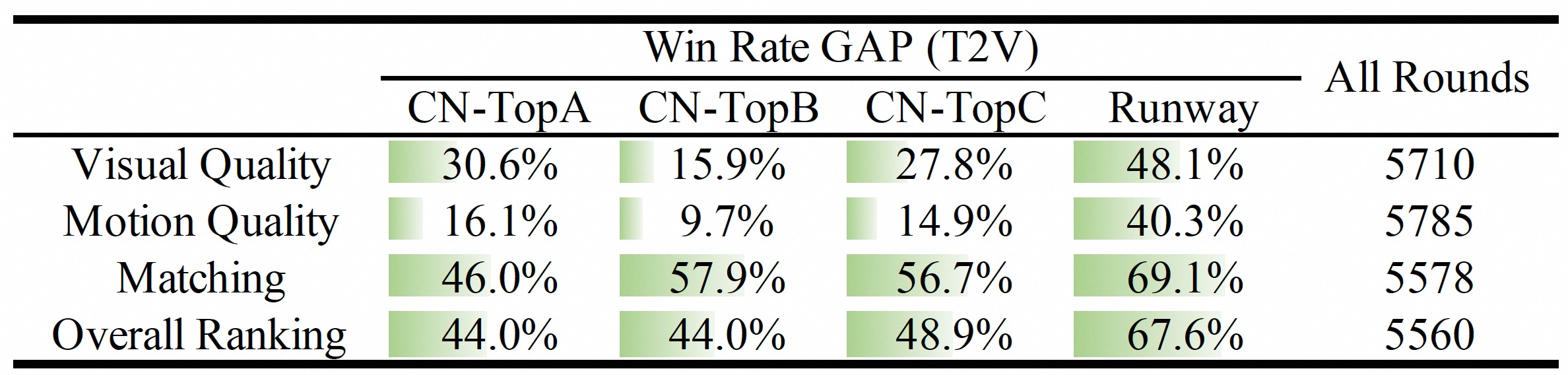
通过人工评估,经过 Prompt 扩展后生成的结果优于闭源和开源模型的结果。
任务
分辨率
模型
480P(~81x480x832)
720P(~81x720x1280)
VACE
✔️
✔️
Wan2.1-VACE-14B
VACE
✔️
❌
Wan2.1-VACE-1.3B