somethingwithproof/terraform-cloudflare-maintenance
GitHub: somethingwithproof/terraform-cloudflare-maintenance
基于 Terraform/OpenTofu 和 Cloudflare Workers 的企业级维护模式模块,支持 IP 白名单、定时调度和通知集成,帮助团队在计划维护期间优雅地管理线上流量。
Stars: 1 | Forks: 0
# Terraform Cloudflare 维护模式
[](LICENSE)
[](https://github.com/RichardLitt/standard-readme)
[](versions.tf)
[](versions.tf)
[](tests/)
使用 OpenTofu 为 Cloudflare 基础设施提供的企业级维护模式解决方案。
## 目录
- [概述](#overview)
- [功能](#features)
- [安全性](#security)
- [要求](#requirements)
- [安装](#installation)
- [用法](#usage)
- [基本用法](#basic-usage)
- [高级配置](#advanced-configuration)
- [架构](#architecture)
- [输入变量](#input-variables)
- [输出](#outputs)
- [测试](#testing)
- [贡献](#contributing)
- [许可证](#license)
## 概述
此 Terraform 模块为托管于 Cloudflare 的应用程序提供了一个强大且企业级的维护模式解决方案。它使用 Cloudflare Workers 部署了一个可自定义的维护页面,并具备 IP 允许列表、计划的维护时间窗口以及详细的分析等功能。
## 功能
- 🛡️ **可自定义的维护页面**:完全可自定义的 HTML/CSS,支持 logo 和品牌设计
- 🔒 **IP 允许列表**:允许特定 IP 绕过维护模式(例如,用于测试或监控)
- ⏱️ **计划的维护时间窗口**:使用 RFC3339 时间戳为维护模式设置特定的活动时间窗口
- 📅 **基于 Cron 的调度**:使用 cron 表达式配置周期性的维护时间窗口
- 📊 **分析集成**:通过 Cloudflare Analytics Engine 进行内置的日志记录和监控
- 🌍 **基于地理位置的路由**:可选的基于地理位置的流量路由,用于特定区域的维护
- 🔄 **零停机切换**:无需重新部署即可启用/禁用维护模式
- 🔍 **SEO 友好**:为搜索引擎提供正确的 HTTP 状态码和标头
- 🔔 **通知支持**:集成 Slack、PagerDuty 和 webhook 以接收维护警报
- 🏷️ **环境感知**:支持多环境(生产、预发布、开发)
## 安全性
### 合规功能
- **GDPR 合规**:所有访问日志均通过 Cloudflare 的隐私功能进行匿名化处理
- **SOC2 兼容**:通过 Terraform Cloud 审计追踪强制执行更改
- **密钥管理**:API token 作为敏感变量存储
### 访问控制
```
provider "cloudflare" {
api_token = var.cloudflare_api_token # Stored as sensitive variable
account_id = var.cloudflare_account_id
}
```
## 前置条件
- OpenTofu >= 1.6.0 (或 Terraform >= 1.5.0)
- Cloudflare Provider >= 5.2
- 启用了 Workers 的 Cloudflare 账户
- 有效的 Cloudflare API 凭证
- 具有适当权限的 Cloudflare API Token:
- Account.Workers Scripts:Edit
- Zone.Workers Routes:Edit
- Zone.DNS:Edit(如果使用自定义 DNS 记录)
- Zone.Firewall Services:Edit(如果使用 IP 允许列表)
## 快速开始
初始化并应用:
```
terraform init
terraform plan
terraform apply
```
## 模块结构
- `main.tf` - 主要的 Cloudflare Worker 和路由定义
- `variables.tf` - 带有验证的输入变量声明
- `outputs.tf` - 输出值定义
- `versions.tf` - Provider 版本约束
- `modules/notifications/` - 通知集成的子模块
- `examples/` - 用法示例(基础、高级、计划)
- `tests/` - 集成测试
## 用法
### 基本用法
```
module "maintenance" {
source = "github.com/thomasvincent/terraform-cloudflare-maintenance"
cloudflare_api_token = var.cloudflare_api_token
cloudflare_account_id = var.cloudflare_account_id
cloudflare_zone_id = var.cloudflare_zone_id
enabled = true
maintenance_title = "System Upgrade in Progress"
contact_email = "support@example.com"
worker_route = "*.example.com/*"
allowed_ips = [
"192.168.1.1",
"10.0.0.1"
]
}
```
### 高级配置
有关包含计划维护时间窗口、自定义样式和监控集成的高级用法,请参阅[高级示例](examples/advanced-config/)。
```
module "maintenance" {
source = "github.com/thomasvincent/terraform-cloudflare-maintenance"
cloudflare_api_token = var.cloudflare_api_token
cloudflare_account_id = var.cloudflare_account_id
cloudflare_zone_id = var.cloudflare_zone_id
# Environment configuration
environment = "production"
# Enable maintenance mode only for specific paths
worker_route = "example.com/api/*"
# Toggle maintenance mode based on environment
enabled = var.environment == "production" ? false : true
# Custom maintenance page content
maintenance_title = "Scheduled System Maintenance"
contact_email = "support@example.com"
# Allow internal IPs to bypass maintenance
allowed_ips = var.office_ip_ranges
# Allow specific regions to bypass maintenance
allowed_regions = ["US", "CA"]
# Schedule maintenance window
maintenance_window = {
start_time = "2025-04-06T08:00:00Z"
end_time = "2025-04-06T10:00:00Z"
}
# Custom styling
custom_css = file("${path.module}/custom-styles.css")
logo_url = "https://example.com/logo.png"
# Cron-based scheduling (for documentation/future automation)
schedules = [
{
name = "weekly-maintenance"
cron = "0 2 * * SUN" # Every Sunday at 2 AM
duration = "2h"
timezone = "America/Los_Angeles"
notify = ["slack://webhook", "pagerduty://service"]
}
]
}
```
### 带通知的计划维护
有关包含通知支持的完整示例,请参阅[计划维护示例](examples/scheduled-maintenance/)。
```
module "maintenance" {
source = "github.com/thomasvincent/terraform-cloudflare-maintenance"
cloudflare_api_token = var.cloudflare_api_token
cloudflare_account_id = var.cloudflare_account_id
cloudflare_zone_id = var.cloudflare_zone_id
environment = "production"
enabled = true
# Time-based maintenance window
maintenance_window = {
start_time = "2025-04-06T08:00:00Z"
end_time = "2025-04-06T10:00:00Z"
}
# Custom branding
custom_css = "body { background: linear-gradient(135deg, #667eea 0%, #764ba2 100%); }"
logo_url = "https://example.com/logo.png"
# Cron schedules for recurring maintenance
schedules = [
{
name = "weekly-maintenance"
cron = "0 2 * * SUN"
duration = "2h"
timezone = "America/Los_Angeles"
notify = ["slack://T00000000/B00000000/XXXXXXXXXXXXXXXXXXXX"]
}
]
}
# 可选:配置通知
module "maintenance_notifications" {
source = "github.com/thomasvincent/terraform-cloudflare-maintenance//modules/notifications"
notification_urls = [
"slack://T00000000/B00000000/XXXXXXXXXXXXXXXXXXXX",
"pagerduty://your-routing-key"
]
maintenance_status = module.maintenance.maintenance_status
schedule_name = "scheduled-maintenance"
environment = "production"
maintenance_window = {
start_time = "2025-04-06T08:00:00Z"
end_time = "2025-04-06T10:00:00Z"
}
}
```
## 架构
该模块部署了以下组件:
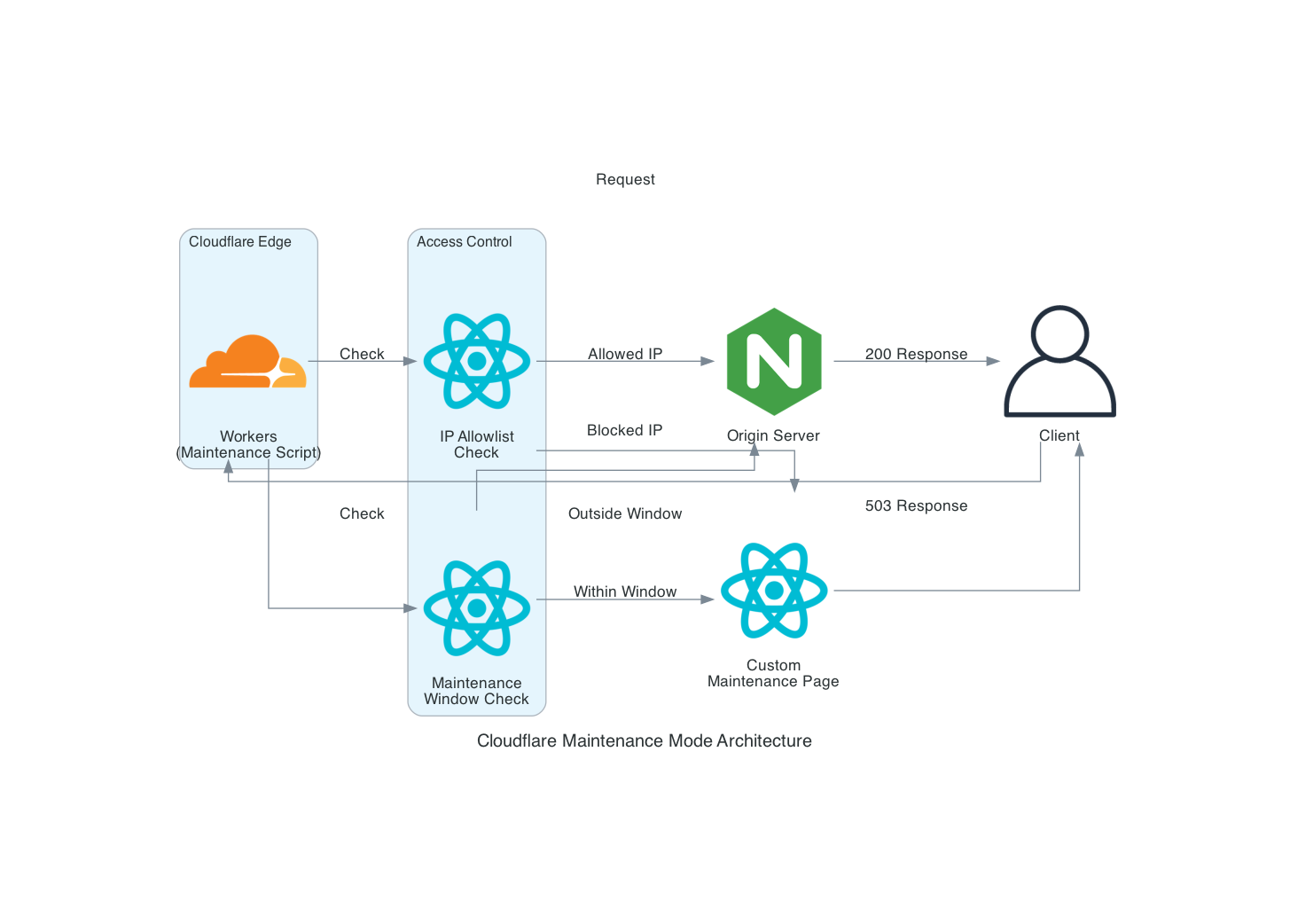
```
graph TD
A[Client Request] --> B{Maintenance Active?}
B -->|Yes| C[Maintenance Worker]
B -->|No| D[Origin Server]
C --> E[Custom HTML Page]
F[Allowed IPs] --> G{IP Check}
G -->|Match| D
G -->|No Match| C
H[Maintenance Window] --> I{Time Check}
I -->|Within Window| C
I -->|Outside Window| D
```
## 输入变量
| 名称 | 描述 | 类型 | 默认值 | 必需 |
|------|-------------|------|---------|:--------:|
| cloudflare_api_token | 具有最小权限的 Cloudflare API token | `string` | n/a | yes |
| cloudflare_account_id | Cloudflare 账户 ID | `string` | n/a | yes |
| cloudflare_zone_id | 域名的 Cloudflare zone ID | `string` | n/a | yes |
| worker_route | 触发维护 worker 的 URL 模式 | `string` | `"*.example.com/*"` | no |
| enabled | 开启/关闭维护模式 | `bool` | `false` | no |
| environment | 环境名称(例如,production、staging) | `string` | `"production"` | no |
| maintenance_title | 维护页面的标题 | `string` | `"System Maintenance in Progress"` | no |
| maintenance_message | 维护页面上显示的消息 | `string` | `"We are currently performing..."` | no |
| contact_email | 维护页面上显示的联系邮箱 | `string` | `""` | no |
| allowed_ips | 可以绕过维护页面的 IP 地址列表 | `list(string)` | `[]` | no |
| allowed_regions | 可以绕过维护的 ISO 3166-1 alpha-2 国家代码列表 | `list(string)` | `[]` | no |
| maintenance_window | RFC3339 格式的计划维护时间窗口 | `object({start_time=string, end_time=string})` | `null` | no |
| schedules | 基于 cron 的计划维护时间窗口列表 | `list(object)` | `[]` | no |
| custom_css | 用于维护页面的自定义 CSS | `string` | `""` | no |
| logo_url | 维护页面上显示的 logo 的 URL | `string` | `""` | no |
有关完整的变量列表,请参阅 [variables.tf](variables.tf)。
## 输出
| 名称 | 描述 |
|------|-------------|
| worker_id | 已部署的 worker 脚本的 ID |
| worker_name | 已部署的 worker 脚本的名称 |
| worker_script_name | 已部署的 worker 脚本的名称(别名) |
| worker_route_pattern | 维护页面的 Cloudflare 路由模式 |
| maintenance_status | 维护模式的当前状态(ENABLED/DISABLED) |
| maintenance_enabled | 当前是否启用了维护模式 |
| maintenance_page_url | 直接访问维护页面的 URL |
| environment | 环境名称 |
| maintenance_window | 已配置的计划维护时间窗口 |
| dns_record_id | 维护状态页面的 DNS 记录 ID |
| ruleset_id | 用于 IP/区域允许列表的防火墙规则集 ID |
| allowed_regions | 可以绕过维护的允许区域列表 |
有关完整的输出列表,请参阅 [outputs.tf](outputs.tf)。
## Cron 表达式参考
`schedules` 变量支持标准的 cron 表达式:
```
┌───────────── minute (0 - 59)
│ ┌───────────── hour (0 - 23)
│ │ ┌───────────── day of month (1 - 31)
│ │ │ ┌───────────── month (1 - 12)
│ │ │ │ ┌───────────── day of week (0 - 6) (Sunday to Saturday)
│ │ │ │ │
* * * * *
```
常见示例:
- `0 2 * * SUN` - 每周日凌晨 2:00
- `0 3 1 * *` - 每月 1 日凌晨 3:00
- `0 0 * * 0,6` - 每周六和周日的午夜
- `30 4 * * 1-5` - 工作日凌晨 4:30
## 通知集成
该模块通过 `modules/notifications` 子模块支持多种通知渠道:
### Slack
通过传入的 webhook 向 Slack 频道发送通知:
```
notification_urls = ["slack://T00000000/B00000000/XXXXXXXXXXXXXXXXXXXX"]
```
### PagerDuty
在 PagerDuty 中创建事件或警报:
```
notification_urls = ["pagerduty://your-routing-key"]
```
### 通用 Webhooks
向任何 webhook endpoint 发送 JSON payload:
```
notification_urls = ["webhook://https://example.com/webhook"]
```
有关更多详细信息,请参阅[通知模块文档](modules/notifications/README.md)。
## 开发
格式化代码:
```
terraform fmt -recursive
```
验证配置:
```
terraform validate
```
运行 lint:
```
tflint
```
## 测试
此模块包含全面的测试,以确保功能正常并防止回归:
- **单元测试**:测试 worker 脚本的单个组件
- **集成测试**:验证整个模块是否按预期工作
运行测试:
```
# 为 worker 运行单元测试
cd worker && npm test
# 为 Terraform module 运行集成测试
cd tests/integration && go test -v
```
## 贡献
欢迎贡献!请参阅 [CONTRIBUTING.md](CONTRIBUTING.md) 了解指南。
1. Fork 该仓库
2. 创建一个功能分支(`git checkout -b feat/amazing-feature`)
3. 使用带 emoji 的约定式提交来提交更改
4. 推送到该分支(`git push origin feat/amazing-feature`)
5. 发起一个 Pull Request
## 许可证
[MIT © Thomas Vincent](LICENSE)
标签:Cloudflare, ECS, MITRE ATT&CK, Terraform, 数据可视化, 无服务器, 日志审计, 程序员工具, 维护模式, 运维