kaisonox/apiscope
GitHub: kaisonox/apiscope
ApiScope 是一款 Windows x64 平台上的 API hooking 研究工具,通过调试器 API 追踪进程中的关键 API 调用并输出结构化事件日志。
Stars: 19 | Forks: 3
# ApiScope
[](https://github.com/kaisonox/apiscope/actions/workflows/build.yml)
[](https://github.com/kaisonox/apiscope/actions/workflows/codeql.yml)
ApiScope 是一款 Windows x64 研究工具,用于追踪新进程或正在运行的进程中选定的 API
调用。它通过 Windows 调试器 API 跟踪 DLL 加载事件,并在被调试者从每个事件继续执行之前安装
hook。
内置的 hook:
- `ntdll.dll!NtCreateFile` (记录目标路径)
- `ntdll.dll!NtOpenFile` (记录目标路径)
- `ntdll.dll!NtReadFile`
- `ntdll.dll!NtWriteFile`
- `ntdll.dll!NtClose`
- `ntdll.dll!NtOpenKey` (记录键路径)
- `ntdll.dll!NtSetValueKey`
- `ntdll.dll!NtQueryValueKey`
- `bcrypt.dll!BCryptOpenAlgorithmProvider`
## 演示
[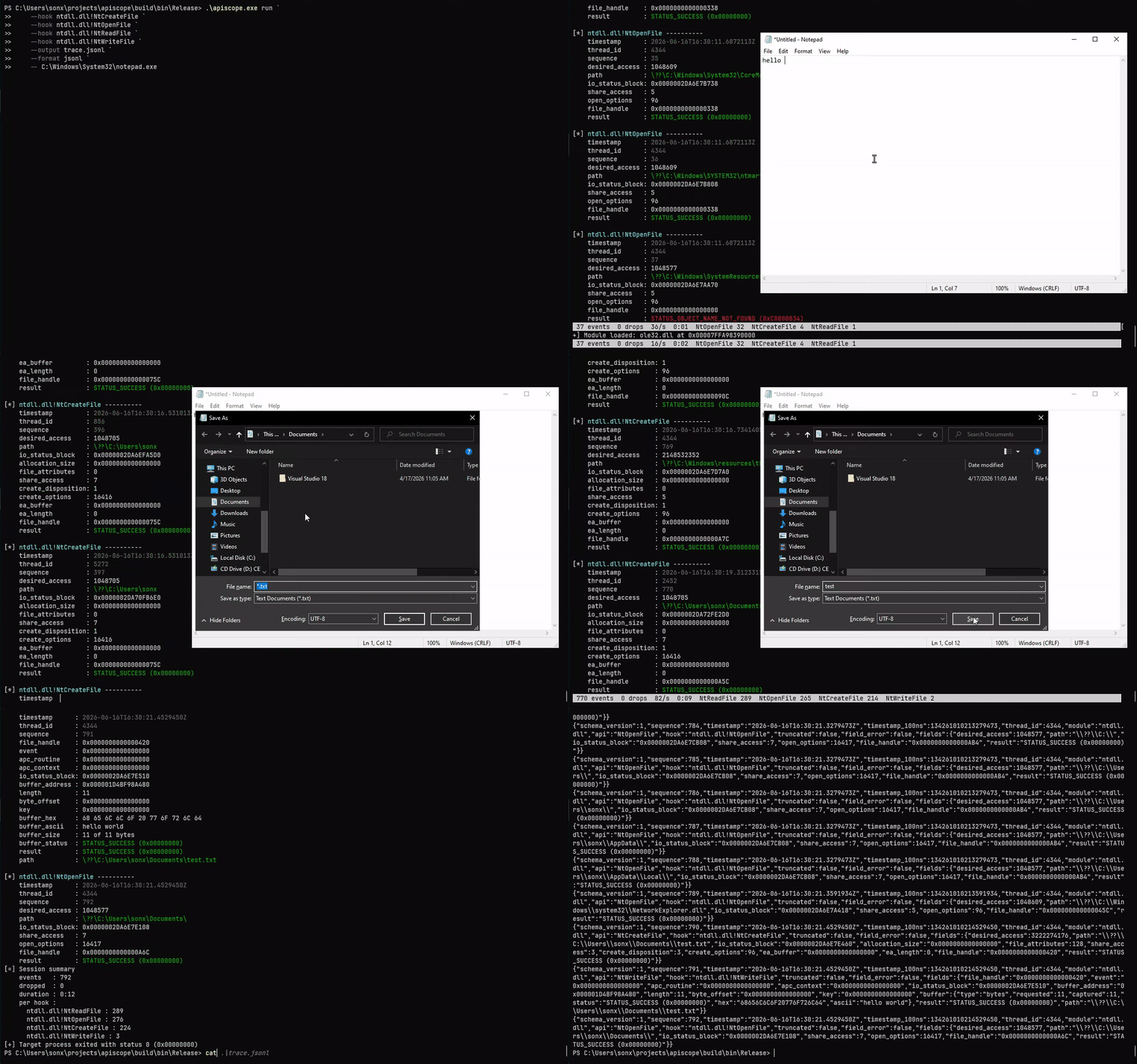](./demo/demo_run.mp4)
[观看 MP4 视频](./demo/demo_run.mp4)。
## 构建
要求:
- Windows x64
- Visual Studio 2019 或更高版本,并附带 C++ 工作负载
- CMake 3.20 或更高版本
- Git,由 CMake 用于获取指定版本的 Zydis 解码器
```
cmake -S . -B build -A x64
cmake --build build --config Release
ctest --test-dir build -C Release --output-on-failure
powershell -ExecutionPolicy Bypass -File .\scripts\validate-apiscope-hooks.ps1 .\build\bin\Release\apiscope-hooks.dll
powershell -ExecutionPolicy Bypass -File .\scripts\smoke.ps1 -SkipBuild
```
Zydis v4.1.1 会在指定的 commit 处获取,并且仅链接到
`apiscope.exe`。注入的 `apiscope-hooks.dll` 保持无依赖(import-free)。
## 用法
```
apiscope.exe [--help | --version | --list-hooks]
apiscope.exe run -k [-k ] [-f text|jsonl] [-o ] [-q] -- [args...]
apiscope.exe attach -p -k [-k ] [-f text|jsonl] [-o ] [-q]
```
Hook 名称始终带有模块限定符。模块匹配不区分大小写;
导出匹配区分大小写。
```
.\apiscope.exe run `
--hook ntdll.dll!NtCreateFile `
--hook bcrypt.dll!BCryptOpenAlgorithmProvider `
-- C:\path\app.exe
.\apiscope.exe attach --pid 4242 --hook all
.\apiscope.exe run --hook all --format jsonl --output trace.jsonl --quiet -- app.exe
```
终端事件保持可读,同时 `--output` 可选择将文本或 JSONL 输出到
文件。`--quiet` 会抑制终端事件镜像。`--color
auto|always|never` 控制终端颜色(默认为 `auto`:TTY 开启,通过管道传输或
在 `NO_COLOR` 下时关闭);颜色永远不会出现在 `--output` 文件中。在
TTY 上,ApiScope 还会显示一个实时状态页脚(事件、丢失、速率和每个 hook 的
计数),该页脚会在原位重绘;使用
`--status auto|always|never` 控制它。
```
[*] ntdll.dll!NtWriteFile ----------
timestamp : 2026-06-07T17:44:23.3834340Z
thread_id : 3508
sequence : 3
file_handle : 0x000000000000008C
length : 16
buffer_ascii : Hello, ApiScope!
result : STATUS_SUCCESS (0x00000000)
```
JSONL 事件包含通用元数据和 hook 局部字段:
```
{"schema_version":1,"sequence":1,"module":"bcrypt.dll","api":"BCryptOpenAlgorithmProvider","hook":"bcrypt.dll!BCryptOpenAlgorithmProvider","fields":{"flags":0,"result":"STATUS_SUCCESS (0x00000000)"}}
```
有关事件封装和按类型的字段编码(指针和状态
渲染为 `0x` 十六进制字符串),请参阅 [SCHEMA.md](docs/SCHEMA.md)。
按 Ctrl+C 或 Ctrl+Break 可还原活动的 hook,释放远程
插桩,并分离。目标程序继续运行。在自然退出时,
ApiScope 会以十进制和十六进制打印目标状态,随后在
stderr 上输出会话摘要(事件、丢失和每个 hook 的计数)。
## 文件路径与 Handle 关联
`NtCreateFile`、`NtOpenFile` 和 `NtOpenKey` 从
`OBJECT_ATTRIBUTES` 解析目标 `path` 并报告生成的 handle。ApiScope 记录每次
成功的打开操作,并使用解析出的 `path` 为后续对同一 handle 的操作(读取、
写入、注册表值访问以及匹配的 `NtClose`)添加注释,
因此无需手动跟踪 handle 即可读取活动。`NtClose`
也会驱逐 handle,而相对打开操作则通过之前
看到的 `root_directory` handle 进行解析。
```
[*] ntdll.dll!NtCreateFile ----------
sequence : 2
path : test_file.txt
file_handle : 0x000000000000008C
result : STATUS_SUCCESS (0x00000000)
[*] ntdll.dll!NtReadFile ----------
sequence : 3
file_handle : 0x000000000000008C
buffer_ascii : Hello, ApiScope!
result : STATUS_SUCCESS (0x00000000)
path : test_file.txt
```
读取和写入事件上的 `path` 是从 handle 关联而来的,而不是在
调用本身上观察到的。
## 添加 Hook
每个 hook 都是 `src/apiscope-hooks/hooks/` 下的一个文件,它声明了其源
模块、导出、handler、trampoline slot、调用约定和签名:
```
DEFINE_API_HOOK(
BCryptOpenAlgorithmProvider,
"bcrypt.dll",
"BCryptOpenAlgorithmProvider",
NTSTATUS,
WINAPI,
PVOID* Algorithm,
const wchar_t* AlgorithmId,
const wchar_t* Implementation,
ULONG Flags) {
TraceEvent event;
InitializeTraceEvent(&event, "bcrypt.dll", "BCryptOpenAlgorithmProvider");
AddTraceUInt32(&event, "flags", Flags);
NTSTATUS result = CALL_ORIGINAL(
BCryptOpenAlgorithmProvider,
Algorithm,
AlgorithmId,
Implementation,
Flags);
AddTraceStatus(&event, "result", result);
EmitTraceEvent(&event);
return result;
}
```
`apiscope.exe --list-hooks` 会发现由
hook DLL 导出的固定布局描述符。不需要集中的 API 列表或启动器端的事件 schema。
## 工作原理
```
sequenceDiagram
actor User
participant ApiScope as apiscope.exe
participant Debugger as Windows debugger API
participant Target as Target process
participant Modules as Loaded DLLs
participant Hooks as apiscope-hooks.dll
participant Ring as Shared-memory ring
User->>ApiScope: run program or attach PID
alt run
ApiScope->>Debugger: CreateProcess(DEBUG_ONLY_THIS_PROCESS)
else attach
ApiScope->>Debugger: DebugActiveProcess(PID)
end
ApiScope->>Debugger: DebugSetProcessKillOnExit(FALSE)
Debugger-->>ApiScope: CREATE_PROCESS_DEBUG_EVENT
ApiScope->>Target: Map import-free hook image
ApiScope->>Ring: Create and initialize bounded ring
ApiScope->>Target: Map shared section with NtMapViewOfSection
loop CREATE_PROCESS / LOAD_DLL events
Debugger-->>ApiScope: Module base and file handle
ApiScope->>Modules: Register module name and base
alt ntdll.dll loaded
ApiScope->>Target: Build unpatched NtReadVirtualMemory bypass
end
ApiScope->>Modules: Resolve module.dll!Export and forwarders
alt export and dependencies are loaded
ApiScope->>Hooks: Resolve handler and trampoline slot
ApiScope->>Target: Allocate trampoline and patch export
else dependency is not loaded yet
ApiScope->>ApiScope: Keep hook pending
end
ApiScope->>Debugger: ContinueDebugEvent
end
Target->>Hooks: Call patched API
Hooks->>Target: CALL_ORIGINAL through trampoline
Hooks->>Ring: Publish bounded TLV event
opt first event in a pending batch
Hooks->>Target: Signal reader through unpatched NtSetEvent
end
Ring-->>ApiScope: Drain event batches
ApiScope-->>User: Readable text and optional JSONL
opt UNLOAD_DLL_DEBUG_EVENT
Debugger-->>ApiScope: Module unloaded
ApiScope->>Target: Release associated hook state
ApiScope->>Debugger: ContinueDebugEvent
end
alt target exits
Debugger-->>ApiScope: EXIT_PROCESS_DEBUG_EVENT and exit status
ApiScope->>Ring: Drain queued events
ApiScope-->>User: Print decimal and hexadecimal exit status
else Ctrl+C or Ctrl+Break
User->>ApiScope: Stop tracing
ApiScope->>Target: DebugBreakProcess
ApiScope->>Target: Restore hooks and free instrumentation
ApiScope->>Debugger: DebugActiveProcessStop
ApiScope-->>User: Target continues running
end
```
控制器创建一个由页面文件支持的 section,并将其映射到两个
进程中。Hook 线程使用
每个 slot 的序列号发布到一个固定容量、多生产者的环形缓冲区。未打补丁的 `NtSetEvent` 旁路为每个
待处理批次发送一个合并的唤醒,然后控制器分批排空事件。
生产者从不等待读取者;满的环形缓冲区会丢弃并计数该事件。
缓冲区预览仍使用未打补丁的 `NtReadVirtualMemory` 旁路,因此无效的
目标指针会失败,而不会导致 hook 崩溃。
## 项目结构
```
cmake/ Dependency configuration
docs/ Event schema and format reference
scripts/ Validation and runtime smoke tests
src/apiscope/ CLI, debugger, mapper, patcher, and renderer
src/apiscope-hooks/ Import-free hook DLL and standalone hooks
src/include/ Shared contracts
tests/ Unit and runtime test targets
```
## 限制
- 仅限 Windows x64;控制器和目标架构必须匹配。
- 只能有一个 ApiScope 会话对目标进行插桩。
- 对于受保护或已提权的目标,调试器可能需要提权。
- 不支持的 trampoline 重定位会安全失败。
- 不支持序号导出转发器。
- 当该 hook 处于活动状态时,handle 到 path 的关联会在 `ntdll.dll!NtClose` 时驱逐;
如果没有它,被重用的已关闭 handle 将保留其先前的 path。
- 手动映射器特定于无依赖的 hook 映像。
- 如果 ApiScope 被强制终止,`DebugSetProcessKillOnExit(FALSE)` 会保持
目标存活,但 hook 和映射的插桩将保留,直到
目标退出。
- 对进程内部进行插桩可能会触发终端安全产品。
仅在您有权检查的系统和进程上使用 ApiScope。参见
[SECURITY.md](SECURITY.md)、[CONTRIBUTING.md](CONTRIBUTING.md) 和
[ROADMAP.md](ROADMAP.md)。
## 许可证
[MIT](LICENSE)。第三方组件保留其许可证;参见
[THIRD_PARTY_NOTICES.md](THIRD_PARTY_NOTICES.md)。
标签:API Hook, Bash脚本, C++, 云资产清单, 数据擦除, 逆向工程