mr-pmillz/gophlare
GitHub: mr-pmillz/gophlare
一个用于 Flare.io 威胁情报平台的 Go SDK 和命令行工具,支持泄露凭证检索、窃密日志分析和 BloodHound 数据关联。
Stars: 7 | Forks: 3
# gophlare
[](https://goreportcard.com/report/github.com/mr-pmillz/gophlare)





[](https://twitter.com/intent/tweet?text=Wow:&url=https%3A%2F%2Fgithub.com%2Fmr-pmillz%2Fgophlare)
[](https://github.com/mr-pmillz/gophlare/actions/workflows/ci.yml)
## 关于
Gophlare 是一个用于 flare.io API 的 SDK 和 CLI 包装器。它可以被导入并用于其他 Go 项目中。
目前尚未完全支持所有的 API 端点。
Gophlare 还内置了一些便捷功能,例如:
1. 生成 XLSX 和 CSV 文件。
2. 偷窃日志下载器,用于下载 zip 文件或特定文件。
3. 偷窃日志 Cookie 解析器,可以按过期日期对 Cookie 进行排序,并支持导出到 CookieBro JSON 格式。
4. 根据域名获取凭据。
5. 对 `hash` 结果进行哈希识别,可以区分密码、密码哈希和加密值。
## 安装
```
go install -v github.com/mr-pmillz/gophlare@latest
```
## 支持的 API 端点
Gophlare 目前支持以下 API 端点:
* /firework/v2/activities/{UID}
* /firework/v2/activities/{UID}/download
* /firework/v2/activities/{UID}/download_file
* [/firework/v4/events/global/_search](https://api.docs.flare.io/api-reference/v4/endpoints/global-search)
* [/astp/v2/credentials/_search](https://api.docs.flare.io/api-reference/astp/endpoints/post-credentials-search)
* [/astp/v2/cookies/_search](https://api.docs.flare.io/api-reference/astp/endpoints/post-cookies-search)
## 使用
```
search the flare api for credentials, emails, and stealer logs
Example Commands:
gophlare search --config config.yaml --search-credentials-by-domain
gophlare search --config config.yaml --search-stealer-logs-by-host-domain
gophlare search --config config.yaml --search-stealer-logs-by-wildcard-host --keep-zip-files --max-zip-download-limit 0
gophlare search --config config.yaml --search-stealer-logs-by-domain --keep-zip-files --max-zip-download-limit 0
gophlare search --config config.yaml --search-stealer-logs-by-domain --query 'metadata.source:stealer_logs* AND features.FOO:BAR'
gophlare search --config config.yaml --search-emails-in-bulk -e emails.txt -o output-directory
Usage:
gophlare search [flags]
Flags:
-c, --company string company name that your testing
-d, --domains string domains string, can be a file file containing domainss ex. domains.txt, or comma-separated list of strings
-e, --emails string emails to check in bulk. Can be a comma separated slice or a file containing emails. ex. emails.txt
--events-filter-types string flare global events filter types. Available values: illicit_networks,open_web,leak,domain,listing,forum_content,blog_content,blog_post,profile,chat_message,ransomleak,infected_devices,financial_data,bot,stealer_log,paste,social_media,source_code,source_code_files,stack_exchange,google,service,buckets,bucket,bucket_object. can be a string, or comma-separated list of strings (default "illicit_networks,open_web,leak,domain,listing,forum_content,blog_content,blog_post,profile,chat_message,ransomleak,infected_devices,financial_data,bot,stealer_log,paste,social_media,source_code,source_code_files,stack_exchange,google,service,buckets,bucket,bucket_object")
--files-to-download string comma separated list of files to match on and download if they exist from the query
-f, --from string from date used for a filter for stealer log searches. ex. 2021-01-01
-h, --help help for search
--keep-zip-files keep all the matching downloaded zip files from the stealer logs
-m, --max-zip-download-limit int maximum number of zip files to download from the stealer logs. Set to 0 to download all zip files. (default 50)
--out-of-scope string out of scope domains, IPs, or CIDRs
-o, --output string report output dir
-q, --query string query to use for searching stealer logs.
--search-credentials-by-domain search for credentials by domain
--search-emails-in-bulk search list of emails for credentials.
--search-stealer-logs-by-domain search the stealer logs by *@email domain(s), download and parse all the matching zip files for passwords and live cookies
--search-stealer-logs-by-host-domain search the stealer logs by host domain(s), download and parse all the matching zip files for passwords and live cookies
--search-stealer-logs-by-wildcard-host search the stealer logs by host wildcard domain(s), (*.example.com) download and parse all the matching zip files for passwords and live cookies
-s, --severity string the stealer log severities to filter on. can be a string, a file, or comma-separated list of strings (default "medium,high,critical")
--timeout int timeout duration for API requests in seconds (default 900)
--to string to date used for a filter for stealer log searches. ex. 2025-01-01. Defaults to today. (default "2025-08-01")
--user-agent string custom user-agent to use for requests
-u, --user-id-format string if you know the user ID format ex. a12345 , include this to enhance matching in-scope results. can be a string, a file, or comma-separated list of strings
-v, --verbose enable verbose output
Global Flags:
--config string config file default location for viper to look is ~/.config/gophlare/config.yaml
```
### 配置
`USER_ID_FORMAT` 选项是一项强大的功能,用于匹配与您的目标相关的账户 ID 命名格式。例如,假设您的目标使用的账户 ID 格式为 `?l?d?d?d?d?d`,即一个大写或小写字母后跟 5 位数字,您可以在 config.yaml 文件中像这样设置 `USER_ID_FORMAT`:
```
USER_ID_FORMAT: |-
a12345
```
上述配置将匹配任何符合正则表达式模式 `^[A-Za-z]\d{5}$` 的用户名,省去了您定义确切正则表达式模式的麻烦。执行此操作的函数名为 `IsUserIDFormatMatch`,可以在 `utils` 包的 `string.go` 文件中找到。如果需要,此功能也可以扩展为直接接受原始正则表达式模式,但为了易于使用,正则表达式模式是根据提供的 USER_ID_FORMAT 选项动态生成的。
### 搜索偷窃日志以获取凭据和有效的 Cookie
如果您想下载并解析所有匹配的偷窃日志,请将 `--max-zip-download-limit` 设置为 0。默认值为 50。
默认情况下,这将搜索过去 2 年的偷窃日志,但您可以使用 `--from` 和 `--to` 标志调整日期范围
```
gophlare search --config config/config.yaml --search-stealer-logs-by-domain --keep-zip-files --max-zip-download-limit 0 --from 2023-01-01 --to 2025-02-19
```
### 搜索电子邮件列表以查找泄露的凭据
```
./gophlare search --config config/config.yaml --search-emails-in-bulk -e emails.txt
```
### 通过域名搜索凭据 API 以获取密码
CLI 标志应覆盖 config.yaml 中设置的选项。例如,以下命令将通过 `-o` 选项将结果输出到当前目录
```
./gophlare search --config config/config.yaml --search-credentials-by-domain -o .
```
## gophlare 作为库使用
```
package main
import (
"github.com/mr-pmillz/gophlare/cmd/search"
"github.com/mr-pmillz/gophlare/config"
"github.com/mr-pmillz/gophlare/phlare"
)
// getDateXYearsAgo returns the `yearsAgo` int as a string in the format: time.RFC3339
func getDateXYearsAgo(yearsAgo int) string {
return time.Now().AddDate(-yearsAgo, 0, 0).Format(time.RFC3339)
}
func main() {
company := "CHANGETHIS" // CHANGE-THIS
output := "/tmp/example" // CHANGE-THIS
domains := []string{"example.com"} // CHANGE-THIS
emails := []string{"test1@example.com", "test2@example.com"} // CHANGE-THIS
phlareOptions := &phlare.Options{
Company: company,
Output: output,
From: getDateXYearsAgo(1),
Timeout: 600,
Severity: []string{"medium", "high", "critical"},
EventsFilterTypes: []string{"illicit_networks", "open_web", "leak", "domain", "listing", "forum_content", "blog_content", "blog_post", "profile", "chat_message", "ransomleak", "infected_devices", "financial_data", "bot", "stealer_log", "paste", "social_media", "source_code", "source_code_files", "stack_exchange", "google", "service", "buckets", "bucket", "bucket_object"},
Emails: emails,
}
apiKeys := config.NewGoPhlareConfig("CHANGETHIS", 123456) // CHANGE-THIS
phlareOptions.APIKeys = apiKeys
flareCreds, err := search.FlareLeaksDatabaseSearchByDomain(phlareOptions, domains)
if err != nil {
panic(err)
}
// do something with flareCreds...
_ = flareCreds
phlareOptions.MaxZipFilesToDownload = 100
phlareOptions.UserIDFormat = []string{"a12345", "a123456", "aa12345", "aa123456"}
scope, err := phlare.NewScope(phlareOptions)
if err != nil {
panic(err)
}
if err = search.DownloadAllStealerLogPasswordFiles(phlareOptions, scope); err != nil {
panic(err)
}
if err = search.SearchEmailsInBulk(phlareOptions, scope.Emails); err != nil {
panic(err)
}
}
```
## Bloodhound 数据关联
此功能仅支持 Bloodhound-CE (社区版)
将 Flare 泄露数据与 Bloodhound 数据进行关联。适用于将 AD 中的 UserID 映射到泄露数据。
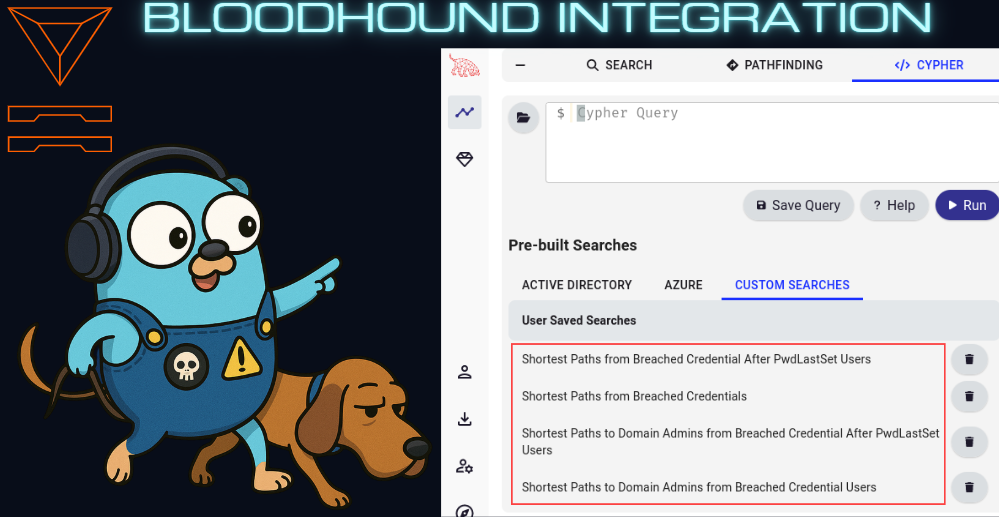
使用 --update-bloodhound 选项时,将创建四个自定义 Cypher 查询
### 快速开始
使用 https://github.com/Tanguy-Boisset/bloodhound-automation
### Bloodhound 使用
```
correlate breach data with bloodhound data and optionally update bloodhound neo4j database with breach data and create custom cypher queries for further analysis in bloodhound
Example Commands:
gophlare bloodhound --config config.yaml
gophlare bloodhound --config config.yaml -f flare-leaks.json -o some_dir --update-bloodhound
Usage:
gophlare bloodhound [flags]
Flags:
--bloodhound-password string Bloodhound password
--bloodhound-server-url string Bloodhound server base URL, ex: http://127.0.0.1:8001
--bloodhound-user string Bloodhound user
-b, --bloodhound-users-json-file string Bloodhound JSON file
-c, --configfileset Config file set
-f, --flare-creds-by-domain-json-file string Flare credentials by domain JSON file
-h, --help help for bloodhound
--neo4j-host string Neo4j host
--neo4j-password string Neo4j password
--neo4j-port string Neo4j port
--neo4j-user string Neo4j user
-o, --output-dir string Output directory
--update-bloodhound update bloodhound neo4j database with breach data
-v, --verbose Verbose output
Global Flags:
--config string config file default location for viper to look is ~/.config/gophlare/config.yaml
```
## 待办事项
- [ ] 实现剩余的 API 端点
- [X] 集成 Bloodhound 以进行泄露数据关联。(适用于 UserID 关联和查找从泄露凭据出发的最短路径)
- [X] 增强 Cookie 搜索
- [X] 将 Cookie 导出到每个偷窃日志 ID 单独的 CookieBro 输出 JSON 文件中
- [X] 添加 Dockerfile 并推送到 ghcr.io 容器注册表
- [X] 在 README.md 中添加库使用示例
标签:API客户端, Cookie解析, CSV生成, EVTX分析, Flare.io, Go, Golang, Ruby工具, Stealer Logs, XLSX导出, 二进制发布, 哈希识别, 威胁情报, 安全编程, 开发者工具, 开源工具, 数据展示, 数据泄露, 文档结构分析, 日志审计, 红队, 网络安全, 网络调试, 自动化, 隐私保护