Chocapikk/wpprobe
GitHub: Chocapikk/wpprobe
一款基于Go开发的WordPress插件快速枚举工具,通过REST API隐蔽检测已安装插件并关联已知漏洞库。
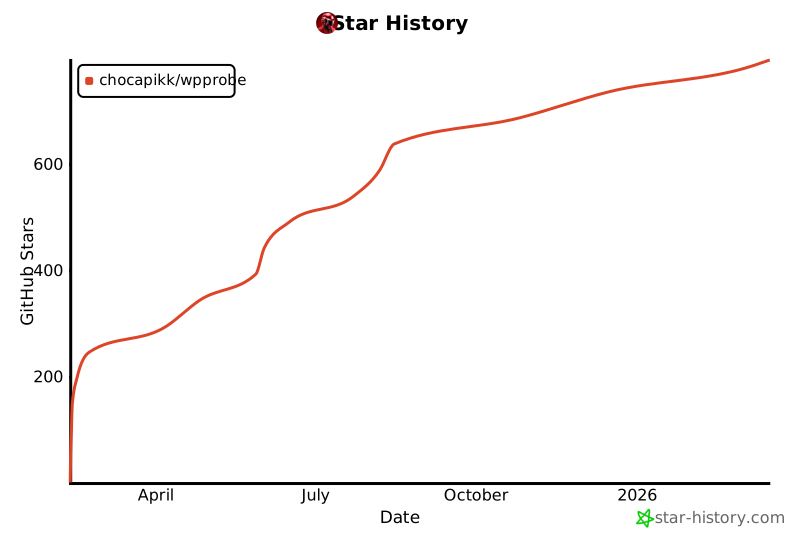
Stars: 879 | Forks: 111

“既然 WordPress 会自我暴露,为何还要盲目扫描?”
[](https://github.com/Chocapikk/wpprobe/actions/workflows/go.yml)
[](https://github.com/Chocapikk/wpprobe/releases/latest)
[](https://pkg.kali.org/pkg/wpprobe)
[](https://github.com/ThePorgs/Exegol)
[](https://github.com/freelabz/secator)
# WPProbe
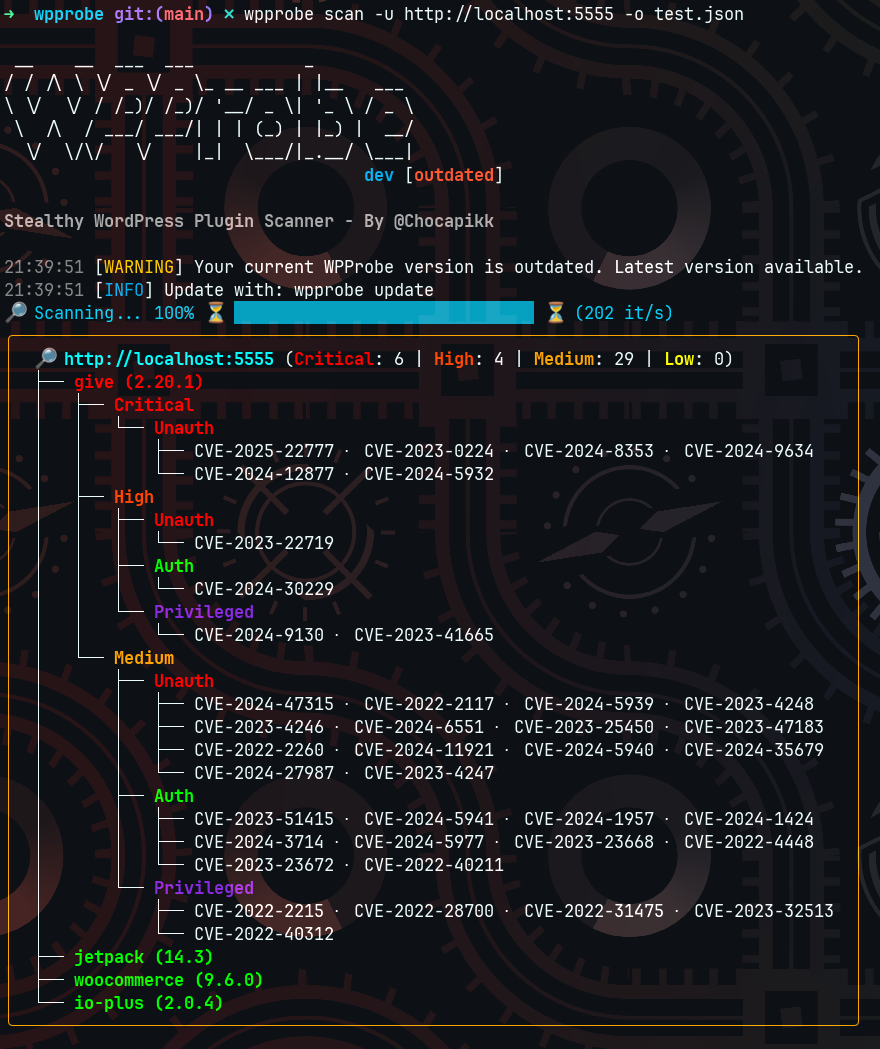
一款快速的 WordPress 插件扫描器,通过 REST API 枚举检测已安装的插件,并将其映射到已知漏洞。无需暴力破解即可检测超过 5000 个插件,使用暴力破解可检测数千个更多插件。
## 重要提示:Wordfence API 变更
自 2026 年 3 月 9 日起,Wordfence 弃用了其 v2 API。所有 v0.10.16 之前的 WPProbe 版本的 `update-db` 功能已失效。你需要更新 WPProbe。
默认情况下,`wpprobe update-db` 从本仓库获取预构建的数据库(通过 CI 每 2 小时更新一次),因此无需 API 密钥。如果你想直接从 Wordfence 获取数据,可以选择设置一个免费的 API 密钥:
1. 在 [wordfence.com](https://www.wordfence.com) 创建账户
2. 前往 [Account > Integrations](https://www.wordfence.com/account/integrations) 并生成一个 API 密钥
3. 通过环境变量或 `--api-key` 标志进行设置
## 快速开始
```
go install github.com/Chocapikk/wpprobe@latest
wpprobe update-db
wpprobe scan -u https://example.com
```
## 扫描模式
| 模式 | 方法 | 隐蔽性 | 覆盖范围 |
|------|--------|---------|----------|
| `stealthy` (默认) | REST API 端点匹配 | 高 | 5000+ 插件 |
| `bruteforce` | 直接目录检查 | 低 | 10k+ 插件 |
| `hybrid` | 先隐蔽模式,后暴力破解 | 中 | 最大 |
```
wpprobe scan -u https://example.com --mode stealthy
wpprobe scan -u https://example.com --mode bruteforce
wpprobe scan -u https://example.com --mode hybrid
```
## 安装
```
# Kali Linux (包含在 kali-rolling 中)
sudo apt install wpprobe
# Go (需要 1.22+)
go install github.com/Chocapikk/wpprobe@latest
# Nix
nix-shell -p wpprobe
# Docker
docker run -it --rm wpprobe scan -u https://example.com
# 从源代码
git clone https://github.com/Chocapikk/wpprobe && cd wpprobe && go build -o wpprobe
```
Docker 文件挂载
```
# 挂载当前目录用于输入/输出文件
docker run -it --rm -v $(pwd):/data wpprobe scan -f /data/targets.txt -o /data/results.csv
# 持久化漏洞数据库
docker run -it --rm \
-v $(pwd):/data \
-v wpprobe-config:/config \
wpprobe scan -f /data/targets.txt -o /data/results.json
# 更新数据库
docker run -it --rm \
-v wpprobe-config:/config \
-e WORDFENCE_API_KEY=your_key \
-e WPSCAN_API_TOKEN=your_token \
wpprobe update-db
```
## 使用方法
### 扫描
```
# 单个目标
wpprobe scan -u https://example.com
# 使用多线程扫描多个目标
wpprobe scan -f targets.txt -t 20
# 自定义选项
wpprobe scan -u https://example.com \
--header "User-Agent: CustomAgent" \
--proxy http://proxy:8080 \
--rate-limit 10 \
--no-check-version
# 输出格式
wpprobe scan -u https://example.com -o results.csv
wpprobe scan -u https://example.com -o results.json
```
### 漏洞数据库
```
# 更新数据库 (Wordfence 需要 free API key, WPScan 需要 Enterprise API token)
wpprobe update-db --api-key your_wordfence_key
# 或使用 env var
export WORDFENCE_API_KEY=your_key_here
wpprobe update-db
# 搜索漏洞
wpprobe search --cve CVE-2024-1234
wpprobe search --plugin woocommerce
wpprobe search --severity critical
wpprobe search --auth Unauth
wpprobe search --title "SQL Injection" --details
# 数据库统计
wpprobe list
```
设置 `WORDFENCE_API_KEY` 用于 Wordfence 数据库更新(免费)。设置 `WPSCAN_API_TOKEN` 用于 WPScan 数据库更新(仅限企业版计划)。
### 自我更新
```
wpprobe update
```
## 工作原理
**隐蔽模式** 查询暴露的 REST API 路由(`?rest_route=/`),并将发现的端点与预编译的已知插件签名数据库进行匹配。这会产生极少的请求,并避免被 WAF 检测到。
**暴力破解模式** 通过 GET 请求直接检查插件目录。403 响应确认插件存在(目录列表被禁止)。200 响应通过检查目录列表中的 `readme.txt` 来验证,以避免对所有路径都返回 200 的 WordPress 实例产生误报。
**混合模式** 结合两者:首先使用隐蔽模式进行低噪声检测,然后使用暴力破解检测其余插件。
检测到的插件会与来自 Wordfence 和 WPScan 数据库的已知 CVE 进行关联,并通过版本范围匹配来识别存在漏洞的安装。
输出格式示例
**CSV:**
```
URL,Plugin,Version,Severity,AuthType,CVEs,CVE Links,CVSS Score,CVSS Vector,Title
http://example.com,give,2.20.1,critical,Unauth,CVE-2025-22777,https://www.cve.org/CVERecord?id=CVE-2025-22777,9.8,CVSS:3.1/AV:N/AC:L/PR:N/UI:N/S:U/C:H/I:H/A:H,GiveWP <= 3.19.3 - Unauthenticated PHP Object Injection
```
**JSON:**
```
{
"url": "http://example.com",
"plugins": {
"give": [
{
"version": "2.20.1",
"severities": [
{
"critical": [
{
"auth_type": "Unauth",
"vulnerabilities": [
{
"cve": "CVE-2025-22777",
"cvss_score": 9.8,
"title": "GiveWP <= 3.19.3 - Unauthenticated PHP Object Injection"
}
]
}
]
}
]
}
]
}
}
```
## 局限性
- **隐蔽模式**:某些插件不暴露 REST API 端点。已禁用或隐藏的插件可能无法被检测到。
- **暴力破解模式**:产生大量请求,可能会触发 WAF 或速率限制。受限于字典覆盖范围。
- **混合模式**:由于包含暴力破解阶段,速度比纯隐蔽模式慢。
## 环境变量
| 变量 | 描述 |
|----------|-------------|
| `WORDFENCE_API_KEY` | 用于数据库更新的 Wordfence API 密钥(免费,[在此获取](https://www.wordfence.com/account/integrations)) |
| `WPSCAN_API_TOKEN` | 用于数据库更新的 WPScan 企业版 API 令牌 |
| `HTTP_PROXY` / `HTTPS_PROXY` / `ALL_PROXY` | 代理配置 |
| `NO_PROXY` | 代理绕过规则 |
## 许可证
MIT 许可证 - 详情请参阅 LICENSE 文件。
## 致谢
由 [@Chocapikk](https://github.com/Chocapikk) 开发。
## 统计
标签:C2日志可视化, CVE映射, EVTX分析, Go语言, Kali工具, REST API, WordPress安全, WPProbe, 加密文件系统, 密码管理, 指纹识别, 插件枚举, 插件系统, 操作系统监控, 无服务器架构, 日志审计, 用户模式钩子绕过, 程序破解, 网站安全, 请求拦截