synacktiv/IPSpinner
GitHub: synacktiv/IPSpinner
IPSpinner 是一个通过 AWS、Azure 和 GitHub 等云服务中转流量以实现 IP 轮换的本地代理工具。
Stars: 119 | Forks: 8
# 🔁 IPSpinner
IPSpinner 是一个本地代理,可用于通过不同的选定提供商重定向所有传入请求。其目的是创建一个透传代理,以此轮换每个请求的源 IP 地址。例如,通过 IPSpinner 运行暴力破解操作将有助于避免被捕获,因为服务器将从数百个不同的 IP 地址接收请求。
IPSpinner 目前支持 AWS (API Gateway)、Azure (Cloud Shell) 和 GitHub (GitHub Actions)。
# 目录
1. [它是如何工作的?](#i-how-it-works)
1. [概述](#1-general)
2. [各提供商与启动器](#2-per-provider-launcher)
1. [AWS API Gateway](#i-aws-api-gateway)
2. [Azure Cloud Shell](#ii-azure-cloud-shell)
3. [GitHub Actions](#iii-github-actions)
3. [启动器对比](#3-launcher-comparison)
2. [如何安装?](##ii-how-to-install)
1. [安装 Go](#1-install-go)
2. [克隆并构建 IPSpinner](#2-clone-and-build-ipspinner)
3. [清理构建](#3-clean-builds)
3. [如何使用?](#iii-how-to-use)
1. [通用设置](#1-general-1)
1. [命令行参数](#i-command-line-arguments)
2. [配置文件](#ii-configuration-file)
2. [各提供商配置](#2-per-provider)
1. [AWS](#i-aws)
2. [Azure](#ii-azure)
3. [GitHub](#iii-github)
4. [如何……?](#iv-how-to-)
1. [HTTP/2 支持?](#1-http2-support)
# 一/ 它是如何工作的?
## 1) 概述
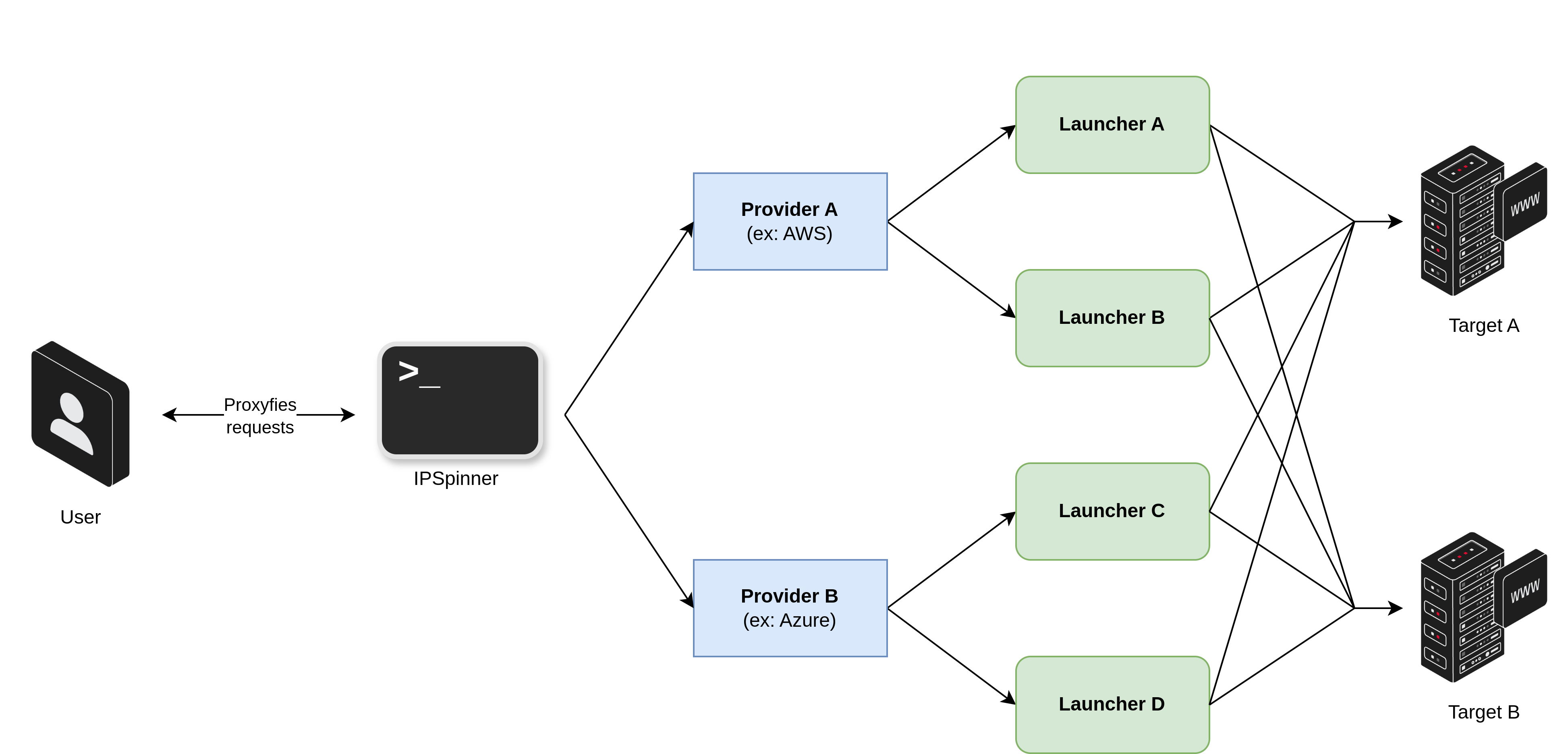 Figure 1: IPSpinner - Overall diagram
IPSpinner 作为本地代理工作,通过外部服务重定向请求。为此,IPSpinner 利用了提供商和启动器。
提供商对应于云提供商或在线服务提供商(AWS、Azure、GitHub 等),它们提供不同的服务,即所谓的启动器,可用于中继用户的请求(AWS API Gateway、GitHub Actions、Azure Cloud Shell 等)。
因此,为了启动 IPSpinner,用户必须为其想要使用的提供商提供凭证,并为启动器提供额外的配置。可以同时使用多种启动器类型,IPSpinner 将为每个请求随机选择一个可用的启动器。
此外,IPSpinner 实现了预加载功能。某些启动器可以预加载,以避免在代理发现新主机时出现重新配置延迟。对于这些启动器,预加载过程是推荐的但不是强制性的。对于其他启动器,则不需要预加载。
## 2) 各提供商与启动器
### i. AWS API Gateway
#### 介绍
IPSpinner 可以利用 AWS API Gateway 发送请求。此实现基于 [FireProx](https://github.com/ustayready/fireprox),它创建一个 REST API Gateway 来重定向传入请求。因此,FireProx 已被调整以处理每个 API Gateway 的多个主机并实现新功能。总之,当 IPSpinner 收到请求时,它会选择或创建正确的 API Gateway 实例并将请求发送出去。然后,它收集响应并将其返回给用户。因此,目标服务器收到的是来自 API Gateway 的请求,而不是直接来自用户的请求。由于 API Gateway 为每个请求轮换其出口 IP,IPSpinner 利用此功能实现 IP 地址轮换。
Figure 1: IPSpinner - Overall diagram
IPSpinner 作为本地代理工作,通过外部服务重定向请求。为此,IPSpinner 利用了提供商和启动器。
提供商对应于云提供商或在线服务提供商(AWS、Azure、GitHub 等),它们提供不同的服务,即所谓的启动器,可用于中继用户的请求(AWS API Gateway、GitHub Actions、Azure Cloud Shell 等)。
因此,为了启动 IPSpinner,用户必须为其想要使用的提供商提供凭证,并为启动器提供额外的配置。可以同时使用多种启动器类型,IPSpinner 将为每个请求随机选择一个可用的启动器。
此外,IPSpinner 实现了预加载功能。某些启动器可以预加载,以避免在代理发现新主机时出现重新配置延迟。对于这些启动器,预加载过程是推荐的但不是强制性的。对于其他启动器,则不需要预加载。
## 2) 各提供商与启动器
### i. AWS API Gateway
#### 介绍
IPSpinner 可以利用 AWS API Gateway 发送请求。此实现基于 [FireProx](https://github.com/ustayready/fireprox),它创建一个 REST API Gateway 来重定向传入请求。因此,FireProx 已被调整以处理每个 API Gateway 的多个主机并实现新功能。总之,当 IPSpinner 收到请求时,它会选择或创建正确的 API Gateway 实例并将请求发送出去。然后,它收集响应并将其返回给用户。因此,目标服务器收到的是来自 API Gateway 的请求,而不是直接来自用户的请求。由于 API Gateway 为每个请求轮换其出口 IP,IPSpinner 利用此功能实现 IP 地址轮换。
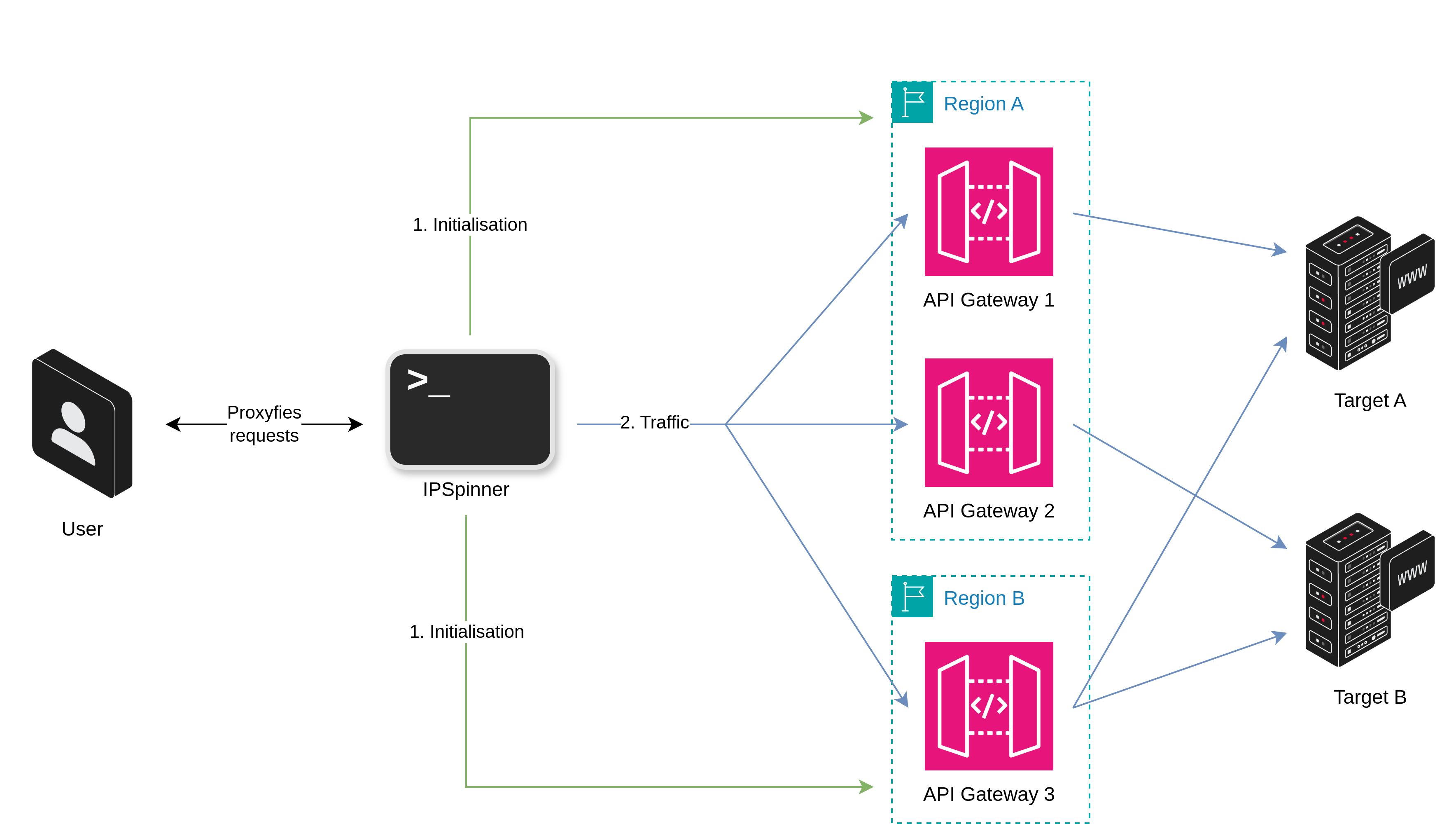 Figure 2: AWS API Gateway - Overall diagram
下图制作于 2024 年 10 月,显示了根据发送的请求数量,每个 AWS 区域可用的唯一 IP 地址数量。大多数区域提供超过 100 个 IP 地址,并且可以同时使用多个区域,允许用户通过数千个全球地址代理其请求。
Figure 2: AWS API Gateway - Overall diagram
下图制作于 2024 年 10 月,显示了根据发送的请求数量,每个 AWS 区域可用的唯一 IP 地址数量。大多数区域提供超过 100 个 IP 地址,并且可以同时使用多个区域,允许用户通过数千个全球地址代理其请求。
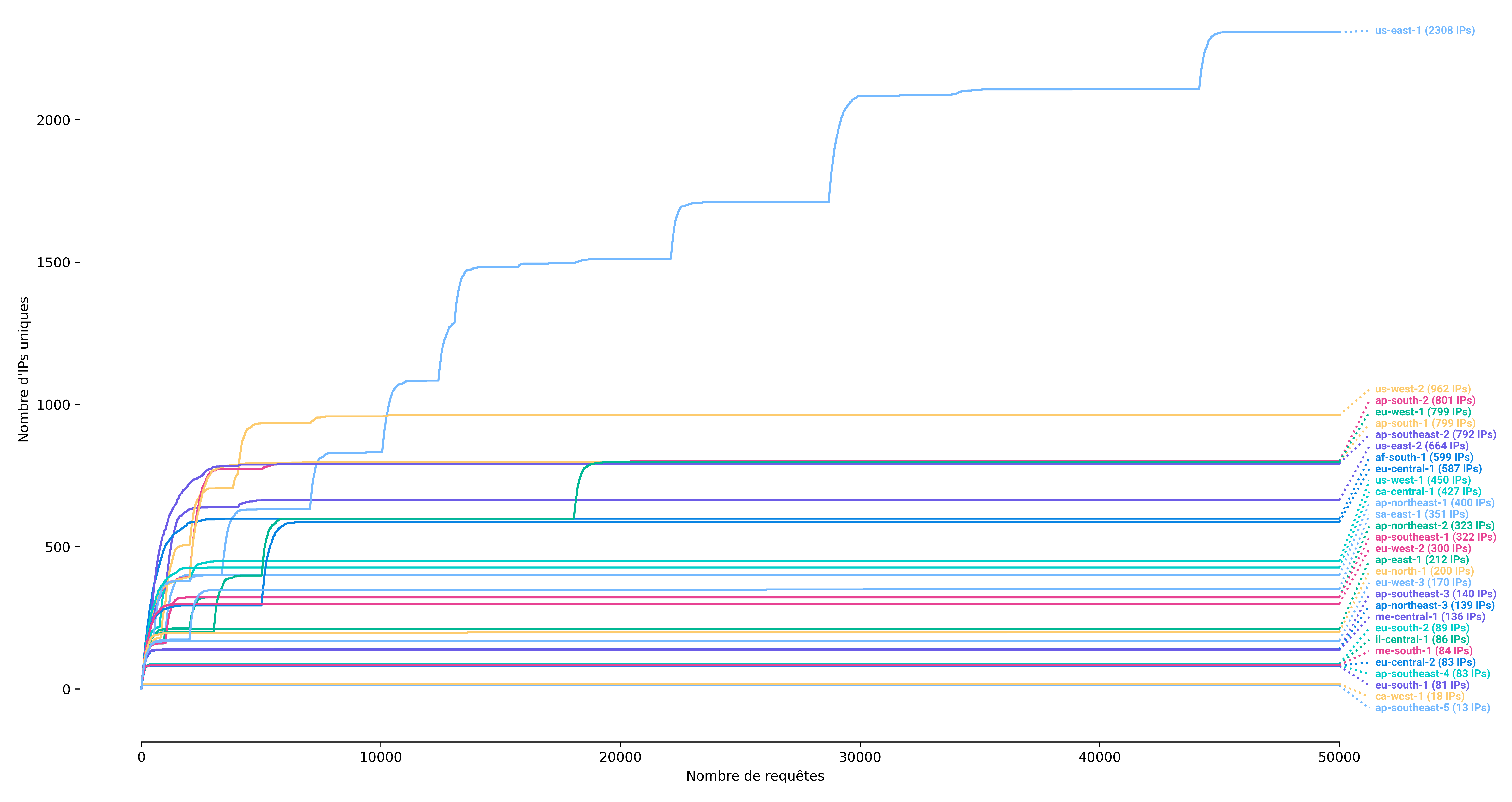 Figure 3: AWS API Gateway - Available IP addresses per region
最后,图 4 以对数绿色级别显示了每个国家/地区可用的地址数量。它表明用户有机会使用任何大陆的地址伪造其源 IP 地址。
Figure 3: AWS API Gateway - Available IP addresses per region
最后,图 4 以对数绿色级别显示了每个国家/地区可用的地址数量。它表明用户有机会使用任何大陆的地址伪造其源 IP 地址。
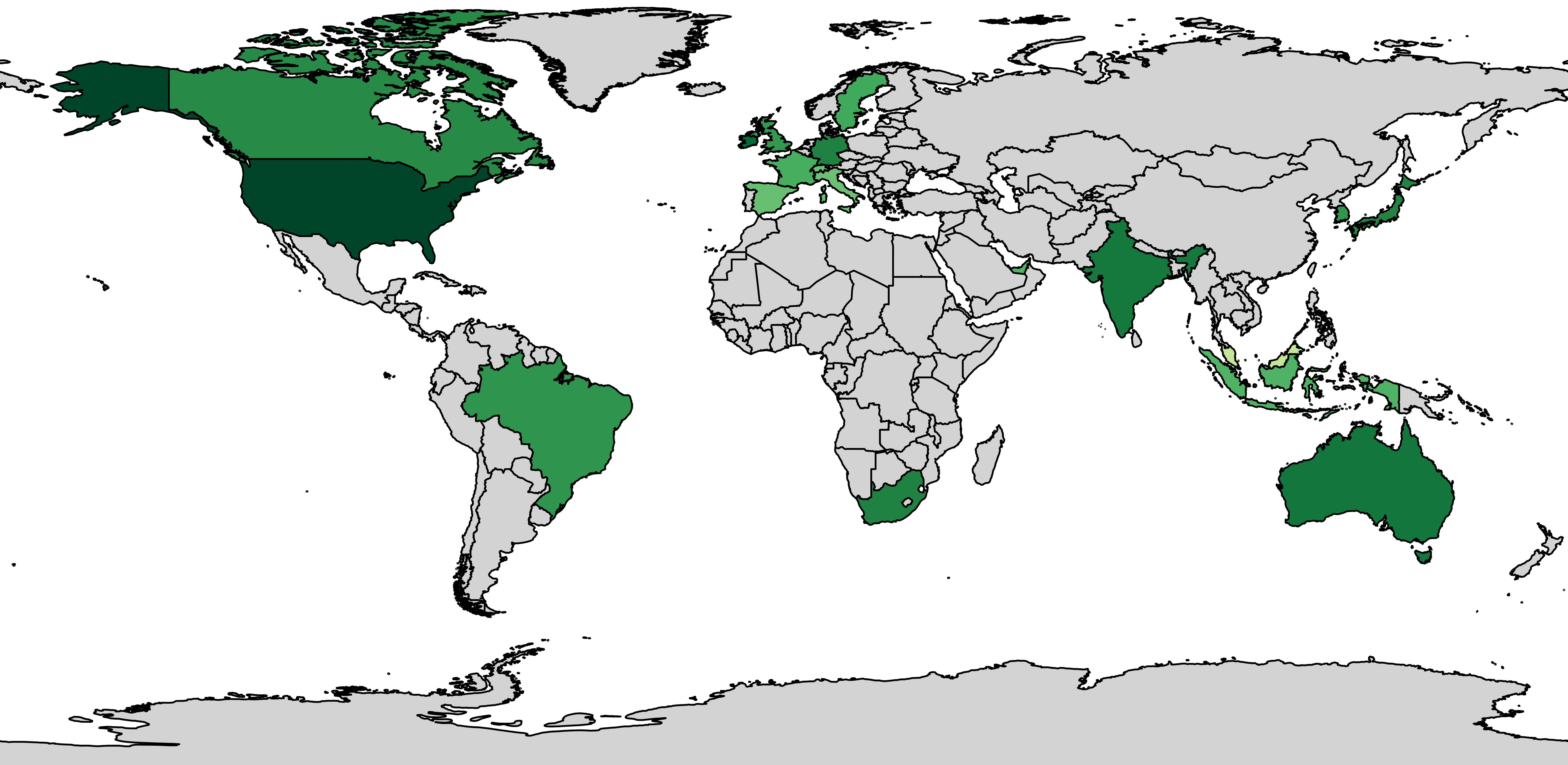 Figure 4: AWS API Gateway - IP addresses per country
#### 值得注意的细节
IPSpinner 实现了一项轮换功能,定期删除并更新创建的 FireProx 实例。如下图所示,轮换 FireProx 实例可能会提供新的 IP 子集。然而,每个 AWS 区域的 IP 集是有限的,因此在某个时刻,轮换将不会提供新的 IP。
Figure 4: AWS API Gateway - IP addresses per country
#### 值得注意的细节
IPSpinner 实现了一项轮换功能,定期删除并更新创建的 FireProx 实例。如下图所示,轮换 FireProx 实例可能会提供新的 IP 子集。然而,每个 AWS 区域的 IP 集是有限的,因此在某个时刻,轮换将不会提供新的 IP。
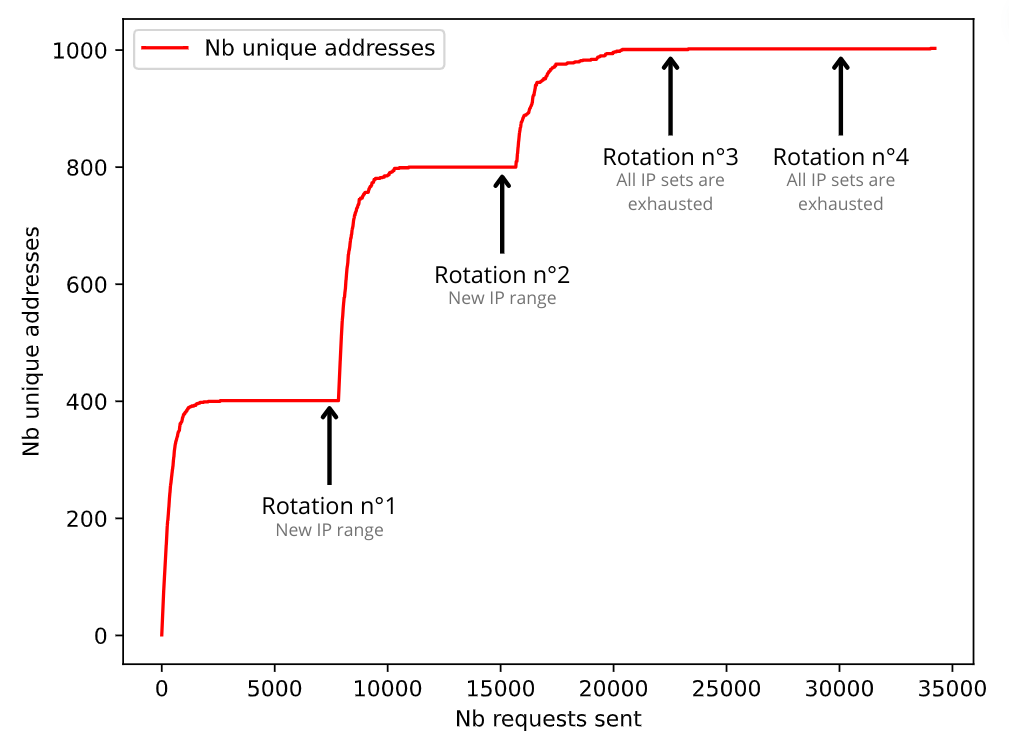 Figure 5: AWS API Gateway - Rotating process
此启动器实现了预加载过程。如前所述,这不是强制性的,但可以防止重新配置后的最初几秒内出现某些重新配置延迟或同步错误。
此外,API Gateway 默认设置一个 X-Forwarded-For 标头,该标头无法删除但可以被覆盖。因此,用户可以在 IPSpinner 配置中指定一个 IP 地址范围,从中为每个请求选择一个随机 IP(IPv4 或 IPv6 范围)。
### ii. Azure Cloud Shell
#### 介绍
IPSpinner 利用 Azure Cloud Shell 发送请求。Azure Cloud Shell 是一个交互式的、经过身份验证的、可通过浏览器访问的终端,用于管理 Azure 资源。Cloud Shell 在按会话、按用户提供的临时主机上运行。
因此,IPSpinner 使用多个已为其准备好 Cloud Shell 会话的 Azure 用户。然后,每个请求将被重定向到一个已初始化的 Cloud Shell,然后再进行更新以重置其 IP 地址。
Figure 5: AWS API Gateway - Rotating process
此启动器实现了预加载过程。如前所述,这不是强制性的,但可以防止重新配置后的最初几秒内出现某些重新配置延迟或同步错误。
此外,API Gateway 默认设置一个 X-Forwarded-For 标头,该标头无法删除但可以被覆盖。因此,用户可以在 IPSpinner 配置中指定一个 IP 地址范围,从中为每个请求选择一个随机 IP(IPv4 或 IPv6 范围)。
### ii. Azure Cloud Shell
#### 介绍
IPSpinner 利用 Azure Cloud Shell 发送请求。Azure Cloud Shell 是一个交互式的、经过身份验证的、可通过浏览器访问的终端,用于管理 Azure 资源。Cloud Shell 在按会话、按用户提供的临时主机上运行。
因此,IPSpinner 使用多个已为其准备好 Cloud Shell 会话的 Azure 用户。然后,每个请求将被重定向到一个已初始化的 Cloud Shell,然后再进行更新以重置其 IP 地址。
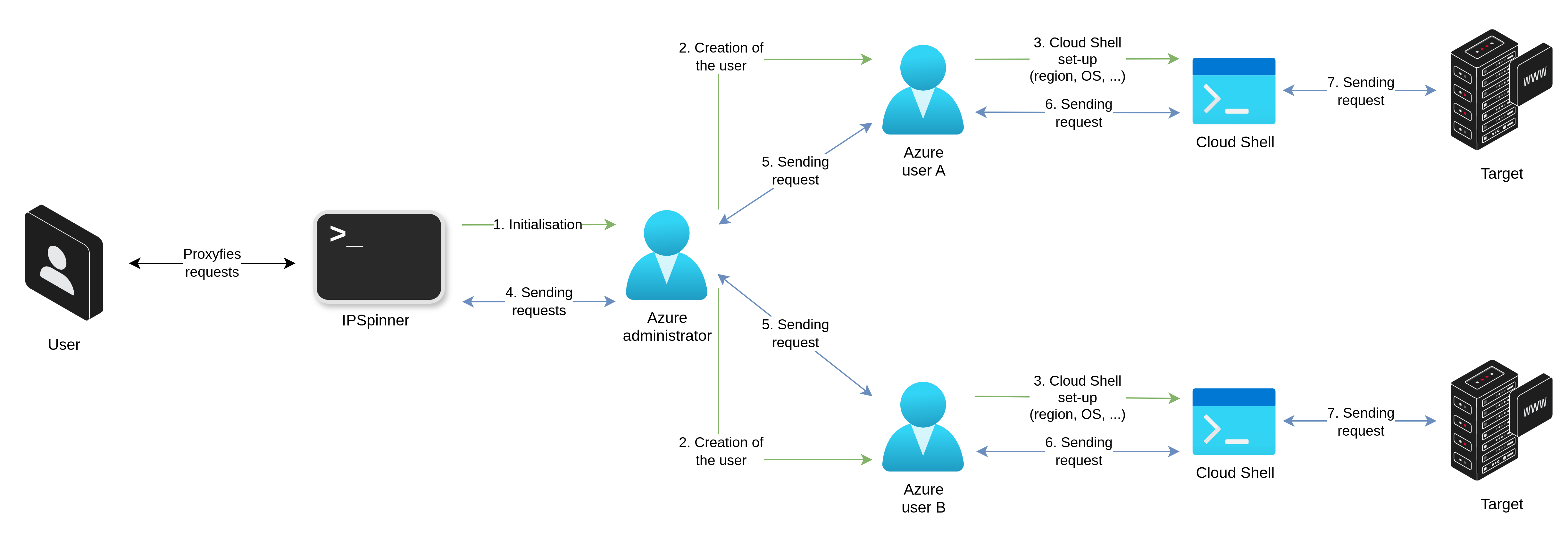 Figure 6: Azure Cloud Shell - Overall diagram
如下图所示,可用于部署 Cloud Shell 会话的不同区域各自提供数十个 IP 地址。用户可以同时配置多个区域以增加其 IP 池。
Figure 6: Azure Cloud Shell - Overall diagram
如下图所示,可用于部署 Cloud Shell 会话的不同区域各自提供数十个 IP 地址。用户可以同时配置多个区域以增加其 IP 池。
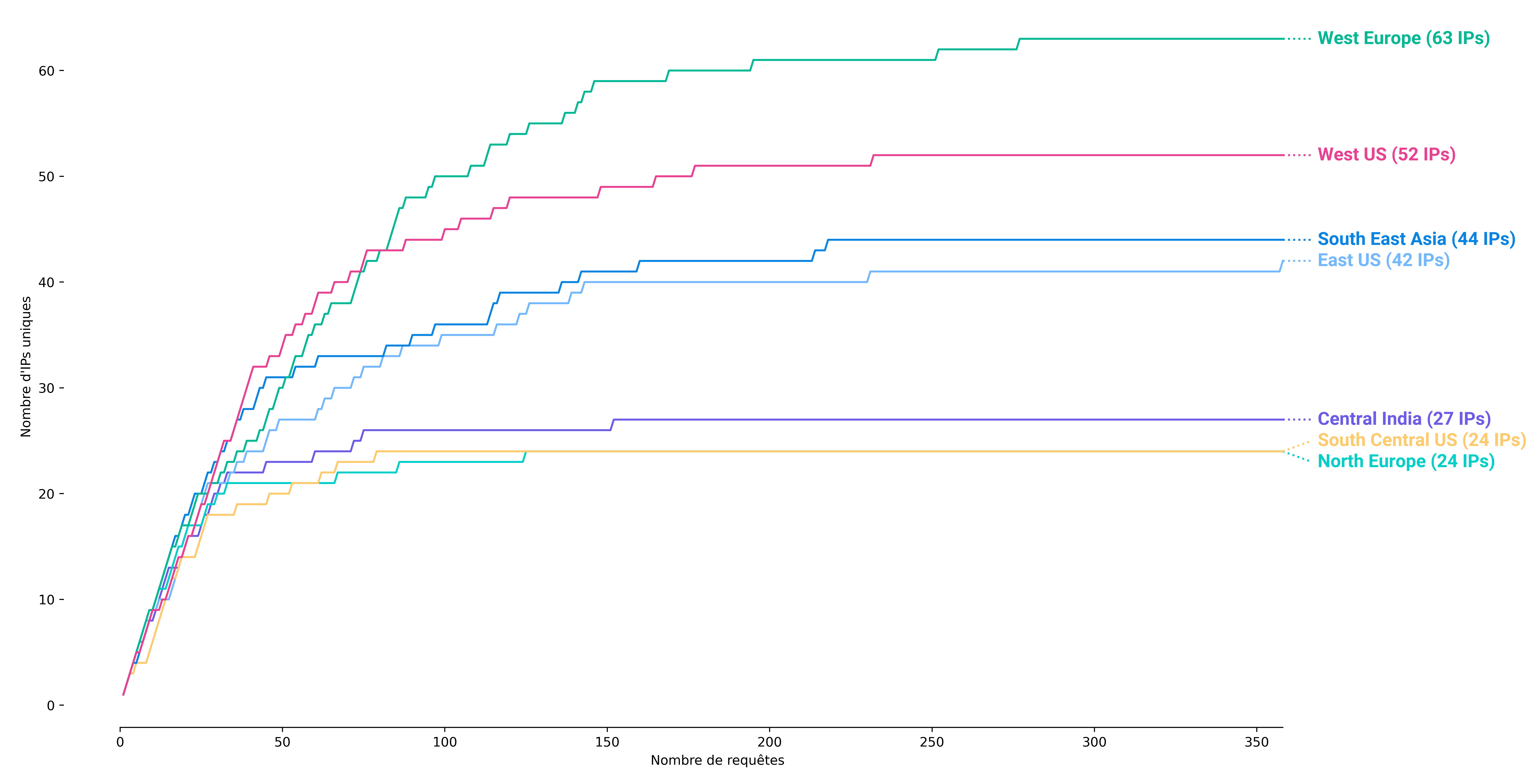 Figure 7: Azure Cloud Shell - Available IP addresses per region
然而,IP 地址比 AWS API Gateway 更集中。如下面地图所示,其中大多数位于美国、欧洲和印度。
Figure 7: Azure Cloud Shell - Available IP addresses per region
然而,IP 地址比 AWS API Gateway 更集中。如下面地图所示,其中大多数位于美国、欧洲和印度。
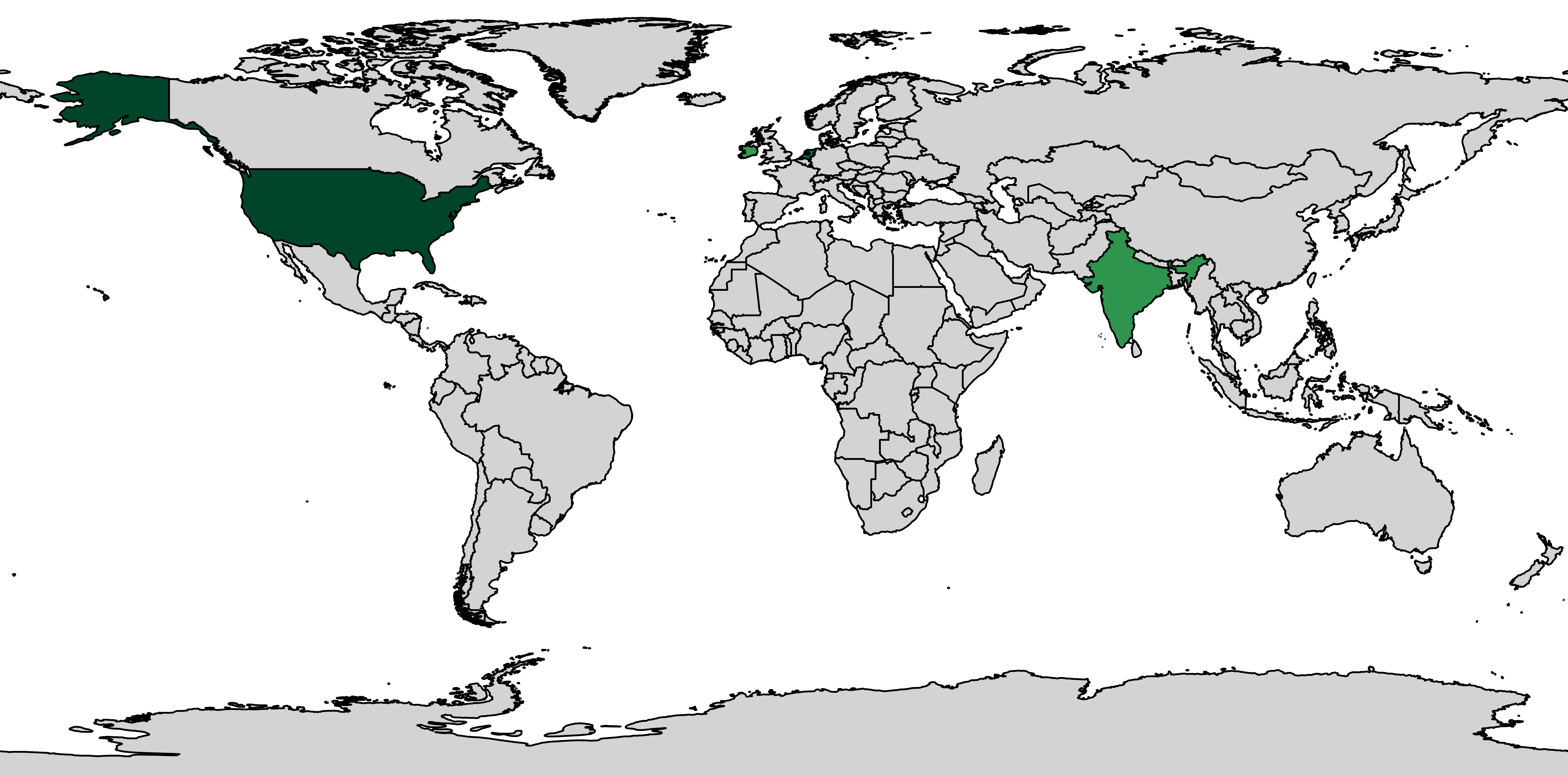 Figure 8: Azure Cloud Shell - IP addresses per country
#### 值得注意的细节
由于 Cloud Shell 更新过程延迟,我们建议限制请求流速。更多信息请参阅 [启动器对比](#3-launcher-comparison) 小节。
### iii. GitHub Actions
#### 介绍
IPSpinner 还可以利用 GitHub Actions 发送请求。此实现受 [git-rotate](https://github.com/dunderhay/git-rotate) 启发,但已完全修改和调整以摆脱捕获服务器。
它创建一个包含预定义工作流模板的仓库。然后,对于每个请求,它通过环境变量提供请求信息来运行工作流。所有数据都经过加密,以避免被外部用户读取。IPSpinner 最终从工作流日志中收集响应数据。
Figure 8: Azure Cloud Shell - IP addresses per country
#### 值得注意的细节
由于 Cloud Shell 更新过程延迟,我们建议限制请求流速。更多信息请参阅 [启动器对比](#3-launcher-comparison) 小节。
### iii. GitHub Actions
#### 介绍
IPSpinner 还可以利用 GitHub Actions 发送请求。此实现受 [git-rotate](https://github.com/dunderhay/git-rotate) 启发,但已完全修改和调整以摆脱捕获服务器。
它创建一个包含预定义工作流模板的仓库。然后,对于每个请求,它通过环境变量提供请求信息来运行工作流。所有数据都经过加密,以避免被外部用户读取。IPSpinner 最终从工作流日志中收集响应数据。
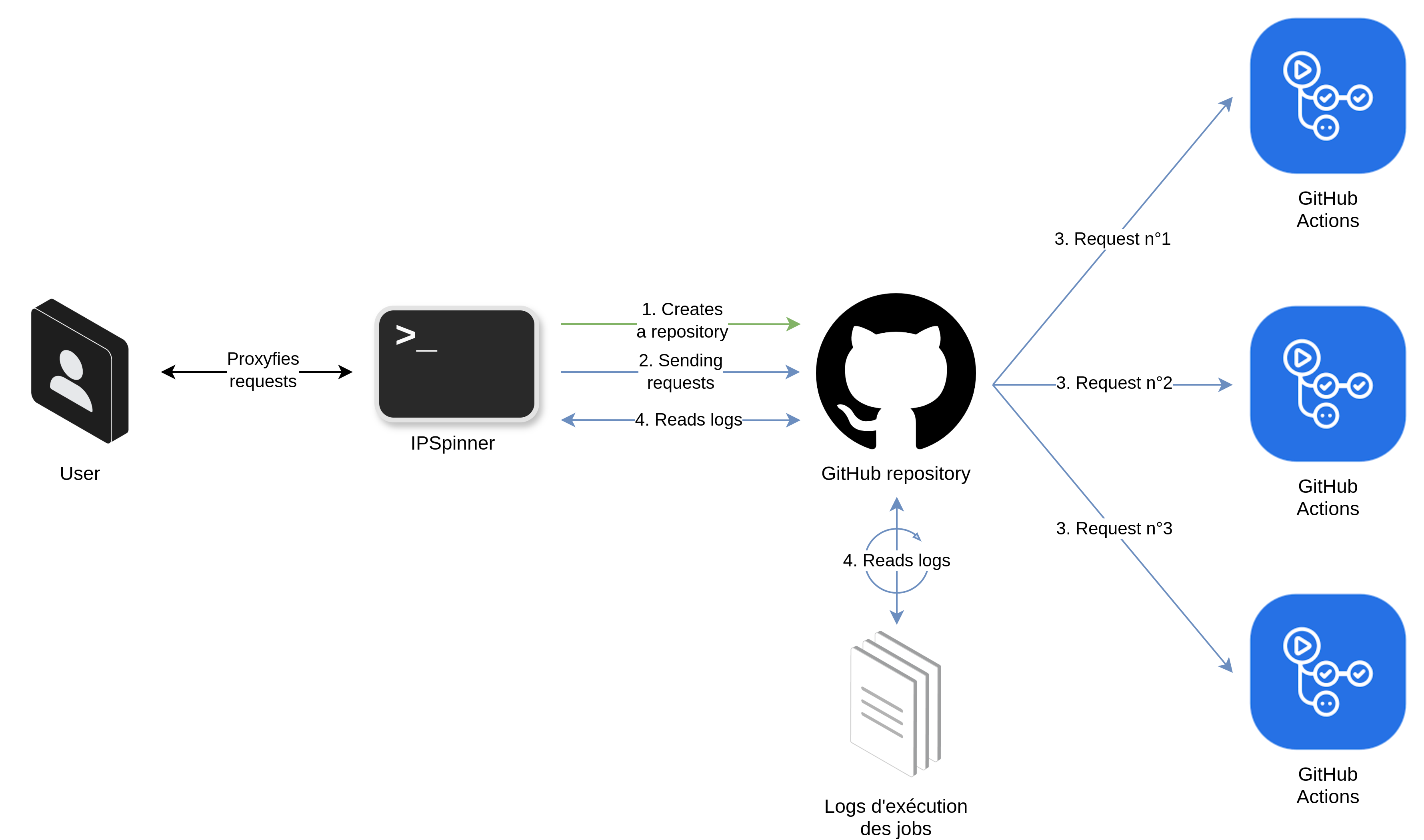 Figure 9: GitHub Actions - Overall diagram
下图显示 GitHub Actions 提供数千个不同的 IP 地址。
Figure 9: GitHub Actions - Overall diagram
下图显示 GitHub Actions 提供数千个不同的 IP 地址。
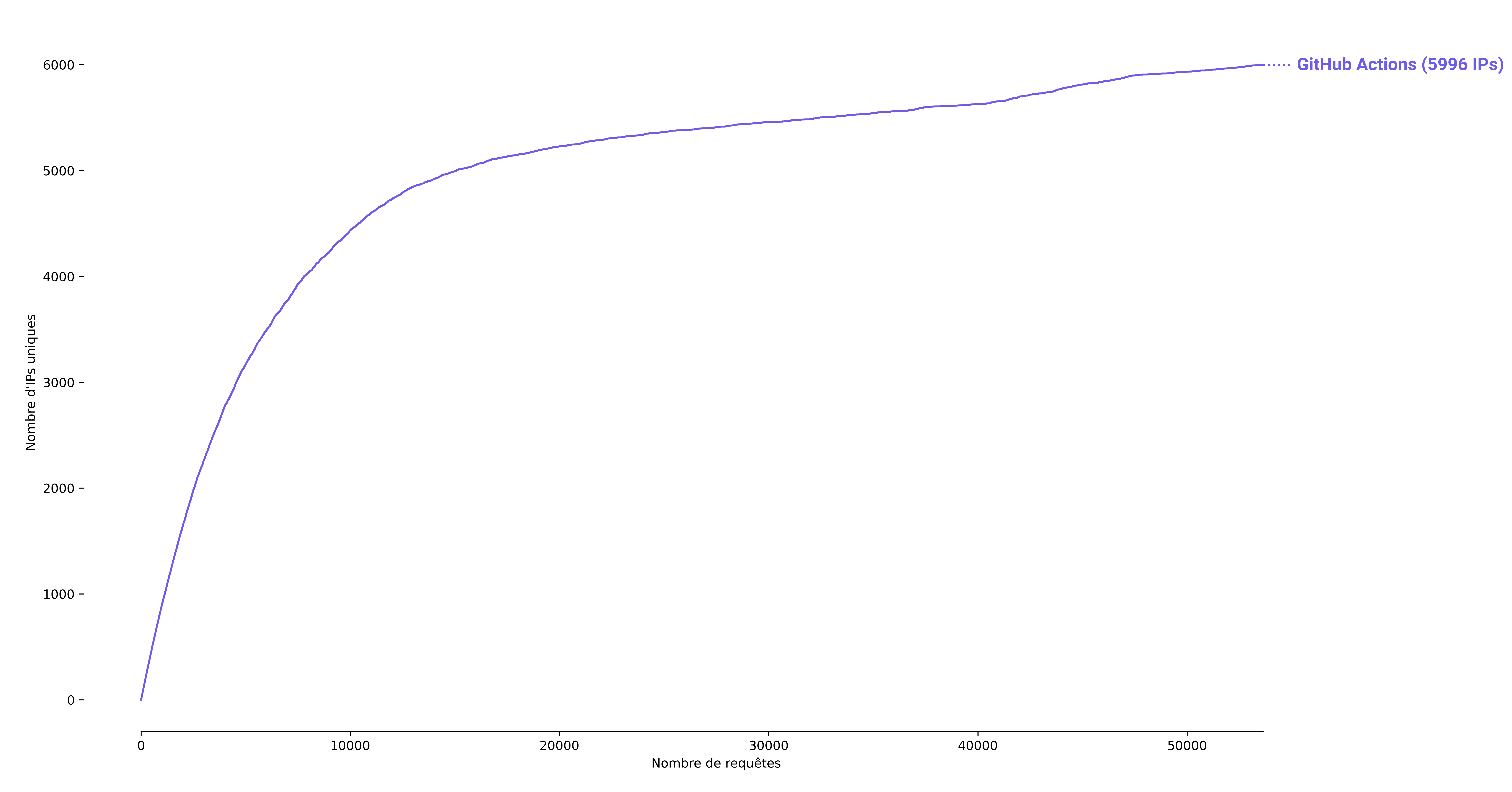 Figure 10: GitHub Actions - Available IP addresses per region
然而,下面的地图说明 GitHub Actions 仅提供美国 IP 地址。经分析,其工作器似乎部署在 Azure 基础设施上。
Figure 10: GitHub Actions - Available IP addresses per region
然而,下面的地图说明 GitHub Actions 仅提供美国 IP 地址。经分析,其工作器似乎部署在 Azure 基础设施上。
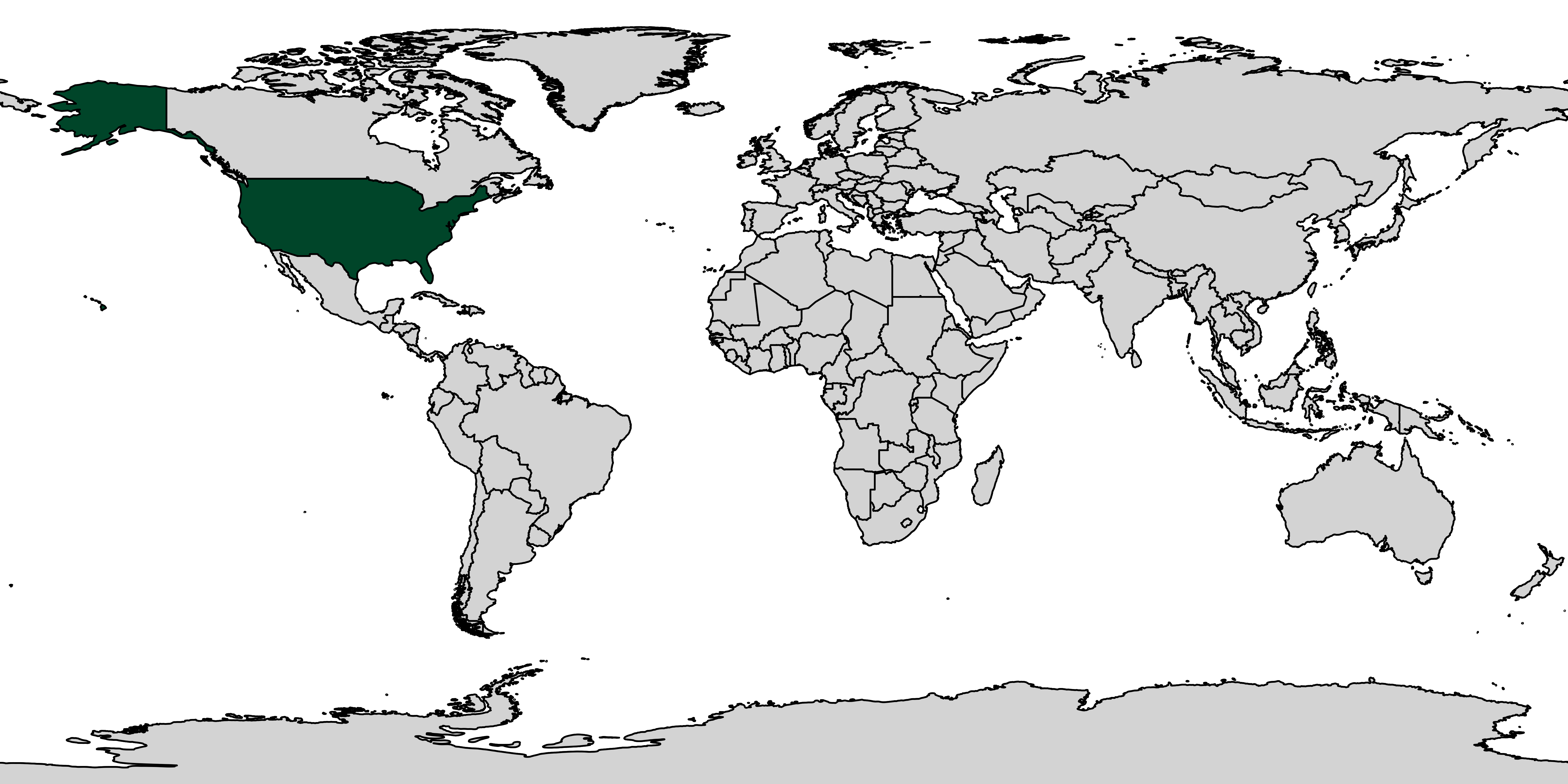 Figure 11: GitHub Actions - IP addresses per country
#### 值得注意的细节
⚠️ 此外,*“GitHub 非常重视 Actions 的滥用和垃圾邮件行为,他们有一个专门的团队来跟踪‘垃圾邮件用户’。”* 因此,用户切勿将此提供商与其自己的账户或公司账户一起使用,以避免任何账户关闭问题。
由于每小时的 GitHub REST API 限制,必须限制最大请求流速以避免任何中断。更多信息请参阅 [启动器对比](#3-launcher-comparison) 小节。
## 3) 启动器对比
| | AWS API Gateway | Azure Cloud Shell | GitHub Actions |
|---------------------------|-----------------|-------------------|----------------|
| 可用 IP 地址 | ≈ 12,418 | ≈ 276 | > 6,000 |
| 平均响应时间 | 0.46s | 13.04s | 21.42s |
| 平均重新配置时间 | 无 | 20s | 无 |
| 最大理论流速 | 4,000 至 16,000 请求/小时 | 107 请求/小时/Cloud Shell 实例 | 1,000 请求/小时 |
| 可以/需要预加载? | ✅ | ❌ | ❌ |
| | | | |
| 用于:浏览 | ✅ | ❌ | ❌ |
| 用于:密码喷洒 | ✅ | ✅ | ✅ |
# 二/ 如何安装?
## 1) 安装 Go
此项目已在 go 版本 >= 1.21 上进行了测试,但也可能适用于较低的 go 版本。
请参阅 [Go 安装文档](https://go.dev/doc/install)
安装后,请确保默认的 go 二进制文件是正确的:
```
$ go version
go version go1.21.1 linux/amd64
```
## 2) 克隆并构建 IPSpinner
```
$ git clone https://github.com/synacktiv/IPSpinner.git
$ cd IPSpinner
$ go mod tidy
$ make build-linux # For Linux AMD64 arch
$ make build-windows # For Windows AMD64 arch
```
可执行文件默认在 Linux 上命名为 "ipspinner",或在 Windows 上命名为 "ipspinner.exe"。
## 3) 清理构建
使用结束后,可以通过运行以下命令清理构建:
```
$ make clean
```
# 三/ 如何使用?
## 1) 通用设置
要获取使用 IPSpinner 的帮助,您可以在不带任何参数的情况下运行命令:
```
$ ./ipspinner -h
Help will be displayed
```
所有信息(不包括请求重定向)都记录在 ipspinner.log 文件中。
一些常用选项作为参数提供,其他配置信息必须在 INI 配置文件中提供。
### i. 命令行参数
用户可以指定一些命令行参数:
| 参数 | 必填 | 默认值 |
| :---------------- | :------: | :------: |
| --config | ❌ | config.ini |
| --export-ca-cert | ❌ | |
| --host | ❌ | |
| --port | ❌ | 8080 |
| --v, --vv, --vvv | ❌ | |
一些全局和提供商参数必须在 INI 配置文件中指定。配置文件必须在运行 IPSpinner 之前准备好。其内容将在接下来的小节中解释。默认情况下,IPSpinner 会查找名为 [*config.ini*](config.ini) 的配置文件。
为了处理 https 请求,IPSpinner 需要证书颁发机构 (CA) 证书和密钥。如果用户不提供证书,IPSpinner 将生成自己的自签名证书和密钥。用户可以使用 **--export-ca-cert** 请求检索生成的证书(例如:将其导入浏览器)。否则,用户可以在配置文件中提供自己的 CA 证书和密钥(见下一部分)。
用户可以使用 **--host** 和 **--port** 指定监听主机和端口。
最后,有三种详细模式可用:
- **--v**:打印创建日志
- **--vv**:与 **--v** 相同并打印请求重定向
- **--vvv**:与 **--vv** 相同并打印请求详细信息
### ii. 配置文件
此外,项目仓库中提供了 [INI 配置文件](config.ini) 的模板。
在 **proxy** 部分中,用户可以指定一些参数:
| 参数 | 必填 | 默认值 | 描述 |
| :---------------- | :------: | :------: | :---- |
| preload_hosts_file | ❌ | | 要预加载的 URL/主机列表,适用于可以预加载主机的提供商 |
| whitelist_hosts_file | ❌ | | 白名单 URL/主机列表(默认情况下所有其他都将被列入黑名单) |
| blacklist_hosts_file | ❌ | | 黑名单 URL/主机列表(如果设置了白名单则忽略) |
| ca_cert_file & ca_cert_key_file | ❌ | | 用户提供的 CA 证书(如果用户想要替换默认生成的证书) |
| user_agents_file | ❌ | | 将为请求随机选择的 User-Agent 列表 |
| debug_response_headers | ❌ | false | 在代理响应中添加两个调试标头:X-IPSpinner-Provider 和 X-IPSpinner-Provider-NbTotalReqSent |
| wait_for_launcher_available_timeout | ❌ | 60 | 如果没有启动器可用,请求超时前的秒数 |
所有其他部分将在相应的提供商章节中描述。
值得注意的是,用户可以同时启用多个提供商和启动器。然后,IPSpinner 将为每个请求在所有可用启动器中随机选择一个。
## 2) 各提供商配置
### i. AWS
AWS 的配置参数,在 **aws** 部分中:
| 参数 | 必填 | 默认值 | 描述 |
| :---------------- | :------: | :------: | :---- |
| regions | ✅ | | 可以部署资源的区域列表,以逗号分隔 |
| profile | ❌ | | 要使用的 AWS CLI 配置文件 |
| access_key | ✅
Figure 11: GitHub Actions - IP addresses per country
#### 值得注意的细节
⚠️ 此外,*“GitHub 非常重视 Actions 的滥用和垃圾邮件行为,他们有一个专门的团队来跟踪‘垃圾邮件用户’。”* 因此,用户切勿将此提供商与其自己的账户或公司账户一起使用,以避免任何账户关闭问题。
由于每小时的 GitHub REST API 限制,必须限制最大请求流速以避免任何中断。更多信息请参阅 [启动器对比](#3-launcher-comparison) 小节。
## 3) 启动器对比
| | AWS API Gateway | Azure Cloud Shell | GitHub Actions |
|---------------------------|-----------------|-------------------|----------------|
| 可用 IP 地址 | ≈ 12,418 | ≈ 276 | > 6,000 |
| 平均响应时间 | 0.46s | 13.04s | 21.42s |
| 平均重新配置时间 | 无 | 20s | 无 |
| 最大理论流速 | 4,000 至 16,000 请求/小时 | 107 请求/小时/Cloud Shell 实例 | 1,000 请求/小时 |
| 可以/需要预加载? | ✅ | ❌ | ❌ |
| | | | |
| 用于:浏览 | ✅ | ❌ | ❌ |
| 用于:密码喷洒 | ✅ | ✅ | ✅ |
# 二/ 如何安装?
## 1) 安装 Go
此项目已在 go 版本 >= 1.21 上进行了测试,但也可能适用于较低的 go 版本。
请参阅 [Go 安装文档](https://go.dev/doc/install)
安装后,请确保默认的 go 二进制文件是正确的:
```
$ go version
go version go1.21.1 linux/amd64
```
## 2) 克隆并构建 IPSpinner
```
$ git clone https://github.com/synacktiv/IPSpinner.git
$ cd IPSpinner
$ go mod tidy
$ make build-linux # For Linux AMD64 arch
$ make build-windows # For Windows AMD64 arch
```
可执行文件默认在 Linux 上命名为 "ipspinner",或在 Windows 上命名为 "ipspinner.exe"。
## 3) 清理构建
使用结束后,可以通过运行以下命令清理构建:
```
$ make clean
```
# 三/ 如何使用?
## 1) 通用设置
要获取使用 IPSpinner 的帮助,您可以在不带任何参数的情况下运行命令:
```
$ ./ipspinner -h
Help will be displayed
```
所有信息(不包括请求重定向)都记录在 ipspinner.log 文件中。
一些常用选项作为参数提供,其他配置信息必须在 INI 配置文件中提供。
### i. 命令行参数
用户可以指定一些命令行参数:
| 参数 | 必填 | 默认值 |
| :---------------- | :------: | :------: |
| --config | ❌ | config.ini |
| --export-ca-cert | ❌ | |
| --host | ❌ | |
| --port | ❌ | 8080 |
| --v, --vv, --vvv | ❌ | |
一些全局和提供商参数必须在 INI 配置文件中指定。配置文件必须在运行 IPSpinner 之前准备好。其内容将在接下来的小节中解释。默认情况下,IPSpinner 会查找名为 [*config.ini*](config.ini) 的配置文件。
为了处理 https 请求,IPSpinner 需要证书颁发机构 (CA) 证书和密钥。如果用户不提供证书,IPSpinner 将生成自己的自签名证书和密钥。用户可以使用 **--export-ca-cert** 请求检索生成的证书(例如:将其导入浏览器)。否则,用户可以在配置文件中提供自己的 CA 证书和密钥(见下一部分)。
用户可以使用 **--host** 和 **--port** 指定监听主机和端口。
最后,有三种详细模式可用:
- **--v**:打印创建日志
- **--vv**:与 **--v** 相同并打印请求重定向
- **--vvv**:与 **--vv** 相同并打印请求详细信息
### ii. 配置文件
此外,项目仓库中提供了 [INI 配置文件](config.ini) 的模板。
在 **proxy** 部分中,用户可以指定一些参数:
| 参数 | 必填 | 默认值 | 描述 |
| :---------------- | :------: | :------: | :---- |
| preload_hosts_file | ❌ | | 要预加载的 URL/主机列表,适用于可以预加载主机的提供商 |
| whitelist_hosts_file | ❌ | | 白名单 URL/主机列表(默认情况下所有其他都将被列入黑名单) |
| blacklist_hosts_file | ❌ | | 黑名单 URL/主机列表(如果设置了白名单则忽略) |
| ca_cert_file & ca_cert_key_file | ❌ | | 用户提供的 CA 证书(如果用户想要替换默认生成的证书) |
| user_agents_file | ❌ | | 将为请求随机选择的 User-Agent 列表 |
| debug_response_headers | ❌ | false | 在代理响应中添加两个调试标头:X-IPSpinner-Provider 和 X-IPSpinner-Provider-NbTotalReqSent |
| wait_for_launcher_available_timeout | ❌ | 60 | 如果没有启动器可用,请求超时前的秒数 |
所有其他部分将在相应的提供商章节中描述。
值得注意的是,用户可以同时启用多个提供商和启动器。然后,IPSpinner 将为每个请求在所有可用启动器中随机选择一个。
## 2) 各提供商配置
### i. AWS
AWS 的配置参数,在 **aws** 部分中:
| 参数 | 必填 | 默认值 | 描述 |
| :---------------- | :------: | :------: | :---- |
| regions | ✅ | | 可以部署资源的区域列表,以逗号分隔 |
| profile | ❌ | | 要使用的 AWS CLI 配置文件 |
| access_key | ✅
(或 profile) | | AWS 用户访问密钥 | | secret_key | ✅
(或 profile) | | AWS 用户秘密密钥 | | session_token | ❌ | | AWS 用户会话令牌 |
API Gateway 的配置参数,在 **aws** 部分中: | 参数 | 必填
(如果 ag_enabled=true) | 默认值 | 描述 | | :---------------- | :------: | :------: | :---- | | ag_enabled | / | | 启用 API Gateway 启动器 | | ag_max_instances | ❌ | 5 | 可以部署的最大 API Gateway 实例数(总体最大值,而非每个区域) | | ag_rotate_nb_requests | ❌ | 5,000 | 轮换 API Gateway 之前的请求数 | | ag_forwarded_for_range | ❌ | 35.180.0.0/16 | X-Forwarded-For 标头的 IP 地址范围(IPv4 或 IPv6 范围) | | ag_instance_title_prefix | ❌ | fpr | API Gateway 信息自定义 | | ag_instance_deployment_description | ❌ | IPSpinner FireProx Prod | API Gateway 信息自定义 | | ag_instance_deployment_stage_description | ❌ | IPSpinner FireProx Prod Stage | API Gateway 信息自定义 | | ag_instance_deployment_stage_name | ❌ | *3 个随机单词* | API Gateway 信息自定义 | ### ii. Azure Azure 的配置参数,在 **azure** 部分中: | 参数 | 必填 | 默认值 | 描述 | | :---------------- | :------: | :------: | :---- | | admin_email | ✅
(或 accounts_file) | | Azure 管理员电子邮件 | | admin_password | ✅
(或 accounts_file) | | Azure 管理员密码 | | tenant_id | ✅ | | 租户 ID | | subscription_id | ✅ | | 订阅 ID | | accounts_file | ❌ | | 预创建账户列表(电子邮件和密码,每行一条信息),覆盖 admin_email 和 admin_password |
Azure Cloud Shell 的配置参数,在 **azure** 部分中: | 参数 | 必填
(如果 cs_enabled=true) | 默认值 | 描述 | | :---------------- | :------: | :------: | :---- | | cs_enabled | / | | 启用 Cloud Shell 启动器 | | cs_preferred_locations | ✅ | | 用于部署 Cloud Shell 实例的位置 | | cs_nb_instances | ❌ | 5 | 要部署的 Cloud Shell 实例数量 | ### iii. GitHub GitHub 的配置参数,在 **github** 部分中: | 参数 | 必填 | 默认值 | 描述 | | :---------------- | :------: | :------: | :---- | | username | ✅ | | GitHub 用户名 | | token | ✅ | | 与提供的用户名关联的 GitHub 令牌 |
GitHub Actions 的配置参数,在 **github** 部分中: | 参数 | 必填
(如果 ga_enabled=true) | 默认值 | 描述 | | :---------------- | :------: | :------: | :---- | | ga_enabled | / | | 启用 GitHub Actions 启动器 | # 四/ 如何……? ## 1) HTTP/2 支持? IPSpinner 不支持 HTTP/2 协议。由于代理终止了第一个 TLS 连接,协议优势丢失并显示为基本的 HTTP/1.1 连接。 因此,为了避免在 Burp Suite 中使用 IPSpinner 时出现 HTTP/2 问题,请移除 HTTP/2 客户端支持:Settings > Network > HTTP > HTTP/2 > 取消勾选 HTTP/2 复选框。
Figure 1: IPSpinner - Overall diagram
Figure 2: AWS API Gateway - Overall diagram
Figure 3: AWS API Gateway - Available IP addresses per region
Figure 4: AWS API Gateway - IP addresses per country
Figure 5: AWS API Gateway - Rotating process
Figure 6: Azure Cloud Shell - Overall diagram
Figure 7: Azure Cloud Shell - Available IP addresses per region
Figure 8: Azure Cloud Shell - IP addresses per country
Figure 9: GitHub Actions - Overall diagram
Figure 10: GitHub Actions - Available IP addresses per region
Figure 11: GitHub Actions - IP addresses per country
(或 profile) | | AWS 用户访问密钥 | | secret_key | ✅
(或 profile) | | AWS 用户秘密密钥 | | session_token | ❌ | | AWS 用户会话令牌 |
API Gateway 的配置参数,在 **aws** 部分中: | 参数 | 必填
(如果 ag_enabled=true) | 默认值 | 描述 | | :---------------- | :------: | :------: | :---- | | ag_enabled | / | | 启用 API Gateway 启动器 | | ag_max_instances | ❌ | 5 | 可以部署的最大 API Gateway 实例数(总体最大值,而非每个区域) | | ag_rotate_nb_requests | ❌ | 5,000 | 轮换 API Gateway 之前的请求数 | | ag_forwarded_for_range | ❌ | 35.180.0.0/16 | X-Forwarded-For 标头的 IP 地址范围(IPv4 或 IPv6 范围) | | ag_instance_title_prefix | ❌ | fpr | API Gateway 信息自定义 | | ag_instance_deployment_description | ❌ | IPSpinner FireProx Prod | API Gateway 信息自定义 | | ag_instance_deployment_stage_description | ❌ | IPSpinner FireProx Prod Stage | API Gateway 信息自定义 | | ag_instance_deployment_stage_name | ❌ | *3 个随机单词* | API Gateway 信息自定义 | ### ii. Azure Azure 的配置参数,在 **azure** 部分中: | 参数 | 必填 | 默认值 | 描述 | | :---------------- | :------: | :------: | :---- | | admin_email | ✅
(或 accounts_file) | | Azure 管理员电子邮件 | | admin_password | ✅
(或 accounts_file) | | Azure 管理员密码 | | tenant_id | ✅ | | 租户 ID | | subscription_id | ✅ | | 订阅 ID | | accounts_file | ❌ | | 预创建账户列表(电子邮件和密码,每行一条信息),覆盖 admin_email 和 admin_password |
Azure Cloud Shell 的配置参数,在 **azure** 部分中: | 参数 | 必填
(如果 cs_enabled=true) | 默认值 | 描述 | | :---------------- | :------: | :------: | :---- | | cs_enabled | / | | 启用 Cloud Shell 启动器 | | cs_preferred_locations | ✅ | | 用于部署 Cloud Shell 实例的位置 | | cs_nb_instances | ❌ | 5 | 要部署的 Cloud Shell 实例数量 | ### iii. GitHub GitHub 的配置参数,在 **github** 部分中: | 参数 | 必填 | 默认值 | 描述 | | :---------------- | :------: | :------: | :---- | | username | ✅ | | GitHub 用户名 | | token | ✅ | | 与提供的用户名关联的 GitHub 令牌 |
GitHub Actions 的配置参数,在 **github** 部分中: | 参数 | 必填
(如果 ga_enabled=true) | 默认值 | 描述 | | :---------------- | :------: | :------: | :---- | | ga_enabled | / | | 启用 GitHub Actions 启动器 | # 四/ 如何……? ## 1) HTTP/2 支持? IPSpinner 不支持 HTTP/2 协议。由于代理终止了第一个 TLS 连接,协议优势丢失并显示为基本的 HTTP/1.1 连接。 因此,为了避免在 Burp Suite 中使用 IPSpinner 时出现 HTTP/2 问题,请移除 HTTP/2 客户端支持:Settings > Network > HTTP > HTTP/2 > 取消勾选 HTTP/2 复选框。
标签:AWS API Gateway, Azure Cloud Shell, EVTX分析, GitHub Actions, Go语言, HTTPS代理, IP旋转, 云服务滥用, 代理服务, 代码生成, 匿名化, 日志审计, 暴力破解辅助, 本地代理, 流量重定向, 渗透测试工具, 源IP隐藏, 程序破解, 网络安全, 自动笔记, 规避检测, 隐私保护