InternScience/GraphGen
GitHub: InternScience/GraphGen
GraphGen 是一个基于知识图谱引导的合成数据生成框架,通过识别模型知识缺口并生成高质量 QA 对来增强大语言模型的监督微调效果。
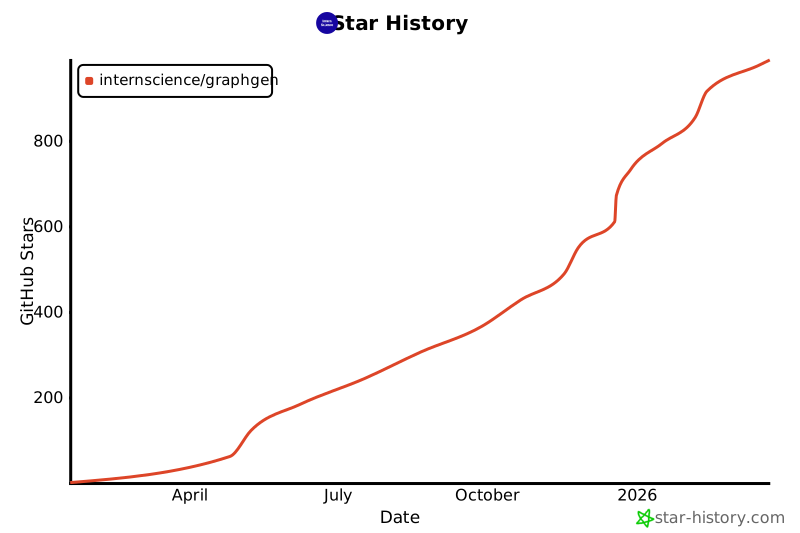
Stars: 1083 | Forks: 81

[](https://github.com/open-sciencelab/GraphGen)
[](https://github.com/open-sciencelab/GraphGen)
[](https://github.com/open-sciencelab/GraphGen/issues)
[](https://github.com/open-sciencelab/GraphGen/issues)
[](https://chenzihong.gitbook.io/graphgen-cookbook/)
[](https://pypi.org/project/graphg/)
[](https://cdn.vansin.top/internlm/dou.jpg)
[](https://arxiv.org/abs/2505.20416)
[](https://huggingface.co/papers/2505.20416)
[](https://huggingface.co/spaces/chenzihong/GraphGen)
[](https://modelscope.cn/studios/chenzihong/GraphGen)
GraphGen:通过知识驱动的合成数据生成增强 LLM 的监督微调
[English](README.md) | [中文](README_zh.md)
📚 目录
- 📝 [什么是 GraphGen?](#-what-is-graphgen)
- 📌 [最新更新](#-latest-updates)
- ⚙️ [支持列表](#-support-list)
- 🚀 [快速开始](#-quick-start)
- 🏗️ [系统架构](#-system-architecture)
- 🍀 [致谢](#-acknowledgements)
- 📚 [引用](#-citation)
- 📜 [许可证](#-license)
- 📅 [Star 历史](#-star-history)
## 📝 什么是 GraphGen?
GraphGen 是一个由知识图谱引导的合成数据生成框架。请查看[**论文**](https://arxiv.org/abs/2505.20416)和[最佳实践](https://github.com/open-sciencelab/GraphGen/issues/17)。
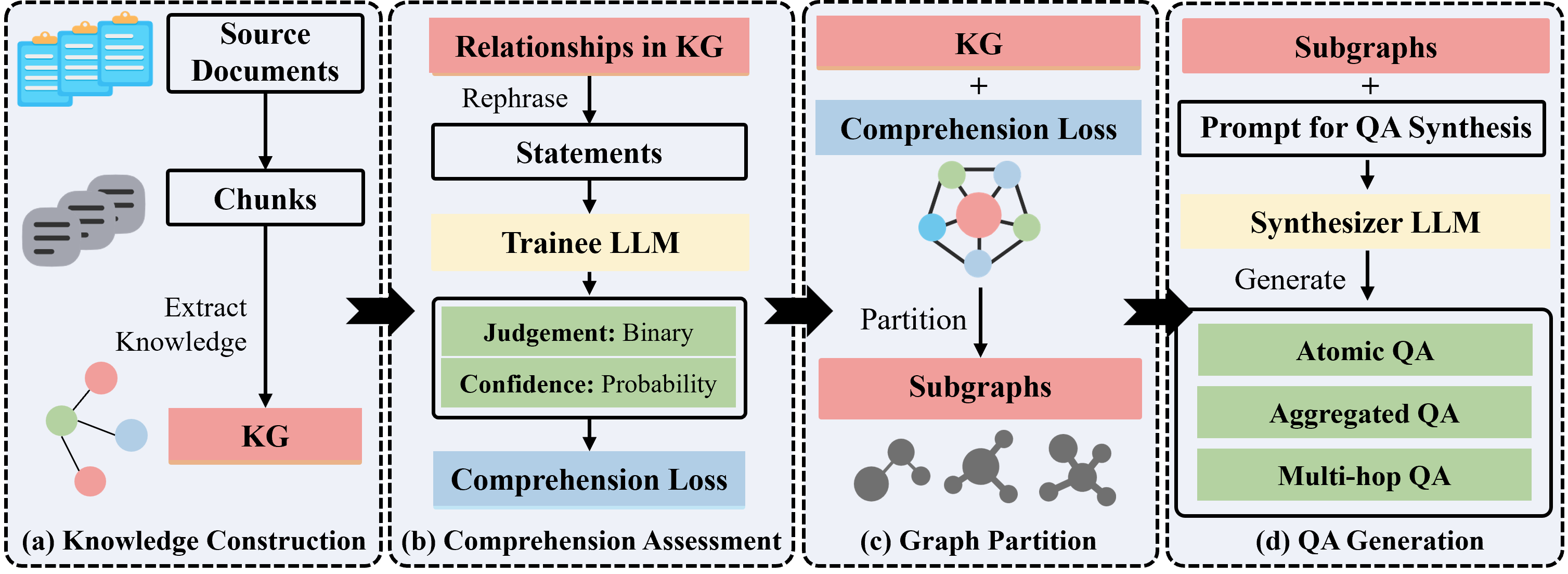
它首先从源文本构建细粒度的知识图谱,然后使用期望校准误差(expected calibration error)指标识别 LLM 中的知识缺口,优先生成针对高价值、长尾知识的 QA 对。
此外,GraphGen 结合了多跳邻域采样以捕获复杂的关系信息,并采用风格控制生成来丰富生成的 QA 数据。
数据生成后,您可以使用 [LLaMA-Factory](https://github.com/hiyouga/LLaMA-Factory) 和 [xtuner](https://github.com/InternLM/xtuner) 来微调您的 LLM。
## 📌 最新更新
- **2026.02.04**:我们现在支持 HuggingFace Datasets 作为数据生成的输入数据源。
- **2026.01.15**:**LLM 基准测试合成**现在支持单选/多选题、填空题和判断题——非常适合教育场景 🌟🌟
- **2025.12.26**:关于准确度(实体/关系)、一致性(冲突检测)、结构鲁棒性(噪声、连通性、度分布)的知识图谱评估指标
历史记录
- **2025.12.16**:添加了 [rocksdb](https://github.com/facebook/rocksdb) 作为键值存储后端,并添加了 [kuzudb](https://github.com/kuzudb/kuzu) 作为图数据库后端支持。
- **2025.12.16**:添加了 [vllm](https://github.com/vllm-project/vllm) 作为本地推理后端支持。
- **2025.12.16**:使用 [ray](https://github.com/ray-project/ray) 重构了数据生成管道,以提高分布式执行和资源管理的效率。
- **2025.12.1**:添加了对 [NCBI](https://www.ncbi.nlm.nih.gov/) 和 [RNAcentral](https://rnacentral.org/) 数据库的搜索支持,能够从这些生物信息学数据库中提取 DNA 和 RNA 数据。
- **2025.10.30**:我们支持了几个新的 LLM 客户端和推理后端,包括 [Ollama_client](https://github.com/open-sciencelab/GraphGen/blob/main/graphgen/models/llm/api/ollama_client.py)、[http_client](https://github.com/open-sciencelab/GraphGen/blob/main/graphgen/models/llm/api/http_client.py)、[HuggingFace Transformers](https://github.com/open-sciencelab/GraphGen/blob/main/graphgen/models/llm/local/hf_wrapper.py) 和 [SGLang](https://github.com/open-sciencelab/GraphGen/blob/main/graphgen/models/llm/local/sglang_wrapper.py)。
- **2025.10.23**:我们现在支持 VQA(视觉问答)数据生成。运行脚本:`bash scripts/generate/generate_vqa.sh`。
- **2025.10.21**:我们现在通过 [MinerU](https://github.com/opendatalab/MinerU) 支持将 PDF 作为数据生成的输入格式。
- **2025.09.29**:我们在 [Hugging Face](https://huggingface.co/spaces/chenzihong/GraphGen) 和 [ModelScope](https://modelscope.cn/studios/chenzihong/GraphGen) 上自动更新 gradio 演示。
- **2025.08.14**:我们增加了使用 Leiden 算法在知识图谱中进行社区检测的支持,从而能够合成思维链(CoT)数据。
- **2025.07.31**:我们添加了 Google、Bing、Wikipedia 和 UniProt 作为搜索后端。
- **2025.04.21**:我们发布了 GraphGen 的初始版本。
## GraphGen 的有效性
### 预训练
受 Kimi-K2 的[技术报告](https://arxiv.org/pdf/2507.20534)(Improving Token Utility with Rephrasing) 和 ByteDance Seed 的 [Reformulation for Pretraining Data Augmentation](https://arxiv.org/abs/2502.04235)(MGA 框架) 的启发,GraphGen 添加了一个 **rephrase pipeline(改写管道)**——使用 LLM 驱动的改写来生成同一语料库的多样化变体,而不是冗余的重复。
**设置:** 从头开始在 [SlimPajama-6B](https://huggingface.co/datasets/DKYoon/SlimPajama-6B) 上训练的 Qwen3-0.6B。
| Method | ARC-E | ARC-C | HellaSwag | GSM8K | TruthfulQA-MC1 | TruthfulQA-MC2 | **Average** |
|:---|:---:|:---:|:---:|:---:|:---:|:---:|:---:|
| SlimPajama-6B trained for 2 epochs | 25.55 | 21.08 | 24.48 | 0.08 | 24.36 | 49.90 | 24.24 |
| SlimPajama-6B + Executive-Summary Rephrase trained for 1 epoch | 26.43 | **22.70** | **24.75** | **1.36** | **26.19** | 51.90 | **25.56**(↑1.32) |
| SlimPajama-6B + Cross-Domain Rephrase trained for 1 epoch | **28.79** | 20.22 | 24.46 | 0.00 | 24.97 | **52.41** | 25.14(↑0.9) |
两种改写方法都在**零额外数据**的情况下将平均分提高了约 1 分——所有收益都来自于同一知识的表达方式。
### SFT
以下是后训练结果,其中 **超过 50% 的 SFT 数据** 来自 GraphGen 和我们的数据清洗管道。
| Domain | Dataset | Ours | Qwen2.5-7B-Instruct (baseline) |
|:---------:|:---------------------------------------------------------:|:--------:|:------------------------------:|
| Plant | [SeedBench](https://github.com/open-sciencelab/SeedBench) | **65.9** | 51.5 |
| Common | CMMLU | 73.6 | **75.8** |
| Knowledge | GPQA-Diamond | **40.0** | 33.3 |
| Math | AIME24 | **20.6** | 16.7 |
| | AIME25 | **22.7** | 7.2 |
## ⚙️ 支持列表
我们支持各种 LLM 推理服务器、API 服务器、推理客户端、输入文件格式、数据模态、输出数据格式和输出数据类型。
用户可以根据合成数据的需求灵活配置。
| Inference Server | Api Server | Inference Client | Data Source | Data Modal | Data Type |
|--------------------------------------------------------------------------|--------------------------------------------------------------------------------|------------------------------------------------------------|---------------------------------------------------------------------------------------------------------------------------------------------------------------------------------------------------------------------------------------------------------------------------------------|---------------|-------------------------------------------------|
| [![hf-icon]HF][hf]
[![sg-icon]SGLang][sg]
[![vllm-icon]vllm][vllm] | [![sif-icon]Silicon][sif]
[![oai-icon]OpenAI][oai]
[![az-icon]Azure][az] | HTTP
[![ol-icon]Ollama][ol]
[![oai-icon]OpenAI][oai] | Files(CSV, JSON, PDF, TXT, etc.)
Databases([![uniprot-icon]UniProt][uniprot], [![ncbi-icon]NCBI][ncbi], [![rnacentral-icon]RNAcentral][rnacentral])
Search Engines([![bing-icon]Bing][bing], [![google-icon]Google][google])
Knowledge Graphs([![wiki-icon]Wikipedia][wiki]) | TEXT
IMAGE | Aggregated
Atomic
CoT
Multi-hop
VQA |
## 🚀 快速开始
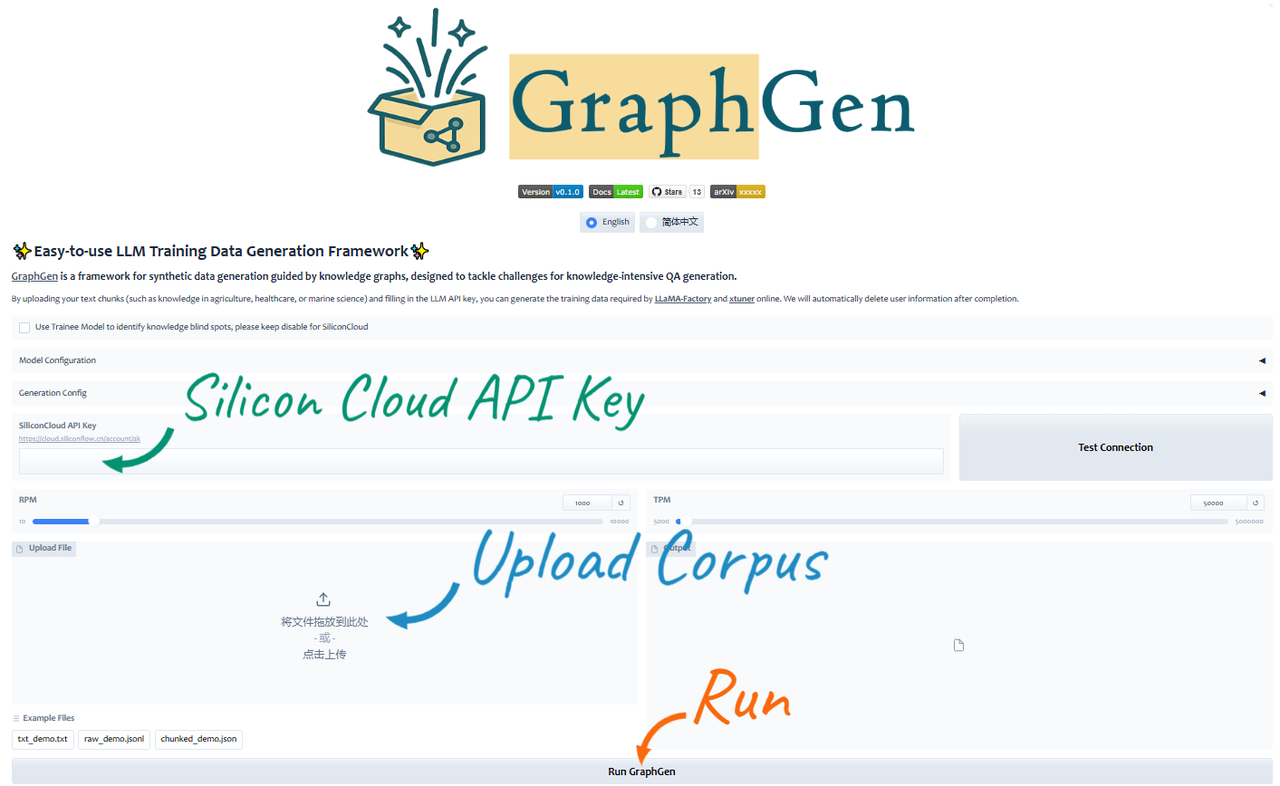
通过 [Huggingface](https://huggingface.co/spaces/chenzihong/GraphGen) 或 [Modelscope](https://modelscope.cn/studios/chenzihong/GraphGen) 体验 GraphGen 演示。
如有任何问题,请查看 [FAQ](https://github.com/open-sciencelab/GraphGen/issues/10),提交新的 [issue](https://github.com/open-sciencelab/GraphGen/issues) 或加入我们的 [微信群](https://cdn.vansin.top/internlm/dou.jpg) 进行咨询。
### 准备工作
1. 安装 [uv](https://docs.astral.sh/uv/reference/installer/)
# 如果遇到网络问题,可以尝试使用 pipx 或 pip 安装 uv,详情请参考 uv 文档
curl -LsSf https://astral.sh/uv/install.sh | sh
2. 克隆仓库
git clone --depth=1 https://github.com/open-sciencelab/GraphGen
cd GraphGen
3. 创建新的 uv 环境
uv venv --python 3.10
4. 配置依赖
uv pip install -r requirements.txt
### 运行 Gradio 演示
```
python -m webui.app
```
### 从 PyPI 运行
1. 安装 GraphGen
uv pip install graphg
2. 在 CLI 中运行
SYNTHESIZER_MODEL=your_synthesizer_model_name \
SYNTHESIZER_BASE_URL=your_base_url_for_synthesizer_model \
SYNTHESIZER_API_KEY=your_api_key_for_synthesizer_model \
TRAINEE_MODEL=your_trainee_model_name \
TRAINEE_BASE_URL=your_base_url_for_trainee_model \
TRAINEE_API_KEY=your_api_key_for_trainee_model \
graphg --output_dir cache
### 从源码运行
1. 配置环境
- 在根目录下创建 `.env` 文件
cp .env.example .env
- 设置以下环境变量:
# Tokenizer
TOKENIZER_MODEL=
# LLM
# 支持不同的后端:http_api, openai_api, ollama_api, ollama, huggingface, tgi, sglang, tensorrt
# Synthesizer 是用于构建 KG 和生成数据的模型
# Trainee 是用于使用生成数据进行训练的模型
# http_api / openai_api
SYNTHESIZER_BACKEND=openai_api
SYNTHESIZER_MODEL=gpt-4o-mini
SYNTHESIZER_BASE_URL=
SYNTHESIZER_API_KEY=
TRAINEE_BACKEND=openai_api
TRAINEE_MODEL=gpt-4o-mini
TRAINEE_BASE_URL=
TRAINEE_API_KEY=
# azure_openai_api
# SYNTHESIZER_BACKEND=azure_openai_api
# 以下内容与您在 Azure 中的 "Deployment name" 相同
# SYNTHESIZER_MODEL=
# SYNTHESIZER_BASE_URL=https://.openai.azure.com/openai/deployments//chat/completions
# SYNTHESIZER_API_KEY=
# SYNTHESIZER_API_VERSION=
# # ollama_api
# SYNTHESIZER_BACKEND=ollama_api
# SYNTHESIZER_MODEL=gemma3
# SYNTHESIZER_BASE_URL=http://localhost:11434
#
# 注意:目前不支持使用 ollama_api 后端的 TRAINEE,因为 ollama_api 不支持 logprobs。
# # huggingface
# SYNTHESIZER_BACKENDuggingface
# SYNTHESIZER_MODEL=Qwen/Qwen2.5-0.5B-Instruct
#
# TRAINEE_BACKEND=huggingface
# TRAINEE_MODEL=Qwen/Qwen2.5-0.5B-Instruct
# # sglang
# SYNTHESIZER_BACKEND=sglang
# SYNTHESIZER_MODEL=Qwen/Qwen2.5-0.5B-Instruct
# SYNTHESIZER_TP_SIZE=1
# SYNTHESIZER_NUM_GPUS=1
# TRAINEE_BACKEND=sglang
# TRAINEE_MODEL=Qwen/Qwen2.5-0.5B-Instruct
# SYNTHESIZER_TP_SIZE=1
# SYNTHESIZER_NUM_GPUS=1
# # vllm
# SYNTHESIZER_BACKEND=vllm
# SYNTHESIZER_MODEL=Qwen/Qwen2.5-0.5B-Instruct
# SYNTHESIZER_NUM_GPUS=1
# TRAINEE_BACKEND=vllm
# TRAINEE_MODEL=Qwen/Qwen2.5-0.5B-Instruct
# TRAINEE_NUM_GPUS=1
2. (可选)在 `config.yaml` 中自定义生成参数。
编辑相应的 YAML 文件,例如:
# examples/generate/generate_aggregated_qa/aggregated_config.yaml
global_params:
working_dir: cache
graph_backend: kuzu # 图数据库后端,支持:kuzu, networkx
kv_backend: rocksdb # 键值存储后端,支持:rocksdb, json_kv
nodes:
- id: read_files # id 在管道中是唯一的,可以被其他步骤引用
op_name: read
type: source
dependencies: []
params:
input_path:
- examples/input_examples/jsonl_demo.jsonl # 输入文件路径,支持 json, jsonl, txt, pdf。示例请参见 examples/input_examples
# 其他设置...
3. 生成数据
选择所需的格式并运行相应的脚本:
| Format | Script to run | Notes |
|-----------------|------------------------------------------------------------------------------|----------------------------------------------------------------------------|
| `cot` | `bash examples/generate/generate_cot_qa/generate_cot.sh` | Chain-of-Thought Q\&A pairs |
| `atomic` | `bash examples/generate/generate_atomic_qa/generate_atomic.sh` | Atomic Q\&A pairs covering basic knowledge |
| `aggregated` | `bash examples/generate/generate_aggregated_qa/generate_aggregated.sh` | Aggregated Q\&A pairs incorporating complex, integrated knowledge |
| `multi-hop` | `examples/generate/generate_multi_hop_qa/generate_multi_hop.sh` | Multi-hop reasoning Q\&A pairs |
| `vqa` | `bash examples/generate/generate_vqa/generate_vqa.sh` | Visual Question Answering pairs combining visual and textual understanding |
| `multi_choice` | `bash examples/generate/generate_multi_choice_qa/generate_multi_choice.sh` | Multiple-choice question-answer pairs |
| `multi_answer` | `bash examples/generate/generate_multi_answer_qa/generate_multi_answer.sh` | Multiple-answer question-answer pairs |
| `fill_in_blank` | `bash examples/generate/generate_fill_in_blank_qa/generate_fill_in_blank.sh` | Fill-in-the-blank question-answer pairs |
| `true_false` | `bash examples/generate/generate_true_false_qa/generate_true_false.sh` | True-or-false question-answer pairs |
4. 获取生成的数据
ls cache/output
### 使用 Docker 运行
1. 构建 Docker 镜像
docker build -t graphgen .
2. 运行 Docker 容器
docker run -p 7860:7860 graphgen
## 🏗️ 系统架构
请参阅 deepwiki 提供的 [分析](https://deepwiki.com/open-sciencelab/GraphGen),了解 GraphGen 系统的技术概述、架构和核心功能。
### 工作流程
## 🍀 致谢
- [SiliconFlow](https://siliconflow.cn) 丰富的 LLM API,部分模型免费
- [LightRAG](https://github.com/HKUDS/LightRAG) 简单高效的图检索解决方案
- [ROGRAG](https://github.com/tpoisonooo/ROGRAG) 一个鲁棒优化的 GraphRAG 框架
- [DB-GPT](https://github.com/eosphoros-ai/DB-GPT) 一个 AI 原生数据应用开发框架
## 📚 引用
如果您觉得此仓库有用,请考虑引用我们的工作:
```
@misc{chen2025graphgenenhancingsupervisedfinetuning,
title={GraphGen: Enhancing Supervised Fine-Tuning for LLMs with Knowledge-Driven Synthetic Data Generation},
author={Zihong Chen and Wanli Jiang and Jinzhe Li and Zhonghang Yuan and Huanjun Kong and Wanli Ouyang and Nanqing Dong},
year={2025},
eprint={2505.20416},
archivePrefix={arXiv},
primaryClass={cs.CL},
url={https://arxiv.org/abs/2505.20416},
}
```
## 📜 许可证
本项目根据 [Apache License 2.0](LICENSE) 获得许可。
## 📅 Star 历史
[](https://www.star-history.com/#InternScience/GraphGen&Date)标签:AI, arXiv, DLL 劫持, DNS解析, GraphGen, Hugging Face, LLM, ModelScope, PyPI, SFT, Unmanaged PE, 人工智能, 便携式工具, 合成数据, 大语言模型, 开源项目, 快速开始, 数据增强, 数据生成, 文档, 模型训练, 深度学习, 用户模式Hook绕过, 监督微调, 知识驱动, 自动化代码审查, 逆向工具