mikeflynn/honeybearhoneypot
GitHub: mikeflynn/honeybearhoneypot
一款带有可视化 GUI 界面和趣味交互的 SSH 蜜罐,用于捕获、记录和分析未经授权的访问行为。
Stars: 2 | Forks: 0
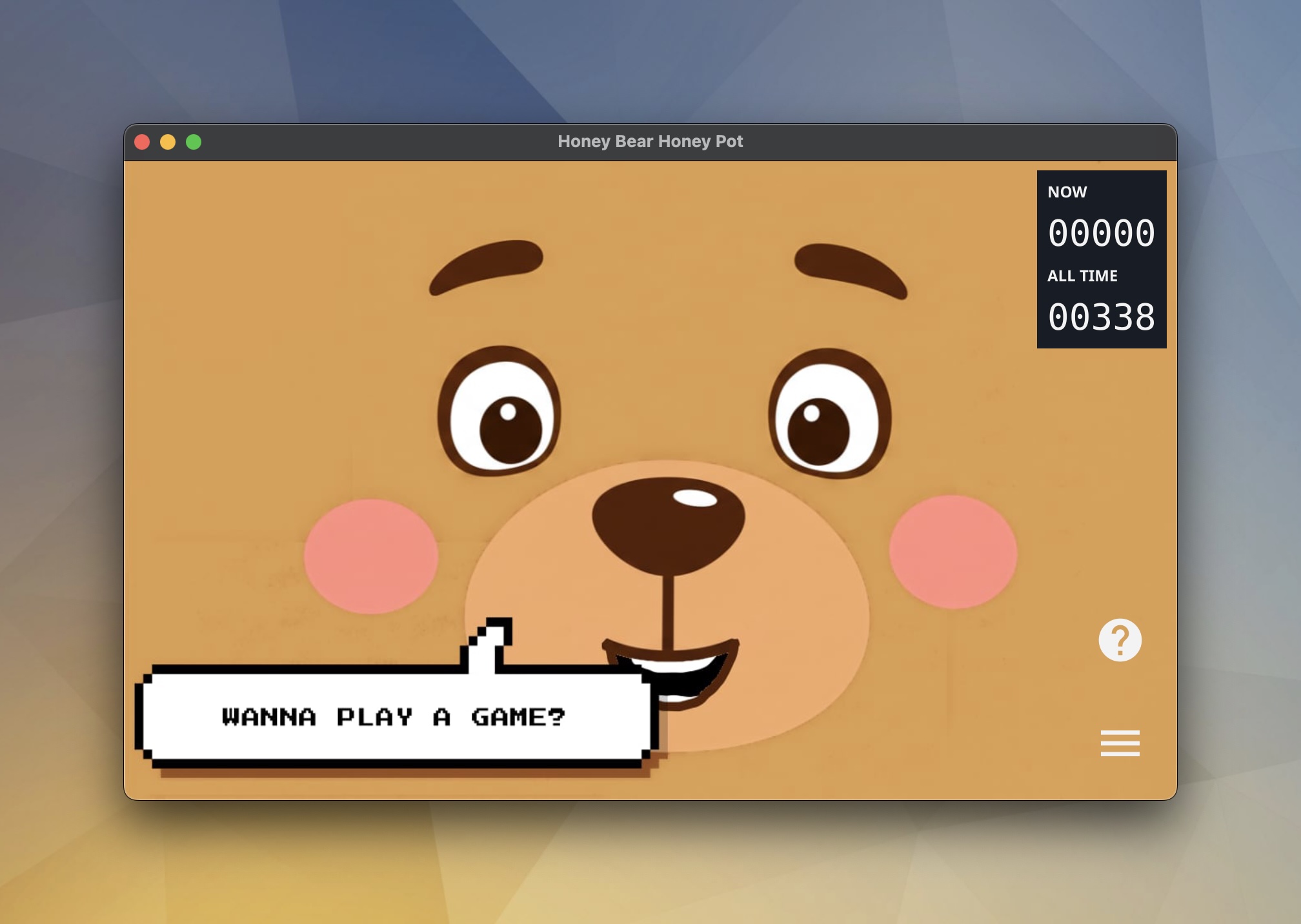
# Honey Bear 蜜罐
一个带有奇妙 GUI 应用的 SSH 蜜罐……而且,如果你喜欢的话,它可以在安全帽上运行!
了解有关此项目的更多信息:[honeybear.hydrox.fun](https://honeybear.hydrox.fun)
## 安装说明
### 安装脚本(推荐)
在 macOS 或 Linux 上最快的安装方式 —— 通过管道传输给 bash:
```
curl -fsSL https://raw.githubusercontent.com/mikeflynn/honeybearhoneypot/main/honeybear.sh | bash
```
在 macOS 上,该脚本会检测 Homebrew 并自动提供使用它的选项。在 Linux 上(或者如果你拒绝使用 Homebrew),它会从最新的 GitHub release 下载预编译二进制文件,验证 SHA-256 校验和,并安装到 `/usr/local/bin`。如果你的平台没有预编译二进制文件,它会提供从源码编译的选项。
**升级到最新版本:**
```
curl -fsSL https://raw.githubusercontent.com/mikeflynn/honeybearhoneypot/main/honeybear.sh | bash -s -- --upgrade
```
如果二进制文件是通过 Homebrew 安装的,`--upgrade` 会自动通过 `brew upgrade` 进行路由。
### Homebrew (macOS)
```
brew install mikeflynn/honeybearhoneypot/honeybearhoneypot
```
升级:
```
brew upgrade honeybearhoneypot
```
### Linux 软件包
你可以从 [Releases](https://github.com/mikeflynn/honeybearhoneypot/releases) 页面下载 `.deb`、`.rpm` 和 `.apk` 软件包。
**Debian/Ubuntu:**
```
sudo dpkg -i honeybearhoneypot_*.deb
```
**RHEL/CentOS/Fedora:**
```
sudo rpm -i honeybearhoneypot_*.rpm
```
**Alpine:**
```
apk add --allow-untrusted honeybearhoneypot_*.apk
```
### 手动下载
从 [Releases](https://github.com/mikeflynn/honeybearhoneypot/releases) 页面下载适合你系统架构的最新二进制文件或软件包。
## 配置
可以在启动应用程序时使用命令行参数来配置蜜罐:
- `-version`:打印版本信息并退出
- `-fs`:以全屏模式启动 GUI
- `-height`:设置 GUI 窗口的高度
- `-width`:设置 GUI 窗口的宽度
- `-log-level`:设置日志级别 (debug, info, warn, error, fatal)(默认为 "info")
- `-no-gui`:在没有 GUI 的情况下运行蜜罐
- `-no-fun`:禁用非标准命令 (celebrate, ctf, matrix)
- `-pin-reset`:将管理员 PIN 重置为特定值
- `-ssh-port`:监听蜜罐 SSH 连接的端口(多个端口使用逗号分隔,默认为 "1337")
- `-export-format`:导出数据的格式 (json, csv, raw)
- `-export-path`:导出数据的目标目录
- `-export-types`:导出的数据类型 (events, options, ctf)。使用逗号分隔。
- `-tunnel`:设置 SSH 反向隧道(格式:user@server.com:22)
- `-tunnel-key`:用于反向隧道身份验证的 SSH 密钥路径
- `-tunnel-bind`:在远程服务器上绑定的地址(默认为 "127.0.0.1")
- `-tunnel-remote-port`:在远程服务器上转发的端口(默认为 "8022")
- `-rate-limit-window`:计算速率限制请求的时间窗口,以秒为单位(例如 60)
- `-rate-limit-max`:在时间窗口内允许的最大请求数
- `-rate-limit-ban`:如果超出速率限制,对 IP 进行封禁的持续时间,以秒为单位(例如 300)
- `-config`:包含相同选项的 JSON 配置文件路径
配置文件还可以定义其他设置,例如额外的文件系统节点或 CTF 任务。有关示例,请参见 `misc/config.sample.json`。
## 使用说明
### GUI
GUI 提供了一个可视化界面,用于监控和管理蜜罐:
- **主显示区**:展示一只会对用户活动(睡觉、工作、生气等)和特定事件(故障、黑客攻击)做出反应的动画熊。
- **当前用户**:显示活跃的 SSH 连接和允许的最大用户数。
- **管理员菜单**:通过受 PIN 保护的界面访问管理功能:
- 统计:查看登录统计数据、热门命令和最近的活动
- 地图:在世界地图上以国家图钉的形式查看最近连接来源的地理位置(支持 30/90/120 天筛选)
- SSH:配置最大并发用户数
- 应用:系统控制功能,包括修改 PIN 和切换全屏模式
- 数据:导出选项或事件日志。
- **广播**:向所有活跃的蜜罐用户发送消息或效果(敲门、通知、假装加入、黑客帝国/Matrix、撒花),或者将他们全部踢出。
- **隧道状态**:在配置后显示反向隧道的连接状态。
- **通知**:显示实时的 SSH 连接和命令活动。
### SSH 蜜罐
SSH 蜜罐组件提供了一个模拟的 Linux 环境("Hardhat Linux"):
- 接受任何用户名/密码组合进行身份验证
- 可配置的最大并发用户限制
- 包含常见的 Linux 命令和实用工具:
- 文件系统导航(`ls`、`cd`、`pwd`)
- 文件查看(`cat`、`less`、`more`)
- 系统信息(`uname`、`w`、`history`、`id`、`ps`、`env`、`netstat`、`whoami`、`neofetch`)
- 趣味扩展(`bearsay`、`cowsay`、`celebrate`、`matrix`)
- **CTF 系统**:内置的 Capture The Flag 游戏
- 运行 `ctf` 进行注册/登录并查看任务
- 运行 `leaderboard` 查看顶级玩家
- 通过 `config.json` 配置任务
- 记录所有用户活动,包括:
- 登录尝试
- 执行的命令
- 连接详情
- 提供可选的 SSH 反向隧道支持以便进行远程访问
- 使用 SQLite 数据库进行持久化的活动日志记录
## 开发 / 本地运行
要在本地运行该应用程序,你的机器上需要安装 Go。检出版本库并运行
```
$ go run main.go -h
Usage of honeybearhoneypot:
-config string
Path to optional JSON config file
-export-format string
The format to export data to (json, csv, raw)
-export-path string
The directory to export data to
-export-types string
The types of data to export (events, options, ctf). Comma separated.
-fs
Start the gui in full screen mode
-height int
The height of the GUI window
-log-level string
Log level (debug, info, warn, error, fatal) (default "info")
-no-fun
Disable non-standard commands (celebrate, ctf, matrix)
-no-gui
Run the honey pot without the GUI
-pin-reset string
Reset the admin PIN to a specific value
-rate-limit-ban int
The duration to ban an IP for if they exceed the rate limit in seconds (e.g. 300)
-rate-limit-max int
The maximum number of requests allowed in the window
-rate-limit-window int
The window of time to count requests for rate limiting in seconds (e.g. 60)
-ssh-port string
The port to listen on for honey pot SSH connections. Comma separated list for multiple ports. (default "1337")
-tunnel string
The user and host to connect to via SSH. Ex: user@server.com:22
-tunnel-bind string
The address to bind to on the remote server. (default "127.0.0.1")
-tunnel-key string
The SSH key to use to connect to the specified remote host.
-tunnel-remote-port string
The port to forward on the remote server. (default "8022")
-width int
The width of the GUI window
```
首次运行时会稍慢一些,但之后你会看到 GUI 应用程序弹出来。
## 部署 / 导出
要为你的本地环境编译二进制文件,你可以安装 fyne 应用(`$ go install fyne.io/demo@latest`),然后运行:
```
$ fyne build
```
如果你想交叉编译二进制文件,你需要 [fyne-cross](https://github.com/fyne-io/fyne-cross) 应用程序和 Docker 来为不同的平台交叉编译该应用。
```
$ go install github.com/fyne-io/fyne-cross@latest
$ fyne-cross linux
```
应用程序将作为一个 tar 文件导出到 `fyne-cross/dist` 目录,其中包含 Makefile 和应用程序二进制文件。
更多信息请查看 [Fyne 应用网站](https://fyne.io)。
## 鸣谢
- 来自 [DB-IP](https://db-ip.com) 的 GeoIP 数据 (IP-to-Country Lite),采用 [CC BY 4.0](https://creativecommons.org/licenses/by/4.0/) 许可。
- 来自 [Natural Earth](https://www.naturalearthdata.com/) 的世界地图图像(公共领域)。
## 贡献
请随时提交 issue,特别是欢迎提交 pull request!
标签:BOF, Elastic, EVTX分析, Go, PE 加载器, Ruby工具, SSH, 日志审计, 欺骗防御, 蜜罐, 证书利用