santoru/shcheck
GitHub: santoru/shcheck
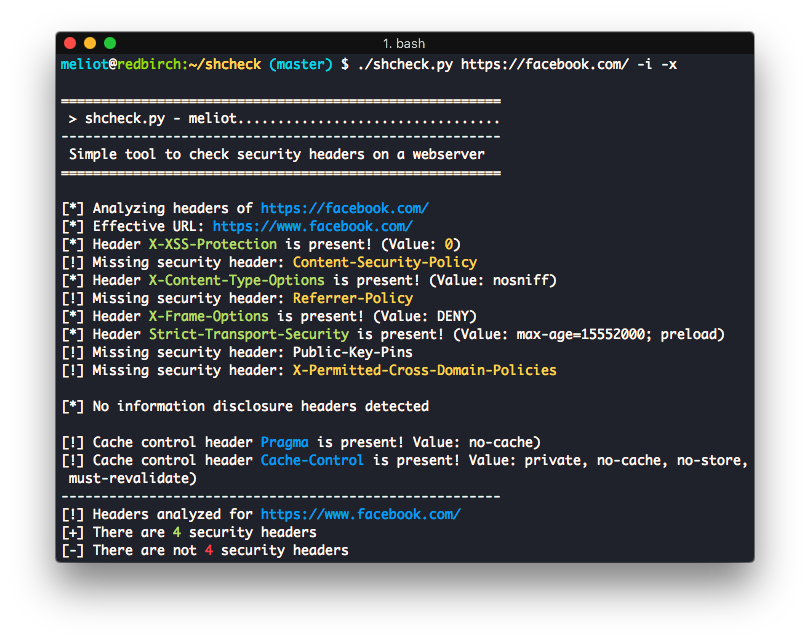
一款轻量级的Python脚本,用于快速检测并分析目标网站的HTTP安全标头配置情况。
Stars: 837 | Forks: 136
# shcheck - 安全标头检查
Options:
-h, --help show this help message and exit
-p PORT, --port=PORT Set a custom port to connect to
-c COOKIE_STRING, --cookie=COOKIE_STRING
Set cookies for the request
-a HEADER_STRING, --add-header=HEADER_STRING
Add headers for the request e.g. 'Header: value'
-d, --disable-ssl-check
Disable SSL/TLS certificate validation
-g, --use-get-method Use GET method instead HEAD method
-j, --json-output Print the output in JSON format
-i, --information Display information headers
-x, --caching Display caching headers
-k, --deprecated Display deprecated headers
--no-follow Do not follow HTTP redirects
--proxy=PROXY_URL Set a proxy (Ex: http://127.0.0.1:8080)
--hfile=PATH_TO_FILE Load a list of hosts from a flat file
--colours=COLOURS Set up a colour profile [dark/light/none]
--colors=COLOURS Alias for colours for US English
```



标签:CSP检测, Docker, HTTPS, HTTP头部检测, Python, Web安全, 二进制发布, 安全基线检查, 安全防御评估, 密码管理, 开源工具, 插件系统, 无后门, 网站安全, 蓝队分析, 请求拦截, 逆向工具