tailcallhq/forgecode
GitHub: tailcallhq/forgecode
这是一个集成在终端中的 AI 增强型编程环境,支持多种大模型,通过智能 Agent 帮助开发者在命令行中高效完成代码编写、重构和自动化任务。
Stars: 7468 | Forks: 1442
⚒️ Forge: AI 增强型终端开发环境
一个功能全面的编码 Agent,将 AI 能力与您的开发环境集成在一起
curl -fsSL https://forgecode.dev/cli | sh
[](https://github.com/tailcallhq/forgecode/actions)
[](https://github.com/tailcallhq/forgecode/releases)
[](https://discord.gg/kRZBPpkgwq)
[](https://cla-assistant.io/tailcallhq/forgecode)
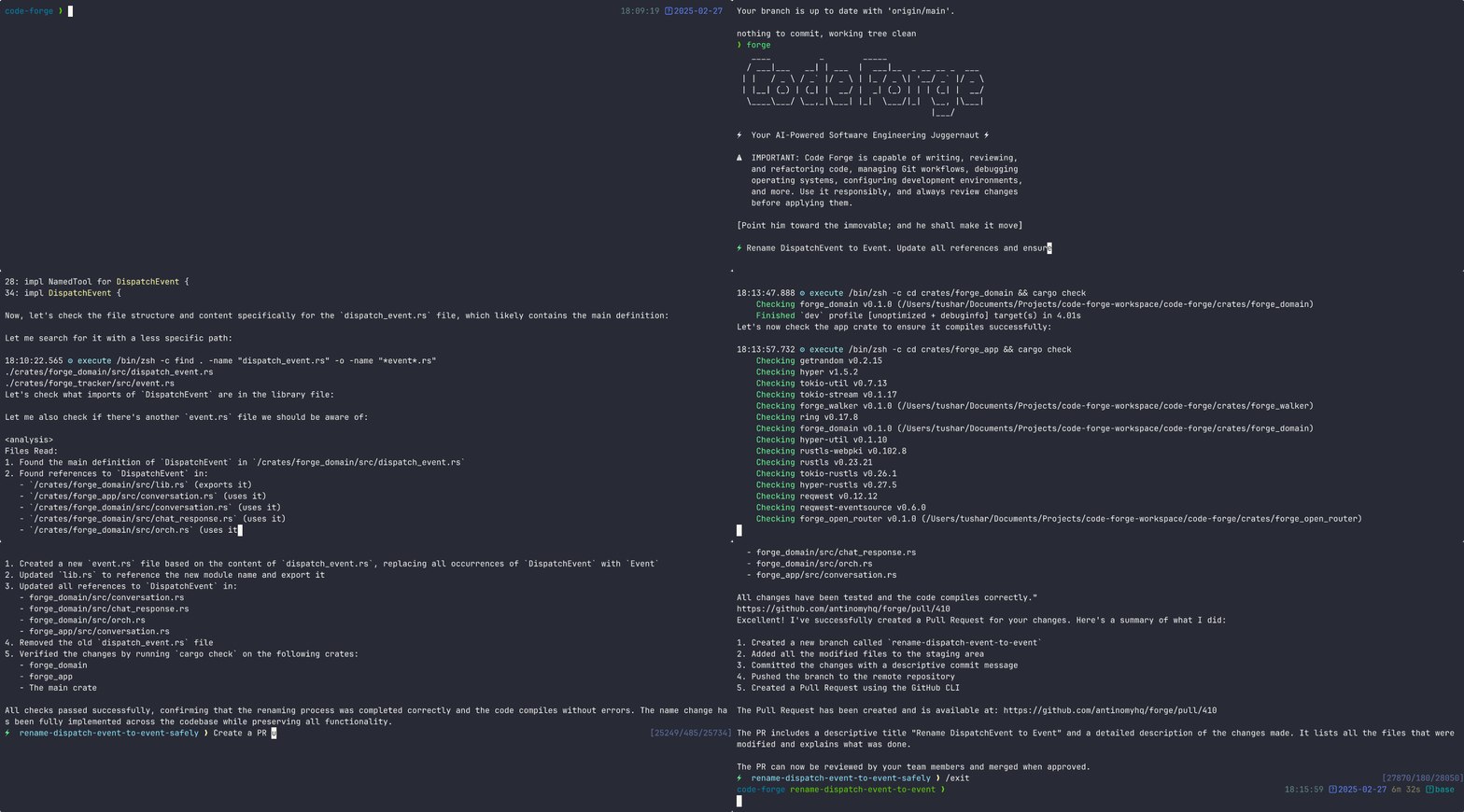
目录
- [快速开始](#quickstart)
- [使用示例](#usage-examples)
- [为什么选择 Forge?](#why-forge)
- [Forge 的工作原理:三种模式](#how-forge-works-three-modes)
- [交互模式 (TUI)](#interactive-mode-tui)
- [一次性 CLI 模式](#one-shot-cli-mode)
- [ZSH 插件模式 (`:` 前缀)](#zsh-plugin-mode--prefix)
- [ZSH 插件:`:` 前缀系统](#zsh-plugin-the--prefix-system)
- [Agents](#agents)
- [发送 Prompts](#sending-prompts)
- [附加文件](#attaching-files)
- [对话管理](#conversation-management)
- [Git 集成](#git-integration)
- [Shell 命令工具](#shell-command-tools)
- [Session 与配置](#session--configuration)
- [Skills](#skills)
- [自定义 Agent 行为](#customizing-agent-behavior)
- [语义搜索 (Workspace)](#semantic-search-workspace)
- [快速参考:所有 `:` 命令](#quick-reference-all--commands)
- [命令行选项](#command-line-options)
- [高级配置](#advanced-configuration)
- [Provider 配置](#provider-configuration)
- [管理 Provider 凭证](#managing-provider-credentials)
- [已弃用:环境变量](#deprecated-environment-variables)
- [forge.yaml 配置选项](#forgeyaml-configuration-options)
- [环境变量](#environment-variables)
- [MCP 配置](#mcp-configuration)
- [使用案例示例](#example-use-cases)
- [在 Multi-Agent 工作流中使用](#usage-in-multi-agent-workflows)
- [文档](#documentation)
- [社区](#community)
- [支持我们](#support-us)
## 快速开始
要开始使用 Forge,请运行以下命令:
```
curl -fsSL https://forgecode.dev/cli | sh
```
首次运行时,Forge 会引导您通过交互式登录流程设置 AI provider 凭证。或者,您可以预先配置 provider:
```
# 交互式配置您的 provider 凭据
forge provider login
# 然后启动 Forge
forge
```
就这样!Forge 已准备好协助您完成开发任务。
## 使用示例
Forge 可以根据您的需求以不同方式使用。以下是一些常见的使用模式:
代码理解
```
> Can you explain how the authentication system works in this codebase?
```
Forge 将分析您的项目结构,识别与身份验证相关的文件,并提供关于身份验证流程的详细解释,包括不同组件之间的关系。
实现新功能
```
> I need to add a dark mode toggle to our React application. How should I approach this?
```
Forge 将根据您当前的代码库建议最佳方法,解释所需步骤,甚至为您搭建必要的组件和样式。
调试辅助
```
> I'm getting this error: "TypeError: Cannot read property 'map' of undefined". What might be causing it?
```
Forge 将分析错误,根据您的代码提出潜在原因,并建议修复问题的不同方案。
代码审查
```
> Please review the code in src/components/UserProfile.js and suggest improvements
```
Forge 将分析代码,识别潜在问题,并就可读性、性能、安全性和可维护性提出改进建议。
学习新技术
```
> I want to integrate GraphQL into this Express application. Can you explain how to get started?
```
Forge 将提供一份关于将 GraphQL 与 Express 集成的定制教程,并使用您的特定项目结构作为上下文。
数据库 Schema 设计
```
> I need to design a database schema for a blog with users, posts, comments, and categories
```
Forge 将建议适当的 schema 设计,包括表/集合、关系、索引和约束,基于您项目现有的数据库技术。
重构遗留代码
```
> Help me refactor this class-based component to use React Hooks
```
Forge 可以通过引导您完成重构步骤并在获得您批准后实施这些步骤,来帮助您现代化代码库。
Git 操作
```
> I need to merge branch 'feature/user-profile' into main but there are conflicts
```
Forge 可以引导您解决 git 冲突,解释差异并建议调和它们的最佳方式。
## 为什么选择 Forge?
Forge 专为希望利用 AI 辅助增强工作流程同时保持对开发环境完全控制的开发者而设计。
- **零配置** - 只需添加您的 API key 即可开始使用
- **无缝集成** - 直接在您的终端中工作,就在您工作的地方
- **多 provider 支持** - 使用 OpenAI、Anthropic 或其他 LLM provider
- **安全设计** - 受限的 shell 模式限制文件系统访问并防止意外更改
- **开源** - 透明、可扩展且社区驱动
Forge 帮助您在不离开终端的情况下更快地编写代码、解决复杂问题并学习新技术。
## Forge 的工作原理:三种模式
Forge 有三种不同的使用方式。提前了解这一区别将避免您的困惑。
### 交互模式 (TUI)
运行不带任何参数的 `forge` 会启动交互式终端 UI,这是一个持久 session,您在其中输入 prompt,AI 以对话循环方式进行响应。这是进行多步骤工作的主要方式。
```
forge # Start a new interactive session
forge conversation resume
# Resume a specific saved conversation in interactive mode
forge --conversation-id # Same: resume conversation by ID
forge --agent # Start interactive session with a specific agent
forge -C /path/to/project # Start in a specific directory
forge --sandbox experiment-name # Create an isolated git worktree + branch, then start there
```
进入交互模式后,输入您的 prompt 并按 Enter。Forge 读取文件、写入补丁、运行命令,并在整个 session 中保持上下文。
### 一次性 CLI 模式
传递 `-p`(或 `--prompt`)以运行单个 prompt 并退出。Forge 完成工作并返回到您的 shell。适用于脚本、管道输出或快速任务。
```
forge -p "Explain the purpose of src/main.rs"
forge -p "Add error handling to the parse() function in lib.rs"
echo "What does this do?" | forge # Pipe input as the prompt
forge commit # Generate an AI commit message and commit (exits when done)
forge commit --preview # Generate commit message, print it, then exit
forge suggest "find large log files" # Translate natural language to a shell command, then exit
```
### ZSH 插件模式 (`:` 前缀)
使用 `forge setup` 安装一次 ZSH 插件,然后直接在 shell prompt 下使用 `:` 命令,而无需输入 `forge`。这是日常开发中最快的模式:发送 prompt、切换对话、提交和建议命令,而无需离开您的 shell。
```
: refactor the auth module # Send a prompt to the active agent
:commit # AI-powered git commit
:suggest "find large log files" # Translate description → shell command in your buffer
:conversation # Browse saved conversations with fzf preview
```
请参阅下面的完整 [ZSH 插件参考](#zsh-plugin-the--prefix-system) 以获取所有命令和别名。
## ZSH 插件:`:` 前缀系统
当您安装 ZSH 插件(`forge setup`)时,您会在 shell prompt 下获得一个 `:` 前缀命令系统。这是在正常开发期间使用 Forge 的最快方式;您无需离开 shell。
**工作原理:** 以 `:` 开头的行会在 shell 看到它们之前被拦截并路由到 Forge。其他所有内容正常运行。
```
: # Send a prompt to the active agent
:sage # Send a prompt to a specific agent by name (sage, muse, forge, or any custom agent)
:agent # Switch the active agent; opens fzf picker if no name given
```
### Agents
Forge 附带三个内置 agent,每个都有不同的角色:
| Agent | Alias | 目的 | 修改文件? |
|---|---|---|---|
| `forge` | (默认) | 实现:构建功能、修复 bug 和运行测试 | 是 |
| `sage` | `:ask` | 研究:映射架构、追踪数据流和读取代码 | 否 |
| `muse` | `:plan` | 规划:分析结构并将实施计划写入 `plans/` | 否 |
### 发送 Prompts
```
: refactor the auth module to use the new middleware
:sage how does the caching layer work? # sage = read-only research agent
:muse design a deployment strategy # muse = planning agent (writes to plans/)
:ask how does X work? # alias for :sage
:plan create a migration plan # alias for :muse
```
Agent 上下文会持久化。仅输入 `:sage`(不带 prompt 文本)会将活动 agent 切换为 sage,用于所有后续的 `: ` 命令。
### 附加文件
在 prompt 中输入 `@`,然后按 Tab 进行模糊搜索并选择文件。路径会以 `@[filename]` 的形式插入并作为上下文附加到 AI。
```
: review this code @[src/auth.rs] @[tests/auth_test.rs]
```
### 对话管理
Forge 会保存每一次对话。您可以像切换目录一样在它们之间切换。
```
:new # Start a fresh conversation (saves current for :conversation -)
:new # Start a new conversation and immediately send a prompt
:conversation # Open fzf picker: browse and switch conversations with preview
:conversation # Switch directly to a conversation by ID
:conversation - # Toggle between current and previous conversation (like cd -)
:clone # Branch the current conversation (try a different direction)
:clone # Clone a specific conversation by ID
:rename # Rename the current conversation
:conversation-rename # Rename a conversation via fzf picker
:retry # Retry the last prompt (useful if the AI misunderstood)
:copy # Copy the last AI response to clipboard as markdown
:dump # Export conversation as JSON
:dump html # Export conversation as formatted HTML
:compact # Manually compact context to free up token budget
```
### Git 集成
```
:commit # AI reads your diff, writes a commit message, and commits immediately
:commit # Same, but pass extra context: :commit fix typo in readme
:commit-preview # AI generates the message and puts "git commit -m '...'" in your buffer
# so you can review/edit the message before pressing Enter
```
### Shell 命令工具
```
:suggest # Translate natural language to a shell command and put it in your buffer
:edit # Open $EDITOR to compose a complex multi-line prompt, then send it
```
### Session 与配置
某些命令仅更改当前 session 的设置。其他设置会持久化到您的配置文件(`~/forge/.forge.toml`)。区别很重要:
```
# 仅限 Session(关闭终端时重置;未保存到 config)
:model # Change model for this session only
:reasoning-effort # Set reasoning effort: none/minimal/low/medium/high/xhigh/max
:agent # Switch active agent for this session
# 持久化(保存到 config 文件)
:config-model # Set default model globally (alias: :cm)
:config-provider # Switch provider globally (alias: :provider, :p)
:config-reasoning-effort # Set default reasoning effort globally (alias: :cre)
:config-commit-model # Set model used for :commit (alias: :ccm)
:config-suggest-model # Set model used for :suggest (alias: :csm)
:config-reload # Reset session overrides back to global config (alias: :cr)
# 查看和编辑 config
:info # Show current session info (model, agent, conversation ID)
:config # Display effective resolved configuration in TOML format
:config-edit # Open config file in $EDITOR (alias: :ce)
:tools # List available tools for the current agent
:skill # List available skills
```
### Skills
Skills 是 AI 可以作为工具调用的可重用工作流。Forge 附带三个内置 skills:
- **`create-skill`**:搭建一个新的自定义 skill
- **`execute-plan`**:执行来自 `plans/` 的计划文件
- **`github-pr-description`**:根据您的 diff 生成 PR 描述
使用 `:skill` 列出可用的 skills。AI 会在相关时自动调用它们,或者您可以明确要求:`: use the github-pr-description skill to generate a PR description`(使用 github-pr-description skill 生成 PR 描述)。
**自定义 skills** 位于带有 YAML front-matter 的 `SKILL.md` 文件中。优先级(从高到低):
| 位置 | 路径 | 作用域 |
|---|---|---|
| 项目本地 | `.forge/skills//SKILL.md` | 仅此项目 |
| 全局 | `~/forge/skills//SKILL.md` | 所有项目 |
| 内置 | 嵌入在二进制文件中 | 始终可用 |
项目本地 skills 会覆盖全局 skills,全局 skills 会覆盖内置 skills。要搭建新的 skill,请询问:`: create a new skill`。
### 自定义 Agent 行为
**`AGENTS.md`**:在您的项目根目录(或全局的 `~/forge/AGENTS.md`)中创建此文件,以为所有 agent 提供持久指令,例如编码约定、提交消息风格和应避免的事项。Forge 会在每次对话开始时自动读取它。
**自定义 agents**:将带有 YAML front-matter 的 `.md` 文件放置在 `.forge/agents/`(项目)或 `~/forge/agents/`(全局)中,以定义具有自己的模型、工具和 system prompts 的附加 agents。项目本地 agents 会覆盖全局 agents。`crates/forge_repo/src/agents/` 中的内置 agent 文件是该格式的好例子。
**自定义命令**:将 YAML 文件放置在 `.forge/commands/`(项目)或 `~/forge/commands/`(全局)中,以定义通过 `:commandname` 可用的快捷命令。命令也可以在 `forge.yaml` 中的 `commands:` 键下内联定义。
### 语义搜索 (Workspace)
```
:sync # Index your codebase for semantic search
:workspace-init # Initialize workspace for indexing
:workspace-status # Show indexing status
:workspace-info # Show workspace details
```
运行 `:sync` 后,AI 可以通过含义而非精确文本匹配来搜索您的代码库。索引将文件内容发送到 workspace server,默认为 `https://api.forgecode.dev`。如果自托管,请设置 `FORGE_WORKSPACE_SERVER_URL` 进行覆盖。
### 快速参考:所有 `:` 命令
| 命令 | Alias | 作用 |
|---|---|---|
| `: ` | | 向活动 agent 发送 prompt |
| `:new` | `:n` | 开始新对话 |
| `:conversation` | `:c` | 浏览/切换对话 (fzf) |
| `:conversation -` | | 切换到上一个对话 |
| `:clone` | | 分支当前对话 |
| `:rename ` | `:rn` | 重命名当前对话 |
| `:conversation-rename` | | 重命名对话 (fzf picker) |
| `:retry` | `:r` | 重试上一个 prompt |
| `:copy` | | 将上一个响应复制到剪贴板 |
| `:dump` | `:d` | 将对话导出为 JSON |
| `:compact` | | 压缩上下文 |
| `:commit` | | AI 提交(立即) |
| `:commit-preview` | | AI 提交(先审查) |
| `:suggest ` | `:s` | 将自然语言翻译为命令 |
| `:edit` | `:ed` | 在 $EDITOR 中编写 prompt |
| `:sage ` | `:ask` | Q&A / 代码理解 agent |
| `:muse ` | `:plan` | 规划 agent |
| `:agent ` | `:a` | 切换活动 agent(如果未给出名称,则使用 fzf picker) |
| `:model ` | `:m` | 设置仅此 session 使用的模型 |
| `:config-model ` | `:cm` | 设置默认模型(持久) |
| `:reasoning-effort ` | `:re` | 设置 session 的推理强度 |
| `:config-reload` | `:cr` | 将 session 覆盖项重置为全局配置 |
| `:info` | `:i` | 显示 session 信息 |
| `:sync` | `:workspace-sync` | 为语义搜索建立代码库索引 |
| `:tools` `:t` | 列出可用工具 |
| `:skill` | | 列出可用 skills |
| `:login` | `:provider-login` | 登录到 provider |
| `:logout` | | 从 provider 登出 |
| `:keyboard-shortcuts` | `:kb` | 显示键盘快捷键 |
| `:doctor` | | 运行 shell 环境诊断 |
## 命令行选项
以下是 Forge 命令行选项的快速参考:
| 选项 | 描述 |
| ----------------------------------- | ------------------------------------------------------------------------ |
| `-p, --prompt ` | 直接处理 prompt 而无需进入交互模式 |
| `-e, --event ` | 以 JSON 格式向工作流分发事件 |
| `--conversation ` | 包含要执行的对话的 JSON 文件路径 |
| `--conversation-id ` | 通过 ID 恢复或继续现有对话 |
| `--agent ` | 用于此 session 的 Agent ID |
| `-C, --directory ` | 在启动之前更改到此目录 |
| `--sandbox ` | 创建一个隔离的 git worktree + 分支以进行安全实验 |
| `--verbose` | 启用详细日志输出 |
| `-h, --help` | 打印帮助信息 |
| `-V, --version` | 打印版本 |
### 子命令
```
# Conversations
forge conversation list # List all saved conversations
forge conversation resume # Resume a conversation in interactive mode
forge conversation new # Create a new conversation ID (prints it)
forge conversation dump # Export conversation as JSON
forge conversation compact # Compact conversation context
forge conversation retry # Retry last message
forge conversation clone # Clone a conversation
forge conversation rename # Rename a conversation
forge conversation delete # Delete a conversation permanently
forge conversation info # Show conversation details
forge conversation stats # Show token usage statistics
forge conversation show # Show last assistant message
# Commits
forge commit # Generate AI commit message and commit
forge commit --preview # Generate commit message only (prints it)
forge commit fix the auth bug # Pass extra context for the commit message
# Shell 命令建议
forge suggest "list files by size" # Translate description to a shell command
# Providers
forge provider login # Add or update provider credentials (interactive)
forge provider logout # Remove provider credentials
forge list provider # List supported providers
# Models 和 agents
forge list model # List available models
forge list agent # List available agents
# 工作区 / 语义搜索
forge workspace sync # Index current directory for semantic search
forge workspace init # Initialize workspace
forge workspace status # Show indexing status
forge workspace query # Query the semantic index
# MCP servers
forge mcp list # List configured MCP servers
forge mcp import # Add a server from JSON
forge mcp show # Show server configuration
forge mcp remove # Remove a server
forge mcp reload # Reload all servers and rebuild caches
# 其他
forge info # Show config, active model, environment
forge list tool --agent # List tools for a specific agent
forge doctor # Run shell environment diagnostics
forge update # Update forge to the latest version
forge setup # Install ZSH plugin (updates .zshrc)
```
## 高级配置
### Provider 配置
Forge 支持多个 AI provider。配置 provider 的推荐方式是使用交互式登录命令:
```
forge provider login
```
这将:
1. 显示可用 provider 列表
2. 引导您输入所需的凭证
#### 管理 Provider 凭证
```
# 登录到 provider(添加或更新凭据)
forge provider login
# 移除 provider 凭据
forge provider logout
# 列出支持的 providers
forge provider list
```
#### 已弃用:环境变量
为了向后兼容,Forge 仍然支持环境变量。首次运行时,在环境变量中找到的任何凭证都将自动迁移到基于文件的存储。
旧版环境变量设置(已弃用)
OpenRouter
```
# .env
OPENROUTER_API_KEY=
```
Requesty
```
# .env
REQUESTY_API_KEY=
```
x-ai
```
# .env
XAI_API_KEY=
```
z.ai
```
# .env
ZAI_API_KEY=
# 或用于 coding plan 订阅
ZAI_CODING_API_KEY=
```
Cerebras
```
# .env
CEREBRAS_API_KEY=
```
IO Intelligence
```
# .env
IO_INTELLIGENCE_API_KEY=
```
```
# forge.yaml
model: meta-llama/Llama-3.3-70B-Instruct
```
OpenAI
```
# .env
OPENAI_API_KEY=
```
```
# forge.yaml
model: o3-mini-high
```
Anthropic
```
# .env
ANTHROPIC_API_KEY=
```
```
# forge.yaml
model: claude-3.7-sonnet
```
Google Vertex AI
**设置说明:**
1. **安装 Google Cloud CLI** 并进行身份验证:
gcloud auth login
gcloud config set project YOUR_PROJECT_ID
2. **获取您的身份验证令牌**:
gcloud auth print-access-token
3. **通过 Forge 登录时使用该令牌**:
forge provider login
# 选择 Google Vertex AI 并输入您的凭证
**旧版 `.env` 设置:**
```
# .env
PROJECT_ID=
LOCATION=
VERTEX_AI_AUTH_TOKEN=
```
```
# forge.yaml
model: google/gemini-2.5-pro
```
**可用模型:**
- Claude 模型:`claude-sonnet-4@20250514`
- Gemini 模型:`gemini-2.5-pro`、`gemini-2.0-flash`
使用 Forge CLI 中的 `/model` 命令查看所有可用模型。
OpenAI 兼容的 Providers
```
# .env
OPENAI_API_KEY=
OPENAI_URL=
```
```
# forge.yaml
model:
```
Groq
```
# .env
OPENAI_API_KEY=
OPENAI_URL=https://api.groq.com/openai/v1
```
```
# forge.yaml
model: deepseek-r1-distill-llama-70b
```
Amazon Bedrock
要将 Amazon Bedrock 模型与 Forge 一起使用,您首先需要设置 [Bedrock Access Gateway](https://github.com/aws-samples/bedrock-access-gateway):
1. **设置 Bedrock Access Gateway**:
- 按照 [Bedrock Access Gateway 仓库](https://github.com/aws-samples/bedrock-access-gateway) 中的部署步骤操作
- 在 Secrets Manager 中创建您自己的 API key
- 部署 CloudFormation stack
- 从 CloudFormation 输出中记下您的 API Base URL
2. **在 Forge 中配置**:
forge provider login
# 选择 OpenAI 兼容的 provider 并输入您的 Bedrock Gateway 详细信息
**旧版 `.env` 设置:**
```
# .env
OPENAI_API_KEY=
OPENAI_URL=
```
```
# forge.yaml
model: anthropic.claude-3-opus
```
ForgeCode Services
```
# .env
FORGE_API_KEY=
```
```
# forge.yaml
model: claude-3.7-sonnet
```
### forge.yaml 配置选项
### 环境变量
Forge 支持多个环境变量用于高级配置和微调。这些可以在您的 `.env` 文件或系统环境中设置。
重试配置
控制 Forge 如何处理失败请求的重试逻辑:
```
# .env
FORGE_RETRY_INITIAL_BACKOFF_MS=1000 # Initial backoff time in milliseconds (default: 1000)
FORGE_RETRY_BACKOFF_FACTOR=2 # Multiplier for backoff time (default: 2)
FORGE_RETRY_MAX_ATTEMPTS=3 # Maximum retry attempts (default: 3)
FORGE_SUPPRESS_RETRY_ERRORS=false # Suppress retry error messages (default: false)
FORGE_RETRY_STATUS_CODES=429,500,502 # HTTP status codes to retry (default: 429,500,502,503,504)
```
HTTP 配置
微调 API 请求的 HTTP 客户端行为:
```
# .env
FORGE_HTTP_CONNECT_TIMEOUT=30 # Connection timeout in seconds (default: 30)
FORGE_HTTP_READ_TIMEOUT=900 # Read timeout in seconds (default: 900)
FORGE_HTTP_POOL_IDLE_TIMEOUT=90 # Pool idle timeout in seconds (default: 90)
FORGE_HTTP_POOL_MAX_IDLE_PER_HOST=5 # Max idle connections per host (default: 5)
FORGE_HTTP_MAX_REDIRECTS=10 # Maximum redirects to follow (default: 10)
FORGE_HTTP_USE_HICKORY=false # Use Hickory DNS resolver (default: false)
FORGE_HTTP_TLS_BACKEND=default # TLS backend: "default" or "rustls" (default: "default")
FORGE_HTTP_MIN_TLS_VERSION=1.2 # Minimum TLS version: "1.0", "1.1", "1.2", "1.3"
FORGE_HTTP_MAX_TLS_VERSION=1.3 # Maximum TLS version: "1.0", "1.1", "1.2", "1.3"
FORGE_HTTP_ADAPTIVE_WINDOW=true # Enable HTTP/2 adaptive window (default: true)
FORGE_HTTP_KEEP_ALIVE_INTERVAL=60 # Keep-alive interval in seconds (default: 60, use "none"/"disabled" to disable)
FORGE_HTTP_KEEP_ALIVE_TIMEOUT=10 # Keep-alive timeout in seconds (default: 10)
FORGE_HTTP_KEEP_ALIVE_WHILE_IDLE=true # Keep-alive while idle (default: true)
FORGE_HTTP_ACCEPT_INVALID_CERTS=false # Accept invalid certificates (default: false) - USE WITH CAUTION
FORGE_HTTP_ROOT_CERT_PATHS=/path/to/cert1.pem,/path/to/cert2.crt # Paths to root certificate files (PEM, CRT, CER format), multiple paths separated by commas
```
API 配置
覆盖默认 API 端点和 provider/model 设置:
```
# .env
FORGE_API_URL=https://api.forgecode.dev # Custom Forge API URL (default: https://api.forgecode.dev)
FORGE_WORKSPACE_SERVER_URL=http://localhost:8080 # URL for the indexing server (default: https://api.forgecode.dev/)
```
工具配置
配置工具调用设置:
```
# .env
FORGE_TOOL_TIMEOUT=300 # Maximum execution time in seconds for a tool before it is terminated to prevent hanging the session. (default: 300)
FORGE_MAX_IMAGE_SIZE=10485760 # Maximum image file size in bytes for read_image operations (default: 10485760 - 10 MB)
FORGE_DUMP_AUTO_OPEN=false # Automatically open dump files in browser (default: false)
FORGE_DEBUG_REQUESTS=/path/to/debug/requests.json # Write debug HTTP request files to specified path (supports absolute and relative paths)
```
ZSH 插件配置
配置 ZSH 插件行为:
```
# .env
FORGE_BIN=forge # Command to use for forge operations (default: "forge")
```
`FORGE_BIN` 环境变量允许您自定义 ZSH 插件在转换 `:` 前缀命令时使用的命令。如果未设置,它默认为 `"forge"`。
显示配置
配置 Forge UI 和 ZSH 主题的显示选项:
```
# .env
FORGE_CURRENCY_SYMBOL="$" # Currency symbol for cost display in ZSH theme (default: "$")
FORGE_CURRENCY_CONVERSION_RATE=1.0 # Conversion rate for currency display (default: 1.0)
NERD_FONT=1 # Enable Nerd Font icons in ZSH theme (default: auto-detected, set to "1" or "true" to enable, "0" or "false" to disable)
USE_NERD_FONT=1 # Alternative variable for enabling Nerd Font icons (same behavior as NERD_FONT)
```
`FORGE_CURRENCY_SYMBOL` 和 `FORGE_CURRENCY_CONVERSION_RATE` 变量控制成本在 ZSH 主题右侧提示中的显示方式。使用这些变量为您的地区或首选货币自定义货币显示。
系统配置
系统级环境变量(通常自动设置):
```
# .env
FORGE_CONFIG=/custom/config/dir # Base directory for all Forge config files (default: ~/.forge)
FORGE_MAX_SEARCH_RESULT_BYTES=10240 # Maximum bytes for search results (default: 10240 - 10 KB)
FORGE_HISTORY_FILE=/path/to/history # Custom path for Forge history file (default: uses system default location)
FORGE_BANNER="Your custom banner text" # Custom banner text to display on startup (default: Forge ASCII art)
FORGE_MAX_CONVERSATIONS=100 # Maximum number of conversations to show in list (default: 100)
FORGE_MAX_LINE_LENGTH=2000 # Maximum characters per line for file read operations (default: 2000)
FORGE_STDOUT_MAX_LINE_LENGTH=2000 # Maximum characters per line for shell output (default: 2000)
SHELL=/bin/zsh # Shell to use for command execution (Unix/Linux/macOS)
COMSPEC=cmd.exe # Command processor to use (Windows)
```
语义搜索配置
配置用于代码理解的语义搜索行为:
```
# .env
FORGE_SEM_SEARCH_LIMIT=200 # Maximum number of results to return from initial vector search (default: 200)
FORGE_SEM_SEARCH_TOP_K=20 # Top-k parameter for relevance filtering during semantic search (default: 20)
```
日志配置
配置日志详细程度和输出:
```
# .env
FORGE_LOG=forge=info # Log filter level (default: forge=debug when tracking disabled, forge=info when tracking enabled)
```
`FORGE_LOG` 变量使用标准跟踪过滤器语法控制 Forge 内部操作的日志记录级别。常用值:
- `forge=error` - 仅错误
- `forge=warn` - 警告和错误
- `forge=info` - 信息性消息(启用跟踪时的默认值)
- `forge=debug` - 调试信息(禁用跟踪时的默认值)
- `forge=trace` - 详细跟踪
跟踪配置
控制在遥测事件中跟踪用户识别元数据:
```
# .env
FORGE_TRACKER=false # Disable tracking enrichment metadata (default: true)
```
`FORGE_TRACKER` 变量控制是否在遥测事件中包含跟踪增强元数据。
`forge.yaml` 文件支持多种高级配置选项,让您可以自定义 Forge 的行为。
自定义规则
添加您自己的准则,供所有 agent 在生成响应时遵循。
```
# forge.yaml
custom_rules: |
1. Always add comprehensive error handling to any code you write.
2. Include unit tests for all new functions.
3. Follow our team's naming convention: camelCase for variables, PascalCase for classes.
```
命令
将自定义命令定义为重复性 prompts 的快捷方式:
```
# forge.yaml
commands:
- name: "refactor"
description: "Refactor selected code"
prompt: "Please refactor this code to improve readability and performance"
```
模型
指定工作流中所有 agent 使用的默认 AI 模型。
```
# forge.yaml
model: "claude-3.7-sonnet"
```
最大 Walker 深度
控制在收集上下文时 Forge 遍历项目目录结构的深度。
```
# forge.yaml
max_walker_depth: 3 # Limit directory traversal to 3 levels deep
```
Temperature
调整 AI 响应的创造力和随机性。较低的值(0.0-0.3)产生更专注、确定性的输出,而较高的值(0.7-2.0)生成更多样化和创造性的结果。
```
# forge.yaml
temperature: 0.7 # Balanced creativity and focus
```
工具最大失败限制
控制在 Forge 强制完成之前工具可以失败的次数,以防止无限重试循环。这有助于避免 agent 陷入重复尝试同一失败操作的情况。
```
# forge.yaml
max_tool_failure_per_turn: 3 # Allow up to 3 failures per tool before forcing completion
```
如果需要更多重试尝试,请设置为较高的值;如果希望更快检测到失败,请设置为较低的值。
每次对话的最大请求数
限制 agent 在单个对话轮次中可以发出的最大请求数。这可以防止失控的对话,并有助于控制 API 使用和成本。
```
# forge.yaml
max_requests_per_turn: 50 # Allow up to 50 requests per turn
```
达到此限制时,Forge 将:
- 询问您是否希望继续
- 如果您回答“Yes”,它将继续对话
- 如果您回答“No”,它将结束对话
Model Context Protocol (MCP)
MCP 功能允许 AI agent 与外部工具和服务通信。此实现遵循 Anthropic 的 [Model Context Protocol](https://docs.anthropic.com/en/docs/claude-code/tutorials#set-up-model-context-protocol-mcp) 设计。
### MCP 配置
使用 CLI 配置 MCP 服务器:
```
# 列出所有 MCP servers
forge mcp list
# 从 JSON 导入 server
forge mcp import
# 显示 server 配置详情
forge mcp show
# 移除 server
forge mcp remove
# 重新加载 servers 并重建缓存
forge mcp reload
```
或手动创建具有以下结构的 `.mcp.json` 文件:
```
{
"mcpServers": {
"server_name": {
"command": "command_to_execute",
"args": ["arg1", "arg2"],
"env": { "ENV_VAR": "value" }
},
"another_server": {
"url": "http://localhost:3000/events"
}
}
}
```
MCP 配置从两个位置读取(项目本地优先):
1. **项目本地:** 项目目录中的 `.mcp.json`
2. **全局:** `~/forge/.mcp.json`
### 使用案例示例
MCP 可用于各种集成:
- Web 浏览器自动化
- 外部 API 交互
- 工具集成
- 自定义服务连接
### 在 Multi-Agent 工作流中使用
MCP 工具可用作 multi-agent 工作流的一部分,允许专门的 agent 与外部系统交互,作为协作解决问题方法的一部分。
## 文档
有关所有功能和功能的综合文档,请访问 [文档站点](https://github.com/tailcallhq/forgecode/tree/main/docs)。
## 安装
```
# YOLO
curl -fsSL https://forgecode.dev/cli | sh
# 包管理器
nix run github:tailcallhq/forgecode # for latest dev branch
```
## 社区
加入我们充满活力的 Discord 社区,与其他 Forge 用户和贡献者联系,为您的项目获得帮助,分享想法并提供反馈!
[](https://discord.gg/kRZBPpkgwq)
## 支持我们
您的支持推动 Forge 的持续发展!通过 starring 我们的 GitHub 仓库,您可以:
- 帮助其他人发现这个强大的工具 🔍
- 激励我们的开发团队 💪
- 使我们能够优先考虑新功能 🛠️
- 增强我们的开源社区 🌱标签:AI编程助手, Claude, CVE检测, Deepseek, Gemini, Git集成, GPT, Grok, LLM集成, TUI界面, ZSH插件, 代码生成, 代码补全, 可视化界面, 开发效率, 开发环境, 智能代理, 渗透测试工具, 漏洞管理, 终端工具, 结对编程, 网络可观测性, 网络安全研究, 网络调试, 自动化, 语义搜索, 通知系统