microsoft/TRELLIS
GitHub: microsoft/TRELLIS
微软推出的基于结构化3D潜表示的大规模3D资产生成模型,支持从文本或图像生成多种格式的高质量3D内容,并具备局部编辑和变体生成能力。
Stars: 13375 | Forks: 1295

Structured 3D Latents
for Scalable and Versatile 3D Generation



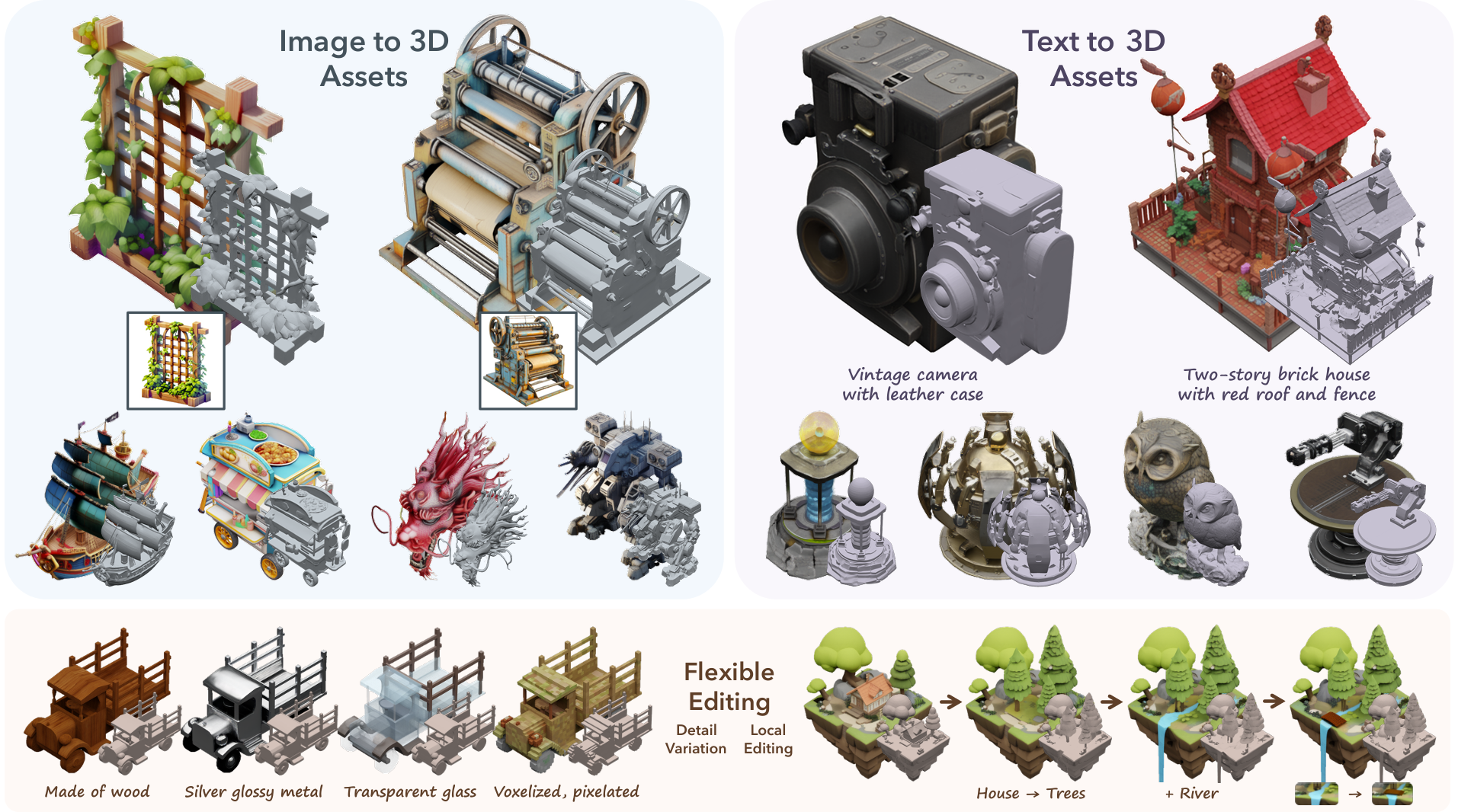
TRELLIS 是一个大型 3D 资产生成模型。它接收文本或图像提示,并生成各种格式的高质量 3D 资产,例如 Radiance Fields、3D Gaussians 和 meshes。
TRELLIS 的基石是统一的 Structured LATent (
SLAT) 表示,它允许解码为不同的输出格式,以及为
SLAT 量身定制的 Rectified Flow Transformers 作为强大的主干网络。我们在包含 50 万个多样化物体的大型 3D 资产数据集上提供了参数量高达 20 亿的大规模预训练模型。
TRELLIS 显著超越了现有方法(包括近期同等规模的方法),并展示了以前模型未曾提供的灵活输出格式选择和局部 3D 编辑功能。
***请查看我们的[项目主页](https://microsoft.github.io/TRELLIS/)以获取更多视频和交互式演示!***
## 🌟 特性
- **高质量**:它能够生成具有复杂形状和纹理细节的高质量、多样化的 3D 资产。
- **多功能性**:它接收文本或图像提示,并能生成各种最终的 3D 表示,包括但不限于 *Radiance Fields*、*3D Gaussians* 和 *meshes*,以满足各种下游需求。
- **灵活编辑**:它允许对生成的 3D 资产进行轻松编辑,例如生成同一对象的变体或对 3D 资产进行局部编辑。
## ⏩ 更新
**03/25/2025**
- 发布训练代码。
- 发布 **TRELLIS-text** 模型和资产生成变体功能。
- 示例已提供为 [example_text.py](example_text.py) 和 [example_variant.py](example_variant.py)。
- Gradio 演示已提供为 [app_text.py](app_text.py)。
- *注意:通常建议进行文本到 3D 的生成时,首先使用文本到图像模型生成图像,然后使用 TRELLIS-image 模型进行 3D 生成。由于数据限制,文本条件模型的创造性和细节较少。*
**12/26/2024**
- 发布 [**TRELLIS-500K**](https://github.com/microsoft/TRELLIS#-dataset) 数据集及数据准备工具包。
**12/18/2024**
- 为 **TRELLIS-image** 模型实现了多图像条件生成。([#7](https://github.com/microsoft/TRELLIS/issues/7))。这基于免微调算法,无需训练专门的模型,因此可能无法对所有输入图像都给出最佳结果。
- 在 `app.py` 和 `example.py` 中添加了 Gaussian 导出功能。([#40](https://github.com/microsoft/TRELLIS/issues/40))
## 📦 安装说明
### 前置条件
- **系统**:该代码目前仅在 **Linux** 上进行了测试。有关 Windows 的配置,您可以参考 [#3](https://github.com/microsoft/TRELLIS/issues/3)(未完全测试)。
- **硬件**:必须配备至少具有 16GB 显存的 NVIDIA GPU。该代码已在 NVIDIA A100 和 A6000 GPU 上通过验证。
- **软件**:
- 需要使用 [CUDA Toolkit](https://developer.nvidia.com/cuda-toolkit-archive) 来编译某些子模块。该代码已在 CUDA 11.8 和 12.2 版本上进行了测试。
- 推荐使用 [Conda](https://docs.anaconda.com/miniconda/install/#quick-command-line-install) 来管理依赖项。
- 需要使用 Python 3.8 或更高版本。
### 安装步骤
1. 克隆此代码仓库:
git clone --recurse-submodules https://github.com/microsoft/TRELLIS.git
cd TRELLIS
2. 安装依赖:
**在运行以下命令之前,有几点需要注意:**
- 添加 `--new-env` 将创建一个名为 `trellis` 的新 conda 环境。如果您想使用现有的 conda 环境,请移除此标志。
- 默认情况下,`trellis` 环境将使用带有 CUDA 11.8 的 PyTorch 2.4.0。如果您想使用其他版本的 CUDA(例如,如果您安装了 CUDA Toolkit 12.2 并且不想为子模块编译安装另一个 11.8 版本),可以移除 `--new-env` 标志并手动安装所需的依赖项。安装命令请参考 [PyTorch](https://pytorch.org/get-started/previous-versions/)。
- 如果您安装了多个 CUDA Toolkit 版本,在运行命令之前应将 `PATH` 设置为正确的版本。例如,如果您同时安装了 CUDA Toolkit 11.8 和 12.2,则应在运行命令之前运行 `export PATH=/usr/local/cuda-11.8/bin:$PATH`。
- 默认情况下,代码使用 `flash-attn` 后端进行注意力计算。对于不支持 `flash-attn` 的 GPU(例如 NVIDIA V100),您可以移除 `--flash-attn` 标志以仅安装 `xformers`,并在运行代码之前将 `ATTN_BACKEND` 环境变量设置为 `xformers`。有关更多详细信息,请参阅[最小示例](#minimal-example)。
- 由于存在大量依赖项,安装过程可能需要一些时间。请耐心等待。如果遇到任何问题,可以尝试逐一安装依赖项,每次指定一个标志。
- 如果您在安装过程中遇到任何问题,请随时提出 issue 或与我们联系。
创建一个名为 `trellis` 的新 conda 环境并安装依赖项:
. ./setup.sh --new-env --basic --xformers --flash-attn --diffoctreerast --spconv --mipgaussian --kaolin --nvdiffrast
可以通过运行 `. ./setup.sh --help` 找到 `setup.sh` 的详细用法。
Usage: setup.sh [OPTIONS]
Options:
-h, --help Display this help message
--new-env Create a new conda environment
--basic Install basic dependencies
--train Install training dependencies
--xformers Install xformers
--flash-attn Install flash-attn
--diffoctreerast Install diffoctreerast
--spconv Install spconv
--mipgaussian Install mip-splatting
--kaolin Install kaolin
--nvdiffrast Install nvdiffrast
--demo Install all dependencies for demo
## 🤖 预训练模型
我们提供以下预训练模型:
| 模型 | 描述 | 参数量 | 下载 |
| --- | --- | --- | --- |
| TRELLIS-image-large | 大型图像到 3D 模型 | 1.2B | [下载](https://huggingface.co/microsoft/TRELLIS-image-large) |
| TRELLIS-text-base | 基础文本到 3D 模型 | 342M | [下载](https://huggingface.co/microsoft/TRELLIS-text-base) |
| TRELLIS-text-large | 大型文本到 3D 模型 | 1.1B | [下载](https://huggingface.co/microsoft/TRELLIS-text-large) |
| TRELLIS-text-xlarge | 超大型文本到 3D 模型 | 2.0B | [下载](https://huggingface.co/microsoft/TRELLIS-text-xlarge) |
*注意:通常建议使用基于图像条件的模型版本以获得更好的性能。*
*注意:所有的 VAE 都包含在 **TRELLIS-image-large** 模型仓库中。*
这些模型托管在 Hugging Face 上。您可以在代码中直接使用它们的仓库名称加载模型:
```
TrellisImageTo3DPipeline.from_pretrained("microsoft/TRELLIS-image-large")
```
如果您更喜欢从本地加载模型,可以从上面的链接下载模型文件,并使用文件夹路径加载模型(应保持文件夹结构不变):
```
TrellisImageTo3DPipeline.from_pretrained("/path/to/TRELLIS-image-large")
```
## 💡 使用方法
### 最小示例
这里有一个关于如何使用预训练模型生成 3D 资产的[示例](example.py)。
```
import os
# os.environ['ATTN_BACKEND'] = 'xformers' # 可以是 'flash-attn' 或 'xformers',默认为 'flash-attn'
os.environ['SPCONV_ALGO'] = 'native' # Can be 'native' or 'auto', default is 'auto'.
# 'auto' is faster but will do benchmarking at the beginning.
# Recommended to set to 'native' if run only once.
import imageio
from PIL import Image
from trellis.pipelines import TrellisImageTo3DPipeline
from trellis.utils import render_utils, postprocessing_utils
# 从模型文件夹或 Hugging Face model hub 加载 pipeline。
pipeline = TrellisImageTo3DPipeline.from_pretrained("microsoft/TRELLIS-image-large")
pipeline.cuda()
# 加载图像
image = Image.open("assets/example_image/T.png")
# 运行 pipeline
outputs = pipeline.run(
image,
seed=1,
# Optional parameters
# sparse_structure_sampler_params={
# "steps": 12,
# "cfg_strength": 7.5,
# },
# slat_sampler_params={
# "steps": 12,
# "cfg_strength": 3,
# },
)
# outputs 是一个包含不同格式生成的 3D 资产的字典:
# - outputs['gaussian']:3D Gaussians 列表
# - outputs['radiance_field']:radiance fields 列表
# - outputs['mesh']:meshes 列表
# 渲染 outputs
video = render_utils.render_video(outputs['gaussian'][0])['color']
imageio.mimsave("sample_gs.mp4", video, fps=30)
video = render_utils.render_video(outputs['radiance_field'][0])['color']
imageio.mimsave("sample_rf.mp4", video, fps=30)
video = render_utils.render_video(outputs['mesh'][0])['normal']
imageio.mimsave("sample_mesh.mp4", video, fps=30)
# 可以从 outputs 中提取 GLB 文件
glb = postprocessing_utils.to_glb(
outputs['gaussian'][0],
outputs['mesh'][0],
# Optional parameters
simplify=0.95, # Ratio of triangles to remove in the simplification process
texture_size=1024, # Size of the texture used for the GLB
)
glb.export("sample.glb")
# 将 Gaussians 保存为 PLY 文件
outputs['gaussian'][0].save_ply("sample.ply")
```
运行代码后,您将获得以下文件:
- `sample_gs.mp4`:展示 3D Gaussian 表示的视频
- `sample_rf.mp4`:展示 Radiance Field 表示的视频
- `sample_mesh.mp4`:展示 mesh 表示的视频
- `sample.glb`:包含提取的纹理 mesh 的 GLB 文件
- `sample.ply`:包含 3D Gaussian 表示的 PLY 文件
### Web 演示
[app.py](app.py) 提供了一个用于 3D 资产生成的简单 Web 演示。由于此演示基于 [Gradio](https://gradio.app/),因此需要一些额外的依赖项:
```
. ./setup.sh --demo
```
安装依赖项后,您可以使用以下命令运行演示:
```
python app.py
```
然后,您可以在终端显示的地址访问该演示。
## 📚 数据集
我们提供了 **TRELLIS-500K**,这是一个包含 50 万个 3D 资产的大规模数据集,该数据集从 [Objaverse(XL)](https://objaverse.allenai.org/)、[ABO](https://amazon-berkeley-objects.s3.amazonaws.com/index.html)、[3D-FUTURE](https://tianchi.aliyun.com/specials/promotion/alibaba-3d-future)、[HSSD](https://huggingface.co/datasets/hssd/hssd-models) 和 [Toys4k](https://github.com/rehg-lab/lowshot-shapebias/tree/main/toys4k) 中精选而来,并根据美学评分进行了过滤。有关更多详细信息,请参阅[数据集 README](DATASET.md)。
## 🏋️♂️ 训练
TRELLIS 的训练框架旨在为构建和微调大规模 3D 生成模型提供灵活且模块化的方法。训练代码以 `train.py` 为中心,并划分为多个目录,以清晰地区分数据集处理、模型组件、训练逻辑和可视化工具。
### 代码结构
- **train.py**:训练的主入口点。
- **trellis/datasets**:数据集加载和预处理。
- **trellis/models**:不同的模型及其组件。
- **trellis/modules**:用于各种模型的自定义模块。
- **trellis/pipelines**:用于不同模型的推理 pipeline。
- **trellis/renderers**:用于不同 3D 表示的渲染器。
- **trellis/representations**:不同的 3D 表示。
- **trellis/trainers**:不同模型的训练逻辑。
- **trellis/utils**:用于训练和可视化的实用工具函数。
### 训练设置
1. **准备环境:**
- 确保已安装所有训练依赖项。
- 使用配备 NVIDIA GPU 的 Linux 系统(模型在 NVIDIA A100 GPU 上进行训练)。
- 对于分布式训练,请验证您的节点是否可以通过指定的主地址和端口进行通信。
2. **数据集准备:**
- 像整理 TRELLIS-500K 一样整理您的数据集。在启动训练时使用 `--data_dir` 参数指定您的数据集路径。
3. **配置文件:**
- 训练超参数和模型架构在 `configs/` 目录下的配置文件中定义。
- 示例配置文件包括:
| 配置文件 | 预训练模型 | 描述 |
| --- | --- | --- |
| [`vae/ss_vae_conv3d_16l8_fp16.json`](configs/vae/ss_vae_conv3d_16l8_fp16.json) | [Encoder](https://huggingface.co/microsoft/TRELLIS-image-large/blob/main/ckpts/ss_enc_conv3d_16l8_fp16.safetensors) [Decoder](https://huggingface.co/microsoft/TRELLIS-image-large/blob/main/ckpts/ss_dec_conv3d_16l8_fp16.safetensors) | Sparse structure VAE |
| [`vae/slat_vae_enc_dec_gs_swin8_B_64l8_fp16.json`](configs/vae/slat_vae_enc_dec_gs_swin8_B_64l8_fp16.json) | [Encoder](https://huggingface.co/microsoft/TRELLIS-image-large/blob/main/ckpts/slat_enc_swin8_B_64l8_fp16.safetensors) [Decoder](https://huggingface.co/microsoft/TRELLIS-image-large/blob/main/ckpts/slat_dec_gs_swin8_B_64l8gs32_fp16.safetensors) | SLat VAE with Gaussian Decoder |
| [`vae/slat_vae_dec_rf_swin8_B_64l8_fp16.json`](configs/vae/slat_vae_dec_rf_swin8_B_64l8_fp16.json) | [Decoder](https://huggingface.co/microsoft/TRELLIS-image-large/blob/main/ckpts/slat_dec_rf_swin8_B_64l8r16_fp16.safetensors) | SLat Radiance Field Decoder |
| [`vae/slat_vae_dec_mesh_swin8_B_64l8_fp16.json`](configs/vae/slat_vae_dec_mesh_swin8_B_64l8_fp16.json) | [Decoder](https://huggingface.co/microsoft/TRELLIS-image-large/blob/main/ckpts/slat_dec_mesh_swin8_B_64l8m256c_fp16.safetensors) | SLat Mesh Decoder |
| [`generation/ss_flow_img_dit_L_16l8_fp16.json`](configs/generation/ss_flow_img_dit_L_16l8_fp16.json) | [Denoiser](https://huggingface.co/microsoft/TRELLIS-image-large/blob/main/ckpts/ss_flow_img_dit_L_16l8_fp16.safetensors) | Image conditioned sparse structure Flow Model |
| [`generation/slat_flow_img_dit_L_64l8p2_fp16.json`](configs/generation/slat_flow_img_dit_L_64l8p2_fp16.json) | [Denoiser](https://huggingface.co/microsoft/TRELLIS-image-large/blob/main/ckpts/slat_flow_img_dit_L_64l8p2_fp16.safetensors) | Image conditioned SLat Flow Model |
| [`generation/ss_flow_txt_dit_B_16l8_fp16.json`](configs/generation/ss_flow_txt_dit_B_16l8_fp16.json) | [Denoiser](https://huggingface.co/microsoft/TRELLIS-text-base/blob/main/ckpts/ss_flow_txt_dit_B_16l8_fp16.safetensors) | Base text-conditioned sparse Flow Model |
| [`generation/slat_flow_txt_dit_B_64l8p2_fp16.json`](configs/generation/slat_flow_txt_dit_B_64l8p2_fp16.json) | [Denoiser](https://huggingface.co/microsoft/TRELLIS-text-base/blob/main/ckpts/slat_flow_txt_dit_B_64l8p2_fp16.safetensors) | Base text-conditioned SLat Flow Model |
| [`generation/ss_flow_txt_dit_L_16l8_fp16.json`](configs/generation/ss_flow_txt_dit_L_16l8_fp16.json) | [Denoiser](https://huggingface.co/microsoft/TRELLIS-text-large/blob/main/ckpts/ss_flow_txt_dit_L_16l8_fp16.safetensors) | Large text-conditioned sparse structure Flow Model |
| [`generation/slat_flow_txt_dit_L_64l8p2_fp16.json`](configs/generation/slat_flow_txt_dit_L_64l8p2_fp16.json) | [Denoiser](https://huggingface.co/microsoft/TRELLIS-text-large/blob/main/ckpts/slat_flow_txt_dit_L_64l8p2_fp16.safetensors) | Large text-conditioned SLat Flow Model |
| [`generation/ss_flow_txt_dit_XL_16l8_fp16.json`](configs/generation/ss_flow_txt_dit_XL_16l8_fp16.json) | [Denoiser](https://huggingface.co/microsoft/TRELLIS-text-xlarge/blob/main/ckpts/ss_flow_txt_dit_XL_16l8_fp16.safetensors) | Extra-large text-conditioned sparse structure Flow Model |
| [`generation/slat_flow_txt_dit_XL_64l8p2_fp16.json`](configs/generation/slat_flow_txt_dit_XL_64l8p2_fp16.json) | [Denoiser](https://huggingface.co/microsoft/TRELLIS-text-xlarge/blob/main/ckpts/slat_flow_txt_dit_XL_64l8p2_fp16.safetensors) | Extra-large text-conditioned SLat Flow Model |
### 命令行选项
训练脚本可以按如下方式运行:
```
usage: train.py [-h] --config CONFIG --output_dir OUTPUT_DIR [--load_dir LOAD_DIR] [--ckpt CKPT] [--data_dir DATA_DIR] [--auto_retry AUTO_RETRY] [--tryrun] [--profile] [--num_nodes NUM_NODES] [--node_rank NODE_RANK] [--num_gpus NUM_GPUS] [--master_addr MASTER_ADDR] [--master_port MASTER_PORT]
options:
-h, --help show this help message and exit
--config CONFIG Experiment config file
--output_dir OUTPUT_DIR Output directory
--load_dir LOAD_DIR Load directory, default to output_dir
--ckpt CKPT Checkpoint step to resume training, default to latest
--data_dir DATA_DIR Data directory
--auto_retry AUTO_RETRY Number of retries on error
--tryrun Try run without training
--profile Profile training
--num_nodes NUM_NODES Number of nodes
--node_rank NODE_RANK Node rank
--num_gpus NUM_GPUS Number of GPUs per node, default to all
--master_addr MASTER_ADDR Master address for distributed training
--master_port MASTER_PORT Port for distributed training
```
### 训练命令示例
#### 单节点训练
使用单台机器训练图像到 3D 的第二阶段模型。
```
python train.py \
--config configs/vae/slat_vae_dec_mesh_swin8_B_64l8_fp16.json \
--output_dir outputs/slat_vae_dec_mesh_swin8_B_64l8_fp16_1node \
--data_dir /path/to/your/dataset1,/path/to/your/dataset2 \
```
该脚本将自动在所有可用的 GPU 上分配训练任务。如果您想限制使用的 GPU 数量,请使用 `--num_gpus` 标志指定 GPU 数量。
#### 多节点训练
使用跨节点的多个 GPU(例如,2 个节点)训练图像到 3D 的第二阶段模型:
```
python train.py \
--config configs/generation/slat_flow_img_dit_L_64l8p2_fp16.json \
--output_dir outputs/slat_flow_img_dit_L_64l8p2_fp16_2nodes \
--data_dir /path/to/your/dataset1,/path/to/your/dataset2 \
--num_nodes 2 \
--node_rank 0 \
--master_addr $MASTER_ADDR \
--master_port $MASTER_PORT
```
请务必为每个节点相应地调整 `node_rank`、`master_addr` 和 `master_port`。
#### 恢复训练
默认情况下,训练将从同一输出目录中最新保存的检查点恢复。要指定从特定的检查点恢复,请使用 `--load_dir` 和 `--ckpt` 标志:
```
python train.py \
--config configs/generation/slat_flow_img_dit_L_64l8p2_fp16.json \
--output_dir outputs/slat_flow_img_dit_L_64l8p2_fp16_resume \
--data_dir /path/to/your/dataset1,/path/to/your/dataset2 \
--load_dir /path/to/your/checkpoint \
--ckpt [step]
```
### 其他选项
- **自动重试**:使用 `--auto_retry` 标志可指定在出现间歇性错误时的重试次数。
- **试运行**:`--tryrun` 标志允许您在不启动完整训练的情况下检查配置和环境。
- **性能分析**:使用 `--profile` 标志启用性能分析,以深入了解训练性能并诊断瓶颈。
请调整文件路径和参数以匹配您的实验设置。
## ⚖️ 许可证
TRELLIS 模型和大部分代码均基于 [MIT 许可证](LICENSE) 授权。以下子模块可能具有不同的许可证:
- [**diffoctreerast**](https://github.com/JeffreyXiang/diffoctreerast):作为本项目的一部分,我们开发了一个基于 CUDA 的实时可微八叉树渲染器,用于渲染 Radiance Fields。此渲染器派生自 [diff-gaussian-rasterization](https://github.com/graphdeco-inria/diff-gaussian-rasterization) 项目,并在 [LICENSE](https://github.com/JeffreyXiang/diffoctreerast/blob/master/LICENSE) 下提供。
- [**Modified Flexicubes**](https://github.com/MaxtirError/FlexiCubes):在本项目中,我们使用了 [Flexicubes](https://github.com/nv-tlabs/FlexiCubes) 的修改版本来支持顶点属性。此修改版本基于 [LICENSE](https://github.com/nv-tlabs/FlexiCubes/blob/main/LICENSE.txt) 授权。
## 📜 引用
如果您觉得这项工作有帮助,请考虑引用我们的论文:
```
@article{xiang2024structured,
title = {Structured 3D Latents for Scalable and Versatile 3D Generation},
author = {Xiang, Jianfeng and Lv, Zelong and Xu, Sicheng and Deng, Yu and Wang, Ruicheng and Zhang, Bowen and Chen, Dong and Tong, Xin and Yang, Jiaolong},
journal = {arXiv preprint arXiv:2412.01506},
year = {2024}
}
```
标签:3D模型, 3D生成, 3D编辑, 3D资产, 3D高斯溅射, AIGC, Apex, CVPR 2025, DNS解析, IaC 扫描, Linux安全, Transformer, TRELLIS, Vectored Exception Handling, 人工智能, 凭据扫描, 图像到3D, 大模型, 学术研究, 开源项目, 微软, 文本到3D, 机器学习, 流匹配, 深度学习, 生成式AI, 用户模式Hook绕过, 神经辐射场, 索引, 结构化潜变量, 网格生成, 计算机视觉, 逆向工具