blacklanternsecurity/webcap
GitHub: blacklanternsecurity/webcap
一款极轻量的网页截图工具,能在截图的同时深度提取 DOM、JavaScript 和网络请求响应内容,适合安全侦察与资产分析场景。
Stars: 44 | Forks: 5
 [](https://www.python.org) [](https://github.com/blacklanternsecurity/webcap/blob/dev/LICENSE) [](https://github.com/astral-sh/ruff) [](https://github.com/blacklanternsecurity/webcap/actions?query=workflow%3A"tests") [](https://codecov.io/gh/blacklanternsecurity
[](https://www.python.org) [](https://github.com/blacklanternsecurity/webcap/blob/dev/LICENSE) [](https://github.com/astral-sh/ruff) [](https://github.com/blacklanternsecurity/webcap/actions?query=workflow%3A"tests") [](https://codecov.io/gh/blacklanternsecurity/webcap) [](https://discord.com/invite/PZqkgxu5SA)
**WebCap** 是一个极轻量级的 Web 截图工具。它不需要 Selenium、Playwright、Puppeteer 或任何其他浏览器自动化框架;它只需要一个可运行的 Chrome 环境。被 [BBOT](https://github.com/blacklanternsecurity/bbot) 使用。
### 安装
```
pipx install webcap
```
### Web 界面 (`webcap server`)
https://github.com/user-attachments/assets/a5dea3fb-fa01-41e7-90cd-67c6efa3d6e5
### 功能
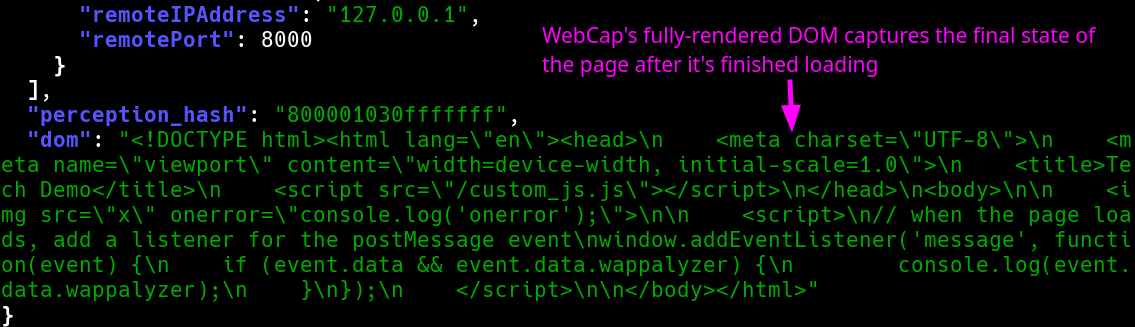
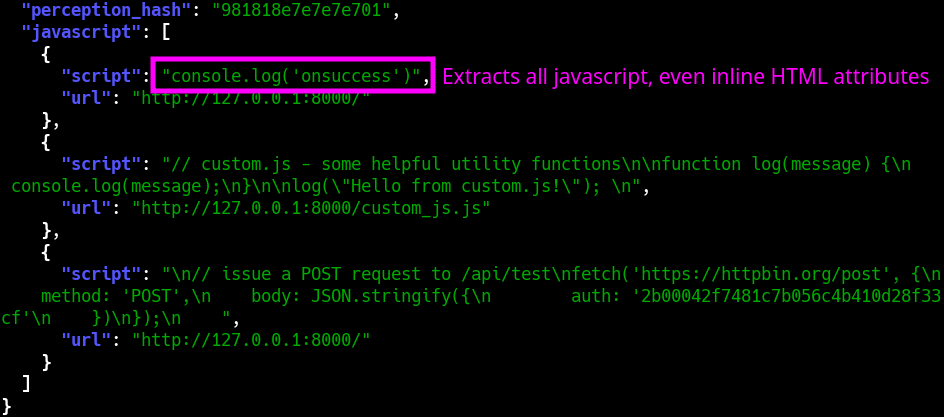
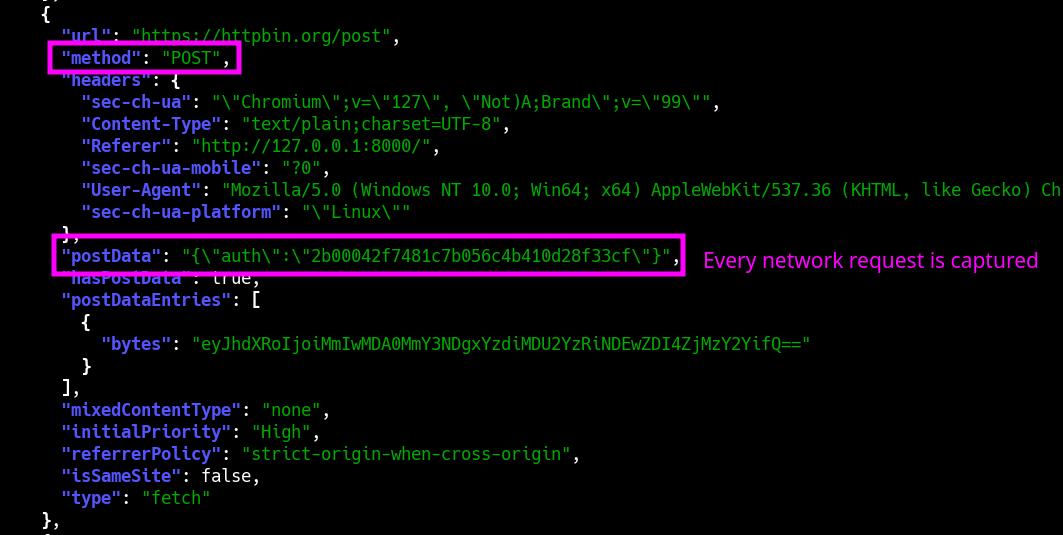
WebCap 最独特的功能是它不仅能捕获**完全渲染的 DOM**,还能捕获每一段**解析过的 Javascript**(无论是内联还是外部的),以及每个 HTTP 请求和响应的**完整内容**(包括 Javascript API 调用等)。为方便起见,它可以直接输出为 JSON。
### 命令示例
#### 扫描
```
# 对 urls.txt 中的所有 URL 截图
webcap scan urls.txt -o ./my_screenshots
# 输出到 JSON,并包含完全渲染的 DOM
webcap scan urls.txt --json --dom | jq
# 捕获请求和响应
webcap scan urls.txt --json --requests --responses | jq
# 捕获 javascript
webcap scan urls.txt --json --javascript | jq
# 从截图中提取文本
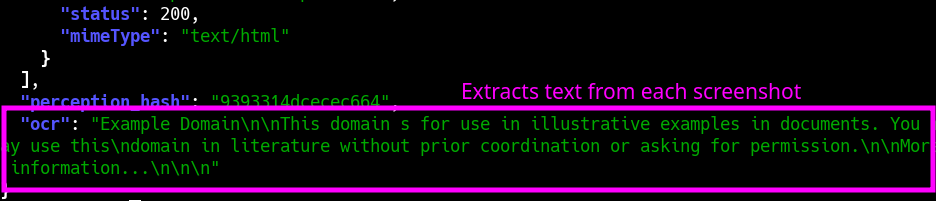
webcap scan urls.txt --json --ocr | jq
```
#### 服务器
```
# 启动服务器
webcap server
# 浏览到 http://localhost:8000
```
# 截图
### 命令行界面 (`webcap scan`)
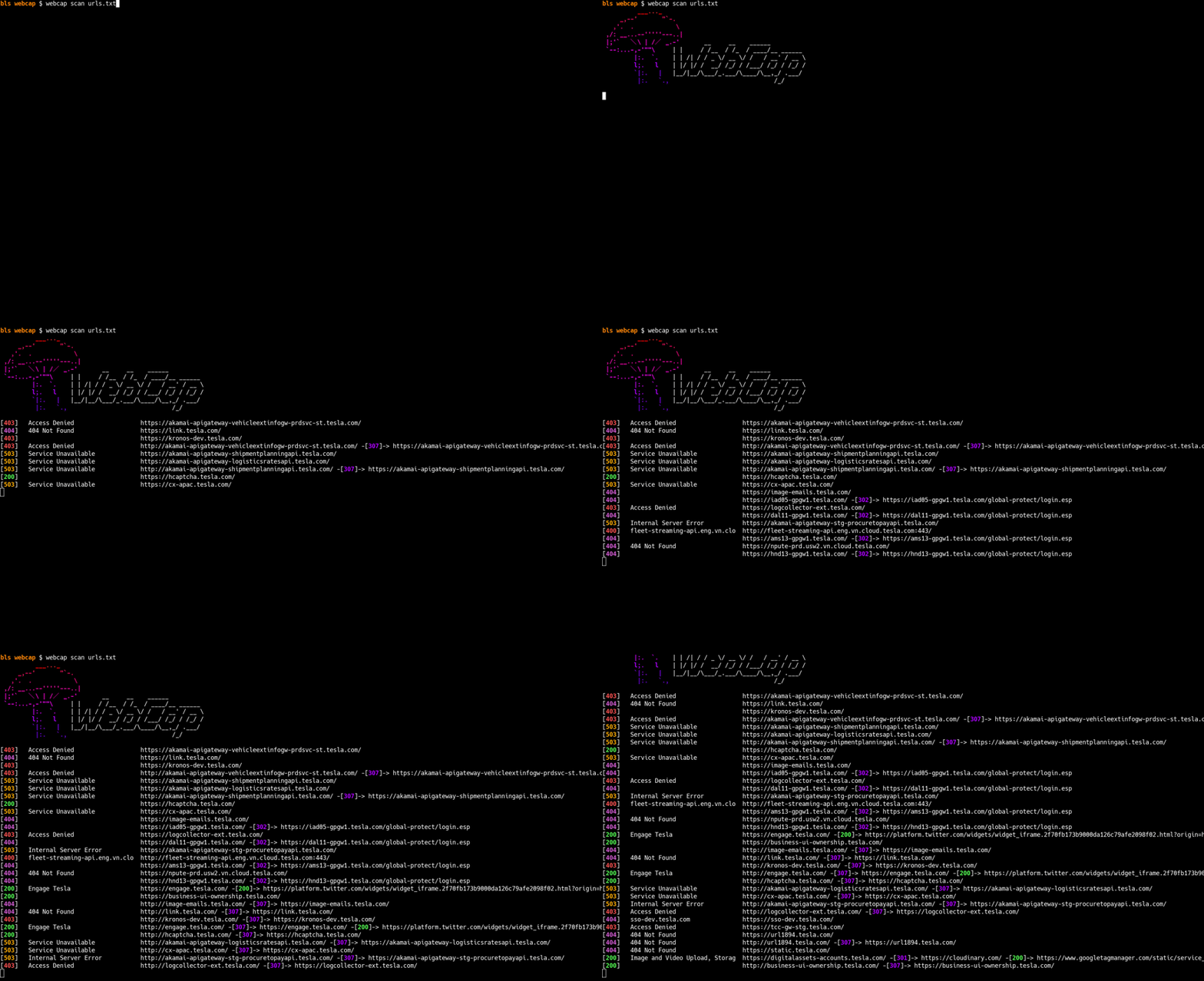
#### 完全渲染的 DOM
#### Javascript 捕获
#### 请求 + 响应
#### OCR
### 完整功能列表
- [x] 极速截图
- [x] 全屏捕获(整个可滚动页面)
- [x] JSON 输出
- [x] 完整 DOM 提取
- [x] Javascript 提取(内联 + 外部)
- [ ] Javascript 提取(环境变量转储)
- [x] 完整网络日志(包括请求/响应体)
- [x] 网页标题
- [x] 状态码
- [x] 模糊(感知)哈希
- [ ] 技术检测
- [x] OCR 文本提取
- [x] Web 界面
### 将 Webcap 作为 Python 库使用
```
import base64
from webcap import Browser
async def main():
# create a browser instance
browser = Browser()
# start the browser
await browser.start()
# take a screenshot
webscreenshot = await browser.screenshot("http://example.com")
# save the screenshot to a file
with open("screenshot.png", "wb") as f:
f.write(webscreenshot.blob)
# stop the browser
await browser.stop()
if __name__ == "__main__":
import asyncio
asyncio.run(main())
```
## CLI 使用方法 (--help)
```
Usage: webcap scan [OPTIONS] URLS
Screenshot URLs
╭─ Arguments ────────────────────────────────────────────────────────────────────────────────╮
│ * urls TEXT URL(s) to capture, or file(s) containing URLs [default: None] │
│ [required] │
╰────────────────────────────────────────────────────────────────────────────────────────────╯
╭─ Options ──────────────────────────────────────────────────────────────────────────────────╮
│ --json -j Output JSON │
│ --chrome -c TEXT Path to Chrome executable [default: None] │
│ --output -o OUTPUT_DIR Output directory │
│ [default: /home/bls/Downloads/code/webcap/screenshots] │
│ --help Show this message and exit. │
╰────────────────────────────────────────────────────────────────────────────────────────────╯
╭─ Screenshots ──────────────────────────────────────────────────────────────────────────────╮
│ --resolution -r RESOLUTION Resolution to capture [default: 1440x900] │
│ --full-page -f Capture the full page (larger resolution images) │
│ --no-screenshots Only visit the sites; don't capture screenshots │
│ (useful with -j/--json) │
╰────────────────────────────────────────────────────────────────────────────────────────────╯
╭─ Performance ──────────────────────────────────────────────────────────────────────────────╮
│ --threads -t INTEGER Number of threads to use [default: 15] │
│ --timeout -T INTEGER Timeout before giving up on a web request [default: 10] │
│ --delay SECONDS Delay before capturing [default: 3.0] │
╰────────────────────────────────────────────────────────────────────────────────────────────╯
╭─ HTTP ─────────────────────────────────────────────────────────────────────────────────────╮
│ --user-agent -U TEXT User agent to use │
│ [default: Mozilla/5.0 (Windows NT 10.0; Win64; x64) │
│ AppleWebKit/537.36 (KHTML, like Gecko) Chrome/131.0.0.0 │
│ Safari/537.36] │
│ --headers -H TEXT Additional headers to send in format: 'Header-Name: │
│ Header-Value' (multiple supported) │
│ --proxy -p TEXT HTTP proxy to use [default: None] │
╰────────────────────────────────────────────────────────────────────────────────────────────╯
╭─ JSON (Only apply when -j/--json is used) ─────────────────────────────────────────────────╮
│ --base64 -b Output each screenshot as base64 │
│ --dom -d Capture the fully-rendered DOM │
│ --responses -rs Capture the full body of each HTTP response │
│ (including API calls etc.) │
│ --requests -rq Capture the full body of each HTTP request │
│ (including API calls etc.) │
│ --javascript -J Capture every snippet of Javascript (inline + │
│ external) │
│ --ignore-types TEXT Ignore these filetypes │
│ [default: Image, Media, Font, Stylesheet] │
│ --ocr --no-ocr Extract text from screenshots [default: no-ocr] │
╰────────────────────────────────────────────────────────────────────────────────────────────╯
```
[](https://www.python.org) [](https://github.com/blacklanternsecurity/webcap/blob/dev/LICENSE) [](https://github.com/astral-sh/ruff) [](https://github.com/blacklanternsecurity/webcap/actions?query=workflow%3A"tests") [](https://codecov.io/gh/blacklanternsecurity
[](https://www.python.org) [](https://github.com/blacklanternsecurity/webcap/blob/dev/LICENSE) [](https://github.com/astral-sh/ruff) [](https://github.com/blacklanternsecurity/webcap/actions?query=workflow%3A"tests") [](https://codecov.io/gh/blacklanternsecurity/webcap) [](https://discord.com/invite/PZqkgxu5SA)
**WebCap** 是一个极轻量级的 Web 截图工具。它不需要 Selenium、Playwright、Puppeteer 或任何其他浏览器自动化框架;它只需要一个可运行的 Chrome 环境。被 [BBOT](https://github.com/blacklanternsecurity/bbot) 使用。
### 安装
```
pipx install webcap
```
### Web 界面 (`webcap server`)
https://github.com/user-attachments/assets/a5dea3fb-fa01-41e7-90cd-67c6efa3d6e5
### 功能
WebCap 最独特的功能是它不仅能捕获**完全渲染的 DOM**,还能捕获每一段**解析过的 Javascript**(无论是内联还是外部的),以及每个 HTTP 请求和响应的**完整内容**(包括 Javascript API 调用等)。为方便起见,它可以直接输出为 JSON。
### 命令示例
#### 扫描
```
# 对 urls.txt 中的所有 URL 截图
webcap scan urls.txt -o ./my_screenshots
# 输出到 JSON,并包含完全渲染的 DOM
webcap scan urls.txt --json --dom | jq
# 捕获请求和响应
webcap scan urls.txt --json --requests --responses | jq
# 捕获 javascript
webcap scan urls.txt --json --javascript | jq
# 从截图中提取文本
webcap scan urls.txt --json --ocr | jq
```
#### 服务器
```
# 启动服务器
webcap server
# 浏览到 http://localhost:8000
```
# 截图
### 命令行界面 (`webcap scan`)

#### 完全渲染的 DOM

#### Javascript 捕获

#### 请求 + 响应

#### OCR

### 完整功能列表
- [x] 极速截图
- [x] 全屏捕获(整个可滚动页面)
- [x] JSON 输出
- [x] 完整 DOM 提取
- [x] Javascript 提取(内联 + 外部)
- [ ] Javascript 提取(环境变量转储)
- [x] 完整网络日志(包括请求/响应体)
- [x] 网页标题
- [x] 状态码
- [x] 模糊(感知)哈希
- [ ] 技术检测
- [x] OCR 文本提取
- [x] Web 界面
### 将 Webcap 作为 Python 库使用
```
import base64
from webcap import Browser
async def main():
# create a browser instance
browser = Browser()
# start the browser
await browser.start()
# take a screenshot
webscreenshot = await browser.screenshot("http://example.com")
# save the screenshot to a file
with open("screenshot.png", "wb") as f:
f.write(webscreenshot.blob)
# stop the browser
await browser.stop()
if __name__ == "__main__":
import asyncio
asyncio.run(main())
```
## CLI 使用方法 (--help)
```
Usage: webcap scan [OPTIONS] URLS
Screenshot URLs
╭─ Arguments ────────────────────────────────────────────────────────────────────────────────╮
│ * urls TEXT URL(s) to capture, or file(s) containing URLs [default: None] │
│ [required] │
╰────────────────────────────────────────────────────────────────────────────────────────────╯
╭─ Options ──────────────────────────────────────────────────────────────────────────────────╮
│ --json -j Output JSON │
│ --chrome -c TEXT Path to Chrome executable [default: None] │
│ --output -o OUTPUT_DIR Output directory │
│ [default: /home/bls/Downloads/code/webcap/screenshots] │
│ --help Show this message and exit. │
╰────────────────────────────────────────────────────────────────────────────────────────────╯
╭─ Screenshots ──────────────────────────────────────────────────────────────────────────────╮
│ --resolution -r RESOLUTION Resolution to capture [default: 1440x900] │
│ --full-page -f Capture the full page (larger resolution images) │
│ --no-screenshots Only visit the sites; don't capture screenshots │
│ (useful with -j/--json) │
╰────────────────────────────────────────────────────────────────────────────────────────────╯
╭─ Performance ──────────────────────────────────────────────────────────────────────────────╮
│ --threads -t INTEGER Number of threads to use [default: 15] │
│ --timeout -T INTEGER Timeout before giving up on a web request [default: 10] │
│ --delay SECONDS Delay before capturing [default: 3.0] │
╰────────────────────────────────────────────────────────────────────────────────────────────╯
╭─ HTTP ─────────────────────────────────────────────────────────────────────────────────────╮
│ --user-agent -U TEXT User agent to use │
│ [default: Mozilla/5.0 (Windows NT 10.0; Win64; x64) │
│ AppleWebKit/537.36 (KHTML, like Gecko) Chrome/131.0.0.0 │
│ Safari/537.36] │
│ --headers -H TEXT Additional headers to send in format: 'Header-Name: │
│ Header-Value' (multiple supported) │
│ --proxy -p TEXT HTTP proxy to use [default: None] │
╰────────────────────────────────────────────────────────────────────────────────────────────╯
╭─ JSON (Only apply when -j/--json is used) ─────────────────────────────────────────────────╮
│ --base64 -b Output each screenshot as base64 │
│ --dom -d Capture the fully-rendered DOM │
│ --responses -rs Capture the full body of each HTTP response │
│ (including API calls etc.) │
│ --requests -rq Capture the full body of each HTTP request │
│ (including API calls etc.) │
│ --javascript -J Capture every snippet of Javascript (inline + │
│ external) │
│ --ignore-types TEXT Ignore these filetypes │
│ [default: Image, Media, Font, Stylesheet] │
│ --ocr --no-ocr Extract text from screenshots [default: no-ocr] │
╰────────────────────────────────────────────────────────────────────────────────────────────╯
```
标签:API安全, BBOT, BeEF, Chrome, HTTP请求捕获, JavaScript解析, JSON输出, LangChain, Python, Web界面, 侦察工具, 前端分析, 实时处理, 开源, 无后门, 无头浏览器, 流量抓包, 爬虫, 网络安全, 网页截图工具, 计算机取证, 轻量级, 逆向工具, 隐私保护, 黑灯安全