thometnanni/vantage
GitHub: thometnanni/vantage
一款面向事实核查与 OSINT 调查的开源工具,通过将图像和视频投影到三维地理环境中来精确还原拍摄场景的空间上下文。
Stars: 14 | Forks: 2
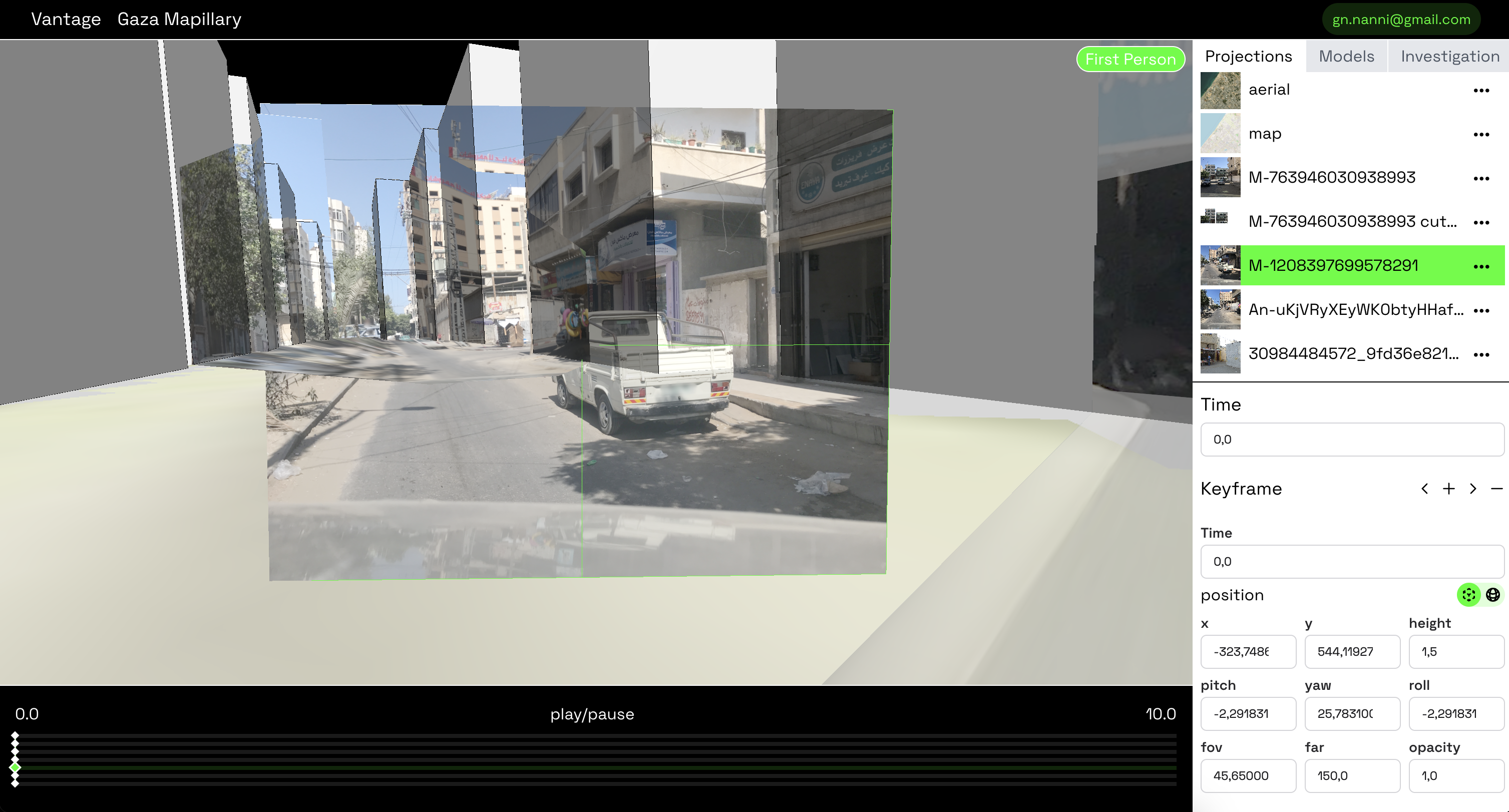
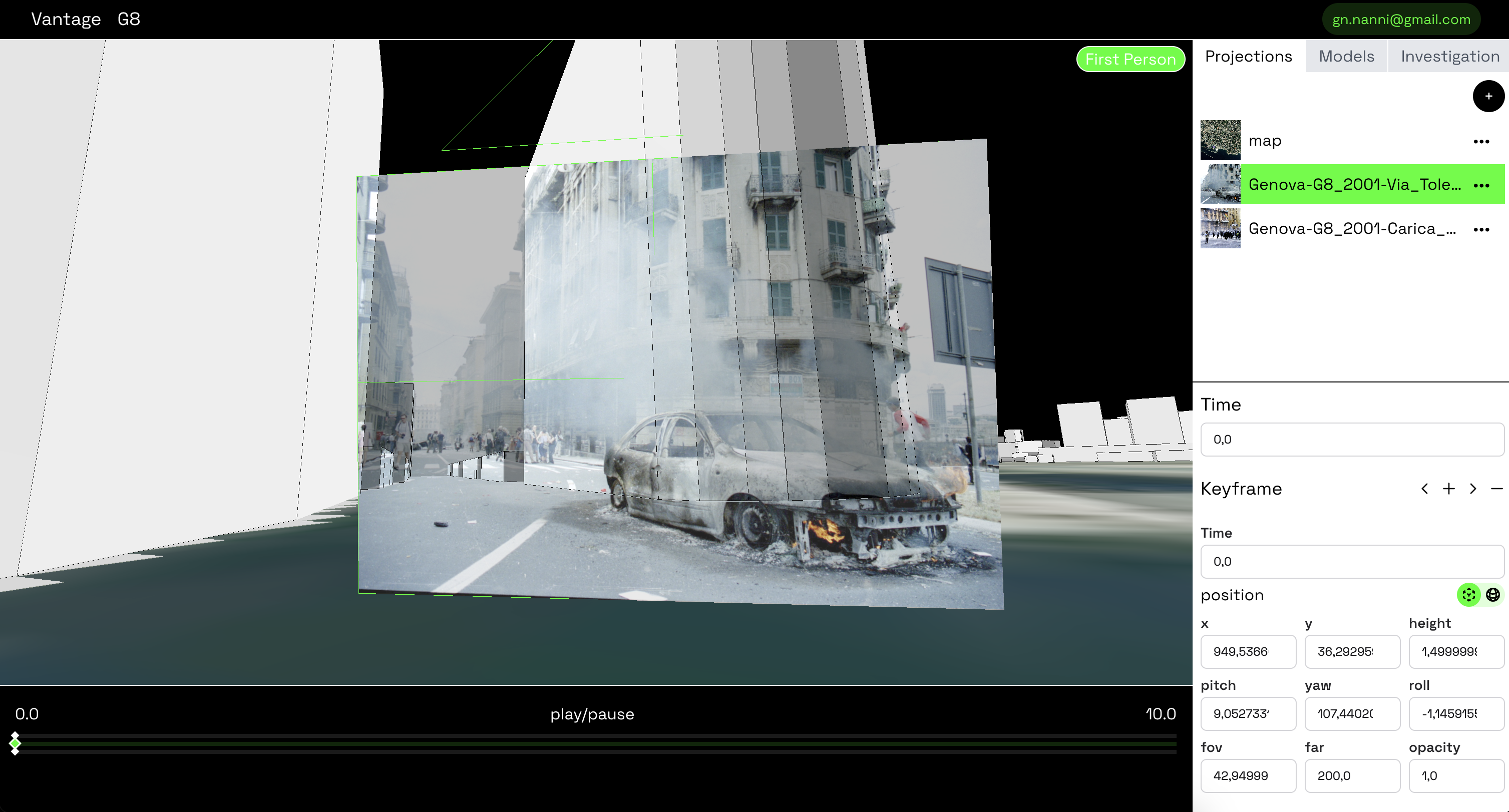
An open-source tool designed for fact-checkers, investigative journalists, and Open Source Intelligence (OSINT) practitioners. It enables users to reconstruct spatial contexts of images and videos by projecting them onto 3D environments.
Platform Overview • Installation
 ## 许可证
Vantage 是开源软件,基于 MIT 许可证授权。
## 安装
### 前置条件
- 如果尚未安装,请下载安装并运行 [Docker Desktop](https://www.docker.com/products/docker-desktop)。
### 步骤
1. 克隆仓库:
```
git clone https://github.com/thometnanni/vantage.git
cd vantage
```
2. 将 `.env.example` 文件重命名为 `.env`
```
mv .env.example .env
```
3. 构建并启动容器:
```
docker compose up
```
4. 访问平台地址:[http://localhost:4000](http://localhost:4000) 。
## 安装
如果你想直接使用 Mix 运行 Vantage(适合开发环境):
### 前置条件
请确保已安装以下软件:
- **Elixir:** [下载 Elixir](https://elixir-lang.org/install.html)
- **Node.js:** [下载 Node.js](https://nodejs.org/)
- **npm:** [下载 npm](https://www.npmjs.com/get-npm)
- **ffmpeg:** [下载 ffmpeg](https://ffmpeg.org/download.html)
### 步骤
1. 克隆仓库:
```
git clone https://github.com/thometnanni/vantage.git cd vantage
```
2. 设置依赖:
```
cd assets
npm install
cd ..
```
```
mix setup
```
3. 启动服务器
```
mix phx.server
```
或者使用 IEx:
```
iex -S mix phx.server
```
4. 访问平台地址:[http://localhost:4000](http://localhost:4000) 。
## 3D 场景设置
要生成给定位置的 3D 模型和地图,请使用 Vantage 的 [场景设置](https://thometnanni.github.io/vantage-scene-setup/) 工具。
你可以选择坐标,生成 3D 模型,然后将其导入到 Vantage 中。
此外,你也可以导入任何 glTF 文件。
## 使用方法
要重建场景:
1. 使用 Vantage 场景设置工具生成 3D 场景。
2. 将模型和地图导入到 Vantage 中。
3. 通过将图像和视频的视角与现实世界中的相机位置相匹配来进行对齐。
- 使用第一人称视角来定位媒体:
- **W**:向前移动
- **A**:向左移动
- **S**:向后移动
- **D**:向右移动
- **F**:向下移动
- **R**:向上移动
- **Q**:逆时针旋转相机(绕 Z 轴)
- **E**:顺时针旋转相机(绕 Z 轴)
4. 使用鼠标滚轮调整相机的视野(FOV),以进行放大或缩小。
5. 使用时间线组织和分析事件的发展过程。
## 许可证
Vantage 是开源软件,基于 MIT 许可证授权。
## 安装
### 前置条件
- 如果尚未安装,请下载安装并运行 [Docker Desktop](https://www.docker.com/products/docker-desktop)。
### 步骤
1. 克隆仓库:
```
git clone https://github.com/thometnanni/vantage.git
cd vantage
```
2. 将 `.env.example` 文件重命名为 `.env`
```
mv .env.example .env
```
3. 构建并启动容器:
```
docker compose up
```
4. 访问平台地址:[http://localhost:4000](http://localhost:4000) 。
## 安装
如果你想直接使用 Mix 运行 Vantage(适合开发环境):
### 前置条件
请确保已安装以下软件:
- **Elixir:** [下载 Elixir](https://elixir-lang.org/install.html)
- **Node.js:** [下载 Node.js](https://nodejs.org/)
- **npm:** [下载 npm](https://www.npmjs.com/get-npm)
- **ffmpeg:** [下载 ffmpeg](https://ffmpeg.org/download.html)
### 步骤
1. 克隆仓库:
```
git clone https://github.com/thometnanni/vantage.git cd vantage
```
2. 设置依赖:
```
cd assets
npm install
cd ..
```
```
mix setup
```
3. 启动服务器
```
mix phx.server
```
或者使用 IEx:
```
iex -S mix phx.server
```
4. 访问平台地址:[http://localhost:4000](http://localhost:4000) 。
## 3D 场景设置
要生成给定位置的 3D 模型和地图,请使用 Vantage 的 [场景设置](https://thometnanni.github.io/vantage-scene-setup/) 工具。
你可以选择坐标,生成 3D 模型,然后将其导入到 Vantage 中。
此外,你也可以导入任何 glTF 文件。
## 使用方法
要重建场景:
1. 使用 Vantage 场景设置工具生成 3D 场景。
2. 将模型和地图导入到 Vantage 中。
3. 通过将图像和视频的视角与现实世界中的相机位置相匹配来进行对齐。
- 使用第一人称视角来定位媒体:
- **W**:向前移动
- **A**:向左移动
- **S**:向后移动
- **D**:向右移动
- **F**:向下移动
- **R**:向上移动
- **Q**:逆时针旋转相机(绕 Z 轴)
- **E**:顺时针旋转相机(绕 Z 轴)
4. 使用鼠标滚轮调整相机的视野(FOV),以进行放大或缩小。
5. 使用时间线组织和分析事件的发展过程。标签:3D建模, 3D环境投影, Docker, Elixir, ESC4, ffmpeg, GNU通用公共许可证, MITM代理, Node.js, npm, OSINT, 事实核查, 二进制发布, 图像分析, 地理位置定位, 地理空间分析, 媒体验证, 安全防御评估, 开源工具, 数据可视化, 新闻调查工具, 空间上下文重构, 视觉情报, 视频分析, 请求拦截, 调查新闻