guanwei49/LogLLM
GitHub: guanwei49/LogLLM
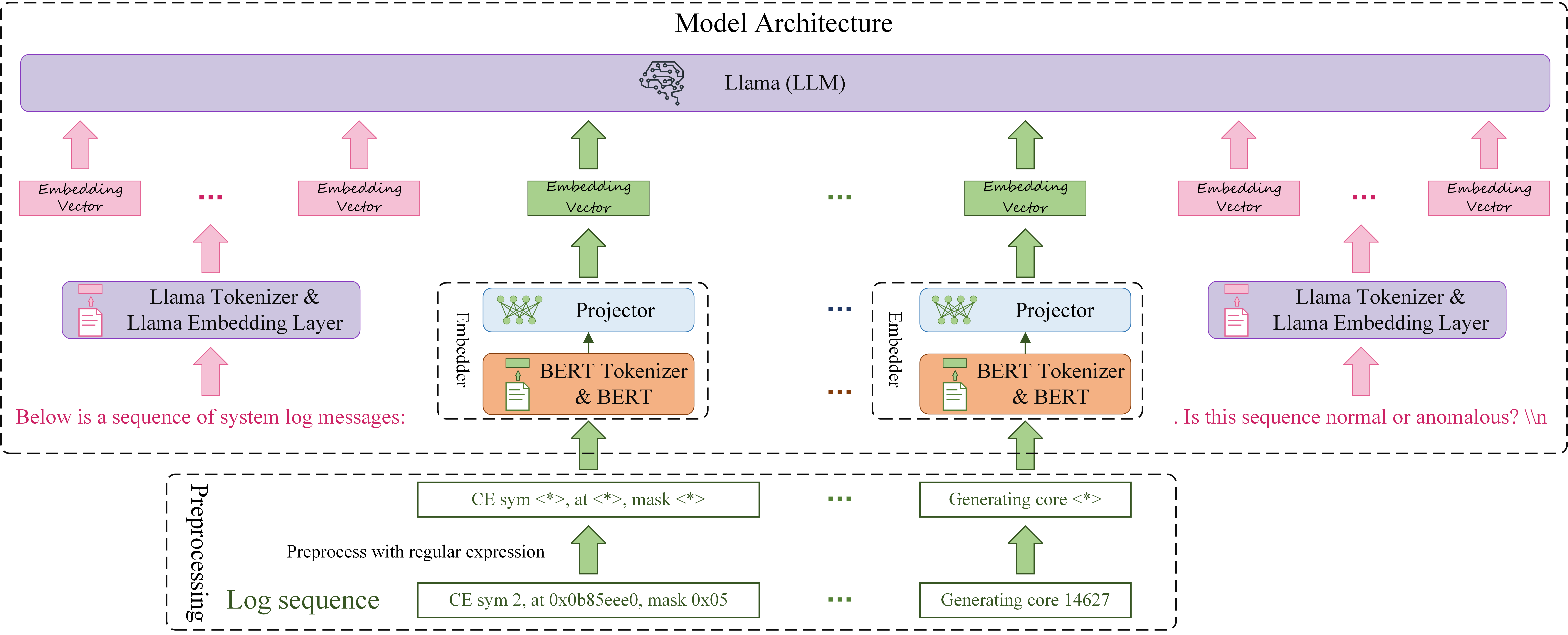
LogLLM是一个利用大语言模型(Llama-3)结合BERT进行系统日志异常检测的工具,显著提升了在HDFS、BGL等数据集上的检测精度。
Stars: 196 | Forks: 37
# LogLLM: 使用 Large Language Models 的基于日志的异常检测
"LogLLM: Log-based Anomaly Detection Using Large Language Models" 的官方实现
## 数据集
实验中使用的数据集统计信息。
| | | | 训练数据 | 训练数据 | 训练数据 | 测试数据 | 测试数据 | 测试数据 |
|:-----------:|:------------------:|:-------------------:|:-------------------:|:---------------:|:-----------------:|:-------------------:|:---------------:|:-----------------:|
| | **# Log Messages** | **# Log Sequences** | **# Log Sequences** | **# Anomalies** | **Anomaly Ratio** | **# Log Sequences** | **# Anomalies** | **Anomaly Ratio** |
| HDFS | 11,175,629 | 575,061 | 460,048 | 13497 | 2.93% | 115013 | 3341 | 2.90% |
| BGL | 4,747,963 | 47,135 | 37,708 | 4009 | 10.63% | 9427 | 817 | 8.67% |
| Liberty | 5,000,000 | 50,000 | 40000 | 34144 | 85.36% | 10000 | 651 | 6.51% |
| Thunderbird | 10,000,000 | 99,997 | 79,997 | 837 | 1.05% | 20000 | 29 | 0.15% |
## 实验结果
在 HDFS、BGL、Liberty 和 Thunderbird 数据集上的实验结果。最佳结果以粗体显示。
| | | HDFS | HDFS | HDFS | BGL | BGL | BGL | Liberty | Liberty | Liberty | Thunderbird | Thunderbird | Thunderbird | |
|:----------:|:--------------:|:---------:|:---------:|:---------:|:---------:|:---------:|:---------:|:---------:|:---------:|:---------:|:-----------:|:-----------:|:-----------:|:-----------:|
| | **Log Parser** | **Prec.** | **Rec.** | **F1** | **Prec.** | **Rec.** | **F1** | **Prec.** | **Rec.** | **F1** | **Prec.** | **Rec.** | **F1** | **Avg. F1** |
| DeepLog | ✔ | 0.835 | 0.994 | 0.908 | 0.166 | 0.988 | 0.285 | 0.751 | 0.855 | 0.800 | 0.017 | 0.966 | 0.033 | 0.506 |
| LogAnomaly | ✔ | 0.886 | 0.893 | 0.966 | 0.176 | 0.985 | 0.299 | 0.684 | 0.876 | 0.768 | 0.025 | 0.966 | 0.050 | 0.521 |
| PLELog | ✔ | 0.893 | 0.979 | 0.934 | 0.595 | 0.880 | 0.710 | 0.795 | 0.874 | 0.832 | 0.808 | 0.724 | 0.764 | 0.810 |
| FastLogAD | ✔ | 0.721 | 0.893 | 0.798 | 0.167 | **1.000** | 0.287 | 0.151 | **0.999** | 0.263 | 0.008 | 0.931 | 0.017 | 0.341 |
| LogBERT | ✔ | 0.989 | 0.614 | 0.758 | 0.165 | 0.989 | 0.283 | 0.902 | 0.633 | 0.744 | 0.022 | 0.172 | 0.039 | 0.456 |
| LogRobust | ✔ | 0.961 | 1.000 | 0.980 | 0.696 | 0.968 | 0.810 | 0.695 | 0.979 | 0.813 | 0.318 | **1.000** | 0.482 | 0.771 |
| CNN | ✔ | 0.966 | 1.000 | 0.982 | 0.698 | 0.965 | 0.810 | 0.580 | 0.914 | 0.709 | 0.870 | 0.690 | 0.769 | 0.818 |
| NeuralLog | ✘ | 0.971 | 0.988 | 0.979 | 0.792 | 0.884 | 0.835 | 0.875 | 0.926 | 0.900 | 0.794 | 0.931 | 0.857 | 0.893 |
| RAPID | ✘ | **1.000** | 0.859 | 0.924 | **0.874** | 0.399 | 0.548 | 0.911 | 0.611 | 0.732 | 0.200 | 0.207 | 0.203 | 0.602 |
| LogLLM | ✘ | 0.994 | **1.000** | **0.997** | 0.861 | 0.979 | **0.916** | **0.992** | 0.926 | **0.958** | **0.966** | 0.966 | **0.966** | **0.959** |
## 使用我们的代码复现结果
### 1. 设置环境。
- **软件要求**:
- Python: 3.8.20
- CUDA: 12.1
- **选择以下方法之一安装依赖**:
--- 选项 1:从 ```requirements.txt``` 安装
```
conda install --yes --file requirements.txt # You may need to downgrade the torch using pip to match the CUDA version
```
--- 选项 2:单独安装包
```
conda create -n logllm python=3.8
pip install torch==2.4.0 torchvision==0.19.0 torchaudio==2.4.0 --index-url https://download.pytorch.org/whl/cu121
pip install transformers datasets peft accelerate bitsandbytes safetensors
pip install scikit-learn
pip install tqdm
```
### 2. 下载开源 LLM [Meta-Llama-3-8B](https://huggingface.co/meta-llama/Meta-Llama-3-8B/tree/main) 和 Bert [bert-base-uncased](https://huggingface.co/google-bert/bert-base-uncased)。
```
├── Meta-Llama-3-8B
│ ├── config.json
│ ├── generation_config.json
│ ├── LICENSE
│ ├── model-00001-of-00004.safetensors
│ ├── model-00002-of-00004.safetensors
│ ├── model-00003-of-00004.safetensors
│ ├── model-00004-of-00004.safetensors
│ ├── model.safetensors.index.json
│ ├── special_tokens_map.json
│ ├── tokenizer.json
│ └── tokenizer_config.json
```
```
├── bert-base-uncased
│ ├── config.json
│ ├── model.safetensors
│ ├── tokenizer.json
│ ├── tokenizer_config.json
│ └── vocab.txt
```
### 3. 准备训练和测试数据
- 从 [这里](https://github.com/logpai/loghub) 下载 BGL/HDFS_v1/Thunderbird 数据集。从 [这里](http://0b4af6cdc2f0c5998459-c0245c5c937c5dedcca3f1764ecc9b2f.r43.cf2.rackcdn.com/hpc4/liberty2.gz) 下载 Liberty 数据集。
- 对于 **BGL**、**Thunderbird** 和 **Liberty**,在 **prepareData** 目录下的 **sliding_window.py** 中设置以下变量:
data_dir = # 例如 r'/mnt/public/gw/SyslogData/BGL'
log_name = # 例如 'BGL.log'
对于 **Liberty**,你应该启用
start_line = 40000000
end_line = 45000000
对于 **Thunderbird**,你应该启用
start_line = 160000000
end_line = 170000000
从根目录运行 ```python prepareData.sliding_window.py``` 以生成训练和测试数据。
训练和测试数据将保存在 {data_dir} 中。
- 对于 **HDFS**,在 **prepareData** 目录下的 **session_window.py** 中设置以下目录:
data_dir = # 例如 r'/mnt/public/gw/SyslogData/HDFS_v1'
log_name = # 例如 'HDFS.log'
从根目录运行 ```python prepareData.session_window.py``` 以生成训练和测试数据。
训练和测试数据将保存在 {data_dir} 中
### 4. 训练我们提出的深度模型。可以通过直接使用我们的微调模型(ft_model_[dataset_name])跳过此步骤。
- 在 **train.py** 中设置以下变量
Bert_path = # 例如,r"/mnt/public/gw/LLM_model/bert-base-uncased"
Llama_path = # 例如,r"/mnt/public/gw/LLM_model/Meta-Llama-3-8B"
dataset_name = # 例如,'Liberty'
data_path = # 例如,r'/mnt/public/gw/SyslogData/{dataset_name}/train.csv'.format(dataset_name)
- 从根目录运行 ```python train.py``` 以获取微调模型。
### 5. 在测试数据集上评估。
- 在 **eval.py** 中设置以下变量
Bert_path = # 例如,r"/mnt/public/gw/LLM_model/bert-base-uncased"
Llama_path = # 例如,r"/mnt/public/gw/LLM_model/Meta-Llama-3-8B"
dataset_name = # 例如,'Liberty'
data_path = # 例如,r'/mnt/public/gw/SyslogData/{dataset_name}/test.csv'.format(dataset_name)
- 我们提供了 BGL 和 Liberty 数据集的测试文件,可以在 [这里 (BGL test file)](https://drive.google.com/file/d/1aMKzhrLklnk5RX78UBc3Zx3voIIGnQzo/view?usp=sharing) 和 [这里 (Liberty test file)](https://drive.google.com/file/d/1-Z2FrsRSm8ojfOW1555obNyU6B_aRDTH/view?usp=sharing) 访问。
- 从根目录运行 ```python eval.py```。
标签:AIOps, Apex, BGL, DLL 劫持, HDFS, Liberty, LogLLM, NLP, osquery, Python, Thunderbird, Vectored Exception Handling, 人工智能, 凭据扫描, 大语言模型, 实验评估, 异常检测, 无后门, 日志异常检测, 时序分析, 机器学习, 模型训练, 深度学习, 用户模式Hook绕过, 系统日志, 系统调用监控, 运维安全, 逆向工具