cc1a2b/JShunter
GitHub: cc1a2b/JShunter
一款用 Go 编写的命令行 JavaScript 安全分析工具,专注于从前端代码中自动发现 API 端点、敏感凭据和潜在安全问题。
Stars: 525 | Forks: 60
# JSHunter
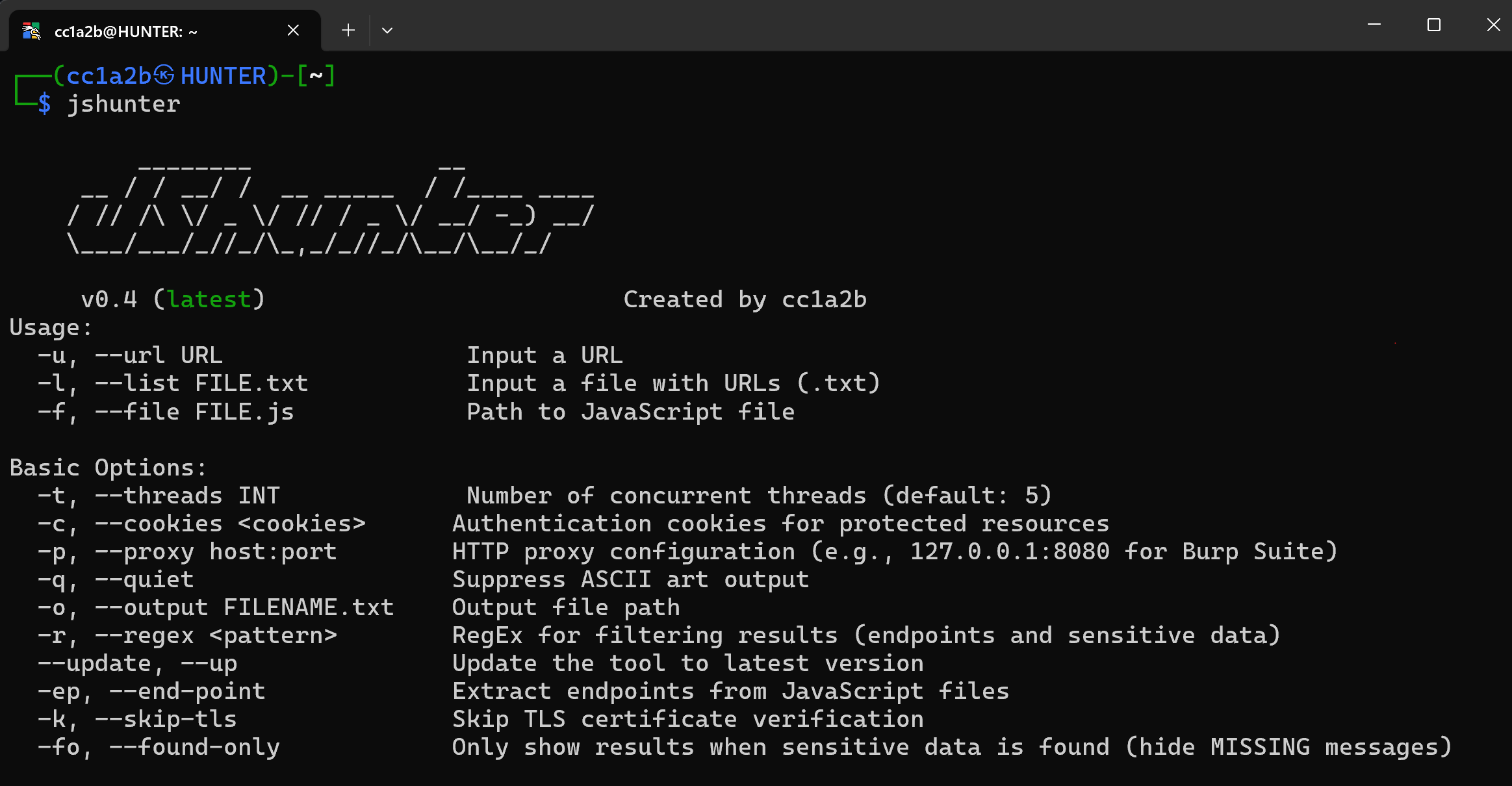 *JSHunter 实战演示 - 专业的 JavaScript 安全分析*
## 📑 目录
- [关于](#-about)
- [功能](#-features)
- [安装说明](#-installation)
- [快速开始](#-quick-start)
- [使用示例](#-usage-examples)
- [命令参考](#-command-reference)
- [高级用法](#-advanced-usage)
- [贡献](#-contributing)
- [许可证](#-license)
- [支持](#-support)
## ✨ 功能
### 🎯 核心能力
- **🔍 全面的端点发现**:自动从 JavaScript 文件中提取 URL、API 端点和隐藏参数
- **🔐 高级安全分析**:高精度识别 API 密钥、JWT token、凭据和潜在漏洞
- **📥 灵活的输入方式**:支持 URL、文件列表、本地文件、stdin 管道和递归发现
- **⚡ 高性能架构**:多线程并发处理与智能速率限制
- **🎭 专业隐蔽功能**:代理支持、自定义 headers、user-agent 轮换和绕过检测
### 🎯 智能检测引擎
- **🎯 智能 Base64 检测**:高精度过滤,消除来自媒体内容和编码数据的误报
- **🏢 专业界面**:企业级的术语、文档和全面的报告格式
- **🧠 上下文感知分析**:高级算法区分真实的安全 token 和编码的媒体数据
- **📊 熵分析**:数学算法精确识别真实的安全 token 和凭据
### 🌐 专业的 HTTP 与网络套件
### 📝 高级 JavaScript 分析
### 🔐 安全分析套件
### 🎯 范围与发现
### 📤 专业报告与导出套件
## 📦 安装说明
### Go Install(推荐)
```
# 安装 JSHunter
go install -v github.com/cc1a2b/jshunter/cmd/jshunter@latest
# 验证安装
jshunter --help
```
### 从源码构建
```
git clone https://github.com/cc1a2b/jshunter.git
cd jshunter
go build -o jshunter ./cmd/jshunter
```
### 系统要求
- **Go 1.22.5+**(用于从源码构建)
- **Linux、macOS 或 Windows**(64 位架构)
- 用于远程 JavaScript 分析的**网络连接**
## 🚀 快速开始
### 基础分析
```
# 分析单个 JavaScript 文件
jshunter -u "https://example.com/app.js"
# 从文件扫描多个 URL
jshunter -l urls.txt
# 分析本地 JavaScript 文件
jshunter -f app.js
```
### 完整安全分析
```
# 查找 API keys、secrets 和 credentials
jshunter -u "https://target.com/app.js" -s
# 包含 deobfuscation、GraphQL 和 Firebase 检测的完整分析
jshunter -u "https://target.com/app.js" -d -s -g -F -x -L
# 使用所有工具的专业安全评估
jshunter -u "https://target.com/app.js" -d -m -e -s -x -P -g -F -B -L
# 导出综合结果用于报告
jshunter -l targets.txt -s -g -F -j -o security_findings.json
```
## 💡 使用示例
```
# 分析单个 URL
jshunter -u "https://example.com/app.js"
# 从文件分析多个 URL
jshunter -l urls.txt
# 通过 stdin 管道传输 URL
cat urls.txt | grep "\.js" | jshunter
# 完整安全分析 - 查找 secrets、API keys 和 credentials
jshunter -u "https://example.com/app.js" -s -x -F
# 包含 deobfuscation 和所有安全工具的完整分析套件
jshunter -u "https://target.com/app.js" -d -m -e -s -x -P -g -F -B -L
# 包含 source map 分析的专业评估
jshunter -u "https://target.com/bundle.js" -d -m -s -g -F
# 导出综合结果为结构化格式
jshunter -l targets.txt -s -x -F -g -j -o security_findings.json
# 集成 Burp Suite 的隐蔽扫描
jshunter -l targets.txt -p 127.0.0.1:8080 -s -g -F -n -o burp_findings.txt
# 通过 SOCKS5 proxy 扫描 (Tor、SSH tunnel 等)
jshunter -l targets.txt -p socks5://127.0.0.1:9050 -s -x -F
# 带身份验证的限速专业扫描
jshunter -l urls.txt -R 2000 -H "Authorization: Bearer token" -s -x -F -g -q
# 完整的 endpoint 和参数发现
jshunter -l urls.txt -ep -P -PU -L -w 2
# 带上下文检测的高级 obfuscation 分析
jshunter -f obfuscated.js -d -z -e -s -v
```
## 📋 命令参考
随时使用 `jshunter --help` 获取完整的帮助信息
```
Usage:
-u, --url URL Input a URL
-l, --list FILE.txt Input a file with URLs (.txt)
-f, --file FILE.js Path to JavaScript file
--har FILE Ingest a Chrome DevTools HAR archive
Basic Options:
-t, --threads INT Number of concurrent threads (default: 5)
-c, --cookies
*JSHunter 实战演示 - 专业的 JavaScript 安全分析*
## 📑 目录
- [关于](#-about)
- [功能](#-features)
- [安装说明](#-installation)
- [快速开始](#-quick-start)
- [使用示例](#-usage-examples)
- [命令参考](#-command-reference)
- [高级用法](#-advanced-usage)
- [贡献](#-contributing)
- [许可证](#-license)
- [支持](#-support)
## ✨ 功能
### 🎯 核心能力
- **🔍 全面的端点发现**:自动从 JavaScript 文件中提取 URL、API 端点和隐藏参数
- **🔐 高级安全分析**:高精度识别 API 密钥、JWT token、凭据和潜在漏洞
- **📥 灵活的输入方式**:支持 URL、文件列表、本地文件、stdin 管道和递归发现
- **⚡ 高性能架构**:多线程并发处理与智能速率限制
- **🎭 专业隐蔽功能**:代理支持、自定义 headers、user-agent 轮换和绕过检测
### 🎯 智能检测引擎
- **🎯 智能 Base64 检测**:高精度过滤,消除来自媒体内容和编码数据的误报
- **🏢 专业界面**:企业级的术语、文档和全面的报告格式
- **🧠 上下文感知分析**:高级算法区分真实的安全 token 和编码的媒体数据
- **📊 熵分析**:数学算法精确识别真实的安全 token 和凭据
### 🌐 专业的 HTTP 与网络套件
### 📝 高级 JavaScript 分析
### 🔐 安全分析套件
### 🎯 范围与发现
### 📤 专业报告与导出套件
## 📦 安装说明
### Go Install(推荐)
```
# 安装 JSHunter
go install -v github.com/cc1a2b/jshunter/cmd/jshunter@latest
# 验证安装
jshunter --help
```
### 从源码构建
```
git clone https://github.com/cc1a2b/jshunter.git
cd jshunter
go build -o jshunter ./cmd/jshunter
```
### 系统要求
- **Go 1.22.5+**(用于从源码构建)
- **Linux、macOS 或 Windows**(64 位架构)
- 用于远程 JavaScript 分析的**网络连接**
## 🚀 快速开始
### 基础分析
```
# 分析单个 JavaScript 文件
jshunter -u "https://example.com/app.js"
# 从文件扫描多个 URL
jshunter -l urls.txt
# 分析本地 JavaScript 文件
jshunter -f app.js
```
### 完整安全分析
```
# 查找 API keys、secrets 和 credentials
jshunter -u "https://target.com/app.js" -s
# 包含 deobfuscation、GraphQL 和 Firebase 检测的完整分析
jshunter -u "https://target.com/app.js" -d -s -g -F -x -L
# 使用所有工具的专业安全评估
jshunter -u "https://target.com/app.js" -d -m -e -s -x -P -g -F -B -L
# 导出综合结果用于报告
jshunter -l targets.txt -s -g -F -j -o security_findings.json
```
## 💡 使用示例
```
# 分析单个 URL
jshunter -u "https://example.com/app.js"
# 从文件分析多个 URL
jshunter -l urls.txt
# 通过 stdin 管道传输 URL
cat urls.txt | grep "\.js" | jshunter
# 完整安全分析 - 查找 secrets、API keys 和 credentials
jshunter -u "https://example.com/app.js" -s -x -F
# 包含 deobfuscation 和所有安全工具的完整分析套件
jshunter -u "https://target.com/app.js" -d -m -e -s -x -P -g -F -B -L
# 包含 source map 分析的专业评估
jshunter -u "https://target.com/bundle.js" -d -m -s -g -F
# 导出综合结果为结构化格式
jshunter -l targets.txt -s -x -F -g -j -o security_findings.json
# 集成 Burp Suite 的隐蔽扫描
jshunter -l targets.txt -p 127.0.0.1:8080 -s -g -F -n -o burp_findings.txt
# 通过 SOCKS5 proxy 扫描 (Tor、SSH tunnel 等)
jshunter -l targets.txt -p socks5://127.0.0.1:9050 -s -x -F
# 带身份验证的限速专业扫描
jshunter -l urls.txt -R 2000 -H "Authorization: Bearer token" -s -x -F -g -q
# 完整的 endpoint 和参数发现
jshunter -l urls.txt -ep -P -PU -L -w 2
# 带上下文检测的高级 obfuscation 分析
jshunter -f obfuscated.js -d -z -e -s -v
```
## 📋 命令参考
随时使用 `jshunter --help` 获取完整的帮助信息
```
Usage:
-u, --url URL Input a URL
-l, --list FILE.txt Input a file with URLs (.txt)
-f, --file FILE.js Path to JavaScript file
--har FILE Ingest a Chrome DevTools HAR archive
Basic Options:
-t, --threads INT Number of concurrent threads (default: 5)
-c, --cookies Authentication cookies for protected resources
-p, --proxy host:port HTTP/SOCKS5 proxy (e.g., 127.0.0.1:8080 for Burp Suite)
-q, --quiet Suppress ASCII art output
--no-color Disable ANSI color (auto-off when not a TTY)
-o, --output FILENAME Output file path
-r, --regex RegEx for filtering results
--update, --up Update the tool to latest version
-ep, --end-point Extract endpoints from JavaScript files
-k, --skip-tls Skip TLS certificate verification
-fo, --found-only Only show results when sensitive data is found
HTTP Configuration:
-H, --header "Key: Value" Custom HTTP headers (repeatable, including Auth)
-U, --user-agent UA Custom User-Agent string or file path
-R, --rate-limit MS Request rate limiting delay (milliseconds)
-T, --timeout SEC HTTP request timeout (seconds)
-y, --retry INT Retry attempts for failed requests (default: 2)
--per-host INT Per-host outbound concurrency cap (default: 4)
--max-bytes N Cap response body read in bytes (default: 32MiB)
--allow-internal Permit localhost / RFC1918 / link-local targets
--cache-dir DIR Persist responses on disk; revalidate via ETag
JavaScript Analysis:
-d, --deobfuscate Deobfuscate minified and obfuscated JavaScript
-m, --sourcemap Fetch and parse source maps + sourcesContent[]
-e, --eval Analyze dynamic code execution (eval, Function)
-z, --obfs-detect Detect code obfuscation patterns and techniques
--inline-html Scan inline
[](LICENSE)
[](https://golang.org)
[](https://github.com/cc1a2b/jshunter/releases)
[](https://github.com/cc1a2b/jshunter/stargazers)
[](https://github.com/cc1a2b/jshunter/releases)
**🔍 专业的 JavaScript 安全分析工具**
*为安全专业人员提供完整的端点发现、敏感数据检测和高级代码分析*
## 📖 关于
**JSHunter** 是一个用于 JavaScript 安全分析和端点发现的综合命令行工具。专为安全专业人员、渗透测试人员和开发人员构建,它通过高精度的检测算法和专业的报告功能,提供企业级的分析能力。
*JSHunter 实战演示 - 专业的 JavaScript 安全分析*