0xdea/rhabdomancer
GitHub: 0xdea/rhabdomancer
一款基于 IDA Pro 9.x idalib 的极速无头插件,用于在二进制文件中自动定位和标记潜在不安全的 API 函数调用以辅助漏洞研究。
Stars: 117 | Forks: 12
# Rhabdomancer
[](https://github.com/0xdea/rhabdomancer)
[](https://crates.io/crates/rhabdomancer)
[](https://crates.io/crates/rhabdomancer)
[](https://hex-rays.com/ida-pro)
[](https://twitter.com/0xdea)
[](https://infosec.exchange/@raptor)
[](https://github.com/0xdea/rhabdomancer/actions/workflows/build.yml)
[](https://github.com/0xdea/rhabdomancer/actions/workflows/doc.yml)
Rhabdomancer 是一款极速的 IDA Pro headless 插件,用于定位二进制文件中可能不安全的 API 函数调用。审计人员可以从这些候选点进行回溯,以发现允许访问不可信输入的路径。
## 功能特性
* 得益于 IDA Pro 9.x 和 Binarly 的 idalib Rust bindings,提供极速的 headless 用户体验。
* 支持针对任何 IDA Pro 实现的架构编译的 C/C++ 二进制目标文件。
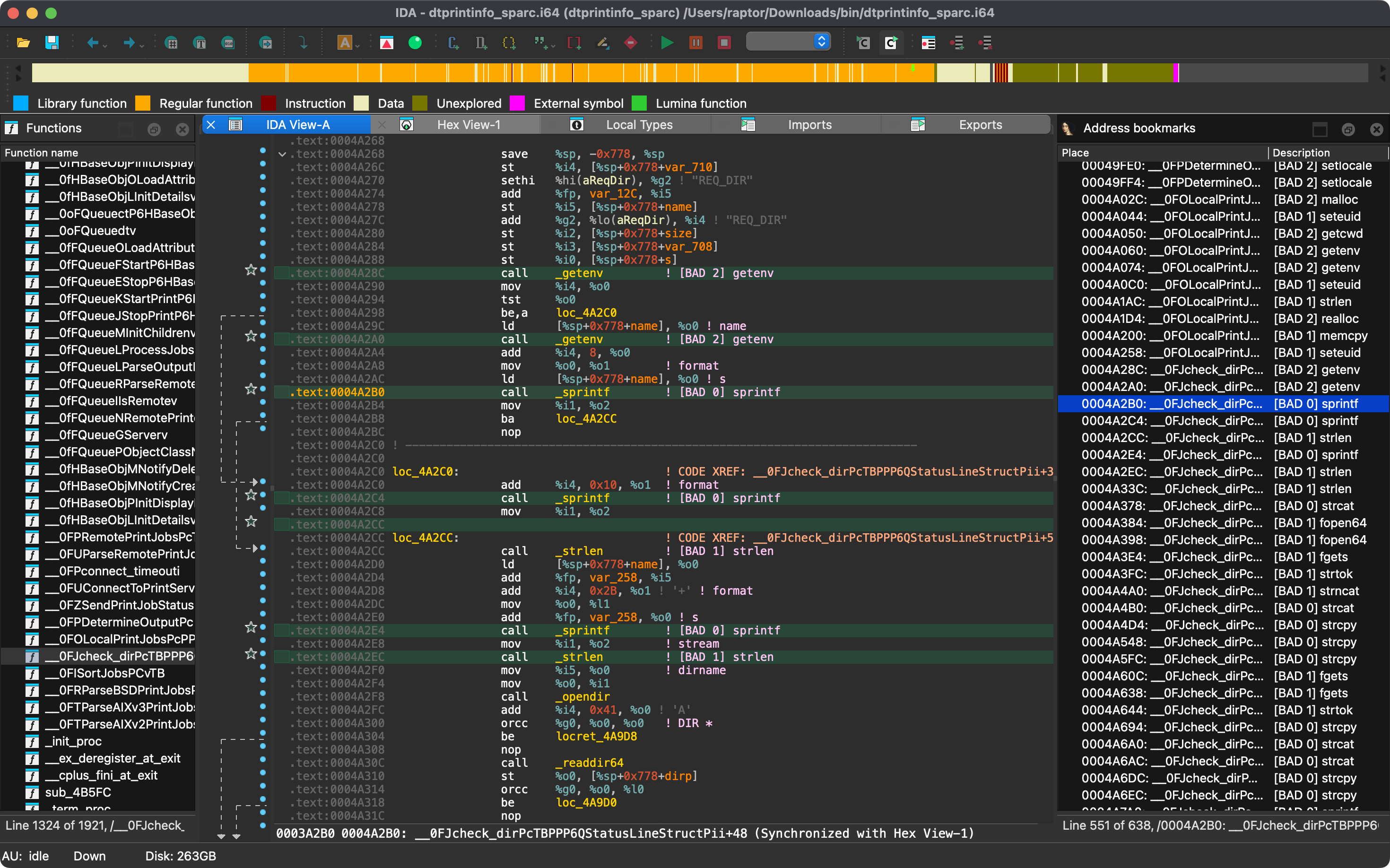
* 不安全的 API 函数调用位置将打印到 stdout 并在 IDB 中标记。
* 已知的不安全 API 函数按危险等级分组,以帮助确定审计工作的优先级。
* [BAD 0] 高优先级 - 通常被认为不安全的函数。
* [BAD 1] 中优先级 - 应检查是否存在不安全用法的值得关注的函数。
* [BAD 2] 低优先级 - 应仔细检查涉及这些函数的代码路径。
* 可以通过编辑 `conf/rhabdomancer.toml` 轻松自定义已知的不安全 API 函数列表。
## 博客文章
*
*
## 另请参阅
*
*
*
*
## 安装说明
获取最新版本最简单的方法是通过 [crates.io](https://crates.io/crates/rhabdomancer):
1. 下载、安装并配置 IDA Pro(参见 )。
2. 安装 LLVM/Clang(参见 )。
3. 在 Linux/macOS 上,按如下方式安装:
export IDADIR=/path/to/ida # 如果未设置,构建脚本将检查常见位置
cargo install rhabdomancer
在 Windows 上,则使用以下命令:
$env:LIBCLANG_PATH="\path\to\clang+llvm\bin"
$env:PATH="\path\to\ida;$env:PATH"
$env:IDADIR="\path\to\ida" # 如果未设置,构建脚本将检查常见位置
cargo install rhabdomancer
## 编译说明
或者,您也可以从 [源代码](https://github.com/0xdea/rhabdomancer) 构建:
1. 下载、安装并配置 IDA Pro(参见 )。
2. 安装 LLVM/Clang(参见 )。
3. 在 Linux/macOS 上,按如下方式编译:
git clone --depth 1 https://github.com/0xdea/rhabdomancer
cd rhabdomancer
export IDADIR=/path/to/ida # 如果未设置,构建脚本将检查常见位置
cargo build --release
在 Windows 上,则使用以下命令:
git clone --depth 1 https://github.com/0xdea/rhabdomancer
cd rhabdomancer
$env:LIBCLANG_PATH="\path\to\clang+llvm\bin"
$env:PATH="\path\to\ida;$env:PATH"
$env:IDADIR="\path\to\ida" # 如果未设置,构建脚本将检查常见位置
cargo build --release
## 使用说明
1. 确保 IDA Pro 已使用有效许可证正确配置。
2. 如有需要,在 `conf/rhabdomancer.toml` 中自定义已知的不安全 API 函数列表。您可以通过设置 `RHABDOMANCER_CONFIG` 环境变量来覆盖默认的配置文件位置。
3. 按如下方式运行:
rhabdomancer
任何现有的 `.i64` IDB 文件都将被更新;否则,将创建新的 IDB 文件。
4. 使用 IDA Pro 打开生成的 `.i64` IDB 文件。
5. 选择 `View` > `Open subviews` > `Bookmarks`
6. 您的结果已便捷地收集在 IDA Pro 窗口中。
## 兼容性
* IDA Pro 9.0.240925 - 最新兼容版本:v0.2.4。
* IDA Pro 9.0.241217 - 最新兼容版本:v0.3.5。
* IDA Pro 9.1.250226 - 最新兼容版本:v0.6.2。
* IDA Pro 9.2.250908 - 最新兼容版本:v0.7.6。
* IDA Pro 9.3.260213 - 最新兼容版本:当前版本。
## 更新日志
* [CHANGELOG.md](CHANGELOG.md)
## 待办事项
* 丰富已知的不安全 API 函数列表(参见 )。
* 考虑将 `traverse_xrefs` 转换为迭代遍历,以避免潜在的栈溢出和无限循环。
* 考虑扩大 `normalize_name` 中规范化的范围,以涵盖更多情况。
* 实现一个类似于 [VulFi](https://github.com/Accenture/VulFi) 和 [VulnFanatic](https://github.com/Martyx00/VulnFanatic) 的基础规则集。
标签:Headless 模式, idalib, IDA Pro 插件, Python安全, Rust, TLS抓取, 不安全API检测, 二进制分析, 二进制安全, 云安全监控, 云安全运维, 云资产清单, 可视化界面, 恶意代码分析, 情报收集, 漏洞研究, 网络流量审计, 软件安全, 逆向工程, 通知系统, 配置文件, 静态分析