ELOESZHANG/MPCF--3d_object_detection
GitHub: ELOESZHANG/MPCF--3d_object_detection
MPCF 是一种基于伪点云的多阶段融合多模态3D目标检测方法,旨在提升检测精度并降低硬件需求。
Stars: 34 | Forks: 3
# MPCF: 基于伪点云的多阶段融合融合多模态3D目标检测
[高攀](https://pangao-1.github.io/) 1, ,
[张平](https://github.com/ELOESZHANG) 1,✉* ,
[`论文`](https://ieeexplore.ieee.org/abstract/document/11398352)。
1 电子科技大学 (UESTC)
我们提出了[`MPCF`](https://doi.org/10.1109/TCSVT.2026.3665922)(MPCF: 基于伪点云的多阶段融合融合多模态3D目标检测),用于点云和伪点云处理。[`论文`](https://ieeexplore.ieee.org/abstract/document/11398352)发表于IEEE TCSVT。您可以点击PDF按钮下载全文。
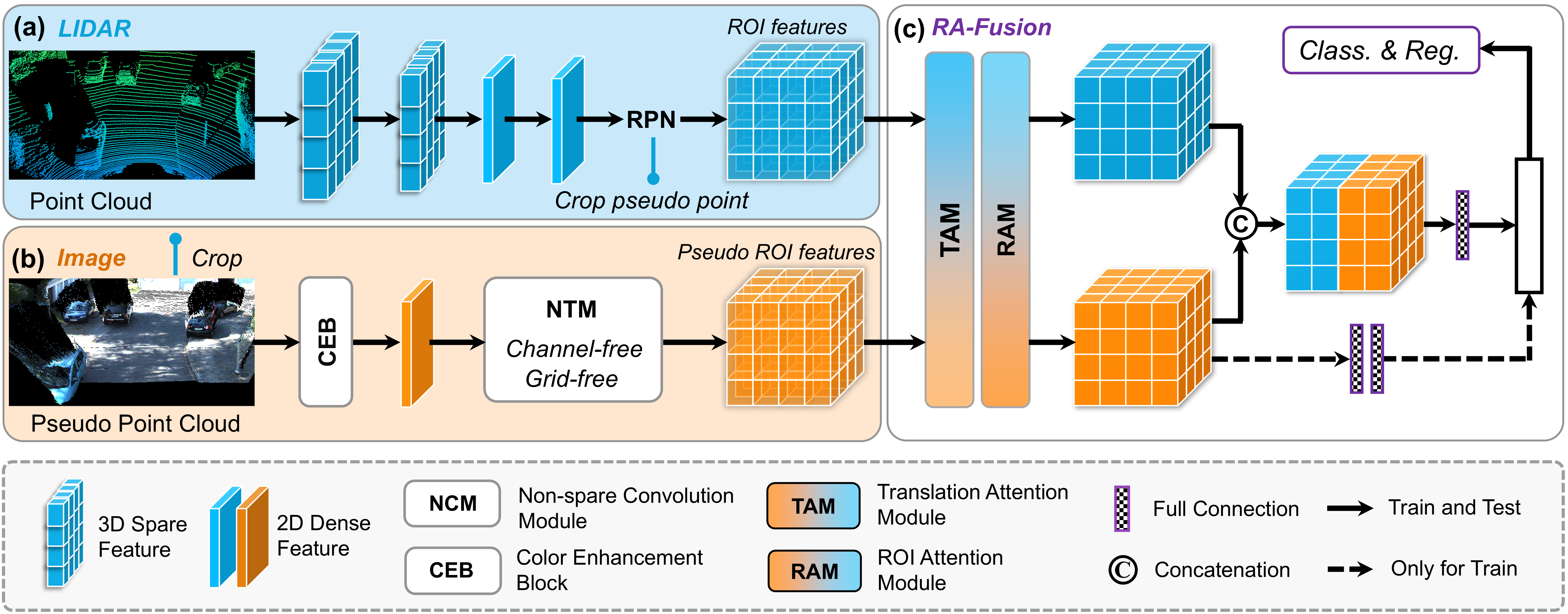
这是 [**MPCF**] 的官方实现,[`论文`](https://ieeexplore.ieee.org/abstract/document/11398352),基于 [`SFD`](https://github.com/LittlePey/SFD) 和 [`OpenPCDet`](https://github.com/open-mmlab/OpenPCDet) 构建。
## 🔥 亮点
* **强大的性能**。MPCF 在 KITTI 测试集上,针对单一数据使用实现了 **SOTA** 性能。 [`KITTI 基准测试`](https://www.cvlibs.net/datasets/kitti/eval_object.php?obj_benchmark=3d)💪
* **更友好**。MPCF 在训练期间使用少于 **7 GB** 显存,在推理期间约 **~3 GB** 显存。(即,RTX 3090、RTX4090 就足够训练我们的 MPCF)。 😀
### 模型库
我们发布了基于 KITTI 数据集的模型。
* 所有模型均使用 1 块 RTX-3090 或 4 块 RTX-4090 GPU 进行训练,并可供下载。
* 对于 KITTI 验证集,模型使用 train 分割(3712 个样本)进行训练。
* 对于 KITTI 测试集,请使用稍低的分数阈值(~0.5)并在所有训练数据上训练模型以获得理想的性能。
| | 模态 | GPU 显存 | 简单 | 中等 | 困难 | 下载 |
|---------------------------------------------|----------:|----------:|:-------:|:-------:|:-------:|:---------:|
| [mpcf-val](tools/cfgs/kitti_models/mpcf.yaml)| LiDAR+RGB | ~7GB (训练)/~3 GB(验证) | 95.97 | 89.67 | 86.89 | [google](https://drive.google.com/file/d/1AT2sthr0YhI5ZurtwLghpp60baefC1C_/view?usp=sharing) / [baidu](https://pan.baidu.com/s/1A_A4OY8Kq3xsPLIj9yDNBA?pwd=1234) |
| [mpcf-test](tools/cfgs/kitti_models/mpcf_can.yaml)| LiDAR+RGB | ~7GB (训练)/~3 GB(验证) | 92.46 | 85.50 | 80.69 | [`KITTI 基准测试`](https://www.cvlibs.net/datasets/kitti/eval_object.php?obj_benchmark=3d) |
### 安装说明
1. 准备运行环境。
您可以按照 [`OpenPCDet`](https://github.com/open-mmlab/OpenPCDet) 中的安装步骤进行操作。我们使用 1 块 RTX-3090 或 4 块 RTX-4090 GPU 来训练我们的 MPCF。
2. 准备数据。
数据集遵循 [`SFD`](https://github.com/LittlePey/SFD) 的设置。总之,您的数据集应如下所示:
MPCF
├── data
│ ├── kitti_pseudo
│ │ │── ImageSets
│ │ │── training
│ │ │ ├── calib & velodyne & label_2 & image_2 & (可选: planes) & depth_dense_twise & depth_pseudo_rgbseguv_twise
│ │ │── testing
│ │ │ ├── calib & velodyne & image_2 & depth_dense_twise & depth_pseudo_rgbseguv_twise
│ │ │── gt_database
│ │ │── gt_database_pseudo_seguv
│ │ │── kitti_dbinfos_train_custom_seguv.pkl
│ │ │── kitti_infos_test.pkl
│ │ │── kitti_infos_train.pkl
│ │ │── kitti_infos_trainval.pkl
│ │ │── kitti_infos_val.pkl
├── pcdet
├── tools
.
3. 设置。
```
conda create -n MPCF_env python=3.8
conda activate MPCF_env
pip install torch==1.10.1+cu113 torchvision==0.11.2+cu113 torchaudio==0.10.1+cu113 -f https://download.pytorch.org/whl/torch_stable.html
(或者: pip install torch==2.0.0+cu117 torchvision==0.15.1+cu117 torchaudio==2.0.1+cu117 -f https://download.pytorch.org/whl/torch_stable.html )
pip install -r requirements.txt
pip install spconv-cu113 (或 spconv-cu116)
cd MPCF
python setup.py develop
cd pcdet/ops/iou3d/cuda_op
python setup.py develop
```
### 快速开始
您可以在 tools/GP_run.sh 中找到训练和测试命令。
0. 生成 kitti_pkl 和 GT 数据
```
python -m pcdet.datasets.kitti.kitti_dataset_custom create_kitti_infos ../tools/cfgs/dataset_configs/kitti_dataset_custom.yaml
```
1. 训练。(我们建议在单 GPU 上运行,我们的最优模型仅使用 1 块 GPU 训练。)
单 GPU 训练:
```
cd tools
python train.py --gpu_id 0 --workers 0 --cfg_file cfgs/kitti_models/mpcf.yaml \
--batch_size 1 --epochs 60 --max_ckpt_save_num 25 --fix_random_seed
```
4 GPU 训练:
```
cd tools
python -m torch.distributed.launch --nnodes 1 --nproc_per_node=4 --master_port 25511 train.py \
--gpu_id 0,1,2,3 --launch 'pytorch' --workers 4 \
--batch_size 4 --cfg_file cfgs/kitti_models/mpcf.yaml --tcp_port 61000 \
--epochs 60 --max_ckpt_save_num 30 --fix_random_seed
```
2. 评估。
```
cd tools
python test.py --gpu_id 1 --workers 4 --cfg_file cfgs/kitti_models/mpcf_test.yaml --batch_size 1 \
--ckpt ../output/kitti_models/mpcf/default/ckpt/checkpoint_epoch_57.pth #--save_to_file
```
## 许可证
本代码在 [Apache 2.0 许可证](LICENSE) 下发布。
## 致谢
我们感谢这些出色的工作和开源仓库:
[OpenPCDet](https://github.com/open-mmlab/OpenPCDet)、[SFD](https://github.com/LittlePey/SFD) 以及 [Voxel-RCNN](https://github.com/djiajunustc/Voxel-R-CNN)。
## 引用
```bibtex
@article{gao2024mpcf,
title={MPCF: Multi-Phase Consolidated Fusion for Multi-Modal 3D Object Detection with Pseudo Point Cloud},
author={Gao, Pan and Zhang, Ping},
journal={IEEE Transactions on Circuits and Systems for Video Technology},
year={2024},
publisher={IEEE}
}
```1 电子科技大学 (UESTC)
标签:3D物体检测, KITTI数据集, LiDAR传感器, OpenPCDet框架, RGB图像, SOTA性能, Vectored Exception Handling, 伪点云, 低显存, 凭据扫描, 多模态融合, 多阶段融合, 深度学习, 点云处理, 目标检测, 神经网络, 自动驾驶, 计算机视觉, 逆向工具, 高效训练