simular-ai/Agent-S
GitHub: simular-ai/Agent-S
Agent S 是一个开源的计算机使用智能体框架,通过模拟人类的视觉与操作逻辑,自主控制 Windows、macOS 和 Linux 系统以完成复杂 GUI 任务。
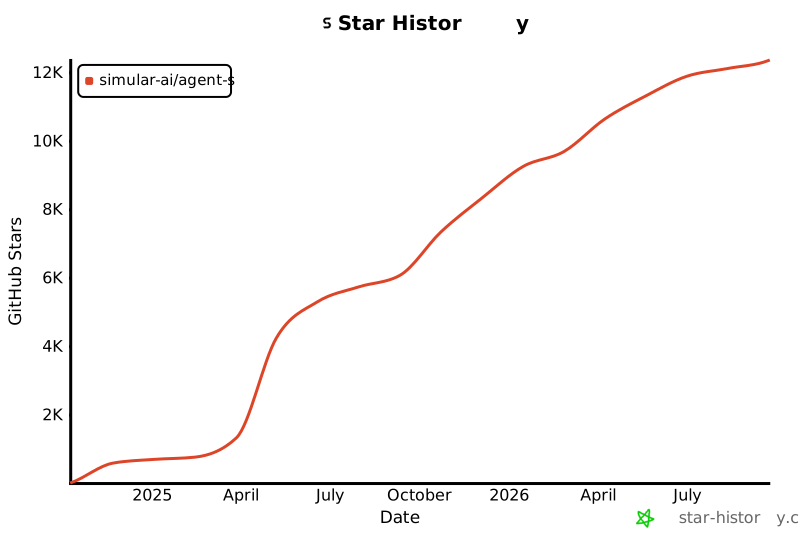
Stars: 11889 | Forks: 1400
 Agent S:
Use Computer Like a Human
Agent S:
Use Computer Like a Human
🏆 Agent S3:首个在 OSWorld 上超越人类表现的产品 (72.60%)
🌐 [S3 博客]
📄 [S3 论文]
🎥 [S3 视频]
🌐 [S2 博客]
📄 [S2 论文 (COLM 2025)]
🎥 [S2 视频]
🌐 [S1 博客]
📄 [S1 论文 (ICLR 2025)]
🎥 [S1 视频]




## 🥳 更新
- [x] **2025/12/15**: Agent S3 是**首个**在 OSWorld 上超越人类水平表现的产品,得分高达 **72.60%**!
- [x] **2025/10/02**: 发布 Agent S3 及其[技术论文](https://arxiv.org/abs/2510.02250),在 OSWorld 上创下 **69.9%** 的新 SOTA(接近 72% 的人类表现),并在 WindowsAgentArena 和 AndroidWorld 上展现出强大的泛化能力!它还更简单、更快速、更灵活。
- [x] **2025/08/01**: Agent S2.5 发布 (gui-agents v0.2.5):更简单、更好、更快!在 [OSWorld-Verified](https://os-world.github.io) 上创下新 SOTA!
- [x] **2025/07/07**: [Agent S2 论文](https://arxiv.org/abs/2504.00906)被 COLM 2025 录用!蒙特利尔见!
- [x] **2025/04/27**: Agent S 论文荣获 ICLR 2025 Agentic AI for Science Workshop 最佳论文奖 🏆!
- [x] **2025/04/01**: 发布 [Agent S2 论文](https://arxiv.org/abs/2504.00906),在 OSWorld、WindowsAgentArena 和 AndroidWorld 上取得新的 SOTA 结果!
- [x] **2025/03/12**: 发布 Agent S2 以及 [gui-agents](https://github.com/simular-ai/Agent-S) 的 v0.2.0 版本,这是计算机使用智能体 (CUA) 的最新技术水平,性能超越 OpenAI 的 CUA/Operator 和 Anthropic 的 Claude 3.7 Sonnet Computer-Use!
- [x] **2025/01/22**: [Agent S 论文](https://arxiv.org/abs/2410.08164)被 ICLR 2025 录用!
- [x] **2025/01/21**: 发布 [gui-agents](https://github.com/simular-ai/Agent-S) 库的 v0.1.2 版本,支持 Linux 和 Windows!
- [x] **2024/12/05**: 发布 [gui-agents](https://github.com/simular-ai/Agent-S) 库的 v0.1.0 版本,让您可以轻松使用 Agent-S 进行 Mac、OSWorld 和 WindowsAgentArena 操作!
- [x] **2024/10/10**: 发布 [Agent S 论文](https://arxiv.org/abs/2410.08164)和代码库!
## 目录
1. [💡 简介](#-introduction)
2. [🎯 当前结果](#-current-results)
3. [🛠️ 安装与设置](#%EF%B8%8F-installation--setup)
4. [🚀 用法](#-usage)
5. [🤝 致谢](#-acknowledgements)
6. [💬 引用](#-citation)
## 💡 简介
欢迎来到 **Agent S**,这是一个旨在通过 Agent-Computer Interface 实现与计算机自主交互的开源框架。我们的使命是构建智能的 GUI 智能体,能够从过去的经验中学习,并在您的计算机上自主执行复杂任务。
无论您是对 AI、自动化感兴趣,还是想为尖端的基于智能体的系统做出贡献,我们都非常高兴您的加入!
## 🎯 当前结果
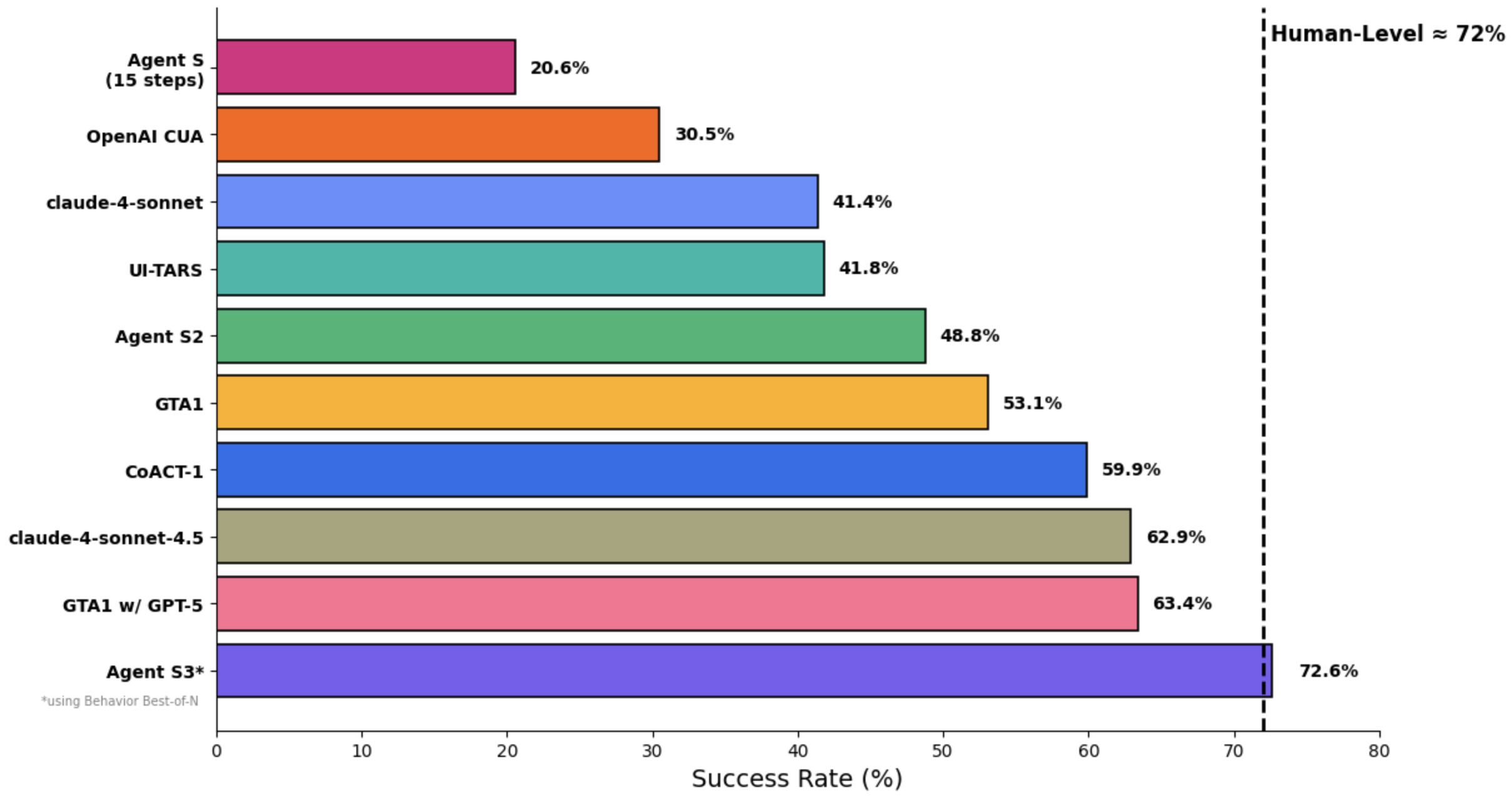
在 OSWorld 上,仅 Agent S3 在 100 步设置中就达到了 66%,已经超过了之前 63.4% 的最先进水平 (GTA1 w/ GPT-5)。加上 Behavior Best-of-N,性能进一步攀升至 72.6%,*超越*了 OSWorld 上的人类水平表现(约 72%)!
Agent S3 还展示了强大的零样本泛化能力!在 WindowsAgentArena 上,准确率从仅使用 Agent S3 的 50.2% 上升到从 3 次推演中选择后的 56.6%。同样在 AndroidWorld 上,性能从 68.1% 提高到 71.6%。
## 🛠️ 安装与设置
### 前置条件
- **单显示器**:我们的智能体专为单显示器屏幕设计
- **安全性**:智能体运行 Python 代码来控制您的计算机 - 请谨慎使用
- **支持的平台**:Linux、Mac 和 Windows
### 安装
要在不克隆仓库的情况下安装 Agent S3,请运行
```
pip install gui-agents
```
如果您想在修改的同时测试 Agent S3,请克隆仓库并使用以下命令安装
```
pip install -e .
```
别忘了还要 `brew install tesseract`!Pytesseract 需要这个额外的安装才能工作。
### API 配置
#### 选项 1:环境变量
添加到您的 `.bashrc` (Linux) 或 `.zshrc` (MacOS):
```
export OPENAI_API_KEY=
export ANTHROPIC_API_KEY=
export HF_TOKEN=
```
#### 选项 2:Python 脚本
```
import os
os.environ["OPENAI_API_KEY"] = ""
```
### 支持的模型
我们支持 Azure OpenAI、Anthropic、Gemini、Open Router 和 vLLM 推理。有关详细信息,请参阅 [models.md](models.md)。
### Grounding 模型(必需)
为了获得最佳性能,我们推荐托管在 Hugging Face Inference Endpoints 或其他提供商上的 [UI-TARS-1.5-7B](https://huggingface.co/ByteDance-Seed/UI-TARS-1.5-7B)。设置说明请参阅 [Hugging Face Inference Endpoints](https://huggingface.co/learn/cookbook/en/enterprise_dedicated_endpoints)。
## 🚀 用法
### CLI
注意,此处运行的是 Agent S3,即我们改进后的智能体,不包含 bBoN。
使用所需参数运行 Agent S3:
```
agent_s \
--provider openai \
--model gpt-5-2025-08-07 \
--ground_provider huggingface \
--ground_url http://localhost:8080 \
--ground_model ui-tars-1.5-7b \
--grounding_width 1920 \
--grounding_height 1080
```
#### 本地编码环境(可选)
对于需要代码执行的任务(例如,数据处理、文件操作、系统自动化),您可以启用本地编码环境:
```
agent_s \
--provider openai \
--model gpt-5-2025-08-07 \
--ground_provider huggingface \
--ground_url http://localhost:8080 \
--ground_model ui-tars-1.5-7b \
--grounding_width 1920 \
--grounding_height 1080 \
--enable_local_env
```
⚠️ **警告**:本地编码环境会在您的机器上本地执行任意 Python 和 Bash 代码。仅在受信任的环境中使用此功能,并确保输入可信。
#### 必需参数
- **`--provider`**:主生成模型提供商(例如,openai、anthropic 等)- 默认值:"openai"
- **`--model`**:主生成模型名称(例如,gpt-5-2025-08-07)- 默认值:"gpt-5-2025-08-07"
- **`--ground_provider`**:Grounding 模型的提供商 - **必需**
- **`--ground_url`**:Grounding 模型的 URL - **必需**
- **`--ground_model`**:Grounding 模型的模型名称 - **必需**
- **`--grounding_width`**:Grounding 模型输出坐标分辨率的宽度 - **必需**
- **`--grounding_height`**:Grounding 模型输出坐标分辨率的高度 - **必需**
#### 可选参数
- **`--model_temperature`**:将所有模型调用固定的温度(对于 o3 等模型需要设置为 1.0,但对于其他模型可以留空)
#### Grounding 模型尺寸
Grounding 宽度和高度应与您的 Grounding 模型的输出坐标分辨率相匹配:
- **UI-TARS-1.5-7B**:使用 `--grounding_width 1920 --grounding_height 1080`
- **UI-TARS-72B**:使用 `--grounding_width 1000 --grounding_height 1000`
#### 可选参数
- **`--model_url`**:主生成模型的自定义 API URL - 默认值:""
- **`--model_api_key`**:主生成模型的 API 密钥 - 默认值:""
- **`--ground_api_key`**:Grounding 模型端点的 API 密钥 - 默认值:""
- **`--max_trajectory_length`**:在轨迹中保留的最大图像轮数 - 默认值:8
- **`--enable_reflection`**:启用反思智能体以辅助工作智能体 - 默认值:True
- **`--enable_local_env`**:启用本地编码环境以执行代码(警告:在本地执行任意代码)- 默认值:False
#### 本地编码环境详情
本地编码环境使 Agent S3 能够直接在您的机器上执行 Python 和 Bash 代码。这对于以下情况特别有用:
- **数据处理**:操作电子表格、CSV 文件或数据库
- **文件操作**:批量文件处理、内容提取或文件组织
- **系统自动化**:配置更改、系统设置或自动化脚本
- **代码开发**:编写、编辑或执行代码文件
- **文本处理**:文档操作、内容编辑或格式化
启用后,智能体可以使用 `call_code_agent` 动作为可以通过编程而非 GUI 交互完成的任务执行代码块。
**要求:**
- **Python**:用于运行 Agent S3 的同一 Python 解释器(自动检测)
- **Bash**:在 `/bin/bash` 中可用(macOS 和 Linux 标准)
- **系统权限**:智能体以执行它的用户所具有的相同权限运行
**安全注意事项:**
- 本地环境以运行智能体的用户的相同权限执行任意代码
- 仅在受信任的环境中启用此功能
- 当智能体生成用于系统级操作的代码时要小心
- 对于不受信任的任务,请考虑在沙盒环境中运行
- Bash 脚本以 30 秒的超时时间执行,以防止进程挂起
### `gui_agents` SDK
首先,我们导入必要的模块。`AgentS3` 是 Agent S3 的主智能体类。`OSWorldACI` 是我们的 Grounding 智能体,它将智能体动作转换为可执行的 Python 代码。
```
import pyautogui
import io
from gui_agents.s3.agents.agent_s import AgentS3
from gui_agents.s3.agents.grounding import OSWorldACI
from gui_agents.s3.utils.local_env import LocalEnv # Optional: for local coding environment
# 载入你的 API keys。
from dotenv import load_dotenv
load_dotenv()
current_platform = "linux" # "darwin", "windows"
```
接下来,我们定义引擎参数。`engine_params` 用于主智能体,`engine_params_for_grounding` 用于 Grounding。对于 `engine_params_for_grounding`,我们支持 HuggingFace TGI、vLLM 和 Open Router 等自定义端点。
```
engine_params = {
"engine_type": provider,
"model": model,
"base_url": model_url, # Optional
"api_key": model_api_key, # Optional
"temperature": model_temperature # Optional
}
# 从自定义 endpoint 加载 grounding engine
ground_provider = ""
ground_url = ""
ground_model = ""
ground_api_key = ""
# 根据模型输出坐标分辨率设置 grounding dimensions
# UI-TARS-1.5-7B:grounding_width=1920,grounding_height=1080
# UI-TARS-72B:grounding_width=1000,grounding_height=1000
grounding_width = 1920 # Width of output coordinate resolution
grounding_height = 1080 # Height of output coordinate resolution
engine_params_for_grounding = {
"engine_type": ground_provider,
"model": ground_model,
"base_url": ground_url,
"api_key": ground_api_key, # Optional
"grounding_width": grounding_width,
"grounding_height": grounding_height,
}
```
然后,我们定义 Grounding 智能体和 Agent S3。
```
# 可选:启用本地 coding 环境
enable_local_env = False # Set to True to enable local code execution
local_env = LocalEnv() if enable_local_env else None
grounding_agent = OSWorldACI(
env=local_env, # Pass local_env for code execution capability
platform=current_platform,
engine_params_for_generation=engine_params,
engine_params_for_grounding=engine_params_for_grounding,
width=1920, # Optional: screen width
height=1080 # Optional: screen height
)
agent = AgentS3(
engine_params,
grounding_agent,
platform=current_platform,
max_trajectory_length=8, # Optional: maximum image turns to keep
enable_reflection=True # Optional: enable reflection agent
)
```
最后,让我们查询智能体!
```
# 获取 screenshot。
screenshot = pyautogui.screenshot()
buffered = io.BytesIO()
screenshot.save(buffered, format="PNG")
screenshot_bytes = buffered.getvalue()
obs = {
"screenshot": screenshot_bytes,
}
instruction = "Close VS Code"
info, action = agent.predict(instruction=instruction, observation=obs)
exec(action[0])
```
有关推理循环如何工作的更多详细信息,请参阅 `gui_agents/s3/cli_app.py`。
### OSWorld
要在 OSWorld 中部署 Agent S3,请遵循 [OSWorld 部署说明](osworld_setup/s3/OSWorld.md)。
## 💬 引
如果您觉得这个代码库有用,请引用:
```
@misc{Agent-S3,
title={The Unreasonable Effectiveness of Scaling Agents for Computer Use},
author={Gonzalo Gonzalez-Pumariega and Vincent Tu and Chih-Lun Lee and Jiachen Yang and Ang Li and Xin Eric Wang},
year={2025},
eprint={2510.02250},
archivePrefix={arXiv},
primaryClass={cs.AI},
url={https://arxiv.org/abs/2510.02250},
}
@misc{Agent-S2,
title={Agent S2: A Compositional Generalist-Specialist Framework for Computer Use Agents},
author={Saaket Agashe and Kyle Wong and Vincent Tu and Jiachen Yang and Ang Li and Xin Eric Wang},
year={2025},
eprint={2504.00906},
archivePrefix={arXiv},
primaryClass={cs.AI},
url={https://arxiv.org/abs/2504.00906},
}
@inproceedings{Agent-S,
title={{Agent S: An Open Agentic Framework that Uses Computers Like a Human}},
author={Saaket Agashe and Jiuzhou Han and Shuyu Gan and Jiachen Yang and Ang Li and Xin Eric Wang},
booktitle={International Conference on Learning Representations (ICLR)},
year={2025},
url={https://arxiv.org/abs/2410.08164}
}
```
## Star 历史
[](https://star-history.com/#simular-ai/Agent-S&Date)标签:Agent框架, AI智能体, Anthropic Claude, C2, DLL 劫持, DNS 反向解析, GUI自动化, IP 地址批量处理, Linux自动化, MacOS自动化, OpenAI GPT, OSWorld, RPA, Simular AI, SOTA, Windows自动化, 人工智能, 人机交互, 多模态AI, 大语言模型, 工作流自动化, 文档结构分析, 桌面自动化, 深度学习, 用户模式Hook绕过, 自动编程, 视觉语言模型, 计算机控制, 逆向工具