muchdogesec/txt2detection
GitHub: muchdogesec/txt2detection
一款利用 AI 将威胁情报文本自动转换为 Sigma 检测规则并输出 STIX 对象的命令行工具。
Stars: 9 | Forks: 1
# txt2detection
[](https://codecov.io/gh/muchdogesec/txt2detection)
## 概述
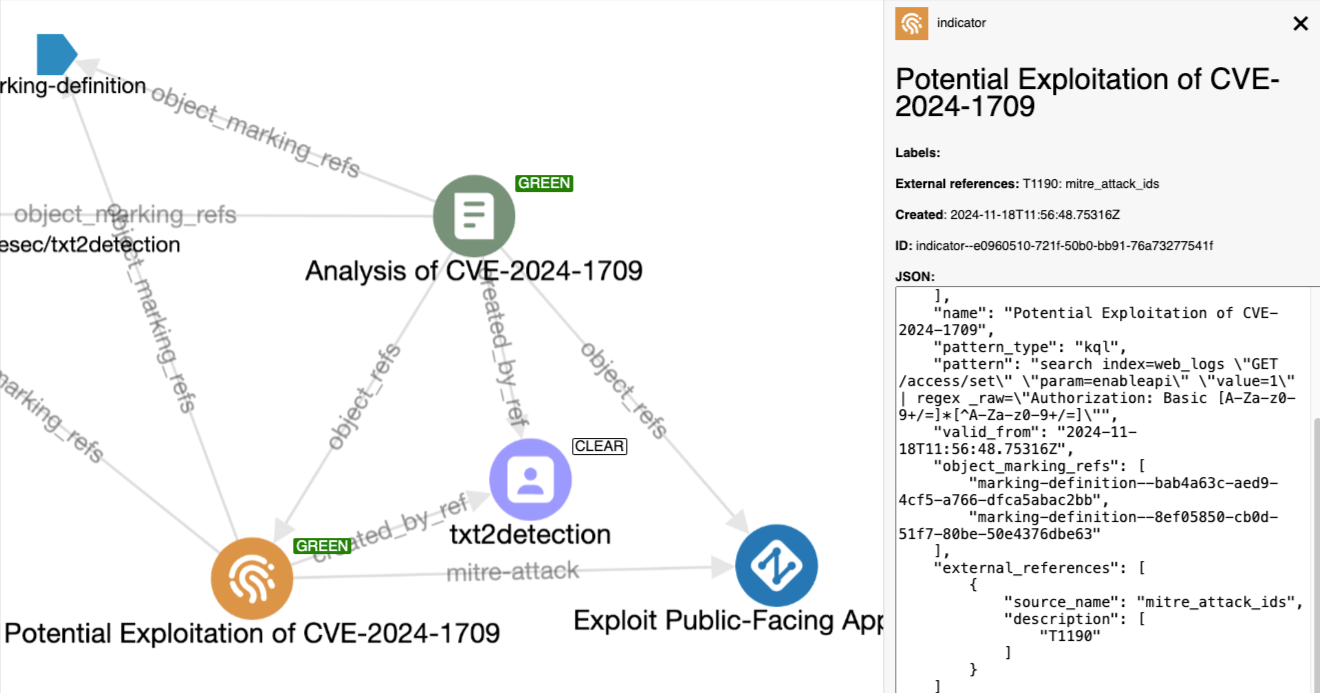
一个命令行工具,接收包含威胁情报的 txt 文件并将其转换为检测规则。
## 问题所在
为了说明这个问题,让我们来看看当前人类从想法(威胁 TTP)到检测规则所经历的常规流程:
1. 通过自己的研究阅读并理解威胁,并借助外部资源(博客、情报源等)
* 问题:报告过多,威胁的描述方式多种多样,报告包含不同的数据
2. 了解哪些日志或安全数据可用于检测此威胁
* 问题:分析师不熟悉日志 schema,TTP 通常跨越多个日志,难以确保检测规则具有完全覆盖
3. 将在第 1 步中创建的逻辑转换为 Sigma 检测规则,以搜索在第 2 步中识别的日志
* 问题:很难将已经理解的内容转换为逻辑检测规则(使用分析师可能不熟悉的检测语言)
4. 在发现新情报时修改检测规则
* 问题:这通常被忽视,因为人们在其检测工具中创建规则后就会将其遗忘
## 解决方案
使用 AI 处理威胁情报,创建并保持其更新。
txt2detection 允许用户输入一些威胁情报作为文件,以便将其转换为检测规则。
1. 用户上传情报报告
2. 根据用户输入,AI 提示被结构化并发送以生成情报规则
3. 规则转换为 STIX 对象
## 使用说明
### 设置
使用以下命令安装所需的依赖项:
```
# 克隆最新代码
git clone https://github.com/muchdogesec/txt2detection
cd txt2detection
# 创建 venv
python3 -m venv txt2detection-venv
source txt2detection-venv/bin/activate
# 安装 requirements
pip3 install -r requirements.txt
pip3 install .
```
### 设置变量
txt2detection 具有在 `.env` 文件中定义的各种设置。
要创建该文件的模板:
```
cp .env.example .env
```
要了解有关如何设置这些变量及其作用的更多信息,请阅读 `.env.markdown` 文件。
然后测试你的配置
```
python3 txt2detection.py \
check-credentials
```
它将返回一个响应,以显示哪些 API 密钥正在工作
```
============= Service Statuses ===============
ctibutler : authorized ✔
vulmatch : authorized ✔
LLMS:
openai : authorized ✔
deepseek : unsupported –
gemini : unsupported –
openrouter : unsupported –
anthropic : unsupported –
```
并非所有的服务都需要配置,如果你不打算使用它们。
### 运行
```
python3 txt2detection.py MODE \
ARGUEMENTS
```
你可以通过 3 种模式使用 txt2detection:
* `file`:一个文本文件,通常是包含你希望从中提取情报以创建规则的威胁报告
* `text`:描述你希望创建的规则的文本提示
* `sigma`:你希望转换为 STIX bundle 的现有 Sigma 规则
#### 文件 (`file`) / 文本输入 (`text`)
使用此模式从输入的文本文件生成一组规则;
* `--input_file`(必填,如果未使用 `--input_text`,则为文件路径):要转换的文件。必须是 `.txt`
* `--input_text`(必填,如果未使用 `--input_file`,则为字符串):如果你不想使用文件,这是一个将由 AI 分析以创建规则的文本字符串。通常,你需要尽可能详细地描述此文本(将其视为类似于 LLM prompt)。非常简短的 `input_text` 通常会导致 AI 在规则生成时失败(你会看到 `Unparsable output returned by LLM model`)。
* `--name`(必填):文件名,最多 72 个字符。将用于创建的 STIX Report 对象。注意,Indicator 对象的名称/标题由 AI 生成
* `--report_id`(可选,默认为随机的 uuidv4):有时需要控制生成的 `report` 对象的 id。因此,你可以在此字段中传递一个有效的 UUIDv4 分配给该报告。例如,传递 `2611965-930e-43db-8b95-30a1e119d7e2` 将创建一个 STIX 对象 id `report--2611965-930e-43db-8b95-30a1e119d7e2`。如果不传递此参数,则将随机生成 UUID。
* `--tlp_level`(可选,默认为 `clear`):选项为 `clear`、`green`、`amber`、`amber_strict`、`red`。
* `--labels`(可选):以空格分隔的标签列表。不区分大小写(都将转换为小写)。允许 `a-z`、`0-9`。必须使用命名空间(`NAMESPACE.TAG_VALUE`)。例如,`"namespace.label1" "namespace.label_2"` 将创建 2 个标签。将添加到创建的 report 和 indicator 对象以及规则 `tags` 中。
* 注意:创建标签时,你可以使用保留的命名空间 `cve.` 和 `attack.`,以使用 Vulmatch 和 CTI Butler 执行外部 enrichment。所有 Indicator 将链接到这些对象(AI enrichments 链接单个规则)。创建的标签将附加到 AI 生成的标签列表中。
* 注意:你不能使用命名空间 `tlp.`。请改用 `--tlp_level` 标志。
* `--created`(可选,`YYYY-MM-DDTHH:MM:SS`):默认情况下,所有对象的 `created` 时间将采用脚本运行时的时间。如果你想显式设置这些时间,可以使用此标志进行设置。以 `YYYY-MM-DDTHH:MM:SS` 格式传递值,例如 `2020-01-01T00:00:00`
* `--use_identity`(可选,默认为 txt2detection 身份):可以传递完整的 STIX 2.1 identity 对象(确保正确转义)。将由 STIX2 库进行验证。该 ID 用于创建 Indicator 和 Report STIX 对象,并用作 Sigma 规则中的 `author` 属性。
* `--license`(可选):[根据 SPDX ID 规范的规则许可证](https://spdx.org/licenses/)。将添加到规则中。
* `--reference_urls`(可选):要作为 `references` 添加到 Sigma Rule 属性以及创建的 Indicator 和 Report STIX 对象的 `external_references` 属性中的 URL 列表。例如 `"https://www.google.com/" "https://www.facebook.com/"`
* `--external_refs`(可选):txt2detection 将自动为其为输入创建的 report 对象填充 `external_references`。你可以使用此值向 `external_references` 添加其他对象。注意,目前只能添加 `source_name` 和 `external_id` 值。以 `source_name=external_id` 形式传递。例如,`--external_refs txt2stix=demo1 source=id` 将在 `external_references` 属性下创建以下对象:`{"source_name":"txt2stix","external_id":"demo1"},{"source_name":"source","external_id":"id"}`
* `--ai_provider`(必填):定义用于生成规则的 `provider:model`。选择一个选项。目前支持:
* Provider(需要环境变量 `OPENROUTER_API_KEY`):`openrouter:`,providers/models `openai/gpt-4o`,`deepseek/deepseek-chat`([更多内容点这里](https://openrouter.ai/models))
* Provider(需要环境变量 `OPENAI_API_KEY`):`openai:`,models 例如:`gpt-4o`,`gpt-4o-mini`,`gpt-4-turbo`,`gpt-4`([更多内容点这里](https://platform.openai.com/docs/models))
* Provider(需要环境变量 `ANTHROPIC_API_KEY`):`anthropic:`,models 例如:`claude-3-5-sonnet-latest`,`claude-3-5-haiku-latest`,`claude-3-opus-latest`([更多内容点这里](https://docs.anthropic.com/en/docs/about-claude/models))
* Provider(需要环境变量 `GOOGLE_API_KEY`):`gemini:models/`,models:`gemini-1.5-pro-latest`,`gemini-1.5-flash-latest`([更多内容点这里](https://ai.google.dev/gemini-api/docs/models/gemini))
* Provider(需要环境变量 `DEEPSEEK_API_KEY`):`deepseek:`,models `deepseek-chat`([更多内容点这里](https://api-docs.deepseek.com/quick_start/pricing))
* `--create_attack_navigator_layer`(布尔值,默认为 `false`):传递此标志将为 MITRE ATT&CK 标签生成 [MITRE ATT&CK Navigator layer](https://mitre-attack.github.io/attack-navigator/)。注意,Sigma 目前仅支持 ATT&CK Enterprise。
注意,在此模式下,以下值将自动分配给规则
* `level`:将提示 AI 进行分配,可选 `informational`、`low`、`medium`、`high`、`critical`
* `status`:在此模式下始终为 `experimental`
#### Sigma 规则输入 (`sigma`)
使用此模式将 Sigma 规则转换为 STIX bundle,并使用 ATT&CK 和 Vulmatch 对其进行 enrichment。
注意,在此模式下你应该了解以下几点;
* `--sigma_file`(必填,文件路径):你希望处理的 sigma 规则 .yml。必须是 `.yml` 或 `.yaml` 文件。目前不支持关联规则。
* `--report_id`:将覆盖规则中找到的任何 `id` 值,同时用于 Indicator 和 Report
* `--name`:将分配为规则的 `title`。将覆盖现有标题
* `--tlp_level`(可选):报告中的 `tlp.` 标签将转换为 TLP 级别。如果规则中没有 TLP 标签,默认情况是将其分配为 TLP `clear` 并添加标签。你可以使用此属性传递 `clear`、`green`、`amber`、`amber_strict`、`red` 以覆盖默认行为。如果规则中存在 TLP,则为此属性设置值将覆盖现有值
* `--labels`(可选):以空格分隔的标签列表。不区分大小写(都将转换为小写)。允许 `a-z`、`0-9`。例如,`"namespace.label1" "namespace.label2"` 将创建 2 个标签。将添加到创建的 report 和 indicator 对象以及规则 `tags` 中。注意,如果规则中有任何现有的 `tags`,这些值将附加到列表中。
* 注意:创建标签时,你可以使用保留的命名空间 `cve.` 和 `attack.`,以使用 Vulmatch 和 CTI Butler 执行外部 enrichment。创建的标签将附加到现有标签列表中。
* 注意:你不能使用命名空间 `tlp.`。请改用 `--tlp_level` 标志。
* `--created`(可选,`YYYY-MM-DDTHH:MM:SS`):默认情况下,将使用规则中的 `data` 和 `modified` 值。如果不存在这些值,默认行为是使用脚本运行时间。你可以在此处传递 `created` 时间,这将覆盖规则中的 `date` 和 `modified` 日期
* `--use_identity`(可选):可以传递完整的 STIX 2.1 identity 对象(确保正确转义)。将由 STIX2 库进行验证。该 ID 用于创建 Indicator 和 Report STIX 对象,并用作 Sigma 规则中的 `author` 属性。将覆盖任何现有的 `author` 值。如果规则中有 `author` 值,它将被转换为 STIX Identity
* `--license`(可选):[根据 SPDX ID 规范的规则许可证](https://spdx.org/licenses/)。将作为 `license` 添加到规则中。将覆盖规则中任何现有的 `license` 值。
* `--reference_urls`(可选):要作为 `references` 添加到 Sigma Rule 属性以及创建的 Indicator 和 Report STIX 对象的 `external_references` 属性中的 URL 列表。例如 `"https://www.google.com/" "https://www.facebook.com/"`。将附加到规则中任何现有的 `references`。
* `--external_refs`(可选):txt2detection 将自动为其为输入创建的 report 对象填充 `external_references`。你可以使用此值向 `external_references` 添加其他对象。注意,目前只能添加 `source_name` 和 `external_id` 值。以 `source_name=external_id` 形式传递。例如,`--external_refs txt2stix=demo1 source=id` 将在 `external_references` 属性下创建以下对象:`{"source_name":"txt2stix","external_id":"demo1"},{"source_name":"source","external_id":"id"}`
* `status`(可选):可选 `stable`、`test`、`experimental`、`deprecated`、`unsupported`。如果传递,将覆盖规则中记录的任何现有 `status`
* `level`(可选):可选 `informational`、`low`、`medium`、`high`、`critical`。如果传递,将覆盖规则中记录的任何现有 `level`
* `--create_attack_navigator_layer`(布尔值,默认为 `false`):传递此标志将为 MITRE ATT&CK 标签生成 [MITRE ATT&CK Navigator layer](https://mitre-attack.github.io/attack-navigator/)。
### 关于 observable 提取的说明
txt2detection 将自动尝试提取在创建或导入的规则中找到的任何 observable(又称 indicators of compromise),以将其转换为加入到规则的 STIX Indicator 对象中的 STIX 对象。
在 `txt2detection/observables.py` 中,你将找到当前支持的 observable 类型(以及用于的 regex)。
### 输出
每次运行的输出结构如下;
```
.
├── logs
│ ├── log-.log
│ ├── log-.log
│ └── log-.log
└── output
└── bundle--
├── rules
│ ├── rule--.yml
│ └── rule--.yml
├── data.json # AI output, useful for debugging
└── bundle.json # final STIX bundle with all objects
```
## 示例
有关一些示例命令,请参阅 `tests/manual-tests/README.md`。
## 支持
[通过 DOGESEC 社区提供最低限度的支持](https://community.dogesec.com/)。
## 许可证
[Apache 2.0](/LICENSE)。
标签:AI自动化, Petitpotam, Sigma规则, STIX, 威胁情报, 开发者工具, 检测规则, 目标导入, 网络资产发现, 逆向工具