Stanislav-Povolotsky/jddlab
GitHub: Stanislav-Povolotsky/jddlab
一款Docker化的Java与Android逆向分析去混淆一体化工具集,整合近20款主流反编译与安全测试工具。
Stars: 21 | Forks: 3
# jddlab - Java **反**编译与**去**混淆 **实验室**
[](https://github.com/Stanislav-Povolotsky/jddlab/)
[](https://github.com/Stanislav-Povolotsky/jddlab/)
[](https://hub.docker.com/r/stanislavpovolotsky/jddlab)
[](https://hub.docker.com/r/stanislavpovolotsky/jddlab)
- jddlab 是一个 [Docker 镜像](https://hub.docker.com/r/stanislavpovolotsky/jddlab/tags?name=latest),包含了反编译和去混淆 Java 和 Android APK 所需的所有工具。
- `jddlab` 是一个命令行工具,用于运行 [jddlab Docker 镜像](https://hub.docker.com/r/stanislavpovolotsky/jddlab/tags?name=latest),提供了一种快速便捷的方式来使用所有反编译和去混淆工具。
为什么运行 `jddlab` 比在主机上使用单独的工具更好:
- 安全性:Docker 将 jddlab 工具与主机系统隔离,最大限度地降低了风险和漏洞。
- 易于安装:只需一条 docker pull 命令即可安装所有工具和依赖项。
- 快速更新:只需拉取最新的容器版本即可获取新工具、功能和补丁。
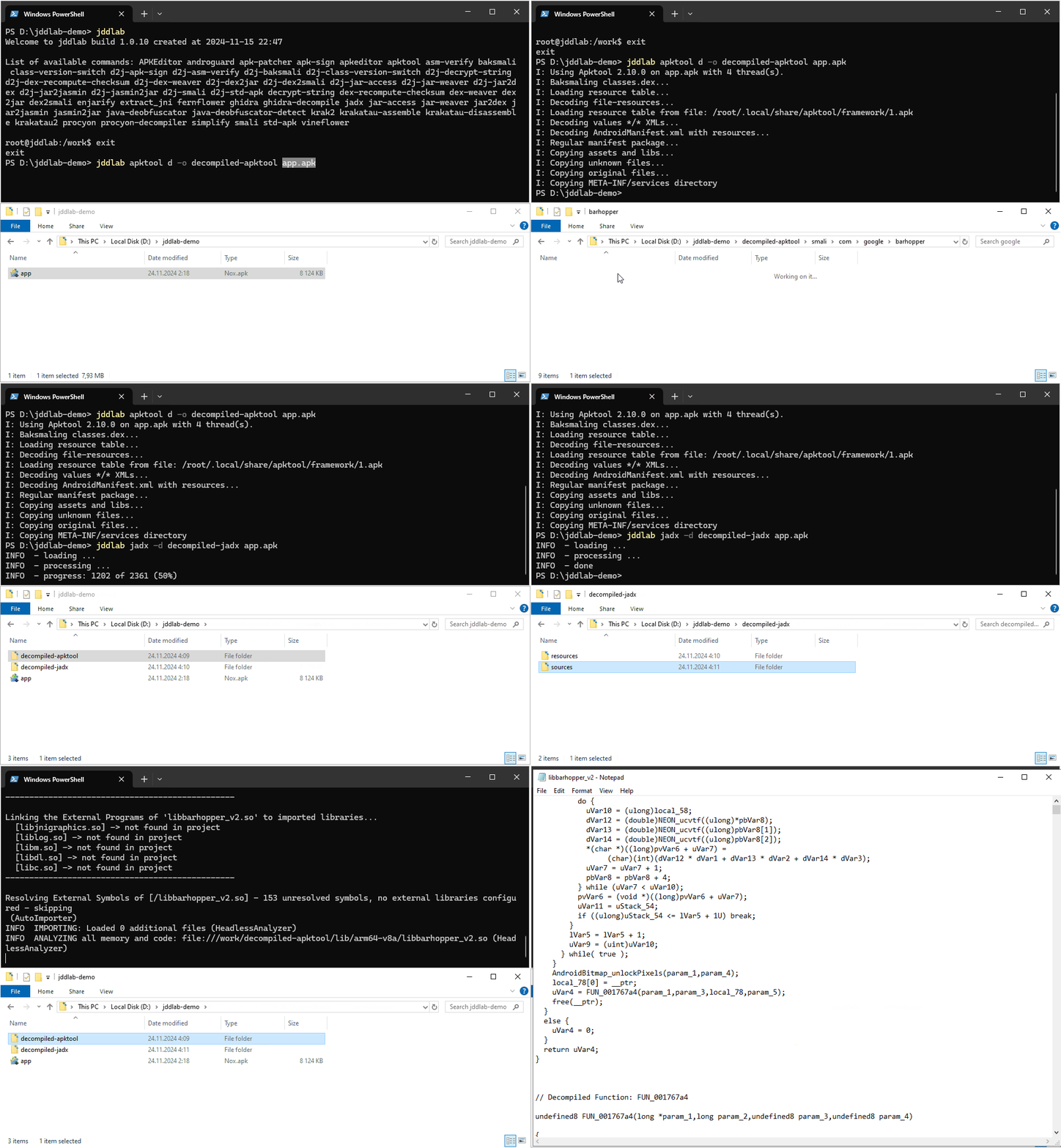
## 演示
## 安装
### 前置条件
首先你需要安装 Docker。因此你需要:
- [Docker 兼容的](https://www.docker.com/blog/top-questions-for-getting-started-with-docker/)操作系统(Windows、Linux 或 macOS)。
- 拥有管理员权限以安装软件。
- 对于 Windows:你还需要安装并启用 [WSL2 (Windows Subsystem for Linux)](https://learn.microsoft.com/en-us/windows/wsl/install) 支持以运行 Linux 镜像。
支持的平台:
- `amd64` (x86_64 Intel 或 AMD CPU)
- `arm64` (ARM64 芯片,如 Apple M1, M2, M3)
### 作为命令行工具安装(推荐)
`jddlab` 命令行工具是 `docker run -it --rm -v "$PWD:/work" stanislavpovolotsky/jddlab:latest` 命令的别名。
它运行 `jddlab` docker 实例并将当前文件夹映射为 `/work` 文件夹(读写),以便 jddlab 命令可以访问当前文件夹和子文件夹中的所有文件。
例如,如果你在当前文件夹中有 `test.apk`,它在 jddlab 实例中将可以通过 `./test.apk` 或 `/work/test.apk` 访问。
要安装 `jddlab` 命令行工具:
要进入 shell 模式,请输入:
```
jddlab
```
要运行特定命令,请输入 `jddlab <你的命令>`:
```
jddlab apktool --version
```
要将 jddlab 更新到最新版本,请运行:
```
jddlab update
```
### 作为 docker 镜像安装
你可以使用以下命令运行最新版本:
- 在 Linux 或 macOS 上:
docker run -it --rm -v "$PWD:/work" stanislavpovolotsky/jddlab:latest
- 在 Windows 上:
docker run -it --rm -v "%CD%:/work" stanislavpovolotsky/jddlab:latest
要进入 shell 模式,请输入:
```
docker run -it --rm -v "$PWD:/work" stanislavpovolotsky/jddlab:latest
```
要运行特定命令,只需在命令行末尾指定它:
```
docker run -it --rm -v "$PWD:/work" stanislavpovolotsky/jddlab:latest apktool --version
```
要将其更新到最新版本:
```
docker pull stanislavpovolotsky/jddlab:latest
```
## 如何操作
### 如何在 jddlab 中使用 ADB
#### 无线调试
使用 ADB 启用无线调试的最简单方法:
1. 在你的 Android 设备上打开 **开发者选项**。
2. 启用 **无线调试**。
3. 在无线调试部分使用 **使用配对码配对设备** 来配对你的设备。
你将看到一个 **IP 地址和端口** 以及一个 **Wi-Fi 配对码**。在 `adb pair` 命令中使用这些值:
jddlab
# 配对你的设备以进行无线调试
adb pair 192.168.1.45:37630
Enter pairing code: 723456
Successfully paired to 192.168.1.45:37630 [guid=adb-HT7AR1A03153-NEMbib]
# 通过 TCP/IP 连接到你的设备(使用无线调试设置中显示的 IP 地址和端口)
adb connect 192.168.1.45:38191
connected to 192.168.1.45:38191
配对并连接后,你可以无线使用 ADB 命令。
**安全警告:** jddlab 自带预装的 ADB 密钥,这极大地简化了使用。然而,这也意味着任何可以网络访问你设备的人都可以通过调试器连接到它。
**建议:** 将你本地的 `~/.android` 目录挂载到容器内的 `/root/.android`,以使用你自己的 ADB 密钥并防止未经授权的访问。
```
docker run -it --rm -v "$HOME/.android:/root/.android" -v "$PWD:/work" stanislavpovolotsky/jddlab:latest apktool --version
```
## 工具
### Apktool - Android apk 文件逆向工程工具
URL: https://github.com/iBotPeaches/Apktool
Apktool 是一个用于逆向工程第三方、封闭、二进制 Android 应用程序的工具。
它可以将资源解码到几乎原始的形式,并在进行一些修改后重新构建它们;这使得逐步调试 smali 代码成为可能。
由于类似项目的文件结构和一些重复性任务(如构建 apk 等)的自动化,它也让处理应用程序变得更加容易。
Copyright 2010 Connor Tumbleson
usage: apktool
-advance,--advanced Print advanced information.
-version,--version Print the version.
usage: apktool if|install-framework [options]
-p,--frame-path Store framework files into .
-t,--tag Tag frameworks using .
usage: apktool d[ecode] [options]
-f,--force Force delete destination directory.
-o,--output The name of folder that gets written. (default: apk.out)
-p,--frame-path Use framework files located in .
-r,--no-res Do not decode resources.
-s,--no-src Do not decode sources.
-t,--frame-tag Use framework files tagged by .
usage: apktool b[uild] [options]
-f,--force-all Skip changes detection and build all files.
-o,--output The name of apk that gets written. (default: dist/name.apk)
-p,--frame-path Use framework files located in .
For additional info, see: https://apktool.org
For smali/baksmali info, see: https://github.com/google/smali
```
示例 1. 解包 APK:
```
jddlab apktool d -o ./unpacked/ sample.apk
```
### jadx - Dex 到 Java 反编译器
URL: https://github.com/skylot/jadx
从 Android Dex 和 Apk 文件生成 Java 源代码的工具。
--help' for command options):
plugins - manage jadx plugins
options:
-d, --output-dir - output directory
-ds, --output-dir-src - output directory for sources
-dr, --output-dir-res - output directory for resources
-r, --no-res - do not decode resources
-s, --no-src - do not decompile source code
--single-class - decompile a single class, full name, raw or alias
--single-class-output - file or dir for write if decompile a single class
--output-format - can be 'java' or 'json', default: java
-e, --export-gradle - save as android gradle project
-j, --threads-count - processing threads count, default: 2
-m, --decompilation-mode - code output mode:
'auto' - trying best options (default)
'restructure' - restore code structure (normal java code)
'simple' - simplified instructions (linear, with goto's)
'fallback' - raw instructions without modifications
--show-bad-code - show inconsistent code (incorrectly decompiled)
--no-xml-pretty-print - do not prettify XML
--no-imports - disable use of imports, always write entire package name
--no-debug-info - disable debug info parsing and processing
--add-debug-lines - add comments with debug line numbers if available
--no-inline-anonymous - disable anonymous classes inline
--no-inline-methods - disable methods inline
--no-move-inner-classes - disable move inner classes into parent
--no-inline-kotlin-lambda - disable inline for Kotlin lambdas
--no-finally - don't extract finally block
--no-replace-consts - don't replace constant value with matching constant field
--escape-unicode - escape non latin characters in strings (with \u)
--respect-bytecode-access-modifiers - don't change original access modifiers
--mappings-path - deobfuscation mappings file or directory. Allowed formats: Tiny and Tiny v2 (both '.tiny'), Enigma (.mapping) or Enigma directory
--mappings-mode - set mode for handling the deobfuscation mapping file:
'read' - just read, user can always save manually (default)
'read-and-autosave-every-change' - read and autosave after every change
'read-and-autosave-before-closing' - read and autosave before exiting the app or closing the project
'ignore' - don't read or save (can be used to skip loading mapping files referenced in the project file)
--deobf - activate deobfuscation
--deobf-min - min length of name, renamed if shorter, default: 3
--deobf-max - max length of name, renamed if longer, default: 64
--deobf-whitelist - space separated list of classes (full name) and packages (ends with '.*') to exclude from deobfuscation, default: android.support.v4.* android.support.v7.* android.support.v4.os.* android.support.annotation.Px androidx.core.os.* androidx.annotation.Px
--deobf-cfg-file - deobfuscation mappings file used for JADX auto-generated names (in the JOBF file format), default: same dir and name as input file with '.jobf' extension
--deobf-cfg-file-mode - set mode for handling the JADX auto-generated names' deobfuscation map file:
'read' - read if found, don't save (default)
'read-or-save' - read if found, save otherwise (don't overwrite)
'overwrite' - don't read, always save
'ignore' - don't read and don't save
--deobf-use-sourcename - use source file name as class name alias
--deobf-res-name-source - better name source for resources:
'auto' - automatically select best name (default)
'resources' - use resources names
'code' - use R class fields names
--use-kotlin-methods-for-var-names - use kotlin intrinsic methods to rename variables, values: disable, apply, apply-and-hide, default: apply
--rename-flags - fix options (comma-separated list of):
'case' - fix case sensitivity issues (according to --fs-case-sensitive option),
'valid' - rename java identifiers to make them valid,
'printable' - remove non-printable chars from identifiers,
or single 'none' - to disable all renames
or single 'all' - to enable all (default)
--integer-format - how integers are displayed:
'auto' - automatically select (default)
'decimal' - use decimal
'hexadecimal' - use hexadecimal
--fs-case-sensitive - treat filesystem as case sensitive, false by default
--cfg - save methods control flow graph to dot file
--raw-cfg - save methods control flow graph (use raw instructions)
-f, --fallback - set '--decompilation-mode' to 'fallback' (deprecated)
--use-dx - use dx/d8 to convert java bytecode
--comments-level - set code comments level, values: error, warn, info, debug, user-only, none, default: info
--log-level - set log level, values: quiet, progress, error, warn, info, debug, default: progress
-v, --verbose - verbose output (set --log-level to DEBUG)
-q, --quiet - turn off output (set --log-level to QUIET)
--version - print jadx version
-h, --help - print this help
Plugin options (-P=):
1) dex-input: Load .dex and .apk files
- dex-input.verify-checksum - verify dex file checksum before load, values: [yes, no], default: yes
2) java-convert: Convert .class, .jar and .aar files to dex
- java-convert.mode - convert mode, values: [dx, d8, both], default: both
- java-convert.d8-desugar - use desugar in d8, values: [yes, no], default: no
3) kotlin-metadata: Use kotlin.Metadata annotation for code generation
- kotlin-metadata.class-alias - rename class alias, values: [yes, no], default: yes
- kotlin-metadata.method-args - rename function arguments, values: [yes, no], default: yes
- kotlin-metadata.fields - rename fields, values: [yes, no], default: yes
- kotlin-metadata.companion - rename companion object, values: [yes, no], default: yes
- kotlin-metadata.data-class - add data class modifier, values: [yes, no], default: yes
- kotlin-metadata.to-string - rename fields using toString, values: [yes, no], default: yes
- kotlin-metadata.getters - rename simple getters to field names, values: [yes, no], default: yes
4) rename-mappings: various mappings support
- rename-mappings.format - mapping format, values: [AUTO, TINY_FILE, TINY_2_FILE, ENIGMA_FILE, ENIGMA_DIR, SRG_FILE, XSRG_FILE, JAM_FILE, CSRG_FILE, TSRG_FILE, TSRG_2_FILE, PROGUARD_FILE, RECAF_SIMPLE_FILE, JOBF_FILE], default: AUTO
- rename-mappings.invert - invert mapping on load, values: [yes, no], default: no
Environment variables:
JADX_DISABLE_XML_SECURITY - set to 'true' to disable all security checks for XML files
JADX_DISABLE_ZIP_SECURITY - set to 'true' to disable all security checks for zip files
JADX_ZIP_MAX_ENTRIES_COUNT - maximum allowed number of entries in zip files (default: 100 000)
JADX_TMP_DIR - custom temp directory, using system by default
Examples:
jadx -d out classes.dex
jadx --rename-flags "none" classes.dex
jadx --rename-flags "valid, printable" classes.dex
jadx --log-level ERROR app.apk
jadx -Pdex-input.verify-checksum=no app.apk
```
示例 1. 反编译 APK 并进行一些去混淆:
```
jddlab jadx sample.apk --deobf --output-dir ./jadx/
```
### FernFlower Java 反编译器
URL: https://github.com/JetBrains/intellij-community/tree/master/plugins/java-decompiler/engine
URL: https://mvnrepository.com/artifact/com.jetbrains.intellij.java/java-decompiler-engine
Fernflower 是第一个实际可用的 Java 分析反编译器,甚至可能是第一个高级编程语言的反编译器。
### Procyon - Java 元编程工具套件,包括 Java 反编译器
URL: https://github.com/mstrobel/procyon
Procyon 是一套 Java 元编程工具,包括丰富的反射 API、受 LINQ 启发的用于运行时代码生成的表达式树 API,以及一个 Java 反编译器。
[options]
Options:
-b, --bytecode-ast
Output Bytecode AST instead of Java.
Default: false
-ci, --collapse-imports
Collapse multiple imports from the same package into a single wildcard
import.
Default: false
--compiler-target
Explicitly specify the language version to decompile for, e.g., 1.7,
1.8, 8, 9, etc. [EXPERIMENTAL, INCOMPLETE]
-cp, --constant-pool
Includes the constant pool when displaying raw bytecode (unnecessary
with -v).
Default: false
-dl, --debug-line-numbers
For debugging, show Java line numbers as inline comments (implies -ln;
requires -o).
Default: false
--disable-foreach
Disable 'for each' loop transforms.
Default: false
-eml, --eager-method-loading
Enable eager loading of method bodies (may speed up decompilation of
larger archives).
Default: false
-ent, --exclude-nested
Exclude nested types when decompiling their enclosing types.
Default: false
-eta, --explicit-type-arguments
Always print type arguments to generic methods.
Default: false
-fsb, --flatten-switch-blocks
Drop the braces statements around switch sections when possible.
Default: false
-fq, --force-qualified-references
Force fully qualified type and member references in Java output.
Default: false
-?, --help
Display this usage information and exit.
-jar, --jar-file
[DEPRECATED] Decompile all classes in the specified jar file (disables
-ent and -s).
-lc, --light
Use a color scheme designed for consoles with light background colors.
Default: false
-lv, --local-variables
Includes the local variable tables when displaying raw bytecode
(unnecessary with -v).
Default: false
-ll, --log-level
Set the level of log verbosity (0-3). Level 0 disables logging.
Default: 0
-mv, --merge-variables
Attempt to merge as many variables as possible. This may lead to fewer
declarations, but at the expense of inlining and useful naming. This
feature is experimental and may be removed or become the standard
behavior in future releases.
Default: false
-o, --output-directory
Write decompiled results to specified directory instead of the console.
-r, --raw-bytecode
Output Raw Bytecode instead of Java (to control the level of detail,
see: -cp, -lv, -ta, -v).
Default: false
-ec, --retain-explicit-casts
Do not remove redundant explicit casts.
Default: false
-ps, --retain-pointless-switches
Do not lift the contents of switches having only a default label.
Default: false
-ss, --show-synthetic
Show synthetic (compiler-generated) members.
Default: false
-sm, --simplify-member-references
Simplify type-qualified member references in Java output [EXPERIMENTAL].
Default: false
-sl, --stretch-lines
Stretch Java lines to match original line numbers (only in combination
with -o) [EXPERIMENTAL].
Default: false
--text-block-line-min
Specify the minimum number of line breaks before string literals are
rendered as text blocksDefault is 3; set to 0 to disable text blocks.
Default: 3
-ta, --type-attributes
Includes type attributes when displaying raw bytecode (unnecessary with
-v).
Default: false
--unicode
Enable Unicode output (printable non-ASCII characters will not be
escaped).
Default: false
-u, --unoptimized
Show unoptimized code (only in combination with -b).
Default: false
-v, --verbose
Includes more detailed output depending on the output language
(currently only supported for raw bytecode).
Default: false
--version
Display the decompiler version and exit.
Default: false
-ln, --with-line-numbers
Include line numbers in raw bytecode mode; supports Java mode with -o
only.
Default: false
```
### Krakatau (v1 和 v2) - Java 反编译器、汇编器和反汇编器
URL: https://github.com/Storyyeller/Krakatau
Krakatau 提供了 Java 字节码的汇编器和反汇编器,允许你将二进制 classfiles 转换为人类可读的文本格式,进行修改,然后再转换回 classfile,即使对于混淆代码也是如此。
OPTIONS:
-h, --help Print help information
-V, --version Print version information
SUBCOMMANDS:
asm
dis
help Print this message or the help of the given subcommand(s)
```
### APKEditor - 强大的 android apk 编辑器
URL: https://github.com/REAndroid/APKEditor
强大的 android apk 资源编辑器。
它可以:反编译、构建、合并、重构、保护、显示信息。
-h
```
### APKscan - 在反编译和去混淆 Android 文件后扫描秘密、端点和其他敏感数据的工具。
URL: https://github.com/LucasFaudman/apkscan
在反编译和去混淆 Android 文件后扫描秘密、端点和其他敏感数据。
(.apk, .xapk, .dex, .jar, .class, .smali, .zip, .aar, .arsc, .aab, .jadx.kts)。
...'. For example: --decompiler-extra-args
'jadx --no-debug-info,--no-inline'.
-dct {thread,process,main}, --decompiler-concurrency-type {thread,process,main}
Type of concurrency to use for decompilation. Default
is 'thread'.
-dro {completed,submitted}, --decompiler-results-order {completed,submitted}
Order to process results from decompiler. Default is
'completed'.
-dmw DECOMPILER_MAX_WORKERS, --decompiler-max-workers DECOMPILER_MAX_WORKERS
Maximum number of workers to use for decompilation.
-dcs DECOMPILER_CHUNKSIZE, --decompiler-chunksize DECOMPILER_CHUNKSIZE
Number of files to decompile per thread/process.
-dto DECOMPILER_TIMEOUT, --decompiler-timeout DECOMPILER_TIMEOUT
Timeout for decompilation in seconds.
Secret Scanner Advanced Options:
Options for secret scanner.
-sct {thread,process,main}, --scanner-concurrency-type {thread,process,main}
Type of concurrency to use for scanning. Default is
'process'.
-sro {completed,submitted}, --scanner-results-order {completed,submitted}
Order to process results from scanner. Default is
'completed'.
-smw SCANNER_MAX_WORKERS, --scanner-max-workers SCANNER_MAX_WORKERS
Maximum number of workers to use for scanning.
-scs SCANNER_CHUNKSIZE, --scanner-chunksize SCANNER_CHUNKSIZE
Number of files to scan per thread/process.
-sto SCANNER_TIMEOUT, --scanner-timeout SCANNER_TIMEOUT
Timeout for scanning in seconds.
```
### Enjarify - 将 Dalvik 字节码转换为等效 Java 字节码的工具。
URL: https://github.com/LucasFaudman/enjarify-adapter
将 Dalvik 字节码(.dex 或 .apk)转换为 Java 字节码(.jar)。
### Simplify - Android 虚拟机和去混淆器
URL: https://github.com/CalebFenton/simplify
Simplify 虚拟执行一个应用程序以了解其行为,然后尝试优化代码,使其行为一致但更容易被人理解。每种优化类型都是简单且通用的,因此无论使用何种特定类型的混淆都无关紧要。
Exclude classes and methods which include
REGEX, eg: "com/android", applied after
include-types
-h,--help Display this message
-ie,--ignore-errors Ignore errors while executing and optimizing
methods. This may lead to unexpected behavior.
--include-support Attempt to execute and optimize classes in
Android support library packages, default:
false
-it,--include-types Limit execution to classes and methods which
include REGEX, eg: ";->targetMethod\("
--max-address-visits Give up executing a method after visiting the
same address N times, limits loops, default:
10000
--max-call-depth Do not call methods after reaching a call depth
of N, limits recursion and long method chains,
default: 50
--max-execution-time Give up executing a method after N seconds,
default: 300
--max-method-visits Give up executing a method after executing N
instructions in that method, default: 1000000
--max-passes Do not run optimizers on a method more than N
times, default: 100
-o,--output Output simplified input to FILE
--output-api-level Set output DEX API compatibility to LEVEL,
default: 15
-q,--quiet Be quiet
--remove-weak Remove code even if there are weak side
effects, default: true
-v,--verbose Set verbosity to LEVEL, default: 0
```
### Java Deobfuscator - 可以帮助去混淆商业可用的 Java 混淆器。
URL: https://github.com/java-deobfuscator/deobfuscator
该项目旨在去混淆大多数商业可用的 Java 混淆器。
```
### dex2jar - 处理 android .dex 和 java .class 文件的工具
URL: https://github.com/pxb1988/dex2jar
dex2jar - 将 Android .dex 文件(Dalvik Executable)转换为 .jar 格式(用于分析 Java 字节码)的工具。
[file1 ... fileN]
options:
--skip-exceptions skip-exceptions
-d,--debug-info translate debug info
-e,--exception-file detail exception file, default is $current_dir/[file-name]-error.zip
-f,--force force overwrite
-h,--help Print this help message
-n,--not-handle-exception not handle any exceptions thrown by dex2jar
-nc,--no-code
-o,--output output .jar file, default is $current_dir/[file-na
me]-dex2jar.jar
-os,--optmize-synchronized optimize-synchronized
-p,--print-ir print ir to System.out
-r,--reuse-reg reuse register while generate java .class file
-s same with --topological-sort/-ts
-ts,--topological-sort sort block by topological, that will generate more
readable code, default enabled
```
### smali 和 baksmali - 用于汇编和反汇编 Android .dex 字节码的工具
URL: https://github.com/google/smali
URL: https://github.com/baksmali/smali/releases (compiled standalone fat-versions)
**smali** 是 Android .dex(Dalvik Executable)字节码格式的汇编器,允许创建或修改字节码文件。
]]
Options:
-h,-?,--help - Show usage information
-v,--version - Print the version of baksmali and then exit
Commands:
assemble(ass,as,a) - Assembles smali files into a dex file.
help(h) - Shows usage information
See smali help for more information about a specific command
```
**baksmali** 是 .dex 字节码的反汇编器,将其转换为可读的 smali 代码,用于 Android 应用程序的分析和修改。
]]
Options:
--help,-h,-? - Show usage information
--version,-v - Print the version of baksmali and then exit
Commands:
deodex(de,x) - Deodexes an odex/oat file
disassemble(dis,d) - Disassembles a dex file.
dump(du) - Prints an annotated hex dump for the given dex file
help(h) - Shows usage information
list(l) - Lists various objects in a dex file.
See baksmali help for more information about a specific command
```
### androguard - 集成了大量工具的瑞士军刀
URL: https://github.com/androguard/androguard
Androguard 是一个处理 Android 文件的工具(DEX, ODEX, APK, Android 的二进制 xml, Android 资源)。
- 反编译 APK 并创建 CFG
- DEX 反汇编器
- Androguard Shell
- APK 创建调用图
- 打印证书指纹
- AndroidManifest.xml 解析器
- resources.arsc 解析器
### objection - 运行时移动探索工具包
URL: https://github.com/sensepost/objection
Objection 是一个由 Frida 驱动的移动应用程序运行时分析工具包,它可以:
- 绕过 SSL pinning。
- 检查容器文件系统并与之交互。
- 转储 keychains。
- 执行与内存相关的任务,例如转储和修补。
- 探索和操作堆上的对象。
### ghidra - 软件逆向工程框架
URL: https://github.com/NationalSecurityAgency/ghidra
Ghidra 在分析 JNI 原生库时非常有用。Ghidra 框架包含一套功能齐全的高端软件分析工具,使用户能够在各种平台上分析编译后的代码,包括 Windows、macOS 和 Linux。功能包括反汇编、汇编、反编译、绘图和脚本,以及数百项其他功能。Ghidra 支持多种处理器指令集和可执行格式,并且可以在用户交互和自动模式下运行。
示例 1. 反编译 protected.so 动态库:
```
jddlab ghidra-decompile protected.so
Result:
INFO CustomDecompileScript.java> Decompilation completed. Output written to: protected.so.c (GhidraScript)
```
[/]
| ghidra://[:]/[/]
[[-import [|]+] | [-process []]]
[-prescript ]
[-postscript ]
[-scriptPath "[;...]"]
[-propertiesPath "[;...]"]
[-scriptlog ]
[-log ]
[-overwrite]
[-recursive]
[-readOnly]
[-deleteproject]
[-noanalysis]
[-processor ]
[-cspec ]
[-analysisTimeoutPerFile ]
[-keystore ]
[-connect []]
[-p]
[-commit [""]]]
[-okToDelete]
[-max-cpu ]
[-librarySearchPaths [;...]]
[-loader ]
[-loader- ]
- All uses of $GHIDRA_HOME or $USER_HOME in script path must be preceded by '\'
Please refer to 'analyzeHeadless README.html' for detailed usage examples and notes.
```
[]
Example: ghidra-decompile test.so test.code.c
```
### android-unpinner - 从 APK 中移除证书锁定
URL: https://github.com/mitmproxy/android-unpinner
android-unpinner 从 APK 中移除证书锁定。不需要 root。
示例 1. 从 test.apk 中移除证书锁定:
```
jddlab android-unpinner patch-apks test.apk
Result:
[23:27:04] Patching test.apk...
[23:27:04] Make APK debuggable...
[23:27:13] Zipalign & re-sign APK...
[23:27:24] Created patched APK: test.unpinned.apk
[23:27:24] All done! 🎉
```
### apk-patcher - 将 Frida 集成到 APK 中的最简单方法
URL: https://github.com/Foo-Manroot/apk-patcher
“在尝试修改 Android 应用程序时,Frida 非常方便。然而,在非 root 设备上,将 gadget 注入到 apk 中有时会很困难。根据我的经验,这种情况越来越少见了,因为我遇到的 APK 越来越多会以某种方式在过程中破坏某些东西。由于 apktool 会解码所有资源,只要缺少一个引用就会导致整个过程失败。另一方面,拆分 APK(那些不仅带有 base.apk,还带有其他文件如 *_config.xxhdpi.apk 等的文件)更难重新编译,因为这些不同文件之间存在某些依赖关系,并且修复所有资源 ID(必须在 apktool 允许你将所有文件合并为一个胖 APK 之前完成)是一件痛苦的事情,而且并不总是完全有效。这个脚本旨在通过尽可能少地修改文件来帮助完成注入任务,这样以后就不会出现资源问题。”
.apk) to inject the provided Frida script.
positional arguments:
base_path
Common prefix for all the split apk files.
For example, if we have:
- com.example.1234.apk
- com.example.1234.config.armeabi_v7a.apk
- com.example.1234.config.en.apk
- com.example.1234.config.xxhdpi.apk
'base-name' must be "com.example.1234." (note the dot at the end)
options:
-h, --help
show this help message and exit
-f, --fix_manifest
If set, the script will attempt to modify AndroidManifest.xml to set extractNativeLibs=true.
ATTENTION: it may cause problems like 'INSTALL_PARSE_FAILED_UNEXPECTED_EXCEPTION' on installation.
-c GADGET_CONFIG, --config GADGET_CONFIG
Path to a custom Gadget config ( https://frida.re/docs/gadget/ )
-v, --verbose
Increase the verbosity. Can be specified up to 3 times.
-l frida_script, --load frida_script
The JS file to patch into the apk.
-a {armeabi-v7a,arm64-v8a,x86,x86_64}, --arch {armeabi-v7a,arm64-v8a,x86,x86_64}
Bypass the ABI detection and force the usage of a specific architecture for the injected Frida gadget.
-d DIR_LIB, --dir-lib DIR_LIB
Force the Frida gadget to be injected into a specific directory within the APK. For example: `-d 'lib/arm/' -a x86_64`.
Requires --arch
```
示例. 将 Frida 集成到 APK (test.apk) 中
```
# 注意:使用不带扩展名的 APK 文件名,并在末尾加上点,即 "test.apk" => "test."
# 对于 split APKs,格式应为 "%base%config.%lang%.apk"、"%base%config.%arch%.apk"、"%base%config.%dpi%.apk"
# 例如:test.apk、test.config.en.apk、test.config.arm64_v8a.apk、test.config.xxhdpi.apk
jddlab apk-patcher ./test.
```
()V [access_flags=public constructor] @ 0x29a8c8
[INFO][JAVA] Parsing DEX file Lcom/mytest/MainActivity;->
[DEBUG][JAVA] Size of the original DEX: 9197940 Bytes
[DEBUG][JAVA] Size of the new generated DEX: 9572036 Bytes
2025-01-28 21:05:31.381 | INFO | Requesting https://api.github.com/repos/frida/frida/releases/latest
2025-01-28 21:05:31.832 | INFO | Using Frida version 16.6.6 (latest)
2025-01-28 21:05:35.262 | INFO | Processing architecture arm
2025-01-28 21:05:35.263 | INFO | Located frida-gadget-16.6.6-android-arm.so.xz @ https://github.com/frida/frida/releases/download/16.6.6/frida-gadget-16.6.6-android-arm.so.xz
2025-01-28 21:05:36.882 | INFO | Processing architecture arm64
2025-01-28 21:05:36.882 | INFO | Located frida-gadget-16.6.6-android-arm64.so.xz @ https://github.com/frida/frida/releases/download/16.6.6/frida-gadget-16.6.6-android-arm64.so.xz
2025-01-28 21:05:38.654 | INFO | Processing architecture x86
2025-01-28 21:05:38.654 | INFO | Located frida-gadget-16.6.6-android-x86.so.xz @ https://github.com/frida/frida/releases/download/16.6.6/frida-gadget-16.6.6-android-x86.so.xz
2025-01-28 21:05:40.493 | INFO | Processing architecture x86_64
2025-01-28 21:05:40.493 | INFO | Located frida-gadget-16.6.6-android-x86_64.so.xz @ https://github.com/frida/frida/releases/download/16.6.6/frida-gadget-16.6.6-android-x86_64.so.xz
[DEBUG][JAVA] Original Zip file: 131258290 Bytes // Aligned Zip file: 131348436 Bytes.
[DEBUG][JAVA] Apk signed.
2025-01-28 21:05:56.323 | SUCCESS | [+] All done! The output APK can be found under /work/test.patched
```
在 Linux 或 macOS 上(点击查看)
将 [jddlab 脚本](https://raw.githubusercontent.com/Stanislav-Povolotsky/jddlab/refs/heads/main/jddlab)下载到 $PATH 中的某个文件夹并使其可执行。 - 仅当前用户安装(推荐): mkdir -p $HOME/bin && curl -L -f -o $HOME/bin/jddlab https://raw.githubusercontent.com/Stanislav-Povolotsky/jddlab/refs/heads/main/jddlab && chmod +x $HOME/bin/jddlab && RC='export PATH=$PATH:$HOME/bin' && (command -v jddlab || (echo "$RC" >>~/.bashrc && echo "$RC" >>~/.zshrc )) && eval "$RC" - 系统安装(针对所有用户): sudo curl -L -f -o /usr/local/bin/jddlab https://raw.githubusercontent.com/Stanislav-Povolotsky/jddlab/refs/heads/main/jddlab && sudo chmod +x /usr/local/bin/jddlab在 Windows 上(点击查看)
将 [jddlab.cmd 脚本](https://raw.githubusercontent.com/Stanislav-Povolotsky/jddlab/refs/heads/main/jddlab.cmd)下载到 %PATH% 中的某个文件夹。 - 仅当前用户安装(推荐): curl -L -f -o "%LOCALAPPDATA%\Microsoft\WindowsApps\jddlab.cmd" https://raw.githubusercontent.com/Stanislav-Povolotsky/jddlab/refs/heads/main/jddlab.cmd - 系统安装(针对所有用户): powershell -ExecutionPolicy ByPass -c "Start-Process PowerShell -Verb RunAs 'cmd /c curl -L -o %SYSTEMROOT%\jddlab.cmd https://raw.githubusercontent.com/Stanislav-Povolotsky/jddlab/refs/heads/main/jddlab.cmd'"apktool 命令行参数
``` shell> jddlab apktool Apktool 2.10.0 - a tool for reengineering Android apk files with smali v3.0.8 and baksmali v3.0.8 Copyright 2010 Ryszard Winiewskijadx 命令行参数
``` shell> jddlab jadx --help jadx - dex to java decompiler, version: 1.5.0 usage: jadx [command] [options] (.apk, .dex, .jar, .class, .smali, .zip, .aar, .arsc, .aab, .xapk, .jadx.kts) commands (use 'fernflower 命令行参数
``` shell> jddlab fernflower Usage: java -jar fernflower.jar [-procyon 命令行参数
``` shell> jddlab procyon Usage:krakatau-disassemble 命令行参数
``` shell> jddlab krakatau-disassemble --help Krakatau Copyright (C) 2012-22 Robert Grosse This program is provided as open source under the GNU General Public License. See LICENSE.TXT for more details. usage: disassemble.py [-h] [-out OUT] [-r] [-path PATH] [-roundtrip] target Krakatau decompiler and bytecode analysis tool positional arguments: target Name of class or jar file to disassemble options: -h, --help show this help message and exit -out OUT Path to generate files in -r Process all files in the directory target and subdirectories -path PATH Jar to look for class in -roundtrip Create assembly file that can roundtrip to original binary. ```krakatau-assemble 命令行参数
``` shell> jddlab krakatau-assemble --help usage: assemble.py [-h] [-out OUT] [-r] [-q] target Krakatau bytecode assembler positional arguments: target Name of file to assemble options: -h, --help show this help message and exit -out OUT Path to generate files in -r Process all files in the directory target and subdirectories -q Only display warnings and errors ```krakatau2 命令行参数
``` shell> jddlab krakatau2 help krakatau2 2.0.0-alpha USAGE: krak2apkeditor 命令行参数
``` shell> jddlab apkeditor -h APKEditor - 1.4.1 https://github.com/REAndroid/APKEditor Android binary resource files editor Commands: d | decode Decodes android resources binary to readable json/xml/raw. b | build Builds android binary from json/xml/raw. m | merge Merges split apk files from directory or compressed apk files like XAPK, APKM, APKS ... x | refactor Refactors obfuscated resource names p | protect Protects/Obfuscates apk resource files. Using unique obfuscation techniques. info Prints information of apk. Other options: -h | -help Displays this help and exit -v | -version Displays version To get help about each command run with:apkscan 命令行参数
``` shell> jddlab apkscan -h usage: apkscan [-h] [-r [SECRET_LOCATOR_FILES ...]] [-o SECRETS_OUTPUT_FILE] [-f {text,json,yaml}] [-g {file,locator,both}] [-c | --cleanup | --no-cleanup] [-q] [--jadx [JADX]] [--apktool [APKTOOL]] [--cfr [CFR]] [--procyon [PROCYON]] [--krakatau [KRAKATAU]] [--fernflower [FERNFLOWER]] [--enjarify-choice {auto,never,always}] [--unpack-xapks | --no-unpack-xapks] [-d | --deobfuscate | --no-deobfuscate] [-w DECOMPILER_WORKING_DIR] [--decompiler-output-suffix DECOMPILER_OUTPUT_SUFFIX] [--decompiler-extra-args DECOMPILER_EXTRA_ARGS [DECOMPILER_EXTRA_ARGS ...]] [-dct {thread,process,main}] [-dro {completed,submitted}] [-dmw DECOMPILER_MAX_WORKERS] [-dcs DECOMPILER_CHUNKSIZE] [-dto DECOMPILER_TIMEOUT] [-sct {thread,process,main}] [-sro {completed,submitted}] [-smw SCANNER_MAX_WORKERS] [-scs SCANNER_CHUNKSIZE] [-sto SCANNER_TIMEOUT] [FILES_TO_SCAN ...] APKscan v0.4.0 - Scan for secrets, endpoints, and other sensitive data after decompiling and deobfuscating Android files. (.apk, .xapk, .dex, .jar, .class, .smali, .zip, .aar, .arsc, .aab, .jadx.kts) (c) Lucas Faudman, 2024. License information in LICENSE file. Credits to the original authors of all dependencies used in this project. options: -h, --help show this help message and exit Input Options: FILES_TO_SCAN Path(s) to Java files to decompile and scan. -r [SECRET_LOCATOR_FILES ...], --rules [SECRET_LOCATOR_FILES ...] Path(s) to secret locator rules/patterns files OR names of included locator sets. Files can be in SecretLocator JSON, secret-patterns-db YAML, or Gitleak TOML formats. Included locator sets: __pycache__, all_secret_locators, aws, azure, cloud, curated, default, endpoints, gcp, generic, gitleaks, high-confidence, key_locators, leakin-regexes, locator_sort, locator_sort.cpython-310, nuclei- regexes, secret. If not provided, default rules will be used. See: /usr/local/python- venv/lib/python3.10/site- packages/apkscan/secret_locators/default.json Output Options: -o SECRETS_OUTPUT_FILE, --output SECRETS_OUTPUT_FILE Output file for secrets found. -f {text,json,yaml}, --format {text,json,yaml} Output format for secrets found. -g {file,locator,both}, --groupby {file,locator,both} Group secrets by input file or locator. Default is 'both'. -c, --cleanup, --no-cleanup Remove decompiled output directories after scanning. (default: False) -q, --quiet Suppress output from subprocesses. Decompiler Choices: Choose which decompiler(s) to use. Optionally specify path to decompiler binary. Default is JADX. --jadx [JADX], -J [JADX] Use JADX Java decompiler. --apktool [APKTOOL], -A [APKTOOL] Use APKTool SMALI disassembler. --cfr [CFR], -C [CFR] Use CFR Java decompiler. Requires Enjarify. --procyon [PROCYON], -P [PROCYON] Use Procyon Java decompiler. Requires Enjarify. --krakatau [KRAKATAU], -K [KRAKATAU] Use Krakatau Java decompiler. Requires Enjarify. --fernflower [FERNFLOWER], -F [FERNFLOWER] Use Fernflower Java decompiler. Requires Enjarify. --enjarify-choice {auto,never,always}, -EC {auto,never,always} When to use Enjarify. Default is 'auto' which means use only when needed. --unpack-xapks, --no-unpack-xapks Unpack XAPK files into APKs before decompiling. Default is True. (default: True) Decompiler Advanced Options: Options for Java decompiler. -d, --deobfuscate, --no-deobfuscate Deobfuscate file before scanning. (default: True) -w DECOMPILER_WORKING_DIR, --decompiler-working-dir DECOMPILER_WORKING_DIR Working directory where files will be decompiled. --decompiler-output-suffix DECOMPILER_OUTPUT_SUFFIX Suffix for decompiled output directory names. Default is '-decompiled'. --decompiler-extra-args DECOMPILER_EXTRA_ARGS [DECOMPILER_EXTRA_ARGS ...] Additional arguments to pass to decompilers in form quoted whitespace separated 'enjarify 命令行参数
``` shell> jddlab enjarify -H usage: enjarify [-h] [-o OUTPUT] [-f] [-q] [--inline-consts | --no-inline-consts] [--prune-store-loads | --no-prune-store-loads] [--copy-propagation | --no-copy-propagation] [--remove-unused-regs | --no-remove-unused-regs] [--dup2ize | --no-dup2ize] [--sort-registers | --no-sort-registers] [--split-pool | --no-split-pool] [--delay-consts | --no-delay-consts] INPUT_FILE Translates Dalvik bytecode (.dex or .apk) to Java bytecode (.jar) positional arguments: INPUT_FILE Input .dex or .apk file options: -h, --help show this help message and exit -o OUTPUT, --output OUTPUT Output .jar file. Default is [input- filename]-enjarify.jar. -f, --overwrite Force overwrite. If output file already exists, this option is required to overwrite. -q, --quiet Suppress output messages. --inline-consts, --no-inline-consts Inline constants. Default is True. (default: True) --prune-store-loads, --no-prune-store-loads Prune store and load instructions. Default is True. (default: True) --copy-propagation, --no-copy-propagation Enable copy propagation optimization. Default is True. (default: True) --remove-unused-regs, --no-remove-unused-regs Remove unused registers. Default is True. (default: True) --dup2ize, --no-dup2ize Enable dup2ize optimization. Default is False. (default: False) --sort-registers, --no-sort-registers Sort registers. Default is False. (default: False) --split-pool, --no-split-pool Split constant pool. Default is False. (default: False) --delay-consts, --no-delay-consts Delay constants. Default is False. (default: False) ```simplify 命令行参数
``` shell> jddlab simplify -h usage: java -jar simplify.jar [options] deobfuscates a dalvik executable -et,--exclude-typesjava-deobfuscator-detect 命令行参数
``` shell> jddlab java-deobfuscator-detect Format: java-deobfuscator-detectjava-deobfuscator 命令行参数
``` shell> jddlab java-deobfuscator Format: java-deobfuscator --config config.yml config.yml example to determine the obfuscators used: -------------------------------------------- input: input.jar detect: true -------------------------------------------- config.yml example to transform: -------------------------------------------- input: input.jar output: output.jar path: - /usr/local/android-sdk-linux/platforms/android-35/android.jar transformers: - normalizer.MethodNormalizer: mapping-file: normalizer.txt - stringer.StringEncryptionTransformer - normalizer.ClassNormalizer: {} normalizer.FieldNormalizer: {} -------------------------------------------- ```dex2jar 命令行参数
``` shell> jddlab dex2jar --help d2j-dex2jar -- convert dex to jar usage: d2j-dex2jar [options]smali 命令行参数
``` shell> jddlab smali --help usage: smali [-h] [-v] [baksmali 命令行参数
``` shell> jddlab baksmali --help usage: baksmali [--help] [--version] [androguard 命令行参数
``` shell> jddlab androguard --help Usage: androguard [OPTIONS] COMMAND [ARGS]... Androguard is a full Python tool to reverse Android Applications. Options: --version Show the version and exit. --verbose, --debug Print more --help Show this message and exit. Commands: analyze Open a IPython Shell and start reverse engineering. apkid Return the packageName/versionCode/versionName per APK as... arsc Decode resources.arsc either directly from a given file or... axml Parse the AndroidManifest.xml. cg Create a call graph based on the data of Analysis and... decompile Decompile an APK and create Control Flow Graphs. disassemble Disassemble Dalvik Code with size SIZE starting from an... dtrace Start dynamically an installed APK on the phone and start... dump Start and dump dynamically an installed APK on the phone sign Return the fingerprint(s) of all certificates inside an APK. trace Push an APK on the phone and start to trace all... ```objection 命令行参数
``` shell> jddlab objection --help Usage: objection [OPTIONS] COMMAND [ARGS]... Options: -N, --network Connect using a network connection instead of USB. -h, --host TEXT [default: 127.0.0.1] -P, --port INTEGER [default: 27042] -ah, --api-host TEXT [default: 127.0.0.1] -ap, --api-port INTEGER [default: 8888] -n, --name TEXT Name or bundle identifier to attach to. -S, --serial TEXT A device serial to connect to. -d, --debug Enable debug mode with verbose output. -s, --spawn Spawn the target. -p, --no-pause Resume the target immediately. -f, --foremost Use the current foremost application. --debugger Enable the Chrome debug port. --uid TEXT Specify the uid to run as (Android only). --help Show this message and exit. Commands: api Start the objection API server in headless mode. patchapk Patch an APK with the frida-gadget.so. patchipa Patch an IPA with the FridaGadget dylib. run Run a single objection command. signapk Zipalign and sign an APK with the objection key. start Start a new session version Prints the current version and exits. ```示例 1. 为 'com.app.name' 禁用 SSL pinning:
``` jddlab # 通过 TCP/IP 连接设备(使用无线调试前需先配对设备) adb connect 192.168.1.45:38191 connected to 192.168.1.45:38191 # 将 Frida gadget 添加到 APK objection patchapk --source app.apk No architecture specified. Determining it using `adb`... Detected target device architecture as: arm64-v8a Writing patched smali back to: /tmp/tmptlo0epk4.apktemp/smali_classes3/com/app/test/certpinning/MainActivity.smali Built new APK with injected loadLibrary and frida-gadget Signed the new APK # 安装修改后的 apk adb install -r app.objection.apk Performing Streamed Install Success # 运行应用程序 adb shell monkey -p com.app.name 1 Events injected: 1 # 使用 objection 禁用 SSL pinning objection -g "Gadget" explore -s "android sslpinning disable" ```示例 2. 在 Android 10 上为 'com.app.name' 禁用 SSL pinning(使用 Frida 16 gadget 和 objection@16)
``` jddlab # 通过 TCP/IP 连接设备(使用无线调试前需先配对设备) adb connect 192.168.1.45:38191 # 将 Frida gadget 添加到 APK(我们使用的旧版 Frida gadget 可在 Android 10 上运行) objection@16 patchapk --source app.apk --gadget-version 16.1.3 Patcher will be using Gadget version: 16.1.3 Signed the new APK # 安装修改后的 apk adb install -r app.objection.apk Performing Streamed Install Success # 运行应用程序 adb shell monkey -p com.app.name 1 Events injected: 1 # 使用 objection 禁用 SSL pinning(我们使用兼容 Frida v16.x.x 的 objection 来控制应用程序) objection@16 -g "Gadget" explore -s "android sslpinning disable" ```ghidra 命令行参数
``` shell> jddlab ghidra Headless Analyzer Usage: analyzeHeadlessghidra-decompile 命令行参数
``` shell> jddlab ghidra-decompile Command-line tool to decompile binary file with ghidra Format: ghidra-decompileandroid-unpinner 命令行参数
``` shell> jddlab android-unpinner --help Usage: android-unpinner [OPTIONS] COMMAND [ARGS]... ╭─ Options ────────────────────────────────────────────────────────────────────╮ │ --help Show this message and exit. │ ╰──────────────────────────────────────────────────────────────────────────────╯ ╭─ Commands ───────────────────────────────────────────────────────────────────╮ │ all Patch a local APK, then install and start it. │ │ get-apks Get all APKs for a specific package from the device. │ │ install Install a package on the device. │ │ list-packages List all packages installed on the device. │ │ package-name Get the package name for a local APK file. │ │ patch-apks Patch an APK file to be debuggable. │ │ push-resources Copy Frida gadget and scripts to device. │ │ start-app Start app on device and inject Frida gadget. │ ╰──────────────────────────────────────────────────────────────────────────────╯ ```apk-patcher 命令行参数
``` shell> jddlab apk-patcher -h usage: APK patcher [-h] [-f] [-c GADGET_CONFIG] [-v] [-l frida_script] [-a {armeabi-v7a,arm64-v8a,x86,x86_64}] [-d DIR_LIB] base_path Script to automate the decompilation, patch and rebuild of any Android split applications (those apps that have base.apk, plus .config.结果
``` 2025-01-28 21:05:15.291 | INFO | Using /work/test.patched as working directory. 2025-01-28 21:05:15.294 | INFO | Found parts: ['test.apk'] 2025-01-28 21:05:15.323 | INFO | Found entry point(s): ['com.mytest.MainActivity'] 2025-01-28 21:05:15.406 | INFO | Parsing classes.dex... 2025-01-28 21:05:21.184 | INFO | Found init method: Lcom/mytest/MainActivity;->标签:Android安全, APK分析, DAST, Docker, JAR反编译, Java反编译, JS文件枚举, 云资产清单, 反混淆, 安全防御评估, 容器化工具, 应用安全, 恶意软件分析, 情报收集, 漏洞研究, 目录枚举, 移动安全, 网络安全, 请求拦截, 逆向工具, 逆向工程, 隐私保护