cyberark/oauth-hunter
GitHub: cyberark/oauth-hunter
基于 mitmproxy 的 OAuth 请求拦截与安全测试工具,专注发现 redirect_uri 等参数的配置漏洞。
Stars: 6 | Forks: 0
# oauth-hunter
[][release]
[][license]

 oauth-hunter 是一个功能强大的工具,旨在使用 mitmproxy 拦截和分析 OAuth 请求。
它会捕获 OAuth 请求并对 redirect_uri 参数进行全面测试,在各种场景下对其进行评估,以识别潜在的漏洞。
这使用户能够确保其 OAuth 实现的健壮性,并防范常见的安全问题。
除了当前的功能外,我们正在积极扩展该工具的功能,包括对 state 参数的测试以及其他增强功能。
这项持续的开发旨在对 OAuth 实现提供更详尽的分析,确保对常见漏洞具备强大的安全性和抵御能力。
该工具作为“How Secure Is Your OAuth? Insights from 100 Websites”研究的一部分发布 https://www.cyberark.com/resources/threat-research-blog/how-secure-is-your-oauth-insights-from-100-websites。
## 目录
- [部署](#deployment)
- [从源码运行](#run-from-source)
- [使用方法](#usage)
- [Burp Suite 集成](#burp-suite-integration)
- [菜单](#menu)
- [贡献](#contributing)
- [许可证](#license)
- [分享您的想法和反馈](#share-your-thoughts-and-feedback)
## 部署
您需要安装以下环境:
* python 3.x
* pip3
### 从源码运行
克隆仓库:
```
git clone https://github.com/cyberark/oauth-hunter.git
```
安装模块依赖。(您可能更倾向于在 [Virtual Environment](https://packaging.python.org/guides/installing-using-pip-and-virtual-environments/) 中执行此操作)
```
cd ./oauth-hunter
pip3 install -r requirements.txt
```
运行:
```
python3 main.py
```
## 使用方法
该工具在默认端口 `1337` 上启动一个代理。请确保将您的系统或工具配置为监听此端口,以拦截和分析网络流量。
### Burp Suite 集成
对于高级用法,该工具可以通过指定 `--burp-proxy` 选项以及 Burp Suite 配置使用的端口来与 Burp Suite 集成。
这允许该工具通过 Burp Suite 代理发送测试请求,以进行增强分析。
### 菜单
```
usage: main.py [-h] [--create-excel [CREATE_EXCEL]] [--overwrite] [--proxy-port PROXY_PORT] [--burp-proxy [BURP_PROXY]] [--evil-domain EVIL_DOMAIN] [--yaml-scenarios YAML_SCENARIOS]
OAuth Proxy Tester
options:
-h, --help show this help message and exit
--create-excel [CREATE_EXCEL]
Create an Excel file with the given name or use the default name.
--overwrite Overwrite the existing file if it exists.
--proxy-port PROXY_PORT
Specify the proxy port.
--burp-proxy [BURP_PROXY]
Specify the Burp proxy port. Defaults to 8080 if specified without a value.
--evil-domain EVIL_DOMAIN
Specify the evil domain.
--yaml-scenarios YAML_SCENARIOS
Path to YAML file with scenarios.
```
## 展示
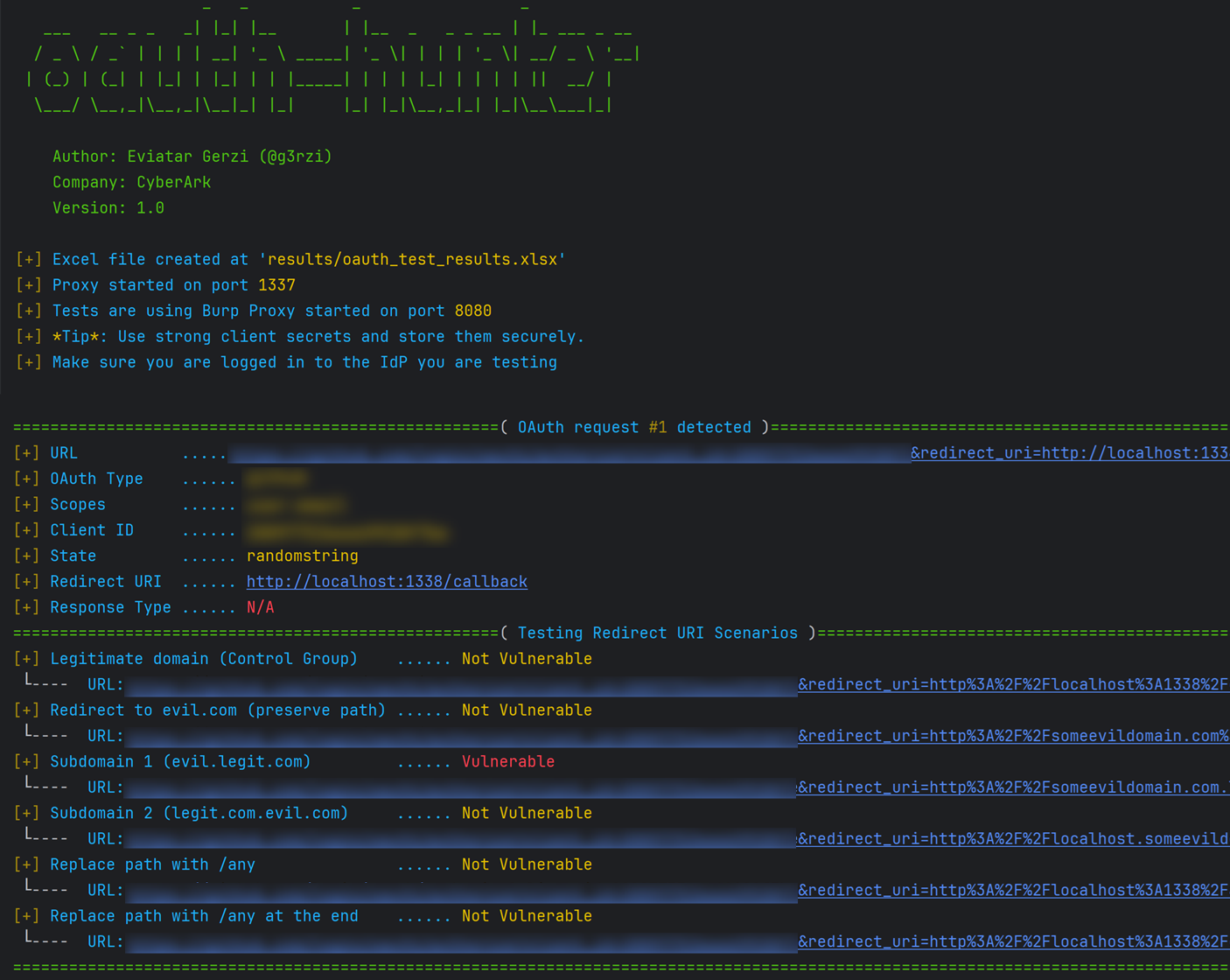
## 免责声明与保证
本工具仅供组织内部使用,用于在您拥有或被授权评估的环境中识别潜在的 OAuth 实现问题。
## 许可证
Copyright (c) 2025 CyberArk Software Ltd. All rights reserved
本仓库根据 Apache-2.0 许可证授权 - 详见 [`LICENSE`](LICENSE)。
## 分享您的想法和反馈
如需更多评论、建议或问题,您可以联系 CyberArk Labs 的 Eviatar Gerzi ([@g3rzi](https://twitter.com/g3rzi))。
您可以在 https://github.com/cyberark/ 找到我们开发的更多项目。
oauth-hunter 是一个功能强大的工具,旨在使用 mitmproxy 拦截和分析 OAuth 请求。
它会捕获 OAuth 请求并对 redirect_uri 参数进行全面测试,在各种场景下对其进行评估,以识别潜在的漏洞。
这使用户能够确保其 OAuth 实现的健壮性,并防范常见的安全问题。
除了当前的功能外,我们正在积极扩展该工具的功能,包括对 state 参数的测试以及其他增强功能。
这项持续的开发旨在对 OAuth 实现提供更详尽的分析,确保对常见漏洞具备强大的安全性和抵御能力。
该工具作为“How Secure Is Your OAuth? Insights from 100 Websites”研究的一部分发布 https://www.cyberark.com/resources/threat-research-blog/how-secure-is-your-oauth-insights-from-100-websites。
## 目录
- [部署](#deployment)
- [从源码运行](#run-from-source)
- [使用方法](#usage)
- [Burp Suite 集成](#burp-suite-integration)
- [菜单](#menu)
- [贡献](#contributing)
- [许可证](#license)
- [分享您的想法和反馈](#share-your-thoughts-and-feedback)
## 部署
您需要安装以下环境:
* python 3.x
* pip3
### 从源码运行
克隆仓库:
```
git clone https://github.com/cyberark/oauth-hunter.git
```
安装模块依赖。(您可能更倾向于在 [Virtual Environment](https://packaging.python.org/guides/installing-using-pip-and-virtual-environments/) 中执行此操作)
```
cd ./oauth-hunter
pip3 install -r requirements.txt
```
运行:
```
python3 main.py
```
## 使用方法
该工具在默认端口 `1337` 上启动一个代理。请确保将您的系统或工具配置为监听此端口,以拦截和分析网络流量。
### Burp Suite 集成
对于高级用法,该工具可以通过指定 `--burp-proxy` 选项以及 Burp Suite 配置使用的端口来与 Burp Suite 集成。
这允许该工具通过 Burp Suite 代理发送测试请求,以进行增强分析。
### 菜单
```
usage: main.py [-h] [--create-excel [CREATE_EXCEL]] [--overwrite] [--proxy-port PROXY_PORT] [--burp-proxy [BURP_PROXY]] [--evil-domain EVIL_DOMAIN] [--yaml-scenarios YAML_SCENARIOS]
OAuth Proxy Tester
options:
-h, --help show this help message and exit
--create-excel [CREATE_EXCEL]
Create an Excel file with the given name or use the default name.
--overwrite Overwrite the existing file if it exists.
--proxy-port PROXY_PORT
Specify the proxy port.
--burp-proxy [BURP_PROXY]
Specify the Burp proxy port. Defaults to 8080 if specified without a value.
--evil-domain EVIL_DOMAIN
Specify the evil domain.
--yaml-scenarios YAML_SCENARIOS
Path to YAML file with scenarios.
```
## 展示

## 免责声明与保证
本工具仅供组织内部使用,用于在您拥有或被授权评估的环境中识别潜在的 OAuth 实现问题。
## 许可证
Copyright (c) 2025 CyberArk Software Ltd. All rights reserved
本仓库根据 Apache-2.0 许可证授权 - 详见 [`LICENSE`](LICENSE)。
## 分享您的想法和反馈
如需更多评论、建议或问题,您可以联系 CyberArk Labs 的 Eviatar Gerzi ([@g3rzi](https://twitter.com/g3rzi))。
您可以在 https://github.com/cyberark/ 找到我们开发的更多项目。
标签:API安全, Burp Suite, DNS枚举, JSON输出, mitmproxy, OAuth 2.0, OAuth安全, Python, Web安全, 中间人攻击, 无后门, 网络安全工具, 蓝队分析, 逆向工具, 重定向_URI检测, 重定向漏洞