shadowy-pycoder/mshark
GitHub: shadowy-pycoder/mshark
一个用纯 Go 实现的轻量级网络抓包与协议解析工具,旨在无 GUI 环境下提供类似 Wireshark 的实时流量分析体验。
Stars: 37 | Forks: 1

# mShark - 使用 Go 编写的迷你版 [Wireshark](https://www.wireshark.org/)
[](https://pkg.go.dev/github.com/shadowy-pycoder/mshark)
[](https://opensource.org/licenses/MIT)

[](https://goreportcard.com/report/github.com/shadowy-pycoder/mshark)


## 安装说明
- Arch Linux/CachyOS/EndeavourOS
```
yay -S mshark
```
- 从 [Releases](https://github.com/shadowy-pycoder/mshark/releases) 页面下载 release 版本。
- 或者使用 `go install` 安装(需要 Go 1.26):
```
CGO_ENABLED=0 go install -ldflags "-s -w" -trimpath github.com/shadowy-pycoder/mshark/cmd/mshark@latest
```
这会将 `mshark` 二进制文件安装到您的 `$GOPATH/bin` 目录中。
如果在运行 `mshark` 时遇到 `Permission denied` 错误,请尝试运行
```
sudo setcap cap_net_raw+ep ~/go/bin/mshark
```
## 使用方法
```
mshark -h
______ __ __
/ \ | \ | \
______ ____ | $$$$$$\| $$____ ______ ______ | $$ __
| \ \ | $$___\$$| $$ \ | \ / \ | $$ / \
| $$$$$$\$$$$\ \$$ \ | $$$$$$$\ \$$$$$$\| $$$$$$\| $$_/ $$
| $$ | $$ | $$ _\$$$$$$\| $$ | $$ / $$| $$ \$$| $$ $$
| $$ | $$ | $$| \__| $$| $$ | $$| $$$$$$$| $$ | $$$$$$\
| $$ | $$ | $$ \$$ $$| $$ | $$ \$$ $$| $$ | $$ \$$\
\$$ \$$ \$$ \$$$$$$ \$$ \$$ \$$$$$$$ \$$ \$$ \$$
Packet Capture Tool by shadowy-pycoder
GitHub: https://github.com/shadowy-pycoder/mshark
Usage: mshark [OPTIONS]
Options:
-h Show this help message and exit.
-D Display list of interfaces and exit.
-V Show version and build information
-b int
The maximum size of packet queue. (default 8192)
-c int
The maximum number of packets to capture.
-e string
BPF filter expression. Example: "ip proto tcp".
-f value
File extension(s) to write captured data. Supported formats: stdout, txt, pcap, pcapng
-i string
The name of the network interface. Example: eth0 (default "any")
-p Promiscuous mode. This setting is ignored for "any" interface. Defaults to false.
-s int
The maximum length of each packet snapshot. Defaults to 65535.
-t duration
The maximum deadline for capture process. Example: 5s
-v Display full packet info when capturing to stdout or txt.
```
### 示例
```
mshark -p -f=txt -f=stdout -f=pcapng -i eth0 -e="port 53"
```
上述命令将从 `eth0` 网络接口捕获包含 `port 53`(假设为 DNS 查询)的数据包,并将捕获的数据输出到 `stdout`、`txt`,以及保存为 `pcapng` 格式的文件。文件将在当前工作目录中创建。
输出:
```
- Interface: eth0
- Snapshot Length: 65535
- Promiscuous Mode: true
- Timeout: 0s
- Number of Packets: 0
- Packet Buffer Size: 8192
- BPF Filter: "port 53"
- Verbose: false
```
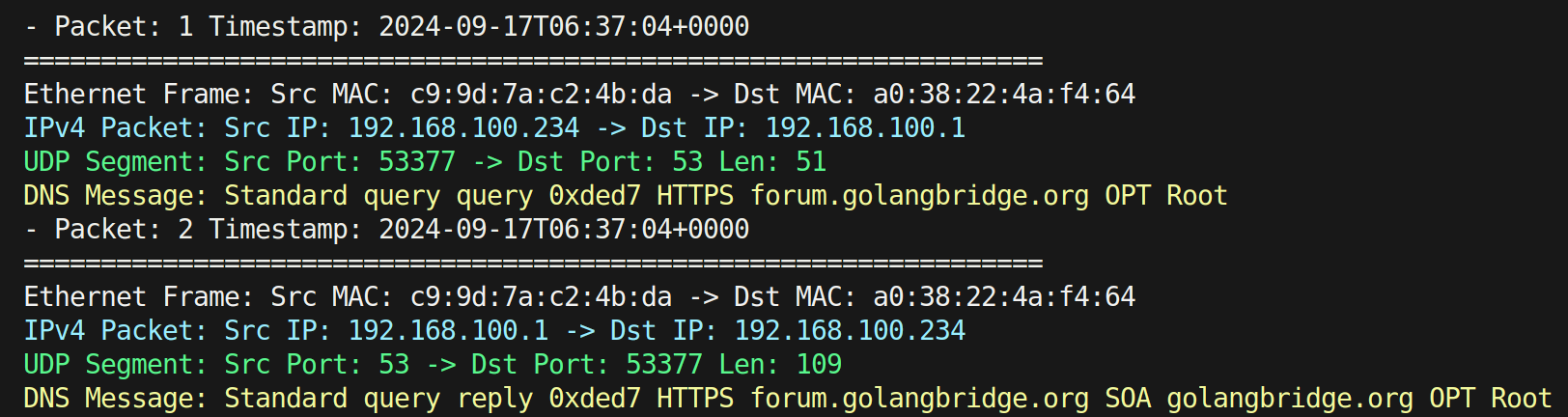
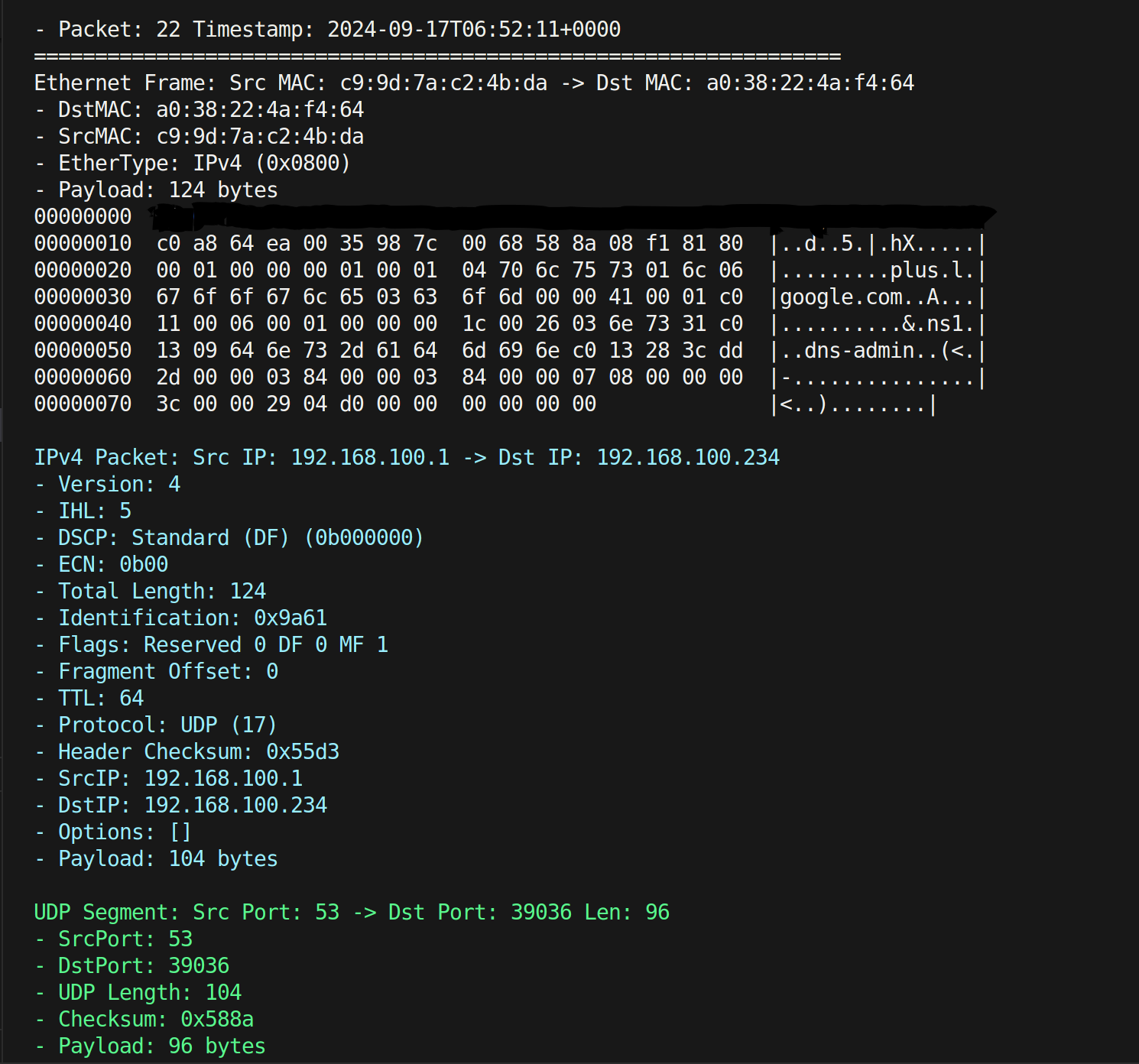
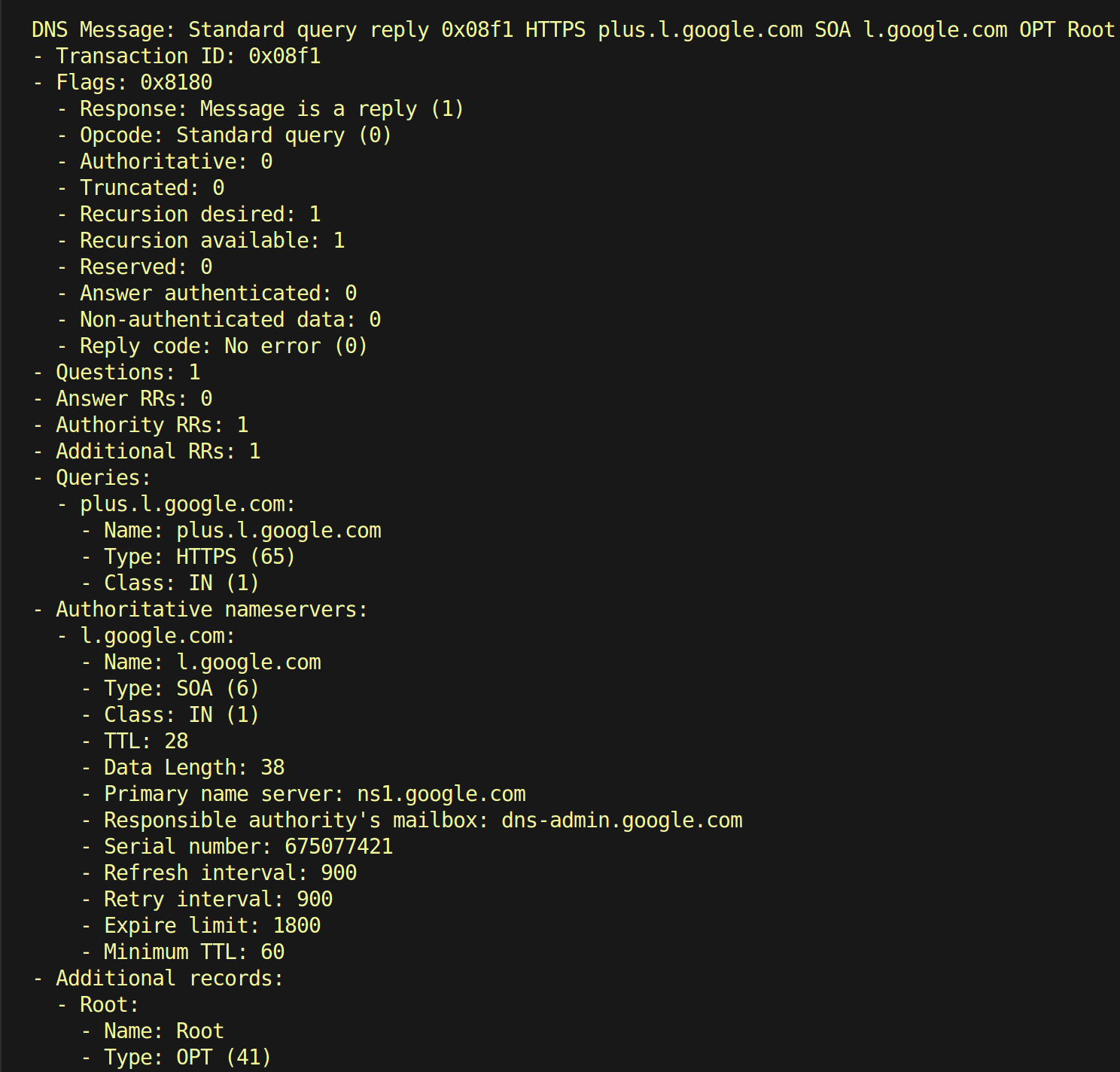
启用 `-v` 标志后,您将看到更详细的信息:
## 支持的协议层
- [Ethernet](https://en.wikipedia.org/wiki/Ethernet_frame)
- [IPv4](https://en.wikipedia.org/wiki/IPv4)
- [IPv6](https://en.wikipedia.org/wiki/IPv6)
- [ARP](https://en.wikipedia.org/wiki/Address_Resolution_Protocol)
- [ICMP](https://en.wikipedia.org/wiki/Internet_Control_Message_Protocol)
- [ICMPv6](https://en.wikipedia.org/wiki/Internet_Control_Message_Protocol_for_IPv6)
- [TCP](https://en.wikipedia.org/wiki/Transmission_Control_Protocol)
- [UDP](https://en.wikipedia.org/wiki/User_Datagram_Protocol)
- [DNS](https://en.wikipedia.org/wiki/Domain_Name_System)
- [HTTP](https://en.wikipedia.org/wiki/Hypertext_Transfer_Protocol)
- [SNMP](https://en.wikipedia.org/wiki/Simple_Network_Management_Protocol)
- [FTP](https://en.wikipedia.org/wiki/File_Transfer_Protocol)
- [SSH](https://en.wikipedia.org/wiki/Secure_Shell)
- [TLS](https://en.wikipedia.org/wiki/Transport_Layer_Security)
## 路线图
- [x] 在线抓包并输出到 `stdout`、`txt`、`pcap` 和 `pcapng` 文件
- [ ] 从 `pcap` 和 `pcapng` 文件进行离线抓包
- [ ] 为 `SNMP` 消息添加完善的解析
- [ ] 添加数据包生成与数据包注入功能
标签:CLI, EVTX分析, Go语言, Linux安全, mshark, WiFi技术, Wireshark替代, 内核驱动, 包捕获, 开源, 数据包解析, 日志审计, 程序破解, 纯Go开发, 网络协议, 网络安全, 网络工具, 网络抓包, 网络流量, 网络调试, 自动化, 防御绕过, 隐私保护